- NewsmagUsing other ads
- NewspaperUsing Other Ads
- NewsmagSidebar ads
- NewspaperSidebar ads
- NewspaperIntroduction to CPT and ACF with Newspaper Theme
- NewspaperHow to edit modules for Flex Block X
- NewspaperHow to use the Posts List shortcode
- NewspaperCreate a frontend submission form
- NewspaperHow to Use the Tabbed Content shortcode
- NewspaperWooCommerce: Happy “Add to Favorites!”
- NewspaperHow to generate Facebook App ID
- NewspaperLink Tracker
- NewspaperFlex Block Settings Guide
- NewspaperGeneral Options that May Interfere with the Newspaper Theme
- NewspaperSocial Icons
- NewspaperPosts Loop Element
- NewspaperSet a Background for Category Page
- NewspaperThe Newspaper Mobile Theme: Introduction
- NewspaperHow to Add a Logo in Newspaper
- NewspapertagDiv Shop
 zazenwebdesign
Hello
I am trying to know the theme better to use more. A simple function that I like to use on other themes is to round the corners on images and columns. When I try to do this it doesn’t seem to work. may you please assist me?
Ben

 Bettina
 Hello!
I recommend you to set a homepage and do not let the blog page created by WordPress: https://i.imgur.com/mwjp18K.png
Any other page seems to be displayed well.
We have 3 options for mobile versions that you can use:
1. Responsive version: A responsive version of your website looks similar to the desktop version. Edit the page with TagDiv Composer. Click on the mobile viewport: https://www.screencast.com/t/XDQJedlggSB; there you can see your mobile version and edit or adjust the elements to look better.
2. Mobile pages: https://tagdiv.com/newspaper-10-3-7-update-brings-customizable-and-fast-mobile-pages
3. Mobile theme plugin: The Mobile Theme is a performance-optimized theme included in the main Newspaper theme that only loads on mobile devices. It comes with its own templates and design for pages, posts, categories, etc., so your current templates from the desktop theme will get converted to the mobile theme layout. Please see https://forum.tagdiv.com/the-mobile-theme/ and https://forum.tagdiv.com/mobile-theme-introduction/ for more information.
A full explanation you can find here: https://www.youtube.com/watch?v=SpGkOnJeNZY
You can choose to use whichever one is more affordable and useful for you.
For the option 1 and 2, you need to deactivate the Mobile Theme plugin.
Thank you!
 creativeopole
Hello,
I wanted to add my own ads between paragraphs in articles. I used the guide:
https://forum.tagdiv.com/using-other-ads-non-adsense-ads/
Unfortunately, on mobile devices, it does not hide dedicated graphics from higher resolutions. It displays all one below the other. As if it wasn’t styled.
I temporarily put one picture for all devices:
<div class = "td-all-devices">

        </div>
However, this is not a solution and I want to fix this problem.
It may result from the “tagDiv Mobile Theme” plug-in installed.
 Generaltech
hello community!
I need your help with the follow topic:
How can I monetize with ads by creating subscription plans?
I am building a newspaper which will have ads, so i need to create a metod in which clients (the people who want their advertising in my newspaper) pay a monthly fee, for example: USD 50 for a month of advertising in the footer, USD 150 for a month of advertising in the header of the main page , etc.
I need the bill to be generated automatically to the customer and charged monthly to their credit card, so if they don’t pay, or at some point cancel the payment of this “plan”, just there delete their ad from the newspaper.
maybe with Woocommerce, but i don’t know how.
I don’t want to create a typical product of a woocommerce store, but rather something similar (or equal) to the way hosting pages offer their plans.
I don’t know if there is any plugin that allows me to do the above.
I thank you very much in advance for your help, I’ve been looking for days and haven’t found anything, but I didn’t want to bother you either.
This is an example of what I want to create

 Bill Fleak
We are using Cloud Templates and are using the plugin Simple Local Avatars to load headshots of our authors. When we display our post with authors’ headshots in our post using the block Single Post Author Box, the headshot image is not displayed on our post. Our WP site, Theme, and plugins are all up to date. Please see the video https://www.screencast.com/t/v0WEk9iv. We are using the same theme older version 10.4 and all is working correctly. Here is another site same Theme older version 10.4 and the same plugin and it also using the block Single Post Author Box and is working fine. https://hrexecutive.com/inside-eys-22-million-strategy-to-get-workers-back-into-the-office/
Please advise.
 kappe79
Hi,
I’m setting a template with Single Post Content box. In ADS options I added my Adsense code for Article Top, Article inline AD 1 (Paragraph 3), Article inline AD 2 (Paragraph 9) and Article Bottom.
In TagDiv Composer edit mode the advertisements (just empty boxes) are correctly inserted in the text of my Single Post Content but if I open the page externally I see correct Adsense banners just corresponding to Article Top and Article Bottom options. The other in line AD aren’t loaded.
I tried to use different codes, or change their position but nothing: the in line ADS within content post doesn’t work.
Any suggestion?
Thank you.
Enzo
 Anamaria
 Hi,
As I said the theme has no control over ads. Also now you have another theme,
Also, when I visited your site and it was our theme, for me the ads don’t appear.
Thank you!
 jorgetejerog
 This bug only happens with your theme. I already had to migrate to another theme, because you are not going to fix this bug. By the way, I use manual ads.
This bug was reported months ago in this forum. Hope you can help me with a refound.
-
This reply was modified 4 years by
jorgetejerog.
-
This reply was modified 4 years by
 Yazz
Yazz Another question is, on footer area, popular category, how to make the post numbers to be on left?
http://qbuzzarstg1.wpengine.com/wp-content/uploads/2022/07/Screenshot-2022-07-18-at-5.19.49-PM.png
Bettina Hello!
Use the cloud/PRO templates in order to have the possibility to edit them with the TagDiv Composer which contains a lot of functions and features, please check our tutorial here: https://forum.tagdiv.com/tagdiv-composer-tutorial/
Documentation here:
– https://forum.tagdiv.com/cloud-library-templates/
– https://forum.tagdiv.com/design-post-pages-using-cloud-library-templates/
– https://forum.tagdiv.com/cloud-library-category-templates/
Check also our video tutorials here: https://www.youtube.com/c/tagdivThemes/videos
You can import any cloud templates from any demos you like from the Cloud Templates and assign it on your website, or you can build them from scratch by importing a blank template(in order to make it editable with the Composer).
Edit the page with TagDiv Composer. Click on the mobile viewport: https://www.screencast.com/t/XDQJedlggSB; there you can see your mobile version and edit or adjust the elements to look better. You have the possibility to hide the elements from the mobile viewport. This setting can be seen in the CSS tab of every element: [Display: HIDDEN]. If you hide it on the mobile viewport, then this element will be seen only on the desktop and tablet viewports.
There are another 2 options for mobile version:
Mobile pages: : https://tagdiv.com/newspaper-10-3-7-update-brings-customizable-and-fast-mobile-pages
Mobile theme plugin: The Mobile Theme is a performance-optimized theme included in the main Newspaper theme that only loads on mobile devices. It comes with its own templates and design for pages, posts, categories, etc., so your current templates from the desktop theme will get converted to the mobile theme layout. Please see https://forum.tagdiv.com/the-mobile-theme/ and https://forum.tagdiv.com/mobile-theme-introduction/ for more information.
Note: All the elements are responsive when you install a cloud demo, but not the elements if you add them extra. You have to set them in the mobile viewport.
Thank you!
 endrisusantodotcom
To whom it may concern,
I have problem with layout (single post). As you can see on : 
When I edited on admin, I can see all my setting. But when I’m not login to dashboard and using guest mode also using another browser, I got layout no 3. There’s no related post and others.
Is there any solution for my issue?
Please help.
 Guardado Rapdio
Hi,
We are running a website, Guardado Rápido, devoted to videogame news, articles, reviews and so. We are using Newspaper theme in our website and we are quite happy with it. Recently we added a special row at the beginning of the page where we show the hot topics of the day. We used a row with a raw html code inside. It works pretty well but for the case of the mobile version of the webpage. In this case, as we are using Mobile Theme of Newspaper, it does not allow us to put this kind of code before the header.
The shortcut that i have found is to put the code in the ads section of the mobile theme but, in this case, it puts the code below the header. Is there any way to put this code so the raw html code appears before the header?
You can check our website at http://www.guardadorapido.com. The part that we want to be before the header is the one that starts by “Hoy se habla de:”.
The other option could be to skip the mobile theme of newspaper and use the mobile view generated by tag div composer. In this case, is there any way to use a different template for the general and the mobile view of the page. In our case the problem is that some of the structures that look fine on the desktop version does not work that well in the mobile one (the big grid)
Sorry for the long text, i hope i explained myself well.
 PIF21Anamaria
 Hello,
If the AdSense code needs to be set between head tags, this can be put in our theme in Theme Panel -> Analytics/Js Codes -> https://prnt.sc/10jk7fq -> https://infotechapb.com/disable-top-adsense-anchor-ads/
You can use the element Ad Box, and set the element where you want.
The ad box has 3 sections for ads: using theme panel ads -> https://i.imgur.com/KFa9ibl.png, using images/banners -> https://i.imgur.com/MfAPTaE.png and custom code -> https://i.imgur.com/2rh8SuD.png save it and will appear on the post (you can set a shortcode like a shortcode from adrotate plugin or other plugins)
Thank you!
 Richard Stone
Hi
I found some earlier threads on this but I couldn’t find an answer anywhere.
I’m trying to get the ID of the currently viewed post, but using get_the_ID() is returning the ID of the template instead of the post. Is there another function I can use to get the post being viewed?
Thanks
Richard
 Calin
Calin Hi,
You can edit the homepage using the tagDiv Composer an add the ad box element to set the source of the ads -> https://i.imgur.com/YCfMdoU.jpg
Another solution is to use the html raw to add the AdSense code or maybe an dedicate plugin for ads.
->https://forum.tagdiv.com/newsmag-header-ads/
Thank you!
 fredredwoods
 Hello —
With all respect, I find your answer to not be helpful.
I understand that the iframe width works for you. I watched the video of you inserting the embed code directly as HTML. I already tried that — the problem is with that method too.
Previously it worked for me, and now it does not.
Disabling the plug-ins is not practical — it would shut down many pages of my site. But if that’s what I need to do to convince you that I have a problem here, then I’ll do it in the middle of the night some time.
But I sincerely doubt that one of these plug-ins is affecting the iframe width. The video width works on Pages — it does not work on Posts.
You have programmers there. Can’t someone look at this page and figure out what is wrong?
Please help.
Thank you.
—————————–
Here is a simple test page:
https://arcata1.com/?p=3044&preview=true
It consists of:
<p>Here the Youtube code is inserted directly as HTML.</p>

<p> </p>

<p>width = 315</p>

<p> </p>

<p><iframe title="YouTube video player" src="https://www.youtube.com/embed/612uI4Z7jsc?start=7065" width="315" height="177" frameborder="0" allowfullscreen="allowfullscreen"></iframe></p>
Here is a list of my Plug-ins. Many are back-end, and only affect the editing, or fixing thumbnnails, etc. The music players were added yesterday — the video width problem occurred before that.
A2 Optimized WP
Admin Menu Editor
Advanced Editor Tools (previously TinyMCE Advanced)
CP Media Player – Audio Player and Video Player
Duplicator
GTranslate
Jetpack
mb.miniAudioPlayer
PDF Embedder Premium
PDFjs Viewer – Embed PDFs
podcast player
Post Type Switcher
Regenerate Thumbnails
Regenerate Thumbnails Advanced
Relevanssi
Select Show modified Date in admin lists
tagDiv Cloud Library
tagDiv Composer
tagDiv Newsletter
UpdraftPlus – Backup/Restore
WP Downgrade | Specific Core Version
WPForms Lite
Yoast SEO
YYDevelopment – Show Pages ID
Here’s a description of the plug-ins:
A2 Optimized WP
A2 Optimized – WordPress Optimization Plugin
Admin Menu Editor
Lets you directly edit the WordPress admin menu. You can re-order, hide or rename existing menus, add custom menus and more.
Advanced Editor Tools (previously TinyMCE Advanced)
Extends and enhances the block editor (Gutenberg) and the classic editor (TinyMCE).
CP Media Player – Audio Player and Video Player
CP Media Player – Audio Player and Video Player allows you to post multimedia files on your website or blog in a simple way while providing compatibility with all major browsers such as IE, Firefox, Opera, Safari, Chrome and mobile devices: iPhone, iPad, Android.
Duplicator
Migrate and backup a copy of your WordPress files and database. Duplicate and move a site from one location to another quickly.
GTranslate
Translate your website and make it multilingual. For support visit GTranslate Support Forum.
Jetpack
Security, performance, and marketing tools made by WordPress experts. Jetpack keeps your site protected so you can focus on more important things.
mb.miniAudioPlayer
Transform your mp3 audio file link into a nice, small light player. ! IMPORTANT – if you customized the skin for the previous version you need to regenerate it from here.
PDF Embedder Premium
Embed mobile-friendly PDFs straight into your posts and pages. No third-party services required. Compatible With Gutenberg Editor WordPress
PDFjs Viewer – Embed PDFs
Embed PDFs with the gorgeous PDF.js viewer
podcast player
Host your podcast episodes anywhere, display them only using podcast feed url. Use custom widget or shortcode to display podcast player anywhere on your site.
Post Type Switcher
A simple way to change a post’s type in WordPress
Regenerate Thumbnails
Regenerate the thumbnails for one or more of your image uploads. Useful when changing their sizes or your theme.
Regenerate Thumbnails Advanced
Regenerate thumbnails fast and easy while removing unused thumbnails of existing images; very useful when changing a theme.
Relevanssi
This plugin replaces WordPress search with a relevance-sorting search.
Show modified Date in admin lists
Shows a new, sortable, column with the modified date in the lists of pages and posts in the WordPress admin panel. It also shows the username that did the last update.
tagDiv Cloud Library
Access a huge collection of pre-made templates you can import on your website and customize on the frontend using the tagDiv Composer plugin.
tagDiv Composer
tagDiv Composer – Create everything on your website right on the frontend with this drag and drop builder. Perfect for articles, pages, headers, and footers. No coding skills required.
tagDiv Newsletter
Easily add newsletter subscription fields for your visitors with the tagDiv Newsletter plugin for WordPress. It brings you 8 beautiful styles to choose from.
UpdraftPlus – Backup/Restore
Backup and restore: take backups locally, or backup to Amazon S3, Dropbox, Google Drive, Rackspace, (S)FTP, WebDAV & email, on automatic schedules.
WP Downgrade | Specific Core Version
WP Downgrade allows you to either downgrade or update WordPress Core to an arbitrary version of your choice. The version you choose is downloaded directly from wordpress.org and installed just like any regular release update. The target version WordPress allows you to update to remains constant until you enter a different one or deactivate the plugin either completely or by leaving the target version field empty.
WPForms Lite
Beginner friendly WordPress contact form plugin. Use our Drag & Drop form builder to create your WordPress forms.
Yoast SEO
The first true all-in-one SEO solution for WordPress, including on-page content analysis, XML sitemaps and much more.
YYDevelopment – Show Pages ID
Simple plugin that show you the pages and posts #id number
Anamaria Hello,
You can use the element Ad Box, and set the element where you want.
The ad box has 3 sections for ads: using theme panel ads -> https://i.imgur.com/KFa9ibl.png, using images/banners -> https://i.imgur.com/MfAPTaE.png and custom code -> https://i.imgur.com/2rh8SuD.png save it and will appear on the post (you can set a shortcode like a shortcode from adrotate plugin or other plugins)
Thank you!
 pistacio
 I’m really sorry to bother you but my TagDiv Composer looks like this one:
https://forum.tagdiv.com/wp-content/uploads/2017/05/Newspaper-tagDiv-Composer.jpg
and I can’t find the buttons you pointed to anywhere.
Do I have to update the Composer to the newest version?
 fferrero
Hello,
I’ve read every thread about this topic but there is no answer that solves my issue.
My site is very well optimized, it fully loads in 2.2 seconds: https://imgur.com/lobFPdt
As soon as I add the 5 most popular posts, the site is ruined completely: https://imgur.com/lUIgn9b
The settings are OK, I’ve selected “last 24 hours” as suggested in another thread: https://imgur.com/MVDpfXL
As soon as I get rid of that single module of popular news, the site ranks perfect again.
The site gets just 30 or 40 news a day, so it shouldn’t be a query that consumes that amount of resources. We use a dedicated server and Cloudflare and no, it’s not a resources issue.
How can I solve this?
Thanks
 alvecrisservices
 I found the solution with this, if you know other variants it will be easier 😀
<iframe src=”https://techstart.ro/wp-content/uploads/2022/07/index.html” width=”900″ height=”700″></iframe>
But I don’t know how to make the slider work on touchscreen phones. On the computer it works well but on the touchscreen is not working.
Also, is it an option to make the width and height responsive?
 sil2
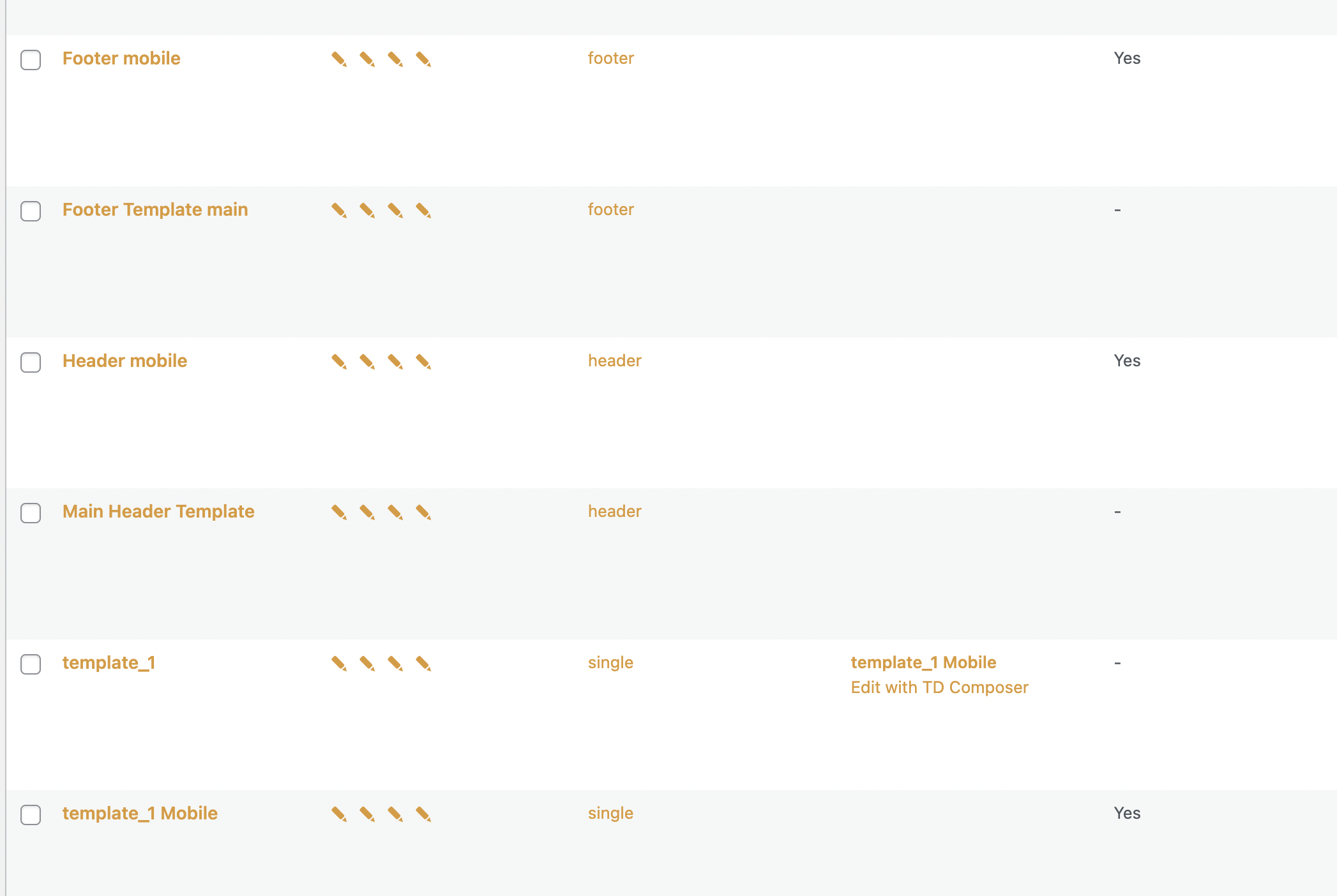
sil2 my home page has mobile version as you can see on this screenshot
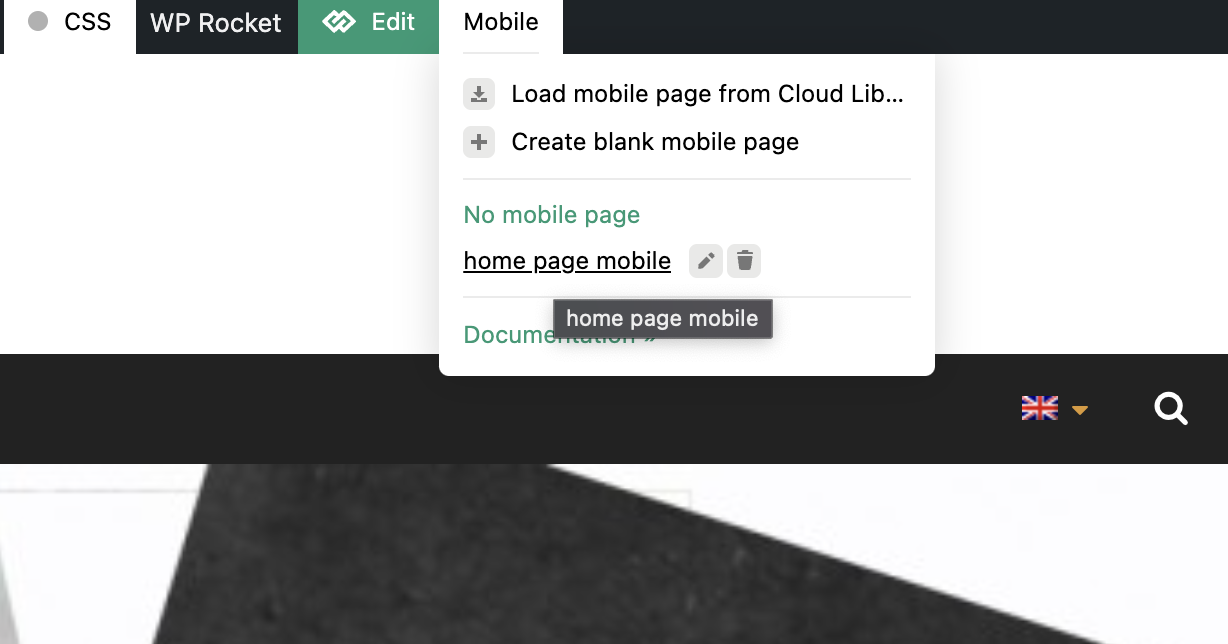
and this is how it should look like
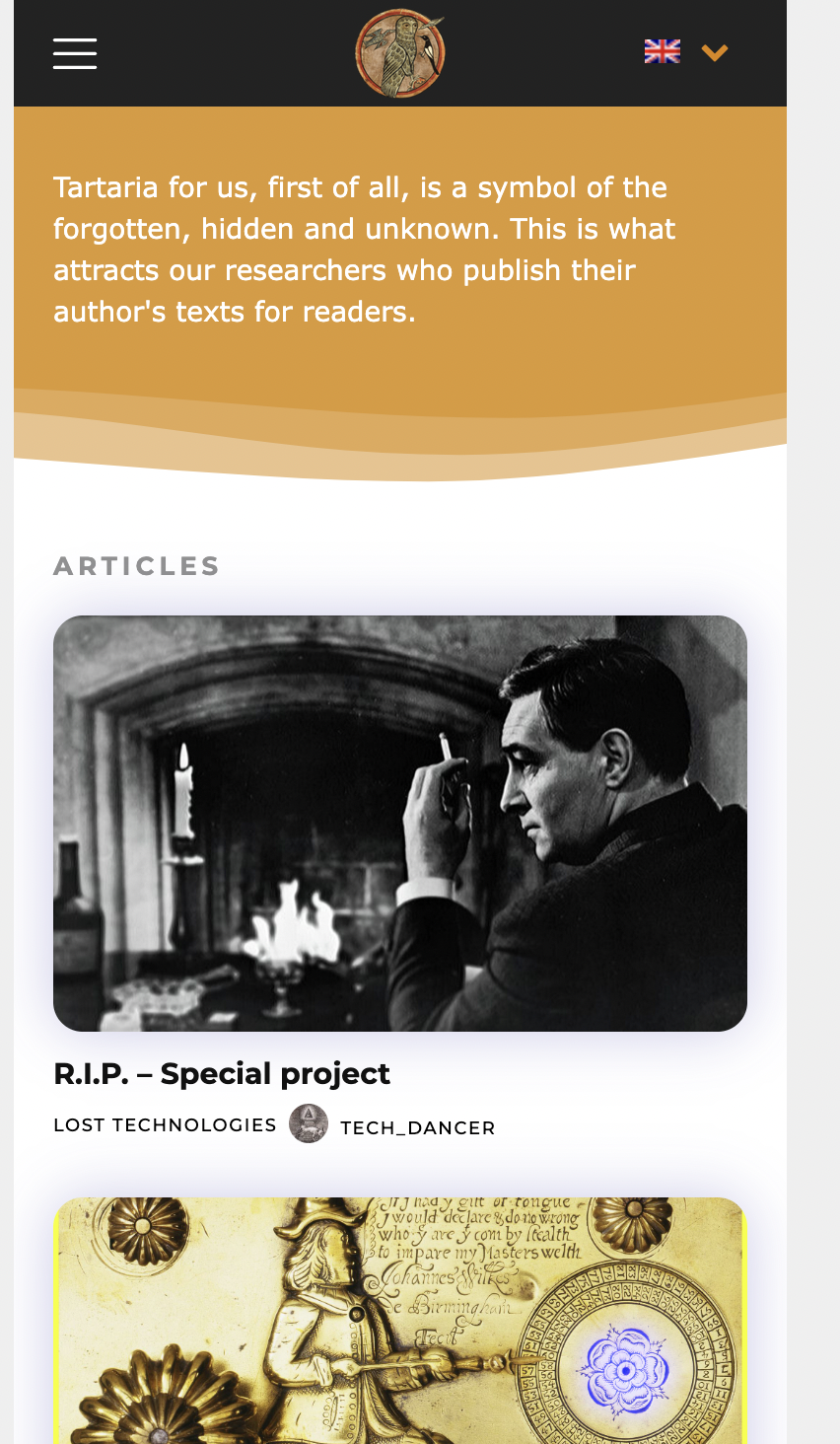
but im getting this desktop version on home page (same as all other pages – desktop versions not mobile ones)

-
This reply was modified 4 years by
sil2.
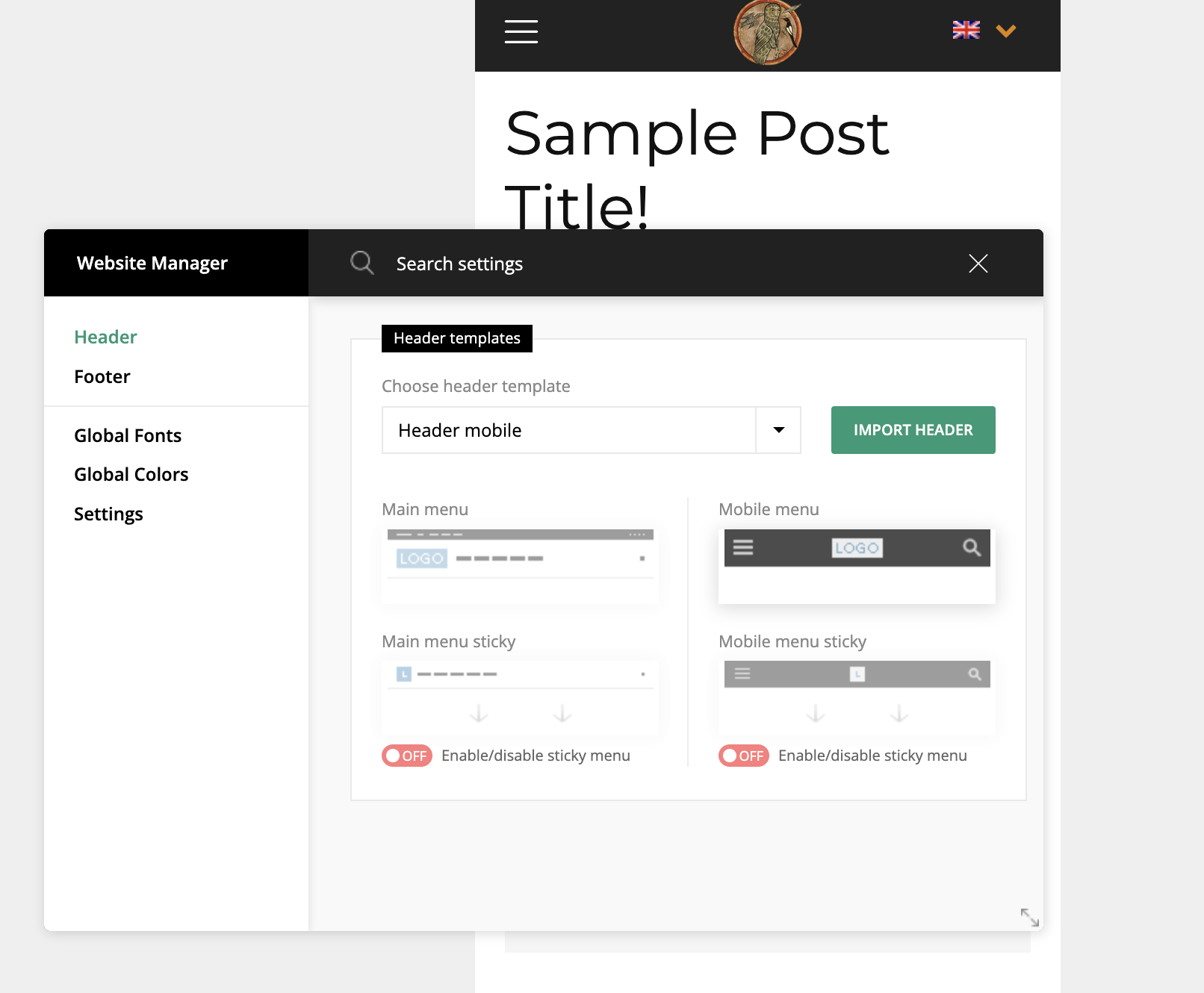
sil2I created mobile versions for header footer, home page, and all other pages for all language variants in tagdiv composer.
But my mobile phone still showing me desktop versions!
my site http://www.tart-aria.info

 msakande
 Hi,
My website is in FRENCH, all the others words are in French.
But comment box is still in ENGLISH.
Can you help me to change the information in FRENCH Language?
-
This reply was modified 4 years by
msakande.
 adminJR
 Thanks for the reply, but I don’t think I could explain myself well.
The problem is that this site is loading the desktop home and mobile home pages separately. When I click the save button on the office version, the site loads that both office version and overwrites the mobile version. And when I click the save button on the mobile version, the site loads that version overwrites the office and mobile version. In other words, the website loads one version or another and applies it to all devices, when in fact the website should work with both at the same time, working independently on each device.
In short:
Mobile version -> save button -> applies to this version for all devices
Office version -> save button -> erase previous versions and apply that version to all devices.
We have already reviewed all cache factors. We are using wordpress 6.0 and Newspaper 11.5.1
If you want, I’ll give you access as an administrator so you can login.
Thks!!
Junior Report Team