
- NewsmagUsing other ads
- NewspaperUsing Other Ads
- NewsmagSidebar ads
- NewspaperSidebar ads
- NewspaperIntroduction to CPT and ACF with Newspaper Theme
- NewspaperHow to edit modules for Flex Block X
- NewspaperHow to use the Posts List shortcode
- NewspaperCreate a frontend submission form
- NewspaperHow to Use the Tabbed Content shortcode
- NewspaperWooCommerce: Happy “Add to Favorites!”
- NewspaperHow to generate Facebook App ID
- NewspaperLink Tracker
- NewspaperFlex Block Settings Guide
- NewspaperGeneral Options that May Interfere with the Newspaper Theme
- NewspaperSocial Icons
- NewspaperPosts Loop Element
- NewspaperSet a Background for Category Page
- NewspaperThe Newspaper Mobile Theme: Introduction
- NewspaperHow to Add a Logo in Newspaper
- NewspapertagDiv Shop
 Simion C.
 Hi,
From what I can see AMP is not currently enabled on your website, so I can’t see where the error leads to. In most cases the javascript code it detects is either inserted by a plugin or is inserted manually somewhere in the theme panel. There could be other causes as well, but usually those are the ones.
If you should re-enable AMP I will take a look.
Thanks
 susanapri
1. I have version 9.7.2 of Newspaper and I have this problem with lightbox.I have disabled it in theme panel but I have not had success
Has it been fixed already?
2. I would like to know if I can put more custom ads, since the subject only has 5.
3.Other doubt, a few days ago you manually corrected my social counter code because Facebook showed 0 followers, could It fail again if I continue updating the theme with later updates?
 Aceon
Aceon another question please:
please check this screenshot of the post demo, this post is using classic editor or gutenberg block? and how could I know these text design elements name? thanks

susanapri Hello Simion:
1. I have version 9.7.2 of Newspaper and I have this problem with lightbox.I have disabled it in theme panel but I have not had success
Has it been fixed already?
2. I would like to know if I can put more customs ads, since the subject only has 5.
3.Other doubt, a few days ago you manually corrected my social counter code because Facebook showed 0 followers, could It fail again if I continue updating the theme with later updates?
Thank you
-
This reply was modified 7 years by
susanapri.
 bobbymc
I have maxed the PHP memory and taken all other advice in the forum but can’t get Homepage Cloud Templates to work.
Single post templates are fine.
WHen create a Homepage template it loads and can edit it, but it doesn’t show in the cloud template list with the others on the “Cloud Template” dashboard?
Solution?
 brianjcameron
Sirs,
Based on this comment in another thread:
“Moving forward with such requirements, a child theme will only work with functions.php, and style.css as there are very few files left in the main theme as envato requires all functionality to be added through plugins.”
Am i to understand that moving forward:
1) Newspaper will still support a child theme but only for functions.php and style.css changes?
2) Any other changes will have to be done on each update manually within the TagDiv Composer plugin ?
3) Will child theme support changes to editors-style.css as a major frustration has been amendments to for example quotes show in front end, but not in the editor, so it is not a wysiwyg environment?
4) Based on comments in other threads, the following line in child theme function requires to be changed from 1000 to 11 so it shows: “add_action( ‘wp_enqueue_scripts’, ‘theme_enqueue_styles’, 11);” – is this correct, as it is not in the update guide?
5) Can their be a guide created for child theme users from 9.7.3 onwards, as the guide is clear for non child theme users, but not for those with a child theme.
 gpm79
gpm79Hello, can anyone help me implement google’s automatic ads? Google gives me two codes, a script that goes in the header of the site and another one that would be the announcement block that is stuck in the announcements part for amp.
The doubt is that the code that goes in the header is
<script async custom-element = “amp-auto-ads”
src = “https://cdn.ampproject.org/v0/amp-auto-ads-0.1.js”>
</ script>
But in the personalized code of the mobile theme says this message:
Add custom JavaScript easly, using this editor. Please do not include the <script> </ script> tags.
NOTE: On AMP scripts are not allowed so this is code will not be included on amp templates.
The question is how do I paste this code
<script async custom-element = “amp-auto-ads”
src = “https://cdn.ampproject.org/v0/amp-auto-ads-0.1.js”>
</ script>
Without using the <script> </ script> tags, or am I implementing it badly?
Can somebody help me?
 rjmiddleton
 Hi,
The blog is at http://www.zumper.com/blog.
Below is a New Relic trace from Kinsta (our host). This indicates ~46% of the load time is driven by tdb_header_logo::render – since the logo graphic itself is very small, I’m guessing this is a theme issue that can be resolved. Can you confirm?


They tell us the average WordPress load time they see is ~500ms, so we’re at the slow end of this, but seems fixing this header logo issue would get us there (and help your other customers).
Please let me know next steps to fix.
 ecarshu
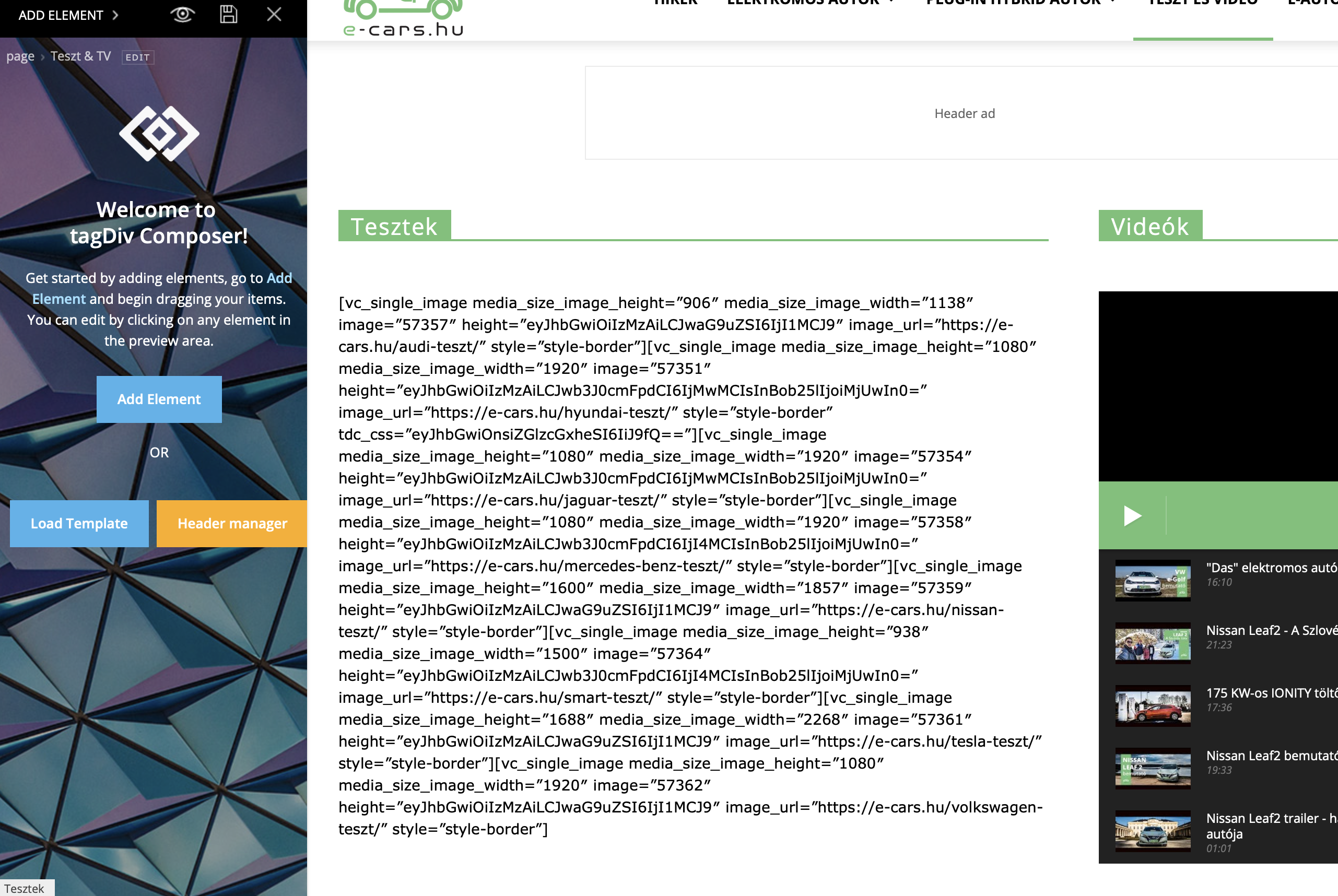
 Really? I don’t want to install a another plugin….
I receive a lot of errors when I want to edit with TD Composer
 Epiq
EpiqDear tagDiv team,
I am trying to re-create one of my web pages with the use of tagDiv Composer (the page was previously created with WPBakery Page Builder, and it’s layout is broken now pretty badly).
On that page I need some rows to be different for mobile and desktop versions. One solution I can think of is to simply create both versions of the rows and only show one of the rows for mobile and the other one for desktop.
With WPBakery Page Builder I could do that by clicking on a row (column), then Responsive settings, and then ticking the ‘Hide’ checkbox next to the corresponding platforms, like this:
How can I achieve the same functionality with tagDiv Composer?
The only alternative solution I can think of is to use custom CSS with @media queries.
Thank you for all your work,
and looking forward to your advice.
Eric
 MrElectrician
Second time that I have tried to update to the latest version of Newspaper. It has been hell. After changing settings in my PHP I was able to upload the theme successfully. I had deleted the old Newspaper theme files, even went into file manager and deleted some old files from there. I renamed the themes folder and got a bunch of error messages. I renamed the Plug-ins folder with no success. Otherwise I just get a blank white screen. I currently have another theme running just so there is something to look at, but it’s not pretty. I activated the Debug file and got this in the log file:
28-May-2019 01:35:32 UTC] PHP Warning: require_once(header/ads.php): failed to open stream: No such file or directory in /home/vzbujfc1chle/public_html/wp-content/plugins/td-composer/legacy/Newspaper/parts/header/header-style-4.php on line 27
[28-May-2019 01:35:32 UTC] PHP Fatal error: require_once(): Failed opening required ‘header/ads.php’ (include_path=’.:/opt/alt/php70/usr/share/pear’) in /home/vzbujfc1chle/public_html/wp-content/plugins/td-composer/legacy/Newspaper/parts/header/header-style-4.php on line 27
[28-May-2019 01:40:26 UTC] PHP Warning: require_once(header/ads.php): failed to open stream: No such file or directory in /home/vzbujfc1chle/public_html/wp-content/plugins/td-composer/legacy/Newspaper/parts/header/header-style-4.php on line 27
[28-May-2019 01:40:26 UTC] PHP Fatal error: require_once(): Failed opening required ‘header/ads.php’ (include_path=’.:/opt/alt/php70/usr/share/pear’) in /home/vzbujfc1chle/public_html/wp-content/plugins/td-composer/legacy/Newspaper/parts/header/header-style-4.php on line 27
[28-May-2019 01:40:53 UTC] PHP Notice: Undefined variable: post_type in /home/vzbujfc1chle/public_html/wp-content/plugins/all-in-one-seo-pack/aioseop_class.php on line 4249
[28-May-2019 01:40:53 UTC] PHP Warning: require_once(header/ads.php): failed to open stream: No such file or directory in /home/vzbujfc1chle/public_html/wp-content/plugins/td-composer/legacy/Newspaper/parts/header/header-style-4.php on line 27
[28-May-2019 01:40:53 UTC] PHP Fatal error: require_once(): Failed opening required ‘header/ads.php’ (include_path=’.:/opt/alt/php70/usr/share/pear’) in /home/vzbujfc1chle/public_html/wp-content/plugins/td-composer/legacy/Newspaper/parts/header/header-style-4.php on line 27
This is what shows up on the home page with the Debug file active:
Warning: require_once(header/ads.php): failed to open stream: No such file or directory in /home/vzbujfc1chle/public_html/wp-content/plugins/td-composer/legacy/Newspaper/parts/header/header-style-4.php on line 27
Fatal error: require_once(): Failed opening required ‘header/ads.php’ (include_path=’.:/opt/alt/php70/usr/share/pear’) in /home/vzbujfc1chle/public_html/wp-content/plugins/td-composer/legacy/Newspaper/parts/header/header-style-4.php on line 27
The site is experiencing technical difficulties.
I also got this message, but I cannot remember where it came from as I have been going crazy researching and changing settings for many hours:
[27-May-2019 13:25:42 UTC] PHP Fatal error: Allowed memory size of 134217728 bytes exhausted (tried to allocate 77845176 bytes) in /home/vzbujfc1chle/public_html/wp-content/plugins/wordfence/vendor/wordfence/wf-waf/src/lib/rules.php on line 1601
I have uploaded the theme 3 times. The third time I did it via FTP and nothing has changed.
I have run out of search options on Google in trying to find a solution. I did a search in this forum with not much luck.
Does anyone have any ideas?
John G
https://MrElectrician.TV
 insumedical
http://insuguid.com/wp-content/uploads/2019/05/error.png
↑↑↑↑↑↑↑
How to reinstall
Another way..
let me know
^^
 Calin
Calin Hi,
You can use other header template, like Header style 4
You can use the header manager to set the ads were you want in header using the ad box -> https://forum.tagdiv.com/header-styles/
Thank you!
 smehr
smehr This is working now. The issue was that I was using the “Hide” function within the custom ad to not show that ad on desktop and tablet, which was causing the shortcode to not function.
One question, in this help article https://forum.tagdiv.com/using-other-ads-non-adsense-ads/ you show ways to only show on desktop, tablet or mobile. Is there an option to just hide on mobile? I’m trying to prevent the side bar ads from pushing to the bottom of the post when viewing on mobile.
 aleister
 OK, solution?
I started using child theme beacuse otherwise ads were not working.
Simion C. Hi,
1. Depends on the ad code, if it’s valid it should work. Maybe there are extra requirements in order for the code to work as well. Check the instructions from the ad provider, and follow them.
Some providers have extra requirements, like verification codes that have to be entered in specific locations. Or maybe the ads appear after a period of time.
2. The columns of a row should fall one below the other on mobile. So on desktop while it looks like this – http://prntscr.com/nsrrby on mobile it will be like this
– http://prntscr.com/nsrrmq
What is happening in your case with the columns?
Note that if you have the mobile theme enabled the content from desktop will not appear on mobile. The mobile page content has to be entered in the mobile editor
– http://prntscr.com/nsrsiu with simple text, images etc.
– https://tagdiv.com/mobile-theme-automatic-optimization-for-mobile-newspaper-theme/
Thanks
Calin Hi,
You can use some examples from this documentation -> https://forum.tagdiv.com/using-other-ads-non-adsense-ads/ just change the image url https://www.screencast.com/t/KUTjuLQEXaB
Thank you!
 maitpatni
 Hi,
I have checked everything by disabling plugins and inserting the ad code manually but its the same issue, It works fine and display only single unit when the auto post load is disabled but as soon as I enable Auto Post load it starts repeating the ads.
I have tried disabling the caching plugins, auto ads and many other things and after doing these testing only I came to the conclusion that the Auto load is causing this issue.
 VADAVO
https://forum.tagdiv.com/background-ads/
Hello,
I want to know if it’s possible to put another background ad on the other side, for example, ad 1 in left, and ad 2 in right.
Thank you
 Warruz
After the latest update, I seem to have adsense ads showing up in places I never put them originally. Some are in blog posts, others in the footer, etc.
Is there a new setting I have missed or something new I must adjust to fix this?
Any help would be appreciated!
 paveldrabek
Hi, my problem is that all links (links to other articles, Adsense ads..) in post content doesn’t work and the text couldn’t be marked by cursor. Links in sidebar and header works.
I can’t find where is the problem. Could you advice me, what is wrong, please? I use Newspaper theme version: 9.7.2 demo Lifestyle Magazine. I use WP super Cache plugin (premium). But the Cache plugin works with other themes.
 mimicreature
In Adsense I see there are two sections for AMP auto ads. One for the Head and other for Body. But in theme panel i see only one option for inserting auto ads for AMP.
Where to insert HEAD code and where to insert BODY code?
Simion C. Hi,
That seems to be the space for the article top ad http://prntscr.com/nrqpzd
But that ad doesn’t load for some reason. Maybe check the ad code in the theme panel to see if it valid. The other ads are loading properly at he moment.
Thanks
 maik-b
 Hey Vlad, sorry i opened another thread already and you replied alread.
Your help is much appreciated.
If anybody has a similar issue. can look here https://forum.tagdiv.com/topic/gap-padding-margin-adspace-between-menu-and-revolution-slider/#post-296218
Calin Hi,
Indeed there seem to be to two ads one after other
-> https://www.screencast.com/t/8KfTsVP4
Please make sure that you do not have a plugin conflict, please deactivate all non theme plugins, also if you are using child theme or cache plugin, please deactivate them, clear all cache and try again.
Also please check the code set for ads that you have set
Thank you!

