
- NewspaperUser review system
- NewsmagReviews
- NewspaperReviews
- NewspaperCredit System
- NewspaperModules Builder in Newspaper Theme
- NewspaperHow to use the Posts List shortcode
- NewspaperModal Popup
- NewspaperLockers
- NewspaperLeads
- NewspaperFlex Block Settings Guide
- NewspaperSingle Post Shortcodes
- NewspaperDefault Category Settings
- NewspaperCloud Library – Category Templates
- NewspaperBig Grid Flex Settings
- NewspaperMeta Info on Modules and Blocks
- NewspapertagDiv Cloud Library Plugin
- NewspapertagDiv AMP Plugin Tutorial
- NewsmagtagDiv Composer Tutorial
- NewspapertagDiv Composer Tutorial
- TutorialsDefault Block Settings Guide
 dailywonder
Hi, if i try to see preview post, it redirects to homepage.
I check hosting and Is all Ok, I delete htaccess e regenerate new.
The problem is with the theme, because I check with Health Check Plugin, and Only if I switch to Defautl Theme (tewnty ecc ) The problem diasappers…No plugin create conflicts. Please Help!
I use the last version of theme and all plugin are updated!
 Fabrizio Azzali
 Hi Tagdiv
I used the automatic update process you suggest at C. 6 point (automatic update) of this page https://forum.tagdiv.com/how-to-update-the-theme-2/ but the result is the same. Theme broken & complete mess.
The problem is customizations we made in our Child theme that are not compatible with the new 4.8 version.
We need this kind of customitazions and we have paid money to a Pro to get it. And know you told us that are not compatible!!!
Tell us how to solve the problem without spend other money please.
About TagDiv Composer
We built our magazine with the previuous version of Newsmag Theme with Visual Composer and we like it. See Fabrizio Azzali review on your theme page.
In the lasts theme versions you use TAG DIV visual composer. We do not love visual editors. It is possible to delete TAG DIV Composer plugin from installation?
 sagebrushrider
Whenever I upload a vertical image it uploads as horizontal. When I try to edit image and rotate I keep getting an error that says “could not load the preview image. Please reload the page and try again.” I have tried multiple times with multiple photos but still it will not rotate. Please advise!
 djbory
Hi,
I’m setting up Newspaper for the first time and I’m having an issue:
I got this related post column appearing on the right of my blog as I scroll down. Can you please tell me how to get rid of this?
 jmedina0107
I purchased Newspaper 9 because I want to make the switch from NewsMag 4 to NewsPaper 9. But when I try to preview the website from the Themes Panel I am getting a fatal error below is what it says:
Fatal error: Uncaught Error: Call to undefined method td_config::get_map_filter_array() in /homepages/6/d706549267/htdocs/clickandbuilds/WordPress/MCE/wp-content/plugins/td-api-plugin/td-api-plugin.php:62 Stack trace: #0 /homepages/6/d706549267/htdocs/clickandbuilds/WordPress/MCE/wp-includes/class-wp-hook.php(286): td_api_plugin->hook_td_global_after(”) #1 /homepages/6/d706549267/htdocs/clickandbuilds/WordPress/MCE/wp-includes/class-wp-hook.php(310): WP_Hook->apply_filters(NULL, Array) #2 /homepages/6/d706549267/htdocs/clickandbuilds/WordPress/MCE/wp-includes/plugin.php(465): WP_Hook->do_action(Array) #3 /homepages/6/d706549267/htdocs/clickandbuilds/WordPress/MCE/wp-content/themes/Newspaper/includes/wp_booster/td_wp_booster_functions.php(36): do_action(‘td_global_after’) #4 /homepages/6/d706549267/htdocs/clickandbuilds/WordPress/MCE/wp-content/themes/Newspaper/functions.php(23): require_once(‘/homepages/6/d7…’) #5 /homepages/6/d706549267/htdocs/clickandbuilds/WordPress/MCE/wp-settings.php(479): include(‘/homepages/6/d7 in /homepages/6/d706549267/htdocs/clickandbuilds/WordPress/MCE/wp-content/plugins/td-api-plugin/td-api-plugin.php on line 62
Do you know what can be causing this issue?
 ancestrycounts
 It probably has to do with how you have your categories set up. Do you have a separate category for each one, Movie category, Reviews Category, Articles Category etc?
I have a parent category GENEALOGY, then I created two other categories and set the parent to GENEALOGY on each of the two new categories(go to POSTS/CATEGORIES). My mega-menu for GENEALOGY category is set to GENEALOGY. Then on my posts, under the category setting, I do not check GENEALOGY, I check one of the two categories I created under GENEALOGY:
I think your parent category is MOVIES & TV. I think you should set up four categories Movies – Reviews, Movies – articles, TV – reviews and TV – articles. On each of those new categories, set the parent as MOVIES & TV. Then go back to your posts and make sure in the category section that one of the new sub-categories is checked.
 ArisaAvena
Hey,
How do I make mega menu with only those categories I want to show? Right now, when I take for example Movies & TV as a mega menu, it shows all the category split – Movies, Reviews, Articles, TV, Reviews, Articles. And I just want it to show Movies – reviews, Movies – articles, TV – reviews and TV – articles. How do I do that?
 bobby20091gmail-com
Hey since i have updated i have an issue that on all my new posts they have an excerpt near the bottom.
One of my latest posts https://reviewkit.co.uk/empire-gaming-hellhounds-gaming-set-mouse-keyboard-and-mousemat
Unsure as to why this has happened but greatly appreciate any help.
Thanks
David
 IanGJ
IanGJ Hi Vlad S
Many thanks – I was about to go ‘Yes, I know that’ as that’s what I did, but then realised something I didn’t do which was to insert the name of the board!
Oops…thanks for your help..
On a different note your theme is excellent…would write more, but pushed for time. when my site is properly launched, will review it and publish the review.
Regards
Ian
 whijazi7
Hi,
When previewing in mobile version, the site doesn’t load the logo and an orange appear.
Moreover, on other pages that are structured like a table, the info is all over the place. ( see members section)
Website address:
https://hmbcm.com/
Please note that mobile plugins and AMP have been installed.
 Calin
Calin Hi,
You can get the previews version from this topic- > https://forum.tagdiv.com/topic/important-new-update-newspaper-9-7/
Thank you!
 jeffbb
The theme is installed but when I try to install a demo I’m taken to the top of the page. The ‘preview’ button works but the ‘install’ button does not.
 Tuudi
TuudiHi Guys!
I read previously that after update to 9.7.1 version my files from child theme will stop working. That’s exactly what happened in my website.
The problem what I have currently is how I can manually edit those files:
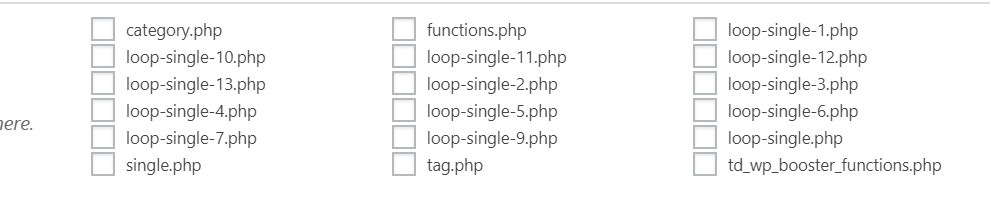
I manually implemented Ratings plugin into my website in every loop-single files:
` <div class="td-post-content">

        <?php echo $td_mod_single->get_content();?>

    </div>

<strong><div><?php if(function_exists('the_ratings')) { the_ratings(); } ?></div></strong>

    <footer>

        <?php echo $td_mod_single->get_post_pagination();?>

        <?php echo $td_mod_single->get_review();?>`
My question is: in which place can I now edit manually post templates?
Thanks a lot!
 PFN365
Hi,
When my writers are saving their post, it goes to a blank white screen. The post saves, but they are led to the white screen. Also, some are having issues previewing the post as it leads to a white screen. I just installed this theme the other day. Website: http://www.profootballnetwork.com.
Here are the plugins I have active:
AMP
Bluehost
Classic Editor
Google Analytics for WP
Internal Link Building
Jetpack by WordPress.com
Members
Open external links in a new window
Publish to Apple News
Really Simple SSL
TablePress
tagDIV Composer
tagDIV Mobile Theme
tagDiv Social Counter
Yoast SEO Premium
Calin Hi,
Usually this is happen when you make the update via FTP and you do not delete the previews version of theme, and you only override it, please make sure that you make the theme update correctly -> https://tagdiv.com/update-newspaper-theme/
If there are still a problem, please remove/delete the theme and reinstall it via FTP.
Thank you for your understanding!
 smehr
smehrI’ve enabled smart sidebar in the theme panel and I’ve also set column with the sidebar widget to sticky. It works in Chrome but not in Safari and Firefox. You can see this by viewing:
 DeChriss
 Hi Catalin,
Thanks for your answer, that made me investigate a bit deeper. 🙂
I think I found the right place in the td-cloud-library plugin within the shortcode tdb_single_review_overall.php.
$buffy .= '<div class="td-review-final-score">' . round($this->calculate_total($post_review_data)) . ($post_review_data['review_meta'] == 'rate_percent' ? ' %' : '') . '</div>';
Now, I have to search a way to hook into this single line to be safe in case of future updates. Maybe you have a idea? 🙂
Cheers,
Chris
 Catalin
 Hi arafat,
Check our demo preview from here -> https://demo.tagdiv.com/newspaper_video/ and try to keep these elements to your mobile responsive mode.
Also, I have checked your license and it seems that your support has been expired long ago, as you can see here -> https://www.screencast.com/t/TxqDt0B1 In the future, if you need any support, please extend it from here -> https://themeforest.net/item/newspaper/5489609?gclid=EAIaIQobChMI4d_7l87j4QIVw6MYCh2vfg4bEAAYASAAEgJv5_D_BwE
Thank you!
 360velo
 I am unable delete empty columns with the methods described above. See video.
smehrOur site is https://adcreview.com
We updated the theme to the current version and the feature image on posts appear smaller when viewing on mobile. When you first load the page on mobile, the image appears small, when you scroll down and then back up to the feature image, it reduces in size. If you keep scrolling down and then back up to feature image, the image will keep reducing in size until it is not visible. You can see this by viewing https://adcreview.com/the-review/what-are-the-latest-technologies-being-used-to-develop-adcs/
This seems to affect most posts but not some posts on the site. For example this post seems to not have this issue:
https://adcreview.com/articles/the-evolving-market-for-antibody-drug-conjugates/
Can you please help?
 a h
a hHello,
After Latest updating of Newspaper Temp I got Error : HTTP ERROR 500
After reviewing the server I got Error:
…………………………..
Fatal error: Uncaught Error: Call to undefined method td_config::get_map_filter_array() in /home/mafaworld/public_html/wp-content/plugins/td-api-plugin/td-api-plugin.php:62 Stack trace: #0 /home/mafaworld/public_html/wp-includes/class-wp-hook.php(286): td_api_plugin->hook_td_global_after(”) #1 /home/mafaworld/public_html/wp-includes/class-wp-hook.php(310): WP_Hook->apply_filters(NULL, Array) #2 /home/mafaworld/public_html/wp-includes/plugin.php(465): WP_Hook->do_action(Array) #3 /home/mafaworld/public_html/wp-content/themes/Newspaper/includes/wp_booster/td_wp_booster_functions.php(36): do_action(‘td_global_after’) #4 /home/mafaworld/public_html/wp-content/themes/Newspaper/functions.php(23): require_once(‘/home/mafaworld…’) #5 /home/mafaworld/public_html/wp-settings.php(479): include(‘/home/mafaworld…’) #6 /home/mafaworld/public_html/wp-config.php(84): require_once(‘/home/mafaworld…’) #7 /home/mafaworld/public_html/wp-load.php(37): require_once(‘/home/mafaworld…’) #8 /home/mafaworld/public_html/wp-blog-header.php( in /home/mafaworld/public_html/wp-content/plugins/td-api-plugin/td-api-plugin.php on line 62
…………………………..
I do not understand the problem
Please help me
thank you
DeChrissHi Guys,
we are using the latest Newspaper V9.6.1.
In the past we were able to round the points to full numbers by editing the function “private static function render_table_footer” in td_review.php like that:
switch ($td_review['has_review']) {

case 'rate_point' :

$buffy .= '<div class="td-review-final-score">' . round(self::calculate_total($td_review)) . '</div>';

break;

}
Did that change after the last updates, because this not seems to work anymore. 🙂
Thanks in advance
Cheers,
Chris
 ruskin
 Finally found a block previewer, so you don’t have to guess what’s different about each [tagdiv] block:
 danblukk
I haven’t changed anything then all the sudden this happens?
https://www.screencast.com/t/f7KDcw5i5rBE
my site, https://martial-arts-review.co.uk
Calin Hi,
In the current version the child this will not longer work as in previews version, please check this documentation ->
https://tagdiv.com/updating-the-core-of-tagdiv-themes/
If you still need our support you should extend it.
Thanks.
