
- NewspaperUser review system
- NewspaperReviews
- NewspaperCredit System
- NewspaperModules Builder in Newspaper Theme
- NewspaperHow to use the Posts List shortcode
- NewspaperModal Popup
- NewspaperLockers
- NewspaperLeads
- NewspaperFlex Block Settings Guide
- NewspaperSingle Post Shortcodes
- NewspaperDefault Category Settings
- NewspaperCloud Library – Category Templates
- NewspaperBig Grid Flex Settings
- NewspaperMeta Info on Modules and Blocks
- NewspapertagDiv Cloud Library Plugin
- NewspapertagDiv AMP Plugin Tutorial
- NewspapertagDiv Composer Tutorial
- NewspaperNewspaper theme documentation
- NewspaperWeather Shortcode
- NewspaperHow to Add an Icon in Menu
 cjm1982
Hi,
I want to use the included review function for album reviews but I only want to give one overall rating, not scores for different categories followed by an overall rating.
At the moment when I try and do this is presents the score twice. How can I set it so it just displays an overall rating?
Also, is it possible to move the summary box and score to the top of the page rather than the bottom?
 ardia
ardiaHi, can i change the header main menu to have horizontal submenu like this :
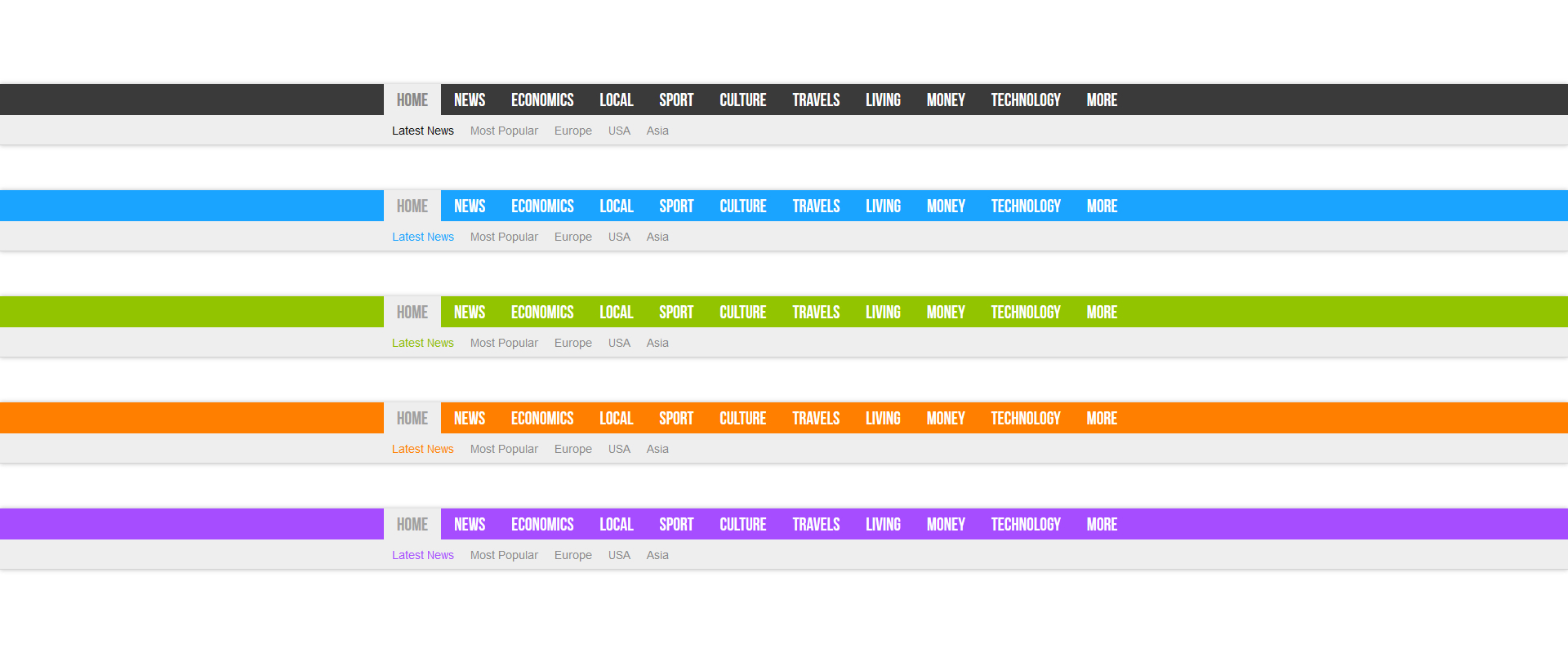
recently, i’m using header main menu 9 right now.
 sociler
The latest upload brings in http error while uploading images of any size.
I have tried deactivating all plugins and it still doesn’t work.
Media upload works only when this theme is deactivated which makes me think the fault is definitely within the theme.
It gives me a http error (and after sometimes the image appears to have uploaded without any preview but the required sizes doesn’t seem to be generated.)
Please help
 usawebdev
 Hello Bogdan,
I already reviewed that article prior to contacting your support. My question is, where does this code:
php_value max_input_vars 5000
php_value max_execution_time 300
php_value post_max_size 50M
need to be placed within the htaccess file? My current htaccess file looks like this:
# BEGIN WordPress
<IfModule mod_rewrite.c>
RewriteEngine On
RewriteBase /
RewriteRule ^index\.php$ – [L]
RewriteCond %{REQUEST_FILENAME} !-f
RewriteCond %{REQUEST_FILENAME} !-d
RewriteRule . /index.php [L]
</IfModule>
# END WordPress
So, I don’t know where exactly to place the php_value lines within the htaccess file. The article you refer to does not explain this. Could you please reply with the php_value lines added to the existing htaccess info I provided? That way, I can just copy and paste into my htaccess file.
Thanks,
Matt
 Andrei L.
 Hi
We have tested the theme security rigorously before releasing and also it was tested and analyzed by Envato reviewers and if would have any security issues would not pass their reviews.
Also I’ve test your site with a malware security scanner and fond some malicious activities: https://sitecheck.sucuri.net/results/pavlikeni.com/ – http://screencast.com/t/ktyzW0bxVB Checking our demo too can be seen that is no thread there so can’t be a theme’s issue: http://screencast.com/t/hfBXLFGJSqzD
Try to deactivate all plugins except Visual Composer, clear all caches and test again. Also I found here some resources that may help you fixing this iisues: http://smackdown.blogsblogsblogs.com/2008/06/24/how-to-completely-clean-your-hacked-wordpress-installation/ – http://vivavivugeek.blogspot.ro/2014/03/detect-and-remove-spam-seo-blackhat-seo.html
Hope this help.
Thanks!
 dreammy
Hello i have this message “Important notice: You have an outdated version of Visual Composer Design Options. It is required to review and save it.” and “Open Design Options” but is not possible open :/ and visual composer is very slowly. Radio disney club
 uss
ussHi,
I’m using Block 1 to show posts from category on homepage.
Post composed using http://www.tablesgenerator.com/html_tables
When preview post everything is ok, but table content of post will be convert to text-line like “JTNDZGl2JTIwY2xhc3MlM0QlMjJ0Zy13cmFwJTIyJTNFJTNDdG” if the post included in Block module.
Is there anyway to fix and force it display full table content post using Block?
Thanks.
 zokolus
 I installed V3.0.3 (previously I tested only V3.0.1), but I had to make rollback again.
I still can’t edit snippet preview. When I click on title in snippet preview – the title disaperes – the same is with snippet preview of meta description. It just disaperes!
Which plugin’s configurations do you need? There is a lot options and I need to know which do you need.
Anyway I will wait for next update of plugin, because this is makes me crazy!
My regards, Z
 simchris
 That is not part of the theme; it’s a built in function of WordPress — unfortunately, it’s almost impossible to hide that unless you do some major “hacking” of WP, which if you’re asking this, you might not be up to.
You should google “hiding wp-admin folder” and similar.
What some folks do is use a posting plugin, which builds separate form, outside of the WP admin system -then folks fill out their post in THAT system — such as custom page, which has post form, which when entered then goes to review to be a live post.
A bit complex — but again, not part of the theme.
If you have people login to your site to post, they are “running” the wp-admin script inside the wp-admin folder — that is WHERE the add-post.php script lives.
That might not have helped — or it might be food for thought. 🙂
simchris WordPress supports just placing link to YouTube video into any post …
it’s a built in feature of WordPress and not theme related:
https://codex.wordpress.org/Embeds
For example:
Check out this cool video:

http://www .youtube .com/watch?v=dQw4w9WgXcQ

That was a cool video.

WordPress will automatically turn the URL into a YouTube embed and provide a live preview in the visual editor.  simchris
 FYI:
3.0.3
Release Date: November 19th, 2015
•Bugfixes: •Fixes a bug where the snippet preview was broken.
3.0.2
Release Date: November 19th, 2015
•Bugfixes:
•Fixes a bug where disabling the visual editor caused our content analysis to break.
•Fixes a bug where the content analysis would break on installs that replace tinyMCE with ckEditor. Currently only supports the html editor.
•Fixes a bug where slug changes were not properly synchronized in the snippet preview.
•Fixes a bug where long slugs could be broken by wrongful synchronization with the snippet preview.
•Fixes a bug where digits were not analyzed well in the content, causing focus keywords or keyphrases with digits to no longer be matched.
•Fixes a bug where the url in the snippet preview was not in line with permalink settings. Fixed for permalinks containing the post name.
•Fixes a bug where focus keyphrases of more than two words would not be recognized properly in the content.
•Fixes a bug where the translation files were corrupted causing the translations to no longer work.
•Enhancements:
•Fixes caching problems. We’ve versioned file names for assets that have changed to circumvent caching strategies that consider preventing regular cache busting a good idea…
3.0.1
Release Date: November 18th, 2015
•Bugfixes: •Fixes a bug where users where getting error notifications about how their site was not indexable when in fact no check had been performed yet.
•Fixes a few broken links to help docs about the OnPage.org integration.
•Fixes an edgecase where the indexability check would go wrong for sites that filter the home url.
•Fixes a bug where the admin email that was sent to report the current indexability status was not rendered as HTML.
 Catalin
 Hi azazelka,
1)Unfortunately, our theme does not have an option for your first request. As an alternative for you, would be to use a plugin when do this thing for you. You could try to find a plugin but we cannot assure it will work because we have not tested these plugin. For instance, you should try this: https://wordpress.org/plugins/registered-users-only/ .
2)As i can see on your site, you are using header style 7. If you look on our demo preview, that white space is found there, because this is the style of this kind of header. If you do not want to have these white space, i will suggest to use other header style, (style 8 for example) like this: https://forum.tagdiv.com/header-styles/ .
If you want to modify this header style it is necessary to know a bit of CSS and HTML. You have to modify header-style-7.php file like that: http://screencast.com/t/RqVdNXwM4e . This is not a simply task and this required some customization. If you do not aware about the steps, please consider to hire a developer to do this for you.
Thank you for your understanding and let us know how it goes!
I hope this helps!
 Bogdan B.
 Hi,
It is a google chrome extension that allows you to create your css code and apply it live. It does not save the code, it only allows you to preview the modification. You have to add the code you create in the theme panel-> custom css box.
Thank you!
Catalin Hi laeban,
On demo preview, in our theme-Newsmag it is shown a static page. As i can see in your website, your front page displays your latest posts (blog mode). For to look like demo preview, you must to activate a static page in WP and set your home page (for example NEWS), like that: http://screencast.com/t/2U2FAhQugEa .
Thanks and let us know how it goes!
 Alin [tagDiv]
 Hi,
I have told you that this solution is for post published in last 2 days, not for comments added in last 2 days for all posts. It will pull the articles posted in last 2 days then it will sort them by number of comments. You realize that making this for comments added in the last 2 days for all posts it needs to create something similar to the 7 days order. Unfortunately I cannot provide a solution for this as requires to review all the code and the time doesn’t allow us to provide custom work, sorry!
Thanks!
 laeban
Dear tagdiv team and newsmag user,
I have been installed the newsmag on my site http://www.gabega.com, and as the documentation, i choose the default newsmag layout and installed from the theme panel. But the layout not like the demo preview, please help me.
see the site : http://www.gabega.com
there is something tips that i have been passed ?
Please tell me,
hendra
cjm1982Hi,
Hopefully I can explain this properly, but what I want to do is get the sub-category tags to display at the top of the sub-category page that they sit under.
So, an example structure of categories:
Music>Reviews>Albums
On the Music category page it displays all the sub category tags at the top, including Reviews. But when I click on Reviews category page it keeps the sake category tags with ‘Reviews’ highlighted, which is fine.
But I also want to show the category tags for the sub-categories that sit under ‘reviews’, such as ‘Albums.’
Is this possible?
 paul_1991
Hello Guys,
I love the NewsPaper theme.
Today I created a great homepage for my blog.
This is a screenshot

but all the articles are so small (small image preview). Before setting this homepage I had the classic post view where posts are bigger. This is a screenshot.

How can I make the posts bigger?
I was using the M4 template now I use the block 4 template but it seems small than the M4 template.
Another thing the title of my page is Home | PcExpert but I only want PcExpert. Is it possible to change it? I’m using the Yoast SEO plugin
 cityslicker444
Hey there guys!
I’m having a small issue with “tabbed” content displaying correctly, I believe. So, I used a Visual Composer “Tab” (the horizontal one) in one of my pages, right near the title. I published the page after previewing it, because everything appeared fine.
However, my friend looked at the page on her computer, and the tabs were rendering completely differently for her. Here are the two screenshots for the same area of the page:
What She Saw (WRONG/BAD): Bad tab example
What I See (RIGHT/GOOD): Good tab example
Any idea as to what might be going on? It seems to be only hers so far that sees this issue, but it happens on all her browsers on the same computer. Could it just be a simple caching or cookie thing on her computer?
On my computer and all others that I’ve tried, the site looks fine. Sorry to bother you for what is probably not an issue of the theme, but just thought I’d bring it up and rule it out. Thanks so much in advance!
Christian
 meriksson
Hi,
I am using Newspaper 6 Theme.
On category pages we have filter passed in query string which is post tag. So want to filter my posts according to that query string tag.
So I have changed query successfully which is effecting results of main category pages content. On loop.php modifying query with post tag make desired results. (In child theme)
But when it comes to top grid, it is hard-cord value of 5 passed there and if posts with tag are not present it displays nothing.
I found this piece of code which is calling Top grid :
<?php td_api_category_template::_helper_show_category_template() ?>
<?php td_api_category_top_posts_style::_helper_show_category_top_posts_style() ?>
And there is main function in File: /Newspaper/includes/wp_booster/td_wp_booster_functions.php
/* ----------------------------------------------------------------------------
 * modify the main query for category pages
 */
add_action('pre_get_posts', 'td_modify_main_query_for_category_page');
function td_modify_main_query_for_category_page($query) {


    //checking for category page and main query
    if(!is_admin() and is_category() and $query->is_main_query()) {

        //get the number of page where on
        $paged = get_query_var('paged');

        //get the filter_by

         URL($_GET) variable
        $filter_by = get_query_var('filter_by');

       <strong> $query_tag = filter_input( INPUT_GET, 'tag', FILTER_DEFAULT );

            if($query_tag)
            $query->set('tag',$query_tag); /*<strong>I tried modifying query but it does not effect top posts*/</strong>

        //get the limit of posts on the category page
        $limit = get_option('posts_per_page');

        // get the category object - with or without permalinks
        if (empty($query->query_vars['cat'])) {
            td_global::$current_category_obj = get_category_by_path(get_query_var('category_name'), false);  // when we have permalinks, we have to get the category object like this.
        } else {
            td_global::$current_category_obj = get_category($query->query_vars['cat']);
        }

        //offset is hardcoded because of big grid
        $offset = td_api_category_top_posts_style::_helper_get_posts_shown_in_the_loop();

        //echo $filter_by;
        switch ($filter_by) {
            case 'featured':
                //get the category object
                $query->set('category_name',  td_global::$current_category_obj->slug);
                $query->set('cat', get_cat_ID(TD_FEATURED_CAT)); //add the fetured cat
                break;

            case 'popular':
                $query->set('meta_key', td_page_views::$post_view_counter_key);
                $query->set('orderby', 'meta_value_num');
                $query->set('order', 'DESC');
                break;

            case 'popular7':
                $query->set('meta_key', td_page_views::$post_view_counter_7_day_total);
                $query->set('orderby', 'meta_value_num');
                $query->set('order', 'DESC');
                break;

            case 'review_high':
                $query->set('meta_key', td_review::$td_review_key);
                $query->set('orderby', 'meta_value_num');
                $query->set('order', 'DESC');
                break;

            case 'random_posts':
                $query->set('orderby', 'rand');
                break;
        }//end switch

	    // offset + custom pagination - if we have offset, WordPress overwrites the pagination and works with offset + limit
	    if(empty($query->is_feed)) {
		    if ( ! empty( $offset ) and $paged > 1 ) {
			    $query->set( 'offset', $offset + ( ( $paged - 1 ) * $limit ) );
		    } else {
			    $query->set( 'offset', $offset );
		    }
	    }


    }//end if main query
}
While using Grid style one:
includes/shortcodes/td_block_big_grid_1.php
POST_LIMIT is passed as 5.
So is there any way that my category posts get filter by tag for top grid as well. I tried modifying main function as mentioned above. Please see this comment in code above (I tried modifying query but it does not effect top posts)
Please suggest how that will be possible.
Screen shot attached for details of URL having query string:
 generics
 After further investigation of that issue we might have found the “bug”
Looking at td_review.php you find the following code snippet:
static function save_post_hook($post_id) {

        //$td_review = get_post_meta($post_id, 'td_review', true);

   $td_review = get_post_meta($post_id, 'td_post_theme_settings', true);

        if (self::has_review($td_review)) {

            update_post_meta($post_id, self::$td_review_key, self::calculate_total_key_value($td_review));

}
Just maybe there is an else snippet missing to remove the td_review_key in case someone “disables” the review for a post?!
Anyhow, for our problem we manually removed the entry from the database to synchronize the backend view and the db.
Cheers!
genericsHi there,
currently we are having an issues with this setting. In general it works fine BUT:
If a review is set for a post, the post appears in the blog which is configured to show the highest rated. But if you remove the review the specific post won’t disappear within this block. It is still there but not showing any stars (well this works as intended).
We also tried not to only set the review setting to “no” but also delete every single “feature name” and the description. Looking into the db entry for that post, all information about the “review” seem to be removed correctly. Anyhow, the post – as already said – still appears in every block using this filter method.
Are there any additional tables which are holding these review information or how could we solve this issue?
By the way, adding the review information automatically by writing them into the database works fine and all information about the review are correctly shown on the post itself. In a Block using the filter method highes rated these post first show up after saving the post through the backend without making any changes. This behavior also makes me belief that additional review information are stored somewhere else in the database?!
Ah, before you ask, there is no caching plugin oder CDN aktive.
Thanks in advance and sorry for my english…
Best regards.
 iMohitPahwa
 Hello,
My website is Tech Remark. It is technology based website where I share news and other information related to technology. I also do reviews of gadgets.

Here is a link to my website: http://www.techremark.com
cjm1982Hi, I’ve selected megemenu for my main categories but is there any way of excluding some sub categories from displaying, or at least showing the hierarchy of second and third level categories?
For example, if I have categories of:
Film > Film Reviews > Action films
But I only want Film and Film Reviews to show in the megemenu, not Action films as well. Is this possible?
 yinako
 Thanks for the direction, it would be good in the future to have the review section as a VC composer element, so it can be placed anywhere
