
- NewspapertagDiv Cloud Library Plugin
- NewspapertagDiv Shop
- NewspaperHow to Use tagDiv Cloud Library
- NewspaperCloud Library Templates
- NewspaperDesign your Post Pages using the Cloud Library Templates
- NewspapertagDiv Composer Tutorial
- NewspaperIntroduction to CPT and ACF with Newspaper Theme
- NewspaperSocial Sharing
- NewspaperInfinite Loading for Single Posts
- NewspaperCustom Post Type Support
- NewspaperHeader Builder
- NewspaperUsing the Theme Translations with WPML
- NewspaperInstagram in Newspaper WordPress Theme
- NewsmagRequirements for Newsmag
- NewspaperSmart Lists
- NewspaperAuthor Card
- NewspaperFeatured Images
- NewspaperSmart Sidebar
- NewspaperPost template ads
- NewspaperFooter Builder
 Anamaria
 Hi,
Please make sure you have the tagDiv Composer and tagDiv Cloud Library plugins activated.
Also, you can try to delete the tagDiv Composer and tagDiv Cloud Library and reinstall them from Newspaper -> Plugins.
Thank you!
Anamaria Hi,
Please make sure you have the tagDiv Composer and tagDiv Cloud Library plugins activated.
Also, please provide some screenshots.
Thank you!
 Calin
Calin Hello,
The code for infinite post iframe is on those files:
-> wp-content/plugins/td-cloud-library/includes/tdb_ajax.php -> https://i.imgur.com/pjVBzDQ.png
-> wp-content/plugins/td-cloud-library/assets/js/js_posts_autoload.min.js -> https://i.imgur.com/smx62mm.png
-> wp-content/plugins/td-composer/legacy/Newspaper/js/tagdiv_theme.min.js -> https://i.imgur.com/uKlJ3iH.png
I hope this will help you!
 yvandeuren
Hello,
We’re trying to update one of our client’s website but when we proceed to the update of the Newspaper theme (so including the tagDiv plugins), we got an ajax error on all tagDiv plugins.
The error message doesn’t give any further information about the issue.
The theme is registered correctly.
Would you be able to help us on that please ?
Here’s the website URL : https://tribumedias.be/
And the WordPress status following.
Note that we restored a recent backup because trying to update breaks the site design etc.
Thanks and have a great day.
—————————-
### wp-core ###

version: 6.0.2
site_language: fr_FR
user_language: fr_FR
timezone: Europe/Paris
permalink: /%year%/%monthnum%/%day%/%postname%/
https_status: true
multisite: false
user_registration: 0
blog_public: 1
default_comment_status: undefined
environment_type: production
user_count: 12
dotorg_communication: true

### wp-paths-sizes ###

wordpress_path: /home/customer/www/tribumedias.be/public_html
wordpress_size: 566,09 Mo (593592890 bytes)
uploads_path: /home/customer/www/tribumedias.be/public_html/wp-content/uploads
uploads_size: 164,16 Mo (172130998 bytes)
themes_path: /home/customer/www/tribumedias.be/public_html/wp-content/themes
themes_size: 15,90 Mo (16672888 bytes)
plugins_path: /home/customer/www/tribumedias.be/public_html/wp-content/plugins
plugins_size: 148,27 Mo (155475098 bytes)
database_size: 25,61 Mo (26853376 bytes)
total_size: 920,03 Mo (964725250 bytes)

### wp-dropins (1) ###

object-cache.php: true

### wp-active-theme ###

name: Newspaper Child (Newspaper-child)
version: 10.3.9.1.1625672265
author: tagDiv
author_website: http://themeforest.net/user/tagDiv/portfolio
parent_theme: Newspaper (Newspaper)
theme_features: core-block-patterns, post-formats, post-thumbnails, automatic-feed-links, html5, woocommerce, bbpress, align-wide, align-full, editor-font-sizes, widgets-block-editor, editor-style, menus, title-tag, widgets
theme_path: /home/customer/www/tribumedias.be/public_html/wp-content/themes/Newspaper-child
auto_update: Désactivé

### wp-parent-theme ###

name: Newspaper (Newspaper)
version: 11.4.2 (latest version: 11.5.1)
author: tagDiv
author_website: http://themeforest.net/user/tagDiv/portfolio
theme_path: /home/customer/www/tribumedias.be/public_html/wp-content/themes/Newspaper
auto_update: Désactivé

### wp-themes-inactive (4) ###

Twenty Nineteen: version: 2.2, author: L’équipe WordPress (latest version: 2.3), Mises à jour auto désactivées
Twenty Twenty: version: 1.9, author: L’équipe WordPress (latest version: 2.0), Mises à jour auto désactivées
Twenty Twenty-One: version: 1.5, author: L’équipe WordPress (latest version: 1.6), Mises à jour auto désactivées
Twenty Twenty-Two: version: 1.1, author: the WordPress team (latest version: 1.2), Mises à jour auto désactivées

### wp-plugins-active (20) ###

Advanced Custom Fields: version: 5.12.3, author: Delicious Brains, Mises à jour auto désactivées
Child Theme Configurator: version: 2.5.9, author: Lilaea Media, Mises à jour auto désactivées
Duplicate Page: version: 4.4.9, author: mndpsingh287, Mises à jour auto désactivées
GDPR Cookie Consent: version: 2.1.2, author: WebToffee, Mises à jour auto désactivées
Ninja Forms: version: 3.6.13, author: Saturday Drive (latest version: 3.6.14), Mises à jour auto désactivées
Regenerate Thumbnails: version: 3.1.5, author: Alex Mills (Viper007Bond), Mises à jour auto désactivées
Revive Old Posts: version: 9.0.10, author: revive.social, Mises à jour auto désactivées
Revive Old Posts Pro Add-on: version: 3.0.7, author: revive.social, Mises à jour auto désactivées
RSS Featured Image: version: 1.0.5, author: Jordy Meow, Mises à jour auto désactivées
SEOPress: version: 5.9.0.3, author: SEOPress, Mises à jour auto désactivées
SiteGround Central: version: 2.0.8, author: SiteGround, Mises à jour auto désactivées
SiteGround Optimizer: version: 7.2.1, author: SiteGround, Mises à jour auto désactivées
tagDiv Cloud Library: version: 2.1 | built on 10.03.2022 11:40, author: tagDiv, Mises à jour auto désactivées
tagDiv Composer: version: 3.2 | built on 10.03.2022 11:40, author: tagDiv, Mises à jour auto désactivées
tagDiv Newsletter: version: 1.7 | built on 11.04.2022 7:46, author: tagDiv, Mises à jour auto désactivées
tagDiv Social Counter: version: 5 | built on 10.03.2022 11:40, author: tagDiv, Mises à jour auto désactivées
tagDiv Standard Pack: version: 1.3 | built on 10.03.2022 11:40, author: tagDiv, Mises à jour auto désactivées
Ultimate Blocks: version: 2.5.2, author: Ultimate Blocks, Mises à jour auto désactivées
UpdraftPlus - Backup/Restore: version: 1.22.19, author: UpdraftPlus.Com, DavidAnderson (latest version: 1.22.22), Mises à jour auto désactivées
WPCode - Insert Headers, Footers, and Code Snippets: version: 2.0.2, author: WPCode, Mises à jour auto désactivées

### wp-plugins-inactive (2) ###

Microblog Poster: version: 2.1.6, author: Efficient Scripts, Mises à jour auto désactivées
SiteGround Security: version: 1.3.0, author: SiteGround (latest version: 1.3.1), Mises à jour auto désactivées

### wp-media ###

image_editor: WP_Image_Editor_GD
imagick_module_version: Non disponible
imagemagick_version: Non disponible
imagick_version: Non disponible
file_uploads: File uploads is turned off
post_max_size: 256M
upload_max_filesize: 256M
max_effective_size: 256 Mo
max_file_uploads: 20
gd_version: 2.2.5
gd_formats: GIF, JPEG, PNG, WebP, BMP, XPM
ghostscript_version: 9.27

### wp-server ###

server_architecture: Linux 3.12.18-clouder0 x86_64
httpd_software: Apache
php_version: 7.4.30 64bit
php_sapi: cgi-fcgi
max_input_variables: 3000
time_limit: 120
memory_limit: 768M
max_input_time: 120
upload_max_filesize: 256M
php_post_max_size: 256M
curl_version: 7.66.0 OpenSSL/1.1.1q-fips
suhosin: false
imagick_availability: false
pretty_permalinks: true
htaccess_extra_rules: true

### wp-database ###

extension: mysqli
server_version: 5.7.39-42-log
client_version: mysqlnd 7.4.30
max_allowed_packet: 33554432
max_connections: 500

### wp-constants ###

WP_HOME: undefined
WP_SITEURL: undefined
WP_CONTENT_DIR: /home/customer/www/tribumedias.be/public_html/wp-content
WP_PLUGIN_DIR: /home/customer/www/tribumedias.be/public_html/wp-content/plugins
WP_MEMORY_LIMIT: 256M
WP_MAX_MEMORY_LIMIT: 768M
WP_DEBUG: false
WP_DEBUG_DISPLAY: true
WP_DEBUG_LOG: false
SCRIPT_DEBUG: false
WP_CACHE: false
CONCATENATE_SCRIPTS: undefined
COMPRESS_SCRIPTS: undefined
COMPRESS_CSS: undefined
WP_ENVIRONMENT_TYPE: Indéfini
DB_CHARSET: utf8mb4
DB_COLLATE: undefined

### wp-filesystem ###

wordpress: writable
wp-content: writable
uploads: writable
plugins: writable
themes: writable
Hello FrankG,
This problem is still persisting when you try only with tagDiv Composer, tagDiv Standard pack and tagDiv Cloud library activated (no other theme plugin)?
We need to do some investigations and see from where is coming this delay. Since you can not share the website link here on forum, maybe you can contact us via email at contact@tagdiv.com there will be a private conversation and we can check the website to see from where the problem is coming from.
Thank you!
Anamaria Hello,
Please try to reupdate the theme https://forum.tagdiv.com/topic/unable-to-make-changes-in-content/
Also, you can try to delete the tagDiv Composer and tagDiv Cloud Library and reinstall them from Newspaper -> Plugins.
Thank you!
 Bettina
 Hello @obit8!
You don’t need an extra plugin if you use cloud templates. Every element from the tagdiv Composer has a setting to hide it and delete it. This setting can be seen in the CSS tab of every element: [Display: HIDDEN]. We recommend to use cloud/PRO templates in order to have the possibility to edit them with the TagDiv Composer which contains a lot of functions and features, please check our tutorial here: https://forum.tagdiv.com/tagdiv-composer-tutorial/
Documentation here:
– https://forum.tagdiv.com/cloud-library-templates/
– https://forum.tagdiv.com/design-post-pages-using-cloud-library-templates/
– https://forum.tagdiv.com/cloud-library-category-templates/
Thank you!
 Abraham Duarte
Hi, yesterday I started to see this code bloc when I build a new single or when open “all post” I deactivate the plugin “tagDiv Cloud Library” and it disapear but the plugin is necessary to the page
https://mega.nz/file/2RwwUS6D#XAgAV-l9ooZltbzSVl2aBr7V3LED-J6qS422UDpOeso
https://mega.nz/file/DUgCTbhZ#DOg9U11VY3TH3dl1UfPiVNpPI6kTkUZxL19tpMnB2Hg
What can I do ?
Bettina Hello @AuroraCattery!
Install the tagdiv shop and Woocommerce plugin.
You can change the demo with one dedicated for shops: https://prnt.sc/8cYnsH3JBho4 or just import the shop templates from the Cloud Library: https://prnt.sc/9zOXPfe4hZfi
You can import any cloud templates from any demos you like from the Cloud Templates and assign it on your website, or you can build them from scratch by importing a blank template(in order to make it editable with the Composer).
I recommend you to try to use the staging plugin, so you won’t ruin your website, check also this article from here and give it a try: https://themeisle.com/blog/wordpress-staging-site/
Thank you!
Bettina Hello @mojopatrakar!
Please use a single cloud post template and not a standard one. We recommend to use cloud/PRO templates in order to have the possibility to edit them with the TagDiv Composer which contains a lot of functions and features, please check our tutorial here: https://forum.tagdiv.com/tagdiv-composer-tutorial/
Documentation here:
– https://forum.tagdiv.com/cloud-library-templates/
– https://forum.tagdiv.com/design-post-pages-using-cloud-library-templates/
– https://forum.tagdiv.com/cloud-library-category-templates/
Make sure your header and footer template are set as Global in the Cloud Templates. In this way, they will appear on every page.
You have to create only a new page Home and set it like this: https://prnt.sc/b5bxSIJQum5V in the WordPress Settings.
We have cloud templates for articles, category, tag, etc. which you can assign directly to any page.
We have 3 options for mobile versions that you can use:
1. Responsive version: A responsive version of your website looks similar to the desktop version. Edit the page with TagDiv Composer. Click on the mobile viewport: https://www.screencast.com/t/XDQJedlggSB; there you can see your mobile version and edit or adjust the elements to look better.
2. Mobile pages: https://tagdiv.com/newspaper-10-3-7-update-brings-customizable-and-fast-mobile-pages
3. Mobile theme plugin: The Mobile Theme is a performance-optimized theme included in the main Newspaper theme that only loads on mobile devices. It comes with its own templates and design for pages, posts, categories, etc., so your current templates from the desktop theme will get converted to the mobile theme layout. Please see https://forum.tagdiv.com/the-mobile-theme/ and https://forum.tagdiv.com/mobile-theme-introduction/ for more information.
A full explanation is here: https://www.youtube.com/watch?v=SpGkOnJeNZY
You can choose to use whichever one is more affordable and useful for you.
For the option 1 and 2, you need to uninstall the Mobile Theme plugin.
You can easily edit the cloud header and footer by editing the homepage with the Tagdiv Composer(scroll down in the editor to see the footer section).
Thank you!
Anamaria Hi,
Please make sure you have the tagDiv Composer and tagDiv Cloud Library plugins activated.
Thank you!
Anamaria Hello,
Your plugins are deactivated https://i.imgur.com/L0NK2qY.png
Please make sure you have the tagDiv Composer and tagDiv Cloud Library plugins activated.
Thank you!
 a3lanjo
Regarding license:
An issue has been encountered while trying to validate your license key
Cant continue active the skin i want and already license registered
Regarding plugin:
tagDiv Cloud Library – Plugin deactivated.
This plugin is not supported by the current theme!
Please note: i used 1 domian : https://knptfitness.com/
Calin Hi Gen Fujiwara,
Indeed, the theme provide by default the responsive version. Also it provides the mobile theme plugin that has a pre-made template that can not be edited, but it can do the mobile version faster then the responsive version.
Now, the mobile page templates, those are cloud templates made for mobile version, in this way you can have a different content/layout on mobile and you can edit it after your needs with the tagDiv Composer.
So our theme has in the end 3 possibilities for the mobile version:
1. Responsive version, this is by default when you install the theme and you do not use mobile page or mobile theme plugin.
2. Mobile page/template this allows you to create with tagDiv Composer and cloud a different layout and set different elements for mobile and iPad/tablet and it will overwrite the responsive version.
3. Mobile theme plugin, this is a light theme version for mobile that will overwrite the mobile page and responsive version if enabled.
So when you have a mobile page/template this will be used instead of a responsive version, but if you also have the mobile theme enabled, this one will override both of them.
How to combine them? Yes, this can be possible, for example the mobile page/template will apply only on that page or cloud template that is assigned. But what to do if you want to use a mobile theme plugin too? If you use mobile theme, in Gutenberg editor it is an option to disable the mobile theme in current post/page, if you use the option, then it will be use the mobile page/template (if is assigned) or the responsive version.
So in your case you can disable the mobile theme on the homepage -> https://i.imgur.com/NX57q4t.png or if you do not want it at all, disable the plugin or use it only for amp -> https://i.imgur.com/Grlz5Ee.png.
Here is also a video that explains all those -> https://www.youtube.com/watch?v=SpGkOnJeNZY
Hope this will help you!
 Tim
Tim When activating the AMP plugin, which is recommended by tagDiv to run with the mobile tagDiv plugin, it says that the tagDiv Composer and tagDiv Cloud Library are causing 118+ validation errors.
Should we supress those plugins.
Screenshots refer.
Anamaria Hello @jeff2020,
This is version 10.3.6 https://we.tl/t-v36dtBGBqT please make sure after the update you have the tagDiv plugins activated like tagDiv Standard Pack, tagDiv Composer, and tagDiv Cloud Library.
Thank you!
Anamaria Hello,
Please make sure you have the tagDiv plugins activated, like tagDiv Composer, tagDiv Cloud Library.
Have you tried to see that this issue is not caused by a plugin conflict?
Usually, this issue is caused by a plugin conflict, please do a test using the theme plugins, clear all cache and see if the problem persists.
Thank you!
 Edanur
Hello,
I activated it with newspaper> plugins> tagdiv cloud library. Then I checked that it is active in the ‘plugins’ section. However the tagdiv cloud library is not displayed. I want to recreate my website design using ”tagdiv cloud library”. But I can’t access the cloud library entry in the articles I’ve reviewed from ”forum.tagdiv.com”. Please help, thank you.
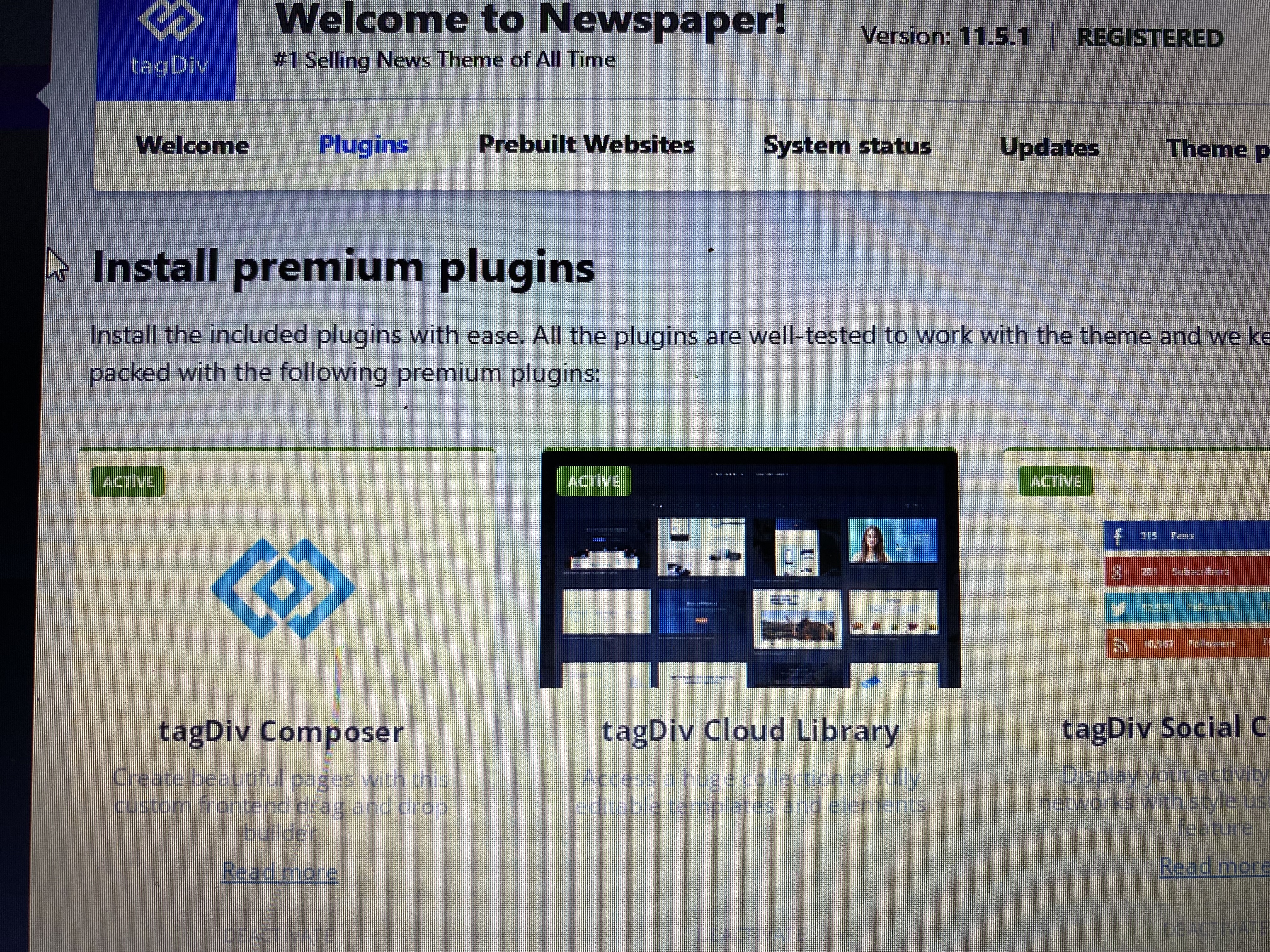

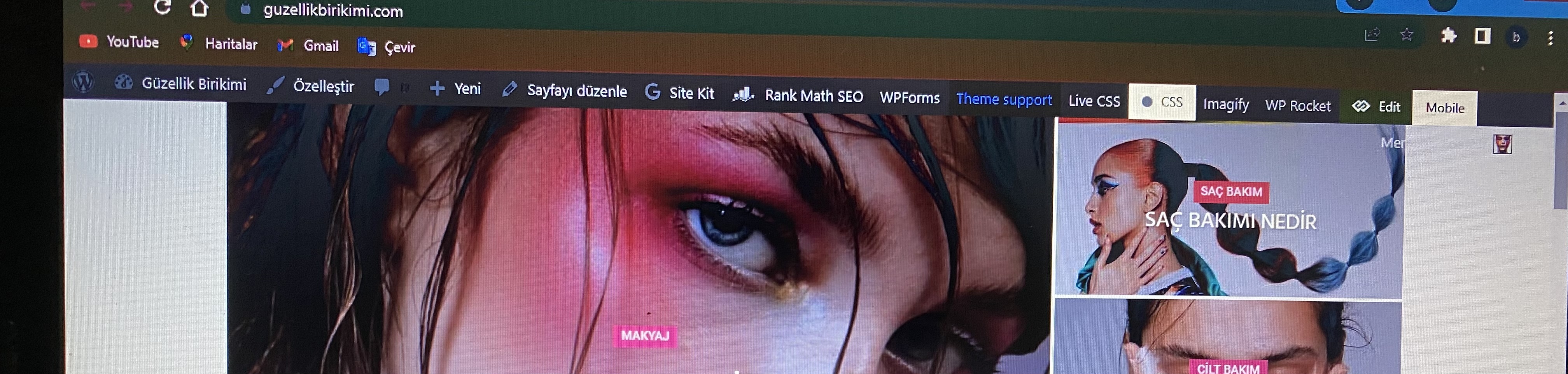
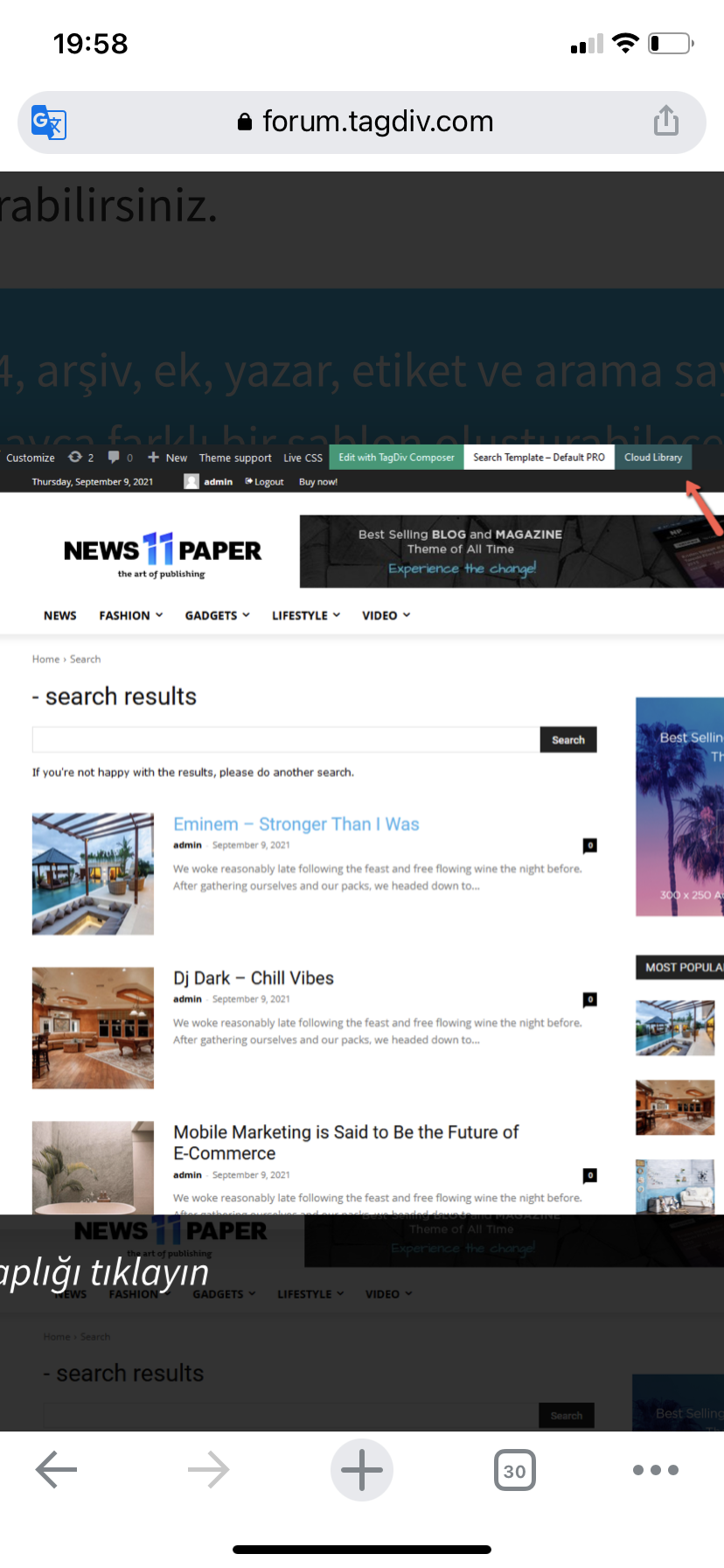
Yours truly
 jonesjw
 Hi – here are the plugins I have. It’s odd because up to oh a week or so ago I didn’t have this issue. I don’t know if an update on some plug-in caused an issue or not.
Thanks for any help.
Everest Business Directory
Deactivate
An ultimate business directory plugin for WordPress
Version 1.2.7 | By Access Keys | Visit plugin site
Select Flip Html5 Short Code
Flip Html5 Short Code
Deactivate
Flip Html5 WordPress Plugin
Version 1.0 | By fliphtml5.com | Visit plugin site
Select Head and Footer Scripts Inserter
Head and Footer Scripts Inserter
Upgrade to PRO | Settings | Deactivate
Easily and safely add your custom HTML code (plus JavaScript, CSS, etc.) to your WordPress website, directly out of the WordPress Admin Area, without the need to have an external editor.
Version 4.52 | By Space X-Chimp | View details | Donate
Enable auto-updates
Select Really Simple SSL
Really Simple SSL
Premium Support | Settings | Deactivate
Lightweight plugin without any setup to make your site SSL proof
Version 5.3.3 | By Really Simple Plugins | View details
Enable auto-updates
Select Really Simple SSL pro
Really Simple SSL pro
Settings | Deactivate
Optimize your SSL security with the mixed content scan, secure cookies and advanced security headers.
Version 5.5.2 | By Really Simple Plugins | View details
Enable auto-updates
Select tagDiv Cloud Library
tagDiv Cloud Library
Deactivate
Access a huge collection of pre-made templates you can import on your website and customize on the frontend using the tagDiv Composer plugin.
Version 2.3 | built on 12.05.2022 9:11 | By tagDiv | Visit plugin site
Select tagDiv Composer
tagDiv Composer
Deactivate
tagDiv Composer – Create everything on your website right on the frontend with this drag and drop builder. Perfect for articles, pages, headers, and footers. No coding skills required.
Version 3.4 | built on 12.05.2022 9:11 | By tagDiv | Visit plugin site
Select tagDiv Social Counter
tagDiv Social Counter
Deactivate
tagDiv Social Counter – Displays your activity on social networks with style. Use it as a cool widget, tagDiv Composer block or shortcode.
Version 5.1 | built on 30.05.2022 15:09 | By tagDiv | Visit plugin site
Select tagDiv Standard Pack
tagDiv Standard Pack
Deactivate
tagDiv Standard Pack Support
Version 1.5 | built on 29.07.2022 8:01 | By tagDiv | Visit plugin site
Select WP Rocket
WP Rocket
Settings | FAQ | Docs | Support | Deactivate
The best WordPress performance plugin.
Version 3.11.5 | By WP Media | Visit plugin site
Auto-updates disabled
Select WPML Media
WPML Media
Deactivate | Registered
Add multilingual support for Media files | Documentation | WPML Media Translation 2.7.0 release notes
Version 2.7.0 | By OnTheGoSystems | View details
Enable auto-updates
Select WPML Multilingual CMS
WPML Multilingual CMS
Deactivate | Configure | Registered
WPML Multilingual CMS | Documentation | WPML 4.5.8 release notes
Version 4.5.8 | By OnTheGoSystems | View details
Enable auto-updates
Select WPML SEO
WPML SEO
Deactivate | Registered
Multilingual support for popular SEO plugins
Version 2.0.1 | By OnTheGoSystems | View details
Enable auto-updates
Select WPML Sticky Links
WPML Sticky Links
Deactivate | Configure | Registered
Prevents internal links from ever breaking | Documentation | WPML Sticky Links 1.5.4 release notes
Version 1.5.4 | By OnTheGoSystems | View details
Enable auto-updates
Select WPML String Translation
WPML String Translation
Deactivate | Configure | Registered
Adds theme and plugins localization capabilities to WPML | Documentation | WPML String Translation 3.2.1 release notes
Version 3.2.1 | By OnTheGoSystems | View details
Enable auto-updates
Select WPML Widgets
WPML Widgets
Deactivate
Easily select which widgets you want to show for which languages
Version 1.0.6 | By Jeroen Sormani | View details
Disable auto-updates
Select Yoast SEO
Yoast SEO
Required by Yoast SEO Premium | FAQ | Settings
The first true all-in-one SEO solution for WordPress, including on-page content analysis, XML sitemaps and much more.
Version 19.5.1 | By Team Yoast | View details
Disable auto-updates
Select Yoast SEO Premium
Yoast SEO Premium
Deactivate
The first true all-in-one SEO solution for WordPress, including on-page content analysis, XML sitemaps and much more.
Version 19.1 | By Team Yoast | View details
Auto-updates are enabled based on this setting for Yoast SEO.
Select Yoast SEO: News
Yoast SEO: News
Settings | Deactivate
Google News plugin for the Yoast SEO plugin
Version 13.1 | By Team Yoast | View details
EdanurHello,
I activated it with newspaper> plugins> tagdiv cloud library. Then I checked that it is active in the ‘plugins’ section. However the tagdiv cloud library is not displayed. What should I do? Please help.
Yours truly
Calin Hi,
I do not see any code -> https://i.imgur.com/F6t0X3H.png
Also, if you have the Newspaper theme activated, please be users that you also have the theme plugins, like tagDiv Composer, tagDiv Cloud Library and for some old users that have standard templates the tagDiv Standard pack need to be installed too -> https://i.imgur.com/9J8sYw5.png
Thank you!
Calin Hi,
I believe that you are referring to this element -> https://i.imgur.com/1Z4KA0V.jpg if is so, then you can displayed those extra elements only by editing the code for the element -> wp-content/plugins/td-composer/legacy/Newspaper/includes/shortcodes/td_block_authors.php
For Author template, you can use a cloud template from the tagDiv Cloud Library, those can be edited using tagDiv Composer and you can make it as you want. Also if you want you can create an individual author template per each author.
Thank you!
Anamaria Hello,
Please let me know what version theme you have.
Also, please make sure you have the tagDiv Cloud Library plugin activate.
Thank you!
Calin Hi yoyo,
I believe that you have set a single post template from the tagDiv Cloud Library, those can be edited using the tagDiv Composer.
Now in case that the template it is not displayed on frontend like in tagDiv Composer, then it can be because of a plugin conflict. Most of the time it is related to WP Bakery plugin. This should not be used with tagDiv Cloud Library, only with tagDiv Standard Pack.
I hope this will help you!
Let us know the results!
 jaykey21
Hi,
I need 4 of the tag plugins to upload to my site. I am using WP Ceber and it is requesting that I upload the plugins for integrity. The 3 plugins are tagDiv Composer, tagDiv Cloud Library, tagDiv Social Counter, and tagDiv Mobile Theme. How do I get these files to upload to check the integrity. I already uninstalled and reinstalled but it is still asking me to upload the files.
Thanks,
James



