
- NewspapertagDiv Cloud Library Plugin
- NewspapertagDiv Shop
- NewspaperHow to Use tagDiv Cloud Library
- NewspaperCloud Library Templates
- NewspaperDesign your Post Pages using the Cloud Library Templates
- NewspapertagDiv Composer Tutorial
- NewspaperIntroduction to CPT and ACF with Newspaper Theme
- NewspaperSocial Sharing
- NewspaperInfinite Loading for Single Posts
- NewspaperCustom Post Type Support
- NewspaperHeader Builder
- NewspaperUsing the Theme Translations with WPML
- NewspaperInstagram in Newspaper WordPress Theme
- NewsmagRequirements for Newsmag
- NewspaperSmart Lists
- NewspaperAuthor Card
- NewspaperFeatured Images
- NewspaperSmart Sidebar
- NewspaperPost template ads
- NewspaperFooter Builder
 PostmasterPU
Hi,
Wordfence signaled today tagdiv cloud library plugin is vulnerable.
Details here:
 yassinee
 I’ve updated the tagDiv Cloud Library plugin to version 3.9.2 (manually), but I’m still receiving a vulnerability warning
 kappe79
Hi,
I’m using Newspaper theme with WPML multilanguage plugin.
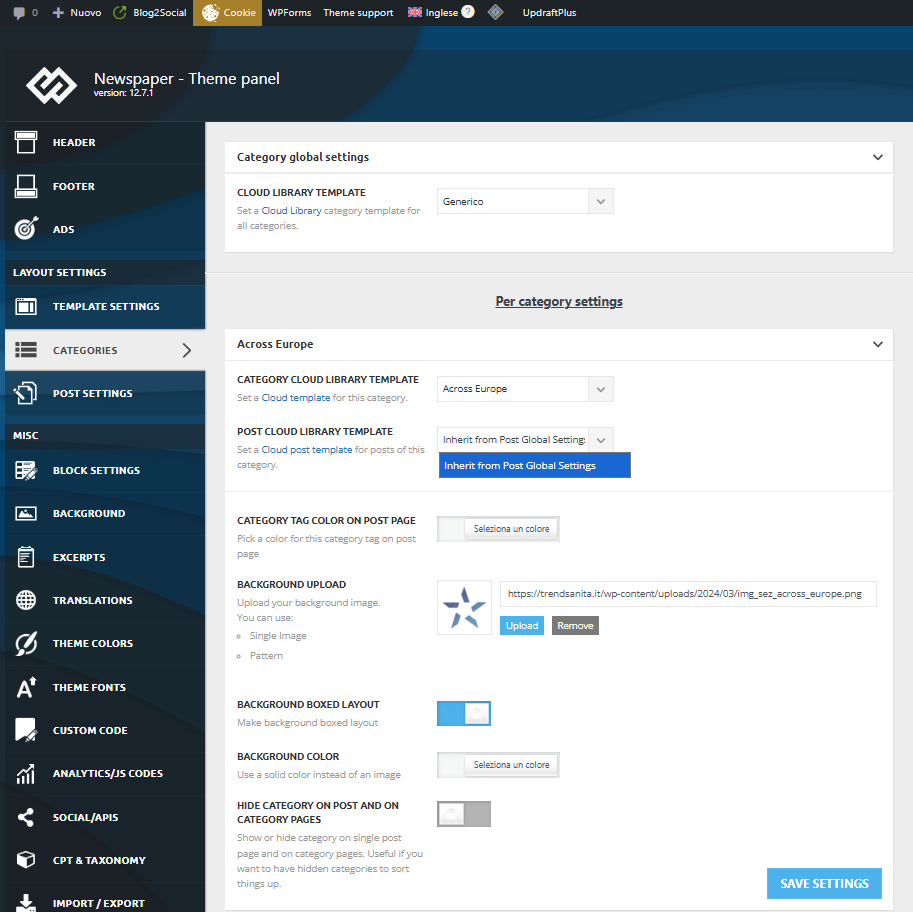
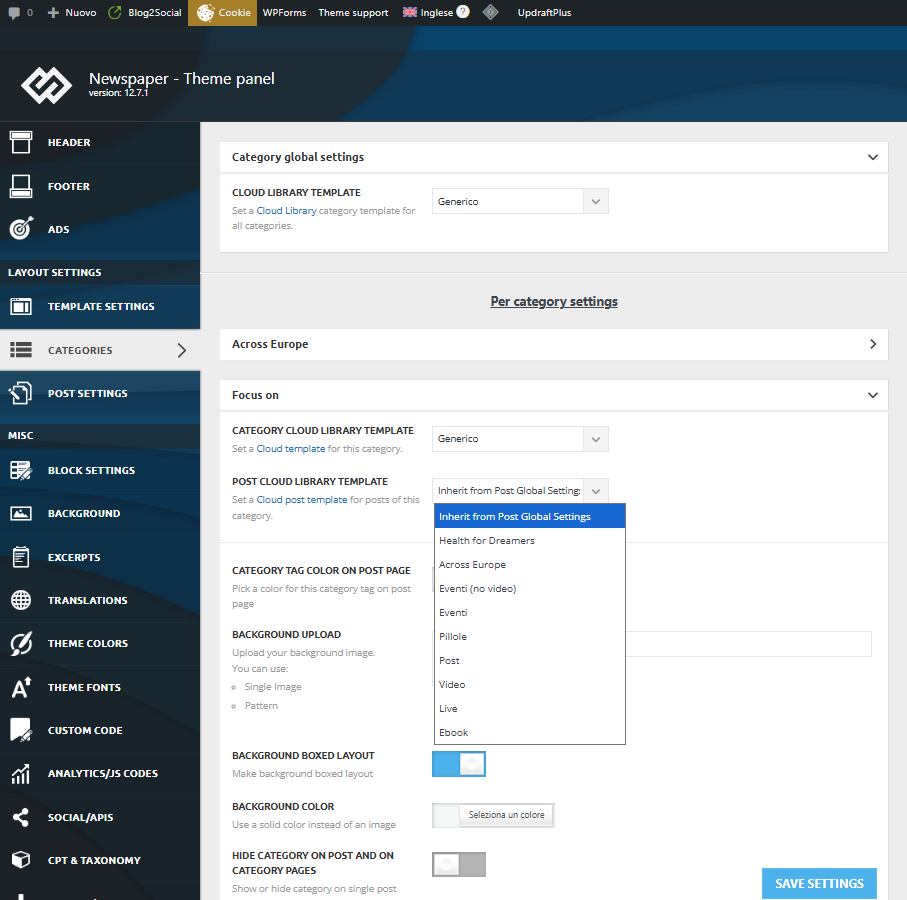
I defined 8 single templates with tagdiv Cloud Template and use two languages managed with WPML. If I work with original language I haven’t any problems, but if select my secondary language there is something wrong in the Theme Category Setting.
For the first category, my Post Cloud Library Template list is empty, so I can’t associate my template to the category:
For the next category instead the list is right and complete:
Why?
Thank you.
Enzo
 Calin
Calin Hello, you have version 3.9.2 and this is the version that has the fix and only previous versions (lower than 3.9.2) have this vulnerability – https://i.imgur.com/xx2opkb.png https://patchstack.com/database/wordpress/plugin/td-cloud-library/vulnerability/wordpress-tagdiv-cloud-library-plugin-3-9-cross-site-scripting-xss-vulnerability?_a_id=241
Other tools like Jetpack and Wordefance will be updated soon.
Thanks!
Calin Hi,
This is the vulnerability reported via Patchstack:
https://patchstack.com/database/wordpress/plugin/td-cloud-library/vulnerability/wordpress-tagdiv-cloud-library-plugin-3-9-cross-site-scripting-xss-vulnerability?_a_id=241
It shows the correct version, but it’s possible that the scan tools haven’t updated their data for some time https://i.imgur.com/LfogY7p.png We hope they will update it soon.
In the meantime, you can manually update the plugin version as shown here:
Thank you!
 mikeshecky
 UPDATE: Sorta…
unable to edit any templates (e.g., post or category templates). When I attempt to open a template for editing, the Composer editor either fails to load, displays a blank screen, or encounters an error, preventing any modifications.
Crucially, the TagDiv Composer seems to work for editing regular pages and posts. I’m guessing the problem is specifically localized to the template editing functionality?
I’ve already done many troubleshooting steps, including:
WordPress & Theme/Composer Versions:
– My WordPress core is up-to-date. 6.8.3
– Dashboard says WP, Themes and Plugins are all up to date. but on the Newspaper updates page it shows I need to update to 12.7.3
– Newspaper theme currently updated to 12.6.9, can’t upto to 12.7.3
Theme Reinstallation Attempts:
– I’ve tried a significant process to ensure theme integrity: I manually downloadeed 12.7.3 from ThemeForest and then performed a fresh, clean update to the current latest version of the Newspaper theme and its associated plugins. This was done to rule out any corrupted files. It wont et me update though, it doesnt complete it.
Site Restore:
– I performed a full site restore from a recent working backup, but the template editing issue persists.
Caching Management:
– I have thoroughly cleared all levels of caching: my WordPress caching plugins (e.g., [mention specific plugin if you use one]), server-side cache via my hosting provider, CDN cache (Cloudflare, etc.), and my browser cache (including incognito mode).
PHP Environment Configuration:
– I have verified my server’s PHP version (currently running 8.3.22)
– I have also manually increased critical PHP limits in my php.ini and wp-config.php, including:
– memory_limit 1024M
– post_max_size 1024M
– upload_max_filesize 1024M
– max_execution_time 600
– max_input_vars 5000
WordPress Core Diagnostics:
– I’ve checked the WordPress Site Health tool, and it reports no issues
– I’ve re-saved permalinks from the WordPress settings.
– I’ve tested editing in different browsers, ccomputers and incognito/private windows.
Plugin Conflicts:
– While pages/posts edit fine, I have also systematically deactivated non-TagDiv plugins that might interact with editors or custom content types to check for conflicts, but the template editing issue remained.
My leading hypothesis is that the problem may be tied to a version mismatch or conflict? My current system is detecting Newspaper Theme 12.6.9, while it seems certain theme components or template assets might have been created or are expecting an environment compatible with Newspaper Theme 12.7.3? This discrepancy appears to specifically affect the way TagDiv Library interacts with or loads template files, as all other Composer functionalities for pages and posts appear to be working correctly.
Could you please provide guidance on this specific issue? I can provide screenshots, access to the browser console, or temporary admin access if needed.
Thank you for your urgent attention to this matter.
-
This reply was modified 11 months by
mikeshecky.
yassinee Hi,
I’ve updated the Newspaper theme to the latest version (12.7.3), but the issue still persists. The tagDiv Cloud Library (v3.9.2) plugin is showing as vulnerable, and even after updating the theme, the problem remains unresolved.
Could you please advise on the next steps to fully fix this issue?
Thank you for your assistance.
Best regards,
Calin Hi,
Please make sure that the thene plugins you used before the update are installed. Those can be installed from Newspaper > plugins. You should have installed and activated tagDiv Composer, cloud library and possible tagdiv standard pack.
Thank you!
Calin Hi,
This is because some theme plugins are no longer installed. Go to Newspaper > plugins and make sure that tagDiv Composer, cloud Library, and tagDiv Standard Pack are installed.
Thank you!
yassineeHi Support,
I’m using the tagDiv Cloud Library plugin on my WordPress site and noticed there is a Cross-Site Scripting (XSS) vulnerability in versions before 3.9.2.
Could you confirm if updating to version 3.9.2 fully fixes this issue? Any advice to secure my site would be appreciated.
Thank you,
 SVPrasad
Hello
I recently noticed a security warning in my hosting panel related to the tagDiv Cloud Library plugin.
Here are the details:
Plugin: tagDiv Cloud Library
Version: 3.9.2
Build Date: 22.10.2025 10:59
Issue Type: Cross-Site Scripting (XSS) Vulnerability
Reference: Patchstack Advisory Link
My hosting provider is flagging this as a potential security issue.
Can you please confirm:
Whether this vulnerability has already been patched in the latest release or upcoming update?
https://prnt.sc/QomoE4P-SpO3
 FBM
FBMHi there,
we came across this issue:
Installing wpml:
– in the template overview as written in your tutorial it works fine BUT
– the cloud template overview does not load correctly with the languages
– the cloud templates wont load correctly in theme panel when you try to give the translated categories the correct translated cloud template.
We made a fix and now it works.
If you guys are interested write an e-mail and I’ll share the code (not sure if you want code in the forum).
Maybe you can then look for a lasting solution.
Here a summary what it does:
Summary: What the Plugin Does
Problem it solves:
When you switch languages in WPML, tagDiv’s Cloud Templates Library and Theme Panel don’t update – they keep showing templates from the wrong language because they use their own cached language setting.
How it fixes it:
1. Client-Side (JavaScript):
Intercepts all HTTP requests (AJAX, Fetch API, XMLHttpRequest) made by tagDiv
Automatically adds the current WPML language parameter (lang=en or lang=de) to every request
Sets language cookies that tagDiv reads (wpml_lang, _icl_current_language)
This ensures tagDiv’s JavaScript always requests templates in the correct language
2. Server-Side (PHP):
Forces WPML to use the language from the URL parameter (?lang=en)
Switches WPML context during AJAX requests so WordPress queries return content in the right language
Filters template metadata to ensure the correct translated templates are loaded
In simple terms:
The plugin acts as a “translator” between WPML and tagDiv, making sure they both agree on which language is currently active. It catches every request tagDiv makes and stamps it with the correct language code before it reaches the server.
Result:
✅ Cloud Templates Library shows correct language templates
✅ Theme Panel dropdowns show correct language templates
✅ Language switching works immediately without page refresh issues
Cheers.
 just_nAnO
Hi, hope you can check this.
Vulnerability issue.
Cross Site Scripting (XSS)
vulnerability discovered by
João Pedro S Alcântara
(Kinorth) in WordPress Plugin
tagDiv Cloud Library
(versions < 3.9.2)
tagDiv Cloud Library vulnerability issue
tagDiv Cloud Library vulnerability issue
Any update?
Thanks in advance.
Calin Hi,
The version passed was incorrect. Patchstack confirmed that Newspaper v12.7.3 and tabDiv Cloud Library v3.9.2 and confirmed that it is fixed.
The fix is in 3.9.2 https://patchstack.com/database/wordpress/plugin/td-cloud-library https://patchstack.com/database/wordpress/plugin/td-cloud-library/vulnerability/wordpress-tagdiv-cloud-library-plugin-3-9-cross-site-scripting-xss-vulnerability
Thank you!
 kal
kalWordPress Plugin Vulnerabilities
tagDiv Cloud Library < 4.0 – Authenticated (Contributor+) Stored Cross-Site Scripting
Description
The tagDiv Cloud Library plugin for WordPress is vulnerable to Stored Cross-Site Scripting in versions up to, and including, 3.9 due to insufficient input sanitization and output escaping. This makes it possible for authenticated attackers, with contributor-level access and above, to inject arbitrary web scripts in pages that will execute whenever a user accesses an injected page.
Affects Plugins
Plugin icon
td-cloud-library
Fixed in 4.0
https://wpscan.com/vulnerability/0ecaeb97-4f67-4e79-bea8-9c9a6ab7add3/
Calin Hi,
I believe that when you updated the theme, the theme plugins were not updated. Please connect to the website and go to Newspaper > plugins and install from there the theme plugins you were using (I believe are tagDiv Composer, tagDiv Cloud Library, and maybe tagDiv Standard pack).
Thank you!
 europeantimes
 Dear TagDiv Support,
I am writing to report several critical issues affecting the Newspaper theme and its bundled plugin td-cloud-library, which are causing instability and performance problems on my website (europeantimes.news).
After thorough debugging, I’ve identified key areas that require immediate attention from your development team.
🔧 1. Translation Loading Triggered Too Early
Error Message:
“Function _load_textdomain_just_in_time was called incorrectly. Translation loading for the ‘td-cloud-library’ domain was triggered too early.”
Location:
tdb_config::on_tdc_loaded() in /wp-content/plugins/td-cloud-library/includes/tdb_config.php
Issue:
The theme loads translation strings before WordPress is fully initialized. According to WordPress Codex , translations should be loaded at the init action or later.
Currently, this causes repeated “doing it wrong” notices and impacts system stability under high load.
Request:
Please ensure all text domains are loaded properly via the init hook:
php
1
2
3
add_action(‘init’, function() {
load_plugin_textdomain(‘td-cloud-library’, false, dirname(plugin_basename(__FILE__)) . ‘/languages’);
});
🔧 2. Deprecated Constructor in Mobile_Detect Class
File:
/wp-content/plugins/td-cloud-library/includes/Mobile_Detect.php
Issue:
The constructor uses outdated syntax that triggers deprecation warnings in modern PHP environments.
This affects compatibility and indicates code maintenance is needed.
Request:
Update the constructor to follow current PHP standards:
php
1
function __construct(?string $userAgent = null, ?array $httpHeaders = null)
🔧 3. Excessive Database Queries Due to Empty Email Lookups
Observed Behavior:
Repeated queries like:
sql
1
SELECT * FROM wp_users WHERE user_email = ‘d41d8cd98f00b204e9800998ecf8427e’
(This is the MD5 hash of an empty string.)
Cause:
Avatar functions call get_user_by(’email’) without validating that the email exists.
Impact:
Unnecessary database load, especially under automation or bot traffic.
Request:
Add validation before querying:
php
1
2
3
if ( ! empty($email) && is_email($email) ) {
$user = get_user_by(’email’, $email);
}
🔧 4. Aggressive Hook Execution Before Initialization
In tdb_config.php, translatable strings are used inside on_tdc_loaded(), which fires before init. This forces premature loading of language files and violates WordPress best practices.
Example Line:
tdb_config::on_tdc_loaded() → calls __() too early
Recommended Fix:
Defer any logic involving translation functions until after the init action.
✅ Environment Summary
Theme: Newspaper (latest version)
Plugin: td-cloud-library (bundled)
WordPress: 6.8.2
Caching: Redis Object Cache + Hummingbird
Traffic Type: High-volume, automated content publishing
🛠 Requested Actions
Please:
Acknowledge these issues
Confirm if fixes are planned in an upcoming release
Provide guidance on running the theme reliably at scale
These are not minor notices — they directly impact performance, scalability, and long-term compatibility with WordPress core.
Thank you for your time and support. I look forward to your response.
Best regards,
Calin Hi,
I’m not sure I understand correctly. Were you using a standard cloud header before, and now a cloud header, or vice versa?
If you had a cloud header before and now you don’t, please go to Newsapper > plugins and install tagDiv Composer, tagDiv Cloud Library and if it was a standard header, install tagDiv Standard pack https://forum.tagdiv.com/tagdiv-cloud-library-plugin/
Thank you!
Calin Hello,
The situation is as follows, when you deactivated the tagDiv Composer and tagDiv Cloud library plugins on the site, you only had shortcodes displayed, that is, text, as a result, the delivery time becomes very fast because only one query is made to the database that brings only text to that page, this is simple, easy and fast to interpret, while when these plugins are active and blocks are used that display articles, ctegories, menus, cpts…, images, texts, background images, different functionalities … it is normal for the duration to be a little longer, but if the site is well optimized it should be under 2 seconds.
Thank you!
 Peter_86
Hello, we have issues with page responsivness – loading times on page http://www.modre-novice.si. We host on highest performance LiteSpeed server. We tried to optimize page with suggested cache plugin WP Super Cache – still not good, than we optimized it with liteSpeed cache – dedicated cacheing plugin for litespeed servers and it was a bit better but still too slow for an news portal.
We asked host to check on it and these were theirs findings:
Hello,
I checked the status of the website and ran a fairly simple test to see how long the initial response time is. I noticed that the response time for the website itself is indeed as described by the client — it takes more than two seconds for the main page to load.
I reviewed the server settings to see if there was anything that could still be optimized, but it seems the configuration is fine and nothing major has been overlooked. I then started looking into the application itself, so I began disabling WordPress plugins to identify which ones have the biggest impact on performance.
First, I disabled the top half of the plugins, but there was no noticeable change. Then I re-enabled them and repeated the process for the bottom half, where it turned out that some plugins could be problematic. When I started disabling the plugins one by one, I found that the “tagDiv Cloud Library” plugin, when disabled, reduced the total page render time by half.
I continued and disabled the “tagDiv Composer” plugin as well, which significantly reduced the load time even further — down to around 320 ms.
Usually, these modules for building and designing websites generate code that, unfortunately, isn’t very optimized for loading speed, even though the end product often looks nice. When I look at the website’s source code, the first thing I notice is that the <head> section is quite large and contains a huge amount of data.
The <head> tag stretches all the way to line 353 in the source code, and there’s a lot going on in that part of the code. This affects how quickly the browser can start loading the content from the <body> section. If there’s too much “bloat” in the <head> area, the browser has to process all of that before it can begin rendering any content.
My suggestion would be to review this page builder and consider replacing it with something else that would ultimately produce better performance.
If you decide to move to a VPS server, it will definitely be able to handle more of these “slow” requests compared to shared hosting. In addition, once the server is actually under load, we can recheck some parameters, and if the page still doesn’t load as expected (in this case, around 2.5 seconds is a typical result for an uncached single request), we can then increase certain limits on the server to achieve higher throughput.
________________________
What is the solution here?
My layman’s question is whether the website still works and looks the same when those two plugins are disabled? Namely, the news or posts are generated in the classic way under “Posts” without using these specific plugins. I’m wondering if they can remain disabled and only be turned on when needed — for example, when editing content on individual pages (and not on posts).
As for the tagDiv Cloud Library, it seems that this plugin provides the layouts for the posts themselves, the archive page, category pages, etc. Does the website’s visual structure break if this plugin is disabled?
Calin Hi,
Yes, if the problem is local, it is indeed harder to check.
What I can recommend is to make sure that the same plugins from the old version are still installed, especially the tagDiv Composer, tagDiv Cloud Library and tagDiv Standard Pack plugins. It would also help if you could provide some images or a video of the problem.
Thank you!
Calin Hi,
Please go to your website plugins section and remove/delete the plugin tagDiv Cloud Library after that, reinstall the plugin from Newspaper > plugins.
Also, make sure that the theme requirements are set as in our guide https://forum.tagdiv.com/requirements-for-newspaper/
 enveribq
tagDiv Cloud Library
Failed
An error occurred and we could not finish the process.
Please manually update the plugins.
I have this issue when I try to activate the plugin, I have tried also manually through file access but it still doesn’t activate
 NyttenET
Hey Team,
I have a website Eurasian Times — where I’ve integrated the Newspaper theme along with the following plugins:
- tagDiv Cloud Library
- tagDiv Composer
- tagDiv Mobile Theme
- tagDiv Social Counter
- tagDiv Standard Pack
Currently, the AMP pages are being displayed using the tagDiv Mobile Theme settings, as shown below:

However, I’d like to customize or update the AMP page UI. I’ve tried creating a mobile page using tagDiv Composer, but the AMP version still loads the tagDiv Mobile Theme layout.
Does anyone know how I can update or override the AMP page design?
Any guidance would be greatly appreciated.
Thanks!
Calin Hi,
For the problem _load_textdomain_just_in_time from td-cloud-library, please download and reinstall the plugin from here -> https://cdn.tagdiv.com/wp-content/uploads/2025/07/td-cloud-library.zip
Thank you!


