- NewspapertagDiv Cloud Library Plugin
- NewspapertagDiv Shop
- NewspaperHow to Use tagDiv Cloud Library
- NewspaperCloud Library Templates
- NewspaperDesign your Post Pages using the Cloud Library Templates
- NewspapertagDiv Composer Tutorial
- NewspaperIntroduction to CPT and ACF with Newspaper Theme
- NewspaperSocial Sharing
- NewspaperInfinite Loading for Single Posts
- NewspaperCustom Post Type Support
- NewspaperHeader Builder
- NewspaperUsing the Theme Translations with WPML
- NewspaperInstagram in Newspaper WordPress Theme
- NewsmagRequirements for Newsmag
- NewspaperSmart Lists
- NewspaperAuthor Card
- NewspaperFeatured Images
- NewspaperSmart Sidebar
- NewspaperPost template ads
- NewspaperFooter Builder
 Sam
Sam We’ve detected potential vulnerabilities in installed plugins. Please check them and keep them updated.
Plugin: tagDiv Cloud Library
tagDiv Cloud Library [td-cloud-library] < 4.0
[+] CVE-2025-62032
 xposedigital
 Hello, I have deactivated all plugins except the tagDiv Cloud Library & tagDiv Composer and the newspaper theme activated. But the issue persists. I can’t edit anything with the builder on a new test page. I need help with this.
Kindly help look into it.
Cheers
 Calin
Calin Please check this identical topic – https://forum.tagdiv.com/topic/tagdiv-cloud-library-plugin-3-9-2-cross-site-scripbility/#post-537051
 sebaslucas10
Hi there as i see the plugin has a vulnerability, are u planning to fix it anytime soon ?
WordPress tagDiv Cloud Library plugin < 3.9.2 – Cross Site Scripting (XSS) vulnerability
Cross Site Scripting (XSS) vulnerability discovered by João Pedro S Alcântara (Kinorth) in WordPress Plugin tagDiv Cloud Library (versions < 3.9.2)
 thesenegambiao
Hello,
I am using the Newspaper Theme on my domain:
https://thesenegambiaobserver.com
I am facing a major problem:
Whenever I try to edit any page with tagDiv Composer OR open the Cloud Library, it shows a 404 page.
I have tried the following steps already:
1.Regenerated permalinks (saved twice)
2.Deactivated all plugins, only Newspaper Theme plugins kept active
3.Switched to default .htaccess
4.Increased PHP limits:
5.max_input_vars = 5000
6.memory_limit = 256M
7.Cleared CDN and browser cache
8.Disabled RankMath SEO plugin
9.Tried switching to parent theme only
10.Deleted custom code from functions.php
11.Reinstalled tagDiv Composer and Newspaper theme
But the problem continues:
Cloud Library always returns 404. Nothing loads.
Please help me check what is blocking the tagDiv Cloud Library from loading on my site.
If you need:
– System Info
I can provide it.
Thank you.
 brockpod
When I activate the AMP plugin is lists nearly all my activated plugins as incompatible. It includes some very popular plugins, like AIOSEO, Advanced Ads Pro, Smush Pro, Jetpack, tagDIV, Wordfence, Woo Commerce.
Even Bluehost’s simple plug-in is listed as incompatible. What do I do? These other plugins are needed. List is below,
tagDiv Composer
by tagDiv
Version 5.4.2 | built on 22.10.2025 10:59
Advanced Ads
by Advanced Ads
Version 2.0.14
tagDiv Cloud Library
by tagDiv
Version 3.9.2 | built on 22.10.2025 10:59
Jetpack
by Automattic
Version 15.2
Real Media Library
by devowl.io
Version 4.22.57
tagDiv Opt-In Builder
by tagDiv
Version 1.7.3 | built on 22.10.2025 10:59
Advanced Ads – Slider
by Advanced Ads
Version 2.0.2
Wordfence Security
by Wordfence
Version 8.1.2
WooCommerce
by Automattic
Version 10.3.5
Advanced Ads – PopUp and Layer Ads
by Advanced Ads
Version 2.0.2
WPMU DEV Dashboard
by WPMU DEV
Version 4.11.29
All in One SEO Pro
by All in One SEO Team
Version 4.9.0
Smush Pro
by WPMU DEV
Version 3.22.1
The Bluehost Plugin
by Bluehost
Version 4.7.2
Broken Link Checker by AIOSEO
by All in One SEO Team
Version 1.2.6
Advanced Ads Pro
by Advanced Ads
Version 3.0.8
 newspatron
Hello Team,
I’m running a local development environment of my production site newspatron.com using Docker.
The site and database were cloned from the live website.
Theme + required plugins are installed and activated:
Newspaper theme 12.7.3 (active)
Newspaper Child theme
td-composer 5.4.2
td-cloud-library 3.9.2
td-standard-pack 2.7.1
td-social-counter latest
Everything is working except:
❌ “Edit with TagDiv Composer” button is missing
❌ TagDiv frontend editor won’t load
⚠ Editing a page only shows a blank white screen
This happens only on the local site.
The live site works perfectly with the same setup.
Other info:
Local URL: http://newspatron.local
Database cloned from Jetpack backup
wp_debug enabled, no TagDiv-specific errors yet
Capabilities granted using WP-CLI
Request:
👉 Please provide any additional required settings, database flags, or licensing constraints needed to restore the TagDiv Composer button and frontend editor in a local dev environment.
Thanks.
 developer@idees-digital.gr
 I purchased the Sucuri Security Platform Basic today (18/11/2025) for $229.00 per year, and it is reporting that the tagDiv Cloud Library has issues, as are the free versions of MalCare and Wordfence. All security-related plugins indicate that the tagDiv Cloud Library has a problem. As a result, my website is not functioning correctly. What else can I do? Also, users visiting the site are receiving warnings from their antivirus software stating that the site has an issue.
The website is hosted on a server by the company called Hetzner. Even from there (Hetzner), they are reporting that the website contains malware.
 tbmedia
Hello tagDiv Support Team,
I need to restrict access to Cloud Templates for users with the Editor role on my Newspaper theme website. Currently, editors can still see and edit Cloud Templates in the backend, which I need to prevent.
What I’ve tried:
– Installed “User Role Editor” plugin and adjusted capabilities
– Added custom code to functions.php to remove menu items and capabilities
– None of these solutions have successfully hidden or blocked access to Cloud Templates
What I need:
– Only Administrators should be able to access, view, and edit Cloud Templates
– Editors should be completely blocked from accessing Cloud Templates (both in the admin menu and via direct URL access)
– Editors should still be able to create and edit regular posts and pages
Questions:
1. Is there a built-in setting in Newspaper theme to restrict Cloud Templates access by user role?
2. What is the correct capability or hook to use to prevent editors from accessing the Cloud Templates custom post type (tdb_templates)?
3. Can you provide the recommended code solution to implement this restriction?
Theme Details:
– Theme: Newspaper
– Plugins: tagDiv Composer, tagDiv Cloud Library (both active)
– WordPress Version: 6.8.3
– Theme Version: 12.7.3
Thank you for your assistance!
Best regards
 happypeoplepickleball
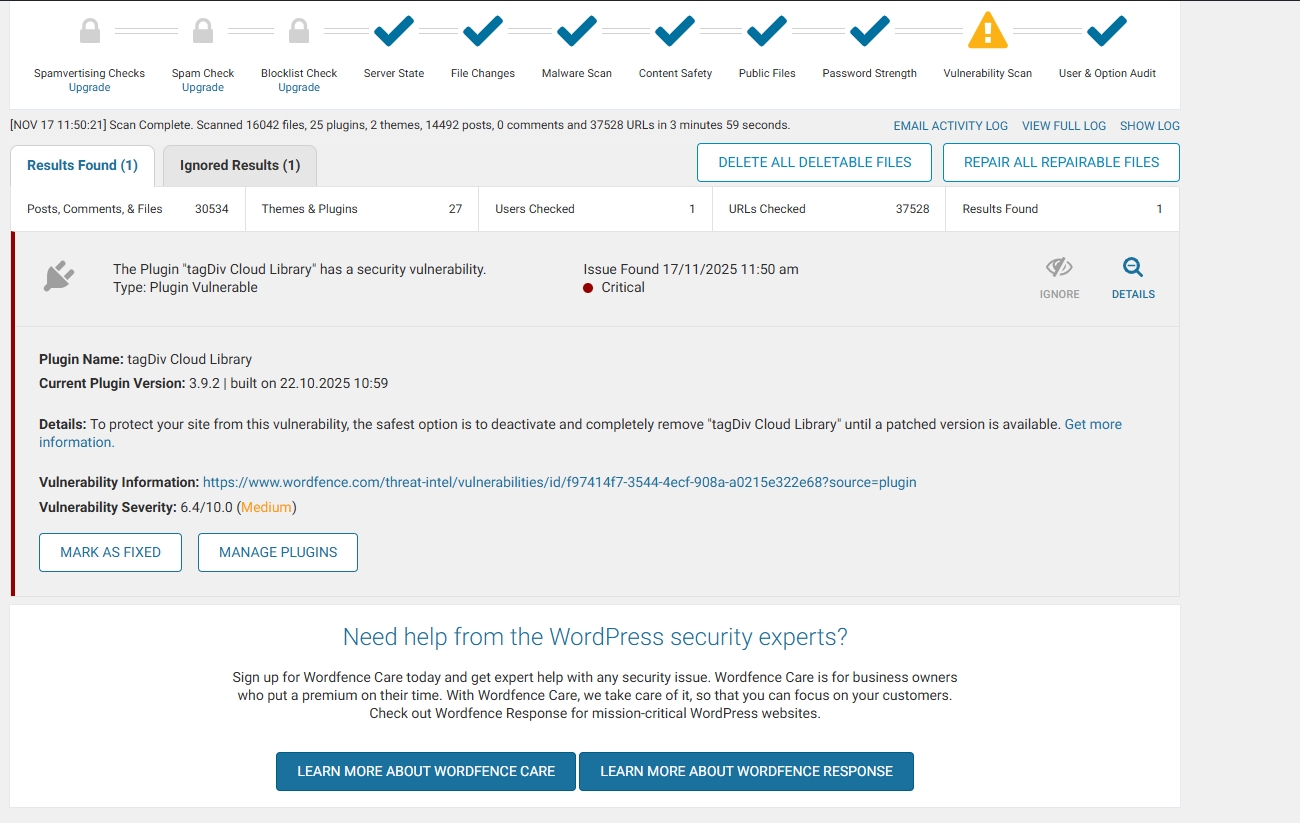
Received this warning from WordFence …
The Plugin “tagDiv Cloud Library” has a security vulnerability.
Type: Plugin Vulnerable
Issue Found November 16, 2025 9:10 am
Critical
Plugin Name: tagDiv Cloud Library
Current Plugin Version: 3.9.2 | built on 22.10.2025 10:59
Details: To protect your site from this vulnerability, the safest option is to deactivate and completely remove “tagDiv Cloud Library” until a patched version is available. Get more information.
Vulnerability Information: https://www.wordfence.com/threat-intel/vulnerabilities/id/f97414f7-3544-4ecf-908a-a0215e322e68?source=plugin
Vulnerability Severity: 6.4/10.0 (Medium)
developer@idees-digital.grSince yesterday, 16/11/2025, my site has been hacked.
My site is a blog with 14,482 articles and 14 page.
With the help of Wordfence, I have managed to locate all the malicious files and delete or replace them with new ones. The only thing I still cannot address is the tagDiv Cloud Library plugin. Can you help me with this? I have deleted all the files of the Newspaper theme and reinstalled them from scratch, as well as all the WordPress files and the other plugins.
It is very important for me to solve this problem quickly, because the site has very high traffic.
link: https://exostis.gr/wp-content/uploads/2025/11/tagDiv-Cloud-Library.jpg
After scab with Wordfence and the same from malcare
Plugin Name: tagDiv Cloud Library
Current Plugin Version: 3.9.2 | built on 22.10.2025 10:59
Details: To protect your site from this vulnerability, the safest option is to deactivate and completely remove “tagDiv Cloud Library” until a patched version is available. Get more information.(opens in new tab)
Vulnerability Information: https://www.wordfence.com/threat-intel/vulnerabilities/id/f97414f7-3544-4ecf-908a-a0215e322e68?source=plugin(opens in new tab)
Vulnerability Severity: 6.4/10.0 (Medium)
Calin Hi,
I think that you are referring to the fact that you have installed a different pre-built website, right? If so, then all content that has been added with the previous install will be removed https://i.imgur.com/SH6Zg73.png – https://forum.tagdiv.com/installing-demos/
What can be done to keep everything you have and change the website layout is to get only the cloud template you like and keep the current install.
– https://forum.tagdiv.com/tagdiv-cloud-library-plugin/
– https://forum.tagdiv.com/how-use-tagdiv-cloud-library-templates/
Thank you!
Calin Hi,
The Chained News PRO is made using tagDiv Composer and cloud templates and it can be edited using the theme builder.
– https://forum.tagdiv.com/tagdiv-composer-tutorial/
– https://forum.tagdiv.com/header-manager/
– https://forum.tagdiv.com/tagdiv-cloud-library-plugin/
-> https://i.imgur.com/9ioGHfF.png – https://i.imgur.com/4ZZ7tTo.png also the logo from that demo is an SVG, so you need to remove the SVG from the logo tab.
Thank you!
Calin Hi,
Our theme do not use no-cache or DONOTCACHEPAGE.
Also, testing with a theme like “Twenty Twenty-Four” that does not have any features and comparing it with the Newspaper theme that you can build almost anything, I think, is not a good comparison, but if this is indeed something related to our theme make some tests like this. Use only the Newspaper theme without any extra plugins except the cache plugin. If it’s ok, go on with tagDiv Composer, this is the hard part of the theme. Then, with tagDiv Cloud Library and so on, until you test it with all the theme plugins you are using.
The text step after you identify the plugin that is interfering with the cache is to check the cache settings. From my experience, setting ‘/’ in cache fields will be interpreted to not cache the homepage, but this is maybe only my interpretation.
As a suggestion you can try a code like this one in the child theme (the code needs to be adjusted):
add_action( 'template_redirect', function() {

    if ( class_exists( 'LSCache\\LSCWP' ) ) {

        // Remove any DONOTCACHEPAGE flag that may have been set earlier

        if ( defined( 'DONOTCACHEPAGE' ) && DONOTCACHEPAGE ) {

            // Un-define the constant (only works if not locked), or override via filter

            // Note: PHP doesn't allow undefining a constant, so we use filter below

        }

        // Use our filter to override caching logic

        add_filter( 'litespeed_cache_allow_cache', function( $allow ) {

            return true;

        }, 99 );

        // Clear any HTTP headers forcing no-cache

        header_remove( 'Cache-Control' );

        header_remove( 'Pragma' );

    }

}, 0 );
Thank you!
 yassinee
 We updated the tagDiv Cloud Library plugin to version 3.9.2, which includes the fix for the XSS vulnerability.
However, all security scanners (Wordfence, WPScan, Patchstack, etc.) are still showing the same vulnerability.
Could you please let us know what we should do in this case, or if there are any additional steps needed to clear these warnings?
yassinee We updated the tagDiv Cloud Library plugin to version 3.9.2, which includes the fix for the XSS vulnerability.
However, all security scanners (Wordfence, WPScan, Patchstack, etc.) are still showing the same vulnerability.
Could you please let us know what we should do in this case, or if there are any additional steps needed to clear these warnings?
Calin Hi,
Here are the tools that mention that the fix is in 3.9.2
– https://wpscan.com/vulnerability/0ecaeb97-4f67-4e79-bea8-9c9a6ab7add3/
– https://vdp.patchstack.com/database/wordpress/plugin/td-cloud-library/vulnerability/wordpress-tagdiv-cloud-library-plugin-3-9-cross-site-scripting-xss-vulnerability
– https://www.wordfence.com/threat-intel/vulnerabilities/wordpress-plugins/td-cloud-library/tagdiv-cloud-library-39-authenticated-contributor-stored-cross-site-scripting
Another solution is to manually change the plugin version – https://i.imgur.com/2V5Okji.png
 Adroff
Hi, I got this message from Wordfence: The Plugin “tagDiv Cloud Library” has a security vulnerability.
Type: Plugin Vulnerable
Issue Found November 3, 2025 4:26 pm
Critical
Current Plugin Version: 3.9.2 | built on 22.10.2025 10:59
Details: To protect your site from this vulnerability, the safest option is to deactivate and completely remove “tagDiv Cloud Library” until a patched version is available.
Do you know anything about it?
Calin Hi,
If this situation were after the theme update, then make sure that the theme plugins that you had before the theme update are also now installed, like tagDiv Composer, tagDiv Cloud Library, and tagDiv Standard Pack.
Thank you!
Calin Hi,
Here are the tools that mention that the fix is in 3.9.2
– https://wpscan.com/vulnerability/0ecaeb97-4f67-4e79-bea8-9c9a6ab7add3/
– https://vdp.patchstack.com/database/wordpress/plugin/td-cloud-library/vulnerability/wordpress-tagdiv-cloud-library-plugin-3-9-cross-site-scripting-xss-vulnerability
– https://www.wordfence.com/threat-intel/vulnerabilities/wordpress-plugins/td-cloud-library/tagdiv-cloud-library-39-authenticated-contributor-stored-cross-site-scripting
Another solution is to manually change the plugin version – https://i.imgur.com/2V5Okji.png
 dragold
Hello,
Today, Wordfence issued a critical security alert for the tagDiv Cloud Library plugin. I’m trying to update the theme, but it won’t let me and says it’s already up to date. Can you tell me when you plan to fix this vulnerability?
I’ve included a link to the Wordfence website with the alert and explanation of the issue.
 duane
duane Hi
I deactivated all plugins except for:
• tagDiv Cloud Library
• tagDiv Composer
• tagDiv Standard Pack
…and the problem still persists.
any other suggestions?
Calin Hi,
Here are the tools that mention that the fix is in 3.9.2
– https://wpscan.com/vulnerability/0ecaeb97-4f67-4e79-bea8-9c9a6ab7add3/
– https://vdp.patchstack.com/database/wordpress/plugin/td-cloud-library/vulnerability/wordpress-tagdiv-cloud-library-plugin-3-9-cross-site-scripting-xss-vulnerability
– https://www.wordfence.com/threat-intel/vulnerabilities/wordpress-plugins/td-cloud-library/tagdiv-cloud-library-39-authenticated-contributor-stored-cross-site-scripting
Another solution is to manually change the plugin version – https://i.imgur.com/2V5Okji.png
Calin Hi,
This was fixed and is present only in versions smaller than 3.9.2, which is the current plugin version in Newspaper 12.7.3 – https://i.imgur.com/0flN6ED.png
https://vdp.patchstack.com/database/wordpress/plugin/td-cloud-library/vulnerability/wordpress-tagdiv-cloud-library-plugin-3-9-cross-site-scripting-xss-vulnerability
Calin Hi,
When you see shortcodes on your website, it is because one of the plugins is not installed. Please go to Newspaper > plugins and install tagDiv Composer, tagDiv Cloud Library, and in case you had tagDiv Social counter or any other plugin installed, you can install them from there.
Thank you!