
- NewsmagtagDiv Composer Tutorial
- TutorialsFrom WPBakery to tagDiv Composer
- NewspapertagDiv Composer Tutorial
- NewsmagHow to use the Visual Composer plugin
- Apitd_api_block::update_key
- Apitd_api_block::update
- Apitd_api_block::add
- NewspaperCredit System
- NewspaperCreate a frontend submission form
- NewspaperHow to Use the Tabbed Content shortcode
- NewspaperCreate a form contact page
- NewspaperFilters and sorting for taxonomies
- NewspaperUser review system
- NewspaperModal Popup
- NewspaperFlex Block Settings Guide
- NewspaperSocial Sharing
- NewspaperSingle Post Shortcodes
- NewspaperInfinite Loading for Single Posts
- NewspaperThe Newspaper Mobile Theme: Introduction
- NewspaperHow to Add a Logo in Newspaper
 Calin
Calin Hi,
Unfortunately, the file can not be set in child theme and for the moment it is the only why you can edit the mobile menu, sorry!
Now, if will be to set the code in the theme header.php file, I think that will be triger this file wp-content/plugins/td-composer/legacy/Newspaper/header.php (our theme has 3 header.php files, but if the tagDiv Standard Pack is not installed and you use a cloud header, the above one will be use). Just copy the file from there in child theme (Newspaper-child/header.php) and set the code in that file, it should work properly.
Thank you for your understanding!
Calin Hi altdenis,
I see.
Yes, you can contact us via email at contact@tagdiv.com you can provide there there the website link as private and please also include the link of this topic to can identify you faster.
About the ajax. If this option it is on blocks, then it need to be disabled using the tagDiv Composer -> https://i.imgur.com/avHFU4n.jpg
Thank you!
 oulyrics
Hi,
Although I selected “Disable dropdown when display inline” from the TagDiv composer for the sibling category in the lyrics category, it doesn’t work. I can’t see all subcategories. Subcategories appear within some Parent categories, but not others. It’s a complex situation. I would be glad if you help. Site http://www.oulyrics.com
The related page with the problem is https://oulyrics.com/category/lyrics/
It’s a weird problem. This part works worse on mobile version. Another detail is that after logging into wordpress on the computer, subcategories in the Lyrics category become fully visible. But it shows some of it when not logged in. It doesn’t show them all. The same is true for the mobile version. The mobile version is important to me.
Thank you for your interest. I wish the problem to be solved as soon as possible.
The template name I use is “Living Pro”.
Related images (after logging into wordpress by Admin): 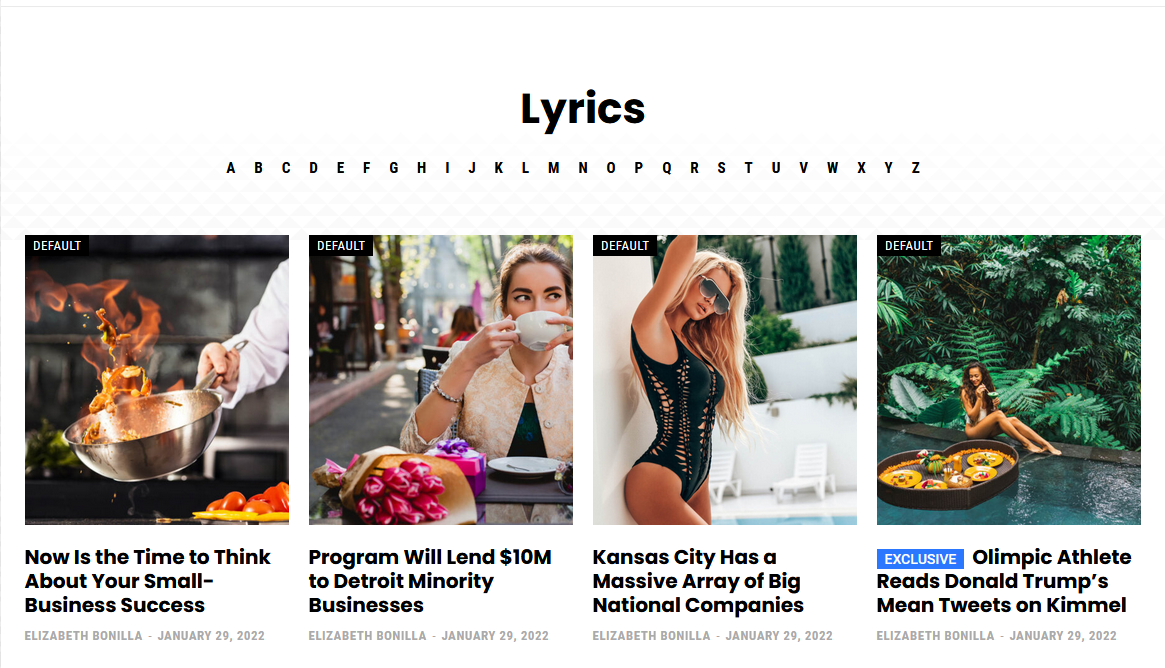
Related image 2 (Not logged in): 
Related image 3 (Mobile version): 
Related image 4 (subcategory page not working correctly): 
Related image 5 (subcategory page working correctly): 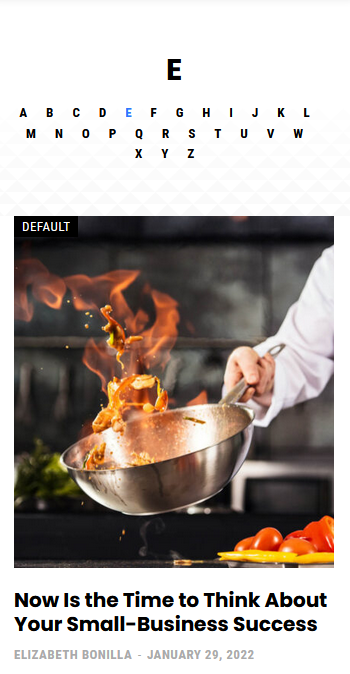
Related image 6 (TagDiv Composer settings): 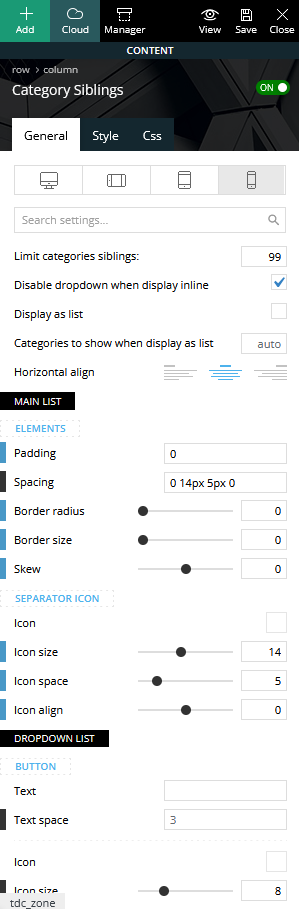
 easherri
 Hi there, my site at Edmondactive.com just stopped working about a half an hour ago. The error was “The tagDiv Standard Pack plugin requires the tagDiv Composer plugin!” and the composer’s error was Version 3 | built on 22.12.2021 13:03 | By tagDiv | Visit plugin site
This plugin failed to load properly and is paused during recovery mode.
An error of type E_PARSE was caused in line 33103 of the file /home/amateur/domains/edmondactive.com/public_html/wp-content/plugins/td-composer-off/legacy/Newspaper/includes/td_config.php. Error message: syntax error, unexpected ‘?’
Calin Hi dimmisel,
If you are using a cloud header, then the menu can be assigned using tagDiv Composer -> https://i.imgur.com/ACfP50w.png then the socials from the open menu can be set from the theme panel -> https://i.imgur.com/RilGStr.png
Also, the file path for this -> https://i.imgur.com/YzOy26P.png is this one wp-content/plugins/td-composer/legacy/Newspaper/parts/menu-mobile.php
Thnak you!
 jojumper
Hi, I get this few errors on blocks
Please help,
Notice: Trying to access array offset on value of type bool in /home/u495161498/domains/pentas.tv/public_html/wp-content/plugins/td-composer/legacy/common/wp_booster/td_module.php on line 554
Trying to access array offset on value of type bool in /home/u495161498/domains/pentas.tv/public_html/wp-content/plugins/td-composer/legacy/common/wp_booster/td_module.php on line 554
Thank you
 kimlm
kimlmIs it possible to edit a single blog post with TD composer just like with single page?
 Bettina
 Hello @gwk!
Please edit the page with the TagDiv Composer and re-add the element: https://www.screencast.com/t/ncfmJzEqKAtd
Thank you!
 CRiTiCAL
I can’t get the content to be saved using Text with Title, or Column Text on Page Editor with TDComposer
 crisalrehe
Hello, I am getting the following error messages on all custom type posts in my website diarioantofagasta.cl.
wp_booster error:
td_api_base::mark_used_on_page : a component with the ID: tdb_template_146842 is not set.
/www/diarioantofagastacl_715/public/wp-content/plugins/td-composer/legacy/common/wp_booster/td_api.php
wp_booster error:
td_api_base::get_key : a component with the ID: tdb_template_146842 Key: exclude_ad_content_top is not set.
/www/diarioantofagastacl_715/public/wp-content/plugins/td-composer/legacy/common/wp_booster/td_api.php
I hope you can help me
Calin Hi,
What you ca do is to exclude the files, please try with this one wp-content/themes/Newspaper/Newspaper/font-newspaper.css and wp-content/plugins/td-composer/mobile/style.css (this need to be set in the css section).
Let us know the results!
 Lalit
LalitHi,
Today, I found that Date not showing in the Article meta info across all module (flex block, post loop) on homepage, category pages, tags, author archive pages and so on.
Watch it: https://drive.google.com/file/d/1GqclXZBNnxwR1gbdUCHruLQYjTmKJ4Hz/view?usp=sharing
Is it a bug?
What I have done to find the issue?
1. Deactivated all plugins and reactivated one by one.
2. Switched back to Newspaper parent from the child theme.
3. Deactivated, deleted, and reinstalled only default newspaper plugins – td composer, cloud library, and newsletter.
4. Removed all plugins except the newspaper default.
Please help soon. I am using Newspaper Tech news demo
Regards,
 stuk88
I’ve installed the latest Newpaper theme + td-composer
And now I’m getting this error:
Uncaught Error at zones: 6(models) : 2(dom). The model does not match the <a href="https://dev.kinderland.co.il/?page_id=150758&td_action=tdc_edit&post_id=150758&tdbTemplateType=page" target="_blank">content</a> Current state has involved an issue. You could try an UNDO operation (CTRL+Z / CTRL+SHIFT+Z)
 jamesportis
Hello, I am having an issue with shortcodes. Unfortunately, I do not have a “Column Text” element available and the “Title with Text” element doesn’t seem to work properly. When I place the element and then click the “edit content” button, the modal window opens and the loading spinner shows, but spinner never goes away and I am unable to edit anything inside the modal.
When I look at the console, I see that https://www.seetucsonhomes.com/wp-content/plugins/td-composer/includes/wpeditor.php?wp_path=/var/www/ is returning a 403. How can I get the “Title with Text” element to work properly and, if not available, how else can I place shortcodes when utilizing the Tagdiv Composer? Thank you for your help!
Calin Hi,
Can you please provide a screenshot with the blank bar and let me know how you’ll like to be and I will see what I can do to help you.
The file from this path wp-content/plugins/td-composer/legacy/Newsmag/parts/header/header-menu.php can be set in a child theme, so there will no longer be problems when you’ll update the theme. Unfortunately, the file from here wp-content/plugins/td-composer/legacy/common/wp_booster/td_page_generator.php will not work with the child theme.
The problem with the Instagram will be fix today.
Thank you!
 avengerxp
 Hi Calin,
We did it! with your guidance now our app loads things as we want it, but still we have a black bar on mobile view – but no bar isvisible on desktop mode.
and also we made the modifications to the following files.
wp-content/plugins/td-composer/legacy/common/wp_booster/td_page_generator.php
wp-content/plugins/td-composer/legacy/Newsmag/parts/header/header-menu.php
and trying to fix the instagram issue – I uninstalled the td editor and reinstalled. then the changes were gone. How can we keep this away from being erased when ever we reinstall it or update the theme and plugins?
our app is on playsote – pcguidelk
 kaibobble
 Hi, I can’t seem to send screenshot, this is the errors I’m getting
wp_booster error:
The path of the single_template_13 template not found. Did you disable a tagDiv plugin?
********public_html/wp-content/plugins/td-composer/legacy/common/wp_booster/td_api.php
Bettina Hello @Piotrk87 !
Please try to exclude the second highlighted link(td-composer) and let me know the results!
Thank you!
 theurbanist
 So I did additional testing today. If I have the tagDiv Mobile Theme and Official AMP for WP activated, it stops the header/menu from presenting. I’ve turned them off as a result but this seems to be counter to what the videos suggest to do. So I’m confused why that is affecting things.
Additionally, I’ve created mobile pages for most our pages. I can get the header/menu to work for the standard mobile layout (e.g., iPhone). But when I go to do the tablet/sideways mobile version in a mobile page, the system is killing the normal version. I can’t set both without killing the other. I’m totally perplexed about what’s happening.
On top of this, pages that that are standard and done through the TD Composer have a slightly different header/menu. I’ve just confused how to make this all uniform like it was before in mobile.
 iamratnesh
What fonts are these?
https://www.networkherald.com/wp-content/themes/Newspaper/images/icons/newspaper.woff?19
https://www.networkherald.com/wp-content/plugins/td-composer/assets/fonts/font-awesome/fontawesome-webfont.woff2?v=4.7.0
and how do I delete them? They are taking a long to load into the website leads to slowing down
 numberonecountry
Hello!
Our website (www.kdqn.net) used TD Composer to edit several pages. All are accessible thru the editor, except one. When I attempt to edit this page, the editor never appears and I only get the grey screen with the endlessly spinning wheel. The host limitation has been raised but the issue is still persisting. I am at a loss of what the problem could be.
Thanks in advance for any help that can be provided!
Calin Hi,
That is the path/place where you need to access if you want to edit the theme files used for the mobile menu. Unfortunately, I do not know How can I provide a more precis location.
For example in wp-content/plugins/td-composer/legacy/Newspaper/parts/header there is a file td-login-modal.php -> https://i.imgur.com/czkOkl9.png
I hope that this will help!
Calin Hi Alessia Pizzi,
The review system was made like that because most of the time the review is about some products and not about the article. What can be do right now is to change the schema from the theme. This is on wp-content/plugins/td-composer/legacy/common/wp_booster/td_module_single_base.php -> https://i.imgur.com/pPFInSt.png and in wp-content/plugins/td-composer/legacy/common/wp_booster/td_module_single_base.php -> https://i.imgur.com/mYYSf80.png all that need to be done is to replace https://schema.org/Product with the schema.org that you need (I think it is https://schema.org/Article).
Thank you!
 Cristian Hatis
Hello,
After the update to the lastest theme version I got this error visible just on homepage (hometalks.ro)
Warning: Undefined property: WP_Error::$slug in /home3/revista1/public_html/wp-content/plugins/td-composer/legacy/common/wp_booster/td_data_source.php on line 171
I have tried to remove the TD Composer Plugin and replace it with the one on in the theme pack, but nothing changed.
How can I solve this error? Thanks!
LATER EDIT: I have solved it, it was caused by the fact that I was trying to skip one particular category on the homepage. It seems that if you make this in a feature post module on homepage you got that error.
 thelacivert
As I summerized in the title,
I am creating a page with TD-Composer and adding row, then I add Block to show some pages with it it doesn’t show the page I just created. I can add the old pages with ID but when I add fresh created pages it doesn’t show the page, posts are displayed but not pages. How can i solve this issue?



