
- NewspaperHow to update a plugin
- NewspaperHow to update the WPBakery Page Builder plugin
- NewspaperHow to Update the Newspaper Theme
- NewspaperSingle Post Excerpt
- NewspaperWP Rocket and Newspaper Theme: Optimization Guide
- NewspaperCredit System
- NewspaperHow to use the Bing Maps API
- NewspaperModules Builder in Newspaper Theme
- NewspaperCreate a frontend submission form
- NewspaperCustom Fields Support
- NewspaperFlex Block Settings Guide
- NewspapertagDiv Opt-In Builder
- NewspaperHow to use the YouTube API
- NewspaperDefault Category Settings
- NewspapertagDiv Composer Tutorial
- NewspaperHow to Set the Image Avatar
- NewspaperUnique Articles
- NewspaperFacebook Share
- NewspaperCache plugin – install and configure
- NewspaperFeatured Image, Video or Audio
 m
m Hi Bettina,
what’s the workaround for the existing posts that were created with previous versions of the theme and are not working after update?
 Bettina
 Hello!
I would gladly recommend you to make a backup and update plugins and the theme via file transfer to the latest update: https://forum.tagdiv.com/how-to-update-the-theme-2/
First of all, please make sure you have a backup done and then you can update the theme and the TagDiv plugins also.
Please take a look for this advice before updating: https://forum.tagdiv.com/topic/action-required-please-read-how-to-update-to-the-newspaper-theme-v-10/
If you have some custom modifications in the theme files, then better save the code and replace it after every update.
You can contact our custom work team here: https://tagdiv.com/premium-customization-services/ and they will help you.
Thank you!
 Puck
PuckHi there,
I want to add Google Tag manager on my website: baby-kind.nl. I tried via the theme panel, but it’s not working.
Analytics code is working via the theme panel, but tag manager not. What’s the best way to implement tag manager. And please keep in mind that I want to keep the code there when the theme is updated. So I prefer to install in child theme.
Many thanks
Best,
 studiogip
Hello,
I come to you because I have a display problem concerning my single posts. Looks like there is a CSS connection issue only for single posts. The other pages no problem (home + category pages).
How it looks: https://vu.fr/hPQS
how it should look: https://youtu.be/BJtCmPy7Dr8
I have already checked for WordPress updates, templates and plugins.
Thank you so much for your help.
Puck Hi there, Is there an update on this subject?
I want to add Google Tag manager on my website: baby-kind.nl. I tried via the theme panel, but it’s not working.
Analytics code is working via the theme panel, but tag manager not. What’s the best way to implement tag manager. And please keep in mind that I want to keep the code there when the theme is updated. So I prefer to instal in child theme.
Many thanks
Best,
 maurizio
Hello, I have the version 9.6 on blog of my client.
The blog it’s very large… and I have fear for this big update.
Can you help me?
Bettina Hello!
If you have some custom modifications in the theme files, then better save the code and replace it after every update.
For customization and other services you can contact our custom work team here: https://tagdiv.com/premium-customization-services/
Thank you for understanding!
 ludyma
Hello, I need your help, I don’t get the new categories in the megamenu or menu that I use from the tagdiv cloud, I don’t know if it’s a bug since the last update, I attach screenshots and a link to the new category.
 DenverLifeMagazine
 Hello, This issue still seems to be occurring. We have turned off all of our firewalls and even basically all of out plugins at certain points to try and fix this with no luck.
Do you happen to have any recommendation for hosting an Siteground, while using Cloudflare as we can not control the setting you are speaking of in your last message? The SG Optimizer has been disabled and tested, but that has not helped the issue.
Here are the logs that we get from the consol when we try to update the footer in general, or specifically the content on the home page:
jquery.min.js?ver=3.6.0:2          POST https://www.denverlifemagazine.com/wp-json/td-composer/update_footer_template?uuid=cf9125d3-2023-0765-cc3b-64a1ad12198f 403

send @ jquery.min.js?ver=3.6.0:2

ajax @ jquery.min.js?ver=3.6.0:2

s.ajax.s.ajax @ jquery-migrate.min.js?ver=3.3.2:2

updateFooterTemplate @ js_files_for_wrapper.min.js?ver=6ea45b81e47c58269b68289d05535e19x:63

savePostHandler @ js_files_for_wrapper.min.js?ver=6ea45b81e47c58269b68289d05535e19x:75

dispatch @ jquery.min.js?ver=3.6.0:2

v.handle @ jquery.min.js?ver=3.6.0:2

jquery.min.js?ver=3.6.0:2          POST https://www.denverlifemagazine.com/wp-json/td-composer/save_post?uuid=2ffbfc35-ca03-523c-5dc8-c1731bc85110 403
 NickDeBaerdemaeker
Hello,
We altered the code of the td_block_mega_menu.php, located wp-content/plugins/td-composer/legacy/Newspaper/includes/shortcodes/td_block_mega_menu.php, so that it only showed the parent category and not all the children.
The alteration happens on line 140:

However, with the update to wordpress 6 and the new altered plugins, this is no longer working after altering this.
Any advise on where I can fix this again ?
thanks in advance.
 SMG
SMGHello,
We have been using your Newspaper theme on a multi-site network of ours for years now.
We even hired TagDiv to develop a couple of custom plugins at one point to integrate in with the theme, which we were told should not have any problems with future updates.
This network consists of 6 sites, 4 of which are each using their own Newspaper license as they are on separate domains.
In the past, we had a rare issue whereupon one of the sites in the multi-site network would ‘reset’ its theme options from time time on its own. This would lead to the site showing the completely wrong header/footer from another site, with some other settings reset as well.
Previously, this happened fairly rarely, so it was not a big deal. Now, however it has been happening daily since October or so, and it is causing a real headache. In addition, another one of the sites in the multi-site network has now started to ‘reset’ its own theme options (not to the same header as the other sites, it stays different but is ‘reset’). We have experienced this on multiple servers, as we have moved servers not long ago and the issue persists.
The strange thing is, when I go into the TagDiv theme options and go to look at the current import/export code for the theme settings, the current/existing export code is correct – yet the theme options are certainly not correct. I have been choosing a previous theme export and choosing to import it again to circumvent the problem.
With this now happening on one of the sites every day now, and a 2nd site beginning to exhibit this problem (not daily yet like the other one, but still a problem as it has happened several times in the last month or so), it has become a daily problem and really needs to be resolved at this point.
I have reached out to TagDiv about this in the past and was never able to find a resolution. Last I was told, they were not aware of what was causing this issue. However, it has now gotten to the point where something needs to be done about this bug, or if nothing some way to automate resetting the theme options when they go awry.
Could somebody please get back to me about finding a resolution to this issue?
Thanks!
 comms
comms Yes. Single post templates are not being displayed correctly as well.
Any timeline for the upcoming theme update that will fix these issues?
 Anamaria
 Hello @comms,
This issue has been reported, and a fix will be available in the future update; in the meantime, you can use the responsive version for categories.
Thank you for your understanding!
 CherryLosAngeles
Hello I wanted to ask if anyone is having similar issues. I have two widgets that no longer work. I want to update with something new but can’t find where I would enter them (the updates seem to have changed the path) or to update my ads. The WordPress appearance doesn’t seem to work and when I’m in newspaper I don’t see where I can enter the information. I looked at a few responses and notice they don’t show the path but instead just the final step. Did anyone else have this issue and were able to get a solution?
Thanks
 mgiannelis
Hello
I am getting all bascially 100% page speed scores and all greens in other metrics on desktop and mobile now. However, one last thing I cannot work out in the diganostics report is Avoid an excessive DOM size 1,751 elements.
A large DOM will increase memory usage, cause longer style calculations, and produce costly layout reflows. Learn more.TBT
Statistic
Element
Value
Total DOM Elements
1,751
Maximum DOM Depth
January 12, 2022
<time class=”entry-date updated td-module-date” datetime=”2022-01-12T21:34:53+11:00″>
23
Maximum Child Elements
body.home
<body class=”home page-template-default page page-id-10886 home-2 global-block-template…” itemscope=”itemscope” itemtype=”https://schema.org/WebPage”>
Can anyone help or show me to how to fix this one?
 rajuborda
 Update.
Auto ads works.
Thank you for your supports.
Regards,
 furkan-g
 they will fix it next update.. you can back to 11.4 version from time machine
commsNot sure what went wrong, however before the 11.5* update these were showing up OK. We are having issues with both category and single post templates.
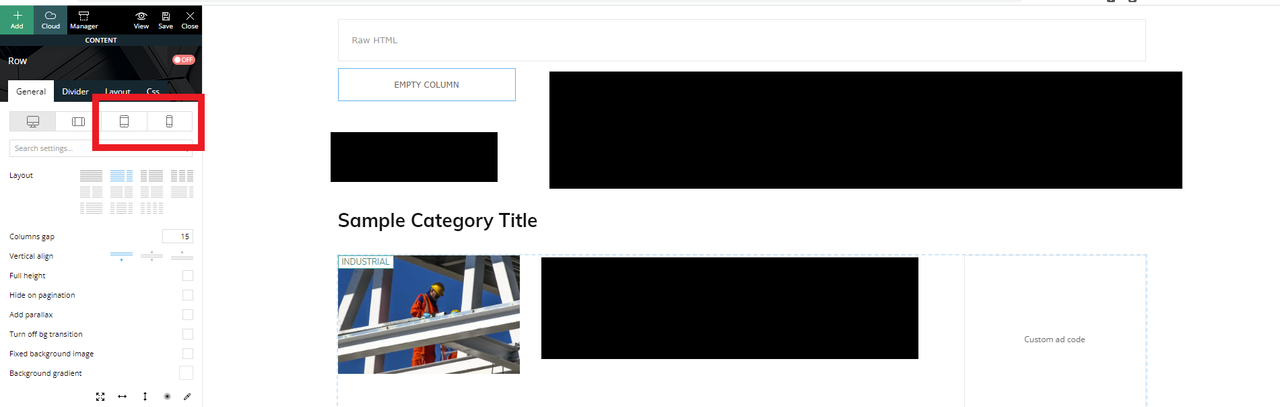
We are using dedicated mobile templates before this, now, it seems whenever I use tagdiv composer to edit a page (desktop mode) I see two more options for mobile views
Example below: (censored some content)
I am editing a Category template (desktop view) – everything looks OK.
However, I see two new options in the panel for tablet/mobile views (which were not in the previous version)
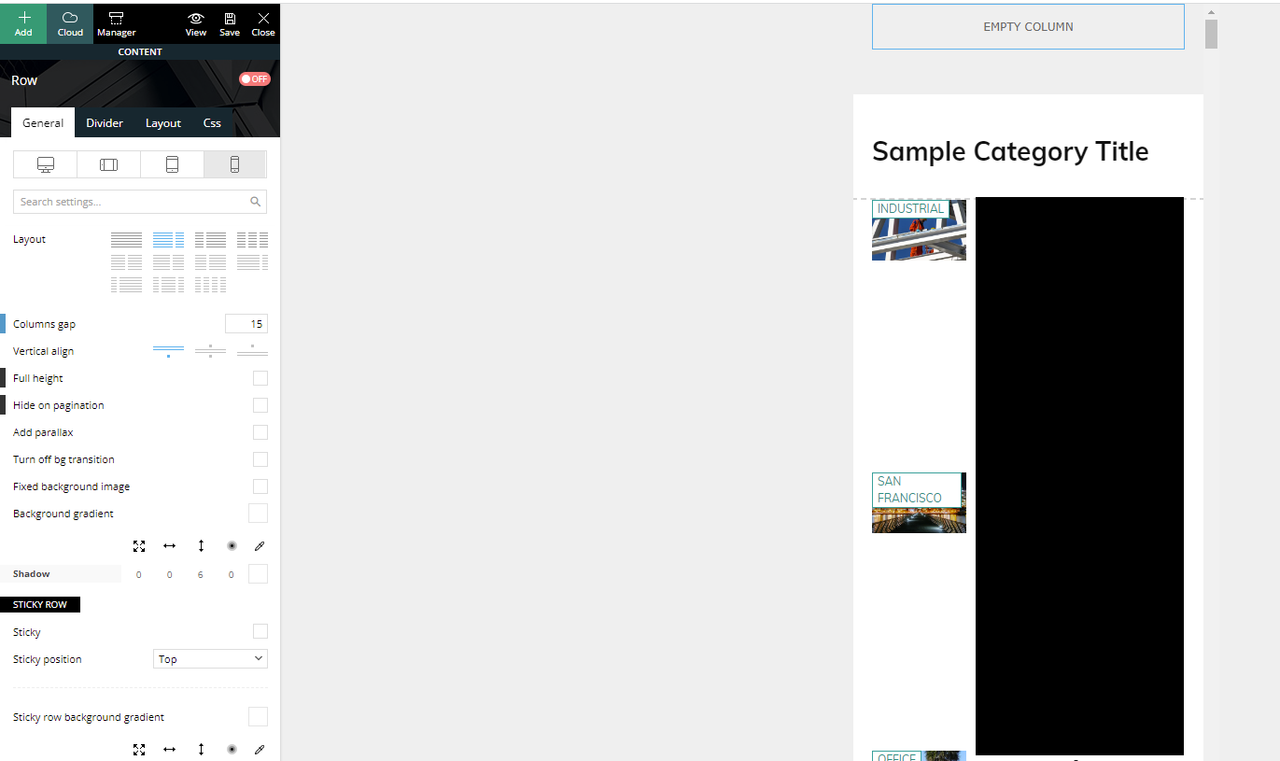
If I click the mobile view, this is what I see and what is actually being displayed if you browse the website in mobile mode.
We have another mobile only template that was created and was working (being displayed) before the update.
If I click on the “Edit the mobile template” from the desktop view takes us to the right mobile template that should have been displayed.
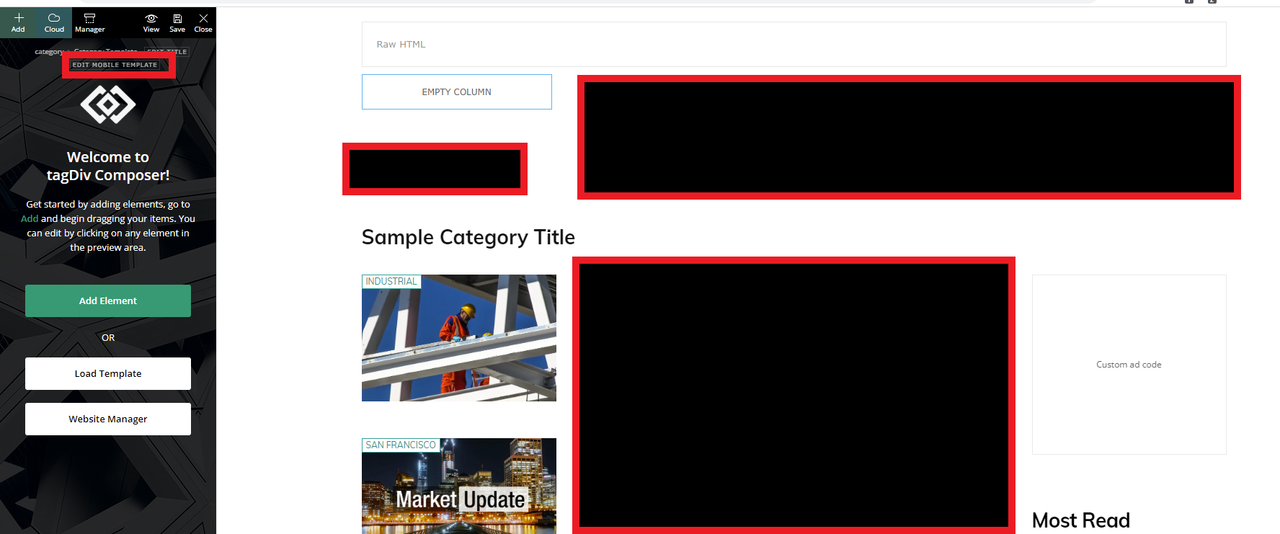
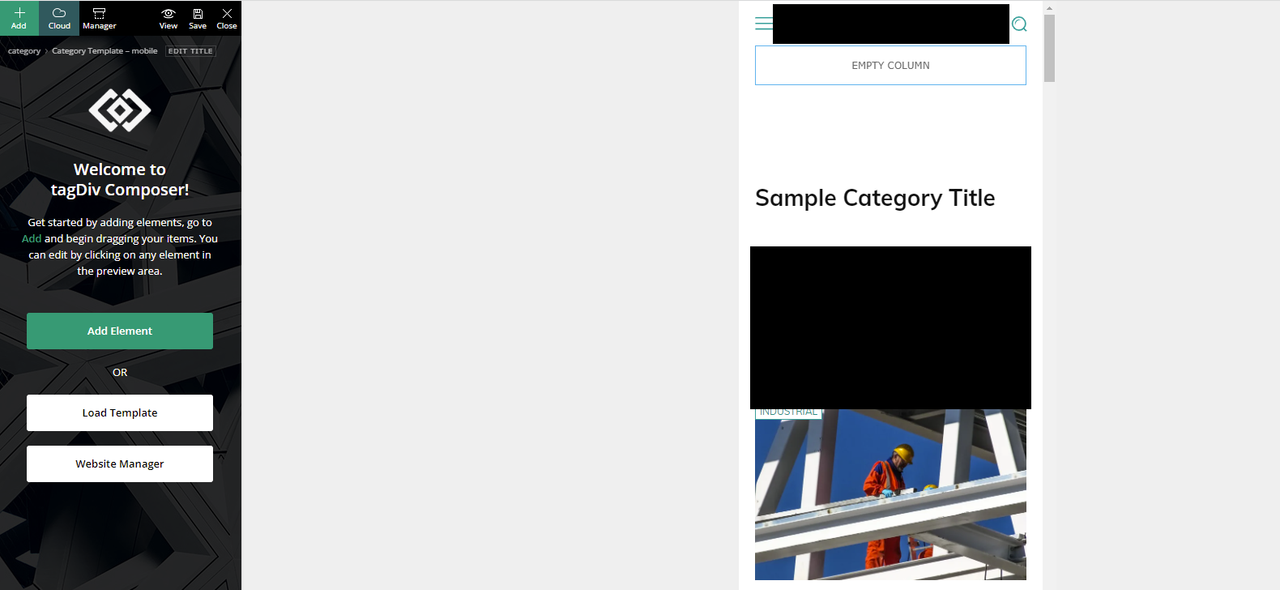
How can we fix this?
Thank you
 sahoobiotech3
 The answer in your mentioned topic is confusing . I am using rank math for FAQ schema from long time. From last one month most probably after the last update in newspaper theme the problem started generating.
If you say that the deleting microdata in your plugin could be helpful , then please tell me how to delete microdata in your plugin (I don’t know which plugin you are talking about)
Please, tell me.
Anamaria Hello,
In that section are displayed the websites where the same activation key is used. For example, if you have a key on a live site and a staging website it should look like this -> https://i.imgur.com/530FmYW.png -> https://tagdiv.com/update-version-11-4-3-newspaper-theme-is-rtl-ready/
Thank you!
 zoldfulu
Hello,
Following the latest update, the website underwent a total crash. Even the Bluehost Dashboard fails to load (“There has been a critical error on this website.”), so that I can not manage the plugins.
On the front end, the frontpage (https://egzostive.com) shows the front page first, but any other page (or even reload) comes with an error message ( “Fatal error: Declaration of Automattic\WooCommerce\Container::has($id) must be compatible with Psr\Container\ContainerInterface::has(string $id): bool in /home2/egzostiv/public_html/wp-content/plugins/woocommerce/src/Container.php on line 104” ).
Could you look into that with urgency?
Best
Z
Egzostive
 webmastermetro
 Here you see some kind of error on update under the network tab
https://pasteboard.co/XwvOh9weYMC5.png
How to fix this?
webmastermetro Here you see some kind of error on update under the network t
Anamaria Hello,
The latest version theme is 11.5.1.
Please let me know what WordPress you have.
Considering that there is a big difference between the versions, I recommend you have a full backup of all files and databases -> https://forum.tagdiv.com/how-to-update-the-theme-2/
Also, if you want to update the theme I recommend that you update the theme on a staging website and make sure that you have activated the tagDiv Standard pack plugin to keep the look of the website.
Also, if possible disable extra plugins during the theme update to avoid any problems that may arise.
Unfortunately, there are also situations where the update does not work properly (due to certain extra plugins that are active, certain restrictions, and server settings), so, please deactivated all extra plugins (if you have WordFence, you need to use the WordFence Assistant to remove it).
In the worst cases, the settings in the theme panel may be lost (there have been isolated cases), in these cases, after the theme plugins that were previously used are activated, you will have to use a backup for the theme panel -> https://forum.tagdiv.com/import-export-theme-settings/
Thank you!
Anamaria Hello,
You can also use automatic updates, but only have tagDiv plugins enabled/activated, (for example if you have the WordFence plugin, you need to use the WordFence assistant plugin to make sure it does not block the update process), also please make sure you have permissions set correctly so as not to interfere with the update process -> https://www.malcare.com/blog/wordpress-file-permissions/
Also, please do a full backup of all files.
Thank you!


