
- NewspaperHow to update a plugin
- NewspaperHow to update the WPBakery Page Builder plugin
- NewspaperHow to Update the Newspaper Theme
- NewspaperSingle Post Excerpt
- NewspaperWP Rocket and Newspaper Theme: Optimization Guide
- NewspaperCredit System
- NewspaperHow to use the Bing Maps API
- NewspaperModules Builder in Newspaper Theme
- NewspaperCreate a frontend submission form
- NewspaperCustom Fields Support
- NewspaperFlex Block Settings Guide
- NewspapertagDiv Opt-In Builder
- NewspaperHow to use the YouTube API
- NewspaperDefault Category Settings
- NewspapertagDiv Composer Tutorial
- NewspaperHow to Set the Image Avatar
- NewspaperUnique Articles
- NewspaperFacebook Share
- NewspaperCache plugin – install and configure
- NewspaperFeatured Image, Video or Audio
 Calin
Calin Hi,
Please make sure that after you make the update to Newspaper v10.3 all the them plugins are installed and activate -> https://i.imgur.com/8wbbW44.png then you should have access to all demos.
Thank you!
 chicky365
Hi
I tried to install the 10.3 update by FTP’ing the files over the theme, but it broke the site as it seemed to remove the TagDIV editor, so all pages were plain text.
I have rolled the site back but would like ot know how I should install?
Calin Hi,
We recommend to make a full backup to your website, I personally recommend to make the update via FTP, delete the old theme and set the new one that you get from themeforest (unzip the package -> https://i.imgur.com/bkYpSnH.png copy the Newspaper.zip in you install and unzip it there -> https://i.imgur.com/NiclkwE.png after that go in Welcome section in WordPress> Newspaper and update the plugins.)
Let me know if there are still some problems.
Thank you!
 nicola
hi I had a problem after the update made yesterday, I went from version 10.2 to version 10.3 it is a problem that can be solved otherwise I go back to version 10.2 I await
Fatal error: Uncaught Error: Call to a member function format() on boolean in /home/kendymak/offerteday.com/wp-content/plugins/td-cloud-library/state/single/tdb_state_single.php:777 Stack trace: #0 /home/kendymak/offerteday.com/wp-content/plugins/td-cloud-library/shortcodes/single/tdb_single_date.php(130): tdb_state_single->{closure}() #1 /home/kendymak/offerteday.com/wp-content/plugins/td-cloud-library/shortcodes/single/tdb_single_date.php(130): Closure->__invoke() #2 /home/kendymak/offerteday.com/wp-content/plugins/td-composer/legacy/common/wp_booster/td_global_blocks.php(27): tdb_single_date->render(Array, ”) #3 /home/kendymak/offerteday.com/wp-includes/shortcodes.php(325): td_global_blocks::proxy_function(Array, ”, ‘tdb_single_date’) #4 [internal function]: do_shortcode_tag(Array) #5 /home/kendymak/offerteday.com/wp-includes/shortcodes.php(199): preg_replace_callback(‘/\\[(\\[?)(tdb_si…’, ‘do_shortcode_ta…’, ‘[tdb_single_aut…’) #6 /home/kendymak/offerteday.com/wp-content/plugins/td-composer/includes/tdc_compos in /home/kendymak/offerteday.com/wp-content/plugins/td-cloud-library/state/single/tdb_state_single.php on line 777
Calin Hi,
Please make sure that you have install the Newspaper v10.3 and all theme plugins are updated.
If there is still a problem, just let me know!
Thank you!
Calin Hi,
I think that your install is not look the same in both places because you overwrite the old theme when you made the update, please try to update it on FTP, delete the old theme and replace with the new one, after that check in the WordPress > Newspaper > Welcome the theme plugins to be updated, this should fix the problem.
Thank you for understanding!
Calin Hi,
Please make sure that you update the them as in our guide from here -> https://tagdiv.com/update-newspaper-theme/
Make sure that you first make a full backup to your website. I personally recommend to make the update via FTP, delete the old theme and set the new one that you get from themeforest (unzip the package -> https://i.imgur.com/bkYpSnH.png copy the Newspaper.zip in you install and unzip it there -> https://i.imgur.com/NiclkwE.png after that go in Welcome section in WordPress> Newspaper and update the plugins.)
Let me know if there are still some problems.
Thank you!
Calin Hi,
You should be able to copy the page content -> https://i.imgur.com/BbZccxc.png and paste it, in the second website, after that publish the page and open in TD Composer and hit the save button (you’ll get the message “the page hasn’t been created with it, and we can’t edit” because the page was publish/update using the WordPress button not from Composer).
Let me know the results!
Thank you!
 cyberking
I just update Newspaper 10.3 and installed theme Black version Pro.
But Sidebar down to after article. It should be right position of article.

But mine;

How to fix it.
 Justin Werner
Hi guys. I can’t edit my site with TD Composer as I’m getting this error after latest update:
Error at zones: 5(models) : 6(dom). The model does not match the content Current state has involved an issue.
I have deleted all plugins except TD and meet all the requirements.
Also sent you an email.
I need this fixed as soon as possible please.
 Bald Brothers
 Hi there. Upon update I can’t seem to update the TagDivi Composer plugin. It keeps failing! Which is now making my site look like a mess. Any ideas?
 zawaapps
Dear sir
how to update newspaper new version
my site lusterhistory.com
 David
David Hi,
With the latest theme update the svg logo now displays in header, but not correctly. Please compare the same svg added as image and the same code as header logo: https://prnt.sc/qy3epr
Thanks!
 guarabana
Hi.
Instagram last publications doesn’t update again. I cleared the cache, turned the Instagram section on/off a few times but everything stays the same.
I tried in the Theme Panel, section Footer > Instagram settings, changing Instagram ID.
If I change it, it leads on a wrong page but the recent publications are OK.
If I set it back, the link leads to our Instagram profile but I see the old publications again.
https://descubreasriasbaixas.com/
https://www.instagram.com/descubreasriasbaixas/
Anny suggestion?
By the way, Newspaper version 10.3
Regards
Roberto
 PopTvFilm
 Sorry, i should have updated, I’ve turned AMP off for the whole site and seems to be linking better now.
 ntpsang
Dear Support,
I have just updated the lastest version
the problem found is:
— When Logging as admin: the style showing up
— When logging out: the style has been gone
I have done:
1 – Update 3 required plugin: tag composer, tag library, tagDiv Standard Pack
Please show me how to fix the problems
Best Regards.
 Lucio.G95
I have this problem after update:
Fatal error: Uncaught Error: Call to a member function format() on boolean in /home/sosguide/public_html/wp-content/plugins/td-cloud-library/state/single/tdb_state_single.php:777 Stack trace: #0 /home/sosguide/public_html/wp-content/plugins/td-cloud-library/shortcodes/single/tdb_single_date.php(130): tdb_state_single->{closure}() #1 /home/sosguide/public_html/wp-content/plugins/td-cloud-library/shortcodes/single/tdb_single_date.php(130): Closure->__invoke() #2 /home/sosguide/public_html/wp-content/plugins/td-composer/legacy/common/wp_booster/td_global_blocks.php(27): tdb_single_date->render(Array, '') #3 /home/sosguide/public_html/wp-includes/shortcodes.php(325): td_global_blocks::proxy_function(Array, '', 'tdb_single_date') #4 [internal function]: do_shortcode_tag(Array) #5 /home/sosguide/public_html/wp-includes/shortcodes.php(199): preg_replace_callback('/\\[(\\[?)(tdb_si...', 'do_shortcode_ta...', '[tdb_single_aut...') #6 /home/sosguide/public_html/wp-content/plugins/td-composer/includes/tdc_composer_block.php(198): do in /home/sosguide/public_html/wp-content/plugins/td-cloud-library/state/single/tdb_state_single.php on line 777
 SmilingSun
Hi team,
I just updated the Newspaper theme to the latest version and I got the following bugs:
1- The Animals Pro post header now it’s not stretched to the full page width. (I tried the following steps to fix the issue but these are not working: edit the template snd save it again, assign the template in the theme panel, delete cache)
2- To the logged in users, the WordPress dashboard and Yoast are displayed in the header. ( The solutions I tried out: I have installed the Remove Dashboard Access plugin – the WP dashboard is blocked but the dashboard sign is still displayed. All the “analyze this page” Yoast functions are accessible to any logged in user)
My website is https://vanlifemagazine.co/
Please let me know how to fix these issues.
Thanks,
Francesco
 Pramodh BN
 I did the same. Thank You. It’s working.
May I suggest that a video be made of such updates, which may not be more than 3 minutes so that it’s easy to follow instructions than search, read, etc.
Warm Regards for your timely support.
 Vlad S
 Hello !
Please make sure that you’ve update the plugins too as you can see here: https://forum.tagdiv.com/newspaper-how-to-update-a-plugin/
Thank you !
Pramodh BNHi,
The Newspaper X was updated through Envato method to 10.3 after which the Theme Panel cannot be seen. I have also cleared the cache.
Pl advice
Pramodh
 molineux
 any update on this???
 Dennis Lowery
This is the second time I’ve reported this:Newspaper theme update installation failure. Message received follows (I have a screen grab too):
Installing Theme from uploaded file: themeforest-8W1gzF5b-newspaper-wordpress-theme.zip
Unpacking the package…
Installing the theme…
Destination folder already exists. /var/www/wp-content/themes/Newspaper/
Theme installation fail
Please advise. Thanks.
 maaikewind
Hi!
I just updated to the new version of Newspaper. Everything looks good except for one thing: the header.
The name of my blog was shown on two lines. See this image below.
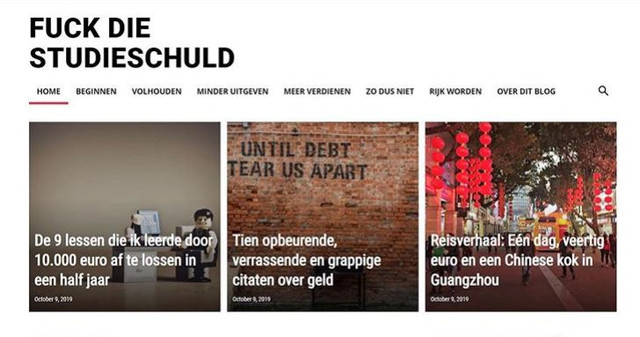
What happened? How can I change it back again?
(I used to create this effect by choosing a row that was separated into two parts. However, after the update, the text just keeps showing on one line, even though the row is separated in two parts.)
Help!
Thanks a lot,
Maaike
 pratibhajbp
 Dear Calin,
Please understand my question, my question is to know whether the theme is updated or not, please view the screenshots and give your valuable support.
Thank you.



