
- NewspaperHow to update a plugin
- NewspaperHow to update the WPBakery Page Builder plugin
- NewspaperHow to Update the Newspaper Theme
- NewspaperSingle Post Excerpt
- NewspaperWP Rocket and Newspaper Theme: Optimization Guide
- NewspaperCredit System
- NewspaperHow to use the Bing Maps API
- NewspaperModules Builder in Newspaper Theme
- NewspaperCreate a frontend submission form
- NewspaperCustom Fields Support
- NewspaperFlex Block Settings Guide
- NewspapertagDiv Opt-In Builder
- NewspaperHow to use the YouTube API
- NewspaperDefault Category Settings
- NewspapertagDiv Composer Tutorial
- NewspaperHow to Set the Image Avatar
- NewspaperUnique Articles
- NewspaperFacebook Share
- NewspaperCache plugin – install and configure
- NewspaperFeatured Image, Video or Audio
 RonnieMartyns
hello and first time I use this theme and can’t upgrade to version 10. I tried to update but when I upload the new files I get an error saying the folder exists
 Vlad S
 Hello !
@meiggsmedia all the updates are found in here: https://themeforest.net/item/newspaper/5489609
@Nitneuk, Standard pack is made to work with older version, you can deactivate it and install Default PRO demo and it will work.
Can you please let us know more details about your instagram issue ? Paste a link to your website too.
Thank you !
 Calin
Calin Hi,
1. Please notice that the Disqus plugin was not tested with our theme, therefore we can not provide technical support for the provide provide by this plugin, please make sure that you are using this plugin only on posts, not pages.
2. Unfortunately there is no settings for the default top bar to change the size ( height ), only the width -> http://prntscr.com/pt9edo
In order to have more control over the header and top bar we recommend to use a cloud header from tagDiv Cloud Library and edit it with tagDiv Composer
3. Unfortunately for the moment there is no option to set the social media in the order you want, sorry!
4. if the H2 is inside the content, then the settings from theme panel should be apply -> http://prntscr.com/pt9hkq, please provide some more details or a link where I can inspect this problem.
5. So if I understand correctly you want to have unique articles on pages, if is so then you can use this option -> https://forum.tagdiv.com/unique-articles/
6. The page templates are these -> https://forum.tagdiv.com/page-templates-2/the unfortunately there is no settings to make a page template, the design nee to be make with tagDiv Composer.
7. Only the the videos from YouTube will work -> http://prntscr.com/pt9ojh, maybe this option will be add in the coming updates.
8. The WP Rocket plugin was not tested with our theme, therefore I can not say how or it will work properly with our theme, sorry! -> https://www.screencast.com/t/cmPkh9jba4sZ
9. The flex can be adjust for all device individual -> http://prntscr.com/pt9qrl -> http://prntscr.com/pt9r37 you can check more about flex blocks in our documentation from here -> https://forum.tagdiv.com/flex-block-settings-guide/
10. There is an general option in theme panel -> http://prntscr.com/pt9s7p but this will not apply only on block headers that do not have set an individual style.
11. That is happen because the standard width of the website is 1068px -> http://prntscr.com/pt9z53 + margin -> https://www.screencast.com/t/FmgLs3wRkAAS when you edit the page will add and extra width from tagDiv Composer sidebar and some padding on the page content, so this will exceed the 1366px.
12. If you are referring to the mega menu next/prev buttons -> https://www.screencast.com/t/xZxnf7Sq2 then you can hide theme only with custom css, you can try this custom css
.td_block_mega_menu .td-next-prev-wrap{
  visibility : hidden;
}
The code need to be set in Theme panel> Custom code> Custom css
If you still have some questions, or I was not clear enough please let me know!
Thank you!
 Nitneuk
 I used the “Envato Market” plugin to update. It’s work !
After you have to activate the “Standard Pack” plugin, or your website will display the shortcodes on the frontend.
But Instagram still d’ont work, even with the access token…. 🙁
 meiggsmedia
 What does the update include? Any fixes?
 Adilosadil
 I have used the envato market plugin to update, what about the content it will be lost or not
Vlad S Hello !
Please make sure that you have updated your theme properly.
The best way to update the Newspaper Theme is to delete the current Newspaper Theme version and TagDiv Plugins and after that you can install the new version.
Overwriting files will cause conflicts.
Thank you !
Vlad S Hello !
The best way to update the Newspaper Theme is to delete the current Newspaper Theme version and TagDiv Plugins and after that you can install the new version.
Overwriting files will cause conflicts.
Thank you !
 jsbjm
jsbjmJust updated the theme and plugins but now all latest posts on homepage are on full view. No excerpts, no read more button. What’s happening? Please help in fixing it. My site is https://www.jsbjm.org
Adilosadilafter the last update, I got this error:
Parse error: syntax error, unexpected ‘.’, expecting ‘)’ in /home1/dishesdeli/public_html/wp-content/plugins/td-composer/legacy/common/wp_booster/td_global.php on line 415
how to fix that please
 Alsok
AlsokWhat is the sequence of steps to update the template ‘Newspaper’?
thanks you!
Vlad S Hello !
The proper update procedure is to delete the old version of tagDiv theme and plugins and upload the new one. Overwriting the files will only cause errors.
If you are sure that your Newspaper Theme system status is fully accomplished as you can see it here: https://forum.tagdiv.com/requirements-for-newspaper/ Please post a link to your website and we will be more than happy to inspect your issue.
Thank you !
 Alina S
Hello, Community!
We know you all want to make your website faster :), we want that for you, too. Newspaper theme 10 brings you a new way to build a faster WordPress website. For the first time in WordPress, you have the freedom to choose how much code the theme is loading and optimize your website’s performance straight from the beginning.
To give you this functionality, we’ve introduced a new plugin called the Standard Pack (available to you for free.) When you update to Newspaper 10, you must activate this plugin, or your website will display the shortcodes on the frontend. We cannot make the plugin automatically activate for you, so you’ll need to go to WordPress Admin area > Newspaper Theme > Plugins and enable the Standard Pack plugin.
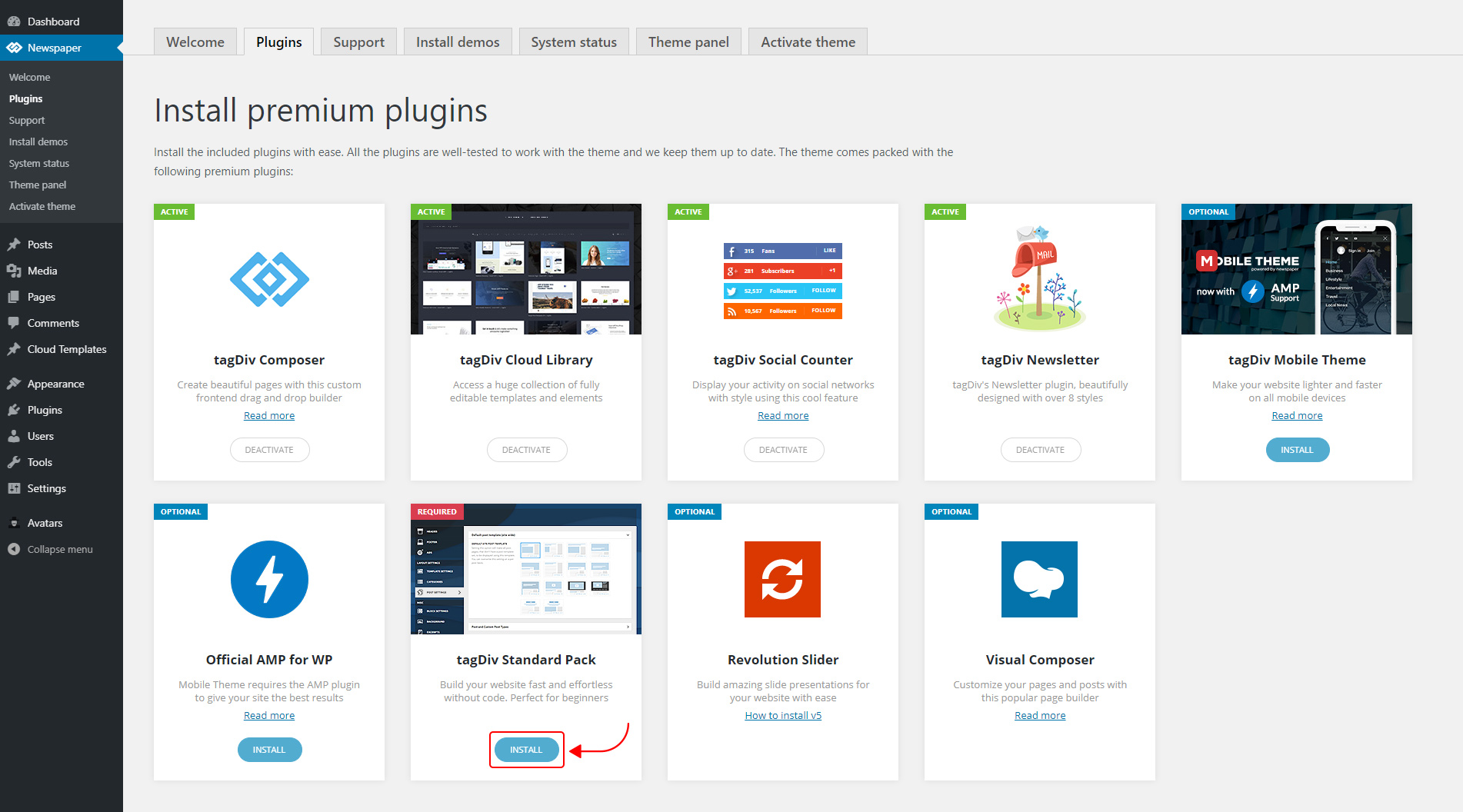
The new Standard Pack Plugin has two functions:
– it brings all the functionality you love in the previous versions
– allows you to separate things when you want to build everything customized and go for website’ performance.
The complete list of templates influenced by the Standard Pack plugin:
In the theme panel:
15 Headers
8 Category templates
10 Big Grids
19 Modules for blocks
14 Single post styles
14 Footer templates
In the tagDiv Composer:
25 Blocks
12 Big Grids
10 Big Grid Full
1 Big Grid Slide
Extra
All the demos that are not marked as PRO Demos.
You can find more details on how to use the Standard Pack Plugin in the dedicated article. When your website has no more dependencies on the Standard Pack plugin, you can deactivate it to increase the page loading time and performance.
If you need the previous version, you can download it from here (Newspaper v9.8).
I hope you’ll enjoy this update!
Thank you!
 ahmetekinler
How to activate widgets after 10 updates. (Example block_3)
ETC: I don’t use the standard plug-in to make my site very fast.
 Keresztlabda
 I tried to update, but when I upload the new files I get an error saying: the folder is exists. So I installed an other template, activate and after delete a Newspaper9 theme and then installed the Newspaper10 files, it was succesfull and when it finished with the update the website looks like then earlier. So it was easy and now the website is much faster.
 Ciaran
uninstalled theme and new updated added and site now gives “The site is experiencing technical difficulties.”
Works fine if I swap theme so seems to be the update
 MikeStankovich
I am using a child theme, so is the update process different? Can I just upload files from folder patch_9.8_10 via ftp or I must delete the whole Newspaper folder and upload all the files again?
Calin Hi,
Yes, please try that way and also make sure that you delete the theme plugins ( tagDiv ) too before making the update.
Thank you!
 Amari
Amari I updated through WordPress, so what would the next step be? Delete what I have and upload the Themeforest version?
 ariwisnu
I have my website installed with Default newspaper demo. Recently I updated my theme to Ver.10 via Envato Market Plugin.
Now I really want to use the new Default Newspaper pro.
1. How to change my current Default Newspaper to the Default Newspaper Pro?
2. Do I need to uninstall this one http://prntscr.com/pt6pxd (the demo I installed earlier)?
3. If I install the Default Newspaper Pro, how to make it not change all of my content that I’ve make with the old Default Newspaper?
Calin Hi,
Please make sure that you’ve made the update according to our theme update documentation from here ->https://tagdiv.com/update-newspaper-theme/
Let me know the results!
Thank you!
AmariAfter the update, I get the following errors on my website – specifically after activating the standard pack https://ibb.co/chc9nYc
Which, apparently without, alters my website quite a bit. Help.
 markwebbink
 Hi, this solution is not working for me? I have selected row but there is no ‘delete block’ (I know what you mean) popping up, nor can I delete it by clicking ‘delete’.
BTW: I just updated to the new release (X). Great job!
Calin Hi,
Please make sure that you made the theme update as in our guide from here -> https://tagdiv.com/update-newspaper-theme/
Let me know the results!
Thank you!
Calin Hello,
The theme can be update directly from WordPress using the Envato Market plugin but this will not show the update in real time, only after a while -> http://prntscr.com/pt6aqq -> https://forum.tagdiv.com/how-to-update-the-theme-2/
Backup the site and the database are not part of theme support -> https://forum.tagdiv.com/support-policy-2/ please check this guide -> https://themeisle.com/blog/backup-a-wordpress-site-for-free/
Hope this will help you better!
