- NewspapertagDiv AMP Plugin Tutorial
- ApiPractical example – How to add a new Block and Module
- NewspaperTrack Subscription Sources with Locker URL in Opt-In Builder
- NewspaperWP Rocket and Newspaper Theme: Optimization Guide
- NewspaperCredit System
- NewspaperIntroduction to CPT and ACF with Newspaper Theme
- NewspaperHow to edit modules for Flex Block X
- NewspaperHow to use the Posts List shortcode
- NewspaperUser review system
- NewspaperCustom Fields Support
- NewspaperHow to generate Facebook App ID
- NewspaperHow to insert a block inside the content of a post
- NewspaperModal Popup
- NewspaperPayPal Setup
- NewspaperLink Tracker
- NewspaperLockers
- NewspaperGeneral Options that May Interfere with the Newspaper Theme
- NewspaperAdd Cryptocurrency Price Ticker Widget
- NewspaperPosts Loop Element
- NewspaperThe Newspaper Mobile Theme: Introduction
 ebhelloworld28
Hello,
I have tried to find and replace all words “td_” with another words for example “al_” also I have renamed all files and folders with name “td_” to “al_” but after my page is not working. Is there any way to replace this name “td_” with another name? We don’t like to show in view source that “td_”.
Hope you understand me what I mean
Thank You!
 Bogdan B.
 It is working but you did not add it properly maybe. I do not know what css to provide as I cannot tell where exactly you are trying to add a shadow to. Please provide an example so i can provide an example code.
Thank you!
 Simion C.
 Hi,
If you want to do achieve something like this , you could do it using a code like this one – https://www.screencast.com/t/foMyVlUGxf and change the color how you want. This is the code used in the example, and it must be entered in Theme panel->Custom Css. Please let me know if this is what you wanted or you need something else.
.td-ajax-prev-page,

.td-ajax-next-page {

background-color: yellow;

}
As for the icon and link, I do not understand exactly where you want to insert them, if you could provide more details, I’ll try to give you a solution.
Thanks
 lisvilla
I am trying to load the logo and I cannot. I went to Theme Panel, Logo & Favicon. On the Logo Upload, I click on the upload button. It takes me to Insert Media- Upload Files. I click on the Select Files button and it does nothing. It does not open or go anywhere. I even tried going into the Media Library and then on Select Files button and nothing happens. I cannot load my logo. I tried logging off and logging back in and it still did not work.
 diablo7
For example, in the following list you can see 15 pages and these look like this:
1 2 3 4 5 6 7 8 9 10 11 12 13 14 15 NEXT
here is the link: http://leveltoday.com/15-times-dragon-ball-z-crossed-series/12042/
To the page I added the buttons PREVIOUS and NEXT, there is some way to hide the numbering and leave only these Buttons Preview NEXT.
Any css code for this?
Look at this article from this site: http://whatculture.com/gaming/mass-effect-andromeda-10-hilarious-animations-you-need-to-see
This is how I would like to see the PREVIOUS and NEXT buttons.
Note: I do not use smart list because I like to use inline ad and I better place the ads thanks to this one.
 jn.rounak
so as my titles says how do we show date in block 25, 12 & 7 ?
i have done every possible way to do this but cant find any option to enable this. please help.
 Meranda Devan
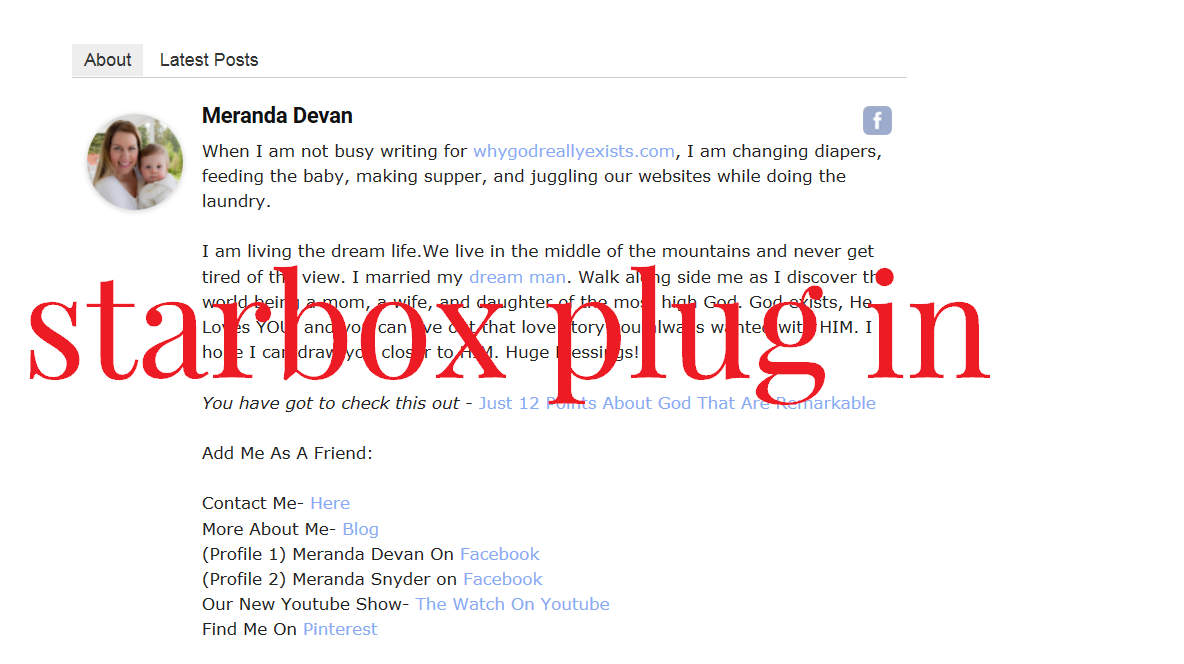
On my website I often feature guest writers who have lengthy BIOS. I have used the Star Box plug in because it allows me to copy in Html where I can space out the bio.
Here is an example.
http://whygodreallyexists.com/wp-content/uploads/2017/03/Star-Box.png
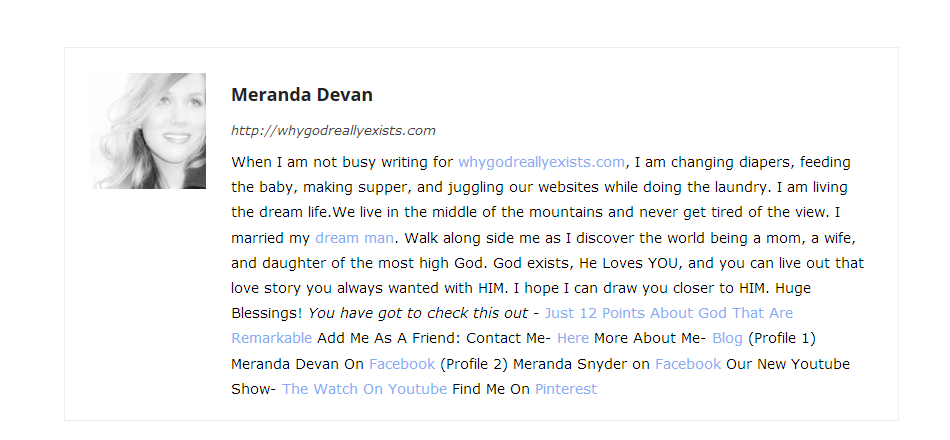
Here is how the themes bio shows up.
http://whygodreallyexists.com/wp-content/uploads/2017/03/Others.png
While this may look good for my profile…when I have very lengthy bio’s….the text runs together badly. How can I fix this? Right now I am seeing duplicate bios on my site. Perhaps removing the themes bio from the page? What do you suggest?
 Marius123
For example, try to acces this page https://bucharestjournal.ro/category/recomandari/
Same happens with every article on the site.
It loads in 7+seconds.
I got cache plugin and I have tryed to deactivate all plugins on site and I still have the same problem.
Bogdan B. Hello,
You can add shadows using css. There are shadow creation tools you can use to create the css code like for example: http://www.cssmatic.com/box-shadow
I hope this helps.
Thank you!
Bogdan B. Hello,
Please provide more details as I cannot see any issue. Please provide an example of the submenu you are referring to.
Thank you!
 baburaj.s
I see that in the big grid we can have features posts. But how can we set features posts in the theme. I am new to the theme and I am learning it slowly . SO it will be great if I can get the answer as to how can I set the featured posts
What I want to do is to set some specific articles (featured) in to the big grid. I can do this using post id but I want to do it via featured images. For example the latest 5 featured posts in the big grid . Can i do this
Simion C. Hi,
Please provide some examples and more details of the problems you are having with the Buddy press plugin so we can investigate this issue. Maybe you have some other plugins that could be interfering, so try to deactivate all the plugins except Visual composer and Buddy Press, clear the cache and check again.
Thanks
Bogdan B. Hello,
Different post styles will show the featured image in different dimensions. Please try to use a different post style that will limit the featured image size like the default post style for example.
Thank you!
Simion C. Hi,
As it can be seen here – https://forum.tagdiv.com/header-styles/ Header styles 9,10,11 do not have a width limit for the header logo, the only limit being if you use a background or not. Here is an example of a full width logo with no background using header style 10 – https://demo.tagdiv.com/newspaper_cars/ and with a background set using header style 11 – https://demo.tagdiv.com/newspaper_recipes/ So you just need to use a bigger logo and it will display in full width in these header styles – https://www.screencast.com/t/x4kdI3YeX7e Also make sure you are setting the logo in full size – https://www.screencast.com/t/d31NVoyPt
Thanks
 Catalin
 Hello visitinglapland,
Unfortunately, I do not exactly understand what you want to do, sorry! If you want to change the style and the layout of the Big Grid/Block, notice that you need to do some additional customizations to the theme core files where all of these elements are created. Notice that is not a simple task, and if you do not have a reliable knowledge, in this case, you can break these. As a hint, for example, if you want to change the Big Grid 1, you should edit the td_block_big_grid_1.php core file, like this -> https://www.screencast.com/t/iTudD14v7a. Notice that is not a simple task and if you are not aware of the steps which are needed to take in this regard, please consider hiring a freelancer/developer to help you because we cannot provide custom services at the moment, sorry!
Thanks for your understanding!
Simion C. Hi,
1. Try adding the code for your plugin in the header template files – https://www.screencast.com/t/CMgHQwjv25 located in the Theme folder->parts->header and corresponding to the header style you are using. Also make sure the code you are adding is correct, and you integrate it properly in the header structure. Follow the examples and documentation of the plugin, if available.
2. The elements from the Visual composer editor like the “trending now” are available for page building using this plugin. Here is a guide to help you create a page and set it as homepage – https://forum.tagdiv.com/homepage-how-to-build-and-set-it/ and also to help you use Visual composer – https://forum.tagdiv.com/how-to-use-visual-composer/
Thanks
 poppeto
hi, my adsense has stopped showing on my frontpage on desktop & mobile? it works on all other pages except for the frontpage …it shows the advert through visual composer editor when editing but when saved to view it will not show the ad? ive flushed cache etc and ive tried putting the code in an ad box and normal text box but nothing works? it did work before?
 hadharm
I am using a custom link for login and registration. How can I change the link on navigation menu and mobile menu as well.
 MaNunes
 I Instaledd WAMPSERVER on localhost, than installed WordPress, than Newspaper theme 7.7.1 than imported theme setings from my live site….
and BANG this error starts to happen….
Warning: Invalid argument supplied for foreach() in ......./themes/mytheme/includes/wp_booster/td_wp_booster_functions.php on line 2212
checked this forum for help, and found nothing… then somehow I remmebered to install a DEMO without sample data, as I did in live site…
and all errors just vanished…
Hope it helps…
MaNunes I had this SAME ISSUE after I installed WAMPESERVER in my Local Disk to test scripts…
all you have to do is to INSTALL A DEMO without sample data, and all errors disapeer.
Try it…
 boss1234
Hi
How to I change logo infomation in CSS
I would like to change
– ABOUT US
&
Contact us:
I would like to edit the information or delete it completely
How do I edit this info in css
Please tell me the steps I need to follow
Thank you
 marcomilic
 As I see, when I activate for example Advanced Custom Fields plugin, VC has a problem to load /wp-admin/admin-ajax.php http://prntscr.com/elgs5a
marcomilicHello,
I have a problem with Visual Composer, when I a add on site any plugin, for example Advanced Custom Fields or Yoast SEO, VC just not edit any block nothing is shown http://prntscr.com/elg11a
VC working correctly only if all other plugins are disabeld.
Version of WordPress is 4.7.3
What is wrong?
 Kage
KageHi, I’m looking to create a main menu drop down composed of certain tag IDs so that when the link is clicked, it does to the specified page and automatically selects the Ajax filter. Is that possible?
As an example, the main menu category is “Guides”, and there are subcategories (sorted by tag IDs on in the Block settings) such as Category 1, Category 2, and so on. I want to be able to hover over the main menu item, click Category 1, and then have it go to the Guides page and automatically activate the Category 1 Ajax filter in the block on the page.
It’s essentially an href link from the main menu to a page’s block filter from a tag ID.
I just have no idea how to do it. Is it possible?
Thanks!
Simion C. Hi,
1. I am not sure I fully understand what you mean. Here you can see all the available blocks in the theme – https://demo.tagdiv.com/newspaper/block-15/ in different layout settings. If the mobile theme is not used, the same content from desktop will be displayed on mobile. This is how block 15 looks on 1 column – https://www.screencast.com/t/wRyjnCqm – https://www.screencast.com/t/Qa1JZkKqg and on 2 columns – https://www.screencast.com/t/lmZuafZx – https://www.screencast.com/t/vAhlmqIF This is how the blocks are designed and how the theme responsiveness works, depending on the page structure in Visual composer. It would not be an easy task to change how the blocks are displayed, and multiple elements have to be taken in account.
2. If you mean the “About Us” and “Follow Us” here – https://www.screencast.com/t/cnTwkha5gVzD you can do it like this – https://www.screencast.com/t/XSjEtHdW in Theme panel->Translations
3. You could use some css for this, to modify the font size on the module title on the slider – https://www.screencast.com/t/8ICa7ynf3ADL This is the code used in the example
@media (max-width: 500px) {

.iosSlider-col-3 .entry-title.td-module-title {

font-size: 12px;

}}
Thanks
-
This reply was modified 9 years by Simion C..