- NewspapertagDiv AMP Plugin Tutorial
- ApiPractical example – How to add a new Block and Module
- NewspaperTrack Subscription Sources with Locker URL in Opt-In Builder
- NewspaperWP Rocket and Newspaper Theme: Optimization Guide
- NewspaperCredit System
- NewspaperIntroduction to CPT and ACF with Newspaper Theme
- NewspaperHow to edit modules for Flex Block X
- NewspaperHow to use the Posts List shortcode
- NewspaperUser review system
- NewspaperCustom Fields Support
- NewspaperHow to generate Facebook App ID
- NewspaperHow to insert a block inside the content of a post
- NewspaperModal Popup
- NewspaperPayPal Setup
- NewspaperLink Tracker
- NewspaperLockers
- NewspaperGeneral Options that May Interfere with the Newspaper Theme
- NewspaperAdd Cryptocurrency Price Ticker Widget
- NewspaperPosts Loop Element
- NewspaperThe Newspaper Mobile Theme: Introduction
 thalesbrandao
 Calin, good afternoon.
We only use the AMP option. This situation has never happened to us before. Our 404 error has been cleared. As we suggested, is it a theme bug? We cannot disable AMP because we use it. Thank you. Awaiting your response.
 omarfilip
 The only thing that happens when changing the author photo size is that the info div gets pushed farther to the right. The image stays the same. BTW, this is with version. 12.7.4

 Calin
Calin Hi,
For this you need to have in Products > attributes the attribute color (gender, size , any attribute you have for your product, for this example we’ll use teh color attribut) and the colors set in it https://prnt.sc/3iwEyJwD4DVj – https://prnt.sc/HIn9HazUMoe9 after that on the single cloud product template on Woo Add to Cart element, make sure that you have set on the attributes tab the settings like this https://prnt.sc/_cAQBTokudK6
Calin Hi thalesbrandao,
The parameters:
{{post_cat_link}}
{{post_url}}
{{td_query_all_results}}
Exists only in one file wp-content/plugins/td-composer/mobile/header-amp.php and thsi is used only when you are using the amp plugin with the mobile theme plugins and one of the options – https://prnt.sc/Ii6EfD58TpTu but those parameters have the rel tag for nofollow therfore should not be indexed in GSC https://prnt.sc/6wyyY9Yrwk4p
Thank you for your understaing!
thalesbrandao It appears to be an update error, as we haven’t had any changes to our website – even when using AMP normally.
omarfilipIs there a way to display the author’s local avatar in a high-density version (retina)? I use Simple Local Avatars to select the local avatar for an author. Editing the Author Photo size in the Single Post Author Box in the Single Post template has no effect on the size or density of the image.
Example post:
https://avbrief.com/evolution-of-a-duct/
The image exists in an 800×800 size, as seen here:
https://avbrief.com/author/ironflight/
Calin Hello,
1. You can see the subscribers details in Opt-in Builder > Subscriptions underthe subscription tab – https://i.imgur.com/aQWMPQ2.png (click on arrow to expand details) https://forum.tagdiv.com/subscriptions/
2. This situation can be related to more situations, for example, if you have object cache, cache on the browser.
Thank you!
Calin Hi,
I can’t say that LiteSpeed is not a good plugin, but you need to find the right configuration, as it has many options.
One of the best plugins is WP Rocket, but it is not free. If you’d like to test a free plugin, you can try WP-Optimize, for example.
Thank you!
 Kevin@hookedmagazine.ca
Loaded the basic demo and it only shows text for my logo, even though I uploaded logos & favicons in the settings. Also it’s not showing the demo theme or anything after the Header medu and when I click on the green edit with TagDiv button I get a red error on the right saying “Error at rows: 2(models) : 1(dom). The model does not match the content Current state has involved an issue. You could try an UNDO operation (CTRL+Z / CTRL+SHIFT+Z)”
Then I tried to load a template and it hangs on install
I’m missing something here.
hookedmagazine.ca is the website I’m trying to move over.
 thedossier
I am currently using the Newspaper theme with the following license status in my account:
bisque-yak-449198.hostingersite.com – Inactive – Assign
ghostwhite-walrus-651110.hostingersite.com – Active – Unassign
There is also a notice stating:
“To use a license key on a different domain, you can unassign it from the list anytime after 2026-02-18 11:19:57 UTC + 02:00.”
At the moment, my active site is:
ghostwhite-walrus-651110.hostingersite.com
I own the domain thedossier.in (also hosted on Hostinger), and I plan to change the domain of the same WordPress installation to thedossier.in on 15 February. I am not creating a new website — I am only changing the domain name, and everything else will remain exactly the same.
I would like to confirm:
Will the license continue working automatically after I change the domain?
Do I need to wait until 18 February to unassign the license?
What is the correct procedure to avoid activation issues during the switch?
Please advise on the safest way to proceed.
Thank you for your assistance.
 cbetancur
Hello TagDiv Support Team,
We are experiencing a critical performance issue on our website ifmnoticias.com, related to the Newspaper theme and TagDiv plugins.
We have detected excessive AJAX requests being generated from the following endpoint:
/wp-admin/admin-ajax.php?td_theme_name=Newspaper&v=12.7.4
In just 30 minutes, approximately 4,599 requests were sent to the site from this source. This spike is causing a significant increase in CPU usage on the server.
We suspect there may be a vulnerability or malfunction in the Newspaper theme (v12.7.4) and/or one of the TagDiv plugins triggering these repeated requests.
Actions already taken on our side:
Reduced the MySQL max connections from 5000 to 200 to improve stability.
Enabled Cloudflare Under Attack mode to mitigate potential abuse or malicious traffic.
However, the issue appears to originate from the theme/plugin itself rather than purely external traffic.
Could you please:
Confirm whether this is a known issue in version 12.7.4?
Advise if there is a patch, configuration adjustment, or update we should implement?
Recommend best practices to prevent admin-ajax overload caused by the theme?
This is a high-priority issue due to server performance impact.
We appreciate your prompt assistance.
Best regards,
 Test2CBD
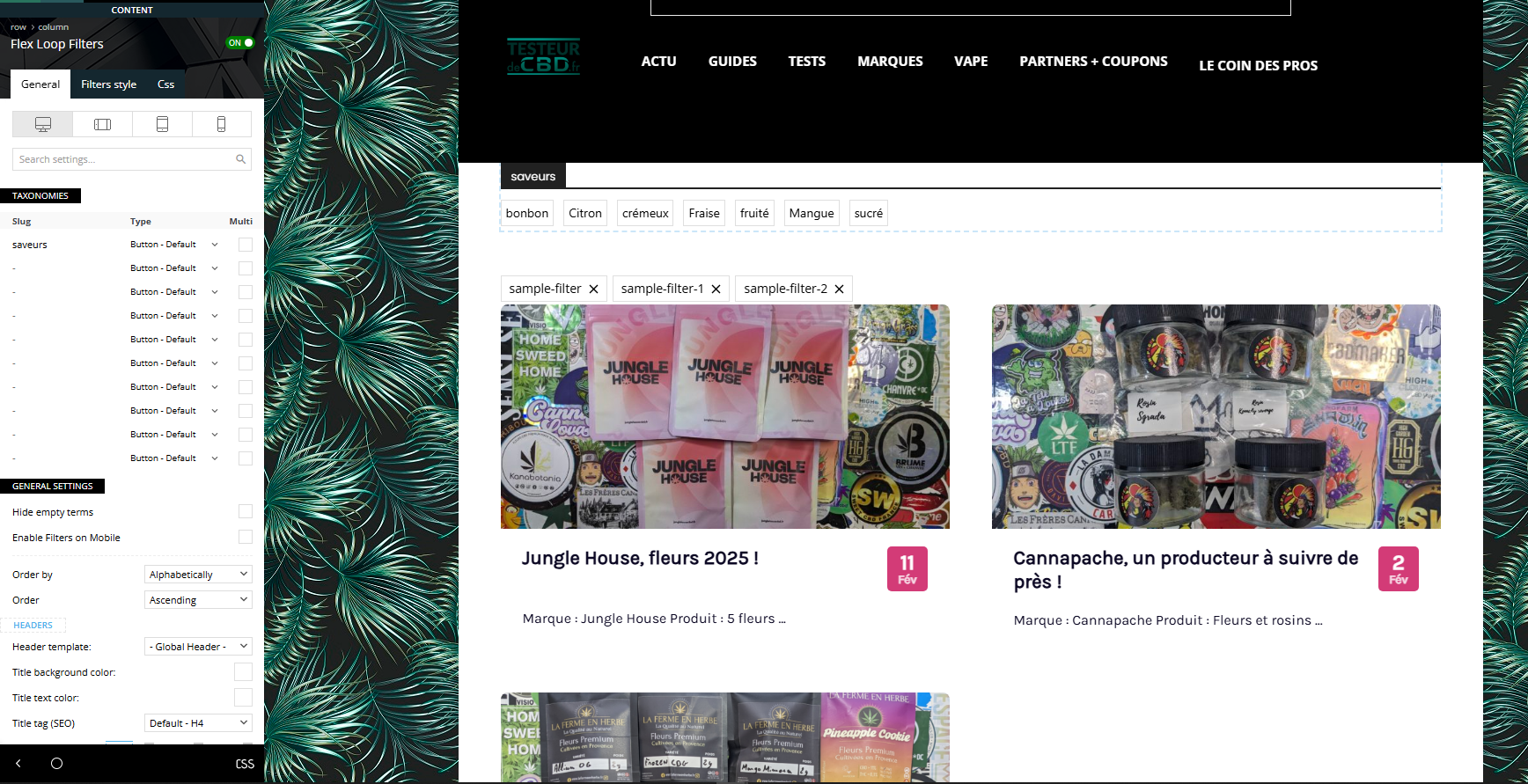
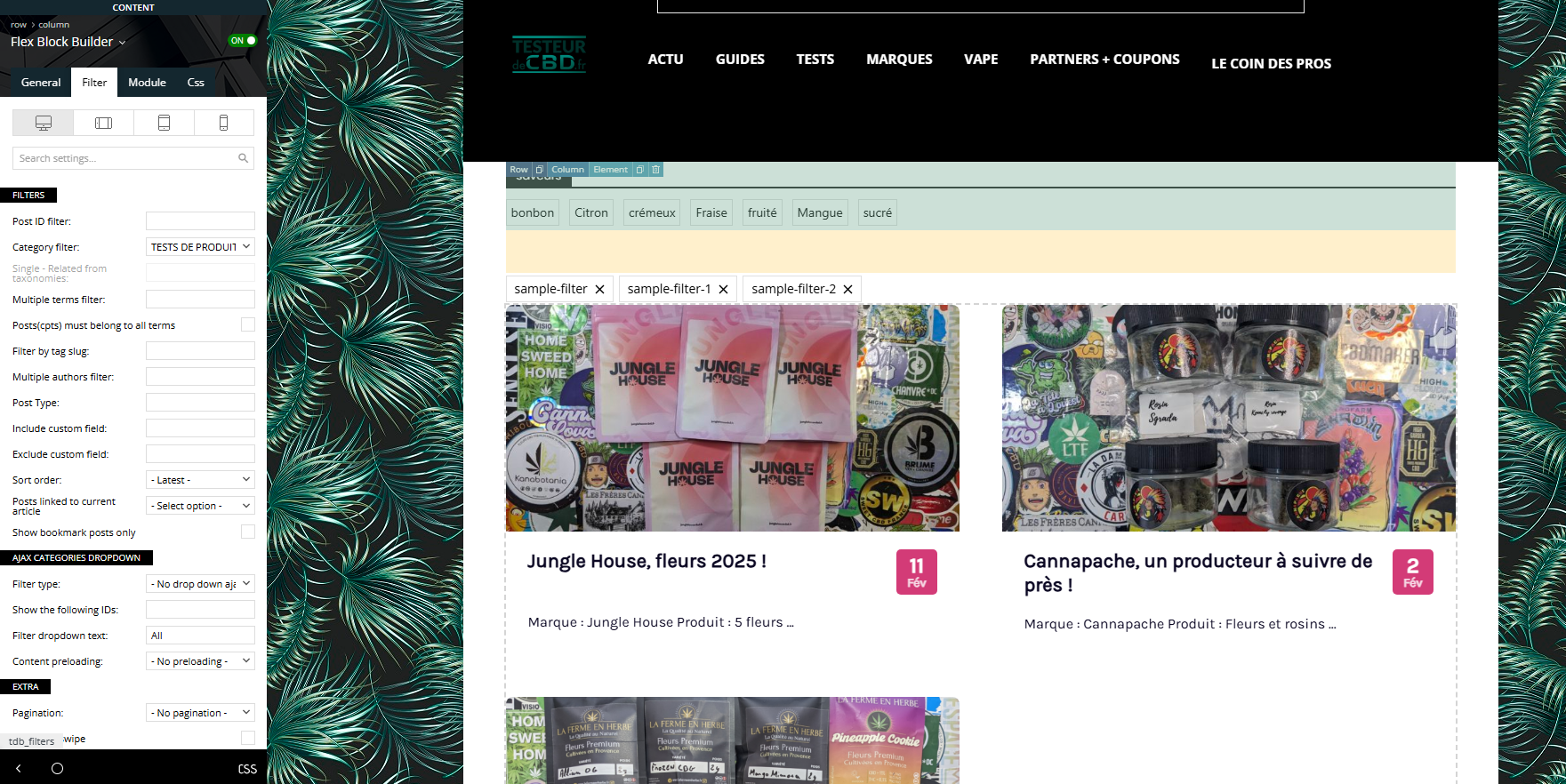
I tried all day to setup this option that look super intersting but I just don’t manage. we are reviewing CBD products and My goal is to create a menu that comes on the top of my post, with for example “flavor” (strawberry, lemon, …) so when the user click on one item, he can see (without reloading page) all the article marked as “strawberry”.
I created a custom taxonomy with Custom Post Type UI plugin.
I followed all the documentation, tried everything, but I dont manage to link the menu to the post.
https://testeurdecbd.fr/toutes-nos-critiques/
I would like to manage to get the menu like it is, but the menu filter article in “ajax” mode. No reloading.
And if possible, I would love to do this with multiple taxonomy on different place of the site.
Calin Hi,
Normally, that code is present only when the tagDiv Mobile theme is used (with amp or without it).
If you can provide a link, we can review it and determine whether this is a different situation.
Thank you!
 nbiga samir
 I would like to clarify an important point: on two of the affected websites, I am not using AMP nor the tagDiv Mobile Theme plugin. However, the issue is exactly the same.
Calin Hi,
Usually, this situation arises if you are using the mobile theme plugin and AMP. If you are using them, please disable it, clear teh cache, and check again.
Thank you!
nbiga samir Hello,
I am experiencing the exact same issue on four different websites using Newspaper.
In Google Search Console, thousands of URLs appear as 404 errors with parameters such as:
{{post_cat_link}}
{{post_url}}
{{td_query_all_results}}
Two of my sites use AMP, but the other two do not use AMP at all, and the issue still occurs on all four websites.
These URLs are not present in the sitemap, are not indexed, and no referring page is detected in Search Console. However, whenever I start the validation process, Google rechecks the URLs and the 404 errors keep reappearing.
I have already:
Checked permalink settings
Verified the sitemap
Inspected the source code
Revalidated multiple times
The issue still persists.
Is this a known bug related to templates, AJAX modules, or internal placeholder handling in the theme?
Is there an official fix recommended by the tagDiv team?
Thank you in advance for your support.
Calin HI,
Ok, I made some test and this seems to be working correctly, for example, I excluded the category Street fashion id 81 – https://i.imgur.com/9E0rhTp.png https://i.imgur.com/ftgsfeb.png and the articles from the rest of articles from the same lavel of the excluded category are displaying https://i.imgur.com/3xU4UKt.png
 mantonelli4
I’m trying to upgrade PHP to version 8.2, mainly because GoDaddy recommends the update for security reasons, but more importantly, because GoDaddy is charging an “Extended PHP Support” fee since I’m using deprecated 8.1. Can anyone tell me how to fix this problem?
https://www.dropbox.com/scl/fi/s804790k3y3cgdqb31xsc/extended-php.png?rlkey=xh3uln2oco2vsupqpvlh33m43&st=1fw1h4v9&dl=0
Calin Hi,
Right now you have a standard template that can be changed using the theme panel settings – https://i.imgur.com/Zoc96wB.png The fonts should be adjusted based on the module used, for example, if you use M4 https://i.imgur.com/vT8oyzH.png check the theme fonts > modules and blocks https://i.imgur.com/oSEpxYf.png
An alternative is to use a cloud template and edit it as you want using the tagDiv Composer on the front-end.
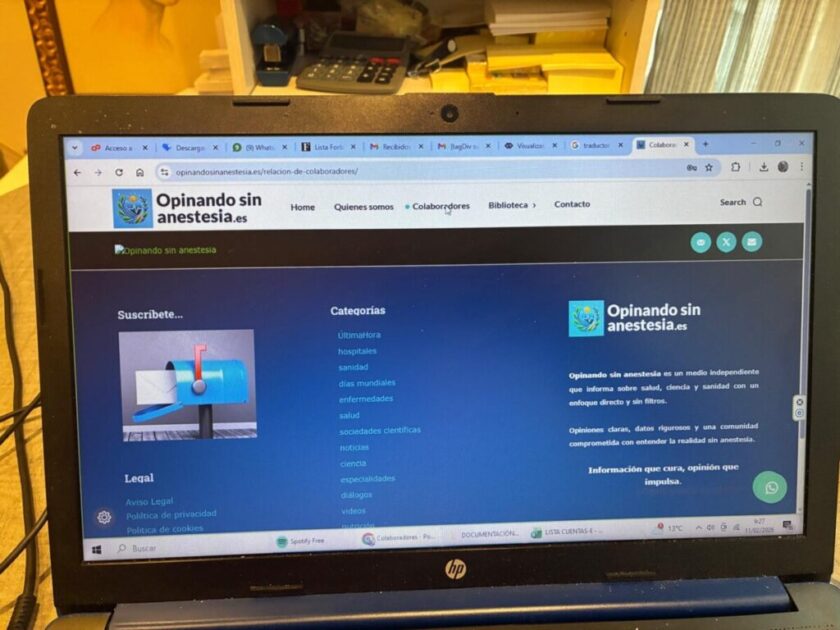
 opinandosinanestesia
 Hola, buenos días.
Disculpas, pero es que no lo entendía.
La imagen se puede ver en este enlace: https://opinandosinanestesia.es/wp-content/uploads/2026/02/3dc078e6-1529-4bc3-a8f8-c125236f96b6.jpg
Es decir, siempre que pincho en “colaboradores” en el menú, me lleva aquí.
A su vez, en esta entrada: https://opinandosinanestesia.es/2026/02/considero-importante-ampliar-el-periodo-de-cribado-poblacional-de-cancer-de-mama-en-nuestra-comunidad-aragon-para-que-comience-a-los-45-anos-equiparandolo-a-otras-comunidades-autonomas/. Siempre que pincho aqui: https://opinandosinanestesia.es/wp-content/uploads/2026/02/d6d015a5-6d02-435f-aae8-539bebf8cfdc.jpg me devuelve a la primera imagen: https://opinandosinanestesia.es/wp-content/uploads/2026/02/3dc078e6-1529-4bc3-a8f8-c125236f96b6.jpg
Estoy convencido de que es un tema de configuración, pero no logro localizar donde esta el problema.
Gracias.
 newsbazar24
Hello TagDiv Support,
I am using the Newspaper Theme (latest version) with TD Composer.
I am experiencing a template-level issue in the Single Post Template – Free News.
Issue Description:
A block titled “আরও দেখুন” (More Stories / Category tag list) is automatically appearing at the top of all single post pages.
This block:
• Appears in two different layouts across different posts
• Is not selectable inside TD Composer
• Clicking on it opens a sliding overlay panel instead of selecting a Row/Element
• Does not appear properly inside the Manager structure
• Cannot be removed from the template
What I Already Tried:
Disabled Articles Auto Loading
Checked Single Template Settings
Checked Category Template
Disabled Related Articles
Disabled More Articles Box
Cleared Cache (LiteSpeed)
Edited the template from Cloud Templates
Tried deleting the Row via Backend & Frontend editor
Still, the block persists.
Observation:
It seems like the block is injected dynamically (possibly via auto-loading, category module, or internal tdb_single_content hook).
When clicking the block, only the gear (⚙️) icon works, and the rest of the area is not selectable — which suggests a layer or JS overlay conflict.
Request:
Please clarify:
From which template hook or module is this block generated?
Is it part of tdb_single_content?
Is it controlled by a hidden “Tags” module?
How can I permanently remove it from the Single Post template?
This is affecting layout consistency and UX.
Website: https://newsbazar24.com
Theme: Newspaper
Template: Single Post Template – Free News
Screenshots attached for reference.
Thank you.
Best regards,
Sankar Chakraborty
Calin Hi,
I understand, but the articles that should be displayed are part of other categories. If
so, teh category will not be displayed.
If you want, we can take a closer look, you can contact us via email at contact@tagdiv.com and provide temporary wp-admin access and some examples.
Thank you!
 c386
c386Hi,
I’m trying to find the best way to create a gallery on a page.
At the moment, I’m using multiple ‘single image’ blocks, which works in creating a neat grid of gallery photos. Users should then be able to click a photo for a larger view, with the option to scroll left and right.
An example of this is available here: https://cloud.tagdiv.com/photo-gallery-spa-heaven/
Unfortunately, when I use or create a similar gallery, the images are not loading in a pop-up, despite ‘Modal image’ being checked in each single image.
What am I doing wrong?
Thanks!
Calin Hi,
Could you please provide more details and examples, or a link where I can check it?
Are you referring to a menu that is created using categories?
 t.shhopov
Hello there,
Recently, I decided to try the theme. I’m still doing the setup on a staging website. So far, it seems that I cannot fix the issue where the text of an article is repeating up two 3 times on a page. For example, I’m clicking on article X and when you scroll its the same one over and over again with the comment section and about the author. As you can see, the end of the article and immediately start again.
The second issue is that the style of a single page is not consistent. Some articles have a slider on the right side, other are only the article.
You can see what I’m trying to explain here: