
- NewspapertagDiv AMP Plugin Tutorial
- ApiPractical example – How to add a new Block and Module
- NewspaperTrack Subscription Sources with Locker URL in Opt-In Builder
- NewspaperWP Rocket and Newspaper Theme: Optimization Guide
- NewspaperCredit System
- NewspaperIntroduction to CPT and ACF with Newspaper Theme
- NewspaperHow to edit modules for Flex Block X
- NewspaperHow to use the Posts List shortcode
- NewspaperUser review system
- NewspaperCustom Fields Support
- NewspaperHow to generate Facebook App ID
- NewspaperHow to insert a block inside the content of a post
- NewspaperModal Popup
- NewspaperPayPal Setup
- NewspaperLink Tracker
- NewspaperLockers
- NewspaperGeneral Options that May Interfere with the Newspaper Theme
- NewspaperAdd Cryptocurrency Price Ticker Widget
- NewspaperPosts Loop Element
- NewspaperThe Newspaper Mobile Theme: Introduction
 allindiablog
Hello, I am Using newspaper theme. Its aswsome features totally i loved it. I have small problem with header. i want to Assigning a custom header to a specific page.
For example:
I am Specified one of the my header to homepage. I want different header for Single posts and Pages (not for home page). Because i am using overlay option to my homepage header. its not good for single posts and pages.
 Kusi
Kusi Hi, I have some problem with activation.
I bought another licence on themeforest > download licence files > in wordpress > activate theme > Copy&Paste Item Purchase Code in to ENVATO PURCHASE CODE field. Clicked on Activate. And nothing happened.
Domain: sbdmodra.sk
Thank you.
 rafael-l
 Yes, I was testing that, thank you, but when you click to enlarge the image, it will open the modal image, not the full image. And I need it to open the full image for the user, not the scaled-down version.
For example, if I set the option there for the “Medium 696x0px”, it will display there nicely, but when you click in to the image to enlarge, it will open this Medium version, not the full image. That is the ONLY problem.
Also I need to check the box “Modal images” for the images to be clicable.
Thank’s for all your help, but now I think you understand the full picture.
-
This reply was modified 3 years by
rafael-l.
 nrgweb
Hello,
I need your help with http://www.tvfreaks.gr.
Please tell me where i can put marfeel tracking code in your theme?
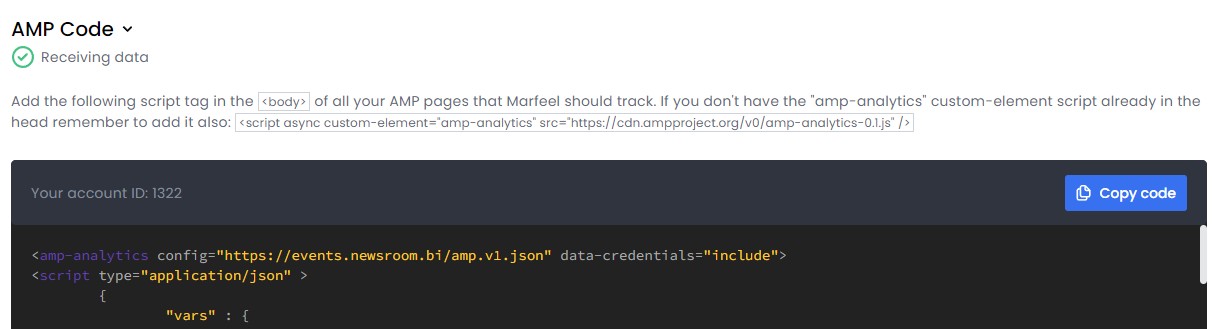
Waiting your soonest reply
 Tech Lifestyle
 No, we don’t have double elements in TagDIV composer. For the first time I notice this bug yesterday. Before was clean.
– We Deactivate, then activate third party plugins
– Update Theme to 12.5.1
– Update WP
– Update THP plugins
Result: duplicated content is still on page in bottom, after page content and before footer.
On all single page situation is same
To be precisely, all within element “Single Post Content” is duplicated
 rayancruzneves
I need to add this little “square” or little retangular element before a news colum on the homepage.
Does anyone know how I can do this?

One more example:

 loslunes
Hello, I have just noticed that last firefox for android version makes my site lost the fonts (for example bolds are not shown). Look at attached images, first one is from mobile firefox not workings as it should. Second one is from chrome where is working fine. Right now it seems its working fine in firefox for pc. It´s something strange that starts to happen today after I have updated firefox in my mobile (maybe its a problem related with my phone..).
Do you know something about this issue? Nothing strange is configured in this firefox for android with font options and it works fine until today.
 philippineone
 Every post is assigned a category, Bettina. Thanks for answering btw. If I go to this category https://philippineone.com/category/pilipino-indie/
I will see articles about zodiac and horoscopes. This category is new and for Indie musicians that I have started to add. It is the same across the board. If I click on any parent category, I see the Home Page astrology posts. I don’t really care if they show up twice on the Home Page, I care that these posts are showing up on pages that have no relation. In the Indie category page, for example, I only want to see Indie posts. thanks again, much appreciated
 mtdas99
 I think the Lightspeed is not fully compatible with the Newspaper theme. Page optimization with Lightspeed plugin breaking the site. I am using Lightspeed webs server and Quic.cloud CDN & cache service which need the Lightspeed plugin. Request to make it compatible for Lightspeed. Also the theme has some issues that causes high CPU load while loading a page or post. I searched everything, tweaked the server but nothing solved that. TTFB is high in the page speed console. Some pages consumes 90% CPU while loading a post. I have activated 26 essential plugins only( https://tinyurl.com/2ab22udm ). This actually disappoints me and stopped me to write articles instead searching for speeding solutions.
-
This reply was modified 3 years by
mtdas99.
 vivreausmic
 Finally, after further research, I disabled AMP.
Thanks for your help.
 Bettina vivreausmic
 Thank you for these detailed explanations.
I want to keep an AMP version for articles even if it is limited.
What are the possible customizations on AMP?
Even if they are weak?
And where can I find these settings?
Bettina Hello!
We have 3 options for mobile versions that you can use:
1. Responsive version: A responsive version of your website looks similar to the desktop version. TagDiv Composer is used to edit the page.Click on the mobile viewport: https://www.screencast.com/t/XDQJedlggSB. There, you can see your mobile version and edit or adjust the elements to look better.
2. Mobile pages: https://tagdiv.com/newspaper-10-3-7-update-brings-customizable-and-fast-mobile-pages
3. Mobile theme plugin: The Mobile Theme is a performance-optimized theme included in the main Newspaper theme that only loads on mobile devices. It comes with its own templates and designs for pages, posts, categories, etc., so your current templates from the desktop theme will get converted to the mobile theme layout. Please see https://forum.tagdiv.com/the-mobile-theme/ and https://forum.tagdiv.com/mobile-theme-introduction/ for more information.
A full explanation is here: https://www.youtube.com/watch?v=SpGkOnJeNZY
If you need to use the mobile version 1 or 2, then you need to uninstall the Mobile Theme plugin and AMP.
Unfortunately, AMP is not working with the cloud templates because the AMP’s layout is not fully customized.
The AMP version works best with default templates and not cloud templates. That’s why we integrated it with the Mobile theme plugin.
The feedback from our clients about AMP was negative and it is not used anymore, that’s why we didn’t add more customization options.
Thank you so much for understanding!
vivreausmicHello,
On my website i have mobile plugin and amp plugin installed.
On the mobile plugin i choose Mobile + AMP
On the AMP plugin : Transitional mode with only AMP version on posts
I have a cloud template header and footer with mobile customized version.
When i navigate on my website in mobile all is perfect (menu, header, footer) in all the pages, but when i go to a post i have two choice : the mobile version i customized in cloud template with the header, the good fonts, colors,… and the AMP version with zero customisation, the website looks very bad.
I try to change the AMP version of the website in Theme Panel > Mobile Theme > Theme color, Theme fonts but no change !
2 questions :
– it’s possible to serve the mobile version customized in cloud template on the AMP version ?
– If the answer at the previous question is no, how to customized the AMP template ?
Sorry for my approximate english.
Thanks
Bettina Hello @nuggsog !
Your website can’t be reached. You should customize the homepage with the TagDiv Composer.
More documentation about the cloud templates is here:
– https://forum.tagdiv.com/cloud-library-templates/
– https://forum.tagdiv.com/design-post-pages-using-cloud-library-templates/
– https://forum.tagdiv.com/cloud-library-category-templates/
We have 3 options for mobile versions that you can use:
1. Responsive version: A responsive version of your website looks similar to the desktop version. TagDiv Composer is used to edit the page.Click on the mobile viewport: https://www.screencast.com/t/XDQJedlggSB. There, you can see your mobile version and edit or adjust the elements to look better.
2. Mobile pages: https://tagdiv.com/newspaper-10-3-7-update-brings-customizable-and-fast-mobile-pages
3. Mobile theme plugin: The Mobile Theme is a performance-optimized theme included in the main Newspaper theme that only loads on mobile devices. It comes with its own templates and designs for pages, posts, categories, etc., so your current templates from the desktop theme will get converted to the mobile theme layout. Please see https://forum.tagdiv.com/the-mobile-theme/ and https://forum.tagdiv.com/mobile-theme-introduction/ for more information.
A full explanation is here: https://www.youtube.com/watch?v=SpGkOnJeNZY
If you need to use the mobile version 1 or 2, then you need to uninstall the Mobile Theme plugin and AMP.
Thank you!
Bettina Hello Megan!
Yes, you should add the element that takes the description automatically. For example, the author box element: https://prnt.sc/PqK4BUS20oEG
In the next update, you will see the new logo for Twitter.
Thank you!
 Alex
Alex Hi @ncalex,
Thank you for the response.
So what you are saying – this means that:
1. Sidebar Ad ignores a set “fixed” width of an image ad (even when max-width is set to 300px for example);
2. It distorts (stretches) the image to 100% of a column – Which means, for example on a mobile size screen which can be @media (max-width: 767px) and (min-width: 0) if an image ad is 300px wide and width is set to 300px wide, Sidebar Ad will stretch the image to 100% width of a column, meaning it will be stretched almost twice size, obviously ruining the resolution.
– Is it an intended behavior of Sidebar Ad?
-
This reply was modified 3 years by
Alex.
 Anurag30
Respected Team,
I have been using one of your “Today’s News Pro” theme for my website and i need help on couple of things from the support team, as listed below.
1. Headline’s are displaying in Capital letters.
– I would like to have my article’s headlines not all letters in caps, only first letter in caps.
2. Posts on the Home page are randomly appearing irrespective of the Category selected.
– I would like to have my articles arranged categorically.
– For example: Currently on my website, under Entertainment category- I have articles of Travel, World, Politics posts.
3. I want to customise my Home page. I want keep “politics & World” on the home page above all other articles.
Note: Please provide me step by step guide to resolve these issue.
My website URL for reference: https://tbpost.in/
Thank you!!
-Anurag Srivastava
Bettina Hello!
You can change the roles and capabilities of your users from here: https://wordpress.org/support/article/roles-and-capabilities/
But, you can use a plugin for this, for example the Members – Membership & User Role Editor Plugin.
I hope that helps you!
Thank you!
Bettina Hello @sjgold !
We have some settings for the rows and different stretch sizes: https://www.screencast.com/t/bsbB5P97A -> https://prnt.sc/icoqdTR9_DMS
You can also split the row into many columns and set a width for each column: https://prnt.sc/SUVH-Y15HNL9
Take a look here in this video for an example where I build six columns: https://www.screencast.com/t/mZ2c5XamTFN
In your case, you can add a row, split it into three, and change the column width.
For the middle column, you can set this option: https://prnt.sc/CwF3Xll-tXeB
Thank you!
Bettina Hello @pkramik !
Disable the AMP plugin as well. In order to disable this option “Exit mobile version”, you need to disable this setting: https://i.imgur.com/LxpDtB2.png
Thank you!
 aitoolsjournal
I have newspaper theme with AppFinder pre-built website installed. I have listed a few apps but the problem is that every single app page is limited to only one user review. If one person leaves a review, everyone else can only reply to that original review but cannot post their own.
The following message shows up for all other users “You have reached the limit of reviews that you can submit for this article.
”
I have checked the settings but unfortunately could not find any option to adjust number of reviews or remove that limit. Can you please help me fix it.
Here is a link to one sample app page for better understanding: https://aitoolsjournal.net/ai-tools/unstable-diffusion-ai/
 luke-tt
 Hi Bettina,
no, this does not work. If I exclude
/jquery-?[0-9.](.*) (.min|.slim|.slim.min)?.js

/jquery-migrate(.min)?.js

/wp-content/plugins/td-composer/legacy/Newsmag/js/tagdiv_theme.min.js

tdBlocksArray
the whole submenu doesn’t work.
Now I deleted the exclusions and it’s like before, I will give you two examples what I mean:
https://www.eronite.com/beziehung-promiskuitive-frau/
=> the menu is not sticky, no “back-to-top” button is shown and the magnifying glass for search is not clickable, no submenu (missing arrows)
https://www.eronite.com/rubber-latex-lack-leder-fetisch/
=> All it’s fine
I am wondering because on some posts it works, on other posts it doesn’t.
Thank you and best regards,
Luke
Bettina Hello @grezako!
1. Take a look here in this video for example where I build 6 columns: https://www.screencast.com/t/mZ2c5XamTFN
2. Set the row per columns like this: https://prnt.sc/44CdqJdKqI-m
Thank you!
Bettina Hello @sjgold !
Yes. Only if that demo has global colors set in the website manager. For example: https://prnt.sc/bgUkbCzhrrPA and you can edit them with the colors you like.
Thank you!

