
- NewspapertagDiv AMP Plugin Tutorial
- NewspaperTrack Subscription Sources with Locker URL in Opt-In Builder
- NewspaperWP Rocket and Newspaper Theme: Optimization Guide
- NewspaperCredit System
- NewspaperIntroduction to CPT and ACF with Newspaper Theme
- NewspaperHow to edit modules for Flex Block X
- NewspaperHow to use the Posts List shortcode
- NewspaperUser review system
- NewspaperCustom Fields Support
- NewspaperHow to generate Facebook App ID
- NewspaperHow to insert a block inside the content of a post
- NewspaperModal Popup
- NewspaperPayPal Setup
- NewspaperLink Tracker
- NewspaperLockers
- NewspaperGeneral Options that May Interfere with the Newspaper Theme
- NewspaperAdd Cryptocurrency Price Ticker Widget
- NewspaperPosts Loop Element
- NewspaperThe Newspaper Mobile Theme: Introduction
- NewspaperAutoptimize Plugin – install and configuration
 fashionablyearly
Created a desktop template and a mobile template for my homepage and for posts. Yet no matter what I try, both templates will not work together at the same time. If the desktop template is working, it’ll show that desktop template when loading in on mobile and desktop. If I clear the cache, the templates will swap and then show the mobile template when loading on both desktop and mobile.
Load the pages: https://www.fashionably-early.com/
or https://www.fashionably-early.com/2023/03/21/splendi-lazy-bones/
and you will surely see our issue.
 Peter_86
 Hello:
I would like to add icon next to category names (see image)
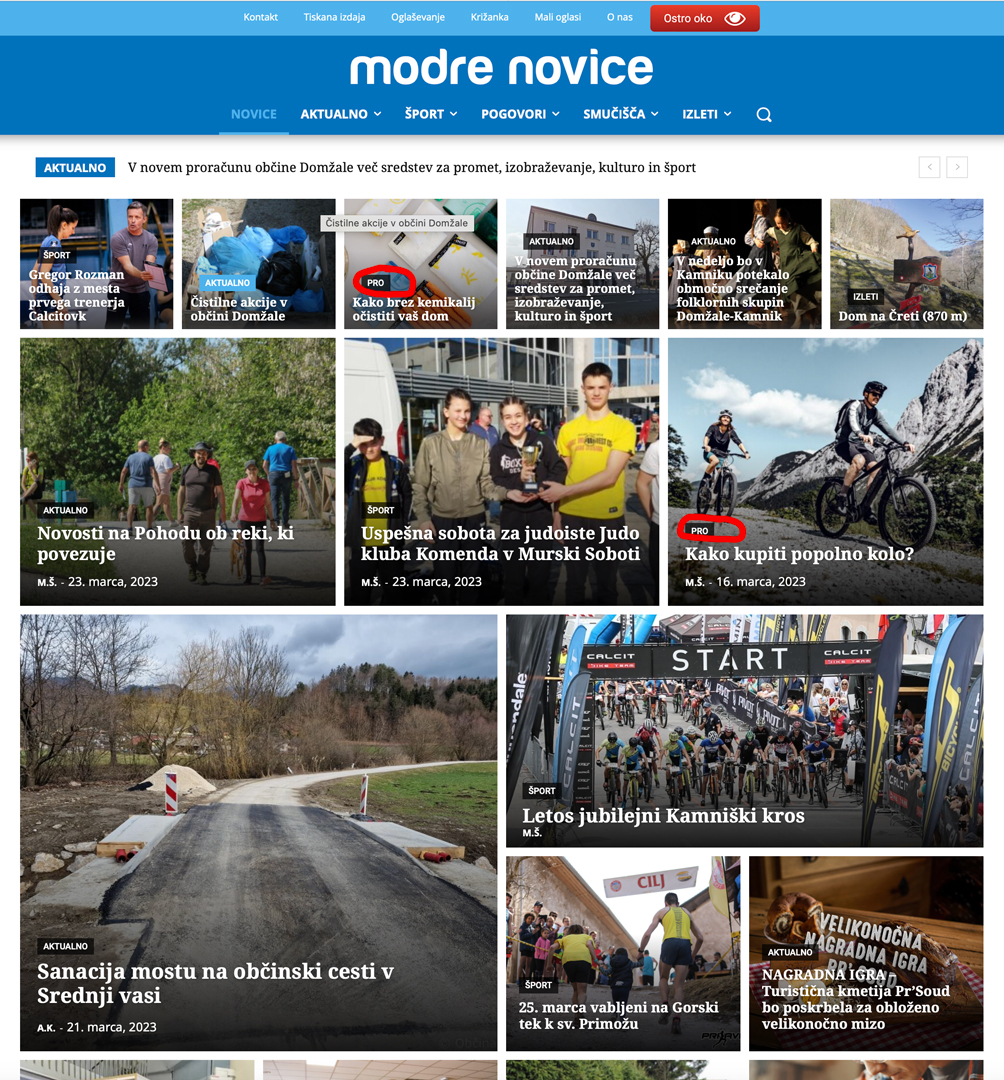
Something similar as they have here:

link to icon:
https://www.modre-novice.si/wp-content/uploads/2023/03/kovanec-ikona-01.svg
thank you!
Peter
 Bettina
 Hello Daniel!
If you use the Mobile theme plugin, then you should add the ads in Newspaper -> Theme Panel -> Mobile theme -> Mobile ads. There is a special field for the AMP ads if you use that plugin too.
Thank you!
 denya
denyaHello. Please tell me how to get rid of these pages?
…../?filter_by=review_high
…../?filter_by=popular
…../?filter_by=random_posts
…../page/2/
For pages with this prefix
here’s one example
https://nevessta.ru/stilizovannaya/?filter_by=review_high
 JJ0000
 Hi I’m using all these:
<div class="td-visible-desktop">
    <!-- Your NON AdSense code here - this ad will show only on desktops -->
</div>
<div class="td-visible-tablet-landscape">
    <!-- Your NON AdSense code here - this ad will show only on tablets in landscape orientation -->
</div>
<div class="td-visible-tablet-portrait">
    <!-- Your NON AdSense code here - this ad will show only on tablets in portrait orientation -->
</div>
<div class="td-visible-phone">
    <!-- Your NON AdSense code here - this ad will show only on phones -->
</div>
I just got the tablet one to work but the problem is anything under 768px goes to the ‘phone’one. Is there a way to customize that more so that I can have an image for something like 425px – 768px? I know there’s ways with CSS & HTML but do you know where I access those templates and how to add the code to a child theme? Thanks
 The Irish Place
Hi,
When I click on the menu selector/accordian icon when using the mobile theme I am getting a display asking me to ‘Click here – to use the wp menu builder’.
Site url is theirishplace.com
I have set the mobile theme to ‘mobile+AMP’
All else appears to work. Please advise.
 grdevan
In Editing dash board Icon’s are correctly appearing, But in actual website which is not reflecting it. Can you help us.
 ninjaray
Hi – We have noticed that the images in our tagDiv galleries are stretched in the carousel view but look fine when clicked on to expand. We have checked sizes, all are set to full. A sample post to view would be here and scroll down a bit for the gallery. Screenshot is here. Images tend to look good when logged in, but regular users on all browsers see the stretched versions. I’ve checked all the other forum posts related to stretched images but they seem to focus on images not being set properly to stretch to the full size of the container. Would appreciate any suggestions. Thank you!
 syed2023
 This site can’t be reachedThe webpage at https://g-technews.com/wp-admin/post.php?post_id=315&td_action=tdc&tdbTemplateType=header&prev_url=https%3A%2F%2Fg-technews.com%2Fwp-admin%2Fadmin.php%3Fpage%3Dtdb_cloud_templates might be temporarily down or it may have moved permanently to a new web address.
ERR_HTTP2_PROTOCOL_ERROR
I am getting this error while edit with tag div composer
Bettina Hello!
We are sorry that we have disappointed you. For some clients, these features are so useful.
These names (tdcpt_doctors, etc.) were given when the CPTs were created. The best thing you can do is to create your own CPTs and use them on your website.
You can edit the modules at: https://forum.tagdiv.com/edit-modules-flex-block-x/.
Also, you can add a listing, for example: https://prnt.sc/8sDZY6J8gP8m. Complete the form, and you’ll have a new listing with all the details.
Check out this guide: https://forum.tagdiv.com/use-google-maps-api/
Thank you!
 michaeldef
Url – https://bayarearegistry.com/
Specific page – https://bayarearegistry.com/category/food-drink/
Page output does not match edit page/input. The edit page (https://drive.google.com/file/d/19Ozwcol6qBB8GKFeRRvIxx1Ji8-NVr8T/view?usp=share_link) shows all posts in the Food & Drink category, but the live/website version (https://drive.google.com/file/d/1rVuWDr5PRUSmTHbyJsoiEL31qNDZ7wLp/view?usp=share_link) is missing (skips 10) posts (https://drive.google.com/file/d/1n__3sj3dMjLRx3J7H1ZngdfwSshsUGLk/view?usp=share_link). Primary categories on desired posts are all set as “Food & Drink.” Already tried deleting cache. Can’t remember – how does the page know what Category to pull into the loop?
 Micha
MichaYour theme is constantly evolving, but lately further and further away from the “news” theme. However, just news was for many (including me) the main reason was to buy it.
Accordingly, the theme is missing some important things, for example a DarkMode, a not so boring rating system or the possibility to make the categories not quite so boring.
All this can be realized with plugins, but every plugin has the problem that it doesn’t work properly after an update (no matter if plugin- or theme-updae) and every plugin has to be adjusted, also in terms of page speed.
For me, meanwhile, the question arises whether a theme change would not be appropriate slowly.
I would therefore be interested in which direction you plan the development, so further away from news and towards a theme for everything, or are features planned that are more for news sites?
 mortuzar
Hi, I have unsuccessfully searched how to disable the tagDiv ad banner “Bespoke Web Development & Design Services – Get free quote” showing on every page of the wp-admin console.
Could you tell me how to disable it?
Thank you!
Martin
 pws_official
 Just a mobile page, not AMP plugin
 Anamaria
 Hi,
Do you use a mobile page? or AMP plugin?
Thank you!
Bettina Hello!
Can you please provide an example, so I can see where the issue is? Also, please provide screenshots with the settings you applied in the TagDiv Composer for the search feature.
Thank you!
Bettina Hello Ken!
Add some margins, for example: 100 in the margin-left (located in the CSS tab of the ad’s row). You can delete any element that appears twice.
Thank you!
Anamaria Hello,
The mobile theme comes with its own templates for page, post, category, etc so your current templates from the desktop theme will get converted to the mobile theme layout, the page content is made without builders in mobile editor => https://www.screencast.com/t/xbgZG8kH also, the options that are provided to edit the mobile theme version are limited (this keeps the things simple)).
So, if you want to have those shortcodes displayed, you need to disable the mobile theme plugin.
Also, please check this topic where I explained each mobile version -> https://forum.tagdiv.com/topic/mobile-version-not-working-properly-2/ -> https://forum.tagdiv.com/topic/amp-pages-not-working-well-with-this-theme/ and choose what mobile version you want.
Also, for page speed please check this topic https://forum.tagdiv.com/topic/my-site-is-so-slow-after-installing-newspaper-theme/
Thank you!
 marcosimbolotti
 Hello,
this is a problem for me, because I can’t disable the mobile for all the articles where I put the shortcode (there are more than 1500).
And working a lot with shortcodes, it becomes difficult for me to keep this plugin active, which also gives me super Page Speed (without this, the Page Speed is very low).
Another problem is with the contact forms, which in the mobile do not display the placeholder (with the plugin deactivated it is displayed) and the captcha (this is not displayed in the mobile even without the plugin deactivated).
An example is the page https://www.vediamocichiara.it/ginecologa-dottssa-farris-risponde/
-
This reply was modified 3 years by
marcosimbolotti.
Anamaria Hi,
Please set the wp-memory and the requirements like our guide -> https://forum.tagdiv.com/requirements-for-newspaper/ also, make sure that you are using SSL and you have a good bandwidth; the one from our server is 1GB/s, and the one that I use at home is 500MB/s, if you have low bandwidth, then you can access parts of the cloud, this can be done from the frontend, for example, if you are on a post -> https://i.imgur.com/4G74M7F.jpg or from tagDiv Composer -> https://i.imgur.com/2F6MhfI.png or from backend -> https://www.screencast.com/t/wekHmc7kJ8J
Also, you can check the console if you receive a message error.
Thank you!
 Olawax
Great and beautiful theme ever. Please is their a way to implement Newsletter Plugin by Stefano Lissa & The Newsletter Team to your Newsletter to enable connect email subscription so that I can send newsletters from my website to subscriber. If their is a way kindly explain how.
Thanks.
marcosimbolottiHi,
I’m trying to insert a shortcode in my posts, but I only see it on Desktop but not on Mobile, with tagDiv Mobile plugin active.
If I disable it, the shortcode also works on mobile.
For example, https://vediamocichiara.it/tipi-di-cistite/. The plugin is [seguici-social]
Thank you.
 chrisfoxatx
I’m using a Flex Block 1 with 3 columns.
They have overall a similar amount of text but an extra word here or there is often unavoidable, especially across different devices.
I have a 1px border around the content. How do I make each meta info/column as tall as the tallest content, so that the button is always overlapping the border?
Example here: https://imgur.com/a/RpWqKKv
 thebookishelf
Please check both image: 1. Mobile site, 2. Web version of the site.
1. https://imgur.com/a/RHwgrc4
2. https://imgur.com/a/wDhVcG2
What setting did I wrong in AMP or somewhere else?
Can you please help me?
site url: https://www.bookishelf.com
 bobwei
Hi Peoples!
I have a question, i wanna make sevaral landingpage inside mais news website, but when you open the article from landingpage, the template of the post is always the default one. how I can make open article post in landingpage with same template as landing page?
example:
my website is https://www.china.org.br
landing page: https://www.china.org.br/zh/ccdibc/
all the posts used on landing page is from the main site, I just wanna know, if possible to open the post from
https://www.china.org.br/zh/ccdibc/ with the same template as https://www.china.org.br/zh/ccdibc/ .
but Now, when I trying to open any post from https://www.china.org.br/zh/ccdibc/, the template is from https://www.china.org.br/
somebody can help?



