
- NewspapertagDiv AMP Plugin Tutorial
- NewspaperTrack Subscription Sources with Locker URL in Opt-In Builder
- NewspaperWP Rocket and Newspaper Theme: Optimization Guide
- NewspaperCredit System
- NewspaperIntroduction to CPT and ACF with Newspaper Theme
- NewspaperHow to edit modules for Flex Block X
- NewspaperHow to use the Posts List shortcode
- NewspaperUser review system
- NewspaperCustom Fields Support
- NewspaperHow to generate Facebook App ID
- NewspaperHow to insert a block inside the content of a post
- NewspaperModal Popup
- NewspaperPayPal Setup
- NewspaperLink Tracker
- NewspaperLockers
- NewspaperGeneral Options that May Interfere with the Newspaper Theme
- NewspaperAdd Cryptocurrency Price Ticker Widget
- NewspaperPosts Loop Element
- NewspaperThe Newspaper Mobile Theme: Introduction
- NewspaperAutoptimize Plugin – install and configuration
 Norua
NoruaHi,
I have this website running your latest theme version
https://www.ihwjournal.com/
Already after update to WordPress latest version it wasn’t working properly on the mobile version and the only way was with your dedicated theme which the client doesn’t want.
I deactivated the mobile theme plugin and AMP but the problem still remains especially when in WordPress back-end is still showing the column for mobile tagDiv composer when I don’t want it.
On the home page there is no issue because I made the mobile page, but with all the threads or secondary page the loading is infinite and I’m pretty sure the reason is that your theme doesn’t see a dedicated mobile page (which it’s ridiculous if I have to go change hundreds of articles for this).
I need a way to remove any mobile version or redirect of your theme to the website. Can you help, please?
 Olli
OlliHi Support,
please check my website:
https://www.motivationsheld.de
Finally, Google has activated my Adsense account … As you can see, there are now ads on my website … So far, so good
BUT: As you can also see, those ads are looking terrible and are destroying the complete design and user experience of entire website.
TWO GOOD EXAMPLES ON THIS SCREENSHOT:
https://www.screencast.com/t/fsv3jmrT
1. The above ad is destroying the design of my footer! I don´t want any ad here
2. The ad below takes up a lot of screen space… I don´t want it
WHAT I WANT:
1. I want to determine WHERE exactly an ad is placed and where not.
2. I want to determine HOW BIG an ad will be sized in the desired location.
QUESTION:
How can I do that?
Thank you,
Oliver
 Edragon
 You can preload your fonts <link rel="preload" as="font">
Or if you use google fonts add swap
<link href="https://fonts.googleapis.com/css?family=Roboto:400,700&display=swap" rel="stylesheet">
EdragonAfter the latest update text is too close to gallery. Hopefully, that would be fixed with a new update?
Example: https://mkuubis.ee/2022/mario-strikers-battle-league/

 rete
reteAfter deactivating my license on a web server, I could not install the theme locally (xampp). I would appreciate your assistance…
 Carvibz
The gallery and youtube video are touching in my posts. The solution is to add a custom top margin for the youtube block but I don’t want to do that all the time.
Are there generalized Theme Settings? Or is there something I’m missing in the Composer?
Screenshots: https://imgur.com/a/WGyZmuP
Example: https://www.carvibz.com/renderings/2-door-2022-gmc-yukon-gt-dreams-of-escalade-v-power-under-its-cowl-hood/
 Anamaria
 Hello,
Please make sure you have the latest version of the theme, 11.5.1
Please check if this code is missing from your .htaccess: https://www.screencast.com/t/iN0R93dD3p from our requirements https://forum.tagdiv.com/requirements-for-newspaper/ this requirement is not displayed in System Status.
Usually, after you set the code in .htaccess the WP editor works well.
Please do a test using only tagDiv plugins and try to open the WP Editor.
Please check the console if you have any errors when you try to open the wp editor, maybe is possible to be from the firewall or security module which blocks the admin-ajax.php request, which usually displays a 403 or 404 error.
If you don’t use a security plugin, please ask your host about this, maybe you have a security module that blocks this.
If you use a plugin like Wordfence please set it in learning mode.
Also, if you are using Cloudflare, please make sure that is set as in our guide https://forum.tagdiv.com/cloudflare-cdn/, you need to disable the Rocket Loader.
Please check if the code needs to be set between head tags, this can be set in our theme in Theme Panel -> Analytics/Js Codes. Example: https://prnt.sc/1tju9qf -> https://prnt.sc/10jk7fq, the code needs to be set only once per page -> https://www.wpbeginner.com/beginners-guide/how-to-add-google-adsense-to-your-wordpress-site/
Thank you!
 Luca Matera
Hello
I noticed that the resolution of images in Ad box is 696px as you can see above. So images are not very detailed. How can I set up bigger than this.
https://i0.wp.com/pocketnews.it/newspaper/wp-content/uploads/2022/06/Banner-top-donne-nobel.jpg?w=696&ssl=1
Thanks
 heathcliff
When trying to edit a ‘column text’ I get the following error:
https://111111111111.com/wp-admin/post.php?post_id=105&td_action=tdc&tdbTemplateType=page&prev_url=%2F%111111111111.com%2Fcontact%2F is displaying unsafe content from https://111111111111.com/wp-content/plugins/td-composer/includes/wpeditor.php?wp_path=/home/754431.cloudwaysapps.com/111111111111/public_html/
Does this address look correct? Some potentially harmful sites could impersonate the URL or content of legitimate sites.
Screenshot: https://ibb.co/Hn9jSSf
Situation:
Hosted via Cloudways using their Cloudflare CDN solution (no configuration options available)
Awaiting your reply,
Thanks
 thanhquan1512
 hi, after read all comments and try out these, still cant save
my link /wp-admin/admin-ajax.php?td_theme_name=Newspaper&v=11.5.1&_fs_blog_admin=true return 403 code
Anamaria Hello,
In the Newspaper theme the Google Analytics Code will be set in the theme panel > analytics/js code -> https://i.imgur.com/K2qeY90.png and will be applied for both theme and mobile theme, only if you are using the amp, then the code for amp needs to be set here -> https://i.imgur.com/k3UDTve.png https://forum.tagdiv.com/tagdiv-amp-plugin-tutorial/
Thank you!
Anamaria Hello,
Unfortunately, a global page template cannot be set for all pages, because each page is individual (for example, contact page, checkout page, login page, etc.).
Thank you!
 Bill Fleak
 We have made the changes per your instructions. We added the view counter to our single post cloud template and updated the Trending section of our home page to display the top viewed posts past 7days. All seems to be working except, that the post does not display the most viewed posts in order. For example, the post in position 1 is not the highest viewed post. See video https://www.screencast.com/t/pUaGzwPqXq
Please advise.
 digitalaimmedia
Hello,
We are using Newspaper Theme 11.5.1. Also, we are using the NewsEngin plugin which posts stories from our editorial system. This works on all of our other WordPress sites, however we can only get one image to show on our site. They have to go into WordPress to submit stories and it’s causing double work.
some additional info:
____________________________________________________
Jun 22, 2022, 4:52 PM EDT:
Mike, thanks for this information.
I re-exported all these stories to the WordPress site. I have listed the export logs below from the NewsEngin system. You will see where we are sending both images successfully.
I then checked the WordPress database, and only the first image on the story is part of the Post.
Do you know if there is anything in the WordPress theme that is only allowing one (1) image per Post?
Thanks for your help.
Here are the log entries:
Shirley Noblitt obit
AIMMedia WordPress NEPlugin –
Wednesday, 6/22 at 4:29:26 PM
Command-Line Script sent http delivery start time: Wednesday, 6/22 at 4:29:25 PM
============================
HTTP response:
{“storyID”:”129116169″,”postID”:”535079″,”postTitlePosted”:”Shirley Ann Noblitt”,”postTitle”:”Shirley Ann Noblitt”,”postGuid”:”https:\/\/www.xxxxxx.com\/2022\/06\/22\/shirley-ann-noblitt\/”,”imgLinks”:{“129116169_web1_webPhoto944515.jpg”:”https:\/\/www.xxxxxxx.com\/wp-content\/uploads\/2022\/06\/129116169_web1_webPhoto944515.jpg”,”129116169_web1_2019VossSons.jpg”:”https:\/\/www.xxxxxxxx.com\/wp-content\/uploads\/2022\/06\/129116169_web1_2019VossSons.jpg”},”log”:””,”postStoryLog”:null}
============================
delivery end time: Wednesday, 6/22 at 4:29:26 PM
David Fiesbeck obit
AIMMedia WordPress NEPlugin –
Wednesday, 6/22 at 4:32:31 PM
Command-Line Script sent http delivery start time: Wednesday, 6/22 at 4:32:29 PM
============================
HTTP response:
{“storyID”:”129116165″,”postID”:”535082″,”postTitlePosted”:”David Dean Fiesbeck”,”postTitle”:”David Dean Fiesbeck”,”postGuid”:”https:\/\/www.xxxxxxxxx.com\/2022\/06\/22\/david-dean-fiesbeck-2\/”,”imgLinks”:{“129116165_web1_webPhoto944761.jpg”:”https:\/\/www.xxxxxxxxxxxx.com\/wp-content\/uploads\/2022\/06\/129116165_web1_webPhoto944761.jpg”,”129116165_web1_BarkesWeaverGlick2020.jpg”:”https:\/\/www.xxxxxxxxxxxxx.com\/wp-content\/uploads\/2022\/06\/129116165_web1_BarkesWeaverGlick2020.jpg”},”log”:””,”postStoryLog”:null}
============================
delivery end time: Wednesday, 6/22 at 4:32:31 PM
Barbara Sanders obit
AIMMedia WordPress NEPlugin –
Wednesday, 6/22 at 4:25:23 PM
Command-Line Script sent http delivery start time: Wednesday, 6/22 at 4:25:22 PM
============================
HTTP response:
{“storyID”:”129060202″,”postID”:”530522″,”postTitlePosted”:”Barbara J. Sanders”,”postTitle”:”Barbara J. Sanders”,”postGuid”:”https:\/\/www.xxxxxxxxx.com\/2022\/06\/14\/barbara-j-sanders\/”,”imgLinks”:{“129060202_web1_BarkesWeaverGlick2020.jpg”:”https:\/\/www.xxxxxxxxxxx.com\/wp-content\/uploads\/2022\/06\/129060202_web1_BarkesWeaverGlick2020.jpg”,”129060202_web1_Barbara-Sanders.jpg”:”https:\/\/www.xxxxxxxxxxx.com\/wp-content\/uploads\/2022\/06\/129060202_web1_Barbara-Sanders.jpg”},”log”:””,”postStoryLog”:null}
============================
delivery end time: Wednesday, 6/22 at 4:25:23 PM
________________________________________
mbrogdon, Jun 22, 2022, 4:18 PM EDT:
For some reason online obits only display on image per obit. I was asked to provide slugs of example obits where this has happened.
This is happening at all of our locations, but sending examples only from xxxxxxxxxx.com.
This seems to affect editorial posts as well, at least in some cases, per Julie.
Thanks.
06/22/22
Slug: 06222022cr obit Noblitt, Shirley
File name: obits_60103444_2022-06-22.xml
Mug and logo. Mug shows on site, no logo.
Slug: 06222022cr obit Fiesbeck, David
File name: obits_60103459_2022-06-22.xml
Mug and logo. Mug shows on site, no logo.
06/14/22
Slug: 06142022cr obit Sanders, Barbara
File name: obits_60102969_2022-06-14.xml
Mug and logo. Logo shows on site, no mug.
I’ve also included XML files for these obituaries.
Attachment(s)
obits_60102969_2022-06-14.xml
obits_60103444_2022-06-22.xml
obits_60103459_2022-06-22.xml
 Bettina
 Hello!
If you use a cloud template for your articles: https://forum.tagdiv.com/design-post-pages-using-cloud-library-templates/, then you have the possibility to drag and drop the element called ” Single Post Content “, or add other elements for example: https://prnt.sc/g3v0sYob-ojb
You can add the sidebar in the tagdiv Composer. Steps:
1. Add 1 row (or existing one)
2. Split into 2 columns( 2/3 + 1/3 )
3. You can add whatever element you want into the second column and consider it a sidebar.
Thank you!
 kevinwebdesign
 Hi Bettina
Sorry make you confused, my need is the follow and like as sample website.
1. May I know is it possible to only make a transparent sticky row header (except the menu bar and logo), when scroll down the screen
2. And make the title tags with gradient color.
sample website
https://www.capital-hk.com/
reference image url
https://www.awesomescreenshot.com/image/29136016?key=92d4e0fb878340b7822d16f9fe892237
 sklbc72
Since this weekend and updated to the latest Newspaper theme version, my website (MyHealthyApple) is only showing the desktop version of the homepage and not the mobile version via the plugin. When I click on a link to a post, the mobile version of the post shows up.
See these screenshots: mobile homepage not showing
This is how the homepage should look on mobile how homepage used to look with mobile theme plugin
I’ve tried deactivating the cache plugin (I use Cache Enabler and check-marked the option to Create a cached version for mobile devices), deactivating Cloudflare (tested via Developer Mode), reinstalling the mobile plugin, rolling back to the previous Newspaper version, refreshing the cache, and so forth. Nothing at this point has worked.
I also have a question about the toggles for mobile theme (see screenshot mobile theme enable/disable in Gutenberg)
When these are toggled off, as in the screenshot example, is the mobile theme disabled or enabled? It’s not clear based on language.
Since I am not using the mobile plugin and NOT the mobile theme, I’ve toggled these off assuming that means the mobile theme is disabled.
Clearly, something is not right, I just don’t know what.
Any assistance is greatly appreciated.
 Satyajit3097
 You are not completely understood the problem. I did not mention post title is missing, post title is showing perfectly in all my post, if you see in all particular post and in the pages.
I have designed my Home Page, where I displaying different category posts in section wise, where now only showing feature image, name of author, date of publish & category of post. In earlier, where post tile was also shown below the feature image. But since two days is not showing.
So, my problem is that post tile is not showing only in my Home Page/ Front page, where I displaying different posts in category wise. You can see from my home page link given below, what is exactly I am saying.
It was fine almost eight months, but suddenly not showing from two days. I want solution for that. Please suggest, what to do ?
Satyajit3097 You are not completely understood the problem. I did not mention post title is missing, post title is showing perfectly in all my post, if you see in all particular post and in the pages.
I have designed my Home Page, where I displaying different category posts in section wise, where now only showing feature image, name of author, date of publish & category of post. In earlier, where post tile was also shown below the feature image. But since two days is not showing.
So, my problem is that post title is not showing only in my Home Page/ Front page, where I displaying different posts in category wise. You can see from my home page link given below, what is exactly I am saying.
It was fine almost eight months, but suddenly not showing from two days. I want solution for that. Please suggest, what to do ?
-
This reply was modified 4 years by
Satyajit3097.
-
This reply was modified 4 years by
Bettina Hello!
I just replied to you here: https://forum.tagdiv.com/topic/how-to-install-tagmanager-code-in-amp-version/
Thank you!
Bettina Bettina Hello!
Please check the link is not AMP, because it is not compatible with cloud templates.
Check the mobile viewport: https://www.screencast.com/t/XDQJedlggSB and you can fix the CSS issues from the element’s settings.
Thank you!
 arungoyal
 Hello Bettina,
Thank you for the response.
We are not willing to use the mobile theme plugin and want to use the same design for AMP as well.
The tagDiv demo/cloud template which we have used is also using the same design for AMP. Here it is:
The same template is breaking at our site:
https://g2g.news/mpl-tweaks-pay-structure-after-layoffs-report/amp/
Let me know how this can be fixed.
 Kaino
KainoI tried it with the single template import and then use the ACF option but it’s not to my liking. Besides that it only shows the entered data and not the field title I would like to know what to add to the single.php because it looks totally different from what I’m used to and I’m having a hard time finding the right code snipped.
So I made a field named Region and on posting I enter for example USA:

It should show like this:
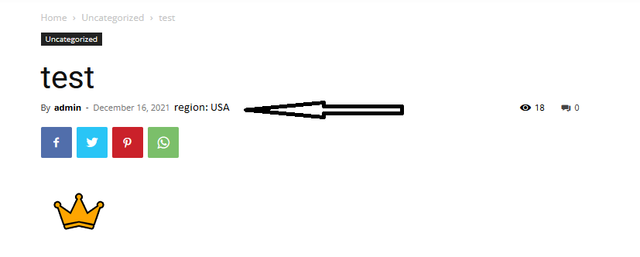
But I don’t understand your single.php, it’s coded totally different so what I need to add to show it properly on the front-end?
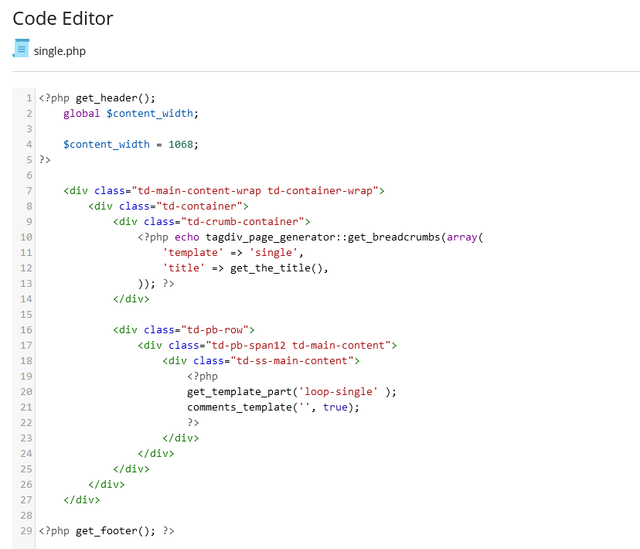
Cheers
 Lagun
Lagun Thank you, the images are already in WebP, as the screenshot is attached. The problem comes in that the images shown in the mega menu, that being inside the CSS is not able to be able to modify them. I have installed the ewww module, but it does not do it either. Moreover, when I installed the EWWW plugin, it caused me that the images were not displayed and appeared blank.
Please, could you help me?
Thank you very much
https://ibb.co/XSvj4xB
https://ibb.co/HPdKrz4
Example of an article image: https://subdominio.eldigitalsur.com/wp-content/webp-express/webp-images/uploads/2022/06/Maestros-canarias-160622.jpg.webp
-
This reply was modified 4 years by
Lagun.



