
- NewspapertagDiv AMP Plugin Tutorial
- ApiPractical example – How to add a new Block and Module
- NewspaperTrack Subscription Sources with Locker URL in Opt-In Builder
- NewspaperWP Rocket and Newspaper Theme: Optimization Guide
- NewspaperCredit System
- NewspaperIntroduction to CPT and ACF with Newspaper Theme
- NewspaperHow to edit modules for Flex Block X
- NewspaperHow to use the Posts List shortcode
- NewspaperUser review system
- NewspaperCustom Fields Support
- NewspaperHow to generate Facebook App ID
- NewspaperHow to insert a block inside the content of a post
- NewspaperModal Popup
- NewspaperPayPal Setup
- NewspaperLink Tracker
- NewspaperLockers
- NewspaperGeneral Options that May Interfere with the Newspaper Theme
- NewspaperAdd Cryptocurrency Price Ticker Widget
- NewspaperPosts Loop Element
- NewspaperThe Newspaper Mobile Theme: Introduction
 jeffmeyerdesigns@gmail.com
Here’s my site URL: https://www.kokandyproductions.com/hundred-days/
I would like to format the page to have several tabs within it, as shown here in this example: http://bohotheatre.com/shows/marie-christine/
Is that setup possible using tagdiv/the Newspaper theme?
 Bettina
 Hello @pratiek!
Unfortunately, for the moment the easiest way to achieve that, is to write there some CSS code.
For example, you will choose your class name ” borderclass ” for a column where you want to build the border radius, write it here: https://www.screencast.com/t/CAofvyHaNWdk, and then you can paste this code in Newspaper -> Theme panel -> Custom code -> Custom CSS:
.borderclass .td-element-style{border-radius: 15px!important;}
Thank you!
 Anamaria
 Hi,
Using our theme you can choose from 3 mobile versions
-> mobile responsive => https://www.screencast.com/t/oJ2ShOp47
-> mobile theme plugin => https://forum.tagdiv.com/the-mobile-theme/
-> mobile page => https://tagdiv.com/newspaper-10-3-7-update-brings-customizable-and-fast-mobile-pages/
Seems you have installed the Mobile theme plugin => https://www.screencast.com/t/KqhPuJV43yf. If you created the mobile pages with tagDiv Composer, then when you install the Mobile Theme plugin, your pages will be overwritten by the plugin (the mobile theme comes with its own templates for page, post, category, etc so your current templates from the desktop theme will get converted to the mobile theme layout, the page content is made without builders in mobile editor => https://www.screencast.com/t/xbgZG8kH also, the options that are provided to edit the mobile theme version are limited (this keeps the things simple)).
Better deactivate the plugin and see the results.
Also, if you create a mobile page, please check if is set correctly => https://tagdiv.com/newspaper-10-3-7-update-brings-customizable-and-fast-mobile-pages/
This is a video about Responsive Newspaper Theme, AMP & Mobile Theme, Mobile Pages & Templates -> https://www.youtube.com/watch?v=SpGkOnJeNZY
So, the mobile responsive is what you see then that you select the viewport on phone => https://www.screencast.com/t/matV17hH, so some settings may apply for each viewport(where is the border blue), and others are not(where the border is black).
The mobile page has the mobile templates from Cloud Library => https://www.screencast.com/t/YCcZ8rL8
Mobile responsive version of the theme and the mobile page editor can be edit with tagDiv Composer, the mobile theme plugin not.
For example, you can have the mobile theme plugin activate and use the mobile page/mobile responsive version for the homepage/pages, but for the categories pages/404 page you can’t use the mobile page/mobile responsive version if you have the mobile theme plugin activate.
Thank you!
 nycinsider
 Hi here is the preview header:
I don’t post live links to my site anywhere. the url is https://www.nycinsiderguide.com/
wp-admin/post.php?post_id=124761&td_action=tdc&tdbTemplateType=page
I want the search icon to the left of the social buttons. Also the font is showing different in the tagdiv editor than it does on the preview.
 Vlad S
 Hello !
That option makes the ads to appear only once after the number of paragraphs set. That will not repeat after each 5 paragraphs for example, It will be displayed once after X paragraphs.
Thank you !
Vlad S Hello !
Unfortunately we have only tested AMP Ads from adsense Can you let us know what type of ads are you running ? Maybe there is a step missing and we will try to reproduce it on our end.
Thank you !
Anamaria Hi,
Using our theme you can choose from 3 mobile versions
-> mobile responsive => https://www.screencast.com/t/oJ2ShOp47
-> mobile theme plugin => https://forum.tagdiv.com/the-mobile-theme/
-> mobile page => https://tagdiv.com/newspaper-10-3-7-update-brings-customizable-and-fast-mobile-pages/
This is a video about Responsive Newspaper Theme, AMP & Mobile Theme, Mobile Pages & Templates -> https://www.youtube.com/watch?v=SpGkOnJeNZY
So, the mobile responsive is what you see then that you select the viewport on phone => https://www.screencast.com/t/matV17hH, so some settings may apply for each viewport(where is the border blue), and others are not(where the border is black).
The mobile page has the mobile templates from Cloud Library => https://www.screencast.com/t/YCcZ8rL8
The mobile theme comes with its own templates for page, post, category, 404 etc so your current templates from the desktop theme will get converted to the mobile theme layout, the page content is made without builders in mobile editor => https://www.screencast.com/t/xbgZG8kH also, the options that are provided to edit the mobile theme version are limited (this keeps the things simple).
Mobile responsive version of the theme and the mobile page editor can be edit with tagDiv Composer, the mobile theme plugin not.
For example, you can have the mobile theme plugin activate and use the mobile page/mobile responsive version for the homepage/pages, but for the categories page/404 page you can’t use the mobile page/mobile responsive version if you have the mobile theme plugin activate.
Thank you!
Anamaria Hello,
Hello,
I am sorry. I’m not sure I fully understand what you are looking to achieve. Can you provide an example?
Thank you!
 harish.bhathee
Question 1. Why can’t I use Tagdiv composer to write/edit/design Blog Posts if I choose DEFAULT POST TYPE to “DEFAULT”.
Question 2. However, if I use a template from the cloud library for the post then it shows Edit with Tagdiv Composer.
So now, in this case, I am on my post and click on Edit With tagDiv Composer, then is it going to edit the template of the post itself. If I edit here Is it going to affect the template itself.
In this post link above, I have applied 2 categories and now it seems like they are one, not Two.
1.PHOTOGRAPHY > 2.REVIEWS. There is no difference between them. I want that them to look different.
for example:- Main category with Bold font then secondary with normal font. So that there is a difference in them visually.
Question 4:- Every time I refresh the Page, Then looks like the website first displays few pixels on the right side in the browser and then comes to its actual place means exactly in the center.
I tried this on Your official Demo and seems there is the same issue.
Question 5:- Currently I haven’t enabled the tagDiv Mobile Theme and AMP plugin.
So, What you recommend in 2021. Like is it mandatory to use these plugins.
What will be the difference and benefits if I use these plugins.
If all go well, I will be using Google Adsense in the future. So what would be your recommendations about these plugins.
Thank You in Advance!
 katsar0v
 An update on this issue would be really helpful, thank you! I have tried adding the code here:
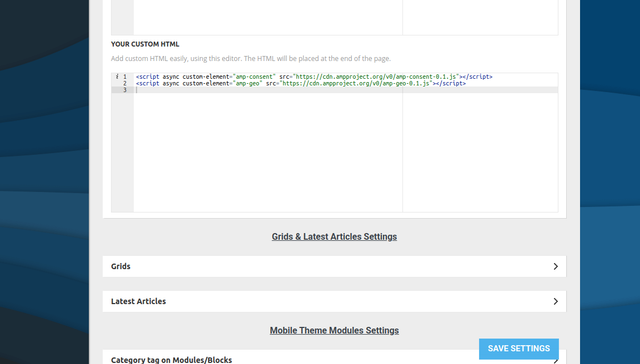
But it does not seem to show. I also tried adding it here (wp-content/plugins/td-composer/mobile/header-amp.php):
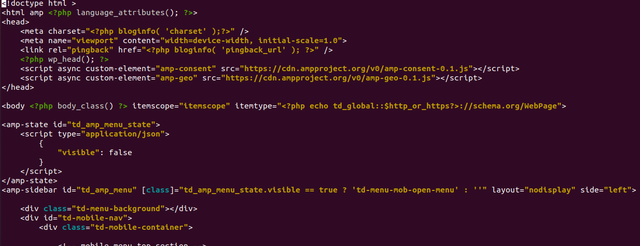
But it also does not work unfortunately. Any help would be appreciated!
katsar0v Hello @Bettina,
can you please recommend a solution for TCF/GDPR Consent on AMP/Mobile theme? This is really crucial and important, if nothing works with your theme you have to find a solution about this.
Greetings,
Kristiyan
 ivanvarela
Hi I got an email from google search console, asking me to fix these settings:
The following issues were found on your site:
Viewport not set
Clickable elements too close together
Text too small to read
I use Newspaper with Mobile Theme and AMP pluging in standart mode.
Where can I adjust those setting for all my posts
 Gatso
Gatso Hi there,
Sorry it works. I was not using column text & text with title elements. I was using inline text & page title. So column text & text with title elements are working.
Thank you
Gatso Hi there,
I did what you recommended. But still not working.
I used column text & title etc from TagDiv composer & inserted it to my page. Then it looks like this:
https://imgur.com/bzx2eAK
Then I clicked on edit page & then it is like this. Still Yaost not able to get data from the page. See below picture:
https://imgur.com/LmPx6iU
Please tell me how can I solve this problem.
Best regards,
 Breinblik
Hi! Sorry if this has been asked a dozen times before.. but how do i implement an shortcode from another plugin for example: Ninja forms?
I;m trying now to do it via TagDiv Composer, add a inline text block and add the shortcode, but it doesn’t render. Even when i save and close the TagDiv composer.
What should do?
 jlkinaz
URL: https://cullenh1.sg-host.com/
I am having troubles with the site holding its configuration after clearing cache. It appears to be reverting to a mobile theme on a desktop view. Here is an example of a page that is now displaying as a mobile page on a PC:
https://cullenh1.sg-host.com/information-center/.
This is happening randomly and it has impacted all screens. Any suggestions?
Temporary fix has been to open each page in TD Composer, save it, then clear cache. It seems to last an hour or so before it breaks.
The issue is readily visible when using a cellphone as well.
 edestudio
install the prebuilt default pro. When I enter an article, after the comments, if loading all the articles in that category. in your example this does not happen. That could be happening? Thank you
I don’t know how to send them a screenshot
 FFF
FFF hi Anamaria
thanks for following up.
Everything as mentioned in the guides, for the sake of testing I even just tried installing, as you suggested, all the unrelated plugins (newsletter, amp…totally unrelated to the home page issue) but no luck in any way.
This already cost me several wasted hours friday night when I quickly needed to build a site.
Unfortunately, I had to request a refund via themeforest, as the product was and still is unusable after a simple install and import of a demo.
I would appreciate if you could speed it up.
thanks
 raebild
I have a problem, hope you can solve for me. When opening my category page live, header, footer and content looks strange
See example: https://prnt.sc/11pijeb
Here is live link: https://www.altomautocamperen.dk/category/pladstips/
Header and footer should be same as: https://www.altomautocamperen.dk/
When opening the category template from Cloud templates – it looks perfect.
I assume its something i do wrong in the panel setup.
Is it possible you can have a look at it?
 Telebari
Dear all, i notice that if i load a background image via theme panel (-> theme background) it does not fit well.
On 1920×1080 is good but for example on 1366*768 and 1680*1050 the background is not responsive!
my site is https: // telebari . it
https://imgur.com/brgEwOx
https://imgur.com/pOh4Npb
my background https://imgur.com/5xZ6Va2
Bettina Hello!
In Composer you can save elements or rows as a reusable element. For example, select the row in the sticky header, right-click and save as element, and when you will want to add the element again, you can find it in the ADD list.
Hope that helps you!
Thank you!
 patrickschua
 Hi Vlad,
Thank you for your reply.
Here is a screenshot of my system status – https://imgur.com/74ifwhA
Also screenshot of my ads page in the system panel – https://imgur.com/zokhJmD and https://imgur.com/nimCGUD
It happens prominently in mobile pages like this – https://insideios.com/our-2021-ipad-pro-and-ipados-15-wish-list/?amp=1 The ads only gets inserted in the first paragraph and doesn’t increment to insert in every 4 or 5 paragraphs.
Thank you and hopping to hear from you soon.
 madamcza
Hi,
I am reading this tutorial https://forum.tagdiv.com/featured-posts-2/ and cannot find the default Featured post category in my categories list.
Should i just create this category by myself and functionality will work (for example I will be able to use flex box filtering method by featured posts?).
Anamaria Hello,
The Posts Loops settings are divided into 4 tabs: General, Layout, Style, and CSS. The Posts loop is a special block and doesn’t have filtering options.
The Posts Loop is automatically filtering the posts depending on the cloud template you set (for example on the category page there will be posted posts from that category).
Hope this helps you!
Thank you!
 sirms
sirms Hi, Thats great! Hope it will be added very soon! Take a look at this: http://gallery.smartadserver.com/smart-mobile-video-parallax-outstream-ad-format (this is exactly what i wanted)
I use cloudflare. I didnt see it in the guide, my mistake. EDIT: I had already disabled rocket loader, so the problem is still there. EDIT 2: i did a conflict test and the problem is slowed. Thank you
I have a question regarding registration and login for subscribers and users. How do I change the default login and registration?
For example: I want you to press on “log in” and it takes you to a new page with a login and registration page. Screenshot from standard: https://www.screencast.com/t/JqaVz22WQuC

