
- NewspapertagDiv AMP Plugin Tutorial
- ApiPractical example – How to add a new Block and Module
- NewspaperTrack Subscription Sources with Locker URL in Opt-In Builder
- NewspaperWP Rocket and Newspaper Theme: Optimization Guide
- NewspaperCredit System
- NewspaperIntroduction to CPT and ACF with Newspaper Theme
- NewspaperHow to edit modules for Flex Block X
- NewspaperHow to use the Posts List shortcode
- NewspaperUser review system
- NewspaperCustom Fields Support
- NewspaperHow to generate Facebook App ID
- NewspaperHow to insert a block inside the content of a post
- NewspaperModal Popup
- NewspaperPayPal Setup
- NewspaperLink Tracker
- NewspaperLockers
- NewspaperGeneral Options that May Interfere with the Newspaper Theme
- NewspaperAdd Cryptocurrency Price Ticker Widget
- NewspaperPosts Loop Element
- NewspaperThe Newspaper Mobile Theme: Introduction
 Alsok
AlsokI would like that when clicking on this link
https://yadi.sk/i/o2iwBW72_3BS3A
one specific templates is always will be used, for example, this
https://cloud.tagdiv.com/blog-page-restro/
I tried saving the “blog-page-restro” template to “Cloud Templates” but could not. Media files are saved, but not the template itself.
Thank you!
 Calin
Calin Hi,
Please make sure that all the settings are like in our requirements, please follow the guide carefully
– https://forum.tagdiv.com/requirements-for-newspaper/
and please increase all requirements that are lower, and follow all steps.
Please make sure that you do not have a plugin conflict with untested plugins, please deactivate all non theme/tested plugins, also if you are using child theme, clear all cache and try again.
Also make sure that you set the amp as in our documentation -> https://tagdiv.com/amp-newspaper-theme/
Let me know the results!
Thank you!
 Sunil Kumar
I want to ask you some questions related to amp, please answer all the questions in simple language and if possible, explain me with screenshot or video.
1. I am trying to put auto ads of adsense on amp posts, I am being given two codes from adsense, one of which I have to paste in the <head> of the amp theme and the other in <body>, So please tell me where to paste those codes? Because in the theme panel I have got the normal head and body section but the head and body section of the amp theme could not be found.
2. I want to put adsense amp ads unit in my amp post so how to implement? (Apart from auto ads) and inside the amp ads unit, two types of codes are also given, where are those codes to be paste?
3. How to install google analytics code for amp? Do I just have to paste the google analytics tracking id in the amp analytics option?
please answer all the questions in simple language and if possible, explain me with screenshot or video.
 PrakashGohel33
Hello team,
I want to uninstall this theme & want to reinstall fresh on on my website, so can you pls guide me to how to uninstall this theme completely from Website, Cpanel, htaccess, WP-confi.php from everywhere & etc.. .
Website link:- https://thethus.com/
 Karma
KarmaHello we have some serious issues going on with theme regarding featured images removed and this is happening again and again even after uploading again.
if we check the source through inspect element its showing (unknown) source in the image property of that post for example you can see here https://karmaimpact.com/music-modernization-act-brings-a-level-of-fairness-to-the-industry-but-theres-still-further-to-go/
please let us know asap why its happening that causing featured images removed.
Thanks
 showusyourwebsite
Good day, I cant activate AMP via Newspaper Plugins page. It responds with a blank page.
If i try install via WP plugins page it responds with Fatal error: Cannot redeclare is_amp_endpoint() (previously declared in /home.
How can i fix this?
 Derek Little
 Thanks Vlad. I took your advice. But now the added image only appears when logged into the site. See attachments
See site (bottom of page)
https://marketingresults.club/challenge-coin-awarded-for-campaign-that-helps-children-of-fallen-heroes/
 Thomas
 I just paste the code like on your capture but it breaks another time the site! 🙁
/**

 * tdStyleCustomizer.js is required

 */

if (TD_DEBUG_LIVE_THEME_STYLE) {

    add_action('wp_footer', 'td_theme_style_footer');

		// new live theme demos

	    function td_theme_style_footer() {

		    ?>

            DEMOS

            BUY

		    <?php

	    }
}
add_action( 'after_setup_theme', 'yourtheme_setup' );
function yourtheme_setup() {
add_theme_support( 'wc-product-gallery-zoom' );
add_theme_support( 'wc-product-gallery-lightbox' );
add_theme_support( 'wc-product-gallery-slider' );
}
//td_demo_state::update_state("podcasts", 'full');
 Mara21
Good morning. I bought the theme 6 months ago, I didn’t know that to get support (which I don’t know where to find it) and updates you had to pay every 6 months. If I do not renew I no longer have updates to the theme? Because those I need … while the support a lot less .. since today I have never been able to contact you nor have answers … for example:
the instagram gallery does not work anymore ie it no longer appears (from a month or so) while the linkedin social under the posts is not shareable while the other social networks do (I have left the correct link or id out of all the social networks)
 dimitrisv
  Calin
Calin Hello,
Please make sure that you do not have a plugin conflict with untested plugins, please deactivate all non theme/tested plugins, also if you are using child theme, clear all cache and try again.
Please make sure that you are using the amp and mobile theme
Thank you!
 divaspathak
I have newspaper Mobile site enabled and an amp version, but sometimes when i open my site from mobile device, i see the site breaking, it shows something like this. https://ibb.co/KqYPw7z
I don’t know what again and again causes this.
 jamiesharpe
Hello – several of my posts are showing up without the ability to make comments. I’ve gone to the theme panel – template settings – page template and ensured that disable comments on pages was not checked. I’ve also gone to the settings of the individual posts and ensured discussion – allow comments is checked. Here’s an example of a post where comments are not showing up https://www.pinkluggageabroad.com/maldives-luxury/ and here is one where they are showing up https://www.pinkluggageabroad.com/fez-to-chefchaouen/. Could you let me know what you think?
Also follow up question on the post where comments are showing up (https://www.pinkluggageabroad.com/fez-to-chefchaouen/), I’d like to customize the Leave a Reply section, where the visitor just needs to leave their name and email, not website and also remove the checked boxes to Save name / notify of follow up comments. Where do I do that?
Thank you
dimitrisvI managed to hide the image, yet I would like to also claim the space of the image for the title of the search results.
I did try
.td-module-thumb{
display: none;
width:1px;
}
.entry-thumb{
display:none;
width:0px;
height:0px;
}
But to no avail.
Also the php that creates this is fixed only for the mobile version (see header-amp.php). It appears that for the pc browser version this is customisable but I cannot find where it is in the panel. Thank you!
 pickupacrayon
Hi, can anyone give me the code to remove the latest button (for example please see webpage: http://pickupacrayon.com/category/series/)
 sejpost
I have a 728×90 header banner and a 300×90 mobile version at the top of my site at http://www.coronadotimes.com. However, the mobile banner does not consistently show on a phone…why is that?
Here is the code for the header banner:
<div class="td-all-devices SP_Full"><a rel="nofollow" target="_blank" href="https://www.coronadoshoresco.com/?utm_source=coronadotimes&utm_medium=bn&utm_campaign=generic&utm_content=header_bn"><img src="/wp-content/uploads/2019/10/Header-Shores-v2.jpg" /></a></div>
<div class="td-all-devices SP_Mobile"><a rel="nofollow" target="_blank" href="https://www.coronadoshoresco.com/?utm_source=coronadotimes&utm_medium=bn&utm_campaign=generic&utm_content=header_mobile_bn"><img src="/wp-content/uploads/2019/11/Shores-Mobile-Header.jpg" /></a>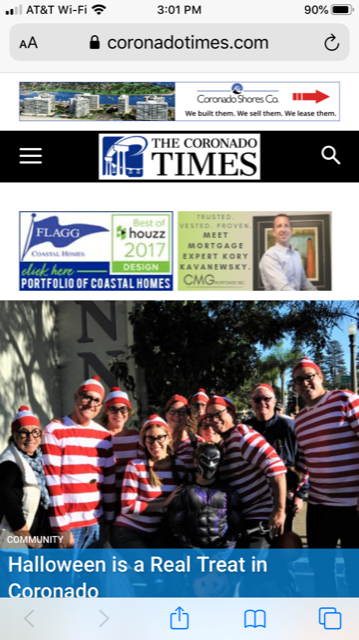
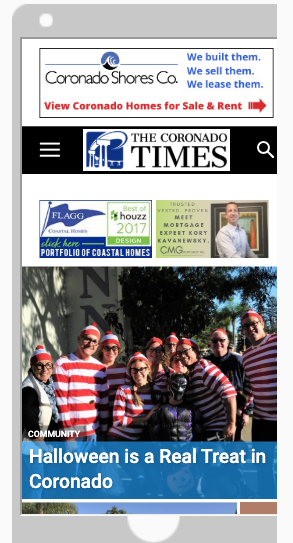
Any advice on how to make sure the mobile banner shows on phones, etc.?
Code:
<div class=”td-all-devices SP_Full”> </div>
<div class=”td-all-devices SP_Mobile”>
Thanks!
 CatchThatSports
i am trying to place an image in the background of a row and its always blurry, cover & contain. The picture is a good resolution 1920×1080. Any solution to this?
 Maggo
Maggo As far as I know I don’t use any cache plugins. The only installed plugins I have are:
AMP (deactivated)
tagDiv Cloud Library
tagDiv Composer
tagDiv Mobile Theme
tagDiv Newsletter
tagDiv Social Counter
Calin Hi,
In order to do that you need to use the revolution Slider, here you can find some documentation for this -> https://www.themepunch.com/revslider-doc/add-wp-standard-gallery/#default
Here is an example -> https://www.screencast.com/t/gz5L6Gjo -> https://www.screencast.com/t/lULmo9IPF -> https://www.screencast.com/t/OP0KGwRZp -> https://www.screencast.com/t/8xzRSWT50p -> https://www.screencast.com/t/nAgnPJdY -> https://www.screencast.com/t/aQvuPQicrF
How to install Revolution Slider v5 -> https://forum.tagdiv.com/how-to-install-revolution-slider-v5/
Import Revolution Sliders on demos -> https://forum.tagdiv.com/import-revolution-sliders-on-demos/
Hope this will help you!
Thank you.
Calin Hi,
If you are referring to these ads then, please notice that this is and auto ad -> http://prntscr.com/pr3dqe so please check all theme sections for ads also if you are using some plugins for amp is possible to be add by these plugins.
Thank you!
Calin Hi,
You can have a different menu only if you are using the mobile theme plugin also using only the amp plugin with the option “AMP” you’ll use the responsive version on mobile and the mobile theme template only for amp, so in order to have a different menu you’ll need to yous the option “mobile + amp”.
Thank you!
 LG
LGHi,
TagDiv Composer is extremely slow to work with, even selecting elements on the page can take several seconds to populate content in the side panel. Sometimes the content won’t show until I click something else, wait, then click back on the item I want to edit. Even then, I might have to do that several times and wait 10-20s each time to see if anything happens. When I make changes, they also take a long time to show, alternatively the element lightens and hangs without updating the page. Sometimes the changes will save, sometimes it won’t.
When saving, occasionally the page saves quickly, as you’d expect, but the majority of the time it hangs, fails to save or saves in the background, while the Composer window hangs and needs to be reloaded. A 5 minute job can easily take 20+mins – very annoying and it gets progressively worse as the day goes on.
The issue is exactly the same on live as well as on my local server. As far as I know, everything is setup as per your requirements. At first I thought it was because I hadn’t activated WP Super Cache, which I was going to do once the site was complete, but it hasn’t made any difference.
Can you help?
 Simion C.
 Hi,
The website uses the Newspaper theme, that is correct. However most of the elements in that page are custom made, they aren’t available by default in the theme. From what I can tell it’s not using Woocommerce.
You can create a shop with the Woocommerce plugin, display products and sell them. The theme is compatible with the plugin, but doesn’t have many features created specially for it, like for example dedicated woocommerce templates or design. Those will have to be custom made.
Thanks
 chilliAdmin
Dear support,
I would like to use a different mobile menu than the main menu, but I would not like to use the AMP-plugin, since it messes up the design. When “AMP” only is chosen, the mobile menu reverts to the main menu, not the mobile menu. How do I proceed? Also, how do I get the action buttons to display (some how) in mobile view. The action buttons in the header are visible in desktop mode.
Kind regards,
Peter
 dreammy
I don’t understand because on my site in my articles when I put an image it automatically takes the width of the page and I just want it to display normally without taking the full width of the page. How to do this?
For example > http://www.lebaladin.fr/les-spectacles-et-activites-au-zooparc-beauval/

