
- NewspapertagDiv AMP Plugin Tutorial
- ApiPractical example – How to add a new Block and Module
- NewspaperTrack Subscription Sources with Locker URL in Opt-In Builder
- NewspaperWP Rocket and Newspaper Theme: Optimization Guide
- NewspaperCredit System
- NewspaperIntroduction to CPT and ACF with Newspaper Theme
- NewspaperHow to edit modules for Flex Block X
- NewspaperHow to use the Posts List shortcode
- NewspaperUser review system
- NewspaperCustom Fields Support
- NewspaperHow to generate Facebook App ID
- NewspaperHow to insert a block inside the content of a post
- NewspaperModal Popup
- NewspaperPayPal Setup
- NewspaperLink Tracker
- NewspaperLockers
- NewspaperGeneral Options that May Interfere with the Newspaper Theme
- NewspaperAdd Cryptocurrency Price Ticker Widget
- NewspaperPosts Loop Element
- NewspaperThe Newspaper Mobile Theme: Introduction
 Simion C.
 You could use a flex block instead, like flex block 1. This can be customized to look in many ways. It has an option for the module padding, image customization options, show/hide post meta and many styling options.
So you can achieve different results with the same block, for example here it looks like block 5 – http://prntscr.com/me3b21
And here it looks in a different way – http://prntscr.com/me3cim
Here are some block designs available through the cloud library plugin, based on flex blocks, you can preview and even edit them to see how they are made
– https://affiliate.tagdiv.com/#/load/Blocks
Let me know if you have more questions.
 DADDY
DADDYI would like to change “Hollywood” & “Music” title from front page body (not from header). I’ve changed Post -> Catagories, but it won’t change in front body page.
 McDohl
 No this issue is unresolved yet..
I have resolved the duplicate title tag with this code provided by tagdiv team:
if (!in_the_loop() && (is_page_template('page-pagebuilder-latest.php') || $is_smart_list || is_page() ) ) {
But my site still have duplicate meta description because %%page%% yoast code is not working on newspaper theme only in homepage.
My site ranking now is down because of this issue.. 🙁
 gmtimothy
We have had a website user say that our website that is using newsmag theme is pushing browser notifications of the secular type and after some research we have found this page – https://blog.sucuri.net/2018/08/massive-wordpress-redirect-campaign-targets-vulnerable-tagdiv-themes-and-ultimate-member-plugins.html
we would like to completely disable any push notifications that the theme is serving how do we do this? we have done a malware scan and nothing has been returned….so we are reaching out to you to help us solve this issue.
we are using version 4.5
 maik_789
how to place automatic Adsense ads for AMP in AMP tagDiv plugin
maik_789The tagFDiv AMP plugin of yours does not read the index made by the Easy Table of Contents plugin, and also your AMP tagDiv plugin does not read the adsense codes by HTML block in the middle of the AMP post.
 Calin
Calin Hi,
Unfortunately I do not quite understand for what elements on homepage you want to set the padding, if you want to set it for content here is an example with custom css -> https://www.screencast.com/t/02fcnwjFX
.home .td-main-content-wrap {

     padding-top: 148px!important;

}
And here is an example using tagDiv Composer -> https://www.screencast.com/t/XSsq3SNSw5
Thank you for your understanding.
 Fausto
Hello!
I don’t know if this an expected behavior or a possible bug in Visual Composer block settings.
Under Filter tab, I selected category “movies” from “Category filter” dropdown.
Then I set filter type by categories and selected some categories IDs for the ajax dropdown, like “news” and “reviews”.
So I got a stream of my latest “movie” posts only, as expected. However, clicking in any of the ajax dropdown filters does not return the double filtering.
For example, when I clicked “news”, it returned ALL posts under “news” category, even the ones that aren’t on “movies” category, like posts categorized as “news” and “tv shows”.
So, what I’m trying to do is set a block filtered by one category (movies) and then filter it again with the ajax dropdown filters for another categories (news, reviews…), showing only posts marked in those two categories (movies AND news, movies AND reviews…) – is it possible?
Calin Hi,
In order to do that you need to use the revolution Slider, here you can find some documentation for this -> https://www.themepunch.com/revslider-doc/add-wp-standard-gallery/#default
Here is an example -> https://www.screencast.com/t/gz5L6Gjo -> https://www.screencast.com/t/lULmo9IPF -> https://www.screencast.com/t/OP0KGwRZp -> https://www.screencast.com/t/8xzRSWT50p -> https://www.screencast.com/t/nAgnPJdY -> https://www.screencast.com/t/aQvuPQicrF
Hope this will help you!
Thank you.
 robinspaul
 Hi,
Thank you so much for your response.
I like to edit the code. Could you please let me know which file I need to edit and some sample code?
Many thanks,
Simion C. I tried both PHP and shortcode implementation for that plugin, the ratings appear but the design is broken in both cases, example for post template 2
– http://prntscr.com/mdnkbg
I then tried on a default WordPress theme, they look alright there (by the way the single template in a default wordpress theme has the same error you mention http://prntscr.com/mdnrna this may not be an error)
– http://prntscr.com/mdnry8
Seems the theme is applying some design to the post ratings, so it will need some CSS to make it look better – http://prntscr.com/mdnugv
This is the code for it
.td-post-content .post-ratings img {

display: inline;

}

.td-post-content .post-ratings  img {

margin-bottom: 0;

}
Simion C. Hi,
@geor_ro If the translation plugin has an option to translate menus that is possible. For example with WPML – https://wpml.org/documentation/getting-started-guide/translating-menus/
This plugin has an option to translate the menu, so when the language is switched a different menu will be displayed. You could check in the documentation of the plugin you are using for translation.
Thanks
Calin Hi believer,
You need to use the td mobile plugin that come with the theme version you are using, for example if you have Newspaper v9.1 the only mobile theme plugin that will work for you will be the one from that package.
So if you want you can update the them to the last version 9.2.2 and use the mobile theme from the package that you have download or you check what version of newspaper you have and you send us an email at contact@tagdiv.com and ask for mobile theme for your version of theme.
-> https://www.screencast.com/t/a3mbiSr8B7m
Thanks.
 Edward
 @WebMasterhi, also read here: https://forum.tagdiv.com/post-formats-for-tinymce/
Quotes – This option lets you set up your quotes with style. There are 8 types of formatting options to make your quotes eye-catching.
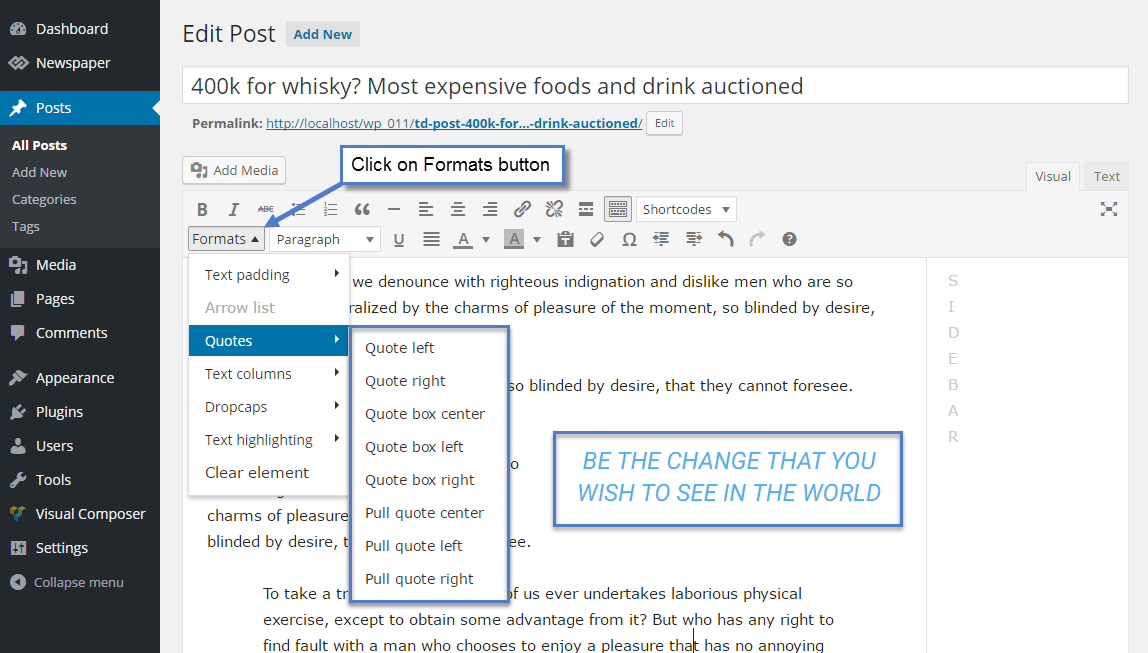
Live examples: https://demo.tagdiv.com/newspaper/blockquotes-pullquotes/
Simion C. Hi,
You mean the demo content when you install the demo with content? Start from the top for example, with the header. Set your own log and menu, configure the header with your own data. The homepage which is provided when the demo is installed with content can be edited with the tagDiv composer, each element in it can be customized
– https://forum.tagdiv.com/tagdiv-composer-tutorial/
– https://forum.tagdiv.com/block-settings-guide/
Then move on the footer, replace the demo data with your own there as well. Here is the theme documentation – https://forum.tagdiv.com/newspaper-theme-documentation/
If you need help or have more questions, please let me know. Provide as many details about it as possible, screenshots are also helpful or a link to the website.
Thanks
Simion C. Hi,
Something like that could be done with CSS, for example – http://prntscr.com/mdlnrw
Enter the code in the Advanced CSS section of the theme panel, in the desktop field.
.td-header-style-7 .td-header-sp-logo {

margin-bottom: 60px;

}

.td-header-style-7 .td-header-sp-rec {

margin-top: -109px;

}
For the mobile case something like this – http://prntscr.com/mdlpgb
This time enter the code in the phones section of the Advanced CSS section.
.td-header-style-7 .td-header-menu-wrap {

margin-top: 60px!important;

}

.td-header-style-7 .td-header-sp-rec .td-header-ad-wrap {

margin-top: -114px!important;

}
Calin Hi,
Like I said, you can use the shortcodes but you need to set theme in specific places, for example in posts you need to set it in code editor
-> https://www.screencast.com/t/9RB6KO0W
-> https://www.screencast.com/t/kcxCGRWFar
-> https://www.screencast.com/t/WSahvrjKzI
In pages/templates you need to set the shortcode in column text
-> https://www.screencast.com/t/10xbwg3WOM
-> https://www.screencast.com/t/wH4kC1KW7yA
-> https://www.screencast.com/t/G7ylEaZtz
So in order to use the shortcode from you link you need to download that plugin and install it ->https://wordpress.org/plugins/geodirectory/ after you install the plugin you can set the shortoceds and those will appear in your content.
Hope that this example using shortcode for crypto widgets will hell you better!
Thank you!
 spu
spu Some conflict between jetpack and tagdiv amp plugin, we removed jetpack and it resolved the issue.
 rockchucksummit
Would be nice to have native support to have one, the other or both. I tried the CSS hack mentioned in some forum posts and it was just that, a hack that depending on screen or post layout the formatting was sloppy.
rockchucksummit Says installed & Active. Will keep poking around. Would be nice if there was an easier way to debug or get info from this 🙂 I’m sure ya’ll get tons of requests for help with the importance of page speed these days!
 cgranier
I’m running into this error code when trying to save a post (seems to happen only after the first save). Makes editing a post impossible. I’m running on WP-Engine, latest WP version.
Any ideas? (other than linking to the requirements page). I see there are other wp-engine clients out here.
Thanks!
[Mon Jan 28 15:10:43.047759 2019] [php7:error] [pid 10115] [client 73.124.243.112:55170] PHP Fatal error: Uncaught Error: Call to undefined function media_sideload_image() in /nas/content/live/rctvradar/wp-content/themes/Newspaper/includes/wp_booster/td_video_support.php:196\nStack trace:\n#0 [internal function]: td_video_support::on_save_post_get_video_thumb(137)\n#1 /nas/content/live/rctvradar/wp-includes/class-wp-hook.php(288): call_user_func_array(Array, Array)\n#2 /nas/content/live/rctvradar/wp-includes/class-wp-hook.php(310): WP_Hook->apply_filters(NULL, Array)\n#3 /nas/content/live/rctvradar/wp-includes/plugin.php(453): WP_Hook->do_action(Array)\n#4 /nas/content/live/rctvradar/wp-includes/post.php(3747): do_action(‘save_post’, 137, Object(WP_Post), true)\n#5 /nas/content/live/rctvradar/wp-includes/post.php(3820): wp_insert_post(Array, true)\n#6 /nas/content/live/rctvradar/wp-includes/rest-api/endpoints/class-wp-rest-posts-controller.php(681): wp_update_post(Array, true)\n#7 [internal function]: WP_REST_Posts_Controller->update_item(Object(WP_REST_Request))\n#8 /nas/content/live/rctvradar/wp-includes/rest-api/class-w in /nas/content/live/rctvradar/wp-content/themes/Newspaper/includes/wp_booster/td_video_support.php on line 196, referer: https://[redacted]/wp-admin/post.php?post=137&action=edit
robinspaulI want to have different header images on different pages and also the title in the header also need to be changed.
For example on Page A, the header image will be of CAR and title will be CAR.
On page B, the header image will be of BUS and the title will be BUS.
On page C, the header image will be Flower and the title of the page will be Flower.
How do I create separate image and title for each page?
 nicnacweb
Hi,
I have this error and really i don’t have a clue
Thank you
wp_booster error:
td_api_base::mark_used_on_page : a component with the ID: tdm_sub_footer_template_1 is not set.
/home/especialsinfocamp/www/wp-content/themes/Newspaper/includes/wp_booster/td_api.php
Display backtrace
wp_booster error:
td_api_base::get_key : a component with the ID: tdm_sub_footer_template_1 Key: file is not set.
/home/especialsinfocamp/www/wp-content/themes/Newspaper/includes/wp_booster/td_api.php
Display backtrace
wp_booster error:
The path of the template id: tdm_sub_footer_template_1 not found.
/home/especialsinfocamp/www/wp-content/themes/Newspaper/includes/wp_booster/td_api.php
Display backtrace
 Hopp3d
 Some progress… I installed a plugin ‘classic editor’ and this restored all original editing options.
However, with the visual editor, my post is not retaining the same format from edit view to actual page view. One example is a smaller image lined up on the left with paragraph in line with the top image border in editing view, whereas the page view (once published) shows a much larger image with the paragraph cramped into 2-3 words on the right before going to the next line.
Hopp3d Yes, I’m familiar with this and a caption has been in place. However, when selecting media & text, editing & publishing, the caption is not included. In addition to the caption missing, the media & text layout does not allow me to perfectly line up bits of the article side by side with the image, like what’s shown in the provided example in my op.
Can you advise exactly how the referred image/article was formatted in my first post example? I’m thinking there are text edits/formats in use that aren’t available in my text editor toolbar. I only have options from the ‘bold’ icon to the solid chain ‘hyperlink’ icon.
