
- NewspaperHow to Use tagDiv Cloud Library
- NewspaperCloud Library Templates
- NewspaperCloud Library – Category Templates
- NewspaperDesign your Post Pages using the Cloud Library Templates
- NewspapertagDiv Cloud Library Plugin
- NewspaperCloudflare (CDN)
- NewspaperSingle External Shortcode and External Shortcode
- NewspaperSearch setup for custom post type
- NewspapertagDiv Composer – Website Manager
- NewspaperFlex Block Builder and Flex Loop Builder
- NewspaperModules Builder in Newspaper Theme
- NewspaperIntroduction to CPT and ACF with Newspaper Theme
- NewspaperCreate a frontend submission form
- NewspaperFilters and sorting for taxonomies
- NewspaperUser review system
- NewspaperHow to use the Google Maps API
- NewspaperWooCommerce: Happy “Add to Favorites!”
- NewspaperHow to insert a block inside the content of a post
- NewspaperHow to setup the Contact Page
- NewspaperPosts Loop Element
 Calin
Calin Hi,
On homepage I see that the core vitals are pass https://i.imgur.com/anuRdx9.png
Now what I can suggest is to make sure that you use a lazy-loading for images -> https://i.imgur.com/QdOfpbN.png also reducing unused JavaScript will help, for this I think that this guide can help you https://www.wordstream.com/blog/ws/2021/04/02/improve-core-web-vitals
Also those are all the js file that contain code for menu and mobile menu:
-> wp-content/plugins/td-cloud-library/assets/js/js_files_for_front.min.js
-> wp-content/plugins/td-composer/legacy/Newspaper/js/tagdiv_theme.min.js
-> wp-content/plugins/td-composer/mobile/js/tagdiv_theme.min.js
-> wp-content/themes/Newspaper/includes/js/tagdiv-theme.min.js
-> wp-content/themes/Newspaper/includes/js/tagdiv-theme.js
Thank you!
 cpsharp
 Hey guys, I have several thousand posts that utilize the co-author Plus plug-in already that you have already documented working with which is why I used the Newspaper theme in our new build. I’m using the default page, not the cloud template, and yet I still have no ability to see my co-author Plus authors attached to the posts. Any ideas?
 kjervert
 Hi there,
The tagline is default in the Newspaper theme. I cannot access either of the ways you set out here unfortunately.
It seems to be neither a cloud template or a standard template. Under template it says “No template” and there are no other options in that dropdown.
When I try to edit in tagDvi, there is no way to select the header to edit. When I go to the Theme Panel, there is no section for “Header” under Theme Fonts…
Karin
 Anamaria
 Hello,
Please let me know what template you used for the header and footer, if you have a standard template, then you need to make the changes from Theme Panel -> Header or Footer => https://www.screencast.com/t/YCsW04zW, if you have a header/footer template from Cloud Library, and you can customize it with tagDiv Composer => https://www.youtube.com/watch?v=HXQQygkCCJo -> https://www.youtube.com/watch?v=nE51MfLV7hE
Also, for the change the menu please check these articles https://forum.tagdiv.com/mega-menu/
https://forum.tagdiv.com/main-menu/
Thank you!
Calin Hi testszerviz, I think that I know what it is the problem. You have installed the Magazine PRO demo and this has set on all posts loops an offset, on category, tags, search cloud templates. To remove it, please edit it with tagDiv Composer, click on post loop element and remove the offset number -> https://i.imgur.com/ZuMU9On.png -> https://i.imgur.com/DmMXQBa.png -> https://i.imgur.com/Dccumaa.png
I hope this will help you!
Calin Hi,
Is you are using a single post template from tagDiv Cloud Library, then you can achieve that by editing the single post template with tagDiv Composer and adding a test/button/image with a link to Google News.
-> https://i.imgur.com/iJyO1KX.png -> https://i.imgur.com/sasNW0N.png
I hope this will help you!
Anamaria Hello,
Please make sure you have the required plugins activated like tagDiv Composer, tagDiv Cloud Library and tagDiv Newsletter => https://i.imgur.com/PXQvwtW.png
Thank you!
 Vlad S
 Hello!
I’m not sure what do you mean. This is basic wordpress, they can see their information in Dashboard. You can also create Author templates as you can see here: https://forum.tagdiv.com/cloud-library-templates/
Thank you!
 Caiaphas
I have a multi-vendor Woo-Commerce website, https://newmexiconomad.com/mercado/
I used one of the Cloud templates for products. The template looks great and works fine on a desktop, but it is generating a critical error on mobile devices and the product photo won’t load. The button still works in terms of redirecting to the affiliate link. I went back to the default product template for now. No issues (other than general aesthetic). However, if anyone has run into this issue and figured out a workaround solution, please let me know. I would prefer to design a product template that matches the branding and has the right header.
 phongvt
Hi there, I can’t not import any Cloud Template into ARTIRST PRO theme.
After I choose an element to import, then click “Import Section”, there’s nothing. I think something is overlap the “Are you sure you want to import this template?” dialog.
Just the homepage has that issue, others page do not.
Please check this out.
Thank you!
 newspaper-user-2
 I had this issue before, I just clear all the cache through wp super chache, cloudflare and siteground. And issues is fixed.
 shpetimH
Hi all,
I have a WP 5.8 and Newspaper 11.2 version (https://observeri.com/).
Everything is working perfectly fine but I have a complex scenario and I ran into some issues which I will try to explain.
– I have few categories, each of them have different headers and footer (body almost the same to all)
– For all categories I also have different mobile versions (those are working as they should)
– Every Single Posts under certain category have also different layout (those are working fine as well)
– When I try to create mobile templates for Single Posts for different Categories, those are getting overwritten 🙁
For example:
– Category X desktop / mobile is fine
– Single Post under Category X uses header and footer as Category X and both desktop / mobile templates are fine
– When I try to design Single Post Mobile Templates for Category Y, all other Single Posts templates are getting overwritten.
Everything is set to use specific templates to “Theme Panel > Categories” and Desktop version is working perfectly, this is happening only on Mobile Templates.
PS: Every mobile template I create from Template itself using “Create Mobile Template”, and on “Cloud Templates” they seem to be correctly linked for example 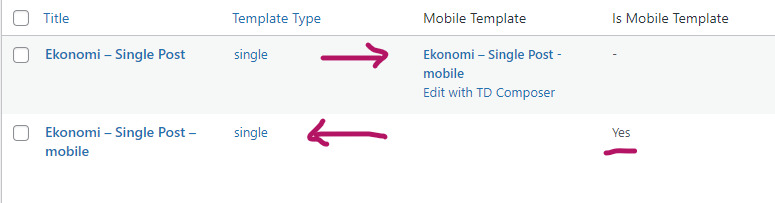
Everytime I create a new single post mobile templates all single posts will start using the latest one!
I would really appreciate any help.
Thanks and regards.
 BarbaraZ
Dear Support,
How to avoid the situation that the cloud templates come up in google search instead of the actual pages of the blog created with the Newspaper Theme: http://www.detektywsmaku.pl.
The first search result is this:
Home Mob – Detektyw Smakuhttps://detektywsmaku.pl › home-mob
And it takes you to the template of the mobile version on normal computer…
All the best,
Barbara
Vlad S Hello!
Please make sure that your CDN is set up properly. take a look at our guide here:https://forum.tagdiv.com/cloudflare-cdn/
You can try to turn it of and test again, to make sure that the CDN issue is out of the discussion first.
Thank you!
Vlad S Hello!
You should be able to change that from here: wp-content/plugins/td-cloud-library/assets/js/js_files_vue_theme_panel.min.js As you can see here is the line: https://i.imgur.com/ynTrV97.png
I hope this was helpful1
Thank you!
 Bill Fleak
We are redeveloping our site using the Newspaper theme with cloud templates. We would like to display the text that is typed in our excerpt fields in the post to display under our post tiles like our current site. I do not see where I would add this in the cloud template. Please advise. See video if needed. Thank you for all your assistance.
 maquinero
Hello,
Site is: https://pre.muchacalidad.com
I have downloaded and customized a simple post template from the cloud library. Then i had to create a mobile template so it shows up on mobiles.
The thing is, when i go to site wide post seting and aply the template, on mobile it shows a direfent header from the original.
My header is a global header both desktop and mobile an int works great but when i apply the single post emplate the header on the post in diferent.
Whant is happening?
Thanks!
 mirko
mirko I should have fixed it, i create a cloud category template)
Vlad S Hello!
You can create or duplicate more templates as you can see you can choose at the moment from Cloud library templates: https://www.screencast.com/t/PI4EetuR
Thank you!
 srampia
 I could solve the problem with the divider, by installing a new single post template from cloud gallery.
Now I face a new problem. When I open one post, other 4 or 5 posts are also shown under that post. For example – https://thecatholic.in/angel-of-god/
Thanks
 steinseba
Warning: Undefined array key “date” in /home/platne/serwer21886/public_html/gminakornik.pl/wp-content/plugins/td-cloud-library/shortcodes/single/tdb_single_date.php on line 223
this error occurs when adding a page or generating a preview. After updating, it takes a long time to preview the post.
 Bettina
 Hello!
It seems you use a cloud template, so you can change the font color by editing the homepage with Tagdiv Composer. For example: https://www.screencast.com/t/QZqp5vN3h3N ; https://forum.tagdiv.com/mega-menu/
Thank you!
Bettina Hello!
Unfortunately, you can not upload a different size image to use for each block and you can not alter the size of the displayed image on default blocks.
If you use a cloud/PRO template, then you will have some settings to adjust the width and height for the size of the displayed image.
Thank you!
 tamsin_lechner
 I have been using standard footer template with the Instagram ID in Footer set-up correctly and the Instagram feed was fine (originally a Personal account). As stated previously the feed (in text form) is still displaying/linking but not the images.
I have now tried “Footer – Voice Report” template from Cloud Library and set-up to my Instagram Business account. And EXACTLY the same thing is happening – feed text but no images. The Instagram ID is correct and the access tokens are current etc.
Any other suggestions?
Re legacy widgets and the new block editor error messages. The problem has been solved by installing “Classic Widgets Plugin” from WP.
 msakande
 Hi Anamaria,
thanks for your assistance.
When I refresh a lot of time, I can get the cloud templates.
But sometime the problem happen.
I have another problem with tag composer
As you can see in this picture
https://iev.wju.mybluehost.me/wp-content/uploads/2021/08/tag-composer-Error.png
I cannot Edit with TagDiv Composer
Can you advise please?



