
- NewspapertagDiv Composer – Website Manager
- NewspaperWhen tagDiv Composer is Not Working
- NewsmagtagDiv Composer Tutorial
- TutorialsFrom WPBakery to tagDiv Composer
- NewspapertagDiv Composer Tutorial
- NewsmagHow to use the Visual Composer plugin
- NewspaperScroll Animation
- NewspaperSingle External Shortcode and External Shortcode
- NewspaperCredit System
- NewspaperBookmark – Save For Later
- NewspaperFlex Block Builder and Flex Loop Builder
- NewspaperModules Builder in Newspaper Theme
- NewspaperIntroduction to CPT and ACF with Newspaper Theme
- NewspaperCreate a frontend submission form
- NewspaperHow to Use the Tabbed Content shortcode
- NewspaperCreate a form contact page
- NewspaperFilters and sorting for taxonomies
- NewspaperUser review system
- NewspaperCustom Fields Support
- NewspaperWooCommerce: Happy “Add to Favorites!”
 Simion C.
 Hi,
By default a post can have one author, this could be extended with plugin like the one you mention. But it will require modifications to the theme files in order to make the plugin work with theme. There are some topics you can follow
– https://forum.tagdiv.com/topic/multiple-authors-co-authors-on-articles-author-links-and-author-boxes/
– https://forum.tagdiv.com/topic/co-authors-plugin-code/
As a note, if you updated the theme to 4.8, the post template files are now in the tagDiv composer plugin – http://prntscr.com/njsluq
From what I know there are plans to make this implementation more easier to do, there will be a guide created by us in the future. Can’t say when exactly however.
Thanks
 nodali
Editing text content in TagDiv Composer is loading forever.
Could you please provide me the information why is this happened?
 alfredmoraes
Hi, the tagvidcomposer on my theme is doenst work well,
Dont letme delete any element, just keep showing the dialogue are you sure you want to delete this?
SO i cant create template for posts or nothing, if i want to delette something i need to go to bareky
vizconde.com
 phess31
Hello –
The background image and filter categories on this page http://www.bio-sourced.com/tagdiv-composer-draft/ are loading after the rest of the content. I see similar issues have been raised with other sites, and the proposed solution has been to add this code in the theme panel analytics js code section:
<style>.td-element-style {
opacity: 1!important;
transition: none!important;
}</style>
But this is not working for me. Is there anything else I should try?
Thank you.
PH
 chakiss
Hi, I wanted to know how to create a global header that can be used all across the WordPress website with the tagDiv Composer.
I need to create a customized header.
Thank you!
 Spinback
I keep getting this error on larger images when tagdiv composer is enabled. My memory limit is set to 256mb/request and everything in the system status looks fine:
php.ini configuration
Server software i LiteSpeed
PHP Version i 7.1.28
post_max_size i 500M – You cannot upload images, themes and plugins that have a size bigger than this value. To see how you can change this please check our guide here.
max_execution_time 600
max_input_vars 8000
SUHOSIN installed false
PHP extensions
mbstring available
GD library available
WordPress and plugins
WP version i 5.1.1
WP multisite enabled i No
WP Language i en_GB
WP Memory Limit 256 MB/request
WP_DEBUG False
as soon as I disable tagdiv composer all pictures upload fine. Is there anything I can do?
 tausifkhan
 Hi there
I have checked cloud library there is no 2 sidebar template,
and single post the composer does not show http://prntscr.com/njndkk
 getfreshtoast
 Hi Simion,
Thanks for you response. I tried changing the post template to the default and was successfully able to display and click the hyperlink. The template that gives us this issue is a custom template that we created. I tried resetting the post to that template however the error persisted.
We haven’t altered CSS outside of the options within the TagDiv Composer but we do have a custom solution in place for ad placements. Could this also have something to do with the problem?
Thanks again for your help.
Matthew Blockus
Systems Administrator
The Fresh Toast
 bricolage-facile
 Hi,
In fact, I try to change the image in the “Single Image” block from the Composer. I can select an image from my WordPress Gallery, but no image appear in the first block and the image selected is not saved in the composer menu 🙁
The screenshot: 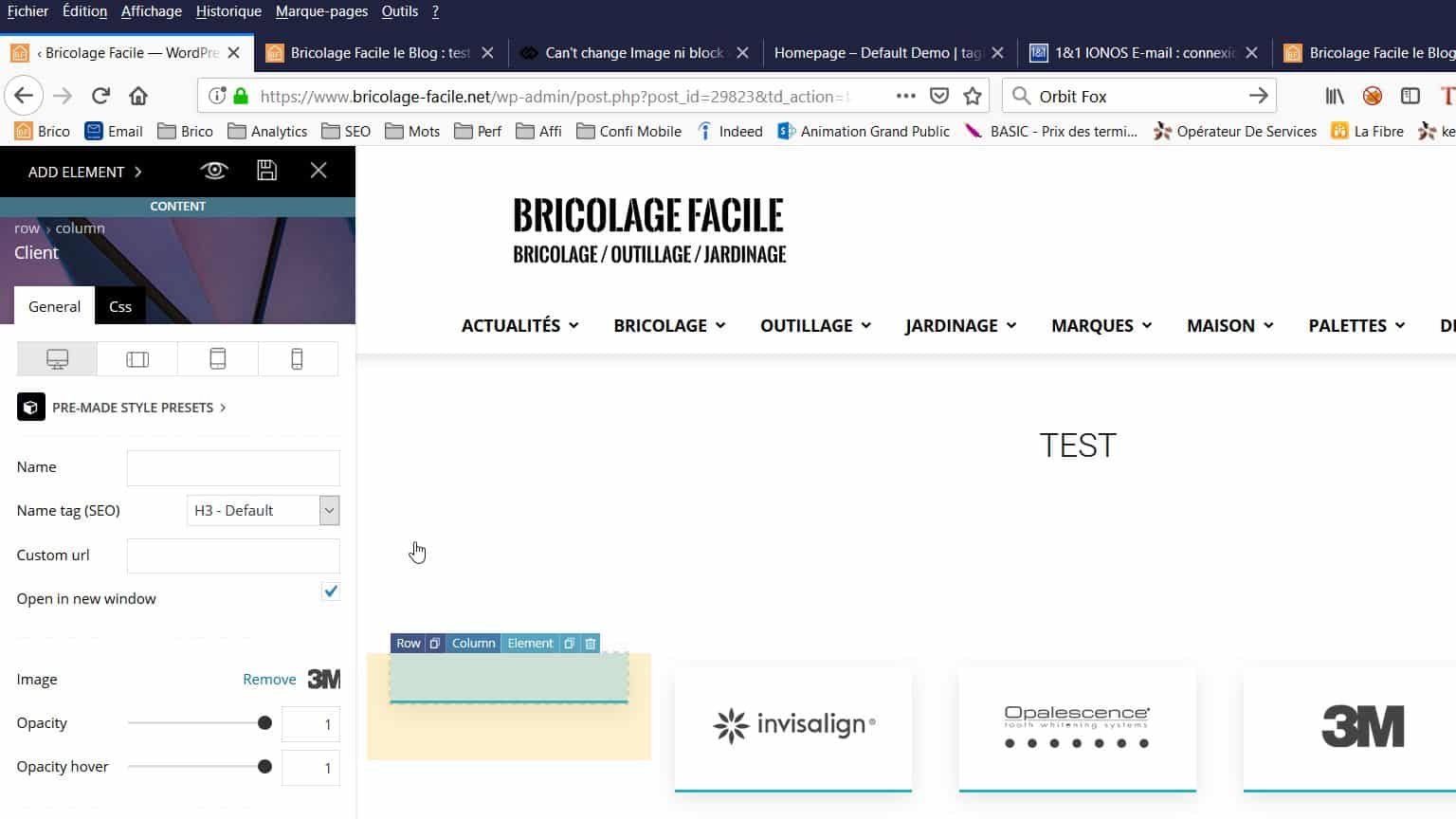
Many thanks for your help 🙂
Cédric
-
This reply was modified 7 years by
bricolage-facile.
 Igor
Igor In each new update, you need to specify – whether or not you need to update the td-composer plugin and attach a patch of update. In order not to completely reinstall the plugin.
 mira
miraHi,
I just updated to V9.7.2. This messed up the images on my site. Thumbnails are missing and image sizes are completely blown out of proportion. This happened before and I was able to fix it by switching off the tag div composer (we have been using wp bakery page builder for ever and it seemed like both of them together did not work.)
So if I have to have tag div composer activated, I do not know how to fix this problem. This is rather urgent as the site looks horrible as it is now.
Thank you very much,
kind regards,
Mira
 egm_ar
 Hi Catalin, thanks for your answer!
This is what happens when I try to do that:
1 – http://prntscr.com/njj3hk
2 – The cloud template library doesn’t automatically opens, so I have to click on TagDiv Composer http://prntscr.com/njj460
3 – Here I go to Load Template http://prntscr.com/njj5kb
4 – And the Single Post doesn’t show: http://prntscr.com/njj60e
Now, look what I found out in the process:
When I click in the “Add New” on the left menu, I don’t get the whole library. That’s the only way I have to add a new template….but if I go to the Published or Draft categories, then I do have the “Add New” button on top of the page:
Which it does open the whole cloud template library:
So now, happy 😛
Simion C. Hi,
What builder did you use to build the page? From what I can see the single image elements don’t display properly, it may happen if you used WPBakery. This is a known issue and will be fixed, it happens when both the composer and WPBakery plugins are active.
A fix is provided in this topic, for the time being
– https://forum.tagdiv.com/topic/single-image-widget-settings/
Sorry for this inconvenience. Please try and check if the single image elements display correctly.
Also be sure to update WPBakery to the latest version
– https://forum.tagdiv.com/how-to-update-visual-composer-plugin/
Let me know.
Thanks
Simion C. Hi,
In this particular case (updating to 9.7) it would be best to try and update by FTP
– https://tagdiv.com/update-newspaper-theme/
There were modifications made to theme files location, so it would be best to delete the old theme and upload the new one manually. Also try and increase the wp-memory, if possible to 256M, this could also be the cause of the problem
– https://forum.tagdiv.com/tagdiv-composer-not-working/
As well, check what is mentioned at point 2 in the guide. Entering that code in the htaccess could also solve it.
If nothing works, we could take a look. Send us an email at contact@tagdiv.com and provide admin login, as well as cPanel if possible. Include a link to this topic in the email.
Thanks
 Catalin
 Hi,
The theme has to be in accordance with the new Envato rules -> https://help.author.envato.com/hc/en-us/articles/360000472383-WordPress-Theme-Requirements, so these modifications were necessary. Moving the files into the composer plugin has consequences for the child theme as well. Maybe a solution will be found, we will make a guide if that will be the case. I can’t say what will happen at the moment, our developers will try to find the best solution.
Thank you!
Simion C. Hi,
@ML You can edit the template of the category page, if it is a cloud category template
– https://cloud.tagdiv.com/#/load/Category
– https://forum.tagdiv.com/tagdiv-cloud-library-plugin/
The template can contain any of the elements available in the composer. You can add blocks, grids, text etc. Let me know if you need help or you have more questions.
Thanks
 prakash13t
Hi team,
I created pages using tagDiv Composer with Newspaper 8.5. Now those pages are NOT loading with new version?
Please help
Catalin Hi,
Unfortunately, I do not exactly understand what you mean, sorry! Do you want to move at the top the Ranking number section from here -> https://www.screencast.com/t/5A4qM1MaQeT to be at the top of your post page? In that case, notice that you can do this from TD Composer if you will use the Cloud Template Library for single posts. If you will create a single post template, through the available elements you will find this -> https://www.screencast.com/t/5SUHtkGg
Hope this helps!
Thank you!
Catalin Hi,
If you want to have any control over your width site, you need to use the TD Composer and stretch your ROW from the settings, like this -> https://www.screencast.com/t/yOtMe8FWEEje Take a look at the following useful guide from here -> https://forum.tagdiv.com/tagdiv-composer-tutorial/
Thank you!
Simion C. I failed to see there are issues with the single images. Single image elements placed in pages with WPBakery may display and function incorrectly, when both the tagDiv composer and WPBakery are active. This is known and will be fixed in the next theme update. A fix is provided in this topic, for the time being
– https://forum.tagdiv.com/topic/single-image-widget-settings/
Sorry for this inconvenience. Let me know if you have more questions.
 Vlad S
 Hello !
You can have this option only when using single post template from the cloud library. After installing the template you can add those features from the tagDiv Composer like here: https://www.screencast.com/t/jQdR5E3CWMk
Thank you !
Simion C. Hi,
That plugin cannot be used anymore since update 9.7, it has been replaced by a new plugin
– https://forum.tagdiv.com/developer-info/
You could use this plugin from now on. Or experiment with flex blocks, maybe what it used to be possible only with the api plugin, it is now possible with flex blocks and grids
– https://tagdiv.com/tagdiv-composer-flex-block-elements/
– https://tagdiv.com/tagdiv-composer-big-grid-flex-elements/
Thanks
 Calin
Calin Hi,
Please not that our demos are build with tagDiv Composer, also some of them like iGossip, Gaming need tagDiv Cloud Library , so in order to make them to work you’ll need to have tagDiv Composer activate, also if the demo use cloud templates you need to have tagDiv Cloud library activate too;
-> https://www.screencast.com/t/JSzxWfjT
If you want you can install that demo
Installing demos -> https://forum.tagdiv.com/installing-demos/
or if you wan only some parts of that demo you can use tagDiv Cloud Library and import only those templates/pages that you want/need.
If there is still a problem with our demos, please provide some more details and some screenshots.
Thank you for your understanding!
Calin Hi,
Now in Newspaper v9.7 the path to the td_module_11.php for block12 is wp-content/plugins/td-composer/legacy/Newspaper/includes/modules/td_module_11.php
-> https://www.screencast.com/t/MIvdG0zu
Theme modules and blocks -> https://forum.tagdiv.com/theme-blocks-modules/
Also you can check some a similar topic -> https://forum.tagdiv.com/topic/custom-fields-in-block4-td_module_2-php/
Thank you!
Simion C. Hi,
The 9.7 contained some issues, most of which are now fixed in 9.7.2. You can update directly to this version, this would be best.
However if there are problems maybe you could take your time and first test this update in a sub-domain or local install containing a copy of the website, instead of the live website.
The 9.7 update was a major update, there were modifications to the theme structure, many theme files were moved in the tagDiv composer plugin. This plugin has to be active at all times in order to maintain the same functionality as before.
There could be various issues that cause an issue like you mention, a child theme, a plugin maybe, custom code or theme modifications. Let me know if you have more questions.
Thanks
