
- NewspapertagDiv Composer – Website Manager
- NewspaperWhen tagDiv Composer is Not Working
- NewsmagtagDiv Composer Tutorial
- TutorialsFrom WPBakery to tagDiv Composer
- NewspapertagDiv Composer Tutorial
- NewsmagHow to use the Visual Composer plugin
- NewspaperScroll Animation
- NewspaperSingle External Shortcode and External Shortcode
- NewspaperCredit System
- NewspaperBookmark – Save For Later
- NewspaperFlex Block Builder and Flex Loop Builder
- NewspaperModules Builder in Newspaper Theme
- NewspaperIntroduction to CPT and ACF with Newspaper Theme
- NewspaperCreate a frontend submission form
- NewspaperHow to Use the Tabbed Content shortcode
- NewspaperCreate a form contact page
- NewspaperFilters and sorting for taxonomies
- NewspaperUser review system
- NewspaperCustom Fields Support
- NewspaperWooCommerce: Happy “Add to Favorites!”
 egm_ar
Hi good evening,
I’ve imported the Urban Observer header, but when I try to edite it on TD Composer, I get the following code:
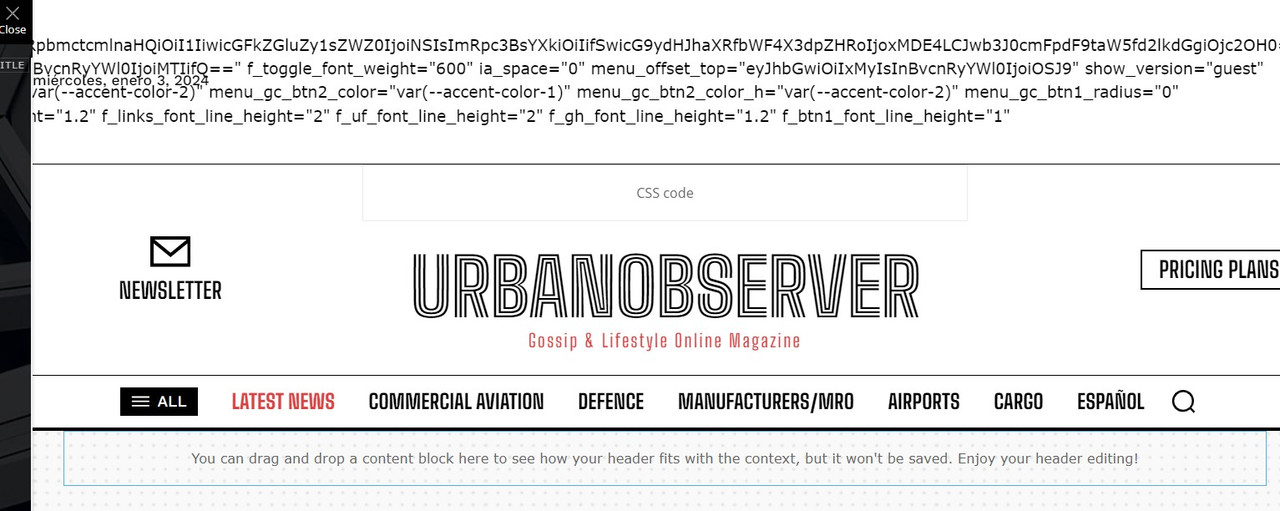
What could be happening?
Thanks in advance!
 Proposition Media
 Hello Calin, and thank you for answering.
This i will do – and it works.
However, since it is not possible to remove the email confirm page, is it possible to change the text within the email-confirmation box? I could just change it to “Welcome – press continue to create a subscribtion” or something like that.
Image:
The text within the green box – can i change it? (In php or composer).
-
This reply was modified 2 years by
Proposition Media.
 Anamaria
 Hi,
Please let me know for what is used the code. A shortcode can be inserted by using the element called “Column text” or “Text with title”. “Column text” and “text with title” elements have a button called “edit content” and if you click on that button, the WP Editor will open, and you can add some text/code/shortcode there. Close the WP Editor from X, save the changes from Composer and view the page to see the changes.
Thank you!
Anamaria Hello,
The options from the Theme Panel are for the standard template, but you have a Pro Prebuilt website and this uses cloud templates, which can be edited with tagDiv Composer ->https://www.screencast.com/t/UeBGkaYuundl, and select the element you want to edit => https://www.screencast.com/t/3vhZ5v4k and change the description.
The same steps are for all templates -> https://forum.tagdiv.com/footer-templates/
Our theme is a frontend theme for most of the elements and changes, you’ll need to use the tagDiv Composer to edit the pages and templates for posts/categories, etc => https://i.imgur.com/I3OUYxr.jpg -> https://i.imgur.com/mMrEufY.jpg from the frontend, no in the code -> https://www.screencast.com/t/LDdokrHPl
Also, this is a video on how to change the logo -> https://www.youtube.com/watch?v=HXQQygkCCJo -> https://forum.tagdiv.com/add-logo-newspaper/
More documentation about the cloud templates is here:
– https://forum.tagdiv.com/cloud-library-templates/
– https://forum.tagdiv.com/design-post-pages-using-cloud-library-templates/
– https://forum.tagdiv.com/cloud-library-category-templates/
Thank you!
 Calin
Calin Hello,
I just checked the provided score and the results appears to be good – https://i.imgur.com/ndFxK2i.png – https://i.imgur.com/nlyGytv.png
What I recommend is to make sure you have the latest theme version, Newspaper v12.6.3 and use the theme optimize options – https://i.imgur.com/5IXDV7y.png – https://i.imgur.com/ZctwGIf.png also on cloud header use tagDiv Composer to disable the desktop header on mobile and the mobile header on desktop – https://i.imgur.com/ZIKaKec.jpg – https://i.imgur.com/Sbeqzql.png
Also, if you are using mobile page or mobile theme plugin the please make sure that you use a cache plugin that has mobile cache option.
Thank you!
Calin Hello,
On pages the blocks and big grids can be sorted using tagDiv Composer and you can set theme on random, latest … also you can use the option of unique article on page – https://forum.tagdiv.com/unique-articles/ this will display at first load of page only unique articles.
Thank you!
Anamaria Hi,
Please check the console when you hit the save button. Please check this topic https://forum.tagdiv.com/topic/tagdiv-composer-does-not-save-only-content-of-homepage/
Thank you!
Anamaria Hello,
You can find all the blocks in cloud templates -> https://cloud.tagdiv.com/#/load/Blocks
The theme doesn’t have blocks as you want, but those can be done with tagdiv Composer.
Thank you!
Anamaria Hello,
Please let me know what footer template you have, maybe you have a cloud template, and you need to edit with tagdiv Composer scroll until footer select the copyright and change it https://imgur.com/EPeTe19
Thank you!
Anamaria Hello,
You can edit with tagdiv Composer, select the block and in the tab Layout you can show the date and hide the author -> https://i.imgur.com/jX1aR71.jpg
Also, you can change the copyright here -> https://i.imgur.com/EPeTe19.png
Thank you!
Anamaria Hi,
Please edit the page normally and change the setting for the page into Template: Default template because you have there the setting: Pagebuilder + Latest articles + Pagination and these are not editable by the tagDiv Composer plugin.
The standard pack plugin is deprecated, so I recommend using cloud templates.
Thank you!
 kerimcankara
Hello team,
I had an issue with the tagDiv Composer, and I wonder if there is a solution to that.
By the ACF plugin, I created a custom field with ACF’s field type “User”. So I tried to add some custom multi-author functionality to my website. Yet, I cannot select custom field with the field type “user” on the tagDiv Composer – while other type of custom fields work normally. Is there something I miss out or could tagDiv Composer totally deny to add “user” filed type ACF functions?
 WEALTHSIDE
 Hello
It does not work. You can see the screenshot I took with my smartphone. And the screenshots from the TagDiv Composer (mobile). Thank you.
https://wealthside.de/support/
Happy New Year,
Rob
 autodesign
Recently we updated the Newspaper theme Version: 12.6.3 and suddenly started facing the issue of opening TagDiv Composer to edit the template.
https://dailycadcam.com/
If we click on TagDiv Composer tab it shows an error. “Hosting Server Read Timeout
HTTP 502 — Unable to Connect to the Origin Server
Please try again in a few minutes”
I contacted our hosting provider, they are saying the issue is with TagDiv plugin.
Could you please guide me. What could be done to know the roots of error.
thank you
 cokemayorga
Hello good evening,
Along with my greetings, I would like to report and see if there is a solution to the following.
When editing a page through TagDIV Composer and then trying to save, there is an option that gets stuck in a loop (Save Header).
I am sharing a screenshot: https://imgur.com/a/cpahTUo
Thank you in advance,
Jorge
 gerard7803
I tried to install the update 12.6.3, but after installing it, it created bugs on my website.
Updating all tagDiv plugins…
tagDiv Composer
Success
tagDiv Cloud Library
Ajax error
tagDiv Social Counter
Ajax error
tagDiv Newsletter
Ajax error
tagDiv Opt-In Builder
Ajax error
tagDiv Shop
Ajax error
tagDiv Standard Pack
Ajax error
Fatal error: Uncaught Error: Class ‘tds_config’ not found in /home/customer/www/lawyertribune.com/public_html/wp-content/plugins/td-laywer-tribune/includes/config/td_cw_config_shortcodes.php:1402 Stack trace: #0 /home/customer/www/lawyertribune.com/public_html/wp-includes/class-wp-hook.php(324): {closure}(”) #1 /home/customer/www/lawyertribune.com/public_html/wp-includes/class-wp-hook.php(348): WP_Hook->apply_filters(”, Array) #2 /home/customer/www/lawyertribune.com/public_html/wp-includes/plugin.php(517): WP_Hook->do_action(Array) #3 /home/customer/www/lawyertribune.com/public_html/wp-content/plugins/td-composer/td-composer.php(178): do_action(‘tdc_loaded’) #4 /home/customer/www/lawyertribune.com/public_html/wp-includes/class-wp-hook.php(324): tdc_plugin_init(”) #5 /home/customer/www/lawyertribune.com/public_html/wp-includes/class-wp-hook.php(348): WP_Hook->apply_filters(”, Array) #6 /home/customer/www/lawyertribune.com/public_html/wp-includes/plugin.php(517): WP_Hook->do_action(Array) #7 /home/customer/www/lawyertri in /home/customer/www/lawyertribune.com/public_html/wp-content/plugins/td-laywer-tribune/includes/config/td_cw_config_shortcodes.php on line 1402
Please, can you help me?
Thanks.
 rahuldas
I’m encountering an issue with this theme where there are only a few options available for sharing a post. I’m looking to add more social media sharing options or the ability to copy the post link or print it. I attempted to use the tagdiv composer, but couldn’t find any settings for these options. How can I add these features?
Anamaria Hi,
You can try to revert an old revision on a page/template -> https://www.wpbeginner.com/beginners-guide/complete-guide-to-wordpress-post-revisions/ Did you delete the elements with tagdiv Composer?
Please follow the steps from this topic https://forum.tagdiv.com/topic/error-at-zones-6models-1dom-the-model-does-not-match-the-content-currene/ if you have a child theme; please use the main theme.
Thank you!
 arunmeena617
Hi,
my website automatically redirects to other unknown links after using the td-composer plugin.
I think the plugin has some malware code that redirects my homepage to unknown websites.
 lalanco
Hi,
I was amending my homepage and removed some widgets.
Once done, I saved and everything was fine, the changes reflected on production. few second after, I went again to modify other things and I received this error:
Errors at columns elements: 1(models) : 2(dom). The model does not match the content Current state has involved an issue. You could try an UNDO operation (CTRL+Z / CTRL+SHIFT+Z)
The problem is that I cant remove this message, so I cant amend anything anymore on the homepage. He doest clearly express where the problem is. Is there a way for me to come back modifying the homepage or reset it somehow?
Kind regards,
Cristiano
 Bettina
 Hello @DUNKY59!
Check these guides: https://www.jezweb.info/how-to-create-a-blog-post-using-wordpress-gutenberg/ and https://forum.tagdiv.com/design-post-pages-using-cloud-library-templates/
We have 3 options for mobile versions that you can use:
1. Responsive version: A responsive version of your website looks similar to the desktop version. TagDiv Composer is used to edit the page.Click on the mobile viewport: https://www.screencast.com/t/XDQJedlggSB. There, you can see your mobile version and edit or adjust the elements to look better.
2. Mobile pages: https://tagdiv.com/newspaper-10-3-7-update-brings-customizable-and-fast-mobile-pages
3. Mobile theme plugin: The Mobile Theme is a performance-optimized theme included in the main Newspaper theme that only loads on mobile devices. It comes with its own templates and designs for pages, posts, categories, etc., so your current templates from the desktop theme will get converted to the mobile theme layout. Please see https://forum.tagdiv.com/the-mobile-theme/ and https://forum.tagdiv.com/mobile-theme-introduction/ for more information.
A full explanation is here: https://www.youtube.com/watch?v=SpGkOnJeNZY
If you need to use mobile version 1 or 2, then you need to uninstall the Mobile Theme plugin and AMP.
Thank you!
 DUNKY59
Hey,
I don’t understand how the single post template is generated on mobile. I can’t edit it, and it’s different from what I have set up with TagDiv Composer.
You can see it on cuisinons.com (the homepage is ok).
Thanks,
Bettina Hello @ilouie!
We have 3 options for mobile versions that you can use:
1. Responsive version: A responsive version of your website looks similar to the desktop version. TagDiv Composer is used to edit the page.Click on the mobile viewport: https://www.screencast.com/t/XDQJedlggSB. There, you can see your mobile version and edit or adjust the elements to look better.
2. Mobile pages: https://tagdiv.com/newspaper-10-3-7-update-brings-customizable-and-fast-mobile-pages
3. Mobile theme plugin: The Mobile Theme is a performance-optimized theme included in the main Newspaper theme that only loads on mobile devices. It comes with its own templates and designs for pages, posts, categories, etc., so your current templates from the desktop theme will get converted to the mobile theme layout. Please see https://forum.tagdiv.com/the-mobile-theme/ and https://forum.tagdiv.com/mobile-theme-introduction/ for more information.
A full explanation is here: https://www.youtube.com/watch?v=SpGkOnJeNZY
If you need to use mobile version 1 or 2, then you need to uninstall the Mobile Theme plugin and AMP.
Make a test and deactivate ALL plugins except tagDiv ones, also if you are using a cache plugin, deactivate it, clear all cache and try again.
Thank you!
Bettina Hello!
Edit the article with the tagdiv Composer: https://app.screencast.com/GTqI4crALSSx5
Thank you!
Anamaria Hi,
1. For the logo, it is not necessary to use custom code css; you can find the settings for logo text here -> https://i.imgur.com/s4ktoe2.png
Please let me know if you want to have the website black, like this -> https://demo.tagdiv.com/newspaper_black_pro/
2. Please provide more details about what you want to achieve. Normally, you shouldn’t need to write custom CSS code, as all design changes are made using the TagDiv Composer to alter the design.
3. You can stretch the row -> https://tagdiv.com/flexibility-rows-columns-newspaper-theme/ and set the width and height on it -> https://i.imgur.com/t4JC9gk.png
4. The live css is the pace where custom code css is saved, but you must ensure that the code works and applies.
Thank you!



