
 Anamaria
 Hello,
Unfortunately, no.
A workaround can be to save an element or row: https://www.screencast.com/t/kVxpDT9SV in the tagdiv composer, so you can add it on every other page. The saved elements can be seen at the end of the other blocks when you add an element in the tagDiv Composer.
Thank you!
Anamaria Hello,
The page loading speed can depend on many factors, and each website is unique from this point of view. Let me explain some of these factors and maybe they give you some starting points for optimizing your website. A good choice for the page speed, could be the mobile layout which contains fewer elements because it can improve a bit your page speed.
There are many optimization guides provided by our users here in the forum, some made by us; you could check some of them
– https://www.infophilic.com/get-almost-100-pagespeed-newspaper-theme/
– https://forum.tagdiv.com/cache-plugin-install-and-configure/
– https://forum.tagdiv.com/how-to-make-the-site-faster/
– https://forum.tagdiv.com/topic/high-number-of-ajax-request/
– https://forum.tagdiv.com/topic/score-100100-pagespeed-with-newspaper-wordpress-theme/
– https://www.andraware.com/wp-rocket-for-newspaper-theme/
– https://forum.tagdiv.com/topic/page-speed-guide-for-2023-beginners-and-advanced/
– https://forum.tagdiv.com/topic/newspaper-theme-speedify-your-website/
– https://forum.tagdiv.com/topic/tutorial-chriss-custom-optimizations-for-functions-php-etc/
– https://forum.tagdiv.com/cloudflare-cdn/
– https://forum.tagdiv.com/topic/theme-causing-high-cpu-usage-2/
– https://forum.tagdiv.com/topic/sql-querys-high-cpu/
– https://forum.tagdiv.com/topic/newspaper-theme-slow-to-respond/
– https://premium.wpmudev.org/blog/optimizing-your-wordpress-database-a-complete-guide/
– https://underconstructionpage.com/optimize-wordpress-database/
– https://crunchify.com/better-optimize-wordpress-database-all-in-one-guide/
Also, pagespeed is not covered by support -> https://forum.tagdiv.com/newspaper-theme-support/
If you use Wp Rocket, you can try to exclude the following files
/jquery-?[0-9.](.*)(.min|.slim|.slim.min)?.js
/jquery-migrate(.min)?.js
/wp-content/plugins/td-composer/legacy/Newspaper/js/tagdiv_theme.min.js
tdBlocksArray
To be able to optimize and to remove CLS and LCP please check these guide => https://developers.google.com/web/tools/lighthouse/ -> https://www.sqlpac.com/en/documents/google-pagespeeds-lighthouse-6-new-features-lcp-cls.html -> https://web.dev/lighthouse-whats-new-6.0/ -> https://web.dev/lcp/ -> https://web.dev/cls/
Thank you!
Anamaria Hi,
We recommend creating the pages with tagdiv Composer, to add the text you can use column text, text with title, inline text etc. -> https://forum.tagdiv.com/tagdiv-composer-tutorial/ -> https://forum.tagdiv.com/sidebars-tutorial/
Thank you!
 Calin
Calin Hello,
Please try like this, please delete tagDiv Composer and tagDiv Cloud library too and after that install the plugins from Newspaper > plugins. Now in case that you can not activate the plugins from that place (but you should) you can try from Dashboard > plugins.
Also, you ca do a test using only tagDiv plugins.
Thank you!
 centora
Using DEFENDER PRO inside my website with 12.6.1 Newspaper, I get 2 NOTIFICATIONS from same file
NOTIFICATION 1
Plugin /td-composer
Location /wp-content/plugins/td-composer/legacy/Newspaper/includes/demos/coaching_pro/td_import.php
Date added 17/10/2023 13:57
Developer Please contact the plugin developer to fix this tagDiv
LINE 1016 : ‘tdcf_summary’ => ‘QnVpbGRpbmcgU3VwcG9ydCBhbmQgQWNjb3VudGFiaWxpdHkgZm9yIEdvYWwgQXR0YWlubWVudDogVGhpcyBjb3Vyc2UgdGVhY2hlcyBpbmRpdmlkdWFscyBob3cgdG8gY3VsdGl2YXRlIGFuIGVudmlyb25tZW50IHRoYXQgZm9zdGVycyBtb3RpdmF0aW9uLCBpbmNsdWRpbmcgc2Vla2luZyBzdXBwb3J0LCBlc3RhYmxpc2hpbmcgYWNjb3VudGFiaWxpdHkgc3lzdGVtcywgYW5kIHN1cnJvdW5kaW5nIHRoZW1zZWx2ZXMgd2l0aCBwb3NpdGl2ZSBpbmZsdWVuY2VzLg==’,
NOTIFICATION 2
Date added 17/10/2023 13:57
LINE 816 : ‘tdcf_summary’ => ‘V2UgZGV2ZWxvcGVkIGEgY3VzdG9tIGVNYWdhemluZSB3ZWJzaXRlIGZvciBhIGxlYWRpbmcgbmV3cyBtYWdhemluZSB0aGF0IGZlYXR1cmVkIGEgY2xlYW4gYW5kIG1pbmltYWxpc3QgZGVzaWduLCB3aXRoIGEgZm9jdXMgb24gaGlnaC1xdWFsaXR5IGNvbnRlbnQgYW5kIHVzZXIgZXhwZXJpZW5jZS4gVGhlIHdlYnNpdGUgaW5jbHVkZWQgYSBwb3dlcmZ1bCBjb250ZW50IG1hbmFnZW1lbnQgc3lzdGVtIGFuZCB3YXMgaW50ZWdyYXRlZCB3aXRoIHNvY2lhbCBtZWRpYSBwbGF0Zm9ybXMgYW5kIGVtYWlsIG1hcmtldGluZyB0b29scywgcmVzdWx0aW5nIGluIGluY3JlYXNlZCByZWFkZXJzaGlwIGFuZCBlbmdhZ2VtZW50Lg==’,
Of course I dont get any warning, just inside info from WPEMU DEV Defender Pro so I would appreciate if you can clarify this.
Thanks a lot
 Bettina
 Hello @novodia!
If you use cloud templates, then you need to change the logo in the tagdiv Composer.
Please check our tutorial here: https://forum.tagdiv.com/tagdiv-composer-tutorial/
More documentation about the cloud templates is here:
– https://forum.tagdiv.com/cloud-library-templates/
– https://forum.tagdiv.com/design-post-pages-using-cloud-library-templates/
– https://forum.tagdiv.com/cloud-library-category-templates/
We have 3 options for mobile versions that you can use:
1. Responsive version: A responsive version of your website looks similar to the desktop version. TagDiv Composer is used to edit the page.Click on the mobile viewport: https://www.screencast.com/t/XDQJedlggSB. There, you can see your mobile version and edit or adjust the elements to look better.
2. Mobile pages: https://tagdiv.com/newspaper-10-3-7-update-brings-customizable-and-fast-mobile-pages
3. Mobile theme plugin: The Mobile Theme is a performance-optimized theme included in the main Newspaper theme that only loads on mobile devices. It comes with its own templates and designs for pages, posts, categories, etc., so your current templates from the desktop theme will get converted to the mobile theme layout. Please see https://forum.tagdiv.com/the-mobile-theme/ and https://forum.tagdiv.com/mobile-theme-introduction/ for more information.
A full explanation is here: https://www.youtube.com/watch?v=SpGkOnJeNZY
If you need to use mobile version 1 or 2, then you need to uninstall the Mobile Theme plugin and AMP.
Thank you!
Anamaria Hi,
You need to disable the mobile theme and amp to have mobile responsive version.
Using our theme you can choose from 3 mobile versions
-> mobile responsive => https://www.screencast.com/t/oJ2ShOp47
-> mobile theme plugin => https://forum.tagdiv.com/the-mobile-theme/
-> mobile page => https://tagdiv.com/newspaper-10-3-7-update-brings-customizable-and-fast-mobile-pages/
If you created the mobile pages with tagDiv Composer, then when you install the Mobile Theme plugin, your pages will be overwritten by the plugin (the mobile theme comes with its templates for page, post, category, etc so your current templates from the desktop theme will get converted to the mobile theme layout, the page content is made without builders in mobile editor => https://www.screencast.com/t/xbgZG8kH also, the options that are provided to edit the mobile theme version are limited (this keeps the things simple)).
This is a video about Responsive Newspaper Theme, AMP & Mobile Theme, Mobile Pages & Templates -> https://www.youtube.com/watch?v=SpGkOnJeNZY
So, the mobile responsive is what you see then that you select the viewport on phone => https://www.screencast.com/t/matV17hH, so some settings may apply for each viewport(where is the border blue), and others are not(where the border is black).
The mobile page has the mobile templates from Cloud Library => https://www.screencast.com/t/YCcZ8rL8
The Mobile responsive version of the theme and the mobile page editor can be edit with tagDiv Composer, the mobile theme plugin cannot.
For example, you can have the mobile theme plugin activated and use the mobile page/mobile responsive version for the homepage/pages, but for the categories pages/404 page, you can’t use the mobile page/mobile responsive version if you have the mobile theme plugin activated.
So, if you want to design the pages with tagDiv Composer, you can use the mobile page or mobile responsive version.
Thank you!
Bettina Hello Joachim!
We also have the 404 templates, which can be modified in the TagDiv Composer: https://forum.tagdiv.com/cloud-library-templates/ (see 404 templates).
If you use the Coaching PRO header, then these are the elements from your header: https://prnt.sc/EnkC-wzg-OBe
Delete the ones you do not want there.
Thank you!
 datingvergleich
 I have deactivated mobile theme and AMP pages for testing, now.
However, the links to the 404 pages are still there. After investigating the source code for the desktop version of the theme, I have found following section:
</div></div><div class="tdm_block td_block_wrap tdm_block_button tdi_30 tdm-block-button-full tdm-content-horiz-right td-pb-border-top td-press-button td-move-arrow td_block_template_1"  data-td-block-uid="tdi_30"     >

<style>@media (max-width:767px){.tdi_30{text-align:left!important}}</style>

<style>.tdm_block.tdm_block_button{margin-bottom:0}.tdm_block.tdm_block_button .tds-button{line-height:0}.tdm_block.tdm_block_button.tdm-block-button-inline{display:inline-block}.tdm_block.tdm_block_button.tdm-block-button-full,.tdm_block.tdm_block_button.tdm-block-button-full .tdm-btn{display:block}.tdc-row .tdi_30 .tdm-btn{height:auto;padding:15px 25px}@media (min-width:768px) and (max-width:1018px){.tdc-row .tdi_30 .tdm-btn{height:auto;padding:12px 20px}}</style>

<style>.tdc-row .tdi_31{padding:15px 25px;height:auto;line-height:1}.tdc-row .tdi_31 i{font-size:16px}body .tdc-row .tdi_31 .tdm-btn-icon:last-child{margin-left:10px}body .tdc-row .tdi_31{background-color:var(--tt-accent-color)}body .tdc-row .tdi_31:after{background-color:var(--tt-hover)}body .tdc-row .tdi_31 .tdm-btn-text,body .tdc-row .tdi_31 i{color:#ffffff}.tdc-row .tdi_31 svg{fill:#ffffff;fill:#ffffff}.tdc-row .tdi_31 svg *{fill:inherit;fill:inherit}body .tdc-row .tdi_31:hover .tdm-btn-text,body .tdc-row .tdi_31:hover i{color:#ffffff;-webkit-text-fill-color:unset;background:transparent;transition:none}body .tdc-row .tdi_31:hover svg{fill:#ffffff;fill:#ffffff}body .tdc-row .tdi_31:hover svg *{fill:inherit;fill:inherit}body .tdc-row .tdi_31 i{color:#ffffff;-webkit-text-fill-color:unset;background:transparent}body .tdc-row .tdi_31:hover i{color:#ffffff;-webkit-text-fill-color:unset;background:transparent;transition:none}.tdc-row .tdi_31:before{border-width:0px;border-style:solid}.tdc-row .tdi_31{font-size:16px!important;line-height:1.2!important;font-weight:600!important;text-transform:uppercase!important;letter-spacing:0.5px!important;height:auto}@media (min-width:768px) and (max-width:1018px){.tdc-row .tdi_31{padding:12px 20px;height:auto;line-height:1}.tdc-row .tdi_31{font-size:14px!important}}</style><div class="tds-button td-fix-index"><span class="tdm-btn-text">See pricing</span><i class="tdm-btn-icon td-icon-arrow-right-rounded"></i></div></div></div></div><div class="vc_column tdi_33  wpb_column vc_column_container tdc-column td-pb-span4">

<style scoped>.tdi_33{vertical-align:baseline}.tdi_33>.wpb_wrapper,.tdi_33>.wpb_wrapper>.tdc-elements{display:block}.tdi_33>.wpb_wrapper>.tdc-elements{width:100%}.tdi_33>.wpb_wrapper>.vc_row_inner{width:auto}.tdi_33>.wpb_wrapper{width:auto;height:auto}.tdi_33{justify-content:center!important;text-align:center!important}@media (min-width:768px) and (max-width:1018px){.tdi_33{padding-top:30px!important;width:36%!important}}</style><div class="wpb_wrapper" ><div class="tdm_block td_block_wrap tdm_block_socials tdi_34 tdm-content-horiz-left td-pb-border-top td_block_template_1"  data-td-block-uid="tdi_34" >

<style>.tdm_block.tdm_block_socials{margin-bottom:0}.tdm-social-wrapper{*zoom:1}.tdm-social-wrapper:before,.tdm-social-wrapper:after{display:table;content:'';line-height:0}.tdm-social-wrapper:after{clear:both}.tdm-social-item-wrap{display:inline-block}.tdm-social-item{position:relative;display:inline-block;vertical-align:middle;-webkit-transition:all 0.2s;transition:all 0.2s;text-align:center;-webkit-transform:translateZ(0);transform:translateZ(0)}.tdm-social-item i{font-size:14px;color:var(--td_theme_color,#4db2ec);-webkit-transition:all 0.2s;transition:all 0.2s}.tdm-social-text{display:none;margin-top:-1px;vertical-align:middle;font-size:13px;color:var(--td_theme_color,#4db2ec);-webkit-transition:all 0.2s;transition:all 0.2s}.tdm-social-item-wrap:hover i,.tdm-social-item-wrap:hover .tdm-social-text{color:#000}.tdm-social-item-wrap:last-child .tdm-social-text{margin-right:0!important}</style>

<style>.tdi_35 .tdm-social-item i{font-size:14px;vertical-align:middle}.tdi_35 .tdm-social-item i.td-icon-linkedin,.tdi_35 .tdm-social-item i.td-icon-pinterest,.tdi_35 .tdm-social-item i.td-icon-blogger,.tdi_35 .tdm-social-item i.td-icon-vimeo{font-size:11.2px}.tdi_35 .tdm-social-item{width:28px;height:28px;margin:5px 10px 5px 0}.tdi_35 .tdm-social-item i{line-height:28px}.tdi_35 .tdm-social-item-wrap:last-child .tdm-social-item{margin-right:0!important}.tdi_35 .tdm-social-item i,.tds-team-member2 .tdi_35.tds-social1 .tdm-social-item i{color:var(--tt-accent-color)}.tdi_35 .tdm-social-item-wrap:hover i,.tds-team-member2 .tdi_35.tds-social1 .tdm-social-item:hover i{color:var(--tt-hover)}.tdi_35 .tdm-social-text{display:none;margin-left:2px;margin-right:18px}@media (min-width:768px) and (max-width:1018px){.tdi_35 .tdm-social-item i{font-size:12px;vertical-align:middle}.tdi_35 .tdm-social-item i.td-icon-linkedin,.tdi_35 .tdm-social-item i.td-icon-pinterest,.tdi_35 .tdm-social-item i.td-icon-blogger,.tdi_35 .tdm-social-item i.td-icon-vimeo{font-size:9.6px}.tdi_35 .tdm-social-item{width:24px;height:24px}.tdi_35 .tdm-social-item i{line-height:24px}}</style><div class="tdm-social-wrapper tds-social1 tdi_35"><div class="tdm-social-item-wrap"><i class="td-icon-font td-icon-instagram"></i><span style="display: none">Instagram</span></div><div class="tdm-social-item-wrap"><i class="td-icon-font td-icon-linkedin"></i><span style="display: none">Linkedin</span></div><div class="tdm-social-item-wrap"><i class="td-icon-font td-icon-twitter"></i><span style="display: none">Twitter</span></div></div></div><div class="td_block_wrap td_block_raw_css tdi_36 td-pb-border-top td_block_template_1"  data-td-block-uid="tdi_36" ><div id=tdi_36 class="td_block_inner td-fix-index"><style>.td-coaching-mm .td-sd-menu-icon.tdm_block_icon_box {

  cursor: pointer;

}

.td-coaching-mm .td-sd-menu-icon.tdm_block_icon_box .tdm-col-icon {

  transition: padding 0.1s ease-in-out;

}

.td-coaching-mm .td-sd-menu-icon.tdm_block_icon_box:hover .tdm-col-icon {

  padding-right: 10px;

}

</style></div></div></div></div></div></div></div></div>
Here, these problematic links are inserted in the header section. However, the links are not visible (i.e. hidden) on the rendered web pages and I cannot find them in the tagdiv composer templates.
Do you have a clue how to remove them and why/how they are inserted?
 Yigi
YigiHello, I updated my Word Press and I have problems installing the tagDiv Composer Plugin. When installing it, it sends me the error that it could not create folders or upload files. My WordPress version is the latest, and my PHP version is too
Anamaria Hi,
You need to edit the Single Post Template with tagdiv Composer and delete the Single Featured Image with right-click https://i.imgur.com/ZRO4Dju.jpg
For the images on the blocks, please check those settings -> https://i.imgur.com/AautwWO.jpg
Thank you!
 mr-x
mr-x Yes we use the Category Background Image element from the tagdiv Composer
check here https://prnt.sc/XOjgl-lHdWUQ
I uploaded it again the same we unstill the cache plugin the problem is not solved
any other suggestions?
Thanks
datingvergleich Dear Bettina,
thank you for your quick reply! I understand that there is this pricing page (accessible under https://www.dating-vergleich.com/switching-plans-wizard/). This is fine and this URL is not contained in any tagDiv Composer.
The problem is, that the theme has apparently created thousands of pages with this slug, e.g.
- https://www.dating-vergleich.com/kategorien/tipps-und-ratgeber/beziehungen-partnerschaft/page/2/switching-plans-wizard/
- https://www.dating-vergleich.com/kategorien/empfehlungen/switching-plans-wizard/
- https://www.dating-vergleich.com/kategorien/tipps-und-ratgeber/flirten-verfuehren-erobern/page/6/switching-plans-wizard/
This should not be the case. There seems to be a technical issue with the theme or an important setting that I am missing.
Further, the theme has created many 404-error-pages with following slugs:
/bookmark-page/, /tagdiv/, /tagdivofficial/.
Please see following ahrefs screenshot (column = Target URL):
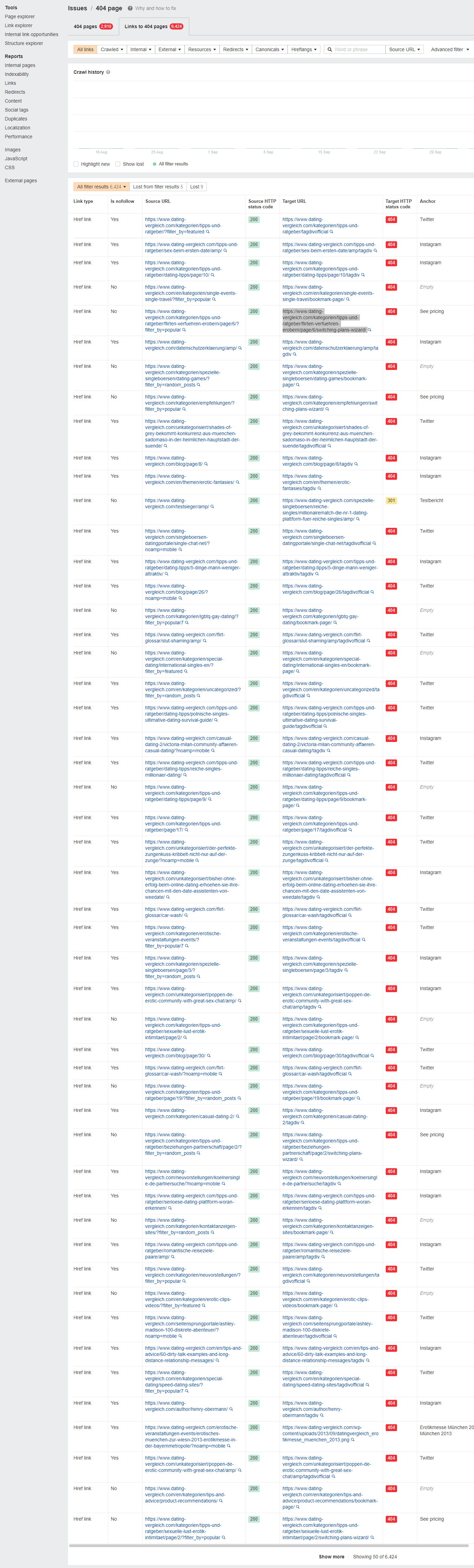
Could you please recheck?
Thank you
Joachim
Bettina Hello Joachim!
This is from the Opt-in Builder plugin. Can be found in pages: https://prnt.sc/2S0cJean6xV1
Make sure it is not set in a URL field (tagdiv Composer).
Thank you!
Bettina Hello @giulian !
Unfortunately, we do not have this feature in our tagdiv Composer. But you can click on every elements, and you can see its name and its settings.
Thank you!
 JG2015
Hi all, unfortunately I can’t undo steps in TagDiv Composer. Undo should work with CMD and Z (Macintosh, Chrome), right? But unfortunately nothing happens with the key combination. If I want to undo something, I have to close the composer, not apply the changes and then reopen the page. What am I doing wrong? Thanks in advance.
 LS_Support
Dear Newspaper Support,
Can you tell me how to create a change banner?
I want three banners in the same place that change randomly (change banner) with TagDiv Composer.
How can i do this?
Regards Raphael
Bettina Hello!
We have 3 options for mobile versions that you can use:
1. Responsive version: A responsive version of your website looks similar to the desktop version. TagDiv Composer is used to edit the page.Click on the mobile viewport: https://www.screencast.com/t/XDQJedlggSB. There, you can see your mobile version and edit or adjust the elements to look better.
2. Mobile pages: https://tagdiv.com/newspaper-10-3-7-update-brings-customizable-and-fast-mobile-pages
3. Mobile theme plugin: The Mobile Theme is a performance-optimized theme included in the main Newspaper theme that only loads on mobile devices. It comes with its own templates and designs for pages, posts, categories, etc., so your current templates from the desktop theme will get converted to the mobile theme layout. Please see https://forum.tagdiv.com/the-mobile-theme/ and https://forum.tagdiv.com/mobile-theme-introduction/ for more information.
A full explanation is here: https://www.youtube.com/watch?v=SpGkOnJeNZY
If you need to use mobile version 1 or 2, then you need to uninstall the Mobile Theme plugin and AMP.
Every mobile version has its own settings section.
Thank you!
Bettina Hello @ramiz1819 !
Unfortunately, AMP is not working with the cloud templates because the AMP’s layout is not fully customized.
The AMP version works best with default templates and not cloud templates. That’s why we integrated it with the Mobile theme plugin.
The feedback from our clients about AMP was negative and it is not used anymore, that’s why we didn’t add more customization options. From my point of view, if you don’t use the Mobile Theme plugin, then there is no reason or benefit to AMP.
We have 3 options for mobile versions that you can use:
1. Responsive version: A responsive version of your website looks similar to the desktop version. TagDiv Composer is used to edit the page.Click on the mobile viewport: https://www.screencast.com/t/XDQJedlggSB. There, you can see your mobile version and edit or adjust the elements to look better.
2. Mobile pages: https://tagdiv.com/newspaper-10-3-7-update-brings-customizable-and-fast-mobile-pages
3. Mobile theme plugin: The Mobile Theme is a performance-optimized theme included in the main Newspaper theme that only loads on mobile devices. It comes with its own templates and designs for pages, posts, categories, etc., so your current templates from the desktop theme will get converted to the mobile theme layout. Please see https://forum.tagdiv.com/the-mobile-theme/ and https://forum.tagdiv.com/mobile-theme-introduction/ for more information.
A full explanation is here: https://www.youtube.com/watch?v=SpGkOnJeNZY
If you need to use mobile version 1 or 2, then you need to uninstall the Mobile Theme plugin and AMP.
Thank you!
Bettina Hello!
Did you use the Category Background Image element from the tagdiv Composer?
Please check if the image is set here: https://prnt.sc/ZRoVdPARQcJx
Try to upload it again, save the settings and view the results.
Please try to uninstall the cache plugin and check if the problem is solved.
Thank you!
Bettina Hello @carpeher !
Here you can remove/set a picture for mobile menu background: https://www.screencast.com/t/x3Xrln2b88x
And the background color here: https://www.screencast.com/t/PbU3hQpDqHh
The opacity of the mobile modal can be changed from Theme panel -> Background -> Mobile menu/search background: https://www.screencast.com/t/hcRoHastuO -> https://www.screencast.com/t/SQapAaaiLRwY
A responsive version of your website looks similar to the desktop version. TagDiv Composer is used to edit the page. Click on the mobile viewport: https://www.screencast.com/t/XDQJedlggSB. There, you can see your mobile version and edit or adjust the elements to look better.
There, you can use a modal popup created by you instead of the default mobile modal. Check this useful guide: https://forum.tagdiv.com/modal-popup/
Thank you!
Bettina Hello!
I can see your logo here: https://prnt.sc/6P828r34hIpZ and in the footer as well.
You should edit the pages with the TagDiv Composer, click on the mobile viewport: https://www.screencast.com/t/XDQJedlggSB. There, you can see your mobile version and edit or adjust the elements to look better.
Please note that you should add the logo element in the header zone of your mobile version because it is different than the desktop one.
Thank you!
Bettina Hello @antcariello !
I think the problem may be caused by the infinite loading of the pages. But our feature will load only the needed images on the page. And it did not load the useless images.
Our developers are aware of this issue and try to synthesize the composer, which is big, and fix the major problems of the theme and speed in the latest update.
This issue about ajax calls has been discussed already here, please check: https://forum.tagdiv.com/topic/content-preloading-admin-ajax-php/
Thank you!
Anamaria Hello,
Please check this topic https://forum.tagdiv.com/topic/low-scores-on-mobile-theme-amp-and-desktop-pagespeed-and-gt-metrics-optimize/ and try this code ->
// Preload Newspaper fonts for responsive theme (main theme) function dns_prefetch_responsive()

{

echo '';

echo '';

}

add_action( 'wp_head', 'dns_prefetch_responsive', 0 );
There are many optimization guides provided by our users here in the forum, some made by us; you could check some of them
– https://www.infophilic.com/get-almost-100-pagespeed-newspaper-theme/
– https://forum.tagdiv.com/cache-plugin-install-and-configure/
– https://forum.tagdiv.com/how-to-make-the-site-faster/
– https://forum.tagdiv.com/topic/high-number-of-ajax-request/
– https://forum.tagdiv.com/topic/score-100100-pagespeed-with-newspaper-wordpress-theme/
– https://www.andraware.com/wp-rocket-for-newspaper-theme/
– https://spraythemes.com/newspaper-theme/how-to-speed-up-the-newspaper-wordpress-theme-using-wp-rocket/
– https://forum.tagdiv.com/topic/page-speed-guide-for-2023-beginners-and-advanced/
– https://forum.tagdiv.com/topic/newspaper-theme-speedify-your-website/
– https://forum.tagdiv.com/topic/tutorial-chriss-custom-optimizations-for-functions-php-etc/
– https://forum.tagdiv.com/cloudflare-cdn/
– https://forum.tagdiv.com/topic/theme-causing-high-cpu-usage-2/
– https://forum.tagdiv.com/topic/sql-querys-high-cpu/
– https://forum.tagdiv.com/topic/newspaper-theme-slow-to-respond/
– https://premium.wpmudev.org/blog/optimizing-your-wordpress-database-a-complete-guide/
– https://underconstructionpage.com/optimize-wordpress-database/
– https://crunchify.com/better-optimize-wordpress-database-all-in-one-guide/
Also, pagespeed is not covered by support -> https://forum.tagdiv.com/newspaper-theme-support/
If you use Wp Rocket, you can try to exclude the following files
/jquery-?[0-9.](.*)(.min|.slim|.slim.min)?.js
/jquery-migrate(.min)?.js
/wp-content/plugins/td-composer/legacy/Newspaper/js/tagdiv_theme.min.js
tdBlocksArray
To be able to optimize and to remove CLS and LCP please check these guide => https://developers.google.com/web/tools/lighthouse/ -> https://www.sqlpac.com/en/documents/google-pagespeeds-lighthouse-6-new-features-lcp-cls.html -> https://web.dev/lighthouse-whats-new-6.0/ -> https://web.dev/lcp/ -> https://web.dev/cls/
Thank you!
Bettina Hello!
Please note that if your pages are default or built with another builder, then you cannot edit them with the TagDiv Composer. You need to re-design your website.
Thank you!


