
- NewspapertagDiv Composer – Website Manager
- NewspaperWhen tagDiv Composer is Not Working
- NewsmagtagDiv Composer Tutorial
- TutorialsFrom WPBakery to tagDiv Composer
- NewspapertagDiv Composer Tutorial
- NewsmagHow to use the Visual Composer plugin
- NewspaperScroll Animation
- NewspaperSingle External Shortcode and External Shortcode
- NewspaperCredit System
- NewspaperBookmark – Save For Later
- NewspaperFlex Block Builder and Flex Loop Builder
- NewspaperModules Builder in Newspaper Theme
- NewspaperIntroduction to CPT and ACF with Newspaper Theme
- NewspaperCreate a frontend submission form
- NewspaperHow to Use the Tabbed Content shortcode
- NewspaperCreate a form contact page
- NewspaperFilters and sorting for taxonomies
- NewspaperUser review system
- NewspaperCustom Fields Support
- NewspaperWooCommerce: Happy “Add to Favorites!”
 vorilask
 Bettina, I changed the Article Inline Ad in Theme Panel. As I visit the relevant Single Post Cloud Template, I can see the Article Inline Ad 1 entity after the 3rd paragraph of each article (seen by tagDiv Composer), as per Theme Panel settings, but the ad code displayed is not the current one. Please, watch an article example: https://www.bet3.gr/stoixima-prognostika/euroleague/thelei-na-chtisei-seri-o-panathinaikos/
My e-mail address is vorilask@gmail.com, if it is to address directly to me, so as to find out what’s happening. Please come back because I change Article Inline Ad settings, but they do not actually change.
Looking forward to hearing from you again. Thank you very much in advance.
Best regards,
Konstantinos Vorilas
 Anamaria
 Hello,
Please edit with tagDiv Composer, select that menu and verify if you have this option “Drop menu items in More” checked, please unchecked it https://i.imgur.com/pbbUXwW.png
The blocks are not aligned because the length of the titles differs.
You can change the excerpt to letters and in this way is possible to achieve what you want -> https://forum.tagdiv.com/excerpts-introduction/
Thank you!
Anamaria Hello,
You can set the menu with tagDiv Composer, where you want on the page -> https://i.imgur.com/8OoFNX1.png not with Customize option.
-> https://forum.tagdiv.com/mega-menu/
-> https://forum.tagdiv.com/main-menu/
Thank you!
Anamaria Hello,
Please edit with tagDiv Composer, scroll until footer, select the row and check if you have set a padding top and bottom -> https://i.imgur.com/dn2XJBG.png -> https://i.imgur.com/1o60noL.png
Thank you!
 Bettina
 Hello!
Please make a test, deactivate all the cache plugins and the extra non-tagdiv ones, clear the cache from your browser and see the results. In this mood you’ll see if a plugin causes this inconvenience.
Check if some settings are not interfering there: check this guide: https://forum.tagdiv.com/general-options-may-interfere-newspaper-theme/
We have a guide with some tips why our Composer is not working properly: https://forum.tagdiv.com/tagdiv-composer-not-working/
Hope that helps you!
Thank you!
Bettina Hello @denoticias!
Please make sure you did all the steps which I mentioned here: https://forum.tagdiv.com/topic/errors-at-columns-1models-0dom-the-model-does-not-match-the-content-curr/
Check this guide too: https://forum.tagdiv.com/general-options-may-interfere-newspaper-theme/
Make sure it’s not a simbol or a strange character in the shortcodes if you use tagdiv Composer and deactivate all the non tagdiv plugins and cache plugins.
Let me know the results!
Thank you!
 Calin
Calin Hi elitechronicle, for that you need to set first for your post the specific categories that you want to use -> https://i.imgur.com/fjAcsIl.png after that on page you need to use tagDiv Composer to edit the page, set a row and drag a flex bloc (or block), then check the filter tab and set the category that you want to be display on that block -> https://i.imgur.com/crrjKKq.jpg ->https://i.imgur.com/iMBXgqt.jpg ->https://i.imgur.com/62pvO3t.jpg -> https://i.imgur.com/mAadmEl.jpg -> https://i.imgur.com/IOI6xYi.png
I hope this will help you!
 desirevp
1. The tool mobile page, is only for pages and not for categories? When I am in a category page or a category template the option to add a mobile page is not visible, only in pages like home.
2. URLs for image adds when inserted via tagdiv composer sometimes disappear after “save”. I have a header banner in mobile which link would not work and reverts to the same page. Tried to delete and add it again and the same happens. The sidebar banners work good in mobile. If I implement it through mobile page works good, but that is only valid for the home, and not for the posts and categories…(see my first question), so I ended up using a mobile page for home and the rest of the responsiveness was inherited (at least the link works on home page).
 shelmes@liebertpub.com
When we click edit with Tagdiv, it goes to a gray screen and the composer does not load.
The site is running Newspaper 11.4 and WP Core 5.9 and PHP 7.4 on an AWS server. We were adding css to a page created in tagdiv when this issue occurred. The designer was using the undo and redo buttons in the composer.
tagdiv will not load for any other page even ones that were not worked on when it broke.
I tried fixing the issue by restoring the theme panel settings to an earlier restore point before the issue happened. That had no effect. I tried rolling Newspaper theme back to 11.3.2 and then going back to 11.4 and updating the plugins again, but that had no effect. I tried activating the parent newspaper theme but that did not fix tagdiv. We tried restoring the page back to a state hours before the issue happened, but tagdiv still will not load.
How do we fix tagdiv and get it working again? Please advise.
Bettina Hello @jozef !
From what I can see in your screenshot, it seems that you use the Mobile Theme plugin which can overwrite the design you build for your mobile view. If you deactivate the plugin, then it will show the responsive version of your desktop.
We have 3 options of mobile versions that you can use:
1. Responsive version: A responsive version of your website is looking similar like on desktop, edit the page with TagDiv Composer, click on the mobile viewport: https://www.screencast.com/t/XDQJedlggSB ; there you can see your mobile version and you can edit the elements there.
2. Mobile pages: https://tagdiv.com/newspaper-10-3-7-update-brings-customizable-and-fast-mobile-pages/
3. Mobile theme plugin: The Mobile Theme is a performance optimized theme included in the Newspaper main theme and it loads only for mobile devices. It comes with its own templates/design for page, post, category, etc so your current templates from the desktop theme will get converted to the mobile theme layout. For more details, please take a look here: https://forum.tagdiv.com/the-mobile-theme/ and https://forum.tagdiv.com/mobile-theme-introduction/
A full explanation you can find here: https://www.youtube.com/watch?v=SpGkOnJeNZY
You can choose to use which one is more affordable and useful for you.
Hope that helps you!
Thank you!
Anamaria Hi,
The modal for NewsWeek pro is a page, and that page is made with the tagDiv Composer -> https://i.imgur.com/ezLfsnx.png -> https://i.imgur.com/s7zh8ax.png .
Thank you!
Bettina Hello @DavidHucks!
I can see that the facebook page has the same name. Sometimes is taking a little time to be actualized. Make sure you add and connect with the correct facebook page in the theme panel or Composer(on that element).
Thank you!
Anamaria Hi,
You can remove the Single Post Author using Edit with tagDiv Composer with a right-click you can delete => https://i.imgur.com/GNzcGmJ.jpg , or selecting the element and with drag & drop place into the deleting red zone from the bottom right of the page => https://i.imgur.com/vkQVCjn.jpg
Thank you!
Bettina Hello @geoforum!
You should edit the file of the module flex 1: wp-content\plugins\td-composer\legacy\Newspaper\includes\modules, to change the design of the block.
Thank you!
Calin Hi,
Now the thumb size that are used are those https://i.imgur.com/xb3F3hG.png and it can be selected using tagDiv Composer -> https://i.imgur.com/nT6grSa.png -> https://i.imgur.com/5o90wSX.png
The flex blocks can be adjusted and you can choose the thumb size, just to make sure that you have enable that thumb in the theme panel and to regenerate the thumbs.
Thank you!
Anamaria Hello,
If you want to make the layout full width, then to change the website width, you need to make sure that you don’t have set a background color/image in the Theme Panel because this makes your website boxed. Make sure this option is disabled => https://www.screencast.com/t/ejiNPCBF
To set a page to full width, you’ll need to edit it with tagDiv Composer like this -> https://i.imgur.com/i5IUJ9E.jpg add or select a row and stretch it after your needs -> https://i.imgur.com/WKYebPX.jpg -> https://i.imgur.com/TO1BZ3M.png -> https://i.imgur.com/Yq8UCv3.jpg
Hope this helps you!
Thank you!
Anamaria Hello,
Please edit with tagDiv Composer, select the row and delete the margin -> https://i.imgur.com/vWYAOnn.png
Thank you!
Calin Hi,
Unfortunately, the file can not be set in child theme and for the moment it is the only why you can edit the mobile menu, sorry!
Now, if will be to set the code in the theme header.php file, I think that will be triger this file wp-content/plugins/td-composer/legacy/Newspaper/header.php (our theme has 3 header.php files, but if the tagDiv Standard Pack is not installed and you use a cloud header, the above one will be use). Just copy the file from there in child theme (Newspaper-child/header.php) and set the code in that file, it should work properly.
Thank you for your understanding!
Calin Hi altdenis,
I see.
Yes, you can contact us via email at contact@tagdiv.com you can provide there there the website link as private and please also include the link of this topic to can identify you faster.
About the ajax. If this option it is on blocks, then it need to be disabled using the tagDiv Composer -> https://i.imgur.com/avHFU4n.jpg
Thank you!
Calin Hi,
Unfortunately, I can not check the images -> https://i.imgur.com/QwCeYRK.png
But, if you are referring to this section from ad box -> https://i.imgur.com/I9ijjRX.png then the banner will be display only for the device that is assigned, indeed on tagDiv Composer you’ll see a message, but this is to know that there is an element set (in case that you want to use it for that viewport).
Thank you!
Anamaria Hello @easherri,
I think this problem is caused by the tagDiv composer not being activated.
We also did a few tests, but we didn’t meet that problem.
please make sure the plugins you use are compatible with the latest version of WordPress.
Thank you!
Calin Hi,
I made some research on Google and most of the codes used are like the one you have provide.
I also found a plugin https://pluginsaddonsextensions.com/disable-auto-tag-suggestion-wordpress-plugin/download but I do not know what to say, it is not on the WordPress plugin list-> https://wordpress.org/plugins/
The live search can be disabled from the cloud header, for this you need to use tagDiv Composer, edit the cloud header, select the search element and check this option -> https://i.imgur.com/p2WCSXf.png (unfortunately for standard header there is no option).
Thank you!
 denoticias
I get an error with all the new prebuilt websites:
Error at zones: 6(models) : 5(dom). The model does not match the content Current state has involved an issue. You could try an UNDO operation (CTRL+Z / CTRL+SHIFT+Z)
 oulyrics
Hi,
Although I selected “Disable dropdown when display inline” from the TagDiv composer for the sibling category in the lyrics category, it doesn’t work. I can’t see all subcategories. Subcategories appear within some Parent categories, but not others. It’s a complex situation. I would be glad if you help. Site http://www.oulyrics.com
The related page with the problem is https://oulyrics.com/category/lyrics/
It’s a weird problem. This part works worse on mobile version. Another detail is that after logging into wordpress on the computer, subcategories in the Lyrics category become fully visible. But it shows some of it when not logged in. It doesn’t show them all. The same is true for the mobile version. The mobile version is important to me.
Thank you for your interest. I wish the problem to be solved as soon as possible.
The template name I use is “Living Pro”.
Related images (after logging into wordpress by Admin): 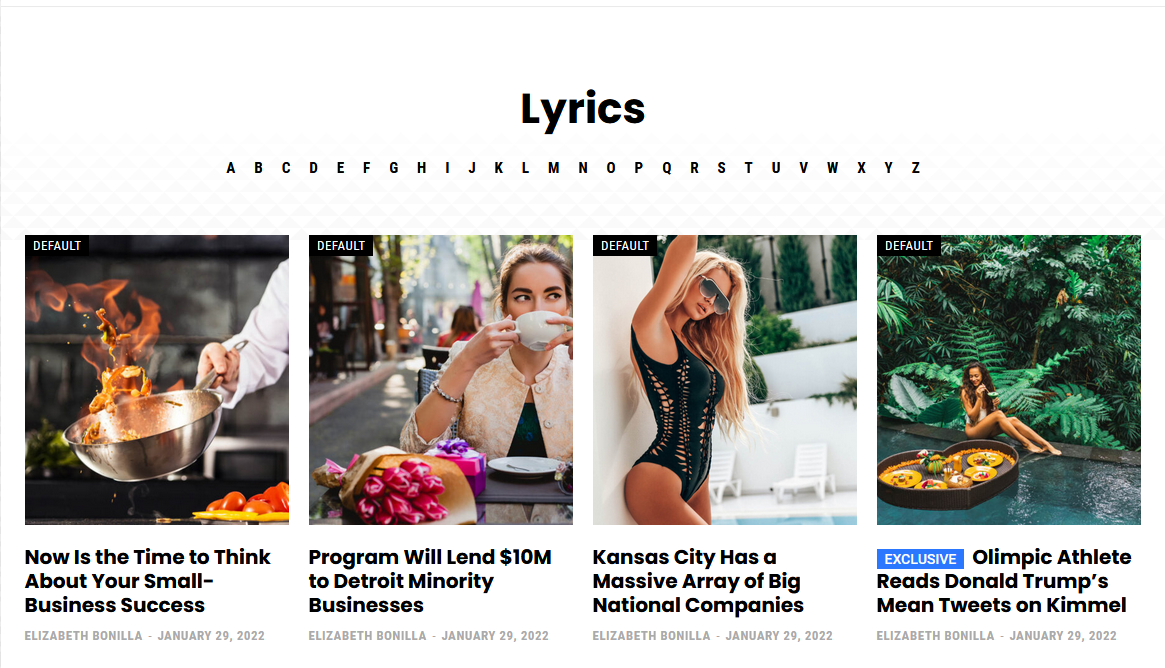
Related image 2 (Not logged in): 
Related image 3 (Mobile version): 
Related image 4 (subcategory page not working correctly): 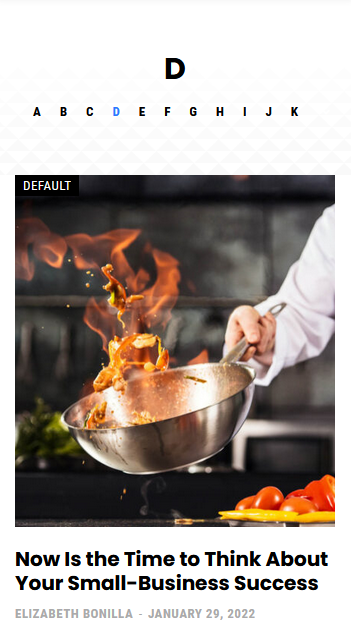
Related image 5 (subcategory page working correctly): 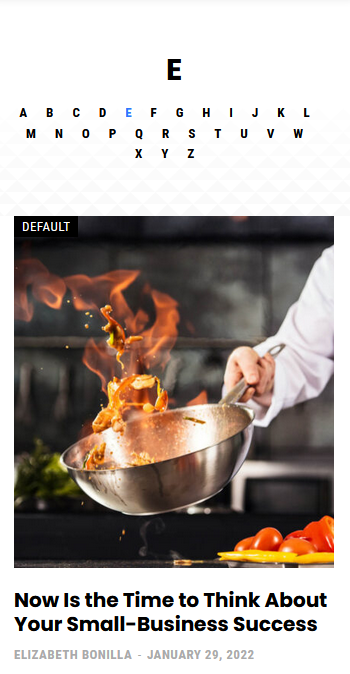
Related image 6 (TagDiv Composer settings): 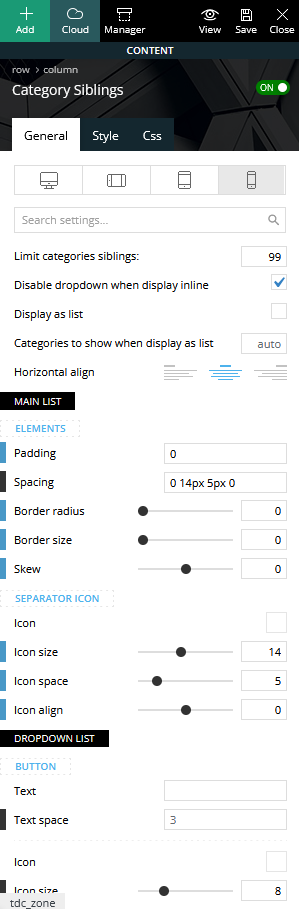
 Masudul Alam
I import ‘newspaper week pro‘ cloud header template. but I can’t configure modal popup page for left menu. My question is:
1. Using tagDiv composer, How to build modal popup like ‘newspaper week pro‘? I did not find any documentation related to this.
2. What is ‘Unique id‘ under the modal popup? How do I get this ID?
I’m surprised that there is nothing in the documentation about modal popup.



