- NewspapertagDiv Composer – Website Manager
- NewspaperWhen tagDiv Composer is Not Working
- NewsmagtagDiv Composer Tutorial
- TutorialsFrom WPBakery to tagDiv Composer
- NewspapertagDiv Composer Tutorial
- NewsmagHow to use the Visual Composer plugin
- NewspaperScroll Animation
- NewspaperSingle External Shortcode and External Shortcode
- NewspaperCredit System
- NewspaperBookmark – Save For Later
- NewspaperFlex Block Builder and Flex Loop Builder
- NewspaperModules Builder in Newspaper Theme
- NewspaperIntroduction to CPT and ACF with Newspaper Theme
- NewspaperCreate a frontend submission form
- NewspaperHow to Use the Tabbed Content shortcode
- NewspaperCreate a form contact page
- NewspaperFilters and sorting for taxonomies
- NewspaperUser review system
- NewspaperCustom Fields Support
- NewspaperWooCommerce: Happy “Add to Favorites!”
 Calin
Calin Hi,
Our theme has only a few options for custom post types (you can check our guide from here https://forum.tagdiv.com/custom-post-type-support-newsmag/).
Also the CPT can be display on blocks using tagDiv Composer -> https://prnt.sc/1rd9m9q and setting the post type on block .
In case that this is not what you mean, please let me know!
Thank you!
Calin Hi totojisic100k,
So you want to use the H1 only on blocks ? Not on logo or page title ?
Then how it will be on posts ?
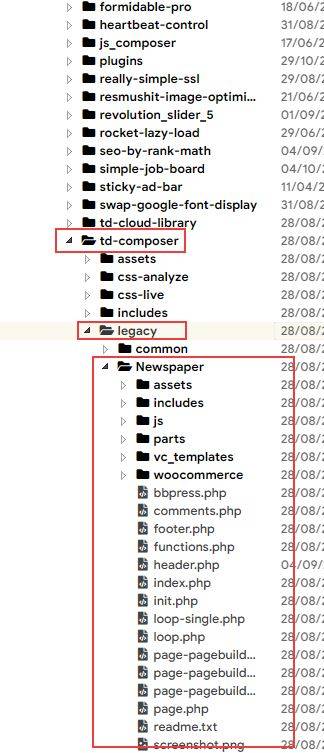
The theme do not have an option to remove the H1 tag entirely form the page, this must be set on logo or on the page title (depends on the page template that you have selected). Also to remove the H1 from those elements you must edit the theme files, for example if you use the default (path -> wp-content/plugins/td-composer/legacy/Newsmag/page.php) or the page builder with the latest articles (path -> wp-content/plugins/td-composer/legacy/Newsmag/page-pagebuilder-latest.php), or in case that you use the page with title template (wp-content/plugins/td-composer/legacy/Newsmag/page-pagebuilder-title.php). after you remove the h1 from those templates that you use, then it will be display only the one set by you.
Thank you for your understanding!
 Bettina
 Hello!
Please check the settings when you edit the pages with TagDiv Composer, also on the mobile viewport: https://www.screencast.com/t/XDQJedlggSB
It could be a gap or some wrong settings.
If the problem is still there, then deactivate ALL plugins except tagDiv ones, also if you are using a cache plugin, deactivate it, clear all cache(also from your browser) and try again.
Let me know the results!
Thank you!
 Anamaria
 Hello,
If you want to make the layout full width, then to change the website width, you need to make sure that you don’t have set a background color/image in the Theme Panel because this makes your website boxed. Make sure this option is disabled => https://www.screencast.com/t/ejiNPCBF
To set a page to full width, you’ll need to edit it with tagDiv Composer like this -> https://i.imgur.com/i5IUJ9E.jpg add or select a row and stretch it after your needs -> https://i.imgur.com/WKYebPX.jpg -> https://i.imgur.com/TO1BZ3M.png -> https://i.imgur.com/Yq8UCv3.jpg
Hope this helps you!
Thank you!
 Nemanja1980
Hi, as the title says, I have problems with my Visual composer.
I can see the list of all of the elements that I can add but when I click on them nothing happens. I also can’t drag them to an empty row of my homepage.
I recently swaped my laptop for an iPad (I still have the keyboard with a mouse). Could this be a problem or there is a problem with my Visual Composer?
Bettina Hello!
This is a category page. Please assign a cloud template and then you can edit it with the TagDiv Composer plugin. If you have some errors while you try to edit this page, then there is a plugin conflict (a plugin which is not tested with our theme).
Check an example here: https://www.youtube.com/watch?v=I1R3j1QYod0
Let me know the results!
Thank you!
Bettina Hello!
When you edit the page with TagDiv Composer, add the element called Flex block and you can delete this element called Blocks. For more information about TagDiv Composer, please check our documentation here: https://forum.tagdiv.com/tagdiv-composer-tutorial/
Thank you!
 dfh
dfhHi,
I’ve just installed the Newspaper Pro pre-built website, and I am looking for ways to change the menu background (in green in my screenshot) as well as the icons next to each menu item (in red). In both cases, I can’t seem to find a way to do it with the tagDiv Composer.
screenshot available here: https://imgur.com/a/Qu85q6p
For the menu background image, I’ve found no way to change it even if I’m sure it’s possible (I see the image file in my media library on WordPress).
For the menu icons, the only way I’ve found is to go to the WordPress dashboard –> Appearance –> Menus, and to change the html. For example taking <i class=”tdc-font-tdmp tdc-font-tdmp-globe”></i> Global and replacing “-globe” by “-bicycle”.
This works, but the issue is I don’t know all the prefixes for each icon.
I’m sure that there’s a better to do this for both issues I’ve encountered.
Thanks in advance for the help!
 stefanegirard
Hi,
When I create a new page I click on
1) Add new
2) TagDiv Composer
3) Load Template
4) I make change in the template loaded
It is always the same change.
Could you tell me how to not have to start over every time?
I would like a page configured with the blocks I use each time and the sidebar to add.
Thanks
 asthaoradhyatm
There has been a critical error on this website. Please check your site admin email inbox for instructions.
Learn more about troubleshooting WordPress.
After activating plugin website conflict making
dfhHi,
I would like to display my twitter feed on my main page (similar to the Instagram feed, which is a module that is available in the TagDiv Composer).
I understand that there is no twitter feed module in the TagDiv Composer at the moment (otherwise I may have missed it). Does this mean I can’t have a twitter feed on the home page? Or perhaps go through a 3rd party plugin, in which case my question is: is there a twitter feed plugin/widget that is known to work well with the Newspaper wordpress theme?
Thank you very much!
Jean
 enigmatictech
Hi,
I followed the troubleshooting steps for the Facebook counter here: https://forum.tagdiv.com/topic/facebook-social-counter-not-updating-2/ but the counter continues to show 0. The theme panel social networks page shows the page with the correct number of likes. The Facebook link field is correctly filled. The social counter and composer plugins have been reinstalled. What else can I try?
Newspaper v 11.2
Site: https://www.wranglernews.com
Thanks!
 Anonymous
hi. why theme files inside tag composer plugin? and what is legacy theme? and why its not using main tactive theme files?
https://banker.az/wp-content/uploads/2021/09/zScreenshot_2021-09-04_19-31-00.jpg
 mockaccino
Hi there,
TD composer is not working when i use td composer to edit my page. It just sits there and spins. Also, I can’t download any cloud templates. I was able to, then halfway through the editing process it just stopped.
I’m still using 9.5 (I’m too scared to upgrade).
Any help would be appreciated.
Thanks!
 aspirin29
The link I have seen posted doesnt work…
https://forum.tagdiv.com/visual-composer-tagdiv-composer-transition/
 es_bauvemedien
I build the responsive website using the diffrent devices trough the tag div composer. I spend a lot of time. And now I see, something else is shown on the mobile device. Only the main page corresponds to the TagDiv composer version. I clean all chaches and used dirfferent browsers. Nothing changed. Please help me.
Anamaria Hello,
Please edit with tagDiv Composer, select the header menu and search after title tag SEO, there you can set div for mega menu => https://i.imgur.com/x7bfQ6x.jpg
Thank you!
Anamaria Hello,
The Single Post Subtitle need to be added in the Single Post Template from tagDiv Composer => https://i.imgur.com/HShXpMm.png and will be displayed only in the post, not in the blocks from the homepage/category page.
Also, about excerpts please take a look at this article
https://forum.tagdiv.com/excerpts-introduction/
Thank you!
Anamaria Hello,
1. You can delete it, and when you want to have it on the posts, you can add it from tagDiv Composer => https://i.imgur.com/uKWO7rA.jpg
2. You can set a background color for each category for category Siblings, from Theme Panel -> Categories -> https://i.imgur.com/EZZNN4e.png and look like this => https://www.screencast.com/t/79IgrCIqIzkW
Thank you!
 Raymond92
 Thank you, the social network panel now is work
But I don t have the layout panel in tagDivcomposer
I attach a picture

Anamaria Hello,
1. If you referring to this element, you can show it https://i.imgur.com/LUM1Kt6.pngon each module, edit with tagDiv Composer, select the block and in the tab called “Layout” you can search after comments for Flex Blocks and Big grid flex.
2. Please delete the symbol “#”, and save it.
Thank you!
Anamaria Hi djovanov,
The SEO tag was added on the flex blocks to be able to create your SEO and those are available only on tagDiv Composer, there are no options for this in the widgets section.
Thank you for your understanding!
Bettina Hello!
Please check if you have “Empty column” in the TagDiv Composer builder page and delete them. Also, check the element’s settings. Check all the pages where you have that gap and see if there is a setting for that.
If every setting is alright, then it could be from a plugin conflict, that’s why, please deactivate ALL plugins except tagDiv ones, also if you are using child theme or cache plugin, deactivate them, clear all cache(also from your browser) and try again.
Let me know the results!
Thank you!
Anamaria Hello,
If you have a pro demo, then please edit with tagDiv Composer, select the block and in the tab called “layout” search after you want to hide https://www.screencast.com/t/F4H998Qa
Thank you!
Bettina Hello!
For this error you can check our guide from here at point 5: https://forum.tagdiv.com/tagdiv-composer-not-working/
Also, try to deactivate ALL plugins except tagDiv ones, also if you are using child theme or cache plugin, deactivate them, clear all cache and try again.
Please also check the page for special characters and remove them if they exist.
If the problem is still there, then make a full backup, send an email at contact@tagdiv.com and provide wp-admin and Cpanel access, so we can investigate this issue. Also paste a link to this topic so we can easily identify you.
Thank you!