
- NewspapertagDiv Composer – Website Manager
- NewspaperWhen tagDiv Composer is Not Working
- NewspapertagDiv Composer Tutorial
- NewspaperScroll Animation
- NewspaperSingle External Shortcode and External Shortcode
- NewspaperCredit System
- NewspaperBookmark – Save For Later
- NewspaperFlex Block Builder and Flex Loop Builder
- NewspaperModules Builder in Newspaper Theme
- NewspaperIntroduction to CPT and ACF with Newspaper Theme
- NewspaperCreate a frontend submission form
- NewspaperHow to Use the Tabbed Content shortcode
- NewspaperCreate a form contact page
- NewspaperFilters and sorting for taxonomies
- NewspaperUser review system
- NewspaperCustom Fields Support
- NewspaperWooCommerce: Happy “Add to Favorites!”
- NewspaperWoo Brands
- NewspaperModal Popup
- NewspaperShortcodes
 Calin
Calin Hi Toma Romica, the Newsletter and News Ticker can be use only with the theme builder, therefore, the only way to use them is with tagDiv Composer.
Thank you for your understanding!
 pawan
pawanIm not able to install tagdiv composer and cloud library. How to install them manually?
pawanIm not able to install tagdiv composer and cloud library. How to install them manually?
 Lightperfect
Hello
Column text’s -> Edit Content function are not responding during editing the page.
Here is what I have been doing:
clear cache ->
uninstall td composer plugin ->
clear cache ->
reinstall td composer plugin ->
clear cache again ->
reactivate td composer plugin again
here is the link: https://www.screencast.com/t/eMrAWKAgbNdh
not working on safari and chrome (both browser have all the extension deactivated)
please help….
 rjs34
rjs34I am trying to edit my home page but when I Edit with TD Composer it gets stuck on a spinning circle indefinitely. I have disabled all plugins except the Tagdiv plugins (Composer, Cloud, Mobile). Tried on several different browsers after clearing cache with no luck. Need some help.
 lwatson1439
I am using the pre-loaded “choppers” site. I tried to replace the main image on the home page, with one of my own. I gave it a size of 860 x 1024. It loaded into the media library OK. But in inserting into the page using TagDiv Composer, it appears to be using a stretched out thumbnail, rather than the full image.
To test this, I reloaded it with the original “choppers” image, and it too is now blurry. There must be something trivial I am doing wrong. I tried loading the image in native word-press, and it indeed is a small thumb nail, not the full image.
Go to http://www.eros-share.com to see the blurry home page image.
 Amit
Amit After updating the Newspaper theme, install and activate tagDiv Standard Pack and tagDiv Composer. This will keep your old design working.
Optional: Then you can start building/redesigning your website templates using tagDiv Cloud Library. Once you’re done with all required templates creation. You can enable them from the theme panel and choose to deactivate tagDiv Standard Pack plugin and optimize your website for better speed and performance.
P.S. If you are using a child theme, you need to update it as well. (especially functions.php file)
I hope you will find this helpful.
 ccpa2318
Hi there.
The text editor is not working on Tagdiv composer. It never finishs loading. This problem exists in every page. Thus, I cannot edit any long text on my pages at all. Please take a look at the issue on the below image.
Best Regards,
Pun
 StevCrutch
 Now the page is opening, but I’m getting this error when trying to edit the page: Error at zones: 5(models) : 0(dom). The model does not match the content/ unfortunately the help document is here https://forum.tagdiv.com/tagdiv-composer-not-working/ is like reading Martian. I have no idea what it even means to clean up the code.
 stefanywj
 Ok we have sent you our details on email provided by you. Please take a look and let us know. There are lot of issues in this theme coming.
1. Tagdiv composer is not loading the pages.
2. Speed of the website is very slow.
3. In theme panel, when we go to insert ADS then Toggle bar is not opened and collapse with WP Admin.
Please fic all these issues and let us know. Thanks.
 mclanfranconi
 Hello Vlad i try this:
#1 – Deactivate, delete, clear cache and re-install the TagDiv Composer Pluing (Nothing happend)
#2 – DEactive plugins (Nothing happend)
#3 Im not using child theme
#4 – I create 3 new HOMEPAGES working first time, save, close the tab, open again and error appears again.
 Vlad S
 Hello!
You can use the column text element in order to render shortcodes or use codes.
Simply copy the shortcode and insert it in the text area of the column text as you can see here: https://www.screencast.com/t/UEMEsVKog
Column text is an element from tagDiv Composer.
Thank you !
 marcnyc
Hello, I am noticing that on some of my content the first image is being duplicated by the theme.
In other words, when I’m editing the content in WordPress I see one image, but when I’m looking at the published article on Chrome I see two of the same first images…
See example here:
https://www.chaindlk.com/interviews/martina-bertoni__/
Also on Safari the images are not displayed AT ALL.
When I load the page and I am logged into the admin section I also get a bunch of wp_booster error messages:
wp_booster error:
td_api_base::mark_used_on_page : a component with the ID: single_template_6 is not set.
/home/chaindlk/public_html/wp/wp-content/plugins/td-composer/legacy/common/wp_booster/td_api.php
Display backtrace
wp_booster error:
td_api_base::get_key : a component with the ID: single_template_6 Key: file is not set.
/home/chaindlk/public_html/wp/wp-content/plugins/td-composer/legacy/common/wp_booster/td_api.php
Display backtrace
wp_booster error:
The path of the single_template_6 template not found. Did you disable a tagDiv plugin?
/home/chaindlk/public_html/wp/wp-content/plugins/td-composer/legacy/common/wp_booster/td_api.php
Display backtrace
wp_booster error:
td_api_base::get_key : a component with the ID: single_template_6 Key: bg_use_featured_image_as_background is not set.
/home/chaindlk/public_html/wp/wp-content/plugins/td-composer/legacy/common/wp_booster/td_api.php
Display backtrace
wp_booster error:
td_api_base::get_key : a component with the ID: single_template_6 Key: bg_disable_background is not set.
/home/chaindlk/public_html/wp/wp-content/plugins/td-composer/legacy/common/wp_booster/td_api.php
Display backtrace
wp_booster error:
td_api_base::get_key : a component with the ID: single_template_6 Key: bg_box_layout_config is not set.
/home/chaindlk/public_html/wp/wp-content/plugins/td-composer/legacy/common/wp_booster/td_api.php
Display backtrace
How can I trouble shoot?
Vlad S Hello!
In the new versions the theme is more focused on using tagDiv Composer and edit your pages live rather than making a change and seeing it later. I recommend you to take a look at our video guides here to learn more about how the theme works now:https://www.youtube.com/user/tagdiv
Thank you!
StevCrutch In this blog it says to “From the Plugins section, deactivate and delete the WPBakery Page Builder plugin.” https://forum.tagdiv.com/how-to-update-visual-composer-plugin/ I do not have that option. Just the text I described above. I have no way to deactivate it. So I’m stuck in a bad loop. I finally got a new page to open when I saved and closed it, then opened it with “edit with tagDiv Composer.” But the page opens and the wheels just spin. Nothing ever loads.
StevCrutch Sorry, I don’t understand any of this. I found a blog post about using tagDiv Composer to create a new home page, opening up a new page, creating it, then deleting the old page. I don’t even have the option of tagDiv Composer when opening a page. No blue button like on all blog posts showing how to use it. (like on this blog post: https://tagdiv.com/mobile-theme-automatic-optimization-for-mobile-newspaper-theme/) Nothing. There is not option anywhere to open tagDiv Composer. And, as I said, I cannot upload the latest version of WP Bakery. I have tried. Nothing happens. The wheels just spin. and I can’t delete it as this is the only message on my Plugins Tab: ““There is a new version of WPBakery Visual Composer available. View version 5.0.1 details. Automatic update is unavailable for this plugin. To receive automatic updates license activation is required. Please visit settings to activate your Visual Composer. Got Visual Composer in theme?” I cannot access it nor delete it.
Vlad S Hello!
Not really. Newspaper theme in combo with tagDiv Composer offer so many customization options that I personally for a magazine / blog wouldn’t need to use a child theme.
Thank you!
Vlad S Hello!
I have replied here: https://forum.tagdiv.com/topic/newspaper-theme-tagdiv-composer-is-not-loading-and-ads-toggles-are-not-open/
Thank you!
 Toma Romica
Hi,
How can I implement The Newsletter plugin and News Ticker without using tagDiv Composer?
My site: https://www.programegratuitepc.com/
Vlad S Hello!
how can I add sticky side bar to my posts
That can be done using tagDiv Composer as shown in the video above. If you can’t edit your post template using tagDiv you will need to import a template from Cloud library: https://www.youtube.com/watch?v=6m8-EebnfM0
On standard templates the sidebar comes from Appearance – Widgets. The sticky option is found in Theme panel: https://www.screencast.com/t/5AagG3Zm
Thank you!
 vorilask
 It worked for me. I added the code both via tagDiv Composer on the subsequent Cloud Template edit (Single Article Cloud Template) and on Theme Panel of the Newspaper theme. I chose ‘disable’ to all buttons and therefore, the settings that I made via tagDiv Composer are the active ones. I guess that this is the normal situation for this function.
Vlad S Hello!
You can use the column text element in order to render shortcodes or use codes.
Simply copy the shortcode and insert it in the text area of the column text as you can see here: https://www.screencast.com/t/UEMEsVKog
Column text is an element from tagDiv Composer.
Thank you !
mclanfranconi UPDATE 3
With this error i can´t edit anything from the tagdiv composer…
mclanfranconiHello.
Today I entered the home page of my website to make some changes. I was surprised to see this message saying that there is an error in column 3.
As I have not changed anything for weeks, I had never seen it.
Any idea what to do?
IMAGE: 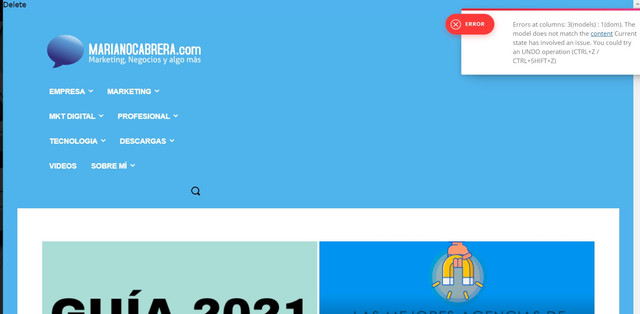
 VisualSuspect
I have a problem with the page insights of google wher the get impact. The first thing that shows me that has most of the size is the js file of td composer:
file: tagdiv_theme.min.js
How to reduce this file?
