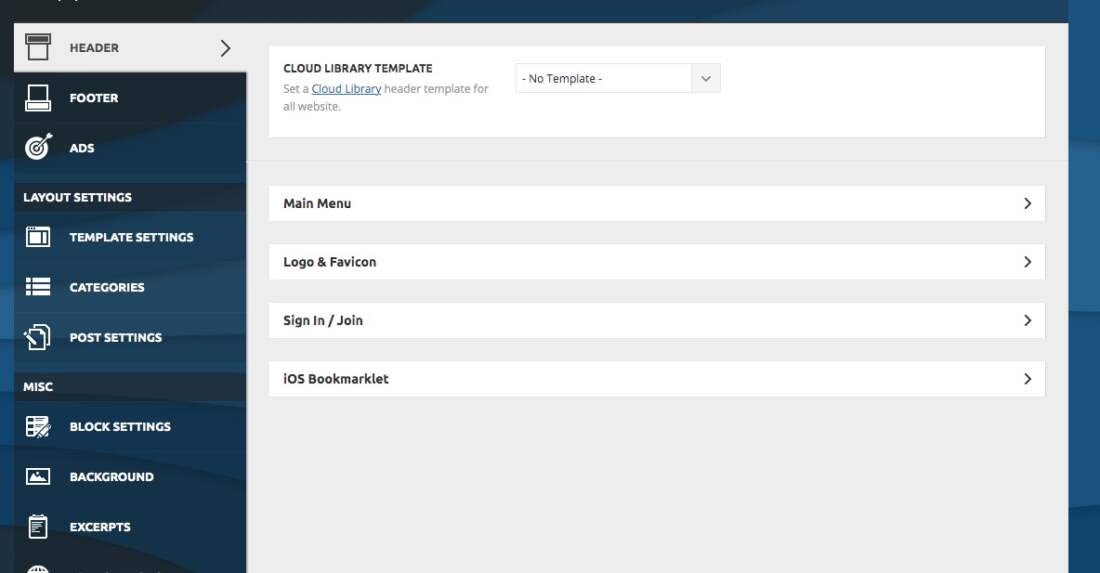
- NewspaperHeader Builder
- NewspaperHeader ads
- NewspaperHeader styles
- NewspaperSearch setup for custom post type
- NewspapertagDiv Composer – Website Manager
- NewspaperBookmark – Save For Later
- NewspaperWooCommerce: Happy “Add to Favorites!”
- NewspaperModal Popup
- NewspaperFlex Block Settings Guide
- NewspaperPosts Loop Element
- NewspaperHow to Add a Logo in Newspaper
- NewspaperDefault Category Settings
- NewspaperWhen tagDiv Composer is Not Working
- NewspapertagDiv Cloud Library Plugin
- NewspapertagDiv Composer Tutorial
- NewspaperUsing the Theme Translations with WPML
- NewspaperInstagram in Newspaper WordPress Theme
- NewspaperWeather Shortcode
- NewspaperThe Mobile Theme
- NewspaperLogin – How to Enable User Registration
 srpskiposlovniimenik
After update to 11 I lose header option in theme panel, i cant setup main and top bar
 Faiq Ahmed
After the version 11 update. My header, footer, Author template, categories template, single post template, theme colors all are changed to default and are not same as I had customize them before. Only the Front page is which is a custom page.
How can I revert to my design settings back.
 trisquelmedia
 Hi:
Same question, how can i change the background color (footer and header) through Tagdiv?
 GAMax
GAMax Unfortunately, this update caused the issue and I have had the tagdiv standard pack plugin activated. Also, I had added the plugin that was helping me do that but now It isn’t allowed due to the new update. I’m referring to the top header bar login (which is directly related to the templates.
 Karokaryabi
According to the video tutorial, I have made a mobile version for my website but as you can see in the attached screenshots the header is totally different. Please help me to change the header of the mobile version and make it like the PC version.
website name: https://digital.computer/
login: https://digital.computer/wp-admin/index.php
https://drive.google.com/file/d/1DFrGBSEF0DOzqXO99Chlg6KiX1uPiMot/view?usp=sharing
https://drive.google.com/file/d/1ZR19xeZfLC0Oi9DUmbsoTxPZm7Pyr50K/view?usp=sharing
Thanks
KarokaryabiAccording to the video tutorial, I have made a mobile version for my website but as you can see in the attached screenshots the header is totally different. Please help me to change the header of the mobile version and make it like the PC version.
website name: https://digital.computer/
https://drive.google.com/file/d/1DFrGBSEF0DOzqXO99Chlg6KiX1uPiMot/view?usp=sharing
https://drive.google.com/file/d/1ZR19xeZfLC0Oi9DUmbsoTxPZm7Pyr50K/view?usp=sharing
Thanks
 pinnaclecompass
 Updated theme today. Header and footer options in theme panel disappeared. We now have to recreate our old basic headers that we had to find and download from cloud library. Full width headers don’t look the same as before, even if we choose the ‘basic’ header styles that were there for last 5 years.
We used multipurpose headers with buttons on one of our sites. That option is gone as well.
We are really thinking on restoring the whole site. This is way too much work to rebuild the headers and footers from scratch, especially when alignment is off (ex. ad and main menu is not centered, even though that’s what the downloaded template showed. There isn’t no option for global settings (ex. social links, footer copyright text, etc…) like in the past versions.
This might be fine for new sites where you can just install a demo, but on existing sites this is way too much work.
-
This reply was modified 5 years by
pinnaclecompass.
 Anonymous
 The Mobile Theme is being neglected… some fixes (the CSS on the captions) were not fully implemented, some new functions (to disable the toTop button) were released only for desktop and mobile (but not for the Mobile Theme).
Also, the Theme is throwing some errors in the php log:
/themes/Newspaper/includes/wp-booster/wp-admin/tagdiv-view-header.php on line 26, for example.
Other than that, it is working well for me.
 luqueriasas
Hello there, with the last update the header style config has disappeared from the admin dashboard. I can’t change anything related to this, and the logo has disappeared too. The website is https://www.brufol.org
https://www.brufol.org/wp-content/uploads/2021/06/Captura-de-pantalla-2021-06-18-a-las-19.25.20.jpg
I have downgrade and upgrade and deactivate all plugins. Nothing worked.
Thanks in advance,
Lucas
 Jabran Ali
 Hi, I am also wondering, how to fix the width issue with the Header and footer. Can you please explain, as I have set the background color for the zone content through Tagdiv composer but nothing works.
 aceofjames
Please see: https://anteupmagazine.com/
Also, the header is messed up an the footer is completely gone.
Downgraded to Newspaper 10.4 and it still looks the same.
 domaincraft
Hi,
I need to upload header menu in mobile menu. I do it:
1) opening Tagdiv Composer on the page of interest;
2) selecting the phone viewport;
3) select the hamburger menu;
4) finally select “td-demo-header menu” from the drop-down menu of the option “select menu” of tagdiv composer.
The above procedure uploads correctly the mobile menu, but it causes the reset of the page text. In particularly the text in the page disappears and appaears the following string [tdc_zone type=”tdc_content”][vc_row][vc_column][/vc_column][/vc_row][/tdc_zone]
 Anamaria
 Hello,
The implementation of the boxed option has been extended, if you set a background image/color this boxed option applies only to content, now it also applies to the header and footer.
So if you want to have the header and footer full width, you need to set the background image/color on the zone of content, and remove the background color/image from Theme Panel.
Thank you!
 Socratease2640!
 Hey Harefamilia,
My understanding is that for the footer template only, you have to first assign it to a page (any page, I chose the homepage) . This can be done in the theme panel footer area or in the website manager. Strangely, setting it on one single page seems to make the footer appear globally on every page. Then you go back to THAT page to edit the footer. The “edit with TagDiv Composer” does NOT appear if you try to edit the footer template directly. Personally, I find it very inconsistent and confusing that they have done it this way. The footer template should be editable in the same way the header template is, that is, with the “edit with TagDiv composer”.
Hope this helps,
 thcp2020
 Hello,
Unfortunately it does not.
Please see screenshots attached –
1 – https://paste.pics/CVCQO
2 – https://paste.pics/CVCQY
3 – https://paste.pics/CVCR9
4 – https://paste.pics/CVCRD
Ideally we would like the Big Title to resize as the block header font size decreases.
All the best
Thomas
Anamaria Hello,
In the screenshot is the footer template which does not have the edit button, and the header template which has the edit button on the back => https://www.screencast.com/t/9HgxEEv7QP, are two different templates this is how they were made.
Also, the steps to edit the footer are those from that topic, but to be much clearer and for a good understanding I made this video https://www.screencast.com/t/j1lKvwrChrWy that I hope will help you.
Also, you can check this video https://www.youtube.com/watch?v=nE51MfLV7hE
Thank you!
Anamaria Hello,
Seems you created a mobile page, the header and footer are taken from the standard ones.
So if you want to use a responsive version, please remove the mobile page, set it on “No mobile page” => https://www.screencast.com/t/E5FO7ZBH and then the responsive version will load.
Also, if you want to use the mobile page you need to edit the mobile page, and in Manager (Website Manager) you need to import or the easy way is to convert the existent footer like this => https://www.screencast.com/t/HrjOBNayd
This is a video about Responsive Newspaper Theme, AMP & Mobile Theme, Mobile Pages & Templates -> https://www.youtube.com/watch?v=SpGkOnJeNZY
Also, please clear your cache.
Thank you!
 leejaehak
 Until the update, when applying a boxed layout and ‘fixed’ the top header menu, the layout didn’t go out of place.
However, if the top header menu is ‘fixed’ after the update, the layout is wrong.
I hope you understand that I am not good at English because I am Korean. Thank you for your interest.
-
This reply was modified 5 years by
leejaehak.
 anderss1
 I have the same problem and here is the issue: https://imgur.com/a/gxgpIQo
https://www.nyariks.se/kategori/inrikes/
I have set Background Boxed Layout and Stretch.
So the main front page that has no background is full wide screen, however all posts and category pages have their header/footer drawn in exactly like @insumedical
If I uncheck Background Boxed Layout the background picture disappears for the category and header/footer goes full wide screen. The posts still stay the same though.
Anamaria Hello,
1. I saw you have only one header, you can import more from Cloud Library => https://www.screencast.com/t/eBWgEj03E
2. the option to remove the unused CSS is used only on pages and this option analyzes the website and all CSS that it finds that is not used is removed. Using the Generate critical CSS option will keep the CSS (is not remove the used CSS) but it is loading the necessary CSS for the first look in the website header and the rest of the CSS will be load in later https://www.youtube.com/watch?v=tnkVapqhIHc
3. To improve the core web vitals you need to optimize your website also, you can check this article https://www.wordstream.com/blog/ws/2021/04/02/improve-core-web-vitals and this topic https://forum.tagdiv.com/topic/guys-it-is-possible-to-get-good-speed-with-newspaper-theme/
Thank you!
Anamaria Hello,
If you follow the steps which are presented in this tutorial here: https://tagdiv.com/how-to-increase-page-loading-speed/ you’ll be able to increase the speed of your website.
Also, to increase the page speed you can check these similar topics for more solutions:
– https://forum.tagdiv.com/topic/optimize-script-to-improve-site-speed/
– https://forum.tagdiv.com/topic/a-few-tips-for-newspaper-x-speed-high-cpu-usage-issues/
– https://tagdiv.com/how-to-increase-page-loading-speed/
– https://developers.google.com/speed/docs/insights/v5/about
– https://forum.tagdiv.com/topic/score-100100-pagespeed-with-newspaper-wordpress-theme/
– https://forum.tagdiv.com/topic/newspaper-theme-speedify-your-website/
Please note that page speed is not covered by the support team: https://forum.tagdiv.com/newspaper-theme-support/
Please give it a try and follow the steps which I presented above about page speed.
Also, check our guide from here: https://forum.tagdiv.com/how-to-make-the-site-faster/
Please make sure to use our newest tool called tagDiv CSS Analyzer which comes in handy to resolve some of your issues. Take a look at the video guide here: https://www.youtube.com/watch?v=tnkVapqhIHc
“This custom tool performs an automatic test to find missing CSS rules applied by user interaction. Moreover, you can manually interact with a chosen section/component from the page while the tool records all the involved CSS. It will generate the final CSS file for this page and also will split the rules in Critical CSS to be loaded in the website’s header.” ( https://tagdiv.com/whats-new-in-the-newspaper-theme-10-4-update/ )
We tested our tool on our demos, and we have such great results!
Take a look at this topic because it could help you: https://forum.tagdiv.com/topic/css-analyzer-step-by-step-and-doubts/
Let me know the results!
Thank you!
 sergioshrek
 Thank you Annamaria for your response. I forgot to publish the page. Now it’s correct.
Under the header should be a Big Flex Grid 5, but instead there are just the titles. In the tagdiv page composer, the page looks good
This happens starting from 10.4 version
How can I solve this issue?
trisquelmediaHi:
Since i updating to newsppaper 11 header y footer are in content and this code has been added
.td-boxed-layout #td-outer-wrap {
max-width: 1164px;
margin: 0 auto;
}
Before the update header and footer are full width, now are in this container size, how i solve this?
 Thomas
Hello
Till the last update, afer activate Shop plugin, WooCommerce Side Cart Premium plugin doesn’t work anymore.
It is all empty.
So we deactivate it for use your My Account and Cart buttons in the header.
Question is simple : how we could add those 2 elements in the header (especially the dynamic Cart with info under it)?
For now we have 2 differents header:
https://www.virtualmagie.com/
https://www.virtualmagie.com/boutique/
 Hoku Marketing
I am loading the Travel Pro Template sections and get errors on some, not all “One of the images failed to upload”
I cannot load homepage template and 1 or two others, however I have been able to load header, footer, and a couple others. I have taken screen shots of the error but cannot load here.
Any ideas why?