- NewsmagHomepage – How to build and set it
- NewspaperHomepage – How to build and set it
- NewspaperHow to edit modules for Flex Block X
- NewspaperGeneral Options that May Interfere with the Newspaper Theme
- NewspaperThe Newspaper Mobile Theme: Introduction
- NewspaperHow to Add a Logo in Newspaper
- NewspapertagDiv Shop
- NewspaperHow to Use tagDiv Cloud Library
- NewspaperDesign your Post Pages using the Cloud Library Templates
- NewspaperHeader Builder
- NewspapertagDiv Cloud Library Plugin
- NewsmagtagDiv Composer Tutorial
- TutorialsFrom WPBakery to tagDiv Composer
- NewspapertagDiv Composer Tutorial
- NewspaperNewspaper theme documentation
- NewspaperThe Mobile Theme
- NewsmagNewsmag documentation
- NewsmagMain menu
- NewsmagLogo & Favicon
- NewsmagPage templates
 Calin
Calin Hi,
Please follow the steps as mentioned:
– open the homepage using tagDiv Composer.
– from the top menu, select Manager.
– enable or disable the sticky header as needed – refer to this screenshot for guidance: https://i.imgur.com/avxI1XM.png
– select the sticky header and set its sticky type to “Always”.
Alternatively, you can select the sticky header the same way it appears on the frontend. Once it is displayed in Composer, the selection process is identical.
 Rogger Baylon
Hello TagDiv Support,
I’m experiencing a problem with the Newspaper theme and TagDiv Composer that affects my site’s layout and customization options.
1. Mobile Layout Issue
On the mobile version, the layout is broken and does not adapt properly to the screen. This makes the site look misaligned on mobile devices.
2. Device-Specific Customization Not Working
Previously, when editing with TagDiv Composer, I was able to customize layouts separately for desktop, tablet, and mobile. For example, I could adjust padding, margins, or hide/show elements per device.
Now, those device-specific settings no longer work. The desktop layout is being applied by default to all devices, and I cannot create different designs for tablet or mobile anymore.
3. Steps to Reproduce
Open the homepage or a post in TagDiv Composer.
Select any row/element.
The alternatives for device customization (desktop, tablet, mobile) appear.
Any changes made for tablet or mobile are overridden, and the desktop view is forced on all devices.
4. What I’ve Tried
Confirmed with WPMU DEV support (my hosting provider) that this is not related to optimization or caching.
Performed cache clearing and plugin conflict checks.
Verified no JS errors in the browser console.
Confirmed that the issue persists even without Hummingbird optimization enabled.
5. Current Status
My hosting support confirmed the issue seems to come from the TagDiv Composer/page builder itself.
I am currently using the latest version of the Newspaper theme and the problem started recently, without any theme update on my side.
Could you please help me investigate this and confirm if it’s a known bug in the latest version of TagDiv Composer?
Any guidance to restore proper mobile layout behavior and per-device customization would be greatly appreciated.
Thanks in advance for your support,
Prensa Regional
Calin  BMBDigital
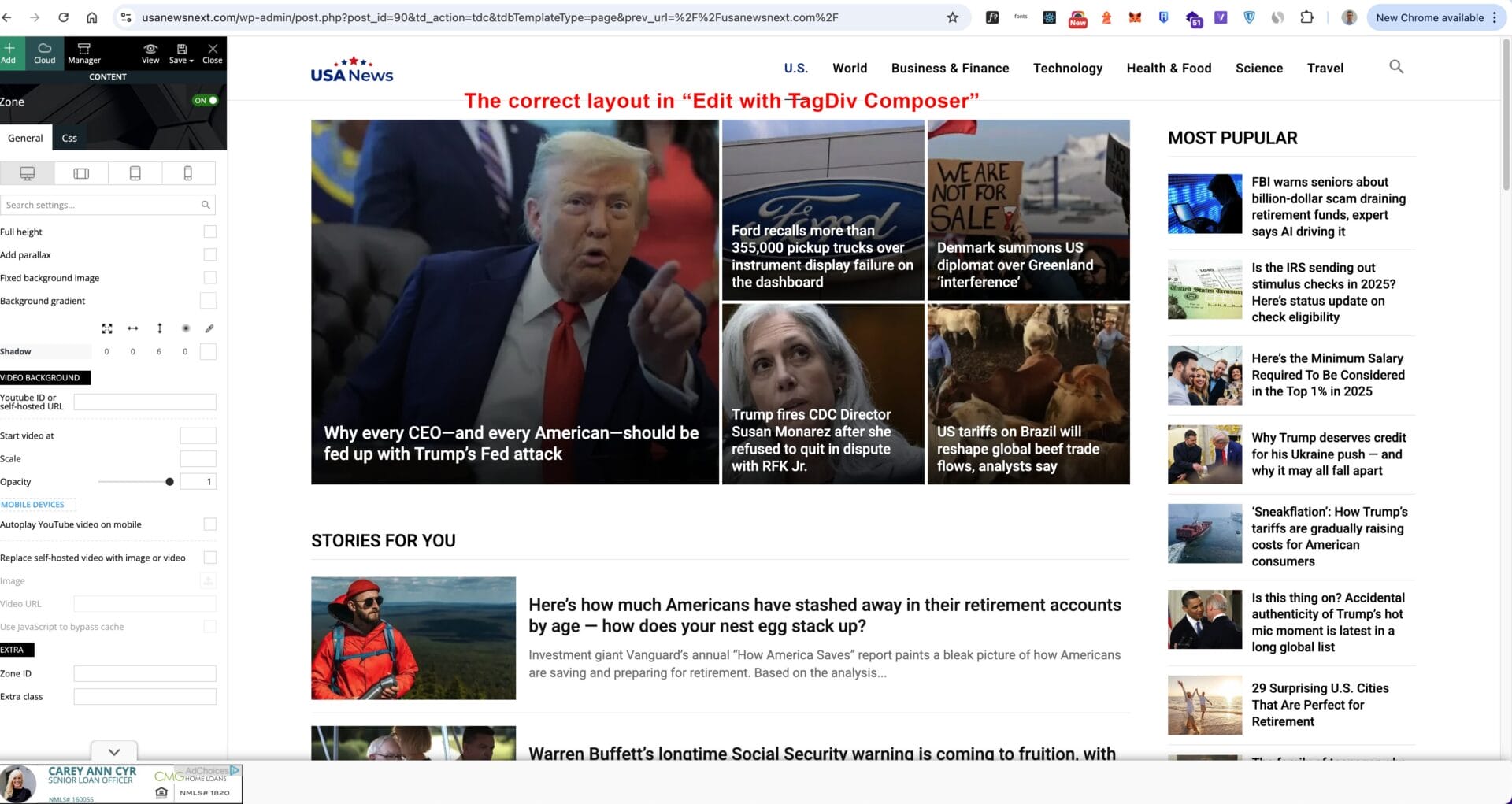
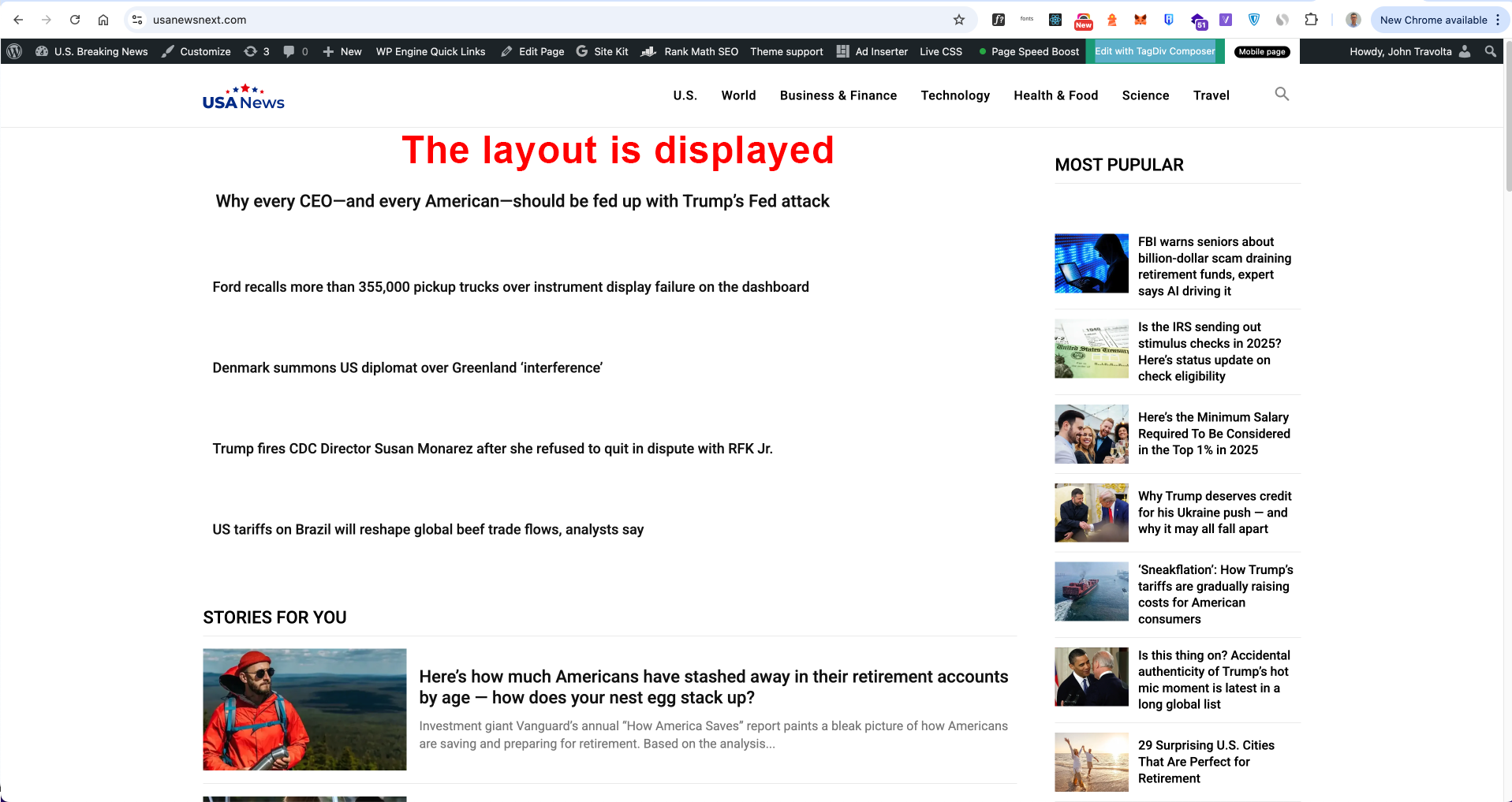
Can you please help me check my homepage? Why are the images not loading on the front end? The editor should reflect exactly what is displayed. I ruled out Page Speed Boost being the problem because even with it disabled, the images still do not show. I have also run a file permissions fix.
Please see the images for more information:
https://usanewsnext.com/wp-content/uploads/2025/08/image-7-1.jpg
https://usanewsnext.com/wp-content/uploads/2025/08/image-1-1.png
My website: https://usanewsnext.com/
Looking for support!!!
Thanks!
Calin Hi,
You need to edit the homepage using tagDiv Composer – https://i.imgur.com/u0WDBap.png select the blocks from column 1, after that from column 2, and for each theme check the filter tab for the categories that are set – https://i.imgur.com/RUyduf4.png, and check in the general tab the number of articles that are set to be displayed and to be skipped – https://i.imgur.com/qStE5V2.png https://i.imgur.com/6ZYtc8G.png if that category do not have enought articles then (more then the offset number), then will not display any articles-> https://forum.tagdiv.com/flex-block-settings-guide/
Thank you!
Calin Hi,
If you are referring to the Latest articles section from homepage, you can use this option – https://i.imgur.com/kOoFyMv.png or it’s about the global loop, then you can use the option from Dashboard> Settings > Reading https://i.imgur.com/I20737H.png
Thank you!
 detlev
Hello dear support team,
I’m once again struggling with tagDiv Composer and hope you can give me a tip.
I have images in different formats as featured images. Is there a way for tagDiv to scale these images automatically in the output? The column in which the image is displayed is always the determining factor. This only applies to the header area in the content block. No matter what I set for the image size, the output is always different. I’m giving two examples here. I have the same problem in the mobile view.
Example:
From my Homepage:
1. Picture in landscape-mode
This image would need to be displayed wider in proportion to avoid the image being cut off
2. Portrait-Modus
Here the image is also cut off, even though it is portrait mode
The header images on mobile are all cut off
I would be happy if you have a solution for my problem. Thank you very much.
Calin Hello,
Please use tagDiv Composer, edit the homepage and choose the mobile viewport to change the logo https://forum.tagdiv.com/add-logo-newspaper/
Thank you!
Calin Hi,
You can use tagDiv Composer select the blocks from your homepage and use the filter tab to choose the articles you want to display there – https://i.imgur.com/0fyeRfi.png https://forum.tagdiv.com/flex-block-settings-guide/
Thank you!
 sami313
How to pin/featured the article at homepage
Calin Hi,
What I will recommend is to use a homepage https://forum.tagdiv.com/homepage-how-to-build-and-set-it/
Also, if you like a theme demo, you can install it https://forum.tagdiv.com/installing-demos/
Thank you!
 Ramesh1989
Hi Team,
I want to showcase the homepage in grid view. My website https://www.ldaofwny.org/.
Please advise me on how to hide the full content for the post on the homepage.
Calin Hi,
Edit the homepage using tagDiv Composer https://i.imgur.com/LqZci0B.png, select the mobile view port – https://i.imgur.com/irzI2i7.png then the menu and change the title – https://i.imgur.com/EQOebz7.png
Thank you!
Calin Hi,
Edit the homepage using tagDiv Composer, select the search icon and check the General tab scroll down to the Search form section and set the for offset to the left (I think 250 will be enough) – https://i.imgur.com/1FCe6Ih.png
Thank you!
 alejandroman
I just installed the pre-built website (with content) “Urban Observer” on the https://staging.claridadpuertorico.com/ site and now want to display it on the homepage, but I do not see how to do it. Please advise.
Thank you,
Alejandro
 mircontents
Hi. I imported the old Newspaper homepage template but I have been unable to change the background colour to white. I like the style but don’t want the colour. I am not a tech person and I have tried everything possibe but I couldn’t.
 duane
duaneHi
I have a long homepage and I want to drag a row above another row that is outside of what I can see in my screen’s viewport. When I drag the row to the top of the screen, the screen doesn’t scroll up like I would expect it to, so I can’t drag it any farther.
Any suggestions?
Calin Hi,
That section is part of the page template “Page builder + latest articles + pagination” and it can be edited from the backend at the end of the page using the provided options from “Homepage Latest Articles” – https://i.imgur.com/daDBiGZ.png also the latest sidebar can be edited from widgets > default – https://i.imgur.com/XN3JABe.png – https://i.imgur.com/yYuaWXs.png
I hope this will help you!
Calin Hi,
The sidebar from your homepage is set using tagDiv Composer. If you check the provided images, you’ll see that the first should be the social counter, then ad block and editorial block, but in your homepage screenhost, you have an ad and popular video, which are different blocks.
Please go to Newsmag > theme panel > template settings > blog and post templates -> https://i.imgur.com/VLbGFey.png
If you want we can take a loo, for this please contact us via email at contact@tagdiv.com and provide temporary wp-admin access to the website.
Thank you!
 vikassainibsnl
What settings i need to apply on the homepage so that duplicate posts doesn’t appear at the homepage.
vikassainibsnlI have placed ad codes in the ad spaces at the right of the posts but ads are not appearing where as same codes are working in the main homepage. What is the issue with post template settings.
 bdp
bdp Hi Calin, this is what I get in DivComposer

If I click “Create Mobile Page” it create me another Home Page. Is it correct? Is this when you talk about mobile?
If I click on the widget i have this menu on the left, but if click on the mobile icon and i made a change this change is for all the version of the homepage also desktop not only the mobile

 Calin
Calin Hi,
It will be need to add some content to your pages so the pages of the website will have some content and the footer will not be right under the header. The website is not only this https://i.imgur.com/rQ3xTHY.png, so there is no place where the menu can be extended to be displayed. On the homepage, where there is content, the menu is coming over the content.
Thank you!
Calin Hi,
Please use tagDiv Composer, edit the homepage and click on the first row containing the big grid, then uncheck the option “Hide on pagination” – https://i.imgur.com/G4OqH1Z.png. Do this for each row you do not want to be hidden when the pagination is used.
Thank you!
Calin Hi,
If this situation is on the homepage, then use tagDiv Composer to edit the page, select the block and check the filter tab and there select the category for that block.
Thank you!