
- NewsmagHomepage – How to build and set it
- NewspaperHomepage – How to build and set it
- NewspaperHow to edit modules for Flex Block X
- NewspaperGeneral Options that May Interfere with the Newspaper Theme
- NewspaperThe Newspaper Mobile Theme: Introduction
- NewspaperHow to Add a Logo in Newspaper
- NewspapertagDiv Shop
- NewspaperHow to Use tagDiv Cloud Library
- NewspaperDesign your Post Pages using the Cloud Library Templates
- NewspaperHeader Builder
- NewspapertagDiv Cloud Library Plugin
- NewsmagtagDiv Composer Tutorial
- TutorialsFrom WPBakery to tagDiv Composer
- NewspapertagDiv Composer Tutorial
- NewspaperNewspaper theme documentation
- NewspaperThe Mobile Theme
- NewsmagNewsmag documentation
- NewsmagMain menu
- NewsmagLogo & Favicon
- NewsmagPage templates
 Calin
Calin Hi,
We received your email and it appears that this notice can be removed if the debug is set to false https://forum.tagdiv.com/requirements-for-newspaper/. It appears to be related to some settings from a block on the homepage, but for the moment, we haven’t identified it. We’ll reply via email when is done.
Thank yoU!
 vikassainibsnl
I want to delete inner columns to remove the empty space created on the homepage but i am unable to delete. Kindly provide the method to delete it or suggest any way to fill / use this emptyspace.

 ICONS
ICONSHi,
How can I add a shortcode to a slider for the homepage? [soliloquy id=””]
Tried various things (text block, Raw HTML) but that didnt work.
Thanks
Calin Hi,
The number of modules per row and the number of modules that should be displayed can be edited using tagDiv Composer, edit the homepage, select that section, and check in the general tab the post title length, the excerpt length, and the limit post number. https://i.imgur.com/XHxJUCg.png – https://forum.tagdiv.com/flex-block-settings-guide/
Thank you!
 Stoyan
Hello,
I’m using this one:
https://demo.tagdiv.com/newspaper_free_news_pro/
I want to change the length of the text of the posts in the “Recent Posts” section.
I see that in the demo site (from the link above) the text is in three lines.
In my case the texts are longer.
Is there any way to control the length of these texts from the homepage editor or is it only done from the preview taken in WP
Thank you.
Calin Hi,
What I will recommend is to edit the homepage using tagDiv Composer https://i.imgur.com/8UMyRBm.png select that block and in the Layout tab, change the image size, set it on large or full – https://i.imgur.com/eJK2fXK.jpeg
Thank you!
 ColinSeif
 The error on the mobile version is when you scroll down the page towards the bottom of the homepage.
 pinxuan
 Hello,
I’ve successfully set up the homepage image for each category. However, I’m currently facing an issue where the images appear blurry on the front end.
Here is the information of my original image file:
• File type: image/jpeg
• File size: 315 KB
• Dimensions: 2560 x 1707 pixels
May I ask how I can adjust the settings to make the images display clearly?
Thank you very much for your help!
Calin Hi,
Unfortunately, this will not be easy to do on the homepage and category as long as the first image on those is dynamic and has the same class as the rest of the pages from the homepage and category. Normally, the class that should be used is td-image-wrap, but should be used only for the first element on page/category
Thank you!
Calin Hi,
I just checked the website and this looks good, indeed, there are multiple fonts on homepage, what I can suggest if you want to replace some fonts is to use tagDiv Composer and manager settings for fonts – https://i.imgur.com/RnktjBk.png https://forum.tagdiv.com/tagdiv-composer-website-manager/
Thank you!
 gleloudas
Hello,
we have setup image lazy loading with wp_rocket plugin.
for article images we have exculted class td-modal-image so as first image does not get lazzy loaded and does not cause high lasgest contentfull paing in core web vitals.
We need to do the same for homepage / category pages but there is no specific class for these images.
https://www.kynigesia.gr/
https://www.kynigesia.gr/perivallon/
#tdi_68 .entry-thumb -> This cannot work
span.entry-thumb.td-thumb-css.rocket-lazyload.entered.lazyloaded (this is the category image classes)
here are the plugins requirements:
https://docs.wp-rocket.me/article/15-disabling-lazy-load-on-specific-images
Thank you very much for your time.
PS plase add in email a.sklepas@gmail.com too!
Calin Hi,
Please check this:
1. Check robots.txt
– Go to: https://expertsay.blog/robots.txt
– Ensure it does NOT have any Disallow: / or rules blocking Googlebot.
– If it looks suspicious or overly restrictive, restore it to the default or intended settings.
2. Check for Noindex Tags
– View your homepage and a few posts/pages in your browser.
– Right-click and choose “View Page Source.”
– Search (Ctrl+F) for or similar tags.
– If present, remove these via your SEO plugin or theme settings.
3. Test with Google Search Console
– Open Google Search Console > Coverage or Indexing report.
– See exactly what errors or warnings are being reported (“Crawled – currently not indexed”, “Blocked by robots.txt”, etc).
– Use the URL Inspection tool for your homepage and a few key pages. Check for: crawlability, indexability, any blocked resources
4. Theme Compatibility & SEO Plugins
– Sometimes new themes override or conflict with SEO plugins (Yoast, Rank Math, etc).
– Check if your SEO plugin is active and up to date.
– Go to SEO plugin settings > Search Appearance > Make sure “Noindex” is not enabled for posts, pages, or the homepage.
5. Sitemap Issues
– Check your sitemap at https://expertsay.blog/sitemap.xml
– Make sure it’s accessible, valid, and submitted in Google Search Console.
I hope this will help you!
 nycinsider
I’ve had the same homepage for 7+ years with various slides/blocks and every month I change the filters. Starting today, any filter I try and change is deleting the entire element. If I put in a different slide #, the whole block disappears. Same for all the other blocks. This has never happened in the 100s of times I’ve done this. What changed and how to fix it? If I could fix in the text editor, I would, but as you know, your code back there is gibberish.
 Quorum SDL
Hi tagDiv team,
I’m facing a critical issue with the tagDiv Composer when trying to edit the homepage of my website, which uses the Newspaper theme version 12.7.1. The page was built entirely with Composer, but I can no longer open it in the visual editor.
The following error appears:
Error at zones: 6(models) : 5(dom). The model does not match the content. Current state has involved an issue. You could try an UNDO operation (CTRL+Z / CTRL+SHIFT+Z)
The page is displayed correctly on the front end — the problem occurs only when attempting to edit it in Composer.
Here’s what I’ve tried so far:
Cleared browser and site cache;
Deactivated and reactivated the Composer plugin;
Updated all plugins and the theme;
Manually checked and fixed duplicate el_ids and empty zones via the Classic Editor.
Even after cleaning up the code, the Composer still won’t load the homepage.
I’d appreciate help with the following:
What exactly causes this error in the Composer?
Is there a safe way to rebuild or re-sync the DOM model?
Is it possible to recover editing capabilities without recreating the page from scratch?
Thanks in advance for any guidance.
Affected page URL: https://ensaiodesi.com.br/
 franfar
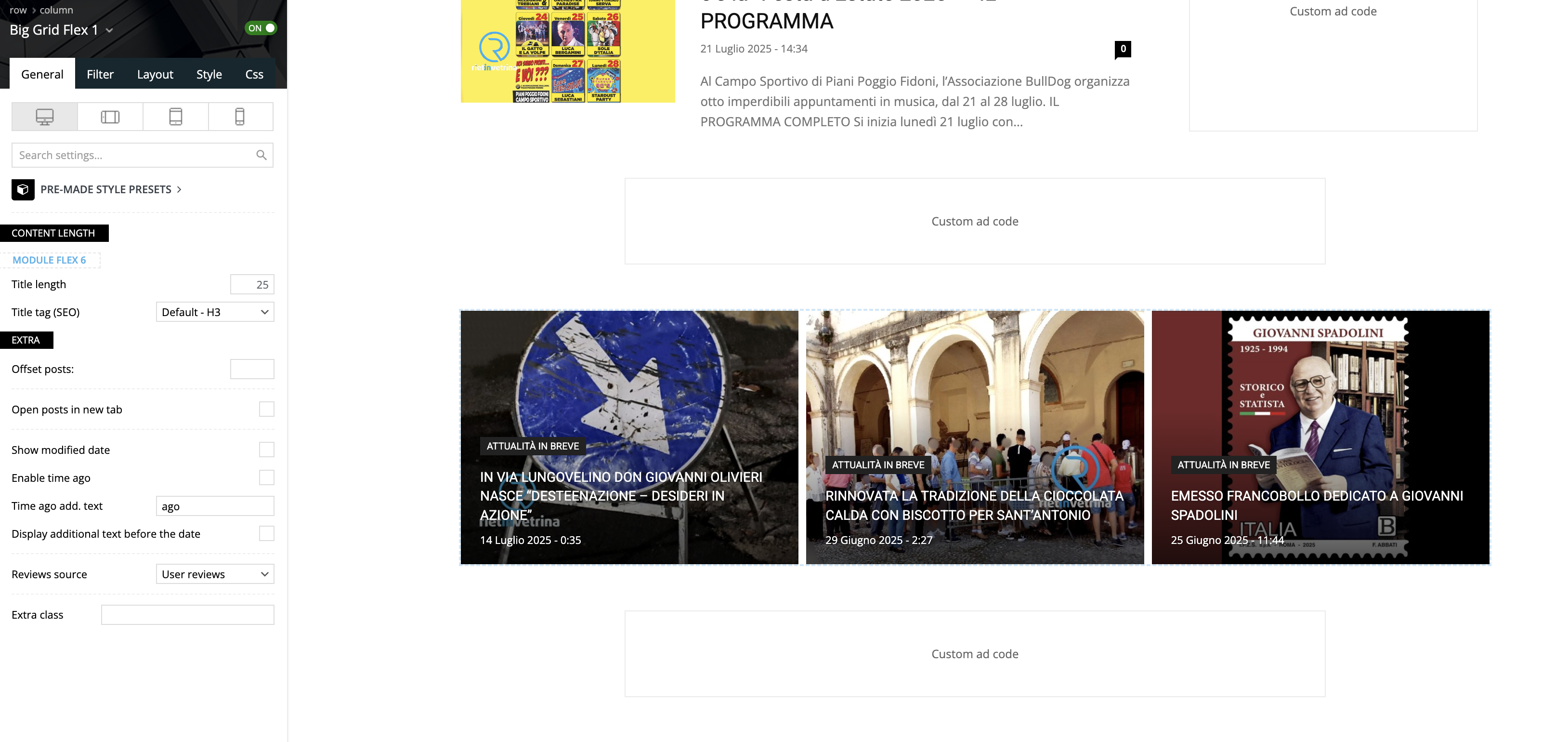
Good morning, using the Big Grid Flex 1 on the homepage of a website we noticed that, on the builder preview it’s all ok, but navigating normally, the third column is not inline with the other 2, but goes on a second row.
Please take a look to these screenshots:
– builder preview
– website view
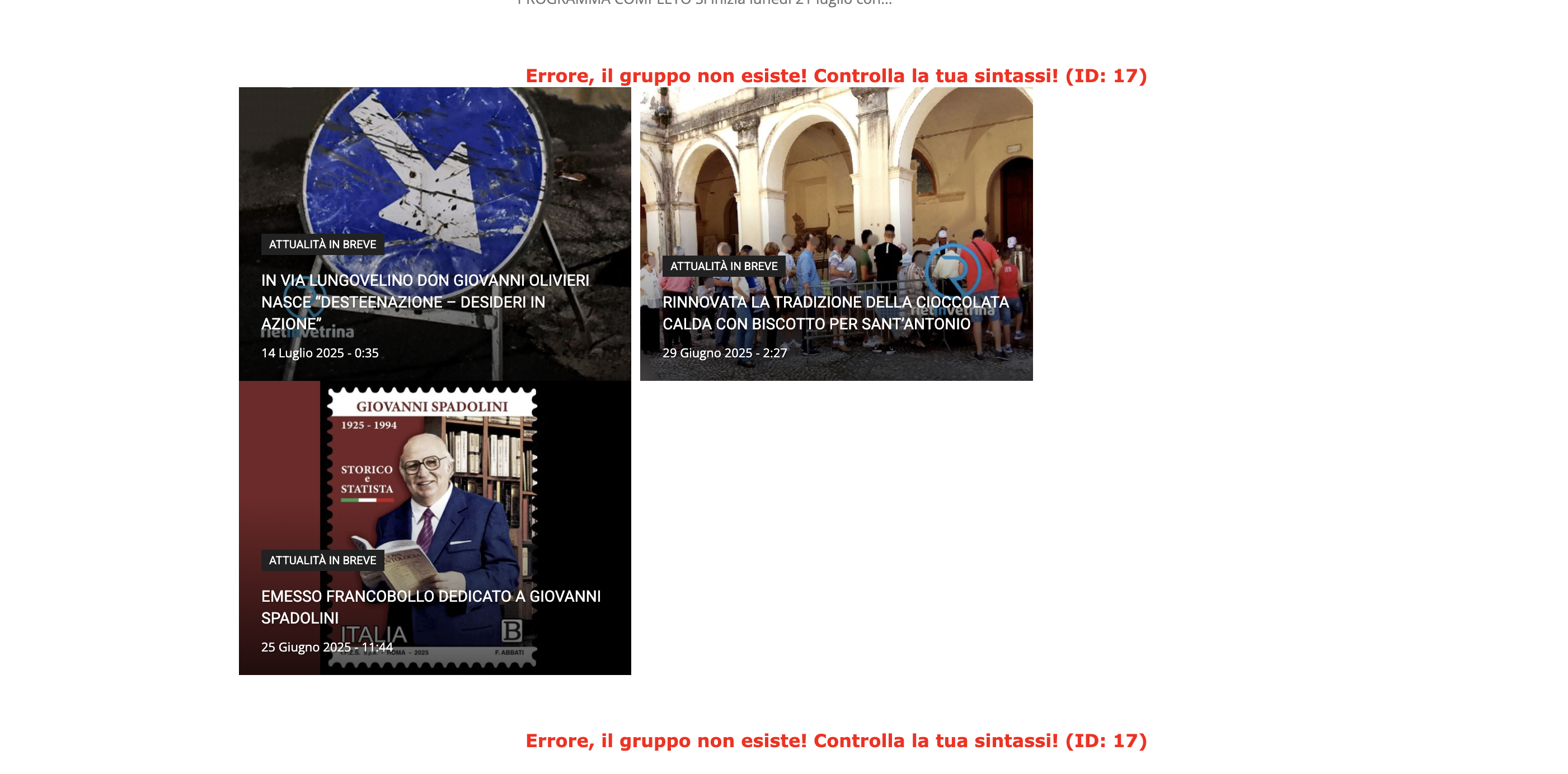
We tested on Safari and Chrome, using 2 different computers and deleting cache.
The website is reachable only by admin.
Can you please help?
Thank you!
 fuenson
Hi, I’ve noticed that the footer on some pages of my website sometimes doesn’t appear on the mobile version, but it displays normally on tablets or computers. After I re-save the page, the footer appears on the mobile version, but it disappears again after some time. What could be causing this issue? Thank you.
My site: https://daydayplay.hk
Currently i can not view the footer on my homepage.
gleloudas In homepage in the row with the main banner image and the right colum in the news the background seems to be applyed two times since there is a td-element-style in the right colum as well..
i tried the css with no sucess:
.redbg3 > .td-element-style::before,
.redbg3 > .td-element-style::after {
background: #9B2A2A;
background: linear-gradient(
90deg,
rgba(155, 42, 42, 1) 0%,
rgba(221, 51, 51, 1) 50%,
rgba(105, 29, 29, 1) 93%
) !important;
}
also the gradiond options you mention dont seem to apply the effect we wish.
anyway to fix the css rule please?
Calin Hi,
If you are referring to this one https://i.imgur.com/pWZHwaM.png, this situation is because you use the logo element and the logo element uses a link on it, if a custom link is set, then it will go to that link, if no link is added, then it will link to the homepage. What you should do is to replace the logo element with an image element using tagDiv Composer.
Thank you!
 cryptobeginnersclub
 Thank you for the reply.
https://pdffileprotectorregistry.com/
Just click on any image on the home page and it will refresh the entire homepage. This happens on phones when the image is tapped.
 emssp
emsspHello,
Could you please tell where I can find the settings to change ‘flex block 1’ hover color exactly like in newspaper_kattmar_pro (Recent Articles, Homepage).
Thank you
gleloudasHello TagDiv Team,
I am encountering an issue in my website’s homepage. Below my header, there is my second row element, and the right column of the row aligns left when I scroll down.
Could you provide some feedback on this?
I’m looking forward to your recommendations.
Thank you!
 Maneek
 Ok so I have to come back to this.. I am NOT using Mobile Theme because it creates too many complications on my side.. So right now I am using non-mobile theme which works very well..
The only issue is that I have a hero image on the site homepage.. This obviously is set for desktop size.. Is there a way I can serve a different image if the device used is a mobile so I can customise the image, or is there a way to make it responsive.. Everything else I am happy with..
cryptobeginnersclubI would like to know how to either make all the images work with the lightbox the way they do in posts, or at least not have any link at all to them so they don’t refresh the homepage when clicked.
 Antonis
 Hello there,
Here is the link https://dev1.xtypos.gr/homepage-week-pro-2/
Template used: Urban Observer
Protected directory
• Username: dev1xtypos
• Password: DFEjmpbimxv1~*92
I can send you login credentials if not in public.
Thank you!
 568Winmk
 Hi Calin,
I’ve updated the .htaccess file as you suggested and also cleared the cache, but unfortunately, the template issue remains. Whenever I click on “Edit,” it redirects me to the homepage, and I’m completely unable to make any changes.
Could you kindly provide further assistance? Thank you!
Here’s a screenshot for reference:



