- NewsmagInstall via WordPress
- NewsmagInstall via FTP
- NewsmagInstalling pre-built websites
- NewsmagUsing the theme translations together with WPML
- NewsmagHow to update a plugin
- NewsmagNewsmag theme support
- NewsmagCustom Post Type Support
- NewsmagImport / Export theme settings
- NewsmagHow to add icons in the menu
- NewsmagRequirements for Newsmag
- NewsmagNewsmag documentation
- NewsmagHow to update the theme
- NewsmagBlock settings tutorial
- NewsmagHow to update the WPBakery plugin
- NewsmagIntroduction
- NewsmagMain menu
- NewsmagFeatured image or video
- NewsmagAuthor card
 Osvaldo Augusto Formiga
Greetings.
My Site is still new and I have just bought the Theme, but after installation, it displays the following information:
“damaged themes
The following themes are installed but incomplete.
Name Description
Newsmag Model missing. Themes need a master template file templates/index.html or index.php. Dependent themes need a Template header in the style.css style sheet.”
In fact, when I try to Unzip the Theme to see the Missing Files, I confirmed that the templates/index.html, index.php and style.css files are missing.
Thanks for the support for this issue.
 Bettina
 Hello!
All the templates were cloud templates made by Composer?
Maybe you can install them again from the Cloud Library.
Thank you!
 shymao
 Hi Anamaria,
Just an update; I have tried everything possible at my end and namecheap’s support has tried all the options from reinstalling, backups, flushing server level cache, removing from cloudflare, bypassing cache and what not but couldn’t achieve what we wanted to.
They are very much certain that there is something messed up within the setting of the theme. Please suggest what needs to be checked and fixed.
 Sergey
 I had the same issue with the galleries.
But in my case the images on laptop screen were ok. But they were blurry on my desktop monitor which has resolution of 2560×1440. The inspector says my thumbnail is 300×450 pixels, but in fact physically they had (at least) twice more pixels.
Finally, I have installed another gallery with Retina support. This gallery generates photo thumbnails for bigger screens too. And the issue have göne.
So, I think that either you can try to seek for some Retina plugin for WP, or the theme developers must add support of Retina screens.
-
This reply was modified 3 years by
Sergey.
 propermenhq
 This was fixed after reinstalling the theme; closing this now.
 novatic
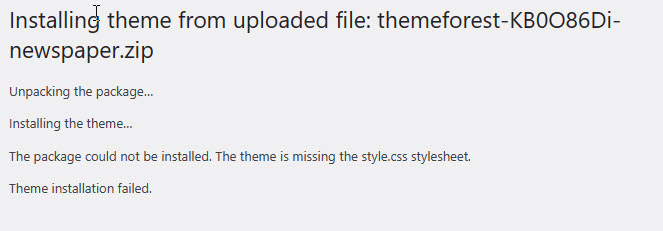
Installing the theme from the uploaded file: themeforest-XsqI62Yg-newspaper.zip
Unzipping…
Installing the theme…
Could not unzip the package. The theme does not have the style.css stylesheet.
Theme installation failed.
please help
 Calin
Calin Hi,
This is a general message added in wordpress since version 6. What is recommended to do when this message is received is to check the site to see if it is ok.
Most of the time there is no need for any intervention, but if certain problems are observed they need to be investigated and most of the time this can only be done if you have access to the site.
Please do is deactivate all the plugins in the theme, delete them and reinstall them from the Newspaper > plugin,s if the problem persists, please contact us by email at contact@tagdiv.com provide wp-admin access and include the link of this topic to can identify you.
Thank you!
 Anamaria
 Hi,
There are a lot of factors which can make your site slow. Make sure you use only some templates and fewer functionalities and options.
Some factors which you need to take into account are:
External factors: server speed, if you are using CDN or not, the external resources loaded by your website like ads, fonts, tracking scripts like Facebook Pixel, Google Analytics, Twitter analytics, Hotjar and so on.
Internal factors: the number of elements on the page, image size, image formats, if you are using mobile optimized layouts, console errors, if you are using the Standard Pack plugin or not, if you are using the PRO demo or a standard one.
There are many optimization guides provided by our users here in the forum, some made by us; you could check some of them
– https://forum.tagdiv.com/cache-plugin-install-and-configure/
– https://forum.tagdiv.com/how-to-make-the-site-faster/
– https://forum.tagdiv.com/topic/high-number-of-ajax-request/
– https://www.infophilic.com/get-almost-100-pagespeed-newspaper-theme/
– https://forum.tagdiv.com/topic/score-100100-pagespeed-with-newspaper-wordpress-theme/
– https://www.andraware.com/wp-rocket-for-newspaper-theme/
– https://spraythemes.com/newspaper-theme/how-to-speed-up-the-newspaper-wordpress-theme-using-wp-rocket/
– https://forum.tagdiv.com/topic/page-speed-guide-for-2023-beginners-and-advanced/
– https://forum.tagdiv.com/topic/newspaper-theme-speedify-your-website/
– https://forum.tagdiv.com/topic/tutorial-chriss-custom-optimizations-for-functions-php-etc/
– https://forum.tagdiv.com/cloudflare-cdn/
– https://forum.tagdiv.com/topic/theme-causing-high-cpu-usage-2/
– https://forum.tagdiv.com/topic/sql-querys-high-cpu/
– https://forum.tagdiv.com/topic/newspaper-theme-slow-to-respond/
– https://premium.wpmudev.org/blog/optimizing-your-wordpress-database-a-complete-guide/
– https://underconstructionpage.com/optimize-wordpress-database/
– https://crunchify.com/better-optimize-wordpress-database-all-in-one-guide/
Also, pagespeed is not covered by support -> https://forum.tagdiv.com/newspaper-theme-support/
If you use Wp Rocket, you can try to exclude the following files
/jquery-?[0-9.](.*)(.min|.slim|.slim.min)?.js
/jquery-migrate(.min)?.js
/wp-content/plugins/td-composer/legacy/Newspaper/js/tagdiv_theme.min.js
tdBlocksArray
Thank you!
Calin Hello,
From what I can see after the update, there are some plugins in the theme that are not updated, please check what they are and install them from Newspaper > plugins. Most likely it is the tagDiv Cloud Library, tagDiv Social Counter.
Also, you can check our guide for How to Update the Newspaper Theme.
Thank you!
Anamaria Hello,
Please let me know what prebuilt website you have installed.
Also, for error zone please check this topic https://forum.tagdiv.com/topic/error-at-zones-6models-1dom-the-model-does-not-match-the-content-currene/ if you have a child theme; please use the main theme.
Also, those are auto ads?
Thank you!
Anamaria Hello,
Did you have other plugins installed? if yes, please disable them and install the prebuilt website.
Thank you!
propermenhqIt says it was installed, but all I see on my website after installation is pure black. I checked the site status and made sure that all recommendations are followed. Looks like something is wrong with the installation but I need to get the black version pro theme working, since it was the reason the theme was bought. Looking forward to your immediate help on this.
 ezioboy
hello
Connected to phpmuadmin for database optimization.
If you connect to phpmuadmin, you can see the plugins you have installed in the past.
Is it okay to delete this if I’m not currently using it?
If I touch it wrong, the problem will become serious, so I ask a question first.
 dorioneill
Hello I just purchased News Paper and the image shows the error missing style CSS files.
https://media.publit.io/file/balancethylife/Theme-Upload-Failed.jpg
 zhangleji
Hi, I installed bbpress and added the visual editor to make it easier for users to post.
However, the visual editor seems to inherit the theme CSS and all the icons are black background now, like this page https://weliveinus.com/forums/forum/1786/ I know the theme doesn’t allow me to use tagDev composer, but is there anyway I can stop the visual editor inherit the theme CSS? I want to make it no background color otherwise it’s so hard to see.
I added the visual editor in the functions.php with the following:
function bbp_enable_visual_editor( $args = array() ) {
$args[‘tinymce’] = true;
return $args;
}
add_filter( ‘bbp_after_get_the_content_parse_args’, ‘bbp_enable_visual_editor’ );
Thanks a lot!
 lastwordonsports
Several years ago, I installed my Newspaper theme on several sites. On one of them, I started using the cloud features to create headers, footers, etc. Now I want to do the same thing on another site, but it says I needed to buy another license. I did that. The issue I’m having is that I CANNOT figure out how to disassociate this site with the old license so I can add the new one! What am I doing wrong? I go into “My License” and I see all the sites with their assignments, but there is no option to disassociate this site with the first key so I can reinstall with the new one.
HELP!?!?!?!
 nickhart
 I want to install the Google Translate shortcode, eg, [gtranslate] with flags as normal with WordPress…
-
This reply was modified 3 years by
nickhart.
Calin Hi denya,
The Doctor demo is a demo that uses custom post types (CPT) and ACF, it is a directory/listings demo – https://i.imgur.com/G9NfNlj.png (made for CPT not articles/posts), so if you want to have that section you have to install the demo and use CPT and that element will appear in the composer for CPT templates – https://i.imgur.com/FwPS6ky.png – https://i.imgur.com/GkOCv1x.png or to use ACF to create your own “Tabbed Content” – https://forum.tagdiv.com/use-tabbed-content-shortcode/
And that element is a “Tabbed Content” (display pages in tabs), these are the page ids – https://i.imgur.com/avYsZHr.png and those are the pages made with custom fields elements to display the ACF elements – https://i.imgur.com/hARlkYO.png and this one is the reviews page made with the reverse elements – https://i.imgur.com/mxhHKj6.png
 gstraton
Hi I’m George S., Editor in Chief at http://www.roadblazing.com
Please be advised upon a recent upgrade from Newspaper 12.2 to 12.3.1 the Slider Revolution installed Plug-In loses some functionality.
Normally, when right clicking media library images embedded in the text body of an article, those images are queued and displayed into a pop-out slide show which recedes when re-clicking any of the images, for resumption of displaying the article body.
With Newspaper 12.3.1 installed that functionality is lost. When right clicking the text body embedded images, the browser page for the article page in the browser page is closed and a new browser page loads with the URL for the image. The only way to resume reading the article body is to back click the browser to return to the article URL.
Otherwise the dedicated slide show Gallery works normally.
Therefore we temporarily restored Newspaper Theme 12.2 until this issue can be rectified.
 denya
denya I don’t understand.
What’s the bottom line?
How do I install this block? https://ibb.co/tBG1TFd
In the posts.
When using the Doctor plugin.
With arbitrary fields
This is your cloud template https://demo.tagdiv.com/newspaper_doctors_pro/tdcpt_doctors/terry-ravinder/
I want to create it on my website.
But when I open the post, this block does not open. https://ibb.co/tBG1TFd
How do you fix this? And create such a post from your cloud template.
-
This reply was modified 3 years by
denya.
 muktipolice
 The wpmudev corresponding plug-in has been installed. However, this problem is not visible in the plug-in list. Why?
Bettina Hello!
We recommend this setting to be enabled: https://forum.tagdiv.com/cache-plugin-install-and-configure/
Make a test and deactivate ALL plugins except tagDiv ones, also if you are using a cache plugin, deactivate it (not the wp super cache plugin), clear all cache and try again.
Let me know the results!
Thank you!
 sranjanrai
Hey whenever i am trying to install the Influencer Prebuilt its not letting me click on that, its like whenever i hover my mouse on install button it simply scroll the page and takes me to prebuilt menu.
Bettina Hello @bucatariamamei!
I can see that you don’t use the Mobile theme plugin.
Are you sure that this plugin is installed and activated in Newspaper -> Plugins?
Make a test and deactivate ALL plugins except tagDiv ones, also if you are using a cache plugin, deactivate it, clear all cache and try again.
Let me know the results!
Thank you!
 Skodino
 I’m on a standalone WP install