
- NewspaperAutoptimize Plugin – install and configuration
- NewspaperCache plugin – install and configure
- NewsmagInstall via WordPress
- NewsmagInstall via FTP
- NewsmagInstalling pre-built websites
- TutorialsHow to install Revolution Slider
- NewspaperInstalling Pre-built Websites
- NewspaperHow to Install Newspaper via FTP
- NewspaperHow to Install Newspaper via WordPress
- TutorialsHow to Install bbPress forum
- NewspaperIntroduction to CPT and ACF with Newspaper Theme
- NewspaperHow to edit modules for Flex Block X
- NewspaperWooCommerce: Happy “Add to Favorites!”
- NewspaperWoo Brands
- NewspaperStripe Setup
- NewspaperModal Popup
- NewspaperPayPal Setup
- NewspaperFlex Block Settings Guide
- NewspaperHow to setup the Contact Page
- NewspaperAdd Cryptocurrency Price Ticker Widget
 Simion C.
 Hi,
The new wordpress update is a maintenance update, it contains bug fixes exclusively -> https://wordpress.org/news/2026/07/wordpress-7-0-1-maintenance-release/ There’s no major change that would cause our theme or plugins to create problems. We updated as well and everything looks fine so far -> https://prnt.sc/HsRSL5zcamiH
I believe you are using wordpress 6.7.5 now -> https://prnt.sc/qkLmmAxiLrsr So you used wordpress 7 before and it worked fine, then you updated to 7.0.1 and there were problems, and then you installed 6.7.5? Or you updated from 6.7.5 to 7.0.1? Either way however, the theme should not create any problems.
If you want I can take a look at it. Do you maybe have a testing/staging clone of the main website, where wordpress can be updated and the issue can be investigated? If you have a staging or you can create one, then it’s better to test there instead of the main website which works fine at this time. If this is possible, please send the link to the staging and the login user/pass and contact@tagdiv.com Also please include access to cPanel or FTP.
Thank you!
 Albertpbj
 Before I installed the mobile theme plugin the website didn’t show on mobile. Is there a way to have it show on mobile without needing the mobile plugin?
Simion C. Hi,
No problem. I can provide WPBakery 8.7.3 so you don’t have to wait until we include it in the next theme update. It will work fine with the theme. You just have to deactivate and delete the version you are using now, and install the new one.
I can provide the plugin by email, please send us an email at contact@tagdiv.com and include a link to this forum topic in the email, so I know what it’s about.
Thank you!
 JORGEVILLASANA
Hello tagDiv Support,
I recently purchased a new Regular License for Newsmag and downloaded the current full package directly from ThemeForest.
The package is Newsmag 5.4.3.6, and the bundled file:
Newsmag-tf/plugins/js_composer.zip
contains WPBakery Page Builder 8.7.2.
Our website currently uses WPBakery 6.13.0, and the homepage depends directly on WPBakery shortcodes. We need to update it securely without breaking compatibility with Newsmag, tagDiv Composer, or the existing homepage layout.
WPBakery’s official changelog lists version 8.7.3 with an additional security-related fix involving capability and nonce verification for frontend preview requests.
Could you please confirm:
1. Whether you can provide a Newsmag-tested WPBakery 8.7.3 package;
2. Whether WPBakery 8.7.3 is officially compatible with Newsmag 5.4.3.6 and may be installed manually;
3. Or whether you recommend installing the bundled WPBakery 8.7.2 version while waiting for a future Newsmag update.
Please also confirm whether an updated ThemeForest package is planned.
Thank you.
AlbertpbjHello,
When visiting my site on mobile, the pages and content don’t load. I’ve installed the mobile TagDiv setting and tried to edit the templates, but nothing seems to work. The closest I got only added someone else’s Instagram page, but not my content.
 Bokatv
Hello,
I am using Newspaper 12.7.6 with WP Super Cache 3.1.1 on Nginx/PHP 7.4.
WP Super Cache works correctly and makes the site very fast, but I have a problem only with the homepage on mobile devices.
The homepage was created with the tagDiv/Newspaper mobile page layout. When WP Super Cache is enabled, the mobile homepage sometimes displays incorrectly on a real mobile phone. Articles and category pages seem to work fine.
My current WP Super Cache settings are based on your guide:
https://forum.tagdiv.com/cache-plugin-install-and-configure/
When I exclude both is_front_page and is_home from caching, the homepage displays correctly on mobile devices.
My question is: how can I safely cache the homepage with WP Super Cache without breaking the mobile homepage layout?
Should the homepage be excluded from cache, or is there a specific WP Super Cache setting recommended for a Newspaper/tagDiv mobile homepage?
Thank you.
 CreekWalker7291
Hello. I am suddenly having trouble editing my Single post templates. I have 3 set up and have edited them with no problem up until this point. Now when I click on “Edit With TagDiv Composer” for any of the 3, it pulls up the default 404 page, and also gives this error: “Layout sync error in Content
The editor expects 6 rows but the page is rendering 3. Usually caused by an unclosed HTML tag in a text block (e.g. <div> without </div>). View page Undo (Ctrl+Z / Ctrl+Shift+Z) to restore.” I haven’t installed any new plugins. I am using Newspaper version 12.7.6 and I am on PHP version 8.2.31. Thanks!
 willskz
 “Hello, I am here to report the same issue. Since updating to WordPress 7.0, the Gutenberg editor is severely bugged, very slow, and the layout/styles are completely broken.
I have done some troubleshooting on my end:
I tested other WP 7.0 sites without the Newspaper theme, and the editor works perfectly.
I disabled all third-party plugins, and the issue persists. It is definitively tied to the theme and the tagDiv Composer.
Checking the browser console, there are conflicts with the new WP 7.0 iframe structure. The console throws errors such as: td-guten-blocks-editor-css-css was added to the iframe incorrectly and fails to load load-scripts.php.
Is there an ETA for a full compatibility patch for WordPress 7.0?”
“Chrome Console”
load-scripts.php?c=1&load%5Bchunk_0%5D=jquery-core,jquery-migrate,utils,wp-dom-ready,wp-hooks&ver=7.0:5 JQMIGRATE: Migrate is installed, version 3.4.1
v833ccba57c9e4d2798f2e76cebdd09a11778172276447:1 Failed to load resource: net::ERR_ADDRESS_INVALID
deprecated.min.js?ver=990e85f234fee8f7d446:1 Block with API version 2 or lower is deprecated since version 6.9. See: https://developer.wordpress.org/block-editor/reference-guides/block-api/block-api-versions/block-migration-for-iframe-editor-compatibility/ Note: The block “mpp/user-profile” is registered with API version 1. This means that the post editor may work as a non-iframe editor. Since all editors are planned to work as iframes in the future, set the apiVersion field to 3 and test the block inside the iframe editor.
S @ deprecated.min.js?ver=990e85f234fee8f7d446:1
deprecated.min.js?ver=990e85f234fee8f7d446:1 Block with API version 2 or lower is deprecated since version 6.9. See: https://developer.wordpress.org/block-editor/reference-guides/block-api/block-api-versions/block-migration-for-iframe-editor-compatibility/ Note: The block “mpp/user-profile-enhanced” is registered with API version 1. This means that the post editor may work as a non-iframe editor. Since all editors are planned to work as iframes in the future, set the apiVersion field to 3 and test the block inside the iframe editor.
S @ deprecated.min.js?ver=990e85f234fee8f7d446:1
deprecated.min.js?ver=990e85f234fee8f7d446:1 wp.compose.withState is deprecated since version 5.8. Please use wp.element.useState instead.
S @ deprecated.min.js?ver=990e85f234fee8f7d446:1
deprecated.min.js?ver=990e85f234fee8f7d446:1 Block with API version 2 or lower is deprecated since version 6.9. See: https://developer.wordpress.org/block-editor/reference-guides/block-api/block-api-versions/block-migration-for-iframe-editor-compatibility/ Note: The block “advads/gblock” is registered with API version 2. This means that the post editor may work as a non-iframe editor. Since all editors are planned to work as iframes in the future, set the apiVersion field to 3 and test the block inside the iframe editor.
S @ deprecated.min.js?ver=990e85f234fee8f7d446:1
deprecated.min.js?ver=990e85f234fee8f7d446:1 36px default size for wp.components.SelectControl is deprecated since version 6.8 and will be removed in version 7.1. Note: Set the __next40pxDefaultSize prop to true to start opting into the new default size, which will become the default in a future version.
S @ deprecated.min.js?ver=990e85f234fee8f7d446:1
deprecated.min.js?ver=990e85f234fee8f7d446:1 36px default size for wp.components.RangeControl is deprecated since version 6.8 and will be removed in version 7.1. Note: Set the __next40pxDefaultSize prop to true to start opting into the new default size, which will become the default in a future version.
S @ deprecated.min.js?ver=990e85f234fee8f7d446:1
deprecated.min.js?ver=990e85f234fee8f7d446:1 wp.editor.RichTextToolbarButton is deprecated since version 5.3 and will be removed in version 6.2. Please use wp.blockEditor.RichTextToolbarButton instead.
S @ deprecated.min.js?ver=990e85f234fee8f7d446:1
load-scripts.php:1 Failed to load resource: the server responded with a status of 404 ()
 johnjgalbo
Hi,
I’m having an issue with the tagDiv Standard Pack plugin on Newspaper 12.7.6.
When I install it from the Newspaper → Plugins panel, the installation completes successfully, but the plugin folder only contains:
common/
Newspaper/
td-standard-pack.php
tdsp_version_check.php
There are no module folders such as:
modules/
shortcodes/
templates/
assets/
includes/
As a result, TagDiv Composer only shows the legacy video blocks.
I also downloaded the ZIP directly from the URL shown during installation, and it contains the same minimal stub files.
My Newspaper license is active and assigned to adultswimcentral.com, and all system status checks are OK.
Could you please push the full Standard Pack module bundle to my domain or provide a direct download link?
Thanks!
 dtbcoin
Hi,
I am starting work on a new site and I unassigned my license from an old site and want to use it for the new site.
I went into the new site the Newspaper them installed fine but will not activate.
Then I see that it will not be active until 30 days from now.
Is there any way to get the theme activated before sitting here doing nothing for 30 days.
I have been a long time customer and I have never abused using the Newspaper theme.
Please get back to me as soon as you can as I would like to get started on the new site sooner then 30 days if it is possible.
Thanks,
David Best
Simion C. I will try to explain more.
There are 2 cases when updating the theme manually:
1. After updating the theme, please ask the siteground tech to check in the theme plugins panel and press the update buttons for the plugins -> https://prnt.sc/qVmiCyNjxXgQ
2. Or, download the full theme package from your themeforest account and the theme plugins will be inside the plugins folder:
-> https://prnt.sc/EOCgMuicSEjt
-> https://prnt.sc/OUAeomuMirjI
-> https://prnt.sc/rjXATJ2Xl2ii
Please ask the siteground tech to install those.
I also provided update guides above, which explain these exact steps in detail. There isn’t much else that I could add unfortunately.
If there are still problems, please let me know what exactly the siteground tech is doing, how are they updating the theme, and why they can’t update the theme plugins using the methods described above.
Thank you!
Simion C. Hi,
To clarify, the system is automatic, it detects the websites where the key is used but it doesn’t “know” which one is not used anymore. The key must be manually reassigned to the new staging. You can simply ask us to do it.
I see that besides the main website you have 10 staging websites and a localhost install. Out of the 10 staging websites only two of them still work, staging 13 and staging 14. I assume you are currently using staging 14, so I removed the others and assigned they to that one.
Updating the theme is a very simple process. There is an automatic update method which requires a few clicks to update everything -> https://prnt.sc/n9nttzqjdv0N And there are the manual methods as well.
All the theme plugins are provided in the full theme package, meaning this option when you check in your themeforest account -> https://prnt.sc/47jptx7y-tEo That package is the same for everyone. After extracting it the plugins can clearly be found in a folder called plugins -> https://prnt.sc/F68dem0h66Rb
Even without the theme package from themeforest, the plugins can simply be installed from the theme plugins panel -> https://prnt.sc/C3L-mK8stOvR
So unless there are actual issues during or after updating, a theme update can be performed in a few minutes. I’m not sure why it requires a developer to do it, maybe that’s necessary if there are customizations in the child theme, which is fine. But there are also some guides on how to do it:
https://tagdiv.com/update-newspaper-theme/
https://tagdiv.com/how-to-install-plugins-and-update-plugins/
It looks to me that something that normally takes a few minutes to research and perform, is unnecessarily made complicated.
In case I am misunderstanding something, or if you have more questions, let me know.
Thank you!
Simion C. Hi,
Changing the logo should be a matter of minutes. Please let me know what kind of issues you are facing when changing the logo.
Some of the theme demos use image logos, some text logos, some SVG logos, or combinations of these. These default logos can be removed and replaced. If you installed a theme demo please mention which one it is, and I will check what kind of logo it uses. Or provide a link to your website, so I can see what kind of header you are using on it and provide instructions for changing the logo.
Let me know and I will help as much as I can.
Thank you!
 RangeleyWebDesign
I am trying to assign my staging site as the 2nd site for the license. There is no way to assign it because you say I have another staging site that is licensed. That is incorrect. The license applies to TravelMaine.com but the staging2.travelmaine.com was deleted a long time ago. Why are you making me buy another license for a new staging site? That does not seem fair to me.
Also, my developer said the site is breaking on the staging site when they try to update because I need the two plugins (see message below). Why are they not included in the update? Is this happening because you will not allow me to use my license on a staging site? Please advise ASAP!
Hello Lisa,
Thank you for contacting our Help Desk.
We have completed testing of the theme update on the staging site.
The Newspaper parent theme was upgraded successfully, while the child theme remained in place as expected. However, after the update, we found an issue with two required companion plugins, td-composer and td-cloud-library. These plugins did not remain active properly after the upgrade, which caused problems with the theme functionality and page layout.
Because of this, we reverted the change after testing so the site would remain stable and continue working as expected.
At this point, the issue does not appear to be with the update process itself, but rather with the plugin versions that should match the updated theme version. The package provided seems to be missing the corresponding plugin files, or it does not include the correct versions needed for this release.
To proceed safely, we would need the complete theme package for this version, including the bundled plugin files, so we can install the matching versions and test the update again.
Please send over the full package if available, and we will be happy to continue from there.
Best Regards,
Kamen Kumanov
Technical Support Supervisor
Simion C. Hi,
Unfortunately I don’t quite understand what you mean. I believe I checked both your websites before and they seemed to be functioning correctly.
Please mention more details. What layout are you installing exactly? Were there always such issues?
If there are server errors when using the theme on this website https://westfrieslandpraat.nl/ then I will have to investigate them. In order to do that I will need access to the website and to cPanel or a similar server manager, even FTP would be something so I can check the error logs. Please send access to the website by email at contact@tagdiv.com and I will check and try to find the cause of the problem.
Thank you!
 Westfrieslandpraat
  T J
T J Those images didn’t come through for some reason. I’ll try again.
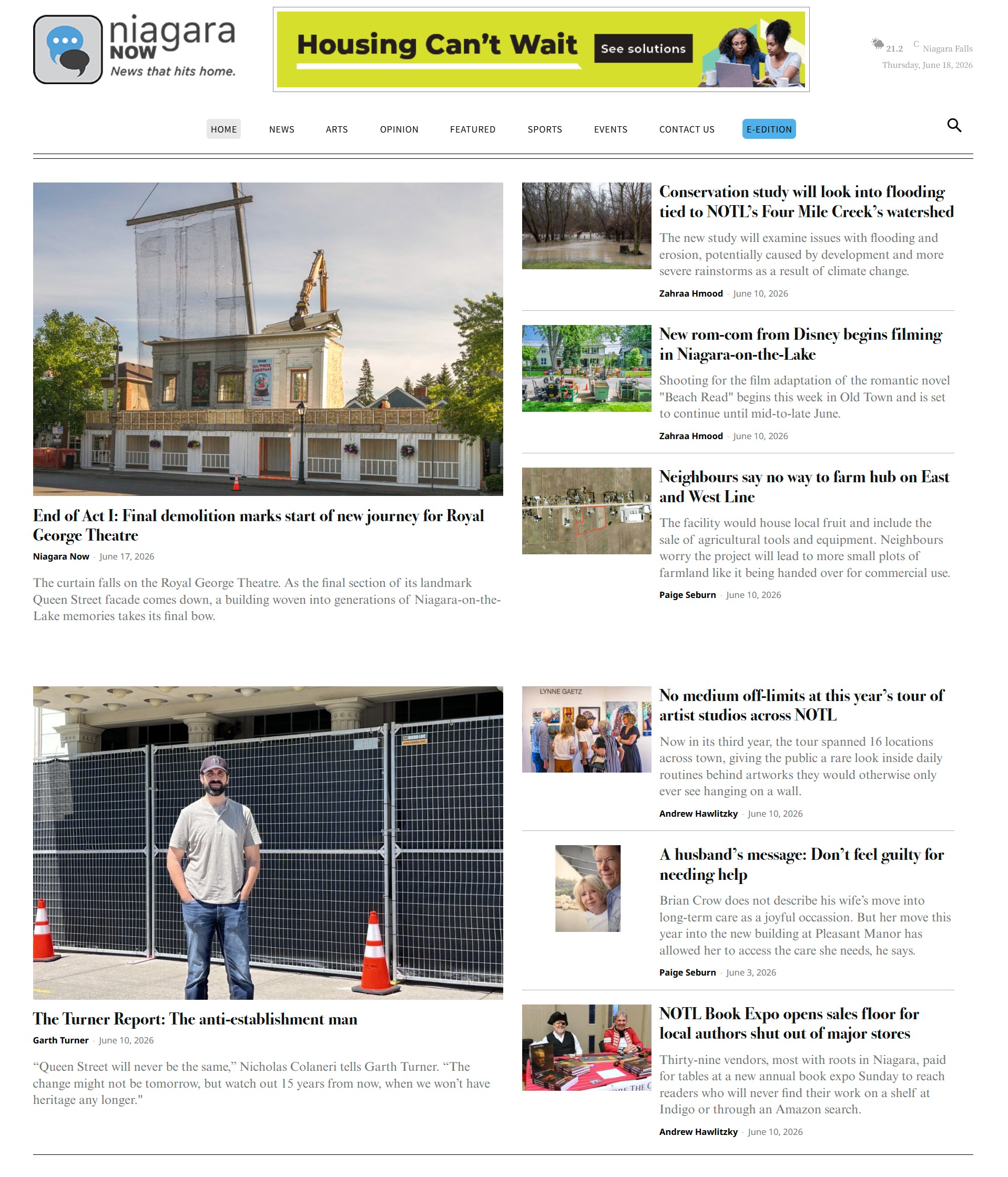
This is what it should look like:
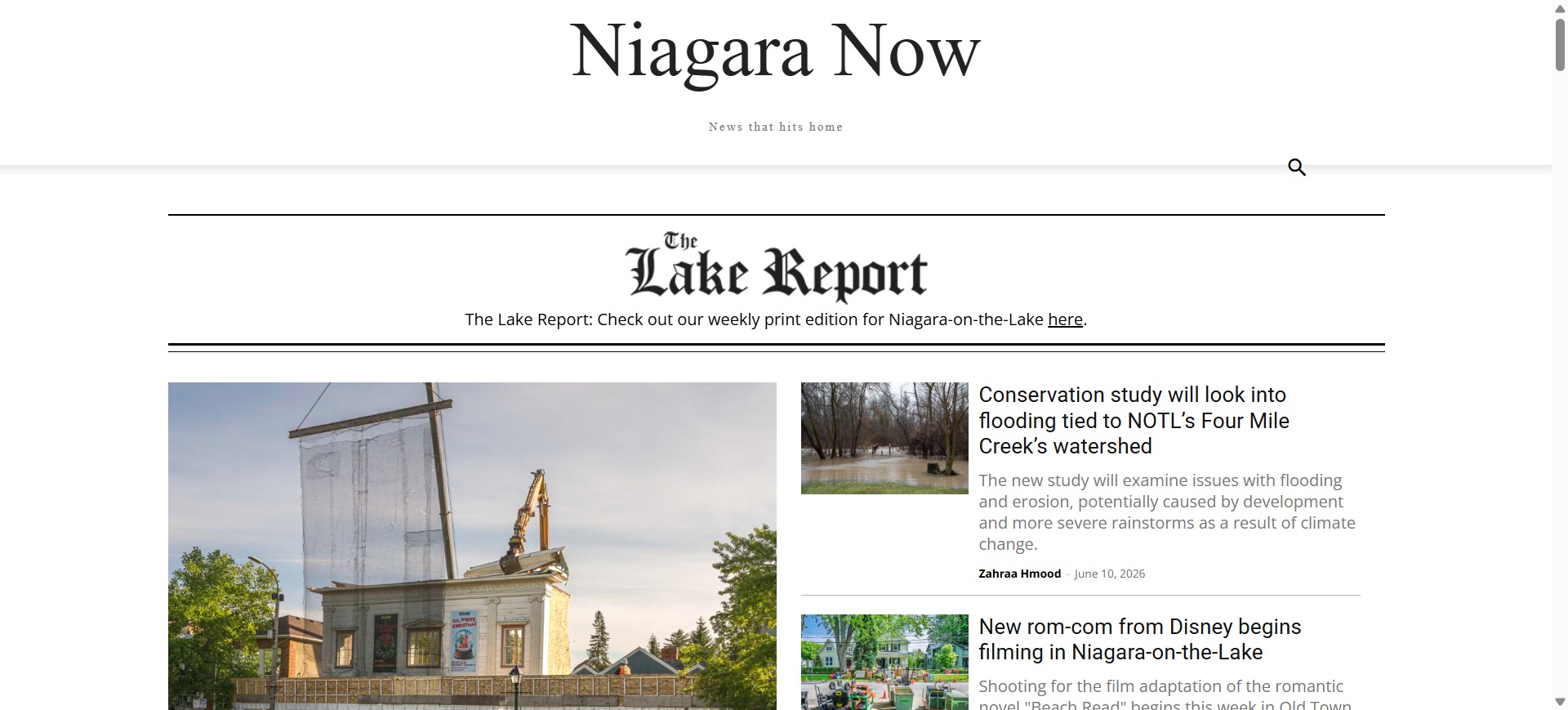
This is what it looks like after updating the theme:
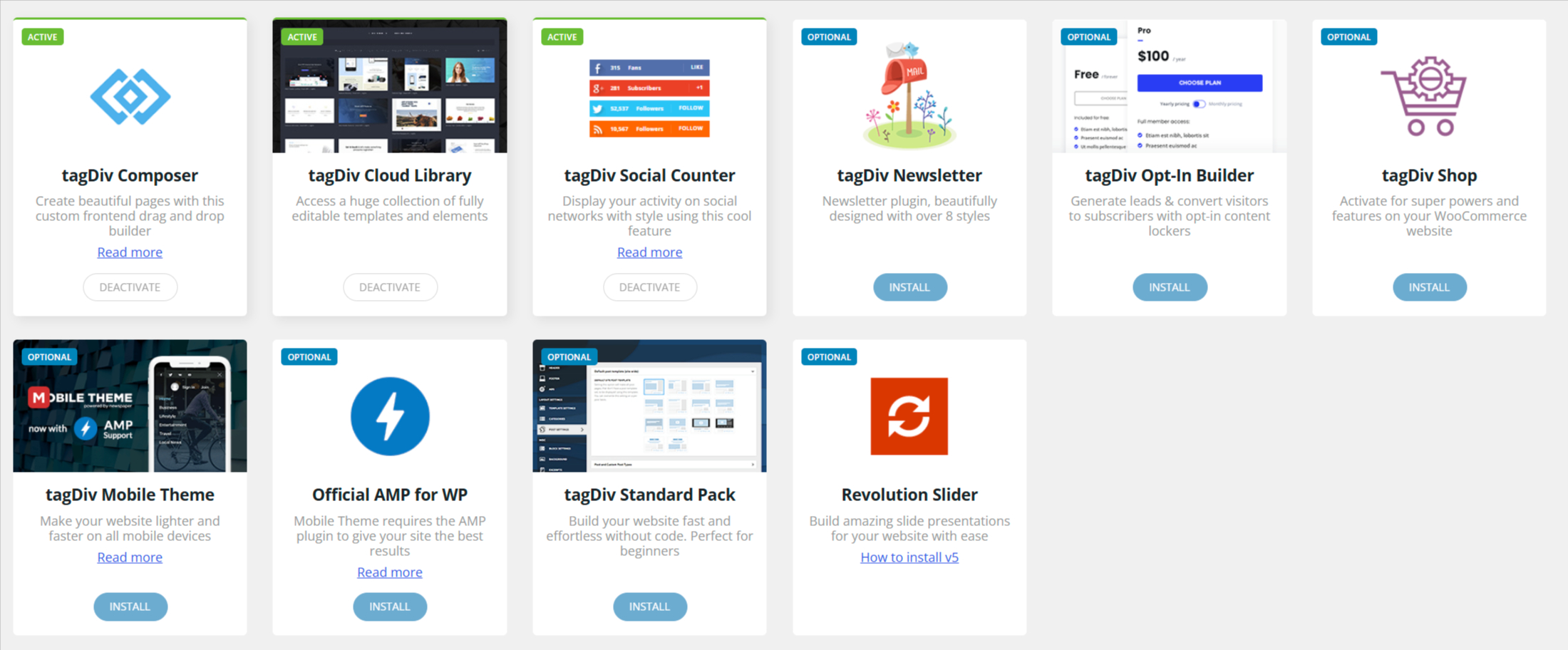
These are the theme plugins that are installed and activated:
T JHi there,
I’ve been trying for awhile now to upgrade a site to 12.7.6 from 12.7.5 but each time it breaks the top portion of the site. After upgrading, I re-install and activate the tagDIV Composer and tagDIV Cloud Library as both installations are removed but the logo, nav menu, ad, weather widget and general formatting are removed. This is what it should look like:

This is what it looks like after updating the theme:

These are the theme plugins that are installed and activated:

Thoughts on what might be causing this?
 bachbillionaire
 Yesterday
I installed Some plugins for Website in wrongly way
Today, I reinstall WordPress
But It showed “An issue has been encountered while trying to validate your license key ”
Can you check it once again?
Thanks & Regards
 pangea
Hello,
We are currently working on the website:
https://www.sostenible.com.mx/
We are having an issue with the page editor / builder. The pages are no longer editable through the builder, and on the frontend the content is being displayed as raw Visual Composer / WPBakery shortcodes instead of being rendered properly.
For example, the homepage is showing content like:
[vc_row][vc_column][td_block_ad_box spot_id="custom_ad_2"]…
[td_block_2 custom_title="ACTIVIDADES PRIMARIAS"]…
[/vc_column][/vc_row]
The site was originally running an older version of the Newspaper theme, version 7. Everything was working correctly before, but the issue suddenly started. We then migrated/updated the theme to version 12, expecting the problem to be resolved, but the issue still persists.
Based on what we are seeing, it looks like the problem may be related to Visual Composer / WPBakery Page Builder, because the builder is not loading correctly and it appears to be asking for a license or activation. Since the content depends heavily on Visual Composer / WPBakery shortcodes, the site is currently unable to render the pages correctly.
Could you please help us review the following?
Confirm if the bundled Visual Composer / WPBakery plugin included with the Newspaper theme is active and compatible with version 12.
Check if the plugin requires a separate license or if it should be activated through the theme package.
Verify why the shortcodes are being printed as plain text instead of being parsed/rendered.
Confirm if there is a missing plugin, corrupted builder installation, or compatibility issue after the migration from Newspaper v7 to v12.
Let us know the recommended steps to restore the page builder functionality without losing the existing page content.
The main issue is that the website content is still stored using Visual Composer / WPBakery shortcodes, but the builder is no longer processing them correctly.
Thank you.
Best regards,
Adalberto Larios
Simion C. Hi,
We should start with the premise that the theme and it’s plugins have to load files, and each file has a purpose.
Those files are related to the Live CSS option in the admin bar -> https://prnt.sc/Hbv7gmqDGdZJ Only an admin can use the Live CSS option, so the files are only loaded while logged in as an admin. They are not loaded publicly, or for any other user roles.
I don’t recall seeing such an issue before, which means it’s either very specific, or it’s happening only on this website. On my test install for example I have no such errors -> https://prnt.sc/C8yG87yzGOS7
Let’s discuss it more.
If I check your website as a visitor, the mobile menu works fine -> https://prnt.sc/zMcWqAoxw9Gg and the search works fine -> https://prnt.sc/Lwq-DKrIYScY Are these only not working for you when you are logged in as an admin?
Or maybe you solved the problem already.
Thank you!
Simion C. Hi,
That depends. In newer theme versions there is a license panel where you can see the websites where you used the theme and how the license key is assigned -> https://prnt.sc/g3Qsn-XyoZas
From what I see you were using an older theme version, and the website doesn’t seem to work anymore. So you can use the theme on a new website when you want to. Simply install it and activate. And please use the latest theme version.
Thank you!
Simion C. Hi,
I see you installed the theme and changed the respective image in the meantime. Looks good so far. Let me know if you have more questions and I will check as soon as possible.
Thank you!
 simchris
 You are trying to install the ‘all files’ zip and not the ‘theme zip’ …
 ferrari6
I tried installing the theme several times its showing this-
Installing theme from uploaded file: themeforest-lANeHNWI-newspaper.zip
Unpacking the package…
Installing the theme…
The package could not be installed. The theme is missing the style.css stylesheet.
Theme installation failed.
Site URL- https://soulsteer.com/
