
- NewspaperAutoptimize Plugin – install and configuration
- NewspaperCache plugin – install and configure
- NewsmagInstall via WordPress
- NewsmagInstall via FTP
- NewsmagInstalling pre-built websites
- TutorialsHow to install Revolution Slider
- NewspaperInstalling Pre-built Websites
- NewspaperHow to Install Newspaper via FTP
- NewspaperHow to Install Newspaper via WordPress
- TutorialsHow to Install bbPress forum
- NewspaperIntroduction to CPT and ACF with Newspaper Theme
- NewspaperHow to edit modules for Flex Block X
- NewspaperWooCommerce: Happy “Add to Favorites!”
- NewspaperWoo Brands
- NewspaperStripe Setup
- NewspaperModal Popup
- NewspaperPayPal Setup
- NewspaperFlex Block Settings Guide
- NewspaperHow to setup the Contact Page
- NewspaperAdd Cryptocurrency Price Ticker Widget
 andreabarbieri
 this is actually important.
IT LOOK AS WP BAKERY DO NOT WORK WITH THE AMP PLUGIN
I use Newspaper theme version 9.7.2.
The theme has installed some plugins from TagDiv such as: 1. “tagDiv Composer”, 2.”tagDiv Mobile Theme”, 3. “tagDiv Speed Booster”, 4. “WPBakery Page Builder”. The last one I think is the one that create that strange sytle, so I deactivated it.
Consider that Google says it will take several days to check. So if you think this could be the problem I can ask google to validate.
Here you can find exact Google error:
for the page
https://petadvisor.it/cucce-cani-interno/?amp
1) “The tag ‘noscript enclosure for boilerplate’ appears more than once in the document”
and the error highlighted by the google search console is:
><noscript><style amp-boilerplate>body{-webkit-animation:none;-moz-animation:none;-ms-animation:none;animation:none}</style></noscript></head><body class=”post-template-default single single-post postid-402 single-format-standard wpb-js-composer js-comp-ver-5.7 vc_responsive” itemscope=”itemscope” itemtype=”https://schema.org/WebPage”>
2) “Only amp-boilerplate and amp-custom ‘style’ tags are allowed, and only in the document head.”
and the error in the search console is
><style type=”text/css”> .wpb_animate_when_almost_visible { opacity: 1; }</style></noscript><style amp-boilerplate>body{-webkit-animation:-amp-start 8s steps(1,end) 0s 1 normal both;-moz-animation:-amp-start 8s steps(1,end) 0s 1 normal both;-ms-animation:-amp-start 8s steps(1,end) 0s 1 normal both;animation:-amp-start 8s steps(1,end) 0s 1 normal both}@-webkit-keyframes -amp-start{from{visibility:hidden}to{visibility:visible}}@-moz-keyframes -amp-start{from{visibility:hidden}to{visibility:visible}}@-ms-keyframes -amp-start{from{visibility:hidden}to{visibility:visible}}@-o-keyframes -amp-start{from{visibility:hidden}to{visibility:visible}}@keyframes -amp-start{from{visibility:hidden}to{visibility:visible}}</style><noscript><style amp-boilerplate>body{-webkit-animation:none;-moz-animation:none;-ms-animation:none;animation:none}</style></noscript></head><body class=”post-template-default single single-post postid-402 single-format-standard wpb-js-composer js-comp-ver-5.7 vc_responsive” itemscope=”itemscope” itemtype=”https://schema.org/WebPage”>
Please give me any advice. I have 5 website with this error!
 Simion C.
 Hi,
That is possible, thought it would be like installing a new theme almost. There were many changes in the theme since version 7, the changelog can be seen at the bottom of this page
– https://themeforest.net/item/newspaper/5489609
Also check out this article – https://tagdiv.com/updating-the-core-of-tagdiv-themes/
Maybe it would be better to test this in a development install or copy of the website, instead of the live website, if possible. This would be safer. There are plugins that can duplicate the website, or clone it (like the duplicator plugin). Then update there first, to see the results.
This would be better than trying it on the live website, I believe it is worth considering
– https://www.wpbeginner.com/wp-tutorials/how-to-clone-a-wordpress-site-in-7-easy-steps/
Here is an update guide as well – https://tagdiv.com/update-newspaper-theme/
If you have more questions let us know.
Thanks
 Vlad S
 Hello !
In order to reproduce this looks all you have to do is install the default demo theme. Take a look at this tips and tricks on how to install a demo: https://tagdiv.com/newspaper-theme-installing-demos/
Thank you !
 Catalin
 Hi,
Please, provide your website URL so I can take a closer look at it and also, so I will be able to provide a more accurate response. Also, provide a screenshot with the differences between the two versions of the theme. We recommend to update the theme via FTP way, remove the old theme version and install the new one which comes bundled with the theme core files. Until now, we do not have any bad reports in this case after theme update and also, we cannot recreate this behavior.
Thank you!
Catalin Hi,
This error appears because the theme was not been correctly installed/updated. You need to remove the theme and add it again according to our documentation. First of all, you need to make a full backup to your database and then, you have to remove
your old theme and then add the new theme folder which contains the latest version of the theme. Also, you have not to overwrite because then you will encounter some problems. Check here -> https://forum.tagdiv.com/install-via-ftp/
Hope this helps and let us know how it goes!
Thank you!
Vlad S Hello !
To have the gossip full features and looks you can install the Gossip demo. https://www.screencast.com/t/mP2QNSDzOPW ; https://tagdiv.com/newspaper-theme-installing-demos/
Thank you !
Catalin Hi,
Please provide your website URL so I can take a closer look at it and also, so I will be able to provide a more accurate response. Ensure that you are using the latest version of the theme installed via FTP way because this is the surest method in this case. Remove all of the untested plugins if you are using something like this, clear all the caches, purge CDN files and check the results.
Thank you!
Simion C. Hi,
It is always best to try and update the theme, plugins and WordPress as soon as possible, when updates are available.
You can update to the latest version normally, the best way would be by FTP
– https://tagdiv.com/update-newspaper-theme/
The changelog for each version can be seen at the bottom of this page
– https://themeforest.net/item/newspaper/5489609
The 9.7 update consists of some changes to the theme files location, an article about the modifications here – https://tagdiv.com/updating-the-core-of-tagdiv-themes/
If the website is stable and working, maybe consider for example to create a testing install on a sub-domain if possible, or locally, with a copy of the current website. There are plugins that can duplicate the website, or clone it (like the duplicator plugin). Then update there first, to see the results.
This would be better than trying it on the live website, I believe it is worth considering
– https://www.wpbeginner.com/wp-tutorials/how-to-clone-a-wordpress-site-in-7-easy-steps/
Thanks
 Calin
Calin Hi,
Please make sure that you do not have a plugin conflict, please deactivate all non theme plugins, also if you are using child theme or cache plugin, please deactivate them, clear all cache and try again.
If the problem is still there, please delete( delete the theme plugins too, do not override ) the current version of Newspaper that you have and download again from themefores the newspaper and reinstall it.
Theme Install Guide -> https://tagdiv.com/how-to-install-newspaper-theme/
How to Update the Newspaper Theme for WordPress -> https://tagdiv.com/update-newspaper-theme/
If you are using single image from WPBakery, please check this topic -> https://forum.tagdiv.com/topic/layout-issues-with-latest-version/
Thumbnails – Fix strange looking images on blocks -> https://forum.tagdiv.com/thumbnails-fix-strange-looking-images-on-blocks/
Also please check this topic about the Newspaper V9.7 -> https://forum.tagdiv.com/topic/important-new-update-newspaper-9-7/
Let me know how it goes!
Thanks.
 Bature419
Hi,
I’m working on the installation of your theme on our website (cfjm-lemag.ch) but my ad will only be displayed on Firefox and Safari, not on Chrome. Can you help me solve that problem?
Thanks for your help
 evolvepolitics
A large number of submenus on the theme panel are refusing to load, simply rotating the lazy load symbol for eternity.
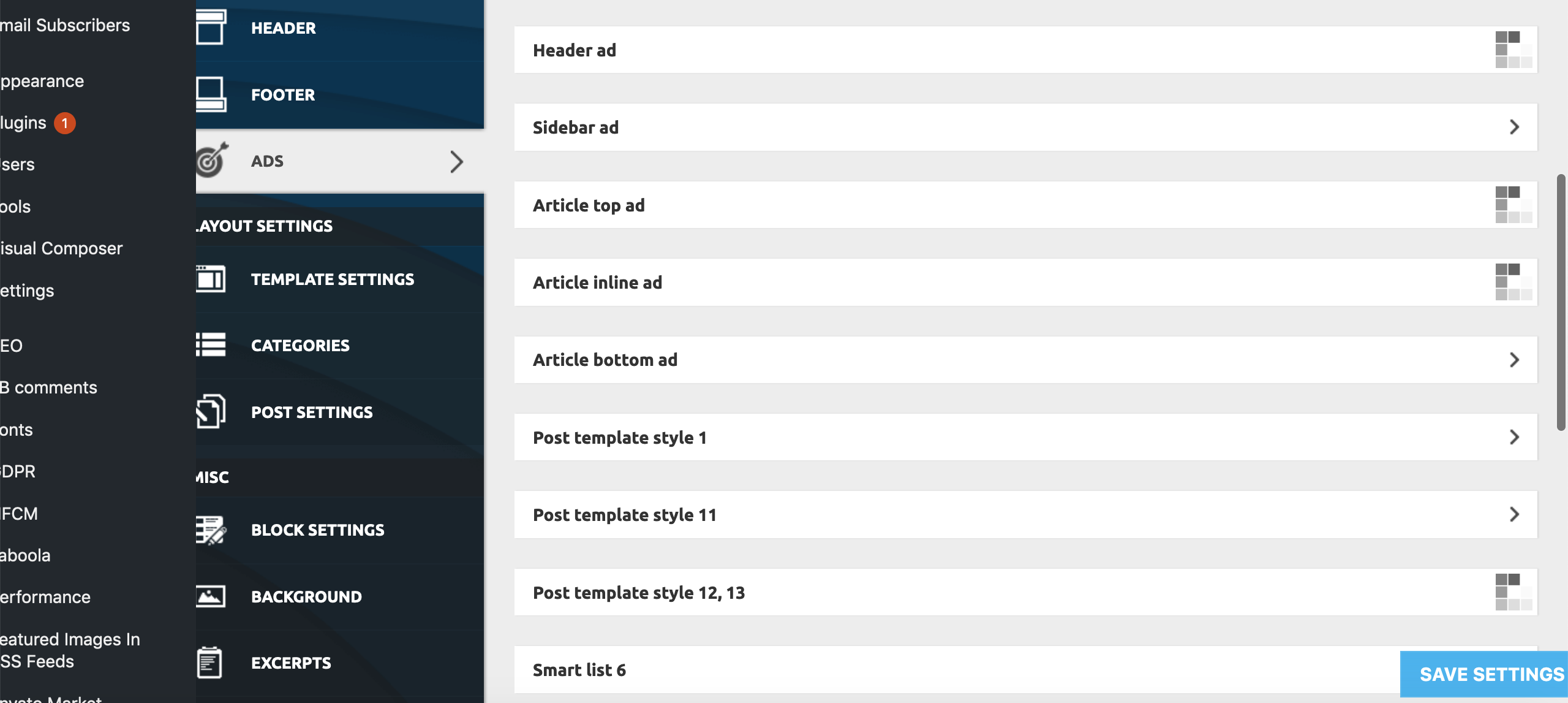
This only appears to be happening on:
Theme Panel > Ads > All submenus bar ‘Background click Ad’
Theme Panel > Theme Colors > All submenus bar Header>Header, Footer>Footer, Footer>Sub-Footer
Theme Panel > Theme Fonts > All ‘Font Settings’ Submenus
Theme Panel > Translations > Translations
Theme Panel > CPT & Taxonomy > All submenus
All other Theme Panel menus and submenus appear to be working correctly.
To try and resolve the issue I have already unsuccessfully tried:
– individually deactivating all Plugins
– deactivating all the essential theme plugins and reactivated the theme
– Reinstalling WP
– Replacing Core Files
– Deactivating all Lazy Load settings (as per a previous thread on a similar problem)
None of these measures has had any effect on the problem as yet.
Furthermore, we are encountering the problem on all browsers we’ve tested (Firefox, Chrome, Opera, Safari), and on all Windows, Mac, Android and iPhone devices we’ve tested, as well as on different IP addresses from a number of locations throughout the country.
Both myself and our tech guy are completely stumped. We now need help! Pleeeasee!
 Imauser78
I know Yoast is a seperate from this theme, but since installing it, none of my pages save or update, i guess this is a caching issue but i’ve followed your guidelines for caching, is Yoast even compatible with the Newspaper Theme?
Any help on resolving this?
 cpt_mk47
 Hi Calin,
Sorry for late replay but i had to test it for a while, it seems its working fine with fresh installation, the coming soon page plugin ( by SeedProd ) was the conflict so thank you so much for that
just need some help with css, would you please provide me with css files path so i can edit and restyle the modal window or is there another alternative to do so?
Thank you very much.
 onewaytwotickets
I am creating my newspaper theme at the moment. I wanted to install tagDiv Composer plugin but I have faced with this error:
Downloading the installation package, download location: https://onewaytwotickets.com/wp-content/themes/Newspaper/includes/plugins/td-composer.zip?uid=5ce136f5749f4 um
File download failed. cURL error 60: SSL certificate problem: self signed certificate
Please help,
Thanks.
 robben07
Hi,
I see some of my posts are throwing the following error (I have the latest theme installed):
Uncaught ReferenceError: jQuery is not defined
https://mysite.com/wp-content/plugins/td-composer/mobile/js/tagdiv_theme.min.js?ver=9.7.2:1
I wonder if you can advise on this matter please?
 yousafsaeed
Hi
I activate the license but now it is showing “Your theme is not registered!”
When I retry to enter the license it doesn’t work
Moreover when I try to Install the demo, it gives error too.
How to fix it?
thanks
 aresgolf
Hello, I have uninstalled all of my plugins back to the base site and the TAGDIV Composer is still giving me the “Page not found” error when I attempt to edit my home page with the TAGDIV Composer.
 DeanoAus
 I also just stumbled on something else. The WP AMP plugin offers lightbox and carousel options for pages.
So if you enable AMP, you can actually force lightbox effects on images, along with dynamic sizes.
This can be marked as solved. For anyone else with the same issue:
– Install WP Embed Facebook plugin. It will fix any legacy posts when you enable the mobile theme.
– Install and activate the AMP plugin, where you can select lightbox options inside the post.
I’m now running the mobile theme AND AMP without issue.
 rrystrom
As youtube has disable the “rel=0” tag in the link all videos are showing related videos at the end.
I tried installing the youtube plugin from embedplus in order to remove the suggested videos at the end of them, but it doesn’t seem to work as when I add a featured video I can’t use embeds or other codes to modify the video. The featured video link is not visible in the editor.
I know that you haven’t tried the plugin but maybe you have some suggestions on how to hide the related videos at the end
Thanks
 forevermogulmag
The auto update of the tagDiv Composer worked after upgrading to 9.7. Is this okay or do I still need to maunally install the update. It was not clear if the manual install was mandatory.
Also, is there a way to widen the default size or maybe the correct term is theme resolution? It seems like the theme could page edge could be a little wider as compared to other themes. The current deault size looks like it’s for background advertising. If we do not have background advertising can the page edge size be bigger?
Thanks
 cedehgen
Hello,
I had a wordpress blog with newspaper and deleted it. I created another blog wordpress and installed the newspaper, so I activated it with my license. Some time after, it request me again to activate, I don’t know why.
I have just one domain using my license.
Am I doing anything wrong or missing something?
Thanks,
DeanoAus As it turns out, installing the “WP Embed Facebook” plugin has allowed me to swap to the mobile + AMP plugin and have videos enabled on both.
 Leofitz
Hello,
I got behind in updating my Newspaper themed site and woud appreciate your advice on the best order of updates that might best retain the current site layout and function. Below are the current versions in place. In which order should I update WP, Newspaper, and plugins? Do I need to progressively install intermediate Newspaper version before installing v.9.7.2 ?
If so, where can I download v8.0 and v9.0?
Due to my negligence, and despite running multiple spam/malware/virus blockers (Stop Spammer, Bad Behaviour, Wordfence, Sheild), the site did end up with hacker infected coding. After many scans I believe I’ve removed all mal-code, and deleted and replaced old, with updated plugins.
Do you have any suggestions for best malware scanning tools? I used Wordfence, Quttera, and Sheild.
Thanks
 cpope
cpopeHow do I upgrade to v9.7.1 and not lose the 25 hours of work in v9.6.1.
I appears to be new install…???
Calin Hi,
Please make sure that you do not have a plugin conflict, please deactivate all non theme plugins, also if you are using child theme or cache plugin, please deactivate them, clear all cache and try again.
Please make sure that you have the last version of theme (v9.7.2) also please make sure that all the settings are like in our requirements, please follow the guide carefully
– https://forum.tagdiv.com/requirements-for-newspaper/
and please increase all requirements that are lower, and follow all steps.
If the problem is still there, please delete( delete the theme plugins too, do not override ) the current version of Newspaper that you have and download again from themefores the newspaper and reinstall it.
Also you can check more about mobile theme on this topic -> https://forum.tagdiv.com/topic/in-mobile-view-link-to-page-not-working/
Thank you!
