
- NewspaperThe Newspaper Mobile Theme: Introduction
- NewspaperThe Mobile Theme
- NewspaperModules Builder in Newspaper Theme
- NewspaperNewspaper theme documentation
- NewsmagTheme colors introduction
- NewspaperTheme Colors Introduction
- NewspaperWhat’s Included in the Newspaper Theme Package
- ApiUsing the Theme API in plugins
- NewspaperFilters and sorting for taxonomies
- NewspaperHow to Add a Logo in Newspaper
- NewspaperBig Grid Flex Settings
- NewspaperHeader Builder
- NewspapertagDiv AMP Plugin Tutorial
- TutorialsFrom WPBakery to tagDiv Composer
- NewsmagSmart list ads
- NewspaperBest Of Forums
- NewspaperCache plugin – install and configure
- NewsmagIntroduction
- NewsmagMain menu
- NewsmagLogo & Favicon
 Times-Independent
Mobile menu font size not updating when changed in theme panel> theme fonts> mobile menu. Cleared cache … no changes. AMP plugin is activated. Please advise.
 Topfgartenwelt
Is there any possibility to set ads between posts on the homepage of the mobile theme? I just found an option for loops that also include archive pages and tag pages.
Greetings Kathrin
 RAKESHVARMA8
Hello Sir,
When I Install newspaper mobile theme & Activate then Some Features like; mobile menus, search button, footer pages doesn’t open & many mores. So Plese help me…
 Calin
Calin Hi,
If the code is set in functions.php and you are using the mobile theme plugin, then you need to set the code in mobile theme functions.php too -> wp-content/plugins/td-composer/mobile/functions.php
Hope this will help you!
Thank you!
Calin Hi,
That is because you are using the mobile theme plugin, if you want to have that option on images, you need to use the responsive version (you need to set the mobile theme only for amp -> https://i.imgur.com/lieSNf2.png or disable it).
Thank you!
Calin Hi,
As I can see in your screenshot, you have only the mobile theme plugin activate, the amp plugin is not installed and activate, that is way you can not choose a different option.
If you are using the mobile theme plugin, you’ll gain a better speed then responsive version of theme, but in order to achieve that speed you’ll need to create a new content for pages because in the most of cases those were made with builders ( tagDiv Composer, WPBakery ) and you need to use only the mobile editor ( you need to set the content for pages in mobile editor and this content will be display on mobile theme)
-> https://i.imgur.com/9d0UWLT.png
Also you can show the responsive version on mobile theme -> https://i.imgur.com/m0bVB5T.png you can check more details about mobile theme in our documentation -> https://forum.tagdiv.com/the-mobile-theme/ or if you want to have the responsive version only, you can use the amp option from mobile theme -> https://i.imgur.com/oofST3D.png (to use the mobile theme template on amp) or you can disable the plugin.
Thank you!
 Vlad S
 Hello !
The Mobile theme was specially designed for optimization on mobile devices. Unfortunately on mobile theme you cannot do much changes of design. If you want to have the same design as on desktop mode you can achieve that by simply disabling the mobile theme.
You will have to recreate your pages into the Mobile editor or completely disable the mobile theme. The mobile editor will not render shortcodes !
Also you can disable mobile theme on certain pages or posts by following this setting: 
Please take a look here: https://forum.tagdiv.com/the-mobile-theme/
Mobile theme plugin can be disabled from Newspaper Plugins as you can see here: https://www.screencast.com/t/LnkZCEVC
Also If you want to use a gallery please follow this: https://forum.tagdiv.com/gallery-2/
Thank you !
Calin Hi,
I just checked your website and now you are no longer using the mobile theme plugin.
If you still want to use the mobile theme plugin make sure that you have enabled the mobile theme thumbs -> https://i.imgur.com/xvwyMQx.png also make sure that you do not have a plugin conflict.
The logo and mobile menu can be set from here -> https://i.imgur.com/xkSQysk.png also the about us section can be set from here -> https://i.imgur.com/e2hkXRO.png or remove with custom css.
If you are using the mobile theme plugin, you’ll gain a better speed then responsive version of theme, but in order to achieve that speed you’ll need to create a new content for pages because in the most of cases those were made with builders ( tagDiv Composer, WPBakery ) and you need to use only the mobile editor ( you need to set the content for pages in mobile editor and this content will be display on mobile theme)
-> https://i.imgur.com/9d0UWLT.png
Also you can show the responsive version on mobile theme -> https://i.imgur.com/m0bVB5T.png you can check more details about mobile theme in our documentation -> https://forum.tagdiv.com/the-mobile-theme/ or if you want to have the responsive version only, you can use the amp option from mobile theme -> https://i.imgur.com/oofST3D.png (to use the mobile theme template on amp) or you can disable the plugin.
Thank you!
Calin Hi,
Please make sure that you have enabled the mobile theme thumbs -> https://i.imgur.com/xvwyMQx.png also make sure that you do not have a plugin conflict.
Unfortunately I do not have access to the above link to see the thumbs problem -> https://i.imgur.com/VUis3l0.jpg
Thank you!
Vlad S Hello !
The mobile theme issue looks like a caching issue. Please make sure you have active only the tagDiv plugins active and also make sure your cache is clear.
The css options is added for the selected block. That can help when you want to add extra css to that specific class.
Unfortunately I don’t quite understand what exactly you want to achieve with the latest question.
Thank you !
Calin Hi investmentguide,
If you are using the mobile theme plugin, you’ll gain a better speed then responsive version of theme, but in order to achieve that speed you’ll need to create a new content for pages because in the most of cases those were made with builders ( tagDiv Composer, WPBakery ) and you need to use only the mobile editor ( you need to set the content for pages in mobile editor and this content will be display on mobile theme)
-> https://i.imgur.com/9d0UWLT.png
Also you can show the responsive version on mobile theme -> https://i.imgur.com/m0bVB5T.png you can check more details about mobile theme in our documentation -> https://forum.tagdiv.com/the-mobile-theme/ or if you want to have the responsive version only, you can use the amp option from mobile theme -> https://i.imgur.com/oofST3D.png (to use the mobile theme template on amp) or you can disable the plugin.
Hope this will help you!
Thank you!
Calin Hi,
The website fro your example is not responsive on small devices, the users will not be able to check the information you have on your website.
Also our theme is full responsive and have even a dedicate plugin for mobile -> https://forum.tagdiv.com/the-mobile-theme/
Why is Responsive Design So Important? -> https://www.webfx.com/web-design/why-responsive-design-important.html
Thank you for your understanding!
Calin Hi,
If you want to remove the featured image inside the article from mobile theme you need to use this custom css ->
.td-post-featured-image{

display: none;

}
The code need to be set in Theme panel> Mobile theme> Custom code> css.
Hope this will help you!
Thank you!
Calin Hi,
2) To remove these elements from mobile theme plugin you need to use the general options from theme panel -> https://i.imgur.com/OHn8b8W.png -> https://i.imgur.com/YVSImVJ.png -> https://i.imgur.com/iOnV1KC.png these will apply on mobile them plugin too.
3) For this you need to use a cloud header from tagDiv Cloud Library, edit it with tagDiv Composer and check the website manager -> https://i.imgur.com/TkOKFjN.png also the menu can be change by click on it -> https://i.imgur.com/hG8Vp14.png
If you want to set a background image you can do it from theme panel -> https://i.imgur.com/iWbulCV.png make sure that this option is enable -> https://i.imgur.com/AsyXkt7.png also if you have set a background color, clear it or set an opacity to can see the background image.
Thank you!
 neghani
Function.php doesn’t execute for mobile theme. I need this badly
 leon01
 mobile theme works on some pages and not on others
 TurbineThree
Hello,
From the Screenshots:
https://www.screencast.com/t/EokIFScK
https://www.screencast.com/t/vQDPXnnxm
I am having problems customizing the mobile theme,
the header doesn’t have my logo, although I added it in the mobile theme settings on the theme panel.
The featured images for each post aren’t displaying.
On the footer, there is the footer and the sub-footer. On the main footer, there is an “about us” text, which isn’t a button and can’t be clicked, is there any way to delete the “about us”?
This is for my site: valorvortech.com
This is just for the mobile theme for my site, I screenshotted it through a mobile emulator, but the same problem can be seen on all mobile devices.
The content within each blog post is fine and as-needed, however the homepage looks empty and terrible, please advise me on how to properly customize the problems stated above, thanks.
Thank you.
Calin Hi,
Make sure that the mobile this is using one of these two options -> https://i.imgur.com/LSD3Tl3.png
Make sure that you do not have a plugin conflict, please deactivate ALL plugins except tagDiv plugins, also if you are using child theme or cache plugin, deactivate them, clear all cache and try again.
Let me know the results!
Thank you!
 investmentguide
 I have the same problem as this.
I don’t want to disable the mobile theme… I want to leave it active. However, even where I just create a new page and add the columntext element with a little bit of random text, the mobile theme does not work.
Can you please explain why this is the case?
Calin Hi,
When the mobile version or amp is displaying on desktop is a cache problem, we recommend to use WP Super Cache with the settings from our guide -> https://forum.tagdiv.com/cache-plugin-install-and-configure/ also if you are using other cache plugins please deactivate theme and make a test.
If you are using the mobile theme plugin, you’ll gain a better speed then responsive version of theme, but in order to achieve that speed you’ll need to create a new content for pages because in the most of cases those were made with builders ( tagDiv Composer, WPBakery ) and you need to use only the mobile editor ( you need to set the content for pages in mobile editor and this content will be display on mobile theme)
-> https://i.imgur.com/9d0UWLT.png
Also you can show the responsive version on mobile theme -> https://i.imgur.com/m0bVB5T.png you can check more details about mobile theme in our documentation -> https://forum.tagdiv.com/the-mobile-theme/ or if you want to have the responsive version only, you can use the amp option from mobile theme -> https://i.imgur.com/oofST3D.png (to use the mobile theme template on amp) or you can disable the plugin.
Hope this will help you!
Thank you!
 Akaueb
Hello, we noticed there is a strange issue with AMP version of websites.
After debugging a few we found this path: plugins/td-composer/mobile/header-amp.php
The thing is that the search bar echoes this snippet of code:
<amp-img src=”{{post_thumb_url}}”
And then replaces the {{post_thumb_url}} at runtime. Unfortunately this confuses search engine crawlers that interpretes this as an URL so we found a lot of 404 like this:
https://www.mywebsite.com/path/to/article/{{post_thumb_url}}
https://www.mywebsite.com/path/to/article/{{post_cat_link}}
…
We did a fast research on google and found that other people have the same issue:
https://mbaretimes.com/search/%7B%7Bpost_cat_link%7D%7D/
So, this is unlikely because of two factors:
1) CPU overload with huge amount of 404 (3-4 for each blog post, that is dramatic for a newspaper)
2) Waste of crawling budget for search engine => less SEO friendly website.
Please, can you investigate this bug and provide to fix in next Theme releases?
Thank you,
Silvio (Akaueb Srls)
Calin Hi,
If you want to replace the url of this button -> https://i.imgur.com/kA9kuwa.png on mobile theme then you need to make the changes in this file wp-content/plugins/td-composer/mobile/parts/login.php -> https://i.imgur.com/1OwWNwH.png if you are not using the mobile theme the file sis on this path -> wp-content/plugins/td-composer/mobile/parts/login.php -> https://i.imgur.com/Vn8d3qi.png
To replace the link from this popup ->https://i.imgur.com/AalcaLI.png you need to replace it in this file wp-content/plugins/td-standard-pack/Newspaper/parts/header/top-menu.php -> https://i.imgur.com/ati1qar.png
Hope this will help!
 ludyma
 Good. It takes a day for the answer and only you will answer me the same as always in a matter of disconnecting the mobile theme, I already made a video before and showed you that even removing all the pluging the page is adapted to mobile devices, it is not shortened. It is enlarged and everything is cut, I put the video back. Please tell me why the theme is not adapted to devices.
As I was saying, I wait for the answer for a whole day and leave questions unanswered, could you answer them please, I will attach them again.
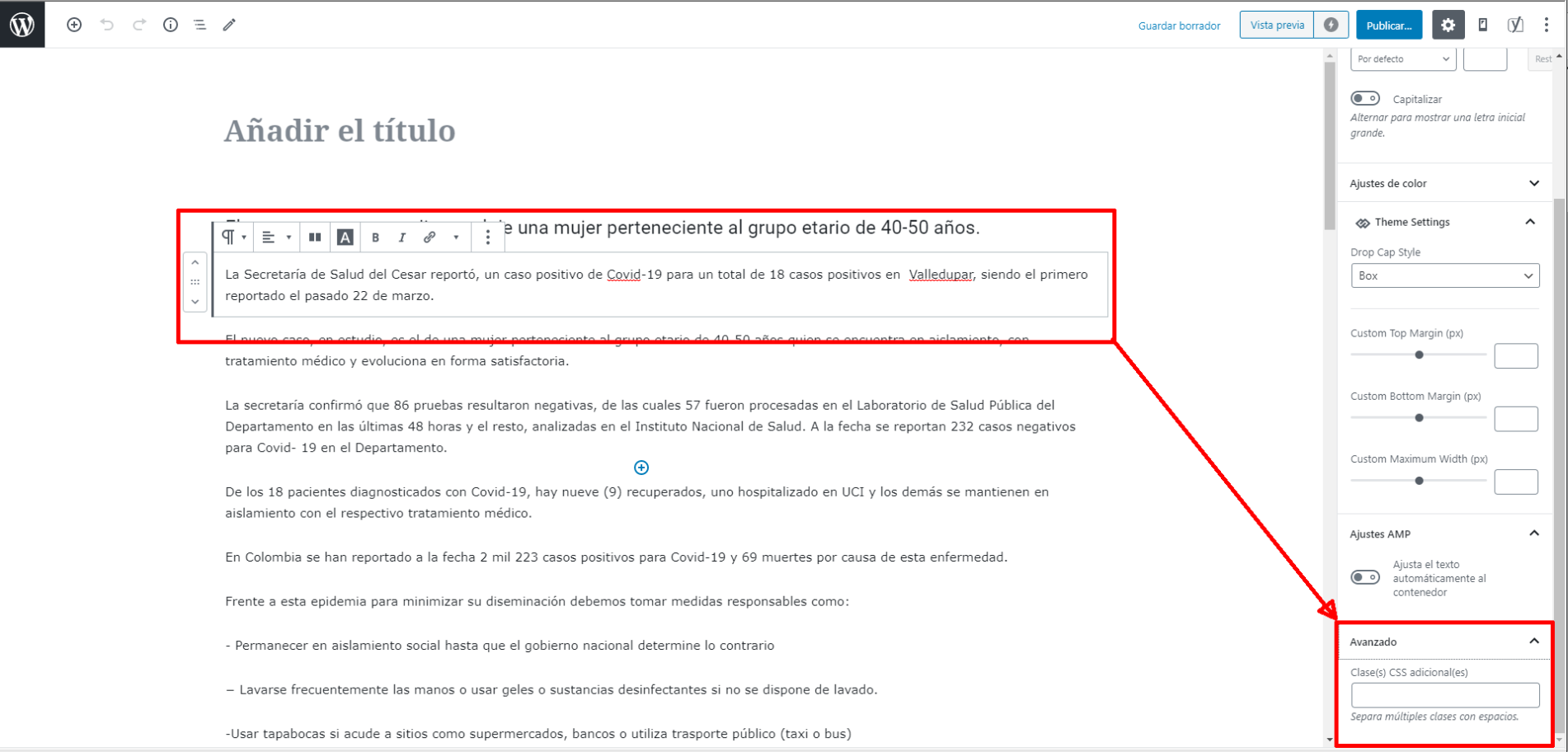
Hello, could you tell me what is the use of the field indicated in the screenshot? naun I’m not very in html, could you tell me xintasis or how to use the newspaper x
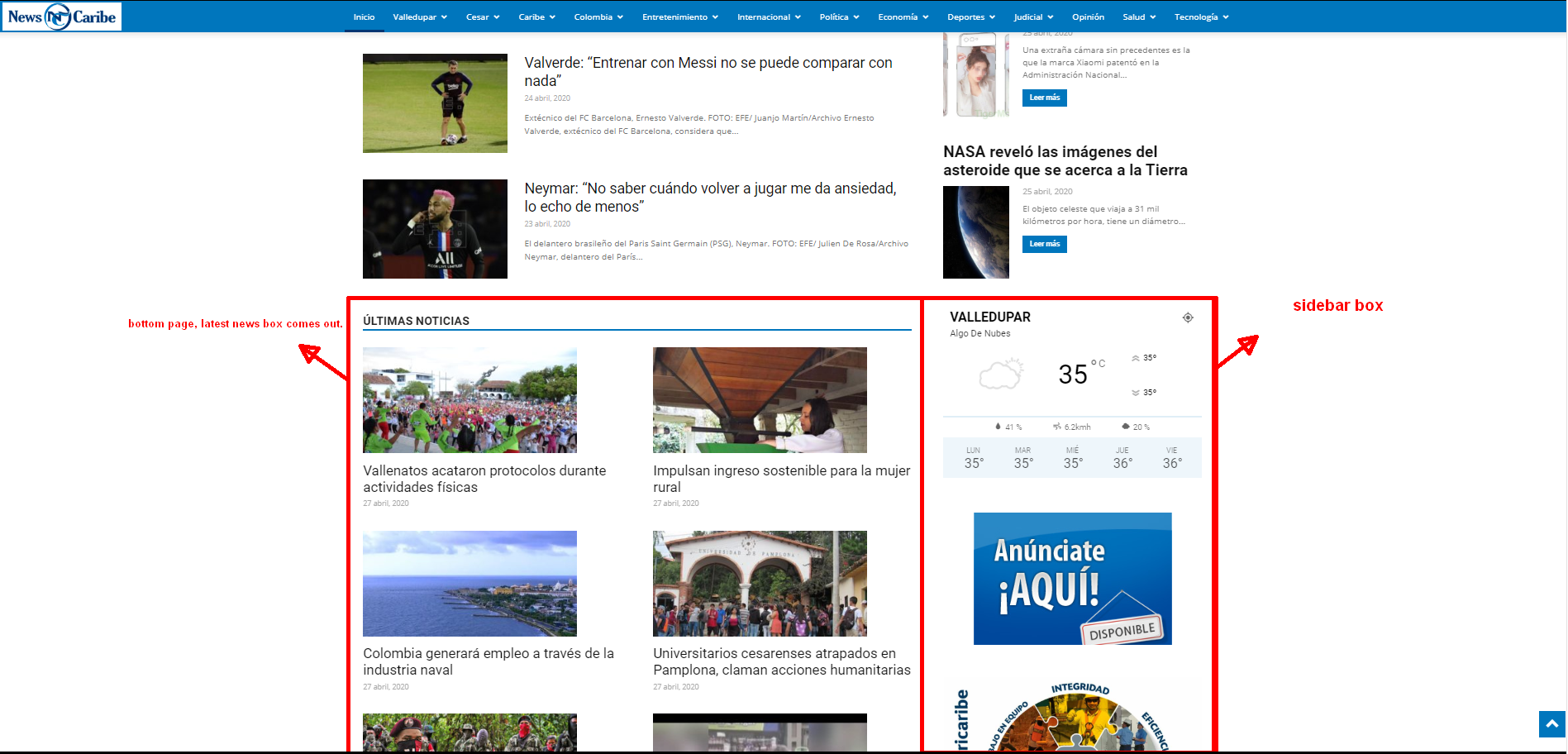
The other question if you go down at the bottom of the futer is the contact and privacy options, bottom right, you will see that the location of page upload covers that menu, how can I solve it, how do I change the page upload site or a little higher so that it bea well the menu.

 Jennifer Hollister
How do I remove featured image from the mobile theme?
investmentguide Feel free to ignore this original request. I have decided to go about customising using Cloud Templates myself.
I have a few specific customisation queries. Please don’t direct me to general advice as these are the queries I’m struggling to resolve after referring to general advice – I’m looking for some specifics!
1) How can I make the bar to the left and right of the navigation, the same colour as the navigation bar.

2) I’m using the mobile theme and AMP. If I go to my homepage on my mobile, I can see author name next to each post. I disabled this using TDComposer on the homepage… but it still shows up like this on the mobile. How can I amend this? I have the same problem on post and category pages where, for example, breadcrumbs are appearing.
3) I would like a separate navigation bar to appear on the desktop version when you ‘snap back’. I had this selected when using the standard plugin… but am struggling to recreate it using TDComposer.
4) On single posts, it appears to automatically take me on to a different post as I scroll down. I would like to disable this option.
Thanks,
Matt
-
This reply was modified 6 years by
investmentguide.



