- NewspaperThe Newspaper Mobile Theme: Introduction
- NewspaperThe Mobile Theme
- NewspaperModules Builder in Newspaper Theme
- NewspaperFilters and sorting for taxonomies
- NewspaperHow to Add a Logo in Newspaper
- NewspaperBig Grid Flex Settings
- NewspaperHeader Builder
- NewspapertagDiv AMP Plugin Tutorial
- NewspaperNewspaper theme documentation
- NewspaperBest Of Forums
- NewspaperCache plugin – install and configure
- NewspaperFont Customization
- NewspaperTheme Colors Introduction
- NewspaperBackground Introduction
- NewspaperHeader ads
- NewspaperPost template ads
- NewspaperCustom ad spots
- NewspaperMain Menu
- NewspaperHow to Install Newspaper via FTP
- NewspaperHow to Install Newspaper via WordPress
 poporil
 Thank you very much. I have one more question.
with it enabled Standard Pack if in the header ad disable display on mobile,
it’s like it’s not working. Ads appear normally on some pages.
sure now with what you’re showing me maybe i don’t need to have it enabled since i read that it also lags in loading.
Standard Pack except for DEFAULT SITE POST TEMPLATE it also has to do with Block 1, 2, 4.. if i understand correctly?
 entertainmentfocus
 Hi Bettina,
I understand that we need to have the Google Site Kit plugin in order for us to be able to track authors in GA4. I don’t believe this is possible without.
In theory, should the Google Analytics tag pull through from the settings for the desktop theme, as I can’t see anywhere to add GA4 code in the Mobile Theme settings.
Thanks
Pip
 Bettina
 Hello @entertainmentfocus!
It could be a plugin conflict because we didn’t test this plugin with ours.
Can’t you use GA4 without the site kit plugin?
Similar topics regarding GA4 are here:
– https://forum.tagdiv.com/topic/how-to-find-and-add-call-to-action-google-analytics-tracking-code/
– https://forum.tagdiv.com/topic/track-ad-performance/
Please note that the mobile theme plugin is very limited and is not customizable with the TgaDiv Composer.
Thank you!
entertainmentfocusHi there,
I set up the mobile theme yesterday and realised that once it’s activated, we no longer get traffic tracking in our GA4 account from mobile devices. After deactivating it, the traffic is visible in our GA4 profile again.
We’re using Google Site Kit to add to the GA4 code to the site. Is there a way to get this working with the mobile theme?
Thanks
Pip
 nolandolce
 Hi Calin,
I noticed on mobile the custom fields are wrapping. Do you know how to fix this? Please see here: https://snipboard.io/XDy1Mp.jpg (The custom field is the “medically reviewed” byline). Thanks!
poporil is there any chance that the old version is to blame, that the site shows it in bad mobile user experience?
 Partha0000
 <div class=”fixed-buttons”>
<button id=”whatsapp-button”>
<i class=”fab fa-whatsapp fa-3x”></i>
</button>
<button id=”phone-call-button”>
<i class=”fas fa-phone fa-3x”></i>
</button>
</div>
<style>
.fixed-buttons {
position: fixed;
bottom: 20px; /* Adjust the distance from the bottom as needed */
left: 50%; /* Center the buttons horizontally */
transform: translateX(-50%);
z-index: 9999;
text-align: center;
}
.fixed-buttons button {
padding: 10px; /* Adjust the button size as needed */
margin: 5px; /* Adjust the button spacing as needed */
background-color: #FF0000; /* Adjust the button’s background color */
color: black; /* Adjust the button’s text color */
border: none;
cursor: pointer;
}
.fixed-buttons button i {
margin-right: 5px; /* Add spacing between the icon and text */
}
.fixed-buttons button:hover {
background-color: red; /* Adjust the button’s background color on hover */
}
@media (max-width: 768px) {
.fixed-buttons {
left: 20px; /* Adjust the left distance for mobile and tablet screens */
bottom: 5%; /* Center the buttons vertically */
transform: translateY(-50%);
display: flex;
flex-direction: column;
}
.fixed-buttons button {
padding: 15px; /* Make the buttons smaller for mobile and tablet screens */
margin: 10px 0; /* Add spacing between the buttons */
}
.fixed-buttons button i {
font-size: 24px; /* Increase the icon size for mobile and tablet screens */
}
}
</style>
Also Get it : https://docs.google.com/document/d/13B9ddhW1dFju-dquhE1RibvnNvL6dMek52X5Q2kgF54/edit?usp=sharing
nolandolceHello,
For some reason the sidebar widget is left-aligning in mobile, even though the CSS of the widget is set to center within tagdiv composer. You can see an example here (scroll down nearer the end for the advertisement): https://rareparenting.com/books-for-children-about-disability/. Usually in these situations it seems I have to add CSS to the Live CSS within the Editor.. could you let me know what to add in order to ensure the widgets center align? Or is it something else?
Thanks!
Bettina Hello Narendra!
To increase the page speed you can check these similar topics for more solutions:
– https://www.infophilic.com/get-almost-100-pagespeed-newspaper-theme/
– https://forum.tagdiv.com/topic/score-100100-pagespeed-with-newspaper-wordpress-theme/
– https://developers.google.com/speed/docs/insights/v5/about
– https://www.youtube.com/watch?v=tnkVapqhIHc
– https://www.xtechkr.com/optimize-newspaper-theme/
– Check those guides : https://web.dev/lcp/ – > https://www.sqlpac.com/en/documents/google-pagespeeds-lighthouse-6-new-features-lcp-cls.html -> > https://wp-rocket.me/google-core-web-vitals-wordpress/improve-cumulative-layout-shift
– https://forum.tagdiv.com/topic/to-high-cumulative-layout-shift-in-mobile-theme/
Please check the tutorials from those platforms gt metrix and Google Pagespeed Insights and I’m sure you can increase the page speed.
Please note that page speed or optimization is not covered by the support team: https://forum.tagdiv.com/newspaper-theme-support/
Thank you for understanding!
 nagi
nagiRespected Sir/Mam,
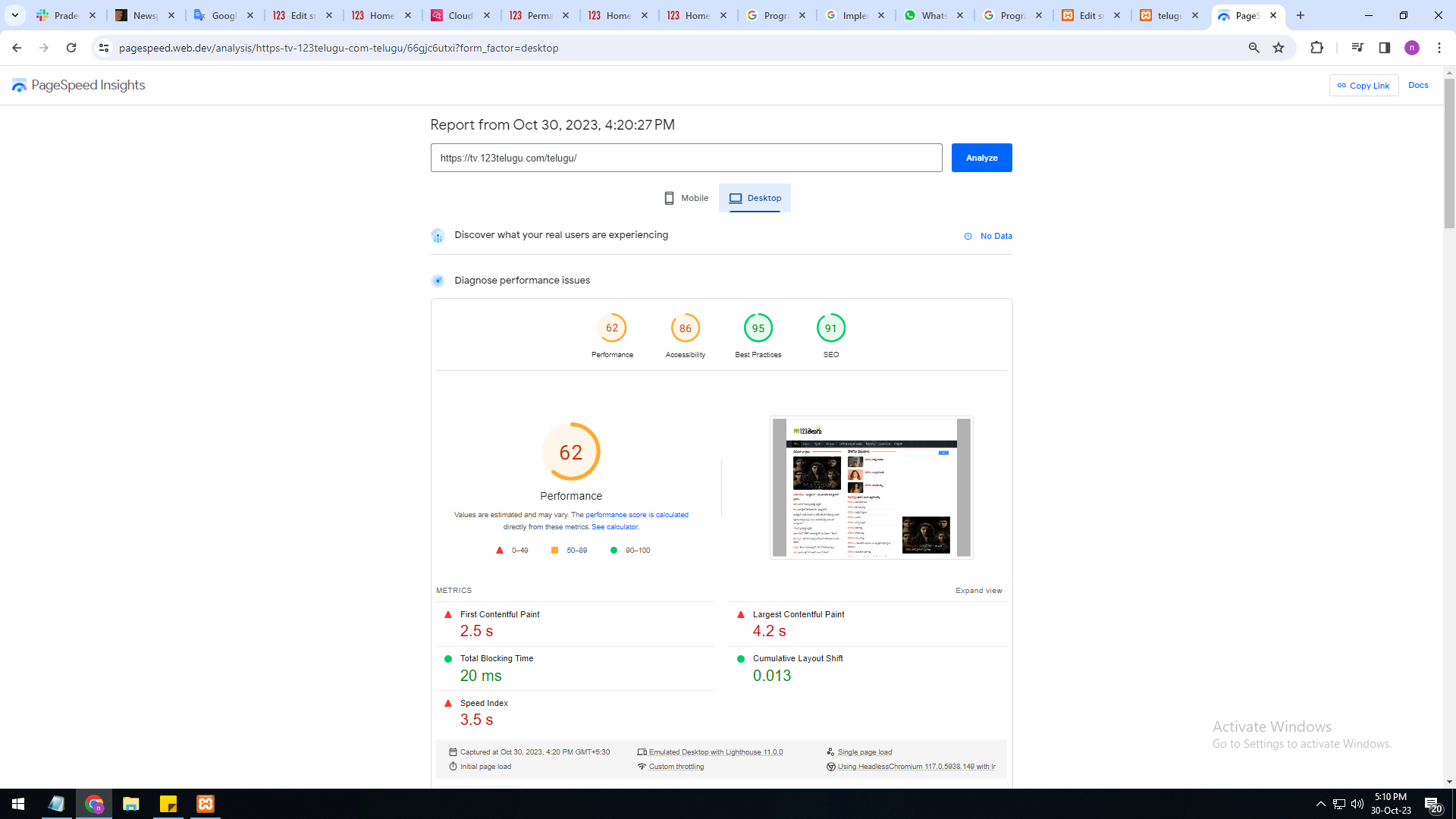
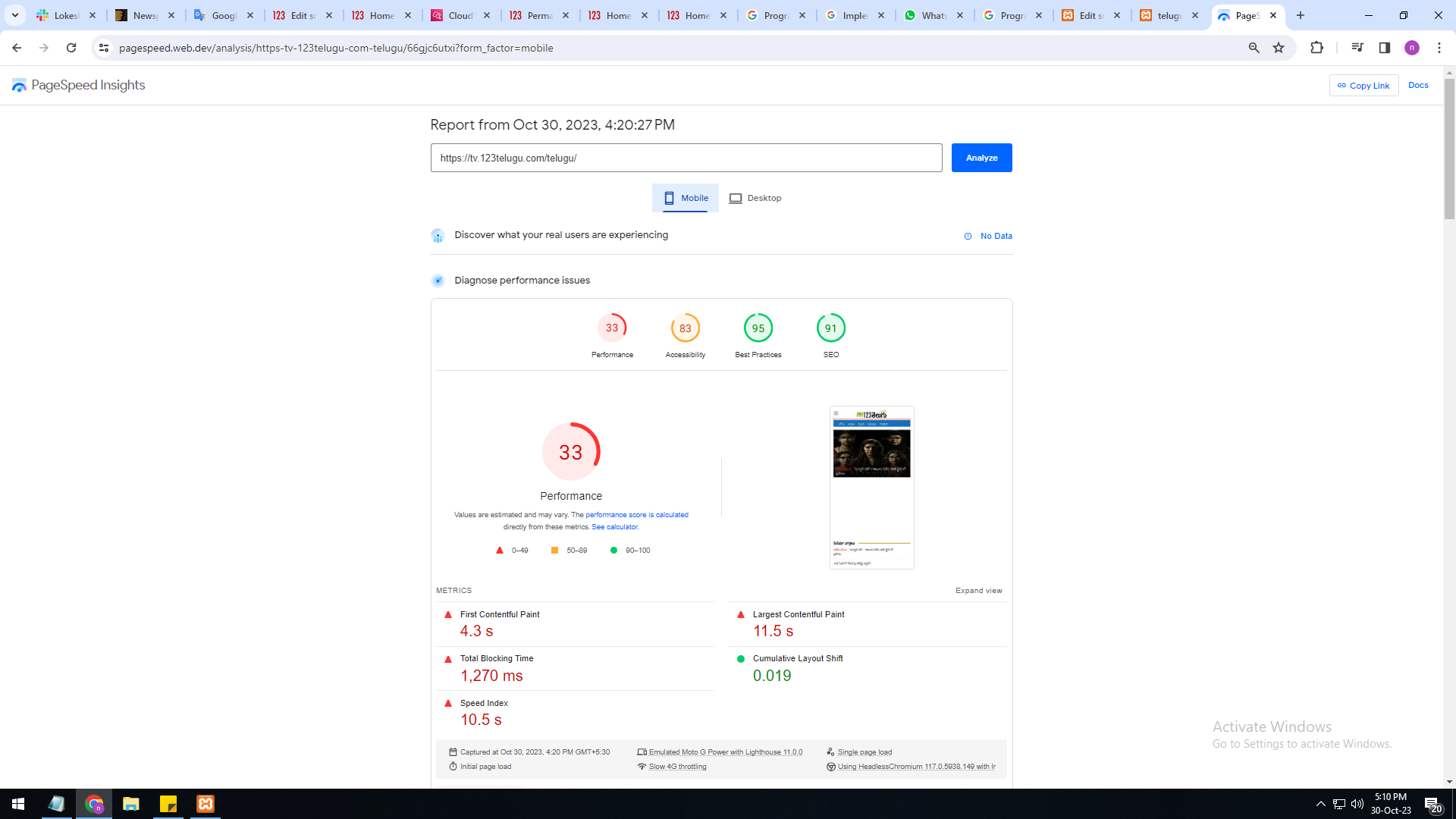
I am a developer at Mallemaala Entertainments, located in Hyderabad. We have a few requirements for our movie review website, 123telugu.com
newspaper theme performance speed is very slow Please give
us some tips to increase website speed
mobile version is very slow 33%
system version is also very slow only 62%
I am sharing images URL links :
https://gallery.123telugu.com/images/theme_test/Basantham1.png
https://gallery.123telugu.com/images/theme_test/Basantham2.png
Thanking you,
Regards,
Narendra.
Bettina Hello @designrepublik !
Unfortunately, we do not fix the page speed issues on our demos.
Our developers are aware of this issue and try to synthesize the composer, which is big, and fix the major problems of the theme and speed.
A cache plugin doesn’t help much with page speed.
To increase the page speed you can check these similar topics for more solutions:
– https://www.infophilic.com/get-almost-100-pagespeed-newspaper-theme/
– https://forum.tagdiv.com/topic/score-100100-pagespeed-with-newspaper-wordpress-theme/
– https://developers.google.com/speed/docs/insights/v5/about
– https://www.youtube.com/watch?v=tnkVapqhIHc
– https://www.xtechkr.com/optimize-newspaper-theme/
– Check those guides : https://web.dev/lcp/ – > https://www.sqlpac.com/en/documents/google-pagespeeds-lighthouse-6-new-features-lcp-cls.html -> > https://wp-rocket.me/google-core-web-vitals-wordpress/improve-cumulative-layout-shift
– https://forum.tagdiv.com/topic/to-high-cumulative-layout-shift-in-mobile-theme/
Please check the tutorials from those platforms gt metrix and Google Pagespeed Insights and I’m sure you can increase the page speed.
Please note that page speed or optimization is not covered by the support team: https://forum.tagdiv.com/newspaper-theme-support/
Thank you for understanding!
Bettina Hello!
We have 3 options for mobile versions that you can use:
1. Responsive version: A responsive version of your website looks similar to the desktop version. TagDiv Composer is used to edit the page.Click on the mobile viewport: https://www.screencast.com/t/XDQJedlggSB. There, you can see your mobile version and edit or adjust the elements to look better.
2. Mobile pages: https://tagdiv.com/newspaper-10-3-7-update-brings-customizable-and-fast-mobile-pages
3. Mobile theme plugin: The Mobile Theme is a performance-optimized theme included in the main Newspaper theme that only loads on mobile devices. It comes with its own templates and designs for pages, posts, categories, etc., so your current templates from the desktop theme will get converted to the mobile theme layout. Please see https://forum.tagdiv.com/the-mobile-theme/ and https://forum.tagdiv.com/mobile-theme-introduction/ for more information.
A full explanation is here: https://www.youtube.com/watch?v=SpGkOnJeNZY
If you need to use mobile version 1 or 2, then you need to uninstall the Mobile Theme plugin and AMP.
Thank you!
Bettina Hello @otaku!
You can use the one from the recommended options. From my point of view, if you don’t use the Mobile Theme plugin, then there is no reason or benefit to AMP.
Thank you!
 Renato Tbw
I am facing a problem on my website. Before he was normal, he has a conventional home and a mobile home, using newspapers. Turns out I had a problem and several functions reset.
I remain with two home pages (conventional and mobile). They appear normally to visitors. However, when I use pagespeed insights the same (conventional) page appears for evaluation. The same page appears on the pagespeed mobile screen for both assessments. How can I resolve this? Before it was normal.
 Jonathan Ee
 Hi there,
I have tried all 3 options and it doesn’t seem to work. What i have noticed is that for part of the day, the talk town mobile template works, but in other parts of the day it doesn’t work and goes to the newspaper template. The content is the same, it’s just the header and menu.
could you please help
 Satheeshraj
Hi,
I want to Deregister below scripts for single post. Please let me know how can I achieve this.
Scripts:
https://simplytamil.com/wp-content/plugins/td-composer/legacy/Newspaper/js/tdAjaxSearch.js
https://simplytamil.com/wp-content/plugins/td-composer/legacy/Newspaper/js/tdLoginMobile.js
https://simplytamil.com/wp-content/plugins/td-composer/legacy/Newspaper/js/tdLoadingBox.js?
https://simplytamil.com/wp-content/plugins/td-composer/legacy/Newspaper/js/tdSmartSidebar.js
https://simplytamil.com/wp-content/plugins/td-composer/legacy/Newspaper/js/tdInfiniteLoader.js
Note: I tried the below code. But it is not working.
wp_deregister_script(‘tdAjaxSearch’);
 PFN365
With the mobile LOAD MORE pagination button, Google PageSpeed Insights says it fails the accessibility test.
The error that Google returns is: Elements with visible text labels do not have matching accessible names.Visible text labels that do not match the accessible name can result in a confusing experience for screen reader users.
The text in the button says Load More, but I suspect the icon in the button is causing it to fail. How do we remove the default icon that is in the Load More pagination?
Bettina Hello Jonathan!
We have 3 options for mobile versions that you can use:
1. Responsive version: A responsive version of your website looks similar to the desktop version. TagDiv Composer is used to edit the page.Click on the mobile viewport: https://www.screencast.com/t/XDQJedlggSB. There, you can see your mobile version and edit or adjust the elements to look better.
2. Mobile pages: https://tagdiv.com/newspaper-10-3-7-update-brings-customizable-and-fast-mobile-pages
3. Mobile theme plugin: The Mobile Theme is a performance-optimized theme included in the main Newspaper theme that only loads on mobile devices. It comes with its own templates and designs for pages, posts, categories, etc., so your current templates from the desktop theme will get converted to the mobile theme layout. Please see https://forum.tagdiv.com/the-mobile-theme/ and https://forum.tagdiv.com/mobile-theme-introduction/ for more information.
A full explanation is here: https://www.youtube.com/watch?v=SpGkOnJeNZY
If you need to use mobile version 1 or 2, then you need to uninstall the Mobile Theme plugin and AMP.
Thank you!
Jonathan EeHi there,
My website joneesparks.com has an issue, the web view for the header has the version i wanted, yesterday when I checked the mobile was the same. But today the mobile version is different. Could you please help me out?
 Anamaria
 Hi,
You can add it with tagdiv Composer, from the front end as I described above. Also, for mobile, you can use a modal popup element for the menu.
Thank you!
Anamaria Hi,
If you don’t want to use mobile theme for pages and posts, then disable the plugin.
Thank you!
 jcewald
Here’s my site:
EVElectronicsEngineeering.com
And a video of what’s happening:
https://www.loom.com/share/acabcd19ea254ca7beeffd1d02d44f21
Basically I can’t get the mobile theme to work properly. It sometimes shows up with the wrong menu at the top, other times it doesn’t. I have a mobile home setup, but that doesn’t always work either?
jcewaldHi I am using the mobile theme, my site is evelectronicsengineering.com
When I make a post, or page, or anything it doesn’t want to show up with the mobile template that I made.
Sometimes in Gutenberg if I disable mobile theme that works… but I don’t want to have to do this for every single post.
Any ideas?
 Otaku
Otaku Hello Anamaria,
I want to add infinite scroll in mobile amp version how can i do it?
 meri
meri Hi @anamaria ,
Thanks for your help, it works perfectly.
But the mobile menu isn’t working anymore.
Is there a way to enable it with a cloud template for the HP? Or should I create a cloud template menu (in this case, I guess I would have to create a whole header, right?)?
Anything else I should fix/create?
Thanks