
- NewspaperThe Newspaper Mobile Theme: Introduction
- NewspaperThe Mobile Theme
- NewspaperModules Builder in Newspaper Theme
- NewspaperFilters and sorting for taxonomies
- NewspaperHow to Add a Logo in Newspaper
- NewspaperBig Grid Flex Settings
- NewspaperHeader Builder
- NewspapertagDiv AMP Plugin Tutorial
- TutorialsFrom WPBakery to tagDiv Composer
- NewsmagSmart list ads
- NewspaperNewspaper theme documentation
- NewspaperBest Of Forums
- NewspaperCache plugin – install and configure
- NewsmagIntroduction
- NewsmagMain menu
- NewsmagLogo & Favicon
- NewsmagHeader ads
- NewsmagSmart sidebar
- NewsmagSharing buttons
- NewsmagCategory tag on modules/blocks
 Anamaria
 Hello,
Please check this topic about page speed https://forum.tagdiv.com/topic/why-is-my-websites-mobile-google-test-slow/
Thank you!
 Bettina
 Hello @cfasencio!
The issue has been discussed already here, please check: https://forum.tagdiv.com/topic/mobile-theme-cant-showing-copy-content/
Let me know the results!
Thank you!
Bettina Hello @stephanwhelan!
If you’ll use Mobile theme plugin, then you can not edit the pages with TagDiv Composer.
You have only some settings for this layout, which you can find in Theme panel -> Mobile Theme. The same thing for AMP plugin too. It comes with its own templates/design for page, post, category, etc so your current templates from the desktop theme will get converted to the mobile theme layout. For more details, please take a look here: https://forum.tagdiv.com/the-mobile-theme/ and https://forum.tagdiv.com/mobile-theme-introduction/
Thank you!
Anamaria Hello,
Seems you have the mobile theme plugin activated https://i.imgur.com/i8Cw5ov.png, please deactivate it, clear all cache and check after the mobile version.
Also, please check this topic where I explained each mobile version -> https://forum.tagdiv.com/topic/mobile-version-not-working-properly-2/ and choose what mobile version you want.
Hope this helps you!
Thank you!
Bettina Hello @nwnuyhs!
Here you can remove/set a picture for mobile menu background: https://www.screencast.com/t/x3Xrln2b88x
And the background color here: https://www.screencast.com/t/PbU3hQpDqHh
Thank you!
 nwnuyhs
 Does anyone know how to fix it? As soon as I install the mobile theme plugin and AMP plugin, this problem appears
 cfasencio
Hi my site displays way different on mobile phones, i’ve used the tools available on wordpress and my theme to change it but it doesn’t work. When i try to preview how the site will look on mobile through my desktop (by using the responsiveness of my browser for example) it displays fine, as it should.
Here is how it displays mobile on my desktop (correct or intended way)
https://imgur.com/u6X4LwW
https://imgur.com/tvqeSRj
Here is how it looks on mobile phones (not correctly), nav menu is empty and colored wrong, header is grey, footer is on the wrong place, areas of the front page not showing.
https://imgur.com/nsY6O7S
https://imgur.com/j0gaWnl
nwnuyhsThe error code is shown in the figure, please ask for urgent help
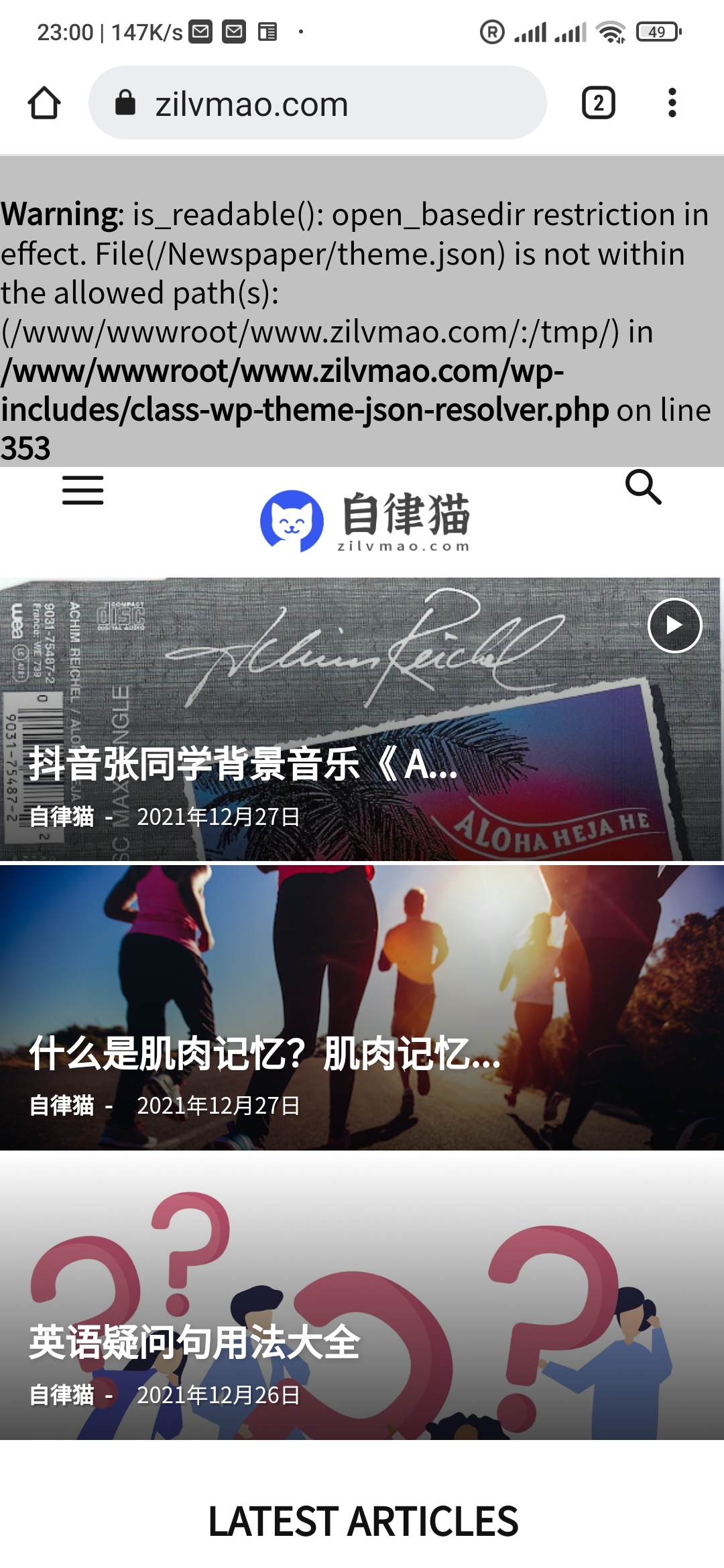
 stephanwhelan
Hi there – is there any way to customise the Mobile Theme delivered via Plugin/AMP? Want to add a few elements if possible?
 peteryu
Hello, this is my site: https://gctv2022dev.wpengine.com/
But when I view the page in mobile and tablet, it’s showing only articles and not responsive from the main page.
nwnuyhsCan anyone tell me how to modify it?
I don’t want this background to be transparent, I want to change it to another color, help
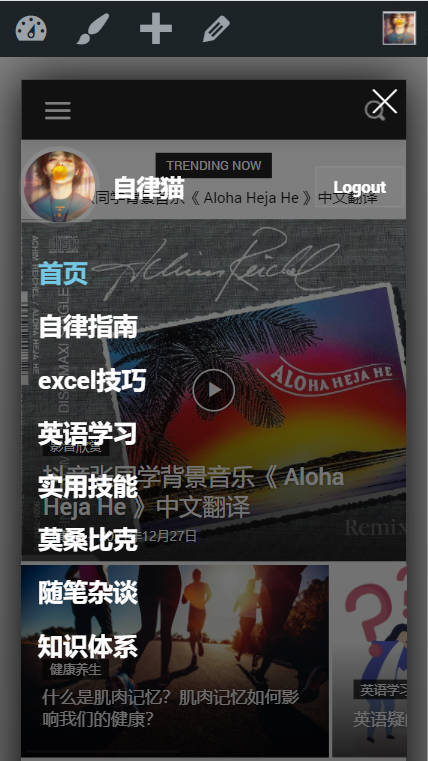
 PeteMason
Hi
Merry Xmas and happy new year all.
I’ve placed an image in an image box. I’ve sized the original to the height and width required.
I can set the height to the height of the image in the image height setting, and it is fine on a wide screen, but I assume that is why, when reducing the screen width, the image does not re-size (because the width is fixed, not percentage), and looks very bad at smaller scales, eg on a mobile, because it is cut off.
But with no setting in the image height setting, or set to 100%, the box expands, is the wrong shape, and the image expands height wise to fit the wrong sized box, and doesn’t fit.
There must be something very simple I’ve missed, or am I using the wrong block to place an image?
Anamaria Hello,
Normally, the settings that you have made in the Theme Panel or with tagDiv Composer will not be affected by the update of the theme, but if you made changes in theme files, then yes, the files will be overwritten.
Also, before update please make a full backup to all files and the database, in case something goes wrong. => https://forum.tagdiv.com/how-to-update-the-theme-2/
Also, for the ad box, please let me know what version you use, mobile responsive or mobile page.
Please try to make the steps form this video https://www.screencast.com/t/1FkjSwB9
Thank you!
 Daniljev
 Yes. I tried to do it through the tagDiv Composer, but this particular block is not visible through the mobile editor for some reason. But at the same time it is visible on the website in the mobile version.
What could be the reason?
Also wanted to clarify: If I made changes to the CSS theme and blocks through the tagDiv Composer, will the changes be lost if I click install new updates for this theme?
 Simone Ferrara
Hi, I wish to showcase some tips I’d like to have in the tagDiv Newspaper theme.
Advice:
- Specify, for those who use other cache plugins, such as js not to minify or exclude from the cache
- Add a function that excludes the display of the WordPress bar for subscribers (or even for others)
- Enable the login on mobile synchronized with the page created with the tagDiv Opt-In plugin (author name must not lead to author template)
- Ability to generate PDF for the invoice or maybe be able to connect to external services for generating the PDF
many of these tips would avoid installing a child theme to add code to function.php
Bugs:
- tagDiv Opt-In – currency in EURO € absent (and others)
- Inability to translate or edit new entries (TagDiv Opt-In) on tagdiv composer or theme panel
- The login menu block (tagDiv Composer) lacks the ability to translate items “Account details” – “Subscription”
- Password reset not working (it works if I force it from the user panel)
- Some blocks (block 23) do not have the possibility to modify some parameters such as: hide comments, author name, in block 23 not even the modification of characters works
- Fix Background video self-hosted 100% with and heigh
- Google Tag Manager does not work on the Hero block, on normal button yes; add the possibility to set GTM differently in the two buttons on the Hero block
Will tagDiv Opt-In become paid?
This is not meant to be a criticism, but I would love to have these options
Regards,
Simone
Anamaria Hello,
To create a header, please check this article https://forum.tagdiv.com/header-manager/
Also, please edit the mobile version (responsive or mobile page) select the row and set the layout to 1/3 + 1/3+1/3 and set the width of the column like in this video https://www.screencast.com/t/xMSF1ACLU and after you can add the elements in columns.
Thank you!
 kimstipguide
 Note that
Mobile screen.
Anamaria Hello,
Please let me know what plugin for the cache you use.
If the cache plugin does not have mobile support then the mobile theme version can be delivered instead. The solution would be to use the recommended WP Super Cache plugin instead and activate these settings (especially the mobile device support): https://forum.tagdiv.com/cache-plugin-install-and-configure/
Thank you!
Bettina Hello @dharma3d!
If you use the Mobile Theme plugin, then you can not have this element on the mobile version. Please note that this element is working with cloud templates.
Thank you!
Bettina Hello Jan!
They should work together for pages and posts too.
If you’ll use Mobile theme plugin, then you can not edit the pages with TagDiv Composer.
You have only some settings for this layout, which you can find in Theme panel -> Mobile Theme. The same thing for AMP plugin too. Please note that if a page is made by Composer, than the content won’t be displayed on Mobile theme version. You should create the content with the Mobile Editor.
Thank you!
Anamaria Hello,
To remove the ad box, please edit with tagDiv Composer, select the viewport on the phone and select element and delete it with right-click.
Also, if you have a mobile page, then you need to edit the mobile page and delete the ad box https://i.imgur.com/ETLC3qR.png
Thank you!
 Calin
Calin Hi TheWedMag, yes, you can hide elements for responsive version using the tagDiv Composer , edit the page and select the mobile version -> https://i.imgur.com/LCsxIoy.png then from css tab you can hide the element per view port -> https://i.imgur.com/wkDlD8p.png or better you can use a mobile page and on it you can let only the elements you want to display (hiding an element will be still loading, but will be not displaying, so using a mobile page you can delete that element and will no longer be load for mobile version).
I hope this will help you!
Bettina  alejandroman
Hi, in an apparently random manner, the homepage switches to the Mobile theme on my desktop and when I log into the WordPress dashboard and click back to the homepage while logged in, it returns to the default homepage I set. Please advise
Alejandro
 dharma3d
 Can this pop-up be shown on a mobile theme?



