- NewspaperThe Newspaper Mobile Theme: Introduction
- NewspaperThe Mobile Theme
- NewspaperModules Builder in Newspaper Theme
- NewspaperFilters and sorting for taxonomies
- NewspaperHow to Add a Logo in Newspaper
- NewspaperBig Grid Flex Settings
- NewspaperHeader Builder
- NewspapertagDiv AMP Plugin Tutorial
- TutorialsFrom WPBakery to tagDiv Composer
- NewsmagSmart list ads
- NewspaperNewspaper theme documentation
- NewspaperBest Of Forums
- NewspaperCache plugin – install and configure
- NewsmagIntroduction
- NewsmagMain menu
- NewsmagLogo & Favicon
- NewsmagHeader ads
- NewsmagSmart sidebar
- NewsmagSharing buttons
- NewsmagCategory tag on modules/blocks
 Bettina
 Hello David!
I recommend uninstalling the Mobile theme ad AMP plugin and using the responsive version or mobile pages.
Please note that page speed is not covered by the support team: https://forum.tagdiv.com/newspaper-theme-support/
Thank you!
 mediatime
 That’s fine, but can you explain how to disable the mobile theme only for some specific pages? The icon in the top right corner of the mobile theme, as in your screenshot, is not there from me.
 Anamaria
 Hello,
You can use whatever version you want, but for the mobile theme plugin page, as I mentioned before, you need to set the content in the mobile editor or disable the mobile theme on that page https://i.imgur.com/3922jmF.png
Thank you!
mediatime You were the ones who had recommended me the mobile theme plugin just to have a better respomnsive version. Now you tell me otherwise?
 Jeromes
 Hi,
We use the mobile theme plugin.
But as you can see, we have a change after the last update and we are not able to display categories list as the desktop page.
Thank you for your help
Bettina Hello!
We have 3 options available for mobile versions that you can use:
1. Responsive version: A responsive version of your website looks similar to the desktop version. TagDiv Composer is used to edit the page. Click on the mobile viewport: https://www.screencast.com/t/XDQJedlggSB. You can see your mobile version there and edit or adjust the elements to look better.
2. Mobile pages: https://tagdiv.com/newspaper-10-3-7-update-brings-customizable-and-fast-mobile-pages
3. Mobile theme plugin: The Mobile Theme is a performance-optimized theme included in the main Newspaper theme that only loads on mobile devices. It comes with its own templates and designs for pages, posts, categories, etc., so your current templates from the desktop theme will get converted to the mobile theme layout. Please see https://forum.tagdiv.com/the-mobile-theme/ and https://forum.tagdiv.com/mobile-theme-introduction/ for more information.
A full explanation is here: https://www.youtube.com/watch?v=SpGkOnJeNZY
If you need to use mobile version 1 or 2, then you need to uninstall the Mobile Theme plugin and AMP.
Thank you!
Anamaria Hello,
If you want to use the responsive version, the best solution is to disable the mobile theme plugin.
Thank you!
mediatime I thank you for your attention. However, I noticed that in all the other Pages of my site (only the pages and not the posts) I have the same problem: it does not display the content from mobile, but only from desktop. What should I do?
Example:
https://mediatime.net/pubblicita/
https://mediatime.net/redazione/
Thank you
 Guelven
 Problem with homepage on mobile phone
Hi, newspaper theme does not display some areas on mobile, logo, menu and other important areas, only displays most recent articles. any solution?
//Solution
Hello!
Please uninstall the Mobile theme plugin.
Thank you!
JeromesHi,
After the last update, we discover a small problem between web (desktop) version of our category page : https://overclocking.com/category/test-articles/ and the mobile version. ( For mobile version we use the mobile theme ).
On the desktop version, everything is correct but on the mobile version, we don’t have all categories displayed, only the first one.
We use “Category siblings” to display all subcategories.
Could you help us please ?
Anamaria Hello,
Yes, these are the templates that are created for pages. You do not need to create a mobile page, only if you want to show different designs and content for mobile.
Thank you!
Anamaria Hello,
Please use a plugin for cache because now you have mobile theme on desktop -> https://imgur.com/W1KaV3U -> https://i.imgur.com/6z19Mek.png
Thank you!
 Davidpinto
 Hi Anamaria,
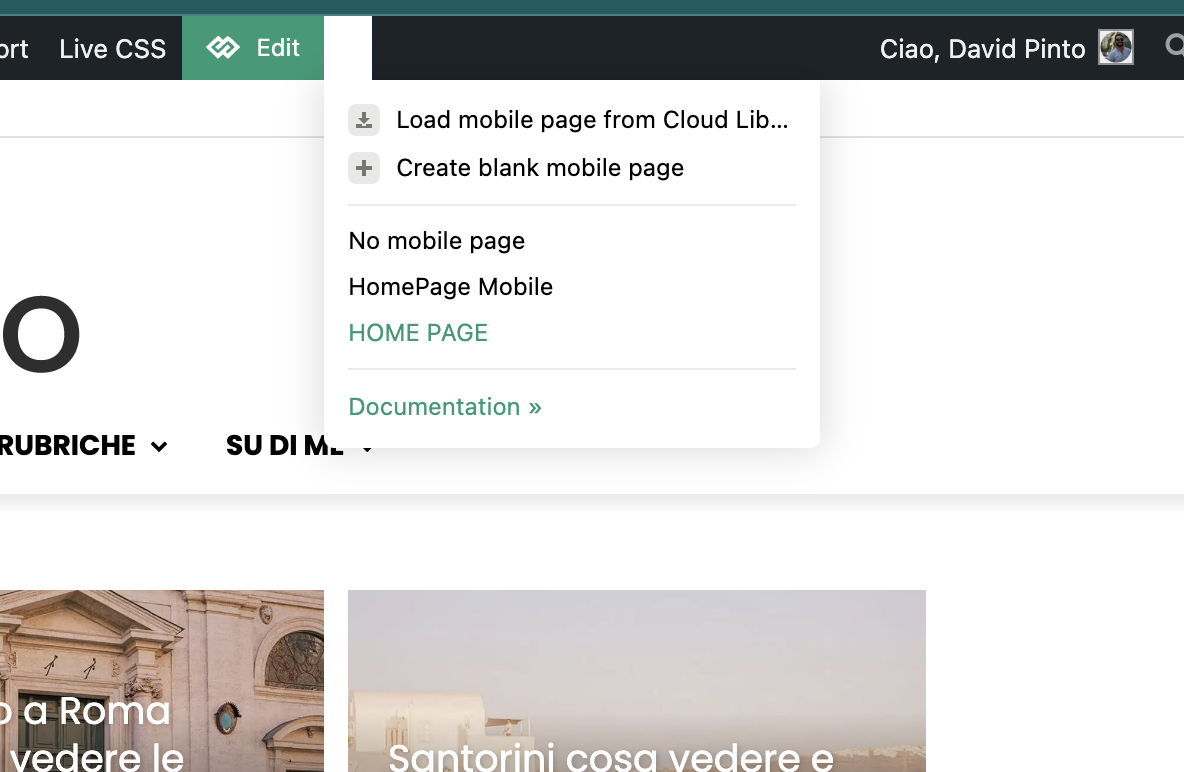
thank you so much, I’ve just now activated the option and now works. But I have a dubt. In the post page i selected the template for mobile and works well, instead in homepage I have this issue, why I don’t see the option specific for mobile template?
It’s correct what i see? This section is only for homepage mobile?
-
This reply was modified 1 year by
Davidpinto.
 petar777
 Hey,
I am sharing you my WP Rocket settings and I think they might be useful for you:
ON THE FILE OPTIMISATION TAB
1. Activate Minify CSS Files
2. Optimise CSS Delivery > Remove unused CSS with these exclusions:
(.*).tagdiv-type(.*)
(.*).bhcrow-(.*)
3. Minify Javascript Files
4. Load Javascript Defered with these exclusions:
\/jquery(-migrate)?-?([0-9.]+)?(.min|.slim|.slim.min)?.js
5. Delay Javascript Execution with these exclusions:
\/jquery(-migrate)?-?([0-9.]+)?(.min|.slim|.slim.min)?.js(\?(.*))?( |’|”|>)
tagdiv_theme.min.js
tdTrendingNow.js
tdPopupModal.js
tdBlocksArray
hammer.min.js
tdbMenu.js
tdLoadingBox.js
tdb_p_autoload_vars
blockClass
tdAjaxCount.js
tdTabbedContent.js
tdStickyRow.js
tdSmartSidebar.js
OneSignalSDK
Important – delaying Javascript will make your ads load after any movement on the page so if you just reload the page they will not be loaded as soon as you move anything on the page it will load them immediately. For me this isn’t a problem.
ON THE MEDIA TAB
1. Activate Enable for images
2. Activate Enable CSS for background images
3. Exclude your logo
4. Activate Add missing file dimensions
5. Activate self host fonts
ON THE PRELOAD TAB:
1. Activate preload
2. Enable link preloading
3. Prefetch these:
//fonts.googleapis.com
//www.googletagmanager.com
//www.googletagservices.com
//tpc.googlesyndication.com
//use.typekit.net
//netdna.bootstrapcdn.com
//www.google-analytics.com
//ajax.googleapis.com
4. Preload fonts – /wp-content/themes/Newspaper/images/icons/newspaper.woff
ON THE DATABASE TAB
Enable everything without scheduling auto cleanup
ON THE HEARTBEAT TAB
Enable it and make everything reduced
Important – if you are self hosting your site on nginx you can enable this https://github.com/SatelliteWP/rocket-nginx – this enables Nginx to serve directly previously cached files without calling WordPress or any PHP
Important – if you are self hosting your site on nginx you can enable FastCGI and Redis (use redis cache plugin and nginx helper). When it comes to FastCGI MAKE SURE TO ENABLE SEPARATE CACHE FOR MOBILE AND DESKTOP OTHERWISE IT WILL WORK BADLY!
Important – if you have a large installation and you notice that your queries become slow (e.g. search page takes a lot of time to load or non-cached pages load for more than 1-2 seconds) you can buy Scalability Pro and Super Speedy Search from here https://www.superspeedyplugins.com/shop/ for me this plugins changed the way the theme worked immensely. My non-cached pages loading time dropped form 10 seconds down to 1-2 seconds.
Important – WPRocket offers a plugin that converts all your images to webp format and this is also crucial for your page speed. Their plugin works well for my site.
I hope this is useful for you!
 Anamaria
 Hi,
The submit button works, but you also need to do the page in mobile editor after submitting -> https://i.imgur.com/4MBDhfG.png
Thank you!
Anamaria Hello,
Please edit with tagdiv Composer, select the button and then remove the mobile menu with right-click like this https://i.imgur.com/F9dxeXx.jpeg
Thank you!
Anamaria Hi,
This usually happens with cache plugins. If the cache plugin does not have mobile support, the mobile version can be delivered instead. Please make sure that you have enabled the mobile cache -> https://i.imgur.com/W1KaV3U.png
Thank you!
Davidpinto And I saw that if I have in “Single Post Template 3” mobile template version on yes, in desktop I see the mobile template version instead of “single post template 3 global version”.
Thank you
DavidpintoHi,
I deactivated the plugin AMP and the Mobile Theme, because I would like to create a template only for mobile.
I tried with this guide: https://tagdiv.com/newspaper-10-3-7-update-brings-customizable-and-fast-mobile-pages/
and i created a template HomePage Mobile.
https://i.postimg.cc/PxcpTMwW/Screenshot-2025-02-18-alle-16-56-50.png
But I’m confused, because when i see on iPhone I have the flex verison of desktop mode.
the site is http://www.davidpinto.it
thank you
mediatime I tried to add in form from the mobile editor of the page, it viusalizes on the smartphone, but it doesn’t work to submit, it gives me error.
Anamaria Hello,
You have the tagdiv mobile theme plugin installed. You can disable the plugin, or you can disable the plugin on the page https://i.imgur.com/fZGN0pf.png
If you want to continue with the tagDiv Mobile theme plugin, then you can edit the homepage using the theme panel settings > mobile theme – https://i.imgur.com/485PT9t.png also using the mobile theme plugin you need to add content for your page in mobile editor, this editor is at the bottom of pages – https://i.imgur.com/dsnoZKP.png the mobile content should be created using only the mobile editor, no builders.
Thank you!
mediatimeWhy does the contact form only show up in desktop mode and not mobile?
https://mediatime.net/contatti/
Thank you.
Bettina Hello!
Ensure the Mobile theme and AMP plugins are disabled, clear the cache, and try again. If the problem is still there, then make a test and deactivate ALL plugins except tagDiv ones. Also, if you are using a cache plugin, deactivate it, clear all cache, and try again.
Let me know the results!
Thank you!
 roqya_France
Hello,
Could you please take a look at my website? There is a lot of empty white space on the right side, and I would like to enlarge everything so that there is no empty space horizontally.
The problem is, if I add content to the right side, it will affect the mobile version, which may cause design issues.
I would like also to modify buttons dimension and make all same size, it looks too bad , I am lost.
site : roqya-coach.com
 valerio88
 Hi Bettina,
I managed to solve the issue by deactiving the mobile theme plugin and AMP.
Now, even though comments are disabled only on my homepage appears the ‘leave a comment’ section. The area is not selectable on tagDiv Composer and I don’t understand how to remove it. Can you help? Thanks
My webiste is ulisse.blog
-
This reply was modified 1 year by
valerio88.