- NewspaperUsing Other Ads
- NewspaperSidebar ads
- NewspaperIntroduction to CPT and ACF with Newspaper Theme
- NewspaperHow to edit modules for Flex Block X
- NewspaperHow to use the Posts List shortcode
- NewspaperCreate a frontend submission form
- NewspaperHow to Use the Tabbed Content shortcode
- NewspaperWooCommerce: Happy “Add to Favorites!”
- NewspaperHow to generate Facebook App ID
- NewspaperLink Tracker
- NewspaperFlex Block Settings Guide
- NewspaperGeneral Options that May Interfere with the Newspaper Theme
- NewspaperSocial Icons
- NewspaperPosts Loop Element
- NewspaperSet a Background for Category Page
- NewspaperThe Newspaper Mobile Theme: Introduction
- NewspaperHow to Add a Logo in Newspaper
- NewspapertagDiv Shop
- NewspaperAutoptimize Plugin – install and configuration
- NewspaperHow to Use tagDiv Cloud Library
 cpndgn
 Hi, I resolved the issue with Google adsense and menu icons. So you can dismiss questions 2 and 3.
But I have another issues now,
4- I change the post title font size in theme panel,
it is OK on desktop view, but in mobile, there is no change,
it is still the same and very big for mobile screens.
is there any way to change them for mobile?
5- Can I decrease the space between menu items on desktop view? there is line spacing option but it adjusts only vertically not horizontally. Because I want to add a few more menu items but there it creates another menu line.
6-Also I couldn’t remove the “search” icon from main menu. Instead I want to put menu items.
Thanks
-
This reply was modified 9 years by
cpndgn.
 cstyn
cstyn on mobile the ads must be below fold. not to be seen when enter site on mobile, but only after scroll
and best is to use for mobile a mobile ad format, smaller, the recommended one.
do not use ads in a sticky sidebar if you enabled the sticky sidebar in theme.
do not use ads near/close to other post images or any trigger image.
 Bogdan B.
 Hello,
Unfortunately there is no simple way of knowing what images will need to be cropped and which ones are not needed. If you want to delete the unused ones, you will have to access your files, (not the media library) as you cannot see each thumb in the media library. Access your uploads folder of WP and you will see each thumb in there and you can delete the ones you do not use.
This will not be an easy thing to do unfortunately.
The best way of preventing the use of too many thumbnails is to rethink your website and only use a few elements. Do not use lots and lots of different modules and blocks on your site that each require a new thumb to display. Assess the blocks used and the thumbs you need, and remove the others you do not use from the theme thumbnail section: http://screencast.com/t/WpFTEQmd3Fo
Here is a list of thumbs used on modules and blocks used in our theme: https://forum.tagdiv.com/theme-thumbs/
Thank you!
 denisveneno
 Hello Catalin, I have the same problem, but my theme is updated. Incidentally, the problem began to occur after updating the theme. The home page loads normally, but all other pages have the original look.
See better here: http://www.portaldefesacivil.com.br/noticias through your smartphone. In time, I have disabled all the plugins and still did not solve the problem. How can I solve this?
If you think better I’ll open a new post for my problem
 juliusuk
Hi!
This might have been asked earlier in some other wording. I’m getting acquainted with Newspaper 7, editing it on a site that will be used for educational purposes and not have any ads. Can I change an advertisement area to a widget area? Or am I at least able to enter shortcodes into them? I’m especially thinking of the Header Ad area in the News Magazine theme. Thinking of having a radio player (or link to a post with one) appear there when my site has a live stream up. Probably using a recent posts plugins.
 Shinjuku
Can someone please help me.
I got this email from Adsense and I to be honest do not get what the problem is.
I have only inserted the code in where it shows on the template.
And then I have this problem.
I deleted the page they specified, but I do not think this is the problem.
They have already demonetized half of my site.
Please help ASAP.
THANKS.
————————————–
Affected website: XXXXXXXX.com
Example page where violation occurred: http://XXXXXXXXXXXXX.com/2016/10/XXXXXXXX/
Action required: Please make changes immediately to your site to follow AdSense program policies.
Current account status: Active
Violation explanation
Publishers may not implement Google ads in a manner that disguises the ads in any way. In order to maintain a good user experience, it is important for publishers to clearly distinguish Google ads from site content. This includes, but is not limited to: site layouts in which the ads push content below the fold on mobile devices; placing 300×250 or larger ad units above the fold on a mobile optimized site.
In order to remain fully compliant please ensure that your site and ad layout remain compliant across all devices. More information about this policy can be found in our help center and on this short video.
How to resolve:
If you received a notification in regard to page content, we request that you immediately remove Google ads from the violating pages. If you are unable to, or unsure of how to remove the ads from these pages, or would like to continue monetizing the page with Google ads, please modify or remove the violating content to meet our AdSense policies.
If you received a notification in regards to the way ads are implemented on your site, please make the necessary changes to your implementation.
You do not need to contact us if you make changes. Please be aware that if additional violations are accrued, ad serving may be disabled to the website listed above. You should immediately take time to review your pages with Google ads to ensure that they comply with our policies.
Additionally, please be aware that the URL above is just an example and that the same violations may exist on other pages of this website or other sites that you own. To reduce the likelihood of future warnings from us, we suggest that you review all your sites for compliance. Here are some useful resources you might be interested in.
AdSense policy FAQs
Using site: search to find violations
Recommended solutions for policing your content
Content filtering
For more information regarding our policy warning notifications, visit our Help Center.
We thank you in advance for your cooperation.
Sincerely,
The Google AdSense Team
Bogdan B. Hello,
Our theme ad system is not created so you can generate ads. it is an ad rendering system not an ad creating system. You can create your own ads but you will have to create it in html. There is no ad generator unfortunately. The image size should have a size depending on the palce you want to insert it in. For example the header ad depends on the header style that you use. If the ad is next to the logo like header style 1, then you cannot add an ad that is too large. The container is only 728×90 so that should be the max dimensions for this header spot. If you use the div’s provided in the other ads link, then your images will be responsive automatically. Now, if you want to use a bigger header ad, you can use another header style that does not use the header ad next to the logo so there will be no size restrictions except for the main content area which is 1064px
I hope this helps.
Thank you!
 Catalin
 Hello Cactus24,
Please ensure that you have correctly setup your Ads according to our documentation here -> https://forum.tagdiv.com/header-ads-adsense/ -> https://forum.tagdiv.com/using-other-ads-non-adsense-ads/ If the problem is still there, please provide more details about how you have implemented your ad so I will be able to provide a more accurate response.
Thanks for the message!
Bogdan B. Hello,
It is possible as our ad system does not require any ad network to show banners. You can simply use this method and place any banner you want in the ad spots: https://forum.tagdiv.com/using-other-ads-non-adsense-ads/
Thank you!
Bogdan B. Hello,
1. Feeds are not handled by the theme but rather wordpress or plugins. We have not tested any feed plugins so i cannot say for sure which one to use with our theme for optimum results. Unfortunately not all plugins work with premium themes.
2. We suggest using this method for implementing any different ads besides adsense: https://forum.tagdiv.com/using-other-ads-non-adsense-ads/ If your ad requires special implementation you will have to follow the ad provider’s instructions
As for the revenue generation, the theme does not interfere in any way in your revenue if everything is set properly. The revenue probably comes from ads so if you say the ads are not shwing up, it;s probably the cause for the low revenue. Please provide a l;ink and an example of the ads and make sure the proper implementation is added for them.
Thank you!
Catalin Hello Mahak,
I suppose that you are referring to Google Adsense Link Units -> https://support.google.com/adsense/answer/15817?hl=en. Our theme does not recognize these parameters and if you want to achieve that format of Ads, you can try to use AdRotate plugin. The theme only works using google Adsense ad codes: https://forum.tagdiv.com/ads/ … for another type of ads you can either use wp text widget or a plugin like Simple Ads Manager or AdRotate to render the code then use theme’s ad spots. There are no official tested ad plugins as we have our own ad system. Adrotate works with our theme even though it’s not tested by us but by our users.
If is not what you mean, please provide more details so I will be able to provide a more accurate response.
Thanks for your understanding!
Bogdan B. Hello,
You can use the offset feature on any block to skip a set number of posts. Please use this guide to learn how to use the block settings to your advantage: https://forum.tagdiv.com/block-settings-guide/
I’m not sure what you want to achieve with the ads. If you want to use custom ads, please use this method of implementation: https://forum.tagdiv.com/using-other-ads-non-adsense-ads/
Thank you!
Catalin Hello deambris,
Yes, the Newspaper theme has been designed to support Google Adsense code for your Advertisements. So, if you want to use other ads, you can create them according to our documentation here -> https://forum.tagdiv.com/newsmag-using-other-ads/ If you are using another ad system, you will see if it will work or not with the theme but unfortunately, we cannot make any recommendation in this regard, because only the Ad System was tested with the theme.
Thanks for your understanding!
 eddycom
 Hi Bogdan,
Thanks for response. We solve the issue with Google News. The problem was “Varnish Cache” on Server. We disabled it and now work fine.
Can I ask you 2 question, please?
1) How can i do to show correct “Also Read” and “Other from author”? I tried with Custom CSS and color tab but nothing changes Please see: https://www.uploady.com/#!/download/p~yapqDQTir/8IkxuY2SOZJwcRAW https://www.uploady.com/#!/download/f2ZnYBf9~af/qvBQFtPPWgyGundm
2) I can change Ads (728×90) in header area to the right of the logo and set it for certain categories? Which files i can change please? (i.e) I want to show in home one Ads, but in certain categories other banner
Thanks
 di_aeiou
 Hello again.
I found that code in the theme files and if there is no other option for now I will have to remove the comment from that code until a future update enables this override.
If I may suggest, in this scenario (and others like it) where a methods are being called statically and by design not overridable in via the child theme, you could add some custom action/filter hooks (via do_action/apply_filter) to allow for customization of the content. That way threads like mine would be more easily responded to since I found quite a few around.
Thanks.
-
This reply was modified 9 years by
di_aeiou.
 Alin [tagDiv]
 Hi,
I’m not aware about the Clicksor ads and I cannot provide you an answer if the theme ad system will render them. The theme ad system was designed for adsense code and html image banners, for other codes you may need to use a plugin – https://forum.tagdiv.com/header-ads-adsense/
Also this issue could be related to your ad code, so please try to add it in a text widget and see how it goes, it should render the ad if you code is fine.
Thanks!
 sphink
 Hi Alin,
I’ve disable the Wp Super Cache and ads on mobile are working fine now. But I’m disappointed with all this because I purchased premium version of this theme. When are you supposed to fix this problem? Or you suggest me any other Cache plugin to use moving forward. Looking forward to your reply.
Best,
Falak.
Catalin Hello alexpoucher,
I have inspected your website on mobile mode and I noticed that your banner ad is not responsive and that’s why this happens. You should check your banner code and try to make it responsive or you should contact the ad provider. For more information about our ads, please consult here -> https://forum.tagdiv.com/header-ads-adsense/ and here -> https://forum.tagdiv.com/using-other-ads-non-adsense-ads/ if you are using non-Adsense code.
Thanks for the message!
Catalin Hello Ahtesham,
Please keep in mind that our theme has been designed to use only the Adsense code and if you do not have any such of this code you should create your own Ad code, according to our documentation here -> https://forum.tagdiv.com/using-other-ads-non-adsense-ads/ and for Adsense, here -> https://forum.tagdiv.com/header-ads-adsense/ So, if you want to replicate another Ad you should try using a plugin with this functionality and see how it will work for you.
Thanks for the message!
 stuartmasson
 Just to add my two cents to this:
Both Newspaper and Newsmag work perfectly well with AdSense. If you are having problems with AdSense compliance, it is most likely that you are entering ad codes incorrectly or you have a conflict with a plugin somewhere that is causing the ad code to display incorrectly.
I have run AdSense (and others) to the maximum limits allowed by Google with Newspaper and Newsmag for more than 18 months, with over 3 million page views in that time, with no violations or warnings from Google.
AdSense allows you to be quite lazy and just insert responsive ads into any of the tagDiv ad slots and it will automatically select an ad size which fits. Or you can use a specific ad unit size code, and then use the theme to re-size the ad for different devices. Experiment with different ad units and formats, as well as synchronous and asynchronous ads, to find out what works best for your site.
No theme can be bulletproof in guaranteeing perfect compliance with changing policies from Google AdSense, but the tagDiv themes seem to be better than pretty much any others out there.
 Josh Manuel
 Better safe than sorry.
I learnt Adsense Premium publishers can have their ads on a sticky sidebar.
So if you see a site with Adsense on their sticky sidebar, plus have more than the recommended 3 ads per page (some sites have more than 5), that’s probably an Adsense Premium publisher/site.
Provided he’s not an ordinary publisher unknowingly violating the Adsense TOS, follow their tactics, put your ads on a sticky sidebar and you’re sure to get banned.
Probably Chris is an Premium publisher. And maybe it doesn’t go against the TOS if you have other elements on the sidebar that scrolls with your page.
Still… better safe than sorry. You shouldn’t risk losing your Adsense account.
 simchris
 @Edragon
I think you got seriously lost someplace.
When you go to ThemeForest, on the downloads page, you can choose multiple options including “all files and theme” or just “the theme.”
As stated, you need to download the main “all files” zip and then unzip that on you hard drive.
In there is a folder called plugins, which clearly contains
1) revolution_slider_5
2) js_composer.zip
3) td-mobile-plugin.zip
4) td-social-booster.zip
5) td-speed-booster.zip
I assure you it is there as thousands of other people here can attest.
You don’t need to ‘update’ the Visual Composer plugin just because an update is available; as it might not be tested to work properly with theme. So VC is only updated when the entire theme package is updated, unless you buy your own VC license separately. So once you install the version included with theme, you don’t need to ‘activate’ it with WP Bakery; but I’m guessing that is not your issue if you didn’t even locate the plugins folder.
## here is the readme from the td-mobile-plugin, once you unzip that folder:
Welcome to the TagDiv Mobile Theme plugin
TagDiv Mobile Theme plugin extends our themes to offer you a better experience on mobile devices. We are in a continue research
in our work, doing our best for fitting your needs, and because the mobile environment is growing up quickly,
and also your expectations, we come to you with a mobile theme that has been tested to load fast using only the necessary components.
The mobile templates files are in the ./mobile theme directory, the TagDiv Mobile Theme plugin detecting and working with them.
From the Mobile Theme section of our well known theme panel, all important mobile theme settings can be set.
Without activating the TagDiv Mobile Theme plugin, the responsive version of our theme is used on mobile devices.
###
ALSO, from the theme docs here for install via FTP, it does tell you to download the -tf version of the zip (all files):
Install via FTP
You can install the theme in two ways: through WordPress or via FTP.
The Newspaper WordPress Theme installable file is Newspaper.zip. Please see the following sections for each method and watch our video tutorial on how to install the Newspaper Theme.
Download the Newspaper files from your ThemeForest account. Navigate to your Downloads tab on ThemeForest and find Newspaper. Click the Download button.
On your local computer extract the ZIP folder called Newspaper-tf. After extracting files you will open the folder called Newspaper-tf where you will find more folders (child-theme, documentation, licensing, plugins, psd).
Locate the Newspaper.zip in the Newspaper-tf folder (this is the theme you want to install).
##
good luck and welcome to the giant Newspaper family of users here — I’ve been lurking here since end of 2013 ! 🙂
Bogdan B. Hello,
We have not tested the adsense plugin. Our theme was built to work with adsense through our theme ad system, not through any plugin. Any ad plugin is not tested and we cannot say for sure if it will work or not. On the other hand, I;m not saying it will; Not work ,only that we have not tested it. It could work or it could not. I can’t say for sure. On the mobile version there is another issue. If you use the mobile theme plugin, the mobile ads have a separate ad section than the standard theme: http://screencast.com/t/ewMlzYyheo
Thank you!
 mdimran899
 Hi,
Thanks for the update.
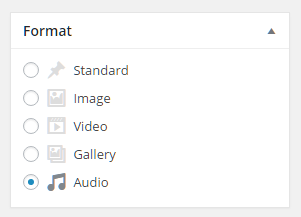
can you please let me know when i’m posting why posting format’s shows only two default & video.
how can i add the post format like below link shows.
https://www.mattcromwell.com/wp-content/uploads/2016/07/PostFormats-Metabox-1.png
currently in my wordpress showing only 2 formats
Standard & video.
how to add the other format as attached
Bogdan B. Hi,
It seems you are not using the div’s provided for using a custom ad. Please use this method of implementation: https://forum.tagdiv.com/using-other-ads-non-adsense-ads/
Thank you!