
- NewspaperUsing Other Ads
- NewspaperSidebar ads
- NewspaperIntroduction to CPT and ACF with Newspaper Theme
- NewspaperHow to edit modules for Flex Block X
- NewspaperHow to use the Posts List shortcode
- NewspaperCreate a frontend submission form
- NewspaperHow to Use the Tabbed Content shortcode
- NewspaperWooCommerce: Happy “Add to Favorites!”
- NewspaperHow to generate Facebook App ID
- NewspaperLink Tracker
- NewspaperFlex Block Settings Guide
- NewspaperGeneral Options that May Interfere with the Newspaper Theme
- NewspaperSocial Icons
- NewspaperPosts Loop Element
- NewspaperSet a Background for Category Page
- NewspaperThe Newspaper Mobile Theme: Introduction
- NewspaperHow to Add a Logo in Newspaper
- NewspapertagDiv Shop
- NewspaperAutoptimize Plugin – install and configuration
- NewspaperHow to Use tagDiv Cloud Library
 crazydiver
 Hello Bogdan,
The ads do not go away when applying the code. Additionally, it adds another ad on the header for all other pages.
Please advise. I think you meant 404.php and not header.php
-
This reply was modified 10 years by
crazydiver.
 Bogdan B.
 Hello,
1) Please try to pt the amazon code inside a post in text mode and see if it gets displayed. We have not tested our ad spots with amazon ads but they should work. If you ads are non adsense we recommend using this method: https://forum.tagdiv.com/using-other-ads-non-adsense-ads/
Test the ads on a wp default theme as well to see if the ads are accepted by wordpress at all.
Alternatively you can use the adrotate plugin to bypass the theme ad system entirely.
2) The first 3 footer templates come with predefined content that cannot be removed, If you want to have your own content in the footer chose an empty footer template and then place widgets in the 3 footer widgets in the wp section: http://screencast.com/t/86e09c10
Thank you!
Bogdan B. Hi,
Unfortunately images are the last to load in every case. This is the way WP works. The mobiule theme loads images faster as it was optimized for improved loading speeds. You cannot load images first. Page speed influences how fast the images load so if you want to get better loading speeds, you will have to use this guide: https://forum.tagdiv.com/how-to-make-the-site-faster/
Please also read this topic to learn about speedbooster’s compatibility: https://forum.tagdiv.com/topic/tinymce-advanced-and-other-various-disabling-speed-boster/
Thank you!
 zunigafelipe
 Hi ssburch,
Now in my site I only have google adsense and another campaign of Nike, but sometimes I use DFP and all work fine, you only have to put a tag in the header and the other tag in the ads section of the thema panel.
Tell me if you need more help.
 MoschatoTavros.gr
 Thanks for your reply.
1. I don’t have a single clue of these things. I’ll try to work it out myself. But it’s weird because when I uploaded the new theme on Saturday (the website is 6 years old and had another theme), I was the first visitor via tablet. How is it possible to be cached and see the mobile theme? Also, as I said before, when I used the Samsung tablet, at first I saw the site fine, the way it was supposed to look. But when I hit the home button via the menu, the mobile theme appeared. So, if it was something about cache, it should display the mobile theme from the start and not after a while, right?
2. I wasn’t very clear about it. I’m aware how to set ads in the predefined spaces, as you’ve done an excellent job to make the interface very easy. I want to display ads after the header, as I point in the following screenshot: http://i.imgur.com/ukhxM2Q.jpg
3. The code works. Thank you!
Bogdan B. Hello,
1) This issue is cache related if the cache settings are not set properly, then the mobile theme can even show up on desktop. We have seen this also in some cases. There are another 2 caches you may have besides the plugin. There is a cdn server if you use it and some hosting providers have cache from the server side that some users are not aware of. Pleas also check these and set them properly and then test the site again.
2) You can use the theme ad spots to do it to soem extent. a header and footer ad will show up on every post/page/category but content ads are handled for posts by the article ads: https://forum.tagdiv.com/article-ads/ and the pagebuilder adbox element on pages. CAtegories do not have content ad possibilities except for sidebar ads.
As a note, you cannot have article ads or content ads of 728 px width because the main content width when using a sidebar is 696 pixels. you can only have 728px ads inside the content if you do not use sidebars.
3)The sibling categories can be removed with css if you use this code in the theme panel->custom css box:
@media(max-width:767px){

.td-category-siblings{

display:none!important;

}}
Thank you!
 Andrei L.
 Hi
The theme have support for banner ads and you can use them in ad-spots as it’s indicated here: https://forum.tagdiv.com/newsmag-using-other-ads/ Here is an example code for a banner ad:
<div class="td-all-devices"><a href="https://www.google.ro/"><img src="http://demo.tagdiv.com/newsmag/wp-content/uploads/2014/08/rec728.jpg"/></a></div>
Hope this helps.
Thanks!
 airplays
Hello,
I need to make ads without AdSense. Only image and link to post or to another webpage as an event for civil
association/charity. Is that possible?
 thaiidol
Hello. I have 2 questions concerning about theme layout.
1. How can I insert more than one Adsense inside the Article Inline part. I’ve noticed that there is one box for article inline, but I want to put more ads inside an article (not head or bottom).
2. In my homepage, when inserting blocks by using Visual Composer, I can only filter those blocks by categories and posts. Is there any chance to filter the blocks by Page?
For example, I have another Page called Travel, and I want to show this Travel Page in the blocks or at least make it appear beautifully in front of my homepage (without messing around with menu bar or footer).
Thanks for your help.
Bogdan B. Hi,
You can use this css:
.td-g-rec-id-content_bottom{

float:left!important;

}
Also if you want to have bigger ads, keep in minf tht the content width is 696 px so if you selected a 700 px so you will have to chsoe another size for your ad in order for it to fill the container: http://screencast.com/t/lGDpPw2IMHtP
Thank you!
Bogdan B. Hi,
1) A module is the base element in our theme. Every block is simply a container of 1 or more modules. In this section of the theme paenl you can see exactly what module is used on what block: http://screencast.com/t/uHbbrmqWCXr
If you want to be more specific about it, you can find out faster by using the browser inspector. For example on a block 1, the small thumbnails: http://screencast.com/t/bkbqegiM2. The small module is a module 6. It’s module 6 you have to edit. The screenshot had module 5 highlighted (my bad) but it is module 6 being edited if you look here: http://screencast.com/t/MWULaIJuoTW. Sorry for the confusion.
2) The black header color shows up when your site gets a bit heavier on the loading speed. Css works in cascades and if you use for example css optomization tools that move the css render block to the footer, then you will be able to see each stept of the css re-write on the first load. The solution for this will be to change the css directly in style.css so there will not be any re-writes done to the file. This is the default css behavior and happens on every theme. An easy way to do it without too much searching is to simply access the page source and copy all of the rendered css directly in style./css at the bottom of the file: http://screencast.com/t/Oym8Cldak (it’s a big list. Copy everything between the ‘style’ tags)
3) The font is not bold in the left big thumb, but rather the font increased. If I increase the font for the small thumbs as well, it will also look bold. You can target them with css like so:
.td_module_6 .entry-title{

font-weight: 600!important;

}
4) Well the widgets are not the same height so you will need a bit of css customization to adjust the different margins to the containers to match the center widget. But adding more content to these sections will cause them to position differently again.
For the current layout you can use this code to make them align :
.widget_display_topics{

    margin-bottom: -22px!important;

}

.widget_display_forums{

margin-bottom: -36px!important;

}
However I cannot guarantee this solution can be a viable one if the content of these widgets changes. All widgets are dynamic so longer titles will make them ‘fall’ below again
5) You can align the instagram text by adding this css code:
@media(max-width: 767px){

.td-footer-instagram-container .td-footer-instagram-title .td-footer-instagram-user-link{

display:initial!important;

}}
6)You can make the search text bigger by using this code:
.td-search-wrap-mob .td-search-input span{

font-size: 30px!important;

}
7) If you want to redirect the login to the bbpress login ,you can use simple 301 redirects and simply redirect the default login to the bbpress forums, but i;m not sure exactly how the login will work then. So maybe you will want a redirect after the login is made. So a user logs in ad is imediatly redirected to the forums maybe, Thait is doen with plugins as our theme dopes not have any such options.
8) That is because there were a few css changes and the code you had in your custom css needed to be more specific. Such things happen afet an update as css gets changed all the time. That is why the custom css code you apply needs to be very specific or some other more specific code we may add in a new update could overwrite it.
9)The big grid can be set as a full box if you remove the 2 pixels margin like so :
@media (max-width: 767px){

.td_block_big_grid_12 .td-big-grid-wrapper .td-big-grid-post:last-child .td-module-thumb {

    margin-left: 0px!important;

}}
10) I’m not sure the code you entered is valid or not, you will have to get a proper ad code from the ad provider and then wrap it into these div elements like this topic suggests: https://forum.tagdiv.com/using-other-ads-non-adsense-ads/
Thank you!
Andrei L. Hi
Theme’s ads system was intent top work with google ad-sense codes or banner ads. We didn’t tested taboola ads with our theme and we can’t provide an accurate answer in this regard. However if the ad appear at least once the theme render its code fine and there shouldn’t be a problem with theme. It may happen that sometimes your ad provider to deliver blank ads to your site or there might be other restrictions. The theme does not control if that ad-code display or not some content, it only render the code and displays its output.
Thanks!
 Sanjin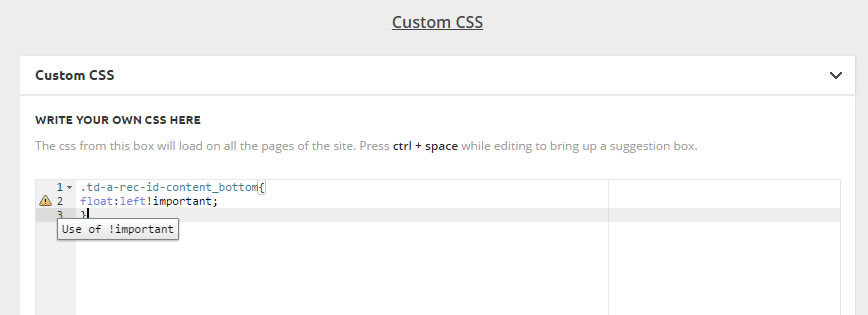
Hello, I think I’ve solved the problem with the number of hits, with ajax option.
However, a problem with the display of ads on the bottom never solved. when I put the code that you sent me has no effect on my ad, what wrong, look at the picture.
Another question: Does advertising module can display two ads, or limited to only one.
Thanks.
 jorelswe
 See image below. This is a screenshot from the Newsmag Theme Panel.
At Feed Items> it has automatically used wprss_feed_item.
This is something we didn’t add.
I believe this is what causes the feed items to become published.
The RSS aggregator itself doesn’t create the URL:s. This has been tested and verified by using other wordpress themes.
I really need your professional help on this problem.
Your suggested solution doesn’t solve our problem, because it is just a bad work-around the real problem. We do need to use the RSS aggregator plugin, and we don’t want the URL:S auto published.

-
This reply was modified 10 years by
jorelswe.
Bogdan B. Hi,
Please read this guide: https://forum.tagdiv.com/the-mobile-theme/ You can customize the mobile ads, the mobile header and footer sections from the mobile settings of the theme panel. You cannot change the header and footer as the mobile theme uses only one header and one footer style. There are no other styles to chose from at the moment
For your third request please provide more details so i can understand better how to help.
Thank you!
 drastic
 I check those links and read that changes will be lost if the theme is updated. So this is only a temporary fix.
On the next update, can you consider putting in an optional title above Adsense? This will help us remain in compliance.
It just has to be a tiny text saying one of their preferred statements such as “advertisement” or “sponsored links”.
I’ve already received a warning from them, so want to make sure there’s a permanent fix.
I’m sure there’s others who might need this too.
Thanks.
Bogdan B. Hi,
The post views are affected by cache so if you use a caching plugin, you need to activate this option: https://forum.tagdiv.com/ajax-view-count/
As for speedbooster, please follow this topic to learn about speedbooster’s compatibility function:
https://forum.tagdiv.com/topic/tinymce-advanced-and-other-various-disabling-speed-boster/
For the ads, if you use adsense, you can select the ad dimensions from the theme panel here: http://screencast.com/t/JoMHKFv4
If you do not use adsense, you need to use this method of implementation: https://forum.tagdiv.com/using-other-ads-non-adsense-ads/
If you want to align the ad left. you can use this css:
.td-a-rec-id-content_bottom{

float:left!important;

}
I hope this helps.
Thanks.
 mrsky28
Hey TagDiv team,
I’m still kinda bothered that the responsive link ads are not yet working on the latest version of the Newsmag Theme. I hope you could expedite this issue as link ads are (surprisingly) important source of revenue for those with Google Adsense.
Here’s the previous post I’m referring to: https://forum.tagdiv.com/topic/responsive-adsense-link-units/
The solution presented is kinda complicated.
 phoenix86to
Hi!
I have a wordpress blog, self-hosted, on my domain.
First of all i give you some info about the configuration of the website:
Theme: Newspaper
Plugins:
a3 Lazy Load
AdSense In-Post Ads
Akismet
Ban Hammer
Contact Form 7
Cookie Law Info
EWWW Image Optimizer
Instant Articles for WP
Jetpack by WordPress.com
Posts for Page Plugin
Revolution Slider
tagDiv Social Counter
tagDiv Speed Booster
Tapatalk for WordPress
TinyMCE Advanced
WP-Optimize
WPBakery Visual Composer
Yoast SEO
YouTube
I have a real issue with the facebook sharing of my posts. Example:
http://www.alfaromeoblog.it/vendite-alfa-giulia-partenza-urlo/
Facebook developers page states the following:
Inferred Property
The ‘og:image’ property should be explicitly provided, even if a value can be inferred from other tags.
Codice di risposta non corretto
URL returned a bad HTTP response code.
Proprietà necessaria mancante
The ‘og:type’ property is required, but not present.
Inferred Property
The ‘og:url’ property should be explicitly provided, even if a value can be inferred from other tags.
Inferred Property
The ‘og:image’ property should be explicitly provided, even if a value can be inferred from other tags.
Parser Mismatched Metadata
The parser’s result for this metadata did not match the input metadata. Likely, this was caused by the data being ordered in an unexpected way, multiple values being given for a property only expecting a single value, or property values for a given property being mismatched. Here are the input properties that were not seen in the parsed result: ‘og:locale:locale, og:type, og:title, og:site_name, fb:app_id, fb:pages’
But the post has been created just like the next one (http://www.alfaromeoblog.it/bolzano-mano-armata/). As soon as I create a post, i add the main image as per wp settings, but it is skipped. And cannot understand why.
The fact is that, if i scrape again with the sharing debugger tool, it gets corrected.
Any hints?
thank you.
Bogdan B. Hi,
The ads have only been tested with those sizes as they are sizes for adsense. I;m not sure adsense can provide any other sizes. If you use custom ads, then the theme will render the ads as best it can in the given container or display the ads in the size you provide if it;s smaller than the container.
We do not recommend changing those values.
Thank you!
Bogdan B. Hi,
The article top ad and article bottom ad is the same for video or non-video post templates. If your post content is empty they will be one under the other. If you have such posts with no content except for the featured image/video, then we suggest you only use one of these ads, not both.
Thank you!
Andrei L. Hi
Default sizes for all ad-spots can be checked in td_block_ad_box.php file: http://screencast.com/t/fC1wPCLn2b These values can be overwritten from theme panel > ads for each ad-spot: http://screencast.com/t/bwmzmQpZ Note that this values can be changed only for ad-sense ads, other ads won’t be affected by them.
Thanks!
Bogdan B. Hi,
The sidebar ad needs to be implemented with this method: https://forum.tagdiv.com/using-other-ads-non-adsense-ads/
If it;s a custom ad, and you have access to the image itself, you need to edit it in an image editor and decrease it;s size. Alternatively you can use css to scale it if you have the proper skills. Our theme provides ad dimensions but only for adsense.
Thank you!
 Tale
TaleHello,
I have added the adsense codes in the functions.php file of the Newspaper theme along with their shortcodes. They suddenly stopped working for mobiles and work for desktops. In other words, for the mobile theme, the functions.php file is not read.
Any idea how to resolve this?
Thanks
[Example, it just shows this: [myadsensecube] in a mobile, and shows an ad on that place on desktop]
 nexusd
 FWIW
The next time you can use this great script, with it, I have changed not only the url but a different domain to move an entire site to other domain, URL, directory, root directory, etc., and worked flawless, obviously you need to move uploads, themes, plugins, etc. along with it.
You can find the script here:
https://interconnectit.com/products/search-and-replace-for-wordpress-databases/
Hope this helps someone that needs to move, change, modify an existing blog to other domain, URL, or similar.
Good Luck and have a nice one!

