
- NewsmagUsing other ads
- NewspaperUsing Other Ads
- NewsmagSidebar ads
- NewspaperSidebar ads
- NewspaperIntroduction to CPT and ACF with Newspaper Theme
- NewspaperHow to edit modules for Flex Block X
- NewspaperHow to use the Posts List shortcode
- NewspaperCreate a frontend submission form
- NewspaperHow to Use the Tabbed Content shortcode
- NewspaperWooCommerce: Happy “Add to Favorites!”
- NewspaperHow to generate Facebook App ID
- NewspaperLink Tracker
- NewspaperFlex Block Settings Guide
- NewspaperGeneral Options that May Interfere with the Newspaper Theme
- NewspaperSocial Icons
- NewspaperPosts Loop Element
- NewspaperSet a Background for Category Page
- NewspaperThe Newspaper Mobile Theme: Introduction
- NewspaperHow to Add a Logo in Newspaper
- NewspapertagDiv Shop
 cloudmark
 You might need to read this too.
https://forum.tagdiv.com/newsmag-using-other-ads/
 Amari
AmariI have trailers in my website and it seems only adsense ads play in the video pop up. Is that by design or should we be able to use alternatives?
 Titine
 Hi Calin,
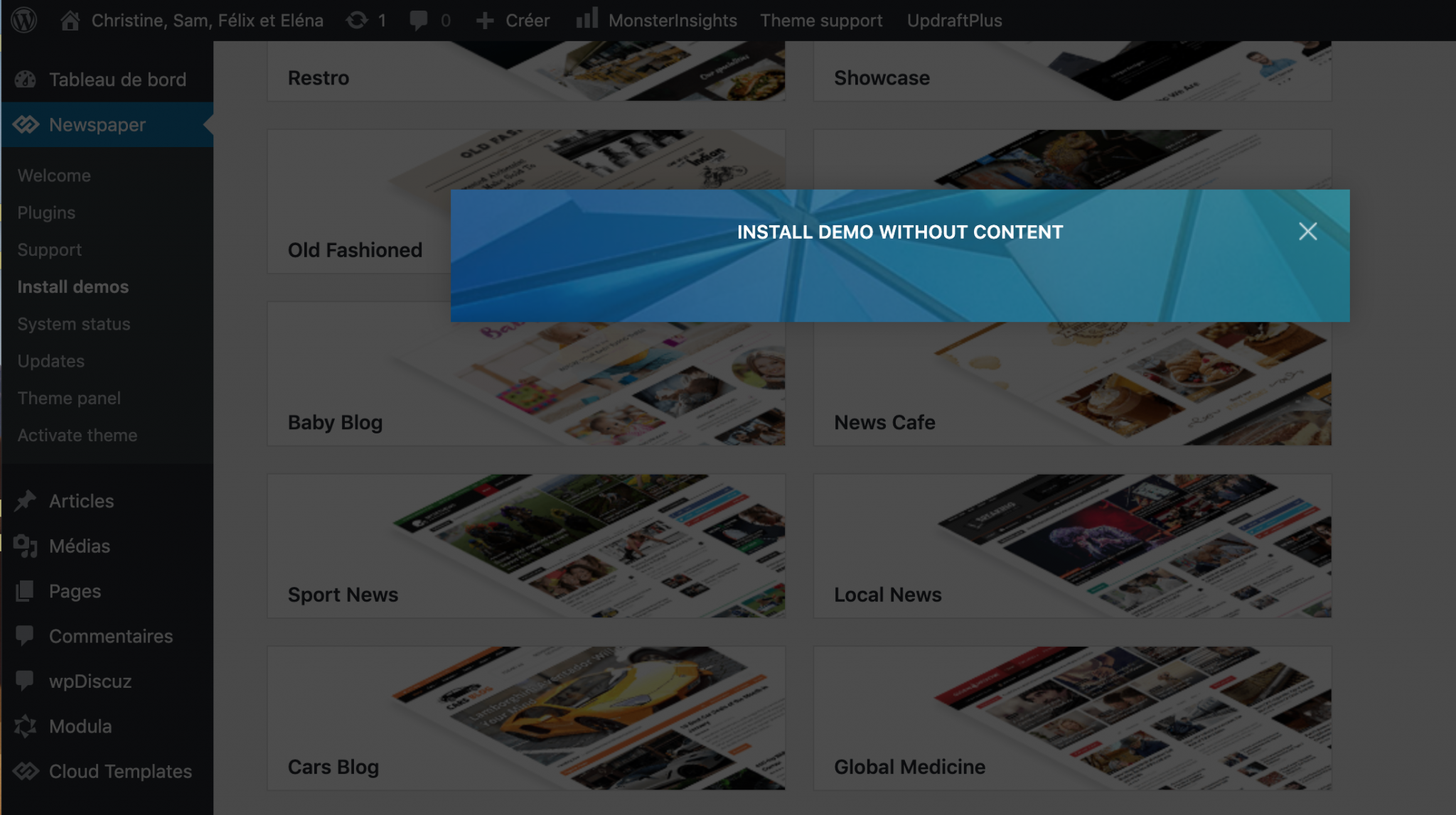
The Newspaper theme is activated, I made sure to use only tagDiv plugins and I tried in other browsers and I am still getting the same issue: I can’t install demos. Can you help me? Please find a screenshot below.
-
This reply was modified 6 years by
Titine.
 hitesh84131
When ever i try to put ads same sec padlock gone and error not secure and if i erase ads then everything fine that happen with amazon affliate link or other ads providers may i knew the reason why is this happen and how can i fix that please
 palani99
 Hi Support Team,
1. I’m using the Mobile Theme plugin. Actually, I already know how to mobile-optimize for the Posts, Pages, etc. But I don’t exactly know how to Turn ON & Turn OFF the Mobile Optimization for the exact CATEGORY PAGE. I can’t find the Mobile Optimization Option in the category Page. SO Please send me the screenshots to Turn ON & OFF for the Category Page only.
2. here I’m requesting – Please suggest to me how can I exactly Add Google Ads before the content exactly on Category Page [ https://prnt.sc/uetenc ] and also how to add Google Ads after the Post on Category Page [ https://prnt.sc/uethfi ]. I’m asking here only on Category Pages, not other pages.
You have already given the shortcode approach methods – I have implemented but it places the ADs only on The TOP Position in category pages. SO pls suggest me how can I add before post and after all posts only on category pages. [ For Your REf:- I already know – to place ADs in Home page – but I don’t know in category pages.] SO pls suggest to me how to do these AD placements in category pages only.PLZ share my screenshots.
Thank You! Please Reply me.
-
This reply was modified 6 years by
palani99.
 Calin
Calin Hi,
In order to fix the problem with the smart list next/prev buttons, please add the code from here https://pastebin.com/LK1PLxQA in wp-content/themes/Newsmag/functions.php at the end of file, like this -> https://i.imgur.com/ZEiPoRF.png after that clear all cache and the smart list pagination will work.
As for google ads, please provide me a link to some posts/pages where the advertisements are not displaying.
1. So if I understand correctly, you’ll like to set some ads in category page, unfortunately using Newsmag this you have the option to set the ads only in sidebar another solution is to use a custom code
<?php echo do_shortcode ('[td_block_ad_box spot_id="custom_ad_1"]'); ?> this code need to be set in the category template you are using -> wp-content/plugins/td-composer/legacy/Newsmag/includes/category_templates -> https://i.imgur.com/kFtngPp.png -> https://i.imgur.com/3dz5lUl.png -> https://i.imgur.com/whNMnge.png -> https://i.imgur.com/i7nUZnY.png
2. Usually like in this case -> https://prnt.sc/uebpfs there should be no problems with the ads policy, but in case that you thing that this will affect your ads, the only thing that you can do is to disable the “More Article Box” from theme panel -> https://i.imgur.com/DVHRLwf.png
Also there is no option to can display ads inside the “More Article Box”, sorry, this can be done only with custom work.
Hope that above suggestions will help you!
Thank you!
 feppa20
 Dear Staff!
Simon C. directed me here.
We have also an extrem cpu usage problem.
Previusly:
“Dear Tagdiv Staff!
We have a huge problem what must to solve please.
We have a news paper theme and it’s reached the maximum limit of server processor.
The entry process number reach the 2000 and more … this is an extremly number and the server has crashed many many times.
We switch off all plugins except Tagdiv composer and other Tagdiv plugins, but the processor usage don’t fall.
After we turn off the theme and change it to another, than the resource usage going down. The first time when we detect this problem the lastest newspaper update. Before, we haven’t got any big problem, but yet, it is horrible and haven’t any idea about the solution. There is the latest wordpress info:
### wp-core ###
version: 5.5.1
site_language: hu_HU
user_language: hu_HU
timezone: Europe/Budapest
permalink: /%year%/%monthnum%/%day%/%postname%/
https_status: true
multisite: false
user_registration: 0
blog_public: 1
default_comment_status: open
environment_type: production
user_count: 20
dotorg_communication: true
### wp-paths-sizes ###
wordpress_path: /home/muixhord/public_html
wordpress_size: loading…
uploads_path: /home/muixhord/public_html/wp-content/uploads
uploads_size: loading…
themes_path: /home/muixhord/public_html/wp-content/themes
themes_size: loading…
plugins_path: /home/muixhord/public_html/wp-content/plugins
plugins_size: loading…
database_size: loading…
total_size: loading…
### wp-dropins (1) ###
advanced-cache.php: true
### wp-active-theme ###
name: Newspaper (Newspaper)
version: 10.3.6.1
author: tagDiv
author_website: http://themeforest.net/user/tagDiv/portfolio
parent_theme: none
theme_features: core-block-patterns, post-formats, post-thumbnails, automatic-feed-links, html5, woocommerce, bbpress, align-wide, align-full, editor-font-sizes, editor-style, menus, widgets
theme_path: /home/muixhord/public_html/wp-content/themes/Newspaper
auto_update: Kikapcsolva
### wp-themes-inactive (1) ###
Twenty Twenty: version: 1.5, author: WordPress Magyarország Közösség,Auto-updates disabled
### wp-plugins-active (19) ###
a3 Lazy Load: version: 2.4.1, author: a3rev Software, Auto-updates disabled
Advanced Gutenberg: version: 2.4.5, author: Advanced Gutenberg, Auto-updates disabled
Async JavaScript: version: 2.20.03.01, author: Frank Goossens (futtta), Auto-updates disabled
Code Snippets: version: 2.14.0, author: Code Snippets Pro, Auto-updates disabled
Contact Form 7: version: 5.2.2, author: Takayuki Miyoshi, Auto-updates disabled
Disable Comments: version: 1.11.0, author: WPDeveloper, Auto-updates disabled
Insert Headers and Footers: version: 1.4.6, author: WPBeginner, Auto-updates disabled
LoginPress – Customizing the WordPress Login: version: 1.4.6, author: WPBrigade, Auto-updates disabled
Smash Balloon Instagram Feed: version: 2.4.6, author: Smash Balloon, Auto-updates disabled
Smush: version: 3.6.3, author: WPMU DEV, Auto-updates disabled
tagDiv Cloud Library: version: 1.5 | built on 10.08.2020 14:58, author: tagDiv, Auto-updates disabled
tagDiv Composer: version: 2.6 | built on 10.08.2020 14:58, author: tagDiv, Auto-updates disabled
tagDiv Social Counter: version: 4.7 | built on 10.08.2020 14:58, author: tagDiv, Auto-updates disabled
tagDiv Standard Pack: version: 1.0 BETA | built on 10.08.2020 14:58, author: tagDiv, Auto-updates disabled
W3 Total Cache: version: 0.14.4, author: BoldGrid, Auto-updates disabled
Webcraftic Hide login page: version: 1.1.1, author: Webcraftic <wordpress.webraftic@gmail.com>, Auto-updates disabled
WP-Optimize – Clean, Compress, Cache: version: 3.1.2, author: David Anderson, Ruhani Rabin, Team Updraft, Auto-updates disabled
WP User Avatar: version: 2.2.7, author: ProfilePress, Auto-updates disabled
Yoast SEO: version: 14.9, author: Team Yoast, Auto-updates disabled
### wp-plugins-inactive (2) ###
Classic Editor: version: 1.6, author: WordPress Contributors, Auto-updates disabled
Health Check & Troubleshooting: version: 1.4.5, author: The WordPress.org community, Auto-updates disabled
### wp-media ###
image_editor: WP_Image_Editor_Imagick
imagick_module_version: 1802
imagemagick_version: ImageMagick 7.0.10-10 Q16 x86_64 2020-07-09 https://imagemagick.org
file_uploads: File uploads is turned off
post_max_size: 8M
upload_max_filesize: 2M
max_effective_size: 2 MB
max_file_uploads: 20
imagick_limits:
imagick::RESOURCETYPE_AREA: 125 GB
imagick::RESOURCETYPE_DISK: 9.2233720368548E+18
imagick::RESOURCETYPE_FILE: 12288
imagick::RESOURCETYPE_MAP: 125 GB
imagick::RESOURCETYPE_MEMORY: 63 GB
imagick::RESOURCETYPE_THREAD: 1
gd_version: 2.2.5
ghostscript_version: 9.25
### wp-server ###
server_architecture: Linux 3.10.0-962.3.2.lve1.5.36.el7.x86_64 x86_64
httpd_software: Apache
php_version: 7.4.9 64bit
php_sapi: cgi-fcgi
max_input_variables: 1000
time_limit: 10
memory_limit: 512M
max_input_time: -1
upload_max_filesize: 2M
php_post_max_size: 8M
curl_version: 7.62.0 OpenSSL/1.0.2k
suhosin: false
imagick_availability: true
pretty_permalinks: true
htaccess_extra_rules: true
### wp-database ###
extension: mysqli
server_version: 10.2.33-MariaDB-log-cll-lve
client_version: mysqlnd 7.4.9
### wp-constants ###
WP_HOME: undefined
WP_SITEURL: undefined
WP_CONTENT_DIR: /home/muixhord/public_html/wp-content
WP_PLUGIN_DIR: /home/muixhord/public_html/wp-content/plugins
WP_MAX_MEMORY_LIMIT: 512M
WP_DEBUG: false
WP_DEBUG_DISPLAY: true
WP_DEBUG_LOG: false
SCRIPT_DEBUG: false
WP_CACHE: true
CONCATENATE_SCRIPTS: undefined
COMPRESS_SCRIPTS: undefined
COMPRESS_CSS: undefined
WP_LOCAL_DEV: undefined
DB_CHARSET: utf8
DB_COLLATE: undefined
### wp-filesystem ###
wordpress: writable
wp-content: writable
uploads: writable
plugins: writable
themes: writable
So we tried many many solution, but it didn’t works. Last we made a new wordpress and reinstall the theme and the TD components, than the cpu usage also going up extremly, becuse there isn’t any visitor, post, picture, pagination in this site.
many thanks for your help!
 turma99
 Hi, Simion! These are Adsense auto ads and it only happens on AMP.
It’s a strange behavior. As I mentioned, it happens only in the most recent posts, right after their publication, and it lasts for a couple of hours.
Here’s another screenshot: https://drive.google.com/file/d/1bJ4n8MqilsXD-8aQdV77mKnDX4tD98TH/view?usp=sharing
Since we’re in different time zones and it takes some time for you to reply, I think it’s gonna be hard for you to observe this behavior. But I can give you admin credentials and you can simulate a publication an see it for yourself.
Thanks!
 Simion C.
 Hi,
Instead of disabling them, you could simply not use them in those pages. The page can be designed how you want it, top to bottom, header to footer, so simply do not use any ads in it.
If you want specific posts to not display ads, these can also be designed header to footer.
You can use cloud templates https://cloud.tagdiv.com/#/load/All for the header, footer, and posts. So for example create/import a cloud header and footer template, and set them for the page https://prnt.sc/ue8sxg
For posts, create/import a cloud post template, use the same header and footer templates in it, and set that for the posts you want.
So you can have header, footer, post etc templates in which you set ads, and ones in which you do not.
If you do not want to use cloud templates, maybe there are other ways of excluding the ads from specific pages and posts, but not by theme settings. Ads entered in the theme panel will always be loaded where they are supposed to load.
Thank you!
 shubhamritam
Hi guys,
I want to disable ads on specific post or page, but not though google adsense exclusion option; i want to disable ads directly though wordpress backend. Please guide me…
There is this option in other themes like Bimber. I really love newspaper theme if there is no such option please add this feature in this.
There is a plugin advance ads to insert ads on website but i’m using theme inbuilt feature so i can’t use that also i don’t want to use extra plugin…
 fonetechcz
We added Adsense ads to our site fonetech.cz and have interesting situation. Ads are working flawlesly on homepage, showing Header, Sidebar and Footer Ad. But as soon as I go to articles, they start showing randomly. One article has all adds correctly in place, others show empty spaces with Advertisement tag. We use page style from Cloud style “Single Post Template – Default PRO” with Auto Loading ON.
Example of post with ads
https://www.fonetech.cz/microsoft-predstavil-levny-xbox-series-s-unikly-ceny/
And one with blank spaces
https://www.fonetech.cz/nordic-telecom-predstavil-podzimni-nabidku-novi-zakaznici-prvni-pulrok-vyrazne-usetri/
Any ideas whats wrong? Could it be that Adsense is slowly indexing website and ads are only on indexed pages? Seems to me, that new posts show Ads, older doesnt…
feppa20Dear Tagdiv Staff!
We have a huge problem what must to solve please.
We have a news paper theme and it’s reached the maximum limit of server processor.
The entry process number reach the 2000 and more … this is an extremly number and the server has crashed many many times.
We switch off all plugins except Tagdiv composer and other Tagdiv plugins, but the processor usage don’t fall.
After we turn off the theme and change it to another the resource usage going down. The first time when we detect this problem the lastest newspaper update. Before, we haven’t got any big problem, but yet, it is horrible and haven’t any idea about the solution. There is the latest wordpress info:
### wp-core ###
version: 5.5.1
site_language: hu_HU
user_language: hu_HU
timezone: Europe/Budapest
permalink: /%year%/%monthnum%/%day%/%postname%/
https_status: true
multisite: false
user_registration: 0
blog_public: 1
default_comment_status: open
environment_type: production
user_count: 20
dotorg_communication: true
### wp-paths-sizes ###
wordpress_path: /home/muixhord/public_html
wordpress_size: loading…
uploads_path: /home/muixhord/public_html/wp-content/uploads
uploads_size: loading…
themes_path: /home/muixhord/public_html/wp-content/themes
themes_size: loading…
plugins_path: /home/muixhord/public_html/wp-content/plugins
plugins_size: loading…
database_size: loading…
total_size: loading…
### wp-dropins (1) ###
advanced-cache.php: true
### wp-active-theme ###
name: Newspaper (Newspaper)
version: 10.3.6.1
author: tagDiv
author_website: http://themeforest.net/user/tagDiv/portfolio
parent_theme: none
theme_features: core-block-patterns, post-formats, post-thumbnails, automatic-feed-links, html5, woocommerce, bbpress, align-wide, align-full, editor-font-sizes, editor-style, menus, widgets
theme_path: /home/muixhord/public_html/wp-content/themes/Newspaper
auto_update: Kikapcsolva
### wp-themes-inactive (1) ###
Twenty Twenty: version: 1.5, author: WordPress Magyarország Közösség,Auto-updates disabled
### wp-plugins-active (19) ###
a3 Lazy Load: version: 2.4.1, author: a3rev Software, Auto-updates disabled
Advanced Gutenberg: version: 2.4.5, author: Advanced Gutenberg, Auto-updates disabled
Async JavaScript: version: 2.20.03.01, author: Frank Goossens (futtta), Auto-updates disabled
Code Snippets: version: 2.14.0, author: Code Snippets Pro, Auto-updates disabled
Contact Form 7: version: 5.2.2, author: Takayuki Miyoshi, Auto-updates disabled
Disable Comments: version: 1.11.0, author: WPDeveloper, Auto-updates disabled
Insert Headers and Footers: version: 1.4.6, author: WPBeginner, Auto-updates disabled
LoginPress – Customizing the WordPress Login: version: 1.4.6, author: WPBrigade, Auto-updates disabled
Smash Balloon Instagram Feed: version: 2.4.6, author: Smash Balloon, Auto-updates disabled
Smush: version: 3.6.3, author: WPMU DEV, Auto-updates disabled
tagDiv Cloud Library: version: 1.5 | built on 10.08.2020 14:58, author: tagDiv, Auto-updates disabled
tagDiv Composer: version: 2.6 | built on 10.08.2020 14:58, author: tagDiv, Auto-updates disabled
tagDiv Social Counter: version: 4.7 | built on 10.08.2020 14:58, author: tagDiv, Auto-updates disabled
tagDiv Standard Pack: version: 1.0 BETA | built on 10.08.2020 14:58, author: tagDiv, Auto-updates disabled
W3 Total Cache: version: 0.14.4, author: BoldGrid, Auto-updates disabled
Webcraftic Hide login page: version: 1.1.1, author: Webcraftic <wordpress.webraftic@gmail.com>, Auto-updates disabled
WP-Optimize – Clean, Compress, Cache: version: 3.1.2, author: David Anderson, Ruhani Rabin, Team Updraft, Auto-updates disabled
WP User Avatar: version: 2.2.7, author: ProfilePress, Auto-updates disabled
Yoast SEO: version: 14.9, author: Team Yoast, Auto-updates disabled
### wp-plugins-inactive (2) ###
Classic Editor: version: 1.6, author: WordPress Contributors, Auto-updates disabled
Health Check & Troubleshooting: version: 1.4.5, author: The WordPress.org community, Auto-updates disabled
### wp-media ###
image_editor: WP_Image_Editor_Imagick
imagick_module_version: 1802
imagemagick_version: ImageMagick 7.0.10-10 Q16 x86_64 2020-07-09 https://imagemagick.org
file_uploads: File uploads is turned off
post_max_size: 8M
upload_max_filesize: 2M
max_effective_size: 2 MB
max_file_uploads: 20
imagick_limits:
imagick::RESOURCETYPE_AREA: 125 GB
imagick::RESOURCETYPE_DISK: 9.2233720368548E+18
imagick::RESOURCETYPE_FILE: 12288
imagick::RESOURCETYPE_MAP: 125 GB
imagick::RESOURCETYPE_MEMORY: 63 GB
imagick::RESOURCETYPE_THREAD: 1
gd_version: 2.2.5
ghostscript_version: 9.25
### wp-server ###
server_architecture: Linux 3.10.0-962.3.2.lve1.5.36.el7.x86_64 x86_64
httpd_software: Apache
php_version: 7.4.9 64bit
php_sapi: cgi-fcgi
max_input_variables: 1000
time_limit: 10
memory_limit: 512M
max_input_time: -1
upload_max_filesize: 2M
php_post_max_size: 8M
curl_version: 7.62.0 OpenSSL/1.0.2k
suhosin: false
imagick_availability: true
pretty_permalinks: true
htaccess_extra_rules: true
### wp-database ###
extension: mysqli
server_version: 10.2.33-MariaDB-log-cll-lve
client_version: mysqlnd 7.4.9
### wp-constants ###
WP_HOME: undefined
WP_SITEURL: undefined
WP_CONTENT_DIR: /home/muixhord/public_html/wp-content
WP_PLUGIN_DIR: /home/muixhord/public_html/wp-content/plugins
WP_MAX_MEMORY_LIMIT: 512M
WP_DEBUG: false
WP_DEBUG_DISPLAY: true
WP_DEBUG_LOG: false
SCRIPT_DEBUG: false
WP_CACHE: true
CONCATENATE_SCRIPTS: undefined
COMPRESS_SCRIPTS: undefined
COMPRESS_CSS: undefined
WP_LOCAL_DEV: undefined
DB_CHARSET: utf8
DB_COLLATE: undefined
### wp-filesystem ###
wordpress: writable
wp-content: writable
uploads: writable
plugins: writable
themes: writable
palani99 Hi sir,
1. I have seen on other websites [ using Newsmag theme ] that – he added Google Adsense Ads on the category page also. I have attached a screenshot – [ 1. https://prnt.sc/udot7f ] [ 2. https://prnt.sc/udowp5 ] so please check and suggest me the steps to add Ads on the category page and please share your screenshot also.
2. Also, suggest to me How can I add Google Ads like this same format – when I scroll at the end I like to display and have this same type of Google Ads in the footer section also on my website. For Your Ref – [ https://prnt.sc/udp1ue ]
3. Please suggest to me based on your experience – whether the ads which are display on the footer [ https://prnt.sc/udp1ue ] is either comes under Pop up Ads or the Pop-Under ADs category. I don’t know about it, so please suggest me.
Thank You sir! I need your SUpport – Please Reply to me.
 Vlad S
 Hello !
You can create a post template from the cloud library and use the Adbox element on the template. There you can insert your adsense code. If you already have a template like this, simply duplicate it and remove the ads code. One template you will be using for the good posts with ads and one for the others who can’t run ads: https://forum.tagdiv.com/design-post-pages-using-cloud-library-templates/
Thank you !
Simion C. Hi,
For a cloud post template the ad code must be entered in the template itself, in the single post content element https://prnt.sc/ucu56v
If that is what you did and it is not displayed, I could take a look.
At the moment from what I can see by checking a post from your website, there is no ad entered in the post content https://prnt.sc/ucu5zv
If you are using other cloud pot templates and entered the ads in them, please provide a link to a post that uses those post templates.
Thank you!
Simion C. Hi,
1. The smart list seems to work fine, it worked when I was creating that code as well, also I see these ads in the content https://prnt.sc/ucs5zx
2. The font settings for the post content are in the theme panel https://prnt.sc/ucs6rt
In case there is no setting for what you would like to change, let me know what that is exactly.
1. All the theme modules can display the category tag. Please check in the theme panel and enable them https://prnt.sc/ucs7zk
2. Bring it where exactly? That is the block pagination, each block can display a few pagination styles https://prnt.sc/ucs8s4 The pagination is available for block widgets in sidebars as well https://prnt.sc/ucs9my -> https://prnt.sc/ucs9jm
3. That is not possible unfortunately. The theme doesn’t have an ad spot for the post loop that is displayed in the category page. Besides the header/footer/sidebar ads there would be no other ad spot created specially for the category pages.
4. The email address in the footer https://prnt.sc/ucsbjt will use the theme accent color set in the theme panel https://prnt.sc/ucsbtp -> https://prnt.sc/ucsbzh
I see that is not happening in your case. Note that this other setting will override the accent color https://prnt.sc/ucsd1f Set it to default of you want the theme accent color to be used.
5. You could try this plugin for example https://wordpress.org/plugins/ewww-image-optimizer/ There are many others as well.
6. What warnings have you received exactly? From what I know the super cache should work fine with the theme, it is the plugin we recommend. You could however use other caching plugins, make tests with them.
7. The theme has the more articles box https://forum.tagdiv.com/newsmag-more-articles-box/ There are a few settings for it in the theme panel.
The more articles box does not slide posts, and does not have a read more button. There is a choice of modules but that functionality is not available.
I can’t say from the screenshot if that is indeed the more articles box, with modifications made to it, or a section implemented through a plugin.
Thank you!
 msmacofmass
Hi. My post I created is automatically loading unrelated post at the bottom of the new Post. Doesn’t matter if I choose the correct category or not, and it doesn’t matter what element I use. I tried different elements and different templates.
In the TD Composer it doesn’t load all posts just shows the one that I’m working on. But when you go out on the internet to view the changes It’s loading other unrelated post made at a different time and date.
How can this feature be shut off so only that one article a viewer is interested in reading is visible.
Thank you
palani99 I’m Requesting Please suggest me the solution for this New Queries also:-
Hi Support Team,
1. How can I display the category name [For Ex:- Health] in the Post images which is present in the Home page and also in Category pages. [ http://prnt.sc/ubdrz6 ]
2. How can I bring this left Arrow and Right Arrow buttons on the editor picks section in the sidebar to navigate all the posts? [ http://prnt.sc/ubdspn ]
3. How can I insert the Google Ads in between the two posts which is present on the category pages? I have a code but don’t know how to insert it on the category page between posts. So pls suggest me [ http://prnt.sc/ub2i71 ]
4. On the Footer section, how can I highlight my email address with a different color? I have selected different colors on the footer in the theme panel but it is not shown in the footer of my website. [ https://prnt.sc/ubdyhz ]
5. Based on your experience please tell me the best image optimization plugins. Please suggest me the best free plugins it will be more helpful for me.
6. I have tried your recommended plugin namely wp super cache for the speed optimization but I have received the PHP warning messages. So I just stopped activating that plugin. So please suggest me how can I optimize my website to load faster. Please suggest me the best one for optimization.
7. For pop up stories – actually on my website only one story is popup right side below when I scroll, but I found on some other website the random posts displaying along with the read next story button is displayed and changed for each and every 5 seconds. How can I do like that
For your reference:- I have attached a screenshot[https://prnt.sc/ube3l5]. SO please suggest the steps how can I Implement as same like this on my website. I like to have read the next story and also to change these posts for every 5 sec or 10 sec. pls, share with me screenshots to follow the steps.
I need your support – so pls suggest me a solution. It’s my Request
Thank you so much! Please reply to me.
 inyour4head
 All system requirements have been met, and I have tried the methods above to no avail. The problem is when I go to activate the plugin(s) the site crashes. It happens every single time and I can’t keep messing with it because the only fix is to uninstall/reinstall WordPress only to crash it again and again. Every other theme I have purchased from themeforest uploads/activates just fine so its something with this one. Running it without the plugins in not an option so can you just point me in the right direction to get a full refund? This is ridiculous!
 goudafm
Hi Guys, bougth another licence code and i wanted to start again. I wanted to import a theme trough Pre-designed Templates – tagDiv Cloud Library and everything works except when i try to IMPORT it. Because it stays at the normal screen. Behind i can see that they ask ‘do you want to import’ and i want to press Yes/Oke but i can not go to that element.
You guys have the same problem?

 kadams1970
Hi there,
Just purchased newspaper theme as I have done with other WP themes, but it won’t even display. Instead, it just crashes out. This is what it looks like – have I done something wrong?

The website is http://www.aronline.co.uk
Regards
 James David
I followed your API page at /youtube-api-key/ and you cover all the things except one that is somewhat important.. I think?
After Step 9 when you click “What credentials do I need?” button to retrieve your API key, the API key comes up but so does a warning. You can see it in your screen shot as well.
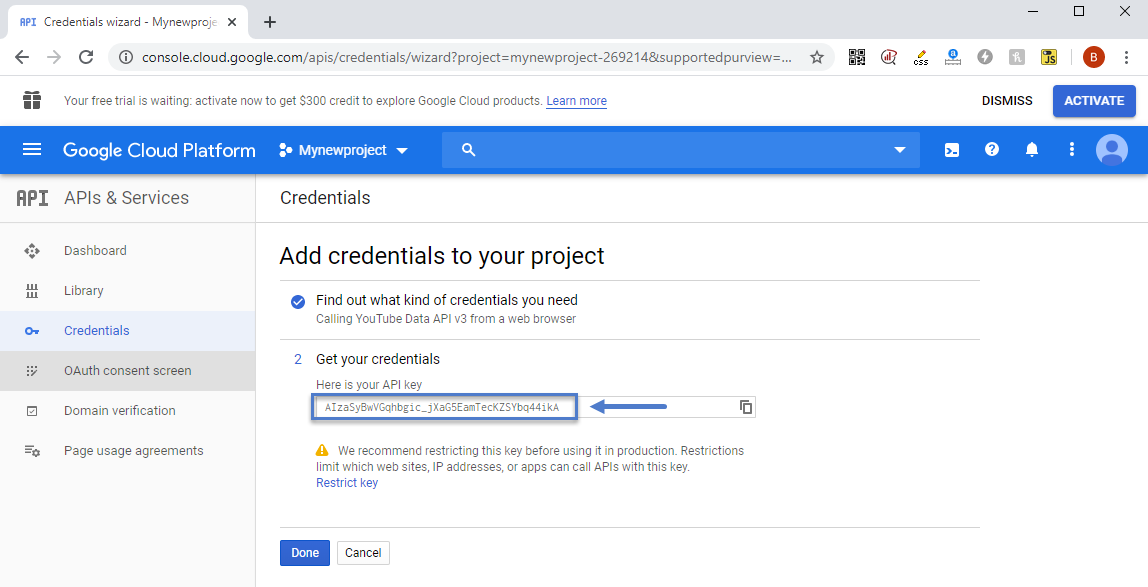
“We recommend restricting this key before using it in production. Restrictions limit which websites, IP addresses, or apps can call APIs with this key.”
In the past I did not restrict a key on previois APIs assuming my sites is small, it’d be fine, I was wrong. I was using the API in a simple YT plugin called Yottie and my site, with little to no traffic somehow had YT emailing me, suspending the API. They wanted me to resubmit an application and detail how/where it’s being used etc. Jump through hoops basically. I’m happy to copy/paste those emails if curious. I assumed it was the plugin, so I tried other plugins, and again.. same thing, too many calls, all over Quota.
I removed all YT API’s and plugins and was going to just copy/paste the URL for each video into a post as needed, knowing WordPress would embed it properly, it’d work, all would be fine.
I tried this, it worked fine, but.. the social counter I think needs the API doesn’t it? Can it work just with a channel name?
If I enter channel/yt-channel-code-here, will that work or do I absolutely need an API key?
So with those answers, I’ll know if I need the key for the counter.
Also – If I add the key in the theme panel under networks, when a video is loaded on a post I make, is that referencing my API key so YT is adding that page load against my quota?
That seems odd given I can just copy/paste the url in and it works so no api is needed etc.. am I missing something?
If I need the key, and I chose to restrict as Google suggests, any suggestions on how to restrict? As in, will this work against the theme at all? Easy to restrict using http/https as noted on their page https://cloud.google.com/docs/authentication/api-keys so that would be it.. right?
Thanks in advance
 Sommer
I have an issue when viewing my site on mobile.
I have uploaded a header background image to use in header. My issue is that before this image loads, header is showing a black background color. First when site is fully loaded, then my uploaded image is showing.
Not sure if this is because of lazy load?
I think i could fix this by making the black background color transparent og change to another color, but i have looked everywhere and can´t find out where it is comming from. Could you please tell med where to find it.
Calin Hi,
1. You can remove these element using tagDiv Composer -> https://i.imgur.com/PO3m4lJ.png click on the menu and change it -> https://i.imgur.com/cs9sVrX.png or use the right click to remove it -> https://tagdiv.com/right-click-menu-tagdiv-composer/
2. Please do not use WPBakery with tagDiv Cloud Library, this will not work correctly. please disable the WPBakery plugin and the layout will be display correctly.
3. To remove the author you need to edit the single post template with tagDiv Composer and use the right click on author to remove it.
4. You can remove the comment count from the blocks using this option from theme panel -> https://i.imgur.com/F5Q1tDg.png also in order to remove it from posts you can use these settings for standard templates -> https://i.imgur.com/iRudzRZ.png if you are using a PRO Demo or just a single post template from tagDiv Cloud Library for posts, then you need to edit it with tagDiv Composer and use the right click on the elements you want to remove. -> https://i.imgur.com/tEctz6F.png -> https://i.imgur.com/eZNPb6Q.png using other ads.
Thank you!
Calin Hi deuja14, this is strange, I tested with Opera, Firefox and there are no 451 errors, but when I try with chrome appears these errors, what I can suggest is to try to see if these errors are affecting your website or not.
Also is look that on Firefox that ads are appearing all the time, the problem appear some times but on other browses.
Thank you!



