
- NewspaperUser review system
- NewsmagReviews
- NewspaperReviews
- NewspaperCredit System
- NewspaperModules Builder in Newspaper Theme
- NewspaperHow to use the Posts List shortcode
- NewspaperModal Popup
- NewspaperLockers
- NewspaperLeads
- NewspaperFlex Block Settings Guide
- NewspaperSingle Post Shortcodes
- NewspaperDefault Category Settings
- NewspaperCloud Library – Category Templates
- NewspaperBig Grid Flex Settings
- NewspaperMeta Info on Modules and Blocks
- NewspapertagDiv Cloud Library Plugin
- NewspapertagDiv AMP Plugin Tutorial
- NewsmagtagDiv Composer Tutorial
- NewspapertagDiv Composer Tutorial
- TutorialsDefault Block Settings Guide
 WSSC_info
We are currently using the “static front page” setting with our Front Page set to display our latest posts
the problem is that the size of the post consumes the entire home page – meaning that one post takes up the entire home page
We need to make it so that posts only take up a small portion of the home page, and we can have multiple post previews in a small amount of space, rather than one entire post
Can you please advise how we would make this change?
 bfrye26
 Hello,
Thanks for the fast reply. The filter in the category section of the newspaper theme. It has “Latest, featured posts, Most Popular, etc etc” it also has by Review Score. What we are looking to do is change this to use our score attribute since we don’t use the built in review system. The issue is we can not locate where this is called in the files.
Any help would be amazing!
 smrtr
smrtri’m new to WordPress! i bought this theme but having difficulties customizing menus! Especially drop down category menus with post previews! Please someone help me!
 Maui No Ka Oi Magazine
Featured Images showing small / wrong size – after latest update.
I did some research and tried running the thumbnail resizer and tested my content halfway through to see its results and realized it was creating MORE of the problem instead of fixing the problem that just started (after latest theme update). So I stopped resizer but now many of my featured images are showing as smaller/incorrect size.
I turned off all plugins, went to newspaper base theme (not child) and confirmed that the preview images do not show at full size, they are all smaller and don’t look as good now.
Can you help please? This makes the whole site look bad, it’s heavy content for a magazine publisher with many articles. Example page where most images are now small – publisher’s note still showing correct width: http://mauimagazine.net/read/
Thank you for your help.
 mayaguez
 Thanks Simion!
Questions:
1. I read in the Block Setting’s Filter that it is recommended to select/set The Sort Order for “Most Popular” to the jetpack (24-48hrs) method, however I do not see this selection in the dropdown. The only selection with the wording of “jetpack” is Popular but says “Jetpack+stat module required”, “does not work with other settings/pagination”. Do not understand what this means!
Question: Is it ok to select this Sort Order? Which one would you recommend?
2. Regarding the Sort Order for Must Read which one would u recommend since my site (for now) does not provide for Reviews nor Comments?
3. I would like to exclude certain Post categories from Latest Articles/Post. I read the instruction and did what I believed was to be done, that is I entered the “posts ID’s” that I wanted to exclude with a minus (-) sign (To exclude categories from this block add them with ‘-‘ (ex: -9, -10) in the Multiple Category Filter Box but in doing my Latest Articles/Post displayed NO POSTs, so I guess what I did was wrong.
Please explain how to exclude Categories?
Thanks!
 AndroidKosmos
Hey,
since i have update to 7.6.1 the search preview is gone. How could i get it back?
AndroidKosmos
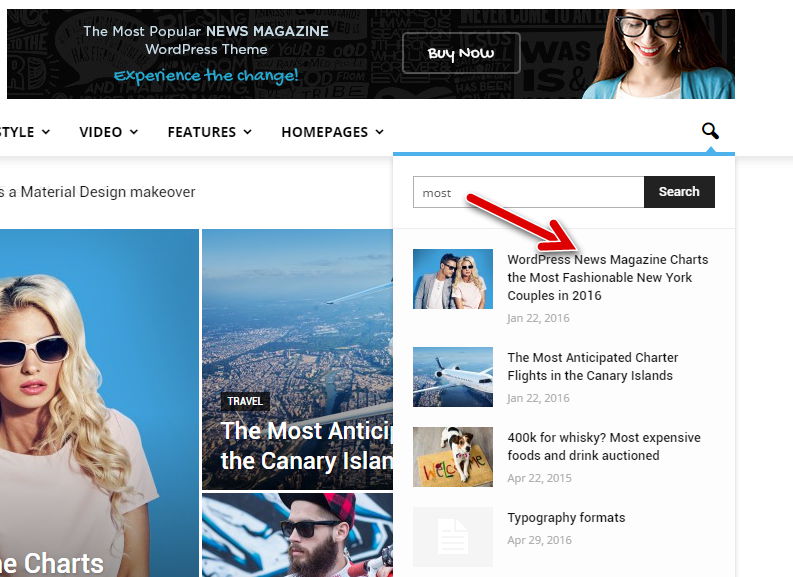
 Juanjo-LAVOZ
 Hello Catalin
We`re going to review the pluggins.
Thanks!!!
 Bogdan B.
 Hello,
Up only delays your answer as we answer from oldest to newest. When you post another reply, your post gets fresher and the answer is delayed. SO it has the opposite effect. It’s in fact ‘down’ 🙂
As for the reviews, our theme review system was built for posts only. It is not present on pages because the review system was not built with pages in mind. sorry. You will have to search for a plugin that can provide such options.
Thank you!
 ChRoM
ChRoM Hey Catalin,
thanks for the quick reply. As for plugins: I’m only using WP User Avatar, Limit Login Attempts and Cookie Law Info. Deactivating those didn’t change anything. If you want to look at the site: http://www.godoculus.at Site hasn’t launched yet so it’s pw protected. Login godoculuspreview PW 321launch. Many thanks in advance!
 gcamara
We purchased this theme after playing few hours with IonMag.
It has more choices than IonMag however I feel IonMag (free) provided some blocks or visuals which are not present in Newspaper.
What’s provide IonMag premium theme?
Is there any chance to get post title and excerpt under pictures with one picture blocks/grids? Blocks 22 and 23 I meant. This is a minor but important choice.
Many visuals representations on tagdiv composer are different in the live preview. Starting with block 1, 2, 3, 4, 5 (three columns instead two)
Visual composer and tagdiv composer feel redundant to me, but maybe I’m missing something with visual composer.
Is it posible to import those blocks from ionmag source code? Two columns blocks which are perfectly fitting a 2/3 scheme
Impressive work anyway guys.
Best regards
 morty
mortyI want my reviews to be pages rather than post, would it be possible? When I write a new page I do not see the review option.
 virgilio
Hi Team,
I need to know how to add the box of Post Settings to custom post type, because i want to see at custom post type the tabs “General”, “Smart list” and “Reviews, and all templates availables, but now i only see “Custom Post Type – Layout Settings” that only show “Sidebar Position” and “Custom sidebar:”
Thanks for your help!
 Catalin
 Hello laurena86,
I have tested again the code provided you above, regarding on Related Articles and More From Author tab for mobile and it seems to work as properly, as you can see below:
@media(max-width:767px){.td-related-title .td-related-left, .td-related-title .td-related-right{

font-size: 23px!important;

}

}
The result is here -> https://www.screencast.com/t/hjAiLVsEruDZ
Regarding on More Articles Box functionality from Posts, please try to update the theme to the latest version of it and also, if you are using some untested plugins, try to disable all of them and install only the plugins that come bundled with the theme packet and rule out any conflicting plugins. Also, as you can see in our demo preview here -> https://www.screencast.com/t/geLX1k0Er seems to work as properly and therefore,
on your website should function properly if it used correctly.
If the problem is still there, please try to make a new clean install from scratch via FTP and check the result. Clear all your caches, purge CDEN files and check the results.
Thanks for your understanding!
 Crewmon
 Dear Bogdan B,
Warm greetings!
First of all, thank you so much for your guidelines, it was very useful.
I have some additional questions about your answers.
Could you give me exactly how I need to follow up please?
1.1. You can translate the latest articles title from the theme translation settings.
(If I do so, it shows with Korean even in English page, how could I fix it?)
1.3. I do not have php what the page mentioned, could you review my list and let me know where I can do it?
404, archive, attachment, author, bbpress, category, comments, footer, functions, header, td_config, td_css_generator, td_templates_builder, index, loop-attachment, loop_single, loop, pagebuilder+latest articles+pagnation, page, search, single, tag, taxonomy, login, searchform, sidebar, single, td_deploy_mode, vc_column, archive-product, single-product, style.css, editor-style.css, style-woocommerce.css.
Thank you so much.
 Danielpintado
Dear friend, I ave been waiting for the last 4 days for my adsense to start to work on my website…
I am still getting the message… ( We’re reviewing your site. Reviewing your site will take up to 3 days. We’ll email you when we’re done.)
However, on my site it says “Your account is awaiting approval. AdSense shows blank ads until your account is approved, so ads may not yet be visible on your site. ” and when I check on my adsense account it says “Important points to help your review:
• Copy the code exactly as it appears on the homepage of your AdSense account.
• Place the code on the site or URL that you used to sign up for AdSense.
• Make sure that you place the code on a page that has content and receives regular visitors.”
I have this code to be placed the code on the site or URL that I use to sign up for AdSense, however using Newspaper theme I cann’t assess it.
Can you please help me? Should I do anything else here?
 indro
indro Hello,
Sorry to read that from you, I do not need custom work, just asking how Newspaper7 accomplishes what I am asking for, If you, like me, were unable to find the solution that’s OK. I am not going to hire any freelancer, but I am going to leave a review about you on envatomarket and suggest to all of my network to do so.
Wish you the best!
Catalin Hello Bloggeravisen,
Obviously yes! If you want to display only the most rated posts you should have enabled on each post you want to appear in this block the Reviews feature. For more information about this, please consult our guide here -> https://forum.tagdiv.com/reviews-2/
Thanks for your understanding!
 Jessie
 If you are still having problems after Bogdan’s suggestions it is, when you preview changes, what you are seeing when the changes isn’t showing is a cached copy from your browsers cache (Chrome, firefox etc), it caches the preview URL for your post. You need to clear your browser’s cache to see the changes. It can also come from your CDN’s cache like Cloudflare, if you are using Cloudflare temporarily place your website in development mode when editing posts to prevent the cache copy from your CDN. You might need to purge the CDN cache first.
-
This reply was modified 9 years by
Jessie.
Bogdan B. Hello,
q2: You can change the stars color using this css:
.td-icon-star, .td-icon-star-half{
color:orange!important
}
The summary does not have a detect for a single review criteria. I will add this to our list for future updates.
q4: You added an incorrect channel to the youtube widget: https://www.screencast.com/t/d7bijfHV After you add the correct channel, click the widget. It should take you to your youtube channel.
q5: Please check the theme colors section in the theme panel. If you use the mobile theme plugin you will find it in the mobile theme section of the theme panel under colors.
q6. It is possible with a bit of css. For example:
@media (max-width:767px){

.single-post .category-video .td-post-featured-image{

display:none!important

}}
This code will remove the mobile featured imege from all posts in the “video category”
q8: The mobile theme will not render visual composer shortcodes. It does not matter if it’s a post or page. They will not work.
q9: I;m not sure what space you are referring to. please provide more details.
Thank you!
 Bloggeravisen
Hi,
In Widget [tagDiv] Block 21 > filter > sort order > Highest rated (reviews) is not showing any post. Do I need to activate “Reviews” or other options so the highest rated show up under the list on the main page?
 usman
usmanDear Team,
I received this error today in my webmaster :
Non-Secure Collection of Passwords will trigger warnings in Chrome 56 for http://www.xyz.com/
To: owner of http://www.xyz.com/
Beginning in January 2017, Chrome (version 56 and later) will mark pages that collect passwords or credit card details as “Not Secure” unless the pages are served over HTTPS.
The following URLs include input fields for passwords or credit card details that will trigger the new Chrome warning. Review these examples to see where these warnings will appear, so that you can take action to help protect users’ data. The list is not exhaustive.
The new warning is the first stage of a long-term plan to mark all pages served over the non-encrypted HTTP protocol as “Not Secure”.
Now, when I searched this in google I reached at Google Forums : https://productforums.google.com/forum/#!msg/webmasters/2H8lnEEux_g/C04Yf5L7AQAJ
Here I found that most of the people using Newspaper theme encountered with that error. Kindly look at this please thanks.
 VZ
VZHi,
I upgraded to 7.6 from 7.2 because I had noticed my images were not loading except after a few refreshes. Now they are not loading at all. The entire site now looks like a mess. Not the first time I have upgraded and everything breaks. I would like tog et it fixed please. http://www.viewpointsandreviews.com/ as I would rather not leave it looking like this.
I was originally on 7.2 and noticed the error with JavaScript here:
tagdiv_theme.js?ver=7.2:56 Uncaught TypeError: Cannot read property 'init' of undefined

    at HTMLDocument.jQuery_ready (tagdiv_theme.js?ver=7.2:56)

    at i (jquery.js?ver=1.12.4:1)

    at Object.add [as done] (jquery.js?ver=1.12.4:1)

    at a.fn.init.n.fn.ready (jquery.js?ver=1.12.4:1)

    at tagdiv_theme.js?ver=7.2:56

jQuery_ready @ tagdiv_theme.js?ver=7.2:56

i @ jquery.js?ver=1.12.4:1

add @ jquery.js?ver=1.12.4:1

n.fn.ready @ jquery.js?ver=1.12.4:1

(anonymous) @ tagdiv_theme.js?ver=7.2:56
I have disabled all plugins and tried it but it still does not work.
Still, the images are not showing.
Thanks
Vincent
 munvik
 Thanks for your reply.
Regarding Q 2 of change of pattern of reviews, I know that there are three system. I just want to change colour, etc. E.g., In star, it is showing black colour star, I just want to change the colour from black to golden.
Further, If I have only one criteria for review then also it is showing that criteria review start + summary stars (which I mean an average) but if there are only one criteria then showing the same twice is not worthful.
Regarding Q 4 relating to youtube, etc subscriber, I have bought the theme only 2 days ago, so I understand that the plugin is upto date. Though youtube subscriber shows 0 value though by clicking if I visit to youtube page it shows 33 subscriber.
Regarding Q 5 relating to menu in mobile, where to set colour combination (or your combination) for the background, my queries is that menu is showing on clicking burger sign on mobile but it looks like that please see screenshot at https://www.dropbox.com/s/8bnhu1mslnwd51e/MobileMenu.png?dl=0
Regarding Q 6 relating to mobile theme, I like the mobile theme and understands that it is different from desktop theme. I want to hide featured image for certain post categories on the mobile as hidden in the style – 5 of the desktop view. Is it possible.
Regarding Q 8 relating to mobile editor, as the same is not available for post, so can I presume that for posts (not pages) content created for desktop version (i.e., through visual composer, etc) will also show in mobile.
Q 9 (new) relating to hide image placeholder, is it possible to hide image placeholder space (see http://viewpublish.com/category/news/) for few post categories in article display view (at archive page of that category) as I dont have featured image for that post category. Similarly hide image placeholder in front page for that too.
Catalin Hello munvik,
Q1->Unfortunatly, please keep in mind that the post template is not available in custom post type because this is CUSTOM and in this type of post which you have made custom, you do not have available this option, sorry! You should do it yourself.
Q2->Please notice that our theme has there type of reviews like as: Stars/Percentage/Points as you can see here -> https://www.screencast.com/t/R4Pnym2G
Q3->Please notice that if you do not have a solid coding skills, and if you want to display more levels in our theme and if you are not aware of the steps which are needed to take in this regard, please consider hiring a freelancer/developer to help you because we cannot provide custom work at the moment, sorry! Usually, we recommend the developers from studio.envato.com
Q4->Ensure that you are using the latest version of the theme and also, the right version of Social Counter which comes bundled with this theme packet. Also, ensure that you have added the right Facebook ID and also, make sure if it is valid. Clear all your caches and check the results.
Q5->The menu background still working only if you are in Menu section, like this -> https://www.screencast.com/t/TERPT3OZZta
Q6->Please keep in mind that the mobile theme uses is too different by desktop version mode. For more information about our mobile theme, you should consult the plugin documentation here -> https://forum.tagdiv.com/the-mobile-theme/ Also, if you want to bring on mobile the same content which is displayed on desktop version you should disable the mobile theme and this will be automatically switched to the general default mobile responsive mode.
Q7->You should add the mobile theme core file if you want to add this. Notice that is not a simple task and if you are not aware of the steps which are needed to take in this regard, please consider hiring a freelancer/developer to help you!
Q8->The mobile editor is unavailable for post page, sorry!
Thanks for your understanding!
 ecase
ecase hi
yes this what I did, but hoping the developers will take time to review this behaviour

