
- NewspapertagDiv AMP Plugin Tutorial
- NewspaperTrack Subscription Sources with Locker URL in Opt-In Builder
- NewspaperWP Rocket and Newspaper Theme: Optimization Guide
- NewspaperCredit System
- NewspaperIntroduction to CPT and ACF with Newspaper Theme
- NewspaperHow to edit modules for Flex Block X
- NewspaperHow to use the Posts List shortcode
- NewspaperUser review system
- NewspaperCustom Fields Support
- NewspaperHow to generate Facebook App ID
- NewspaperHow to insert a block inside the content of a post
- NewspaperModal Popup
- NewspaperPayPal Setup
- NewspaperLink Tracker
- NewspaperLockers
- NewspaperGeneral Options that May Interfere with the Newspaper Theme
- NewspaperAdd Cryptocurrency Price Ticker Widget
- NewspaperPosts Loop Element
- NewspaperThe Newspaper Mobile Theme: Introduction
- NewspaperAutoptimize Plugin – install and configuration
 Catalin
 Hello mc_kot,
You can hide an Ad for a specific category only if you will use the category Id for that category, just like that -> http://screencast.com/t/Rsx9kbTSs Try to use this basic example for your website and let us know how it goes!
Thanks for the message!
 Arved007
 Yoast SEO dont recognize the custom field the theme uses for featured video. You have to add the custom field in the plugin config.
Also, the featured video doesnt display on AMP pages.
 nairolf
 Sounds good, but I don’t have the courage to be beta tester on real enviroment 🙂
In this project I use only the theme & 3 plugins (speed-booster, VC and Yoast premium) on VPS server 4G DDR4, 3×3.5Ghz Xeon E5, and I have to admit that I’m very surprised for the speed: 0,4 sec. and 98-99 pts. in Google PageSpeed Insights for both devices and for all pages (of course, optimized images 🙂 ).
Sincerely, as I am right now, I’m super super satisfied with the performance (in none of my other sites I have this score). Over the years I’ve learned something, when something works well, don’t change!
By the way @neotrope, all the best for your work, contributions and selfless help in this forum!
My respect
 simchris
 Hey!
I’ll post updated version once I finish the tweak of doom! Have been messing with the new TD Composer beta, so got sidetracked, as I wanted to leave VC behind entirely from “now” onward.
I will actually update and add the #comments on what couple of the things actually do. And I’ll include my AMP footer injection code, too!
Actually the trick with the stupid render blocking thing is three step
a) generate ‘critical CSS’ for your post page; insert this into the header.php right before </head>
b) in functions.php – “de-enqueue” the main style.css from being generated and placed in the head.
c) put link to the main style.css file in the footer.php file.
d) if you don’t want to use functions.php to move the other .js stuff; use the “Scripts to Footer” WP plugin.
THAT is the super secret way we do it for my SEO service here (not a sales pitch). What this does is load the important CSS “above the fold” inline, then page loads on mobile (and I have 98 MPS score to prove it; the last gotcha is the CSS for stupid ‘tap targets’ — ugh) without waiting for anything, then main CSS loaded at end.
This simply works. If you have weirdo plugins injecting css and js in the head, you’ll have to de-enqueue them and move to footer.php manually. But the speed rating improvement is insane as there is literally *no* “render blocking” of any kind for Google on mobile or desktop. Period.
I was writing an ebook on all of this but personal life intruded so that didn’t happen.
-
This reply was modified 10 years by
simchris.
 nigelpradeep
Hi,
I have added the google analytics code to the theme – but, I’m not able to see clicks and Impressions for the custom banner content that I added to the site.
Link shows the areas I want to track clicks and impressiosns.
https://s10.postimg.org/5mybvosy1/track_clicks_and_impressions.png
Is there some code I have to add to make google track clicks and impression on these areas and the Ab Box areas too?
Thanks in advance..
Regards,
Nigel
 msaydati
 The same problem
I think the problem is that the heart does not comply with the Arab
this my web site
http://www.newborntoddler.com/ar
user : khouya59@gmail.com
pass : #EP7MeIk6Jx2eWA&pD6D0DNo
If you can solve problems
 Bogdan B.
 Hi,
1) Different smart list types have a different implementation of the images. On smartlist 1 they will be left aligned, but on a smartlist 7 they will be centered. here are examples:
smartlist 1: http://screencast.com/t/8dXS2K8We8Dg
smartlist 7: http://screencast.com/t/g814ViUx
2) The smartlists are in a way predefined post stiles that have very different implementation from one another. There are no settings for them unfortunately so any change that needs to be made has to be made from the code. I;m not sure exactly why for gif’s the style does not apply. It’s the gif’s that display differently. The jpg’s display as the developer team intended them to. Try to add giphs from the media library not external sourcess as the implementation is different if you embed a gif
3) You can add videos inside a smartlist as there are no restrictions
4) You can add anything you want inside a smartlist as it only needs to be after a heading tag.The default is h3 Any content you add between to h3 titles will be shown in the smartlist whether it;s an image, text, video, gif, or all at once. It’s your choice what content you want to have.
Thank you!
Catalin Hello frenzygh,
Thumbs up for your project! I am glad that you begin to understand how you can create your website using our theme. So, please notice that our theme uses some thumbs for displaying the featured images for each post and if your image is too short than that thumb, will appear those gray margins -> http://screencast.com/t/aWWq9JTS As you can see in next example, you are using and image which is less than size of thumb, like this -> http://screencast.com/t/mPUNYhypAvV
Please notice that our system is based on cropping and not for resizing of images. Our cropping system to the center to top. Please notice that the cropping system of our theme is the same for all featured image and this will crop the image from the center to top. Please notice that you cannot change very easy this system and if you want this, please notice that is not a simple task and involve custom work. If you want to better understand this process, please check this topic here -> https://forum.tagdiv.com/topic/resize-thumbnails-to-proper-size/
If you need more assistance in this regard please provide your website URL so I can inspect it closer. Also, please try to disable all the active plugins, leave just Visual Composer to active, clear all your caches, purge CDN file if you are using the CDN system and install only the plugins that come bundled with our theme and rule out the conflicting plugins.
Thanks for your understanding!
 Andrei L.
 Hi @rida
You can use blocks to sort posts from each page. For example in page 1 you add block 1 and choose in filters category1; http://screencast.com/t/BzaQQ74DhD9e For page 2 you can do the same, just change the category: http://screencast.com/t/8PwvC4KCIz2 You can also use page-builder+latest as a page template and choose the category from post loop settings: http://screencast.com/t/F2b8jkN9LXy
For more details about how to use visual Composer and how to built pages please check these links: https://forum.tagdiv.com/newsmag-how-to-use-visual-composer/ – https://forum.tagdiv.com/newsmag-block-settings-tutorial/ – https://forum.tagdiv.com/newsmag-homepage-how-to-build-and-set-it/ – https://forum.tagdiv.com/newsmag-page-templates/
Hope this helps.
Thanks!
Catalin Hello srampia,
Please try the code below and place it in Theme panel->Custom CSS Area.
.td-excerpt{

margin-top: 0;

}

.td_module_wrap .entry-title{

margin-bottom:0;

}
The result -> http://screencast.com/t/DV1ZuwBSbJV8
Thanks.
 muppins
Ad code:
<script type="text/javascript">

  ( function() {

    if (window.CHITIKA === undefined) { window.CHITIKA = { 'units' : [] }; };

    var unit = {"calltype":"async[2]","publisher":"chaoticways","width":300,"height":250,"sid":"Chitika Default"};

    var placement_id = window.CHITIKA.units.length;

    window.CHITIKA.units.push(unit);

    document.write('<div id="chitikaAdBlock-' + placement_id + '"></div>');

}());

</script>

<script type="text/javascript" src="//cdn.chitika.net/getads.js" async></script>
Size: 300×250
put in template 11 post type.
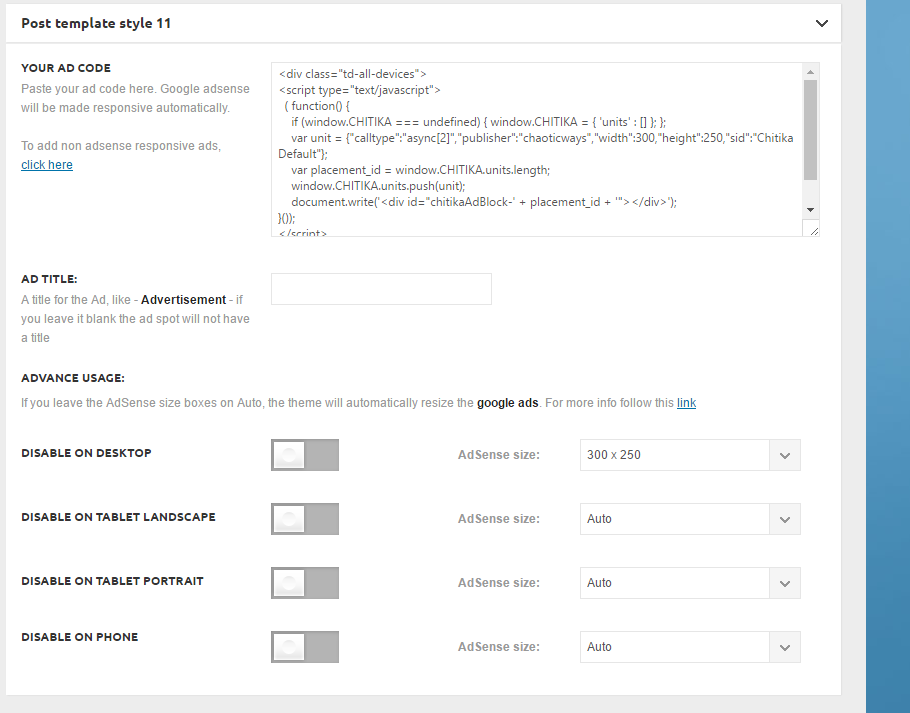
It’s not showing up on the top right next to the video:
http://ghesports.com/runescape-chaotic-ways-pk-video/
Nor is it showing on the homepage.
 Nano
Nano Thank you for the response and clear instructions .
Few things-
As of now I have 25+ plugins installed under the wordpress while as I can see in the screenshot http://screencast.com/t/RZLIOPUNdqh , there are almost 10 plugins whitelisted under TDbooster.
Does it mean that having any other plugins other than these 10 plugins will automatically disable the TDbooster even if it is activated under the plugin dashboard. Right?
But then on my “system status “dashboard ( see here : https://i.imgur.com/rpcyRvM.jpg ) why it’s showing only one incompatible plugins even though there are 15+ plugins which are activated but not whitelisted under the tdbooster plugin? Or is it because under the “system status” it can only show one name, no matter even if other plugins are also causing compatibility ?
Now about the workaround solution:
1. Can I whitelist the incompatible plugins ( in this case the one plugin name “adminise” shown under system status ) If yes then what code should I write there under the TDbooster .php file.
2. The second method you said is to remove ( or commenting out) the code which causes the restrictions on incompatible plugins and hence I should remove the codes shown here http://screencast.com/t/RZLIOPUNdqh .
Right?
And you somehow missed to respond on the point no-5 in my previous comment where I tried to detect the JS/CSS files but couldn’t achieve the desired result. I am copying the same question here again:
5. I tried to move the JS, CSS files under footer based on the instructions given here: https://forum.tagdiv.com/how-to-make-the-site-faster/ . I extracted and copied the list of registered JS and CSS files in a text file ( Look here: http://pastebin.com/D5CAive8 )
but then I compared it with my blocking JS/CSS listed under Pagespeed ( look here: http://pastebin.com/EH2uS3Pz )
But the problem is, almost none of the JS/CSS files listed under Pagespeed is matching with the one I extracted from my sites using functions.php code. For example- As per Pagespeed, I can see that YTSubscribe and Facebook Login JS/CSS files are causing issues, but I can’t find it under the extracted list.
Please take your time and help me to achieve greater speed and performance of my site. I am worried because just few days back under my old themes, I used to have 97 Pagespeed score and 90 Yslow scores but currently it’s too bad 🙁 ( Have a look at my speed scores on 20th august 2016 snapshots: https://i.imgur.com/JbnKtAO.png )
Thank you.
 Boke
Boke Andrei,
The problem is fully solved. I have tried to insert again &rel=0’. This type, I have used letters and sign from your code, rather than typing them from my Mac computer. For some strange reasons, your code editor does not reckonise the sign ‘&’.
Anyhow, for the time being, it is working well.
Thanks a lot for your support.
Boke
Boke Andrei,
I have corrected the second problem. The error has been removed.
Parse error: syntax error, unexpected end of file, expecting function (T_FUNCTION) in /home/nkoyboke/public_html/blog/wp-content/themes/Newsmag/includes/wp_booster/td_video_support.php on line 319
…..So I have remained still with the problem regarding this code 720&rel=0’
Boke
Boke Hi, AndreiL,
I have found td_video_support.php file.
As suggested, I have inserted the tiny code this way…
<iframe id=”td_youtube_player” width=”600″ height=”560″ src=”‘ . td_global::$http_or_https . ‘://www.youtube.com/embed/’ . self::get_youtube_id($videoUrl) . ‘?enablejsapi=1&feature=oembed&wmode=opaque&vq=hd720&rel=0’ .
It didn’t work. There is an error
Parse error: syntax error, unexpected ‘=’ in /home/nkoyboke/public_html/blog/wp-content/themes/Newsmag/includes/wp_booster/td_video_support.php on line 22
… I am suspecting the formulation of ….720&rel=0’…. has something missing. Either ‘ should be replaced by “, or 720’&rel=0’. I have tried those combinations, the error is still there.
Can you figure out the problem?
NanoHello,
My website is a multi author website and hence I have set the “default user type to “Author” under WordPress General Settings.
Each authors are supposed to have capability to edit their profile and write new posts. but since I am using this theme and trying to login through TOP login menu, authors are facing few issues.
Though they are successfully logged in, but once they try to open their dashboard or their profile or to write a new posts – they automatically redirects to a new page which asks to signin again and so on-
Here is the flow chart.
– I logged in using Top login Modal from my website mydomain.com
– I successfully logged in and then I try to open the dabhbaord , the url is: https://mydomain.com/wp-admin/
but it automatically redirects to :
https://mydomain.com/login/?redirect_to=https%3A%2F%2Fmydomain.com%2Fwp-admin%2F&reauth=1
– then I try to open my profile- the url is: https://mydomain.com/wp-admin/profile.php
But after clicking it, it automatically redirects to this page: https://mydomain.com/login/?redirect_to=https%3A%2F%2Fmydomain.com%2Fwp-admin%2Fprofile.php&reauth=1
I don’t know why it always redirects to a new page. How can I change this behavior. I have already tried checking all my security plugins or User role plugins, there is no such configurations or settings done by me anywhere.
Please help me with this. Thank you.
 sainthilaire
Hi i have some problem with mobile theme because it lost the style for example this http://www.sabanetasr.com/wp-content/uploads/2016/08/Screenshot_2016-08-30-16-06-45.png doesnt see like the correct homepage style. the correct is http://www.sabanetasr.com/wp-content/uploads/2016/08/14045424_1263535043687314_1765977916_o.jpg lost the style and an other problem is that views counter post takes to upgrade; for example desktop theme show that have 500 views and in the mobile thema only 172 Views.
NanoHello awesome people,
Today I tried “Smart list” for the first time, and let me tell you frankly- IT’S AWESOME !! 🙂 🙂
Though I noticed few issues, and I want to make it correct.
In this example- I have used “Smart List Style 1” and “Smart List Style 7” , I have also selected the recommended “Post template style-5” for this- but
1. I noticed that all the .JPEG images are not in the centre. It’s left aligned even when I had already centered it during composing the post. While surprisingly, all GIFS are already centered aligned . So, my issue is to centrally align all kinds of images in the lists. ( Image: https://i.imgur.com/iuck0wG.jpg )
2. I have also used the “image captioning” to hyperlink the image source link. But it’s also not visible in case of .JPEG images while under GIFS, these image caption links are visible and working perfectly. How can I fix it for .JPEG too. – Also incase of .JPEG, the whole image gets hyperlinked to the image source link. I mean if somebody clicks JPEG images, it automatically opens a new image source link in new window. While in case of .GIFs , there is no such strange behavior. ( Image: https://i.imgur.com/XQsy20N.jpg)
I don’t know why this smart list is behaving strangely with .JPEG files while working very well for externally sourced GIF Images.
3. Can I include YouTube or Facebook Video at the place of images to create smart lists?
4. Can I write 1. Title and 2. Images only to create smart lists? Means can I skip “contents/description” part to create smart lists?
Here are two images to understand the point 1. and 2. well.


Please reply. Thank you.
Bogdan B. Hello,
The duplication of featured images usually occurs when adding the image in the featured image section and on the post itself thus resulting in 2 images being displayed. Please make sure you do not ad the featured image inside the post content. Only add it here: http://screencast.com/t/fl8HNEo5
If this is not the case, we did have reports in the past with featured image duplication caused by plugins. Sometimes plugins add their own featured image like photon for example. In your case I can see in the code a WPDM template which contains the image. It could be a plugin causing this so please disable all plugins except visual composer, clear cache and reset cdn files. Then check the posts again.
Thank you!
Catalin Hello srampia,
Please provide the website URL so I can inspect it closer and also, so I will be able to provide a more accurate response.
Thanks for your message!
Catalin Hello srampia,
If you want to make your main container being wider, also you will have to change the width of the theme and please notice that our product does not have such an option for dynamic width and we do not recommend to do that through the custom CSS code because the layout of the theme will be damaged. If you want to change the width of the theme to be in full-width mode, please notice that is not a simple task and you will have to adjust the entire theme to the new width for better results. If you want to display more levels in our theme and you are not aware of the steps in this regard, please consider hiring a freelancer/developer to do this for you because we cannot provide customization services at the moment, sorry!
Also, I have noticed that above sites which you gave me, as an example, are supports the RTL mode while out theme do not support this mode, sorry!
Thanks for your understanding!
 Incrosnatu
Buna ziua TagDiv!
Am urmatorul site: http://www.sociedelic.com si as dori sa adaug comentarii si pe mobil.
Pentru partea desktop fisierul comments.php a fost modificat, adica sters tot continutul si adaugat doar asta:
<div id=”fb-root”></div>
<script>(function(d, s, id) {
var js, fjs = d.getElementsByTagName(s)[0];
if (d.getElementById(id)) return;
js = d.createElement(s); js.id = id;
js.src = “//connect.facebook.net/en_US/sdk.js#xfbml=1&version=v2.4&appId=898431453537286″;
fjs.parentNode.insertBefore(js, fjs);
}(document, ‘script’, ‘facebook-jssdk’));</script>
<div class=”fb-comments” data-href=”<?php the_permalink(); ?>” data-width=”100%” data-numposts=”10″ data-order-by=”social” data-colorscheme=”light”></div>
Este in regula? Iar pentru mobil, as dori sa fiu indrumat de voi, ce trebuie sa modific/adaug. Am gasit niste raspunsuri dintr-un search dar nu inteleg ce trebuie sa modific.
Bogdan B. Hi,
Sorry but our theme has no implementation for amp and FBIA for the moment. It will have to be done through plugins and customization if you want to get it going. We will look into it and make our theme amp friendly in the future but for the moment I cannot promise anything.
Thank you!
NanoHi, Since I am aware of CSS and JS files so I tried to use advance optimisation methods using Speed booster plugin. Here are few things that I want to know.
1. There are two versions of “important notice” I read under various threads about this speed booster plugin:
A : Important note: SpeedBooster will not work with all plugins. It has a compatibility function in it’s code and will deactivate itself if an incompatible plugin is detected.
B: We added a list with plugins with which we tested the Speed Booster plugin, it automatically disables itself if a new plugin is installed.
I mean, what’s the ultimate truth? Will the speed booster get disabled with any new plugin installed and activated under “plugin” section or it first checks some compatibility and if it finds itself not compatible, it disconnects itself?
2. What does it mean by “deactivate automatically” ? Does it mean that under plugin section, I will Speed booster plugin as “deactivated but installed plugin” or it will still show activated here but will stop working internally ( internal deactivation) even if it shows active here? ( Image here: https://i.imgur.com/h4vpHSm.jpg )
3. Suppose I find it deactivated and then after installing 2-3 new plugin, I manually activate it again , what will happen now? What JS and CSS files it will move to footer? Will it automatically sends every new JS and CSS files added to footer or Will it send only those files, whose plugins are defined under whitelist.
If the later one is true then I don’t think Speedbooster can break site automatically since it’s not adding new JS/CSS files automatically to footer, hence there should be no issue in using it atleast for moving few known JS, CSS files. Right?
4. How to whitelist new plugins to use it under this speedbooster plugin?
5. I tried to move the JS, CSS files under footer based on the instructions given here: https://forum.tagdiv.com/how-to-make-the-site-faster/ . I extracted and copied the list of registered JS and CSS files in a text file ( Look here: http://pastebin.com/D5CAive8 )
but then I compared it with my blocking JS/CSS listed under Pagespeed ( look here: http://pastebin.com/EH2uS3Pz )
But the problem is, almost none of the JS/CSS files listed under Pagespeed is matching with the one I extracted from my sites using functions.php code. For example- As per Pagespeed, I can see that YTSubscribe and Facebook Login JS/CSS files are causing issues, but I can’t find it under the extracted list.
Why is it happening and what should I do to avoid this and remove the render blockings?
Please help. Thank you.
 rodrigocarlos
 This code to insert into the functions.php, so that I can use the Style 11? Or even that use the Style 5?
And another thing … This solution is to insert on pages amp, but I don’t edit the pages amp manually. They are created automatically by the plugin of Automatic AMP.
The problem here is that, with the use of the amp, my site will never be able to use the Style 11.
And another problem is that when choosing the Style 5, I’m going to have to change post by post, and insert the url of the youtube video in the body of the text. A rework … that if in the future there is the possibility to use the Style 11, I’m going to have to do this all again rework, post by post, which will likely have more post now.
I use the plugin “AMP-Yoast SEO”, and it has two fields where I can insert CSS and Extra code in (only meta and link) to be inserted in the <head> when it is converted to amp. So, would have some code that could collect the url of the youtube video and automatically insert at the beginning of the text, when amp page?
If access the original page, so keep as is (Style 11). But if it is the amp page access, so this code collects the url of the youtube video and insert text automatically. More or less it.



