- NewspapertagDiv AMP Plugin Tutorial
- NewspaperTrack Subscription Sources with Locker URL in Opt-In Builder
- NewspaperWP Rocket and Newspaper Theme: Optimization Guide
- NewspaperCredit System
- NewspaperIntroduction to CPT and ACF with Newspaper Theme
- NewspaperHow to edit modules for Flex Block X
- NewspaperHow to use the Posts List shortcode
- NewspaperUser review system
- NewspaperCustom Fields Support
- NewspaperHow to generate Facebook App ID
- NewspaperHow to insert a block inside the content of a post
- NewspaperModal Popup
- NewspaperPayPal Setup
- NewspaperLink Tracker
- NewspaperLockers
- NewspaperGeneral Options that May Interfere with the Newspaper Theme
- NewspaperAdd Cryptocurrency Price Ticker Widget
- NewspaperPosts Loop Element
- NewspaperThe Newspaper Mobile Theme: Introduction
- NewspaperAutoptimize Plugin – install and configuration
 Trent Ernst
Hey:
This one’s a bit out of my league.
Basically, when I try and enter my location into the weather widget, it pops up with the name of a hole-in-the-wall town 150 km away.
This is really irksome, and it’s not just OWM. Google had the same bad data until I complained to them.
However, OWM has changed how they’re doing things, so when I asked them if they could fix it at their end, they sent me this note.
1) Our data is based not only on weather stations; our data is a whole chain, and the basis is based on our model, so in your case, it’s not just a weather station that stands in Groundbirch.
2) This moment will be more complicated, and this is geocoding. In our products, for example, in current weather or, on our website, or in hourly forecast, there is a database with all cities – embedded geocoding. Previously, it was supported, supplemented and updated. However, for more than a year, we have completely removed the support and production of embedded geocoding, and because of this, new locations or the repair of old ones are not supported. Of course, in general, the performance still remains for users, but we do not recommend and do not guarantee quality when using.
As an alternative to the old embedded geocoding, we have introduced our new separate Geocoding API product; this product dynamically updates a database filled with recent locations and supported. And, of course, in our geocoding, your location is there, and this is a separate city; examples will be shown below.
Documentation – https://openweathermap.org/api/geocoding-api#description
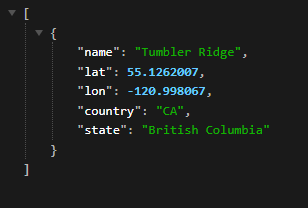
Requests syntaxes – https://api.openweathermap.org/geo/1.0/direct?q=Tumbler Ridge&limit=5&appid=yourapikey
Requests syntaxes – https://api.openweathermap.org/geo/1.0/reverse?lat=55.1262007&lon=-120.998067&limit=5&appid=yourapikey
Screenshot or response – https://i.gyazo.com/3db694f93e406ff4069dba4440c68ef7.png
3) The main point you will have to pass to the technical team is that they will need to use another plugin or write a separate script. In this script, the main point is that you will need to use the coordinates for the request you will receive from the Geocoding API, after which you will substitute the exact coordinates in the Gecodoing API, which will return the correct location.
I, of course, understand this only enough to know that it’s over my head. Is this something that is currently able to be done with the weather widget? I’ve tried, but it doesn’t seem to work, but it could just be operator error, and I might have tried to fix it one too many times and introduced an error. Or it could be at their end, because as of right now, I’m not able to get any data to load, even if I type in London, which is where they are HQed out of. Are you able to see weather data for where you are?
 extremenoisebd
 js_files_vue_modals.min.js?ver=34c58173fa732974ccb0ca4df5ede162:391 Uncaught TypeError: Cannot read properties of undefined (reading ‘length’)
at p.<anonymous> (js_files_vue_modals.min.js?ver=34c58173fa732974ccb0ca4df5ede162:391:290)
at Object.done (js_files_wp_admin.min.js?ver=34c58173fa732974ccb0ca4df5ede162:7:442)
at Object.success (js_files_wp_admin.min.js?ver=34c58173fa732974ccb0ca4df5ede162:5:405)
at c (load-scripts.php?c=1&load%5Bchunk_0%5D=jquery-core,jquery-migrate,utils,wp-polyfill-inert,regenerator-runtime,wp-polyfill,wp-hooks&ver=6.4.2:2:25304)
at Object.fireWith [as resolveWith] (load-scripts.php?c=1&load%5Bchunk_0%5D=jquery-core,jquery-migrate,utils,wp-polyfill-inert,regenerator-runtime,wp-polyfill,wp-hooks&ver=6.4.2:2:26053)
at l (load-scripts.php?c=1&load%5Bchunk_0%5D=jquery-core,jquery-migrate,utils,wp-polyfill-inert,regenerator-runtime,wp-polyfill,wp-hooks&ver=6.4.2:2:77782)
at XMLHttpRequest.<anonymous> (load-scripts.php?c=1&load%5Bchunk_0%5D=jquery-core,jquery-migrate,utils,wp-polyfill-inert,regenerator-runtime,wp-polyfill,wp-hooks&ver=6.4.2:2:80265)
(anonymous) @ js_files_vue_modals.min.js?ver=34c58173fa732974ccb0ca4df5ede162:391
done @ js_files_wp_admin.min.js?ver=34c58173fa732974ccb0ca4df5ede162:7
success @ js_files_wp_admin.min.js?ver=34c58173fa732974ccb0ca4df5ede162:5
c @ load-scripts.php?c=1&load%5Bchunk_0%5D=jquery-core,jquery-migrate,utils,wp-polyfill-inert,regenerator-runtime,wp-polyfill,wp-hooks&ver=6.4.2:2
fireWith @ load-scripts.php?c=1&load%5Bchunk_0%5D=jquery-core,jquery-migrate,utils,wp-polyfill-inert,regenerator-runtime,wp-polyfill,wp-hooks&ver=6.4.2:2
l @ load-scripts.php?c=1&load%5Bchunk_0%5D=jquery-core,jquery-migrate,utils,wp-polyfill-inert,regenerator-runtime,wp-polyfill,wp-hooks&ver=6.4.2:2
(anonymous) @ load-scripts.php?c=1&load%5Bchunk_0%5D=jquery-core,jquery-migrate,utils,wp-polyfill-inert,regenerator-runtime,wp-polyfill,wp-hooks&ver=6.4.2:2
 eman
eman I don’t think you understood or I misspoke.
I want the FRONT-END and each article to display the view counter, and see the number of views before clicking on the article.
Also, on the AMP version, I don’t see the icon with the number of views of the article, how can I do this?
 Bettina
 Hello @rockerosnet!
If you use a cloud template that can be modified with the TagDiv Composer, then you can hide the widget sidebar element on the mobile viewport: https://app.screencast.com/J1WHpnwEiWXe8 -> https://app.screencast.com/l7gEvJiOFpYWz
We have 3 options for mobile versions that you can use:
1. Responsive version: A responsive version of your website looks similar to the desktop version. TagDiv Composer is used to edit the page.Click on the mobile viewport: https://www.screencast.com/t/XDQJedlggSB. There, you can see your mobile version and edit or adjust the elements to look better.
2. Mobile pages: https://tagdiv.com/newspaper-10-3-7-update-brings-customizable-and-fast-mobile-pages
3. Mobile theme plugin: The Mobile Theme is a performance-optimized theme included in the main Newspaper theme that only loads on mobile devices. It comes with its own templates and designs for pages, posts, categories, etc., so your current templates from the desktop theme will get converted to the mobile theme layout. Please see https://forum.tagdiv.com/the-mobile-theme/ and https://forum.tagdiv.com/mobile-theme-introduction/ for more information.
A full explanation is here: https://www.youtube.com/watch?v=SpGkOnJeNZY
If you need to use mobile version 1 or 2, then you need to uninstall the Mobile Theme plugin and AMP.
Thank you!
 Calin
Calin Hello,
A). Unfortunately for this it will be need to edit the theme files, because there is no option for that. The file path is – wp-content/plugins/td-subscription/includes/shortcodes/tds_create_account.php
B). Those are in the time panel, but the name are different, the ‘Sample Information Message’ / ‘Sample Error Message’ etc are only simple text in tagDiv Composer. The texts are – https://i.imgur.com/ThGgr09.png – https://i.imgur.com/vu3WpZV.png
Thank you!
 DCBast
Why is my custom HTML displaying at the bottom of every page? See, for example: https://appletonwi.org/category/wisconsin-state-government/
It’s just formatting code, it shouldn’t be displayed.
 SportsNewsIRLAND
i am getting the following error with td-cloud-library[12-Dec-2023 18:47:18 UTC] PHP Deprecated: preg_match(): Passing null to parameter #2 ($subject) of type string is deprecated in /bitnami/wordpress/wp-content/plugins/td-cloud-library/includes/Mobile_Detect.php on line 1257
i am also getting errors wihe AMP and mobile plugins since PHP version: 8.1.14
how do i fix or will these errors be fixed in updates
 pratul11
 Hi
The Homepage also not showing me latest posts. Why?
Strange thing is the pages (homepage & Shop) are loading correct from your end (even without tagdiv cloud shop template) but not in my end!! And is installing cloud template for shop mandatory? What I do for homepage?
And earlier…like couple of weeks back, everything was fine and loading everything updated…even without your cloud templates!
It doesn’t make any sense! Can you also check again from your end if latest pages are loading without problems?
And what should I do?
 robink
 Look, It’s BUGGING, please…
randomly, some articles are sharing fine, some don’t.
try with another post, like these one, they are all displaying the Wrong image, :
or this one
Or this one
And here are example on the Second Website:
https://lobservateurdemonaco.com/infos/coup-denvoi-des-illuminations-de-noel-par-le-couple-princier/
… I can send more if you need, but they do all use the same custom templates.
I have no idea why yesterdays link now works… maybe because I switched back and forth between Custom and default template… I don’t know really, and no the article in question is not using the default template right now…
Only solution I see for now is to Downgrade the theme to a previous version and see if it’s resolving the issue…
-
This reply was modified 2 years by
robink.
 ESANNI
 gigiograndi
Hi,
How to have the same sidebar widgets of homepage (https://www.edigraph.it/fin_20244/)
In internal page (https://www.edigraph.it/fin_20244/category/campionati/)?
Regards
Staging url: https://www.edigraph.it/fin_20244/
 jordyf
Hello everyone,
I’m using the Newspaper Default Pro theme for my website, http://www.sydneyfocus.com, and I’ve encountered an issue with the homepage layout that I need help resolving.
Issue Description:
On my homepage, there are several sections with headings like “Don’t Miss,” “House Design,” “WRX RACING” etc., which are automatically populated with articles and are completely irrelevant to the categories and tags I have set up. They are nowhere to be found in the Bluehost categories/tags I’ve created, The articles displayed under these headings are often mislabeled or not relevant to the heading itself. For example, an article about local bushfires appears under “Make it Modern,” which is misleading and inappropriate.
What I Need help with:
I’m looking to adjust these sections so that they either display the correct articles relevant to their headings or remove/change these headings to better reflect the content being displayed.
What I’ve Tried:
-I’ve checked and correctly categorized my posts.
-I’ve explored the theme settings, including Template Settings, Block Settings, and Post Settings, but haven’t found a way to adjust these specific homepage sections.
-The categories are well-curated, and the issue seems to be with how the homepage pulls and displays these articles.
My Question:
How can I modify these specific sections/headings on my homepage to ensure they display the correct content? Is there a setting in the Newspaper Default Pro theme that allows me to control which articles appear under these headings, or a way to customize these headings to align with the content displayed?
Any guidance, tips, or step-by-step instructions would be greatly appreciated, as I’m relatively new to this theme and want to ensure my site is as user-friendly and accurate as possible.
Thank you in advance for your help!
Best regards,
Jordy
robinkHello Support,
I’ve noticed and found the issue, when using a custom post template, and sharing the article in Linkedin (fb and twitter are ok), th featured image is not found…
But when I Switch back to Default newspaper post template, then the image is correctly fetched and showing when publishing on Likedin…
I guess there is an issue with recent updates, because the sharing was working fine until Theme update to 12.5.1 and new update 12.6.2 isn’t resolving the issue either.
So my guess is, there must be an issue with the Featured Image Module, when creating a custom template…
Please advice,
Many thanks & kind regards.
You can try this post on Linkedin post debug : https://monaco-hebdo.com/actualites/international/monaco-a-nairobi-pour-la-6eme-assemblee-des-nations-unies-pour-lenvironnement/
Direct link to Linkedin debug :
 BennySG
 Hi thank you for your response – unforunately I still don’t know where to edit the form for the log in/register.
A) Where can this be modified, for instance – so a GDPR checkbox can be added to the form?
B) The translation options in theme panel > translation section don’t include the strings for ‘Sample Information Message’ / ‘Sample Error Message’ etc anywhere
To be clear: I’m looking for where I can modify the login/register form directly, to ensure there is a checkbox and the above strings don’t appear.
 wordpressive
 Thank you. Is it possible for you to show me where in the code Flex Block 4 was added/created, so I could copy/modify that code? I assume it uses this same API? I want to use it as an example to follow.
 Anamaria
 Hello,
Usually the “Invalid reply from server endpoint error” is caused by insufficient WP_Memory_limit, if you’ll set it to 256M, and is still not working, please double it and check the rest of the settings from our guide -> https://forum.tagdiv.com/requirements-for-newspaper/ also make sure that you are using SSL and you have a good bandwidth, the one from our server is 1GB/s and the one that I use at home is 500MB/s, if you have low bandwidth, then you can access parts of the cloud, this can be done from the frontend, for example, if you are on a post -> https://i.imgur.com/4G74M7F.jpg or from tagDiv Composer -> https://i.imgur.com/2F6MhfI.png or from backend -> https://www.screencast.com/t/wekHmc7kJ8J
Thank you!
Bettina Anamaria Hello,
You need to edit the post with tagDiv Composer => https://www.screencast.com/t/jHatJGC1qRf, for example, select the Single Post Views => https://www.screencast.com/t/NhUGCRfI and with right-click, you can delete it.
Also, you can delete other elements.
Thank you!
Calin Hello thalesbrandao, as simchris suggested, you need to have og:image to can display the featured image in some social share, and this website doesn’t seems to have it – https://yoast.com/help/getting-open-graph-for-your-articles/
Thank you!
 gezimag
 Hi Bettina
I had removed the date from the template already. The problem is some of my blogs still showing the dates on google. There is no date stamp on my posts. There is no dates on anywhere on website. But google still showing the dates some of my blog posts, not all of them
 FDS
FDS hello, I have the same problem…example : https://www.fringuesdeseries.com/news-le-bestiaire-dines-investit-la-place-de-brouckhere/
How did u resolve it ?
 simchris
 Some guides are found in the forum; but good place to start:
https://gtmetrix.com/
they provide free examples of stuff you need to do, like set proper headers, time to live, recommendations for photo optimization, etc.
(free!)
 amazingdogs
Hello, I recently changed to the newspaper theme and now all my posts show a duplicate author name. I only want one name to display on the posts but I am unsure how to turn one of them off. The new tag that has appeared is hyperlinked to the home page. Go to this page for an example. https://www.ouramazingdogs.com/dog-training-for-service-dogs/
Thanks
Lawrence
 miltonrodas
Hello,
I have reviewed https://forum.tagdiv.com/mega-menu/ and it is no help for this issue. Also read many support posts and nothing explains how to fix this. Please, help!
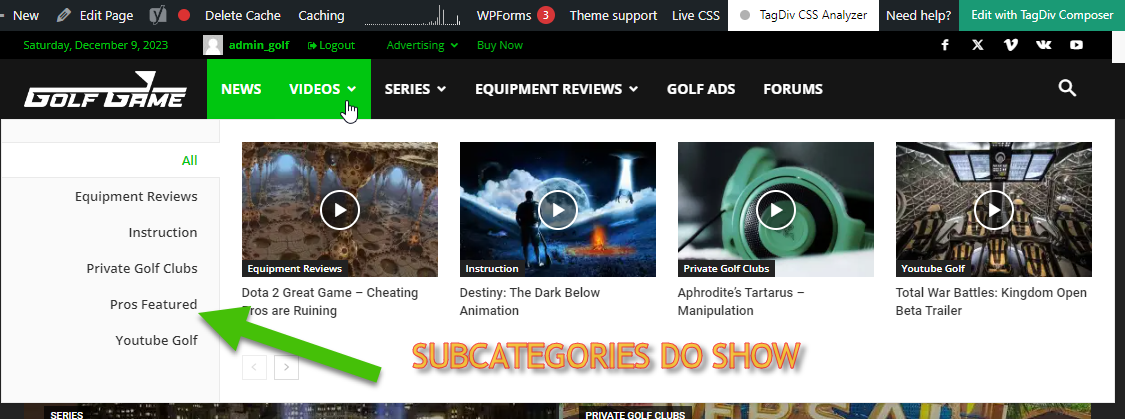
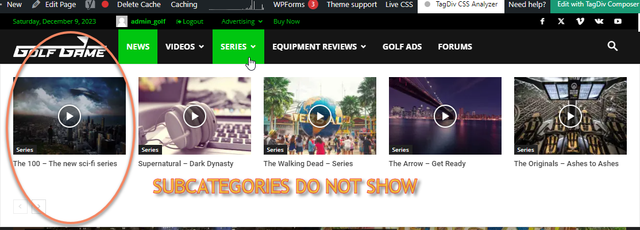
Basically, in building this new website, I like the Mega Menu drop downs. I have set Mega Menus to [parent] Categories that have Sub-Categories within them.
— There is nothing different about what was done. The process is exactly the same and it gives different results.
Is there a way to customize which drop-downs show Sub-Categories and which do not? How do I find this way, if it exists? Please, help! Thank you! (Btw, tried using Tagdiv composer and it said menus cannot be updated with it, just FYI)
 nitin sethi
Hello,
The mobile theme conflicts with the redis cache hence it cannot be used atleast in my case. So, to monetize the AMP version is there a way that one can add the <head> code for the AMP site. For AMP I am using the AMP plugin, which does not have that facility.
This query is specifically when the user does not want to add yet another plugin like Ad Inserter, etc.
Thank You.
NJ