- NewspapertagDiv AMP Plugin Tutorial
- ApiPractical example – How to add a new Block and Module
- NewspaperTrack Subscription Sources with Locker URL in Opt-In Builder
- NewspaperWP Rocket and Newspaper Theme: Optimization Guide
- NewspaperCredit System
- NewspaperIntroduction to CPT and ACF with Newspaper Theme
- NewspaperHow to edit modules for Flex Block X
- NewspaperHow to use the Posts List shortcode
- NewspaperUser review system
- NewspaperCustom Fields Support
- NewspaperHow to generate Facebook App ID
- NewspaperHow to insert a block inside the content of a post
- NewspaperModal Popup
- NewspaperPayPal Setup
- NewspaperLink Tracker
- NewspaperLockers
- NewspaperGeneral Options that May Interfere with the Newspaper Theme
- NewspaperAdd Cryptocurrency Price Ticker Widget
- NewspaperPosts Loop Element
- NewspaperThe Newspaper Mobile Theme: Introduction
 vastio7
Hi there,
Today without making any changes to my site I have observed a malfunction in the pages that I have enable adsense ads. Particularly the header ads, right below the menu, while clickable, appear on completely yellow box without being visible at all.
An example can be found on the following link: https://myfinancestuff.com/myfinancestuff-index/
Any help will be highly appreciated.
Many thanks,
Vasilis
 SarahP
Hi,
I’ve installed the theme, but somehow the header and menu are not showing.
This is the website: southandpepper.com.
Thank you!
 ericnyandwi
Hello i have serious issue on my website ” http://www.ubmnews.com ” the post setting doesn’t work and i have tried everything but it doesn’t solve the issue, for example im trying disable the post views (on single post page) and it doesn’t work, can you please help me how to fix it ? thank you
 Anonymous
I’ve solved this..
But on amp menu item not showing properly.. ? ? ?
 Maurafarah
Hi, whenever I try to show the categories, I get the following error:
Warning: Undefined array key “tdb_templates” in /home/customer/www/games.barcelona/public_html/wp-content/plugins/td-cloud-library/includes/tdb_functions.php on line 518
One sample url its: https://www.games.barcelona/category/games/electronic/
Can you help please?
Thanks in advance
 Bettina
 Hello @rjsurjo!
Unfortunately, there are no settings to customize that.
When you enable the mobile theme plugin with AMP, then it will overwrite the templates with their layout. This layout has some settings only in order to customize the design. These settings can be found in the Newspaper -> Theme panel -> Mobile theme. More information can be found at https://forum.tagdiv.com/the-mobile-theme/ and https://forum.tagdiv.com/mobile-theme-introduction/. Please read all about AMP here: https://forum.tagdiv.com/tagdiv-amp-plugin-tutorial/
We have 3 options for mobile versions that you can use:
1. Responsive version: A responsive version of your website looks similar to the desktop version. Edit the page with TagDiv Composer. Click on the mobile viewport: https://www.screencast.com/t/XDQJedlggSB; there you can see your mobile version and edit or adjust the elements to look better.
2. Mobile pages: https://tagdiv.com/newspaper-10-3-7-update-brings-customizable-and-fast-mobile-pages
3. Mobile theme plugin: The Mobile Theme is a performance-optimized theme included in the main Newspaper theme that only loads on mobile devices. It comes with its own templates and design for pages, posts, categories, etc., so your current templates from the desktop theme will get converted to the mobile theme layout. Please see https://forum.tagdiv.com/the-mobile-theme/ and https://forum.tagdiv.com/mobile-theme-introduction/ for more information.
A full explanation is here: https://www.youtube.com/watch?v=SpGkOnJeNZY
You can choose to use whichever one is more affordable and useful for you.
For the option 1 and 2, you need to uninstall the Mobile Theme plugin.
Thank you!
Bettina Hello @cnnhindi!
Check the size of the featured image: https://forum.tagdiv.com/featured-image-or-video/. For example, Facebook requires an image larger than 200 x 200 pixels: https://forum.tagdiv.com/facebook-share/
Thank you!
 Simion C.
 Hi,
You can use the offset option for that https://forum.tagdiv.com/offset-feature/
If multiple blocks use the same filter and sort, then they will display the same posts. But using the offset option you can make for example the second block skip a set number of posts, which are displayed the previous block. And so on for the following blocks.
Regarding the category tag, where exactly don’t you want them to be displayed?
There is a setting for example that removed the category tag in the post page and in the category page https://i.imgur.com/Ngzi5oX.png The setting is per category.
In modules/blocks, there are these settings https://i.imgur.com/HhXqaVF.png
So if you don’t want category tags in a specific block, you can disable them.
Let me know if you have more questions, or if perhaps I misunderstood what you want to do.
Thank you!
Bettina Hello @edragon!
Strange, because the amp and mobile theme work well together for me.
If you like, we can take a look and check if everything is alright and inspect why it is not working for you.
Please contact us via email at contact@tagdiv.com and provide the following:
– admin url and credentials
– cpanel url and credentials
– a link to this topic in order to identify you
Thank you!
 sudipto
 Hi Bettina,
Thanks.
This is exactly what I am doing. But the content that is coming in the block is latest articles despite applying the filter.
I understand the cloud template will show the dummy content. But the actual pages (after applying template to global) is also showing “latest articles” on all templates.
Here are 2 example URLs of 2 different custom taxonomies ::
https://www.thip.media/health/diabetes/
https://www.thip.media/health/polycystic-ovary-syndrome-pcos/
You will note that they are showing the same set of articles.
[Fact Check and Questions are categories]
Can’t figure out what I am doing wrong.
Anonymous
Please help me, i want remove header and meta from mobile / amp version, please help me how to remove this from my site / theme…
 insessionfilm
 Hey Bettina,
Please forgive my frustration, but I’m still having the same problem. I’m aware of where menu’s are built, and editing the Mega-Menu did not fix the issue. For example, using the screenshot in the original post, all it did was add an arrow under “Interviews” …I still have the same problem.
Bettina Hello @essjay !
You can only modify the footer with TagDiv Composer if you go to a page where it is assigned and edit that page with TagDiv Composer, and then you will have access to the footer also. For example, edit your homepage with TagDiv Composer, scroll till footer, click on footer zone and you can edit it. Click on the row and change the background color: https://prnt.sc/d2Zti7GWIxPu
Thank you!
Bettina Hello @emptycoconuts!
Check the size of the featured image. For example, Facebook requires an image larger than 200 x 200 pixels: https://forum.tagdiv.com/facebook-share/
Thank you!
 Edragon
 Hi Bettina
We do use Mobile Theme plugin, and the problem is that if I switch AMP ON it ruins mobile menu, if AMP is OFF mobile menu works perfectly with Mobile Theme plugin. At the moment we switched AMP off and everything works as it should, but previously AMP was on or whenever you turn it ON it, mobile menu is locked, it shows a full menu with submenu and if there are more than 10 then the rest of the menu is not accessible anymore. This means that MOBILE+AMP, like it has been shown in tagDiv AMP Plugin Tutorial, does not work together properly. I tested it with other website and the same thing happened so I am pretty sure that you can repeat that process too.
-
This reply was modified 4 years by
Edragon.
Bettina Hello @Edragon!
In order to disable this option “Exit mobile version”, you need to disable this setting: https://i.imgur.com/LxpDtB2.png
The AMP works better only with the Mobile Theme plugin. From my point of view, if you don’t use the Mobile Theme plugin, then there is no reason or benefit to AMP. Please read all about AMP here: https://forum.tagdiv.com/tagdiv-amp-plugin-tutorial/
It comes with its own templates/design for page, post, category, etc so your current templates from the desktop theme will get converted to the mobile theme layout. Documentation here:
– https://forum.tagdiv.com/the-mobile-theme/
– https://forum.tagdiv.com/mobile-theme-introduction/
Thank you!
Bettina Hello @edragon!
Yes, it is there in order to be applied to the cloud templates. For example, here: https://prnt.sc/I3BQy7W0q_nd
It is everywhere in order to be applied to every different ad.
Make a test and deactivate ALL plugins except tagDiv ones, also if you are using a cache plugin, deactivate it, and see if the problem goes away.
Thank you!
Simion C. Hi,
So after some time the settings you make in the theme panel and then save, revert to the previous setting. This sounds like a caching issue. To be more specific, a caching that affects the backend as well, like object cache perhaps. But that would affect the whole theme panel, not just specific settings.
It could also happen due to a firewall or security setting, but if that was the case none of the settings would save. Or maybe it could happen if the database is running out of space, but that also would lead to none of the settings being saved at all.
I will take a look at it and try to find out why this issue is happening on your website. Please send us an email at contact@tagdiv.com and there provide admin login for the website, and also access to cPanel https://www.location-appartement.org/cpanel Maybe also mention an example of the issue, so I can try the same directly.
Let me know.
Thank you!
 AuroraCattery
For example I want to write there ” Your name?” for the name blank but I cant edit the “Name” writing top of the blank. I want to edit them but couldnt find the way. It doesnt work when i try to edit Template comment.php
 Schmitz-Engelen
Hi all,
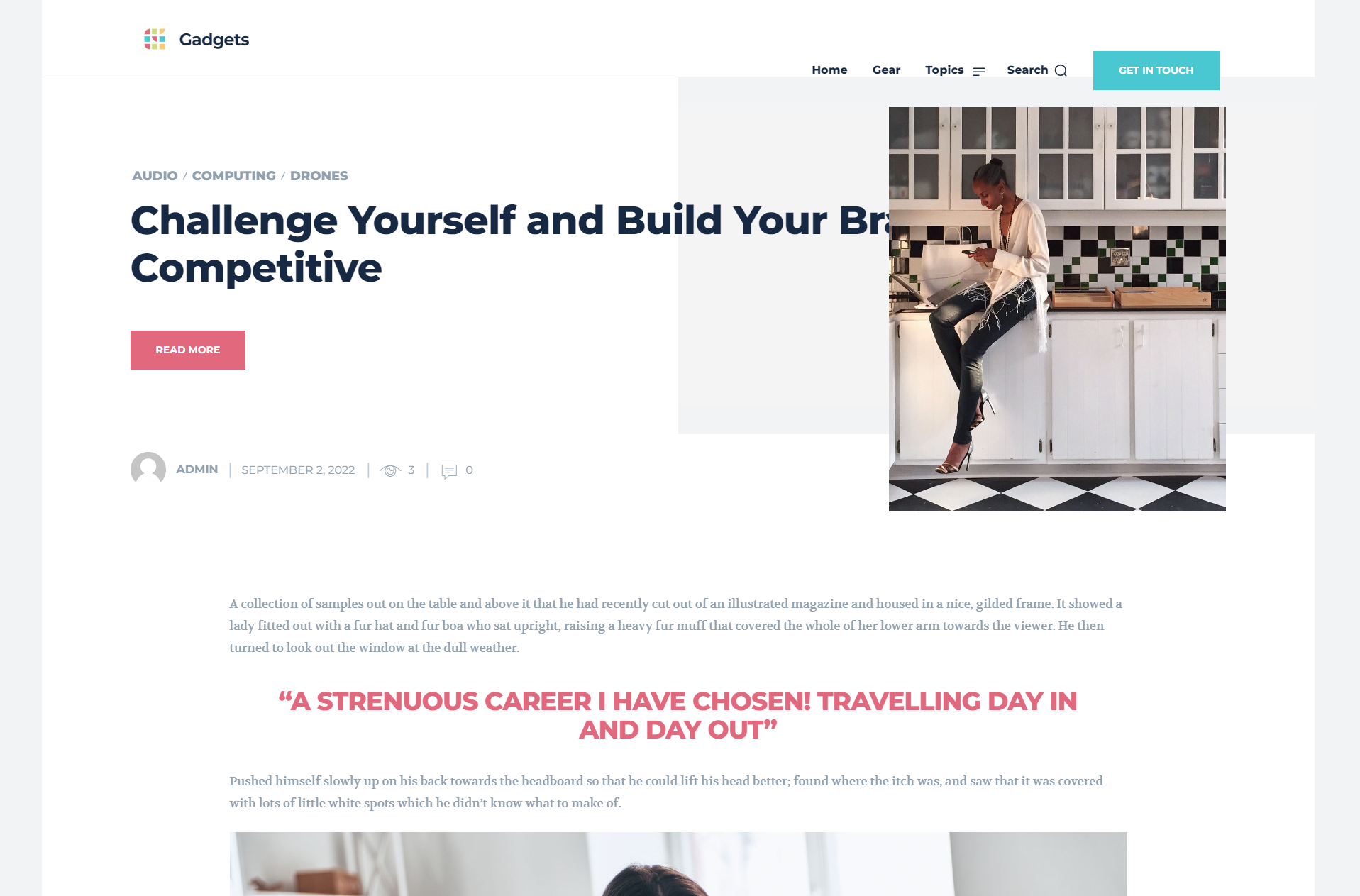
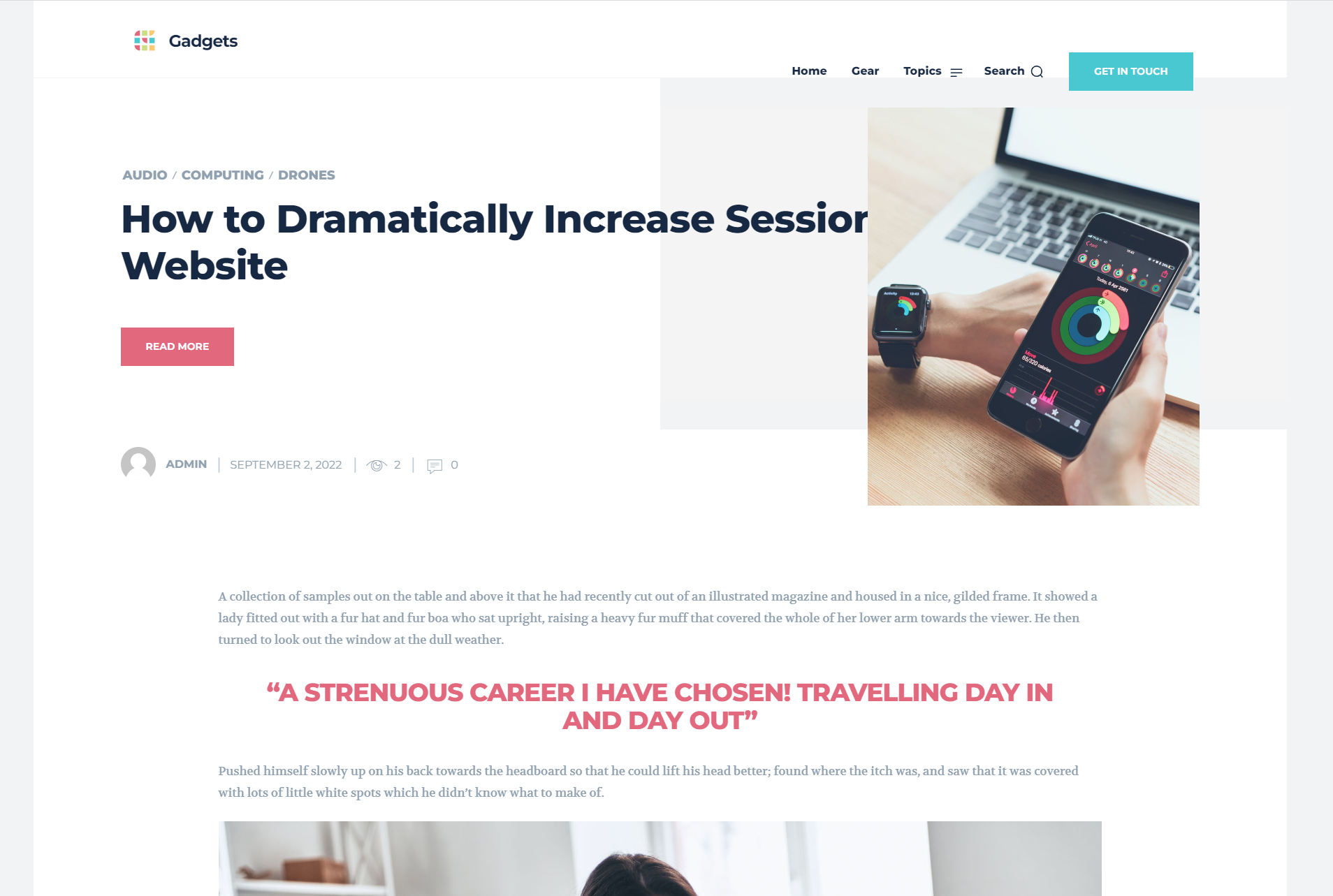
I just started with the gadget templates. When checking the article pages, I see that the top page photo’s have a strange shape and the title is behind these photos. Is this a bug or something I can easily solve?
See example screenshots:
https://like2movit.nl/wp-content/uploads/2022/09/2022-09-03-09_59_50-Window.png
https://like2movit.nl/wp-content/uploads/2022/09/2022-09-03-09_59_32-Window.png
Thank you, Frank
 dita999
Mega menu seems to work on some pages like home and posts but not others. I wouldn’t mind so much, but the section name displayed isn’t clickable, so part of the menu doesn’t work. Here are a few examples of it not working (I tested in Chrome & FF on Mac):
Page: https://www.hungrypinner.com/about/
Tag: https://www.hungrypinner.com/tag/breakfast/
Shop (main page): https://www.hungrypinner.com/shop/
Product Category: https://www.hungrypinner.com/product-category/bakeware/
Product: https://www.hungrypinner.com/shop/nonstick-bakeware-springform-pan-9-inch/
Edragon Looks like AMP is what is breaking menu on mobiles. When I switch amp off, menu works perfectly as it should. But whenever I switch AMP ON, it breaks menu.
Edragon Sorry, it’s actually still a problem. I accidentally clicked EXIT MOBILE VERSION where menu worked as it should. But when I switch back to mobile ?amp version then menu is not working properly again
EdragonNoticed that if menu is bigger/longer (let’s there are more than 10 menu links) than your mobile screen then you can’t access rest of menu, since you can’t scroll mobile menu.
Example: mkuubis.ee
Edragon Thank you for the suggestion but post loop elements are very limited, only 2 different blocks when there ae way more blocks/styles available. And I do use completely different blocks. Example Block 11.