
- NewspapertagDiv AMP Plugin Tutorial
- ApiPractical example – How to add a new Block and Module
- NewspaperTrack Subscription Sources with Locker URL in Opt-In Builder
- NewspaperWP Rocket and Newspaper Theme: Optimization Guide
- NewspaperCredit System
- NewspaperIntroduction to CPT and ACF with Newspaper Theme
- NewspaperHow to edit modules for Flex Block X
- NewspaperHow to use the Posts List shortcode
- NewspaperUser review system
- NewspaperCustom Fields Support
- NewspaperHow to generate Facebook App ID
- NewspaperHow to insert a block inside the content of a post
- NewspaperModal Popup
- NewspaperPayPal Setup
- NewspaperLink Tracker
- NewspaperLockers
- NewspaperGeneral Options that May Interfere with the Newspaper Theme
- NewspaperAdd Cryptocurrency Price Ticker Widget
- NewspaperPosts Loop Element
- NewspaperThe Newspaper Mobile Theme: Introduction
 Bogdan B.
 Hello,
The space is being held by the header ad. Here is an example of what removing the space will result in: https://www.screencast.com/t/yxFNHRgvqv
You can improve it a bit to a certain point using this guide:
.td-header-style-1 .td-header-sp-recs{

margin: 5px 0 9px 0;

}

.td-header-style-1 .td-header-sp-logo{

    margin: 0px 28px 0px 28px;

}
Thank you!
 Simion C.
 The message you get is quite common with WordPress. In most cases it can be easily fixed.
For example – https://wordpress.org/support/topic/the-link-you-followed-has-expired/
In that case the max upload size was limited, increasing it solved the problem. Usually this is the main cause.
Check this guide carefully and make modifications if needed
– https://forum.tagdiv.com/requirements-for-newspaper/
If everything is set properly there should be no problem. Contact your hosting provider if needed and ask them to make changes as the guide suggests.
You can also install the theme by FTP, that is not difficult to do and it’s very useful to know how to use FTP. If our guide is not detailed enough check some more online
– https://dappercodes.com/installing-wordpress-theme-via-ftp/
– https://docs.presscustomizr.com/article/141-how-to-manually-install-or-update-a-wordpress-theme
– https://www.shoutmeloud.com/install-wordpress-theme.html
Simion C. Hi,
The category tag displayed in the modules will be the primary category of the post. Check the posts displayed in the block and that have the “A la une” to see how the primary category setting is set.
If it’s on auto select, then the first category alphabetically will be picked. Choose from the posts categories and set the primary category you want.
Check this post for example to see what primary category setting it has
– https://www.screencast.com/t/wZ3UcftGXa
Thanks
 Rob
RobHello,
I’m trying to use jquery conditionals to hide or show certain parts of my content to certain users based on several variables, but I’m having trouble determining the item IDs to use as selectors.
For example, on my homepage http://www.theburnin.com, in the sidebar a little way down is a box that says “Build your presence- Write for us”, which I would like to hide from users that have already taken that step. How would I determine the ID of that box to use as my jQuery selector?
Thank you,
Deven
 Edward
 Alternatively use a third-party plugin. For example: https://wpdiscuz.com
The plugin offers a large set of customizations including color settings for administrator comments.
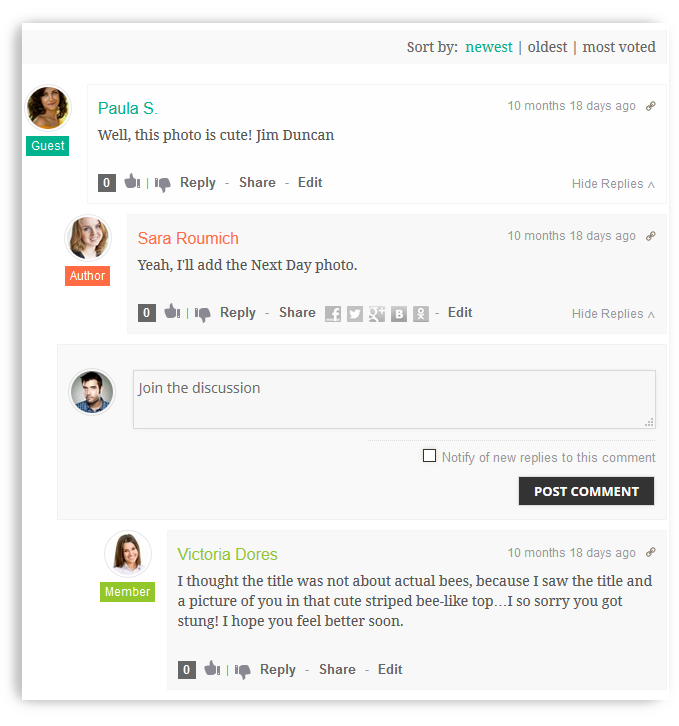
However please note that this plugin is not supported by the Newspaper theme developers.
Simion C. Hi,
That depends on a few factors. If you just entered them and the ads are blank for example, or come with a 403 error maybe, that could could mean that the website is not yet fully approved by Google, so it could resolve itself after a while
– https://support.google.com/adsense/answer/76228?hl=en
– https://support.google.com/adsense/answer/9724?hl=en
– https://support.google.com/adsense/troubleshooter/7049023?hl=en
– https://support.google.com/adsense/answer/1208336?hl=en
Thanks
 Catalin
 Hello johnmiao,
You should edit the top bar section from header style used by you and if you are not aware of the steps which are needed to take in this case, please consider hiring a freelancer/developer to help you because we cannot provide custom work at the moment, sorry! As a quick example -> https://www.screencast.com/t/ThUc0L47cq
Thanks for the message!
 Wattention
Hi,
We are using TD Composer and theme newspaper.
When we are editing a post, some part of the article becomes to be not editable with TD composer. For example, when I select A part and click “Edit Content” button, I can only edit some fields of A part but not whole A part.
Why does this kind of things happen?
Are there any tips I can avoid this.
It’s very troublesome that we delete the article and create it again from scratch.
Simion C. Hi,
That would not be possible, unless maybe with custom CSS. But it would depend where this sidebar is, in a page, post etc.
Hiding it would be possible, but also it will require some adapting for the remaining content with no sidebar. I could give it try, provide a link to where you want to do this. Mention if it should work only for that page.
A general setting to remove a sidebar by the device used to view the website does not exist.
In a page for example elements, rows, columns, can be hidden per viewport
– https://www.screencast.com/t/Cgew8aYUpP
– https://www.screencast.com/t/yDtjHwIK2
This works in pages or cloud templates built with the composer.
Thanks
Bogdan B. Hello,
Please do not post your purchase code here. Others can see it and it is a personal code not meant for sharing.
Our themes are envato exclusive and we cannot provide individual discounts. We can only make theme discounts on envato sale campaigns for everyone at once. Keep an eye out for envato sales if you want to purchase the theme at a discount price.
Thank you!
Simion C. Hi,
What do you mean exactly by putting them in a block? The default reviews looks like in this post for example
– https://demo.tagdiv.com/newspaper/td-post-why-tech-accelerators-may-soon-be-as-irrelevant-as-an-mba/
You can edit post templates with the composer, this is an option since the cloud library plugin was introduced a while back
– https://forum.tagdiv.com/tagdiv-cloud-library-plugin/
Using Cloud library templates the reviews are split into three different element, you can place them in any way possible in the post template
– https://www.screencast.com/t/QDN0mzGMP
Maybe this is what you want to do.
Thanks
Simion C. Hi,
That is the image info box, that element does not have image alignment options at the moment. It will have the options same as a title over image element for example, in coming updates
– https://www.screencast.com/t/HebEJLVeNxB
You could use that element instead, and set image size to contain, that will display the whole image. I believe that is what you want.
Simion C. Hi,
Using the standard theme panel ad system that is not possible. It could be a solution to use Cloud library single templates.
For example if you create/import a cloud post template
– https://forum.tagdiv.com/tagdiv-cloud-library-plugin/
Now you can enter the ad codes in the template itself, so those ads will be shown only in the posts that use that template
– https://www.screencast.com/t/ELMrkSxoA
Apply that template to posts in a category, and use the ads you want.
Or maybe use the Adrotate plugin, I believe that may have settings for something like that. Also many theme users recommend it, some info about it here
– http://www.wpbeginner.com/plugins/how-to-manage-ads-in-wordpress-with-adrotate-plugin/
– https://ajdg.solutions/manuals/adrotate-manuals/
Thanks
Simion C. Hi,
The image you can set is not per viewport. But there would be one way of doing it if required.
Create four single image elements in the page, instead of one. Then using the “Display” hidden setting in the CSS tab (this is per viewport) hide each one per the device you want
– https://www.screencast.com/t/53mrmljg
For example hiding the image in all these viewports will make it visible only on mobile
– https://www.screencast.com/t/BSRQpbSZz
This could be a solution if you should consider it and try it.
Thanks
Bogdan B. Hello,
Is it the hover effect you want removed? It seems you already managed to change the grid style. You can select different styles for your grids in the tagdiv composer
As for the reviews, you can use the cloud library template to import a custom post template and use the tagdiv composer to implement the reviews above the post content.
Here is an example of how you can edit post templates: https://www.youtube.com/watch?v=BC-gCCy80Gw
Thank you!
Catalin Hello,
Please follow the guide which I have provided you above. It’s not a complicated task, sorry! Also, if you are not aware to do this, please check here -> https://studio.envato.com/search?utf8=%E2%9C%93&search%5Bquery%5D=theme+install+
Thanks for the message!
Simion C. Hi,
I see you use mostly flex blocks. Be sure to take into account when building the page, the mobile variant. For example while using four module per row in a flex block is fine on desktop
– https://www.screencast.com/t/clc9Uo96DDy
On mobile that will not look nice – https://www.screencast.com/t/ZC9Xzsisq11A
So while the mobile view is selected, choose for example one module per row
– https://www.screencast.com/t/O6GIVj28
Then on desktop there will be four modules per row, while on mobile there will be one.
Also the CSS tab margins padding etc are per device if you use them
– https://www.screencast.com/t/Zii5FqnV
If you use custom CSS use it per device – https://www.screencast.com/t/ndmigIDX
It depends on how you build the page, that will directly affect the mobile result as well. That will be the case with flex blocks. Th predefined blocks will always be automatically responsive, but the flex blocks will require more care when used.
Thanks
 speichenheld
When I’m trying to choose icons, for example for the icon box, there are just the “Font Newspaper”-Icons. The other icon-services are empty.
https://screenshots.firefox.com/Ie5W0MNKLX2hXXyV/stage.speichenheld.de
The system status is ok and i switched off all plugins (except the composer plugin).
https://screenshots.firefox.com/0XeQsQLPthqkwUvb/stage.speichenheld.de
I tried it with a similar configuration in a local environment and it worked.
Do you have an idea what I can do?
Thanks, David
 kibiribi
Dear dev. team!
I’ve updated to ver.9
I know about this Newspaper 0 intro video – https://www.youtube.com/watch?v=eyoDUiWZcPQ
But do you have an article with the list of changes?
For example:
This option in ver8 – new changes in ver 9 – screenshot or picture and text explaining how to operate with new improvements.
or could you refer to help page with such info?
Catalin Hi,
We followed the AMP instructions for our plugin so there should be no problem in the matter
– https://developers.google.com/analytics/devguides/collection/amp-analytics/
You could try some suggestions, I found some guides
– https://support.google.com/analytics/answer/1009683?hl=en
– https://holini.com/google-analytics-isnt-working/
– https://www.optimizesmart.com/google-analytics-stopped-working-10-ways-fix/
– https://www.theleverageway.com/blog/google-analytics-not-tracking/
Hope this helps!
Thanks for the message!
Simion C. Hi,
So you are referring to the block in the top of the page. It should work if you follow the documentation for adding a new block and a new module
– https://forum.tagdiv.com/api-blocks-introduction/
– https://forum.tagdiv.com/api-modules-introduction/
You can also experiment with the new flex blocks, these are highly customizable blocks that can be made to look in many ways. For example all of these are made with flex block 1
– https://demo.tagdiv.com/newspaper/flex-block/
It is also easier to do if you use flex blocks.
Thanks
 Aman Singh
 Hey it’s same for me. This is one of the worst page builder I have use tbh. As after every update it starts giving a new problem & also says that page is not created with Tagdiv composer when I have only used Tagdiv till now
Hello,
TD composer is not working. I add the element “Title with Text”
And when I try to add content by clicking “Edit content” a popup opens for WP Editor
But the problem is when I enter the text in that box it doesn’t reflect on the website.
Please let me know what the issue is as I have deactivated all the plugins and deleted all cache and everything and still it’s the same
Thank you.
 Arafat
Here the Some Recommendation for Mobile device:
#Firstly, Move menu on left to right. It helps to user to use the menu. The user easily uses the menu (Try yourself). Like this:

#Secondly, Disable the popup search bar. Make search bar like this:
 .
.
#Thirdly, Make default social Floating sharing like this:

Check this site on the mobile: https://www.theodysseyonline.com/
It makes more user-friendly & Google friendly.
 RTW
RTW I am trying to link some headings and images to other pages on my site. Hate to compound more things but I also would like to know if it is possible to link to any category pages? I thought using categories would be easier than pages but they don’t seem to be an option when I try to link elements.
I added the headings and images using tagdiv elements ‘title over image’, ‘inline text’, and ‘title’.
I’m sorry but I’m quite new to this and don’t know how to provide an example of the back-end. Which admin credentials would you need to test the site?
Thanks
Simion C. The website does not load at the moment – http://prntscr.com/kq2qty
So from what I understand you used a flex block at the top and a post loop below. It all depends on your filtering and sorting used.
If the filtering used is set to display posts from that category and ordered by latest, they will be the same as in the loop. In that case set in the loop an offset according to the number of posts (modules) the flex block has.
For example if the flex block shows 3 posts, set an offset of 3 in the loop. That will avoid repeating posts.
