- NewspaperHow to Use tagDiv Cloud Library
- NewspaperCloud Library Templates
- NewspaperCloud Library – Category Templates
- NewspaperDesign your Post Pages using the Cloud Library Templates
- NewspapertagDiv Cloud Library Plugin
- NewspaperFlex Block Builder and Flex Loop Builder
- NewspaperIntroduction to CPT and ACF with Newspaper Theme
- NewspaperFilters and sorting for taxonomies
- NewspaperHow to use the Google Maps API
- NewspaperHow to insert a block inside the content of a post
- NewspaperPosts Loop Element
- NewspaperSocial Sharing
- NewspaperInfinite Loading for Single Posts
- NewspaperHow to Add a Logo in Newspaper
- NewspapertagDiv Shop
- NewspaperCustom Post Type Support
- NewspaperHow to use the YouTube API
- NewspaperHeader Builder
- NewspaperMeta Info on Modules and Blocks
- NewspapertagDiv Composer Tutorial
 Calin
Calin Hi,
For category you need to edit tdb_module_loop.php -> https://www.screencast.com/t/SlKfgEMViF -> wp-content/plugins/td-cloud-library/modules/tdb_module_loop.php
Also the code provide by me is get from here -> https://codex.wordpress.org/Function_Reference/human_time_diff
Thank you!
 Bogdan B.
 Hello,
You have to actually apply the template after you create it. There are 2 ways to create a template.
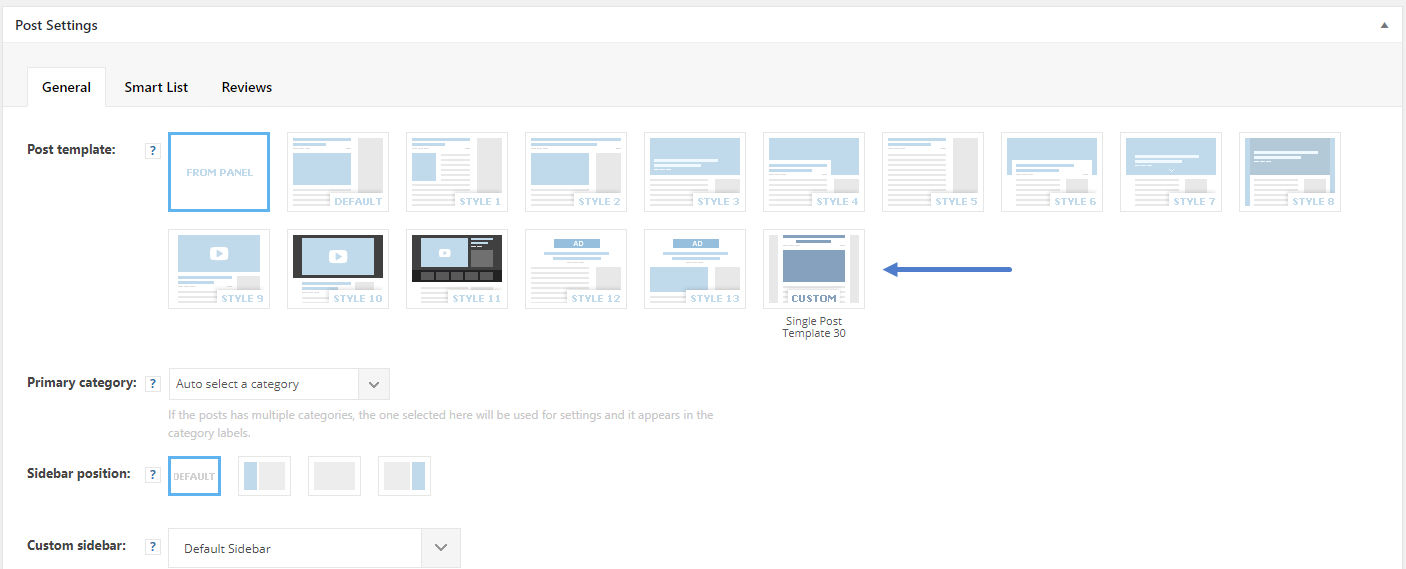
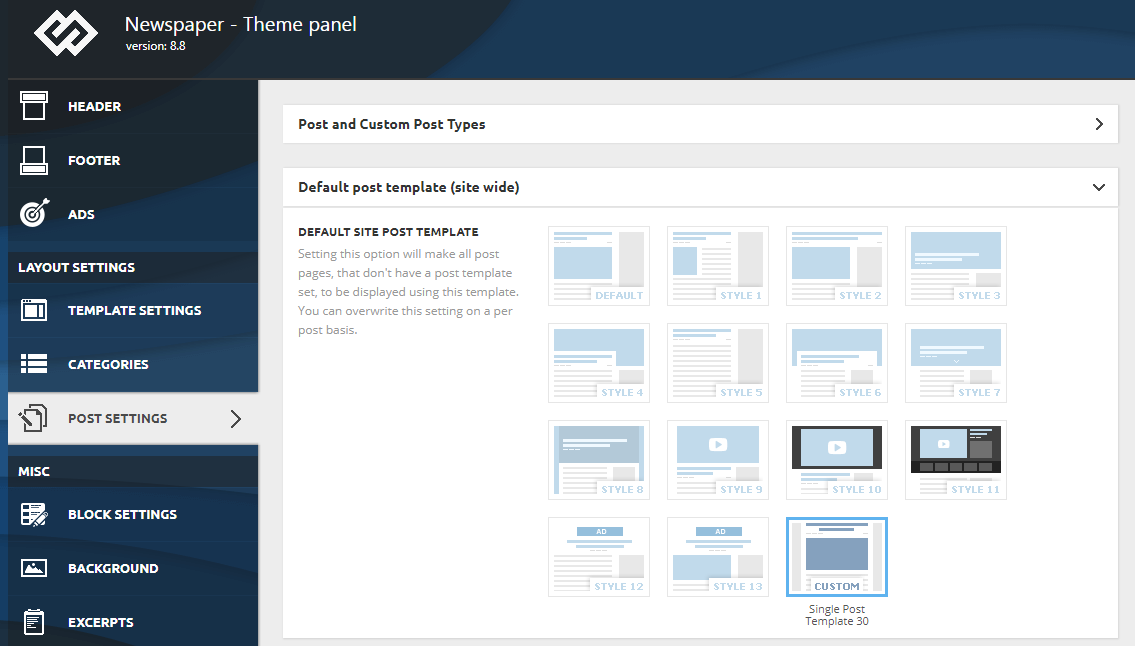
1. is to access the cloud library settings and press add new and import a template. Once done, you hit save. But this will not apply anywhere at the moment. You have to access the theme panel and set it for your website: https://www.screencast.com/t/4LrzLsUZFg
2. the second option is adding a specific header for a specific page or template. This is done directly in the tagdiv composer when editing a page or a cloud library template. Using this method will apply the header only to that particular page or template, not across the whole site at once as option 1 does.
Thank you!
Bogdan B. Hello,
Please make sure you have the cloud library plugin installed and activated.
Thank you!
Bogdan B. Hello,
1. the infinite loading only works on cloud library templates so it cannot be added to the default post template styles. That is why it is not part of the main theme panel.
2. Any post style can be a cloud library template. Please look through the post styles you can import in the cloud library. The old post styles are there as well.
3. When you edit a template you will not see actual content. But rather a placeholder for the content. Think of it as a mold. Creating a template is creating a mold. Once the mold is done you apply the content to it by applying the template to your post.
Thank you!
Calin Hi,
If I understand correctly you want to set the category and tag after post content, if is so you need to using a single post template from tagDIv Cloud Library, you’ll need to edit it and and drag the category and tag below the post content
for example -> https://www.screencast.com/t/W0nyvu34jSn
-> https://www.screencast.com/t/UXVvcpoI2o
-> https://www.screencast.com/t/LsgRAXOVQ
After that set the post template on posts.
Thank you for your understanding!
Calin Hi,
I think that you can do that more easy using some templates from tagDiv Cloud Library -> https://www.screencast.com/t/1hSPVLs1 all you need to do is to import those templates, edit them with tagDiv Composer to look how you want save theme, and set them in theme panel
-> https://www.screencast.com/t/yymaEeS9Fxt
-> https://www.screencast.com/t/DWS7nSC4gf4
-> https://www.screencast.com/t/m4jzwIwDUxg1
Thank you for your understanding!
Calin Hi chakribd,
In order to have access to “Single Related post” you’ll need to chose a single post template from tagDiv Cloud Library -> https://www.screencast.com/t/6VmSMxCztbhw for example -> https://www.screencast.com/t/6VmSMxCztbhw -> https://www.screencast.com/t/p48Ly8D0iwV -> https://www.screencast.com/t/PQACCo4NW8 -> https://www.screencast.com/t/SkoLyyCPMfT3
Also you can add others shortcodes for images, blocks … -> https://www.screencast.com/t/MJI0oJgZ change the place, build the template how you want, after tat save it and set it on post as post template.
You can set this template as global template -> https://www.screencast.com/t/YkG8UKJCToS or individual template -> https://www.screencast.com/t/QZis1ic9cVTL
Thaak you!
Calin Hi,
You’ll need to edit the page with tagDiv Composer click on row and set the layout like this -> https://www.screencast.com/t/e7fkiTl1EJq after that add the Newsletter in sidebar -> https://www.screencast.com/t/wKEgqgcjDiMt -> https://www.screencast.com/t/jvoLiSwwYn6
If you want to set it in sidebar post you can set the code in a custom html https://www.screencast.com/t/L1gXiWkp7n3n or you can set a single post template from tagdiv Cloud Library, edit the template with tagDiv Composer
-> https://www.screencast.com/t/8jLnhZT5
-> https://www.screencast.com/t/jdwF99utfjHS
do the same as for page, after that set the template on posts.
Thank you!
 ashutoshjosh
Hello Guys
I hope you are doing well and are having a great new year!
We have recently started facing issues with the category URLs for the category pages created on TD composer and otherwise coded.
We had created category pages using the TD composer and added then to the menu. We also assigned the templates to the respective categories using the theme panel.
This seems to work if there is one level category as in the URL for the category shows like
url is https://www.joshtalks.com/joshkosh/career/
However wherever there is a subcategory the URL is that of the template 🙁
https://www.joshtalks.com/joshkosh/tdb_templates/interview-kaise-dein/
Which should be
https://www.joshtalks.com/joshkosh/career/naukri-chahiye/interview/
This link redirects to the category template again.
This is a bilingual website using WPML (Compatible plugin)
Now we had already have an issue with incompatibility between WPML and cloud templates. The issue is that we cannot assign category templates to translation languages as in there is no option in theme settings> categories> per category settings.
http://prntscr.com/mkyf3k
We had opened a ticket with support and you were quite helpful saying that this issue will be looked into
https://forum.tagdiv.com/topic/cant-see-translated-cloud-library-template-in-per-category-settings/
WPML support was also very helpful and said that they are in touch with the Tagdiv compatibility team and this is in process.
So meanwhile we decided to code the pages in the category settings.
However this is running into major issues with the category URLs. The primary categories are all right
https://www.joshtalks.com/joshkosh/hi/%E0%A4%B8%E0%A4%B0%E0%A4%95%E0%A4%BE%E0%A4%B0%E0%A5%80-%E0%A4%A8%E0%A5%8C%E0%A4%95%E0%A4%B0%E0%A5%80/
However the sub categories are acting very weird and redirecting to random pages or showing a 404
This seems to be very odd and so we decided to try the basics
Updated the theme to 9.5 and the plugins too
System status us all Green
Disabled all plugins and it’s not a plugin issue especially not a WPML issue
We are kind of struggling with this. I would really appreciate if you could let us know if we are doing something wrong 🙁
Regards
Ashutosh
 Simion C.
 Hi,
I could give you the code for that section – https://pastebin.com/Qpqqkt2z
Enter it in a new page – http://prntscr.com/mkxph8
Then edit it with the composer and set your own images and text.
Also be sure to check some sections created by us which you can import with the cloud library plugin
– https://affiliate.tagdiv.com/#/load/Sections
– https://forum.tagdiv.com/tagdiv-cloud-library-plugin/
Let us know if you have more questions.
Thanks
Calin Hi,
So if you want to use your code you’ll need to go first in
wp-content/themes/Newspaper/includes/wp_booster/td_module.php
and
wp-content/plugins/td-cloud-library/includes/tdb_module.php
and comment the td-post-date class
-> https://www.screencast.com/t/XpmJdfUBsF
-> https://www.screencast.com/t/KzdSyWOfKX
Now for example we edit flex block 1
-> https://www.screencast.com/t/ogChT9ydUD
For post loop 1 -> https://www.screencast.com/t/Pt5d9Qrp
Doing this the post date will be align and get the color/fort.
Results: -> https://www.screencast.com/t/anaT9cWw
Thank you.
 hiquynhon
Hi, After downloaded newspaper 9.5 from themeforest and deleted all old theme and old plugin, I uploaded the newest theme. Everything is okey except when I install plugin from Plugin tab inside Newspaper theme.
It’s said this :
PLUGINS DISABLED AUTOMATICALLY
The following plugins were disabled because they are incompatible with this version of Newspaper:
tagDiv Cloud Library
tagDiv Composer
tagDiv AMP
I don’t know why but now my website is crazy.
Please help me as soon as posible.
Simion C. As a widget the newsletter is not available. You could use a cloud template and instead of using a widget sidebar, define the sidebar in the template directly
– http://prntscr.com/mkvqyv
– https://forum.tagdiv.com/tagdiv-cloud-library-plugin/
Cloud post templates can be imported with the cloud library plugin, here are some templates designed by us – https://affiliate.tagdiv.com/#/load/Single
Each one can be imported, there is also a blank template if you want to start from scratch and design a template.
 geraldinetay27
 From the documentation, it seems like the cloud library is mainly for importing of templates.
Will I still be able to use the functionality below if I disable cloud library?
https://forum.tagdiv.com/wp-content/uploads/2018/06/post_template_settings.png
https://forum.tagdiv.com/wp-content/uploads/2018/06/default_template.png
Smart list
Calin Hi,
In order to achieve that you’ll need to use some single post templates from tagDiv Cloud Library edit those single post templates and remove the post date and author
here is an example -> https://www.screencast.com/t/VtjXb66SC -> https://www.screencast.com/t/xR6pdudxmF after that set the template to that post that you do not want to have those information.
You can set this template as global template -> https://www.screencast.com/t/YkG8UKJCToS or individual template -> https://www.screencast.com/t/QZis1ic9cVTL
Also this can be possible using custom css.
Hope this will help you!
Thanks.
Calin Hi,
Now with Newspaper v9.5 this can be achieve, so in order to do that you’ll need to get a single post template-> https://www.screencast.com/t/oKeW55CYBjQL from tagDiv Cloud library
edit the template and set a new header -> https://www.screencast.com/t/G6jjMgUq -> https://tagdiv.com/whats-new-in-newspaper-theme-9-5-update/ after that set the single post template on general-> https://www.screencast.com/t/S0WGm1Ua / individual posts -> https://www.screencast.com/t/QlG7ZwiRf
Thank you!
Simion C. Hi,
The header builder/manager requires the cloud library plugin to be active. If this plugin is not active there will be no header builder elements in the composer or header manager button option in the composer
– http://prntscr.com/mkjn3v – http://prntscr.com/mkjno1 – http://prntscr.com/mkjnuh
Thanks
 lazdim
 Just another question:
We have seen some pre-designed template in tagDiv Cloud Library that we would like to install.
Will be any problem if we use the same purchase key that we use in our production website?
Calin Hi,
So if you want to have in all blocks in pages/ categories … the time ago you need to set this code
$buffy .= ' - '. human_time_diff( get_the_time('U', $this->post->ID), current_time('timestamp') ) . ' ago';
like this -> https://www.screencast.com/t/lWhmJDCKoL45 -> for cloud blocks -> wp-content/plugins/td-cloud-library/includes/tdb_module.php
and for default blocks in wp-content/themes/Newspaper/includes/wp_booster/td_module.php -> https://www.screencast.com/t/NfJkpSX3
This will solved the problems with the time ago align and color too.
-> https://www.screencast.com/t/Dg43Z86o -> https://www.screencast.com/t/wdlW2jPh
If you want only the time ago all you need to do is to comment the post date
-> https://www.screencast.com/t/IedWkZLvr
-> https://www.screencast.com/t/dJxjmjZ9 -> https://www.screencast.com/t/neMzPzXDW
Hope this is what you need!
If there is still a problem or you have more questions, please let me know!
Thanks.
Simion C. Hi,
The option is not in the theme panel, please check this brief guide
– https://tagdiv.com/infinite-loading-for-single-posts/
It will require that the cloud library plugin be active, then the option will be available while editing a cloud post template – http://prntscr.com/mkgwoq
I should note that this feature is in it’s early stages, it will be improved or some aspects may change in coming updates.
Thanks
Simion C. Hi,
There will be more documentation added as soon as possible. Basically all that is needed is to have the cloud library plugin active.
Then there will be header builder elements in the tagDiv composer
– http://prntscr.com/mkgsar
With the header manager you can import/manage your header templates
– http://prntscr.com/mkgsjp
If you have more questions let us know.
Thanks
Simion C. Hi,
I remember trying to add a block as a widget a while back, but not through a child theme
– https://forum.tagdiv.com/topic/registering-custom-widgets/
I don’t think it is possible from a child theme. Not all them files are supported to be used in a child theme.
If you use the tagDiv composer, now there are flex blocks which have a great deal of customization options, so maybe the result you achieved with the block you added can be achieved with a flex block.
With the cloud library you can design templates and create them entirely with the tagDiv composer, bypassing the need to use widgets
– https://forum.tagdiv.com/tagdiv-cloud-library-plugin/
– https://affiliate.tagdiv.com/#/load/All
Thanks
Simion C. Elements from the cloud library are only available with the tagDiv composer
– https://forum.tagdiv.com/tagdiv-cloud-library-plugin/
If the tagDiv composer is deactivated the cloud plugin will have no use.
You can use WPBakery for the website and deactivate the tagDiv composer, there will be no problem. But in this case none of the cloud features will be unavailable.
Simion C. Hi,
So you want to separate more from author and related articles. If that is the case, it is possible. Using the cloud library plugin and tagDiv composer you can create a post template as you want, those are separate elements and can be placed independently in a cloud post template – http://prntscr.com/mkef18
– https://forum.tagdiv.com/tagdiv-cloud-library-plugin/
Here you can preview and even edit cloud post template designed by us, you can import them and modify then if needed
– https://affiliate.tagdiv.com/#/load/Single
So you can import a cloud post template already designed, and use it for the posts you want. Make modifications to it if needed. If you have more questions let us know.
Thanks
 lowhoh
 Thank you for your response.
I tried ‘tag,Div Cloud Library’ and choose ‘Category Template 12 by tagDiv’
I tried your guide and but there wasn’t filter function in category template12.
1) I want to make searching block or tag list showing on the top as ‘category template12’
but I can’t make searching function in the category, and how to set tag list showing on the top.
2) How can I set template page ‘category template 12’ as a category page in my page?