
- NewspaperHow to Use tagDiv Cloud Library
- NewspaperCloud Library Templates
- NewspaperCloud Library – Category Templates
- NewspaperDesign your Post Pages using the Cloud Library Templates
- NewspapertagDiv Cloud Library Plugin
- NewspaperCloudflare (CDN)
- NewspaperSingle External Shortcode and External Shortcode
- NewspaperSearch setup for custom post type
- NewspapertagDiv Composer – Website Manager
- NewspaperFlex Block Builder and Flex Loop Builder
- NewspaperModules Builder in Newspaper Theme
- NewspaperIntroduction to CPT and ACF with Newspaper Theme
- NewspaperCreate a frontend submission form
- NewspaperFilters and sorting for taxonomies
- NewspaperUser review system
- NewspaperHow to use the Google Maps API
- NewspaperWooCommerce: Happy “Add to Favorites!”
- NewspaperHow to insert a block inside the content of a post
- NewspaperHow to setup the Contact Page
- NewspaperPosts Loop Element
 questit
Hey there,
We are customizing a version of Newspaper’s cloud library via tag div editor on a staging version of our live website. How can we “move” the edited cloud library to the live website after we finish?
 Calin
Calin Hi,
Most probably the Advanced Ads widget can be use with our theme if you do not use cloud templates. Now this is just my opinion, because the plugin was not tested with our theme therefore we do not know how this should work, also we can not provide support for untested plugins.
Now if you are using a pro demo (pre-build website) there are many changes that the plugin to not work with our theme.
https://i.imgur.com/mZ0WADk.png
thank you!
Calin Hi,
Yes, this is right, the cloud templates are practically custom post types and those can be set global in theme panel or individual per post, category…
https://tagdiv.com/what-is-the-cloud-library/
Thank you!
 Anamaria
 Hi,
This problem can appear when you are using the WPBakery, if you have this plugin enable then please disable it and try again.
If there is still a problem, it can be from a setting like allow_url_fopen = On;
-> https://chemicloud.com/kb/article/how-to-enable-or-disable-allow_url_fopen-in-cpanel/
-> https://www.a2hosting.com/kb/developer-corner/php/using-php.ini-directives/php-allow-url-fopen-directive
If the problem persists, please provide more information and some screenshots.
Let me know the results!
Thank you!
 DocMovies
Hi,
I am trying to import some demo template from cloud template, but everytime it is giving me error of “One of the images failed to upload” after some progress.
Please find the error in the screensho

 shawshawshaw
I click on a block from the library and I press “import selection” from the description box – and the box asking me “TEMPLATE IMPORT: are you sure you want to import the selection?” stays BEHIND of the box with the description of the block, preventing me to press “ok”. As soon as I press “X” on the description, the “import selection” box – it disappears along with the “template import” box. I turned off all of my plugins and I still can’t figure out the problem. Any ideas?
This is what I mean by the description box:

I can’t get to the “TEMPLATE IMPORT: are you sure you want to import the selection?” box because the description box is covering it.
-Thanks in advance!
 John Kord
I have the single page template in the cloud library.
How can I make the radius of the featured image to “9”?
Usually I have only two options – radius on and radius off.
 pensivedog
Hello,
I have used the “Style, Fashion, Outfits – Lifestyle PRO” section from the cloud template library to display posts of a custom content type. I would like the titles/images displayed in this section to NOT link to the post, but instead link to an external URL which is stored in a field of the custom content type.
Can you please provide some instruction on how to achieve this? I’m using a child template and happy to edit some files as needed if you can indicate which ones.
Thanks in advance!
 mgyaktemur
Merhaba,
Invalid reply from server endpoint.
Yeni sayfa eklemek istediğimde böyle bi hata alıyorum.
Yardımcı olurmusunuz
Teşekkürler
 mbos01
Hi I would like to know how I can apply custom hover actions to my menu? Currently I’ve got a mega menu and I’m using a hover effect that fades the color of the active item (the page I’m at) and the item I’m hovering over. This is the default effect. Now I want the menu to load as it does right now. So with the active item selected, but when I hover over an item I want the active item to drop the selection temporarily so that only the hovered item is selected. When the mouse leaves the menu it should default back to the active item being selected. (the situation as it was) Could you give me some pointers about where to look? Thanks!!
(I’m using the Magazine Pro cloud template)
Anamaria Hello,
You can chose a template for author from Cloud Library Templates => https://www.screencast.com/t/YjmnXJSn and import it.
You can edit after with tagDiv Composer => https://www.screencast.com/t/l0XnF94YuK where you can change the font, size, color => https://www.screencast.com/t/vIj3SfMFsO
Hope this helps you!
Thank you!
 Bettina
 Hello!
If you have the cloud template header, then you can modify the element by TagDiv Composer on different viewports for tablets and mobiles also.
Please try and let me know about your results!
Thank you!
Bettina Hello!
Yes, you can create a cloud category template and you can customize it how you want.
Please note that customization is not covered by the support team: https://forum.tagdiv.com/newspaper-theme-support/
For customization and other services you can contact our custom work team here: https://tagdiv.com/premium-customization-services/
Thank you!
 bhaveshgajjar
Newspaper theme,
for this page => “Beauty Pro – Footer Template”
Not showing => “Edit with TagDiv Composer”
in Cloud Templates, the Footer Template page is not coming with Edit with TagDiv Composer.
please send me some settings for it,
my website name : http://fashion-marketing-press-releases.worldmedianetwork.uk/
 Lukas Fila
 Hello Vlad,
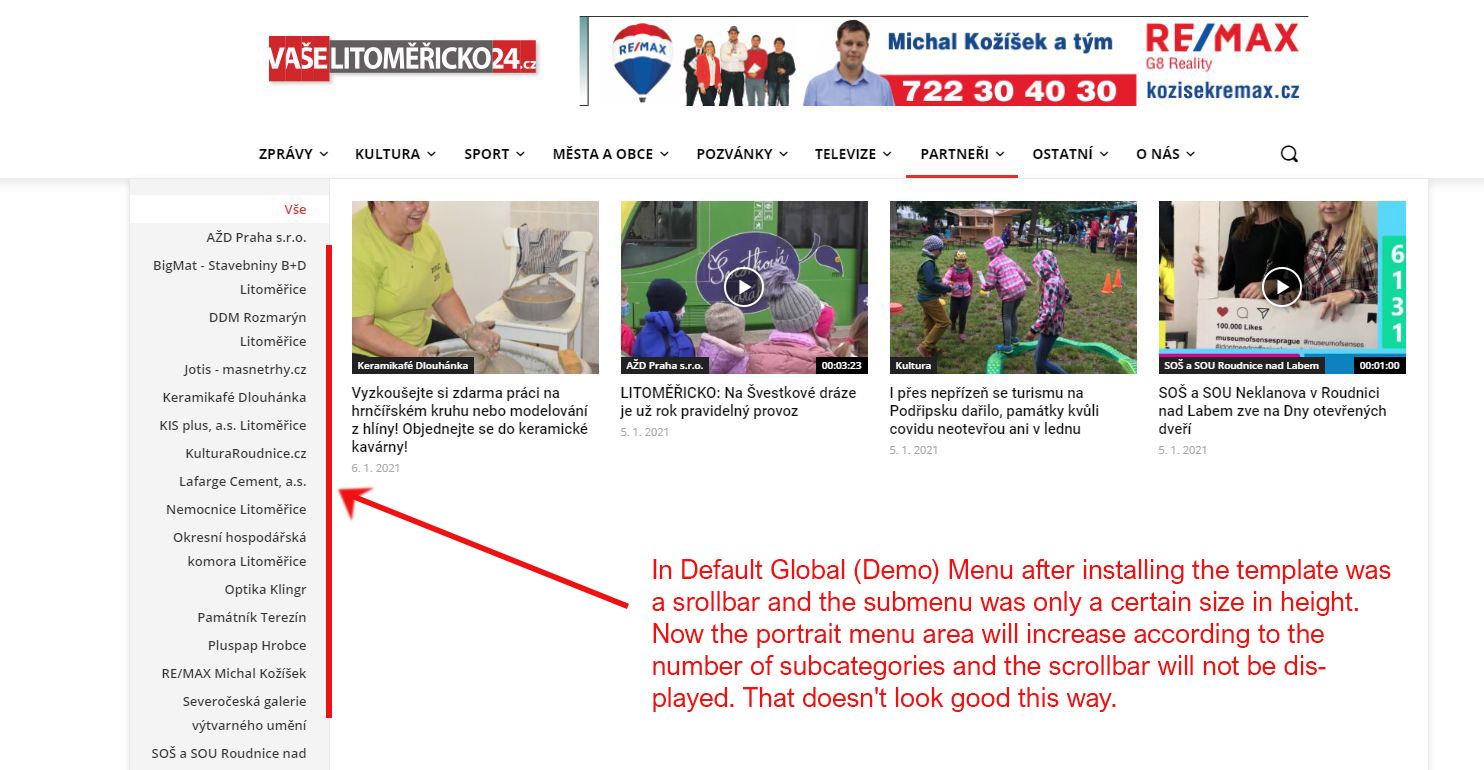
I’m sorry to react so late, but only now is my problem really current. The point is that after setting my own form of the header from the cloud, the scrollbar disappeared from the Mega menu.
In Default Global (Demo) Menu after installing the template was a srollbar and the submenu was only a certain size in height. Now the portrait menu area will increase according to the number of subcategories and the scrollbar will not be displayed. That doesn’t look good this way. My web: https://litomericko24.cz/
Anamaria Hello,
tagDiv Composer is a page and cloud builder, it can be used only for pages and cloud templates, therefore you can use it on a single post template from tagDiv cloud library to adjust the layout, but not to write the post content, for this, you need to use the WordPress editor.
You can edit the page with TD Composer in WordPress->Pages => https://www.screencast.com/t/AMOjYCA7Q7p, or in front side.
Thank you!
 FietsersbondHZ
 I had this issue and in my case it was the rocket loader plugin in my cloudflare account that was blocking it, as soon as I disabled it I could edit again.
 Mark Gilbert
I think it’s possible to alter an author page like this – https://jazzjournal.co.uk/author/dave-jones/ – using a cloud template. Can you give me a link to such a template? I want a bigger picture, different font and size and paragraphing. Or is possible to give me code to make these changes in the existing deflate template?
Thanks
Mark Gilbert
Anamaria Hello,
When this message appears “ Errors at columns: 1(models) : 0(dom). The model does not match the content Current state has involved an issue. You could try an UNDO operation (CTRL+Z / CTRL+SHIFT+Z)” then indeed it is a problem, most of the time the problem is from a code that is not compatible with our theme, therefore after you set it with tagDiv Composer and save the page/cloud template, the next time when you try to edit it, you’ll get that error. Please remove the code and see if the problem persists.
We have a guide for how to investigate this problem and fix it -> https://forum.tagdiv.com/tagdiv-composer-not-working/
You can try to add your code in Theme Panel -> Analytics/JS Codes => https://www.screencast.com/t/nou4AMaBhSMn
Also, you can use the cloud templates for header and footer, whence you can import one, and with tagDiv Composer, you can edit and style it as you wish.
Let us know about your results!
Thank you!
 adrian_van_hal
Hello,
I have I think imported a template from the cloud. Most posts are for mobile view same as for desktop, responsive. However, I have one type of post that shows a mobile template, only for this type. How can I delete this template and make that system shows desktop template also on mobile view? When I click in front end on edit with tagdiv composer i see in left corner: single [name] edit title edit mobile template.
I ve checked. There is only for this post a mobile template. Can I just delete it? – without disturbing desktop template?
Many thanks,
Adrian
Anamaria Hello,
tagDiv Composer is a page and cloud builder, it can be used only for pages and cloud templates, therefore you can use it on a single post template from tagDiv cloud library to adjust the layout, but not to write the post content, for this, you need to use the WordPress editor.
You can edit the page with TD Composer in WordPress->Pages => https://www.screencast.com/t/AMOjYCA7Q7p, or in front side.
You can set a different single post template for each post if you want. Please check this guide for single post template: https://forum.tagdiv.com/design-post-pages-using-cloud-library-templates/
Thank you!
Anamaria Hello,
I’m sorry for the misunderstanding, you are referring to the mobile page.
First, you need to change the mobile page from Homepage/Pages to “No mobile page”, like this => https://www.screencast.com/t/JAK83XBAphN and also for Templates you need to set on “No mobile template”, like this => https://www.screencast.com/t/lkpRKtrzy4N .
After these settings, you can remove the mobile templates and mobile pages.
To remove the mobile pages you need to go in WordPress -> Pages -> select the filter SELECT ALL TYPE on Mobile and apply filter => https://www.screencast.com/t/cdcpsi3AnsSl, and to delete the mobile templates go in Cloud Templates -> select the filter SELECT ALL TYPE on Mobile and apply filter => https://www.screencast.com/t/vJaLJ8SKer0.
Hope this helps you!
Thank you!
Anamaria Hello,
If you want to use the “Time ago format”, it can be use only for the posts and not for blocks, you need to use a single post template from tagDiv Cloud Library and edit it with tagDiv Composer click on single post date and enable the “Time ago format” -> https://www.screencast.com/t/HcjkFySnV
Hope this helps you!
Thank you!
 irmankarim
Hi! I am using various cloud library layout for different pages. And I like one of the hover effect which is the wiping shine effect: https://sunrider.blog/home-new/ (on the Recommended Articles for You section). Is it possible for me to apply the same hover effect for the other layouts?
Please advise and thank you in advance!
 Piotrk87
 To be specific on what I want to remove: https://ibb.co/Z2PF246
You call it mobile template.
Now from what I see this template is creates a new entry in Cloud Templates Tab in Wordpres Dashboard. See: https://ibb.co/KLbd5Q4
Now, how can I remove this template without negatively affecting my website?
I see no point in disabling plugins and checking which plugin causes the issue. I need all of my additional plugins. Unless you know which plugins cause the problem in general and how to avoid them, I don’t want to play with them at this stage.

