
- NewspaperHow to Use tagDiv Cloud Library
- NewspaperCloud Library Templates
- NewspaperCloud Library – Category Templates
- NewspaperDesign your Post Pages using the Cloud Library Templates
- NewspapertagDiv Cloud Library Plugin
- NewspaperCloudflare (CDN)
- NewspaperSingle External Shortcode and External Shortcode
- NewspaperSearch setup for custom post type
- NewspapertagDiv Composer – Website Manager
- NewspaperFlex Block Builder and Flex Loop Builder
- NewspaperModules Builder in Newspaper Theme
- NewspaperIntroduction to CPT and ACF with Newspaper Theme
- NewspaperCreate a frontend submission form
- NewspaperFilters and sorting for taxonomies
- NewspaperUser review system
- NewspaperHow to use the Google Maps API
- NewspaperWooCommerce: Happy “Add to Favorites!”
- NewspaperHow to insert a block inside the content of a post
- NewspaperHow to setup the Contact Page
- NewspaperPosts Loop Element
 advanco_pex
 Thank you very much for your answer.
I looked at the manual, but didn’t find a way to get a CPT with the possibility to use the TD Composer. The link to the composer is not displayed.
I added a Cloud Template. How do I assign to my Custom Post Type “Magazines”? I want to separate normal Posts and Custom Post Types.
Regards
 Simion C.
 I did some testing and it seems it doesn’t work that way currently, I was wrong. Even if a cloud template and the modified date elements is used, the theme will still output both the datepublished and the datemodified metas. Google will pick either one in most cases, from what I can find online it is random. I believe this is supposed to happen, because it is better to have them both
– https://support.google.com/webmasters/answer/9253249?hl=en
Even Yoast loads both metas by default, and they could only be removed with code and not by a setting in the plugin
– https://github.com/Yoast/wordpress-seo/issues/12707
If you want to remove the datepublished and see what happens, the only option is to remove it from the theme code, for default templates in the location mentioned in the screenshot (still possible through a child theme at the moment, might change in future updates). If you also use Yoast, try the code from the topic provided above.
However note that this might result is errors with the structured data
– https://support.google.com/webmasters/forum/AAAA2Jdx3sUYLyTQhbwrSo/
– https://stackoverflow.com/questions/31549422/getting-headline-and-datepublished-required-and-missing-errror-in-blogger
– https://www.bloggerspice.com/2015/12/how-to-fix-post-update-error-from-your-Blogger-template.html
 Calin
Calin Hi,
The php file for mega menu is in wp-content/plugins/td-cloud-library/shortcodes/header/tdb_header_mega_menu.php
Hope this will help you!
Thanks.
 mario118
 I was playing around with the cloud header templates and your suggestion, but the other headers still crop the images too much.
Question – I am trying to use this header because I really like it:
https://cloud.tagdiv.com/header-template-27/?edit_url=null
1.) How do I change the turquoise colored area to another color? The part that says “Express delivery etc. etc.” I can change the text but I can’t figure out how to change the actual color of it.
1.1) As a side inquiry – how can you remove that part of the header altogether and replace it with a small shadow to give the header an accent?
2.) How can I add a solid background color to the top menu header part where it says “contact us, work with us..etc.etc” I want to make the entire top header (full width of the site) red and the text/social icons white.

 willkar
Hello. I would like to know if it is possible for anybody to guide me to some changes i want to make.
How can i make a custom post (examples : games) and use the Div Composer and Cloud on it?
Thanks on advance.
 Palermoviva
Hi, the theme is beautiful, but every time we want to install the required plugins, we get an error response. We have to load it from the outside. Even the cloud library plugin gives us the same problem and when we try to add a model it tells us: “Failed to contact the templates API server”.
How to solve the problem?
Thank you.
mario118 But the theme crops the image this way because it’s coded to do so, correct?
So if I had custom development done on the theme to remove or change that code, this could be a solution as well, correct?
Everytime I try using a cloud template for anything the CSS always comes in broken.
Also, how do I get rid of latest articles like at the bottom of my homepage http://www.vettoc.com so that I can use a different module to load better thumbnail sizes?
Keep in mind, I’m using the Bakery page/post editor not themediv editor. Is this an issue?
 adnaner99
 Some little problems I faced that relate to the mobile experience:
– How can I configure ad sizes of mobile devices? I do make modifications on the ads section from the panel but no result.
– How can I get rid of a sticky ad that appears when I scroll down on mobile, I want to disable it because it is against AdSense policy perhaps.
– And lastly, how to minimize the space between the custom ad I created and the next and back buttons -see my page below for reference.
The template I used from the cloud is:
https://thastory.com/tdb_templates/single-post-template-1
For context here is my page:
https://thastory.com/top-5-exercises-every-woman-must-do-for-her-dream-body/2/
Thank you so so much!! and sorry for being silly
 BruceInLouisville
I’ve d/l and tried using some of the cloud templates. They are really well-done and tasteful, and I look forward to making full use of them.
However, I have a couple of questions:
1. Is there a reason some of them will work, and others won’t? I tried applying Single Post Template 35 to an existing post, and all I got was a black screen under the header. Other templates seem to work as designed.
2. Do the templates honor the settings in the theme panel? For example, I have social sharing turned off (I use a different plugin for that). I also have Previous/Next and Related Articles turned off, and yet all of these elements show up if I apply a template. Do I have to edit the templates individually to remove them?
Thanks for your help. Newspaper is still head-and-shoulders above other themes.
 fabienpomies
Hello,
I am looking to make changes in the menu of my site. When I scroll, a sticky menu appears. Except I can’t change it. It displays Newspaper and the footer menu. I would like to change newpaper to Toulouse Infos and replace the footer menu with the main menu.
For information, I created my header with “tagdiv composer” in the “cloud templates”.
This is my website: https://www.toulouseinfos.site
Translated with http://www.DeepL.com/Translator
 namtv
namtv Yes, thank you, I see. I have another question: I go to “Cloud Templates” shows only one cloud template, although I have two of them.
On “Used On” writes an error:
On the site there were problems of a technical nature. Please check your administrator email Inbox for further instructions.
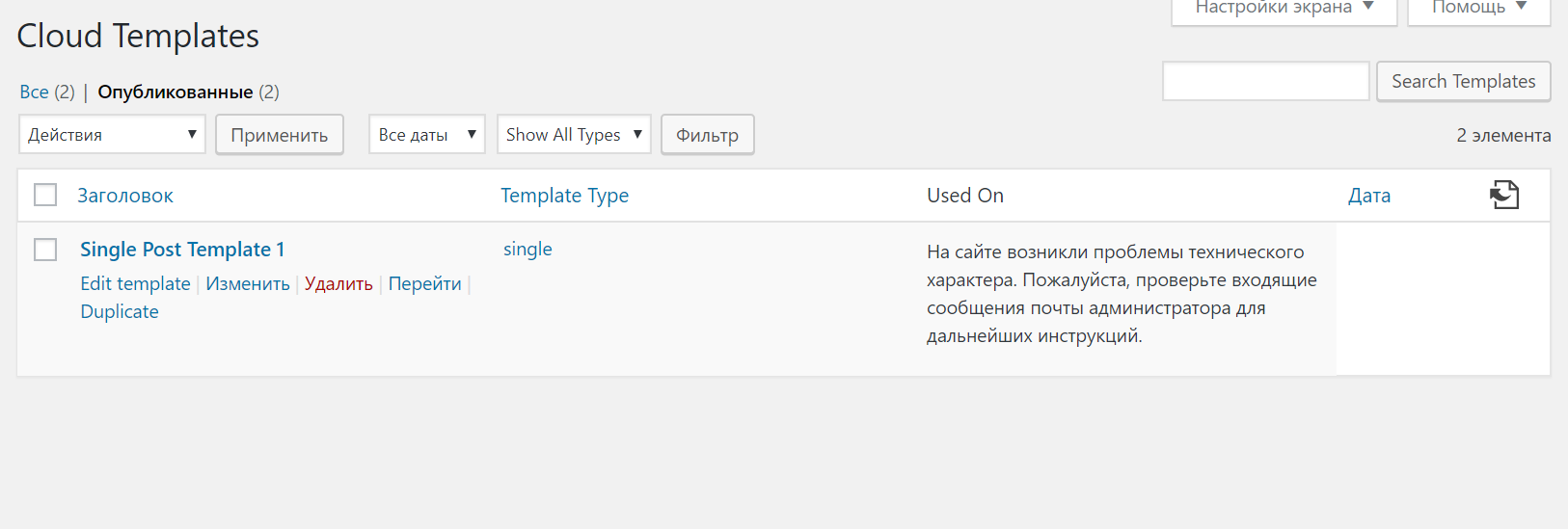
Simion C. Hi,
That error in some cases is related to content entered in pages/cloud templates that is not part of the composer, like custom code or various plugin shortcodes for example.
Or it can be caused by plugins – https://forum.tagdiv.com/tagdiv-composer-not-working/
Thanks
 Vlad S
 Hello !
You can achieve by using the tagDiv Composer, selecting the row you want to stretch and select the stretch method you want like here: https://www.screencast.com/t/yVyvk8yTQCCO And for the header you can do it here: https://www.screencast.com/t/xf56tQN0. In order to stretch post pages you will have to add a template from the cloud templates to it and then modify it.
Thank you !
 zebal
zebal Really interesting cloud post!! All my post are simples. Is it possible to create a Cloud post and apply to my posted articles? could negatively affect SEO?
In case that I prefer delete the datepublished meta, It would be work fine only deleting the lines that you told me?
Thanks ins advance
Simion C. Cloud post templates are templates that can be created with the tagDiv composer, here are some templates designed by us – https://cloud.tagdiv.com/#/load/Single
You can also design your own. These will be available when the cloud library plugin is installed and active
– https://forum.tagdiv.com/tagdiv-cloud-library-plugin/
If you however want to remove the datepublished meta from the theme, this can only be done if you remove it from the code – http://prntscr.com/nrcl7i
Simion C. Hi,
All the theme modules have a specific thumbnail size that they will use, including the module used for the mega-menu
– https://forum.tagdiv.com/theme-thumbs/
The theme will always crop the images, they will be cropped center top
– https://forum.tagdiv.com/featured-image/
Maybe you can consider using a cloud header template
– https://cloud.tagdiv.com/#/load/Headers
Using a cloud header there are options for the mega-menu for the images, so you can load a bigger thumbnail and adjust it – http://prntscr.com/nrabgc – http://prntscr.com/nrab81
In pages you can use flex blocks and flex grids, these have the same options for the images, so you can adjust them there as well if needed. As opposed to predefined blocks the flex blocks have many settings in terms of layout, we created some designs here (these can be imported with the cloud library plugin) – https://cloud.tagdiv.com/#/load/Blocks
As a note, please don’t bump the post. This will only refresh the topic date and move it to the back of the line. We reply from oldest to newest at all times.
Thanks
Simion C. Hi,
The loop files are now in the composer plugin, as in the screenshot from above. You could edit the ones you want and enter the code there, but I should note that when the theme and plugins are updated the code would have to be entered again.
An exception is the default post template which remained in the theme and can still be edited in a child theme
– http://prntscr.com/nr8qm4
Instead of this maybe try using a cloud post template. Enter the plugin shortcode directly in the template while editing with the composer.
If you use the ratings plugin try t like here – https://forum.tagdiv.com/topic/how-to-edit-post-template-in-version-9-7-1/
Vlad S Hello !
In order to change the header colors for stock colors you can select them here: https://www.screencast.com/t/d0Qos2WJ
If you have cloud template header you will have to select the Header Manager from the tagDiv Composer
Thank you !
Simion C. Using default predefined post templates and category templates, the smart sidebar (when the setting is enabled in the theme panel) will apply to both.
If you don’t want a sticky sidebar in category pages, you could use a cloud category template, here are some examples – https://cloud.tagdiv.com/#/load/Category
A cloud category template can be imported (and modified if needed) or designed from blank.
In a cloud templates or pages you can choose if you want a sticky column or not
– http://prntscr.com/nr8k3m
So regardless of the general smart sidebar option being active, you can configure the template sidebar column to not be sticky.
zebal Hi Simion,
I don’t know what is the cloud post templates. But anyway I found a plugin to do what I want (remove datePublished from google resultsand show only the dateModified).
But to do it, I need to delete the datePublished from the schema markup.
How can I do this?
Thanks
namtvHi. I can’t install the template – Cloud Library – Single(57). Some are available for installation that I need, no.


Calin Hi,
Unfortunately the infinite load can be achieve only using tagDiv Composer and tagDiv Cloud Library.
Thank you!
Simion C. Hi,
So only in posts? You could use a cloud post template, and place an ad box element in the position you want (also stretch the row containing it if needed)
– https://cloud.tagdiv.com/#/load/Single
Then apply that cloud post template to the posts. This would be a solution to display larger ads.
Thanks
Calin Hi,
I do not know for sure if this will work or not, the ?tdb_action=tdb_ajax can be found in wp-content/plugins/td-cloud-library/includes/tdb_ajax.php
-> https://www.screencast.com/t/7400Q1uytj
Thank you!
Simion C. Hi,
The theme now has a last modified date for posts, if you use cloud post templates
– http://prntscr.com/nqygjo
The default publish date element should be removed, and the modified date entered in the post template. Google should pick this up eventually.
Thanks
