
- NewspapertagDiv Composer – Website Manager
- NewspaperWhen tagDiv Composer is Not Working
- NewsmagtagDiv Composer Tutorial
- TutorialsFrom WPBakery to tagDiv Composer
- NewspapertagDiv Composer Tutorial
- NewsmagHow to use the Visual Composer plugin
- NewspaperScroll Animation
- NewspaperSingle External Shortcode and External Shortcode
- NewspaperCredit System
- NewspaperBookmark – Save For Later
- NewspaperFlex Block Builder and Flex Loop Builder
- NewspaperModules Builder in Newspaper Theme
- NewspaperIntroduction to CPT and ACF with Newspaper Theme
- NewspaperCreate a frontend submission form
- NewspaperHow to Use the Tabbed Content shortcode
- NewspaperCreate a form contact page
- NewspaperFilters and sorting for taxonomies
- NewspaperUser review system
- NewspaperCustom Fields Support
- NewspaperWooCommerce: Happy “Add to Favorites!”
 Catalin
 Hello T2N,
I have checked your website and I saw in the bottom of the page that your two columns seem to work as properly. Please notice that the only way in this regard is using the two columns from TCM Editor from panel, like this -> http://screencast.com/t/ASG8XS45m Please try to remove all your untested plugins if you are using something like that and leave just Visual Composer and the plugins that come bundled with our theme, clear all the caches and check the results.
If you need more assistance in this regard, please provide more details about your problem because I did not saw at the moment!
Thanks for your understanding!
 Andrei L.
 HI
Please make sure that the smar sidebar is enabled in theme panel > template settings: http://screencast.com/t/QQmMq2nUVDu also try to deactivate all plugin except Visual Composer, clear all caches then test the site again.
If you still can’t mange to solve this please provide your site url so we can have a closer look.
Thanks!
 Bogdan B.
 Hi,
Please disable all plugins except visual composer, clear cache and reset cdn files if you use it. Then check article inline ads again. Please note that smart lists will ignore article inline ads and if you use the mkobile theme, you must use these ad spots: http://screencast.com/t/at9XiAXGo
Let us know if you still have trouble with ads and if you do please contact us via email at contact@tagdiv.com and provide qp-admin so we can login and investigate the issue. please also include a link to this topic.
Thank you!
Bogdan B
Bogdan B. Hello,
The ajax dropdown on categories or the live search are not elements available in visual composer. Our custom search was not created with this in mind. and it cannot be moved to another section of the site. sorry.
Thanks.
Andrei L. Hi
Try to deactivate all plugins except Visual Composer, deactivate the child theme, clear all caches, purge cdn files if you’re using then test the site again.
Let us know how it goes and if you still can’t mange to solve this please provide a link where you’re using page-builder+title so we can inspect this closer.
Thanks!
Catalin Hello kreativewire,
Please ensure that you do not need to any additional license for our product. All of the plugins which come bundled with our theme, include the own license and you must not buy anything. So, first of all, please ensure that you are using the latest version of the theme with the latest version of required plugins in order to achieve best results. Very important in this case is that you theme installing should have to be done using the FTP method because this is the surest method in this regard. For more information, please chek here -> https://forum.tagdiv.com/how-to-update-visual-composer-plugin/ -> https://forum.tagdiv.com/how-to-use-visual-composer/ -> https://forum.tagdiv.com/install-via-ftp/
Hope this helps and let us know how it goes!
Thanks for your understanding!
 eizaz
eizazHi. I would like to make a static page for my homepage. Im using Newspaper theme. However, when i want to make it at the new page, I could not click on the layout that I want. It keeps loading and does not appear at the visual composer. I have watch the tutorial but seems I could not load the layout.Is there any ways I can fix this problems? Thanks
 Nano
NanoHave a look at one of the ajax filtered design here:

This appears to be a common design whenever I select any ajax filters on any Visual Composer elements. But It looks ugly.
First thing that I want to do is to change the fonts of these ajax filters texts, change the color and make all letters CAPITAL.
Also, if there are any ways to change the animation.
Please help. Thank you
 quizyourfriends
I am using newspaper for a youtube feed blog and I love the behavior of actually showing the video you can play (instead of a thumbnail) in post template M15 (td_module_15) however I can not find this same behavior in any page content in the visual composer. Can you help so that the embedded youtube videos are playable in pages that list the most popular etc.
 Equapio
Hi
i want to display an overview of all categories and sub-categories of my page like this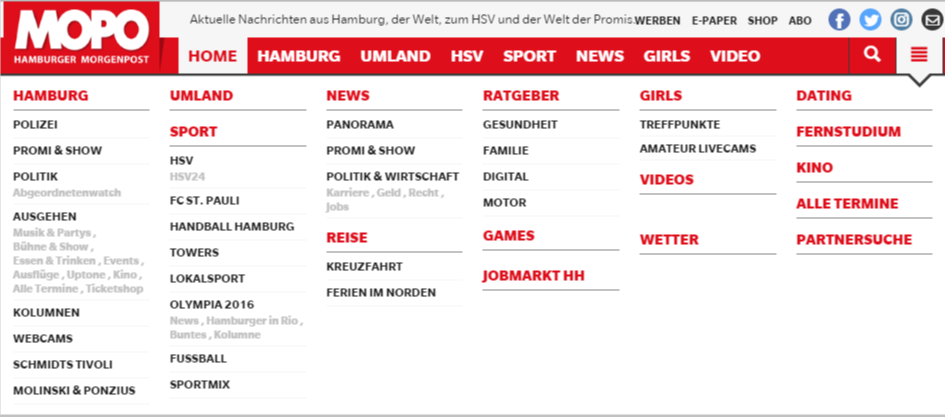 in the main menu under the 3 bar icon.
It looks good and correct on the main page but as soon as you view (click on) the nav icon from a different page or post the overview is displayed from top to bottom instead of next to each other like this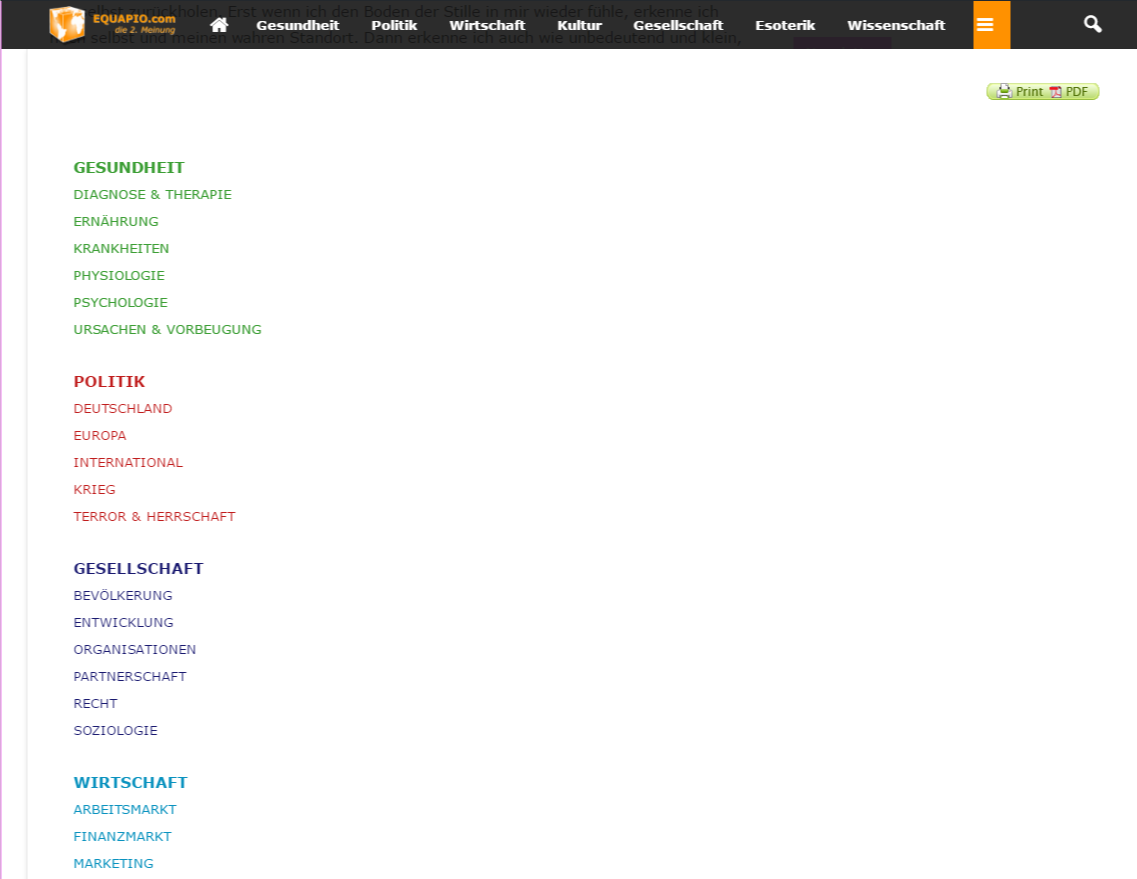 without being able to scroll.
I created the page with the visual composer using a blue layout (3 columns). Why does it work on my homepage and not on other pages and posts?
i actually like to have 6 columns like in the example pic and since you recommend not to use other layouts i tried it with a table. But the table won’t show proberly either.
Any advice how to get it done as in the example pic showing correctly on all pages and posts?
Help is much appreciated!
Thanks in advance
 nandakishorkn
I see a dropdown Ajax search box in the header section next to menu which works as expected.
However, Using Visual Composer I don’t see a ‘drop down Ajax search box’ as an element to be added to a page.
Can you guide me to add a dropdown Ajax search box (or live search) as an element inside a complete row using Visual Composer ?
Appreciate your help in advance.
Thanks.
 kreativewire
 My visual composer says:
In order to receive all benefits of Visual Composer you need to activate your copy of plugin. By activating Visual Composer license you will unlock premium options – direct plugin updates and access to official support.
if I click activate it says no license. I have a theme I purchased from someone else for another website and that visual composer is activated and I can see the + and blocks, etc.
 Carmelo Nicolosi
 Tnx a lot…now all is ok
I write solution for other people:
1) Delete theme folder (newsmag)
2) Upload last theme folder version
3) Delete plugin’s folders (only plugins inside theme)
4) Upload plugin’s folders new version (only plugins inside theme)
5) Deactivate all plugins except “Visual Composer”
6) Delete Cache
7) Reactivate every plugin (onebyone) to discover wich one creates problem (in my case was Eventon)
8) Activate all plugin except wich one creates problem.
9) Control if there is an update for this plugin and in case update it and activate it
Andrei L. Hi
There is no option in this regard for post grid element from Visual Composer, sorry. To achieve a similar result are required some customization in plugins files and also many tests.
This is a complex task which involve many customization in order to be achieved.
We can’t offer speed customization services at the moment so if really need this and you’re not aware of the steps you need to take in this regard please consider hiring a developer or a freelancer to do this for you.
Thanks!
Andrei L. Hi
Try to deactivate all plugins except Visual Composer then check if the problem is still there. It may be an issue caused by one of the plugin installed on your wordpress but I can’t say for sure which is the cause. Meanwhile you can use this code to fix the issue with the button: http://screencast.com/t/z8clXsIWHWmr
.wpb_animate_when_almost_visible {

    opacity: 1;

}
Thanks!
Bogdan B. Hello,
You can first try to disable all plugins except visual composer, clear cache and rest cdn files if you use it. This will rule out a plugin conflict. Not all plugins work with our theme. If you have a child theme, make sure you switch to the main theme to see if there is no custom code in there affecting the front-end.
let us know how it goes.
Thank you!
Catalin Hello seifdine,
Please try to disable all the active plugins, leave just Visual Composer to active, clear all your caches and install only the plugins that come bundled with the theme and rule out the conflicting pluigns. Also, please try to clear the server cache if you have it or if you do not know about this, please request to your hosting provider. Also, if you are using the CDN system, purge all the files and test it again. Usually, these types of problems come from these causes.
Hope this helps and let us know how it goes!
Thanks for your understanding!
Bogdan B. Hello,
The colors should work as expected. Please check other settings in the theme panel and see if they also do not work.
If you use wordfence, please set the firewall to learning mode. If you don;t please disable all plugins except visual composer, clear cache and reset cdn files if you use it. Also if you use a child theme, please switch to the main theme to rule out any custom code affecting the theme panel.
Let us know how it goes.
Thank you!
 nycinsider
 Exactly how do you comment out code? Is this it? Please don’t screenshot – send me something I can copy and paste. Thanks.
<?php // the_content(Continue Reading…); ?>
private $allowed_plugins = array(
‘bbpress/bbpress.php’,
‘contact-form-7/wp-contact-form-7.php’,
‘jetpack/jetpack.php’,
‘js_composer/js_composer.php’,
‘td-speed-booster/td-speed-booster.php’,
‘font-awesome-4-menus/n9m-font-awesome-4.php’,
‘wordpress-seo/wp-seo.php’,
‘wp-user-avatar/wp-user-avatar.php’,
‘td-social-counter/td-social-counter.php’,
‘wp-super-cache/wp-cache.php’,
‘woocommerce/woocommerce.php’,
‘td-mobile-plugin/td-mobile-plugin.php’,
);
 WebK
WebK Thank you..
I discovered why the BLOCK 1 was not displaying correctly and that was due to one of the Visual Composer ROW SETTINGS on the home page ( disable row ) was ticket and that was somehow causing issues to the block 1 which was on another row..
Bogdan B. Hello,
Please disable all plugins except visual composer, clear cache and reset cdn files if you use it. Also if you have a child theme, try to switch to the main theme to see if the problem does not originate from there.
Let us know how it goes.
Thank you!
 Radu
Radu Hi Chris,
That field is used by tagDiv composer to mark pages that are manually modified in tinyMCE. We show a warning when a page is modified manually or with visual composer. It’s name is inspired by https://en.wikipedia.org/wiki/Dirty_bit 🙂
btw the new version of tagDiv composer (v1.0-beta.4) should work better with Newsmag. It is not yet live but I will release it today: https://github.com/tagDiv/td-composer/releases
Bogdan B. Hello,
The license has nothing to do with it. Visual composer supports full width elements but there is a catch. Our theme elements cannot be used in a full width layout. You can use a stretched row and select the stretch row and content feature but it will only work with visual composer default elements, not our theme;s blocks and grids. In order to identify the visual composer elements and separate them from the theme elements you can simply enable a wp default theme so there will be no theme elements present in visual composer. You can reactivate tht ehtme once you complete your landing page. our theme elements were not designed to work in full screen. Our theme was built on a fixed width and all of the theme elements depend on this width.
i hope this helps.
Thank you!
Bogdan B. Hello,
Please disable all plugins except visual composer. clear cache and reset cnd files if you use it. Also if you have wordfence please set the firewall on learning mode as it will affect the theme panel even if the plugin is disabled.
let us know how it goes.
Thank you!
 Tech Lifestyle
 I just did the following: I have set up a banner through the visual composer as an element only to the home page. banner is linking properly.
More and more I think that the problem is Visual Composer ???
