
- NewspapertagDiv Composer – Website Manager
- NewspaperWhen tagDiv Composer is Not Working
- NewspapertagDiv Composer Tutorial
- NewspaperScroll Animation
- NewspaperSingle External Shortcode and External Shortcode
- NewspaperCredit System
- NewspaperBookmark – Save For Later
- NewspaperFlex Block Builder and Flex Loop Builder
- NewspaperModules Builder in Newspaper Theme
- NewspaperIntroduction to CPT and ACF with Newspaper Theme
- NewspaperCreate a frontend submission form
- NewspaperHow to Use the Tabbed Content shortcode
- NewspaperCreate a form contact page
- NewspaperFilters and sorting for taxonomies
- NewspaperUser review system
- NewspaperCustom Fields Support
- NewspaperWooCommerce: Happy “Add to Favorites!”
- NewspaperWoo Brands
- NewspaperModal Popup
- NewspaperShortcodes
 Anamaria
 Hi,
Please try the suggestion from here https://forum.tagdiv.com/topic/tagdiv-composer-plugin-error/#post-495071
Thank you!
Anamaria Hello,
You need to edit the post with tagDiv Composer => https://www.screencast.com/t/jHatJGC1qRf, for example, select the Single Post Views => https://www.screencast.com/t/NhUGCRfI and with right-click, you can delete it.
Also, you can delete other elements.
Thank you!
 Calin
Calin Hello,
The tagDiv Cloud Library is a special plugin provided for cloud templates that can be edited using tagDiv Composer and it’s available on for Newspaper theme.
Thank you!
 candc
candc Hello,
Thank you for your response.
Unfortunately, creating a new page with the tagDiv Composer did not work as expected. Is there a way to create a new page directly in tagDiv Composer without going through the WordPress standard page editing interface?
When I create a new page, I usually transition from the WordPress block editor’s new page editing screen to the tagDiv Composer by clicking the blue button. The header and footer are already created and are visible in the tagDiv Composer. Even without adding any content, if I save the page, set it as the front-page, and then attempt to re-edit it, the same error message appears.
As I mentioned in my initial query, the issue persists even when creating the front-page from a Cloud Template. How can this be resolved?
I am not using the Classic Editor plugin or the Disable Gutenberg plugin.
Thank you for your assistance.
 rajushrestha2005
Our site https://www.zapyard.com/ is having issue. tagDiv Composer plugin is giving the below error. Please help resolve it.
Version 4.5 | built on 09.11.2023 13:19 | By tagDiv | Visit plugin site
This plugin failed to load properly and is paused during recovery mode.
An error of type E_ERROR was caused in line 771 of the file /home3/sapyardc/public_html/wp-content/plugins/td-composer/legacy/common/wp_booster/td_global.php. Error message: Uncaught Error: Class ‘tdc_state’ not found in /home3/sapyardc/public_html/wp-content/plugins/td-composer/legacy/common/wp_booster/td_global.php:771 Stack trace: #0 /home3/sapyardc/public_html/wp-content/plugins/td-composer/legacy/common/wp_booster/td_util.php(2802): td_global::td_generate_unique_id() #1 /home3/sapyardc/public_html/wp-content/plugins/td-composer/legacy/common/wp_booster/td_api.php(37): td_util::error(‘/home3/sapyardc…’, ‘td_api_base: A …’, Array) #2 /home3/sapyardc/public_html/wp-content/plugins/td-composer/legacy/common/wp_booster/td_api.php(1273): td_api_base::add_component(‘td_api_module’, ‘td_module_mega_…’, Array) #3 /home3/sapyardc/public_html/wp-content/plugins/td-standard-pack/Newspaper/includes/tdsp_config.php(1802): td_api_module::add(‘td_module_mega_…’, Array) #4 /home3/sapyardc/public_html/wp-includes/class-wp-hook.php(324): tdsp_config::on_td_global_after_config(”) #5 /home3/sapyardc/public_html/wp-includes/class-wp-hook.php(348): WP_Hook->apply_filters(NULL, Array) #6 /
rajushrestha2005Our website https://www.zapyard.com/ has been down since Nov 9th 2023 update. Error “Error establishing a database connection”.
I think the plugin tagDiv Cloud Library is the culprit. As soon as we activate it, our site does not recognize the database. Also tagDiv Composer seems not working. As our website home page has bunch of tagDiv code showing up.
Can someone help?
 Webmamadou
Hello My Web site design Break after I Update my theme ( form 9 to 12 version) un-Page Builder: td-composer.
How can I solve it
 Mededgemea
Hi,
Some function are not working inTagdiv composer. It is not allowing to right click [to delete row ], Mobile view is not showing [ screenshot attached]
 sdfasdfsdf
Hi,
I have been using the Newspaper theme running a demo site for some time with no issues. I reset my site using a WP Reset plugin (use before with no issue) and switched to the Ridgemont Demo, since then the composer is so slow it is un-usable (5+ min load times).
The site itself seems to have no issues, passes health checks and on Page Speed Insights returned:
82 Performance
94 Accessibility
95 Best Practices
92 SEO
It seems to be an issue with the composer, if it eventually loads the undo and redo buttons have also gone missing.
I might’ve attributed this to the WP Reset plugin had I not used it successfully before, but seemingly something must be infinitely loading or duplicating for such significant delays to arise.
Any help would be most appreciated.
My site: https://gandermag.com
 samnash68
hi
im using the series plugin and I was wondering if the series taxemony and series categories work in the composer ??
 joviberton@gmail.com
 Hi
as you suggested
– I disable and delete the tagDiv Composer
– I reinstalled the plugin from Newsmag > plugins
The ‘error decoding the Instagram API json’ message is still on the page https://www.unamamma.it/ .
I can’t remove the connection from Instagram in the theme panel, because the click on the ‘remove’ button of the them panel is disabled.
Any other ideas?
Thanks for your support
j
 fra246fafa
Hi there, I’m trying to activate the NewsMag Cloud, but realizing that maybe Newsmag doesn’t have that option?
Just checking to see if I should have purchased NewsPaper theme instead. If there is, can you demo how to do that.
Thanks,
 chabotjeff
 What exactly is the tagdiv composer? Is it the entire left column section? Or does it include the header section as well (where the Edit templates options are)?
My website header is not working correctly and tagdiv elements stopped working yesterday.
In addition, the sidebar no longer shows up. Wondering if there was an update to the code to cause this.
 lacim.eth
 Try solution number 3, that helped me 🙂
https://forum.tagdiv.com/tagdiv-composer-not-working/
 miltonrodas
Hello,
I have reviewed https://forum.tagdiv.com/mega-menu/ and it is no help for this issue. Also read many support posts and nothing explains how to fix this. Please, help!
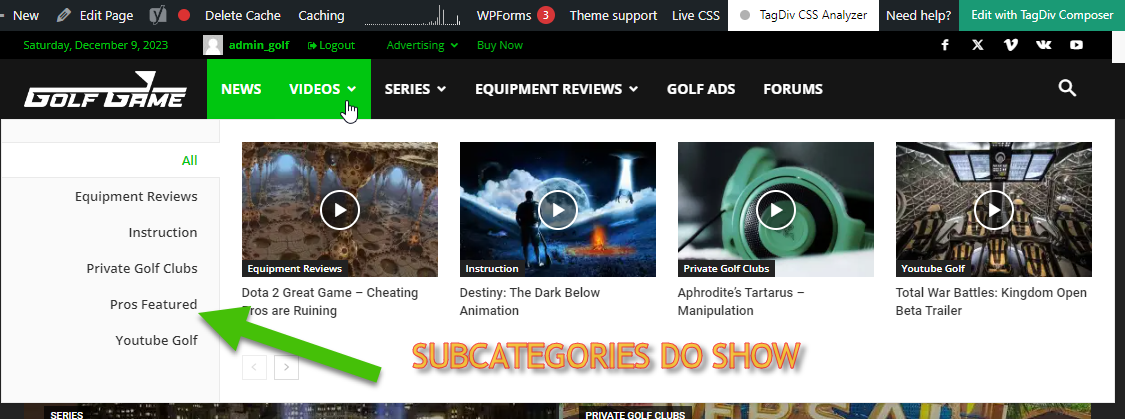
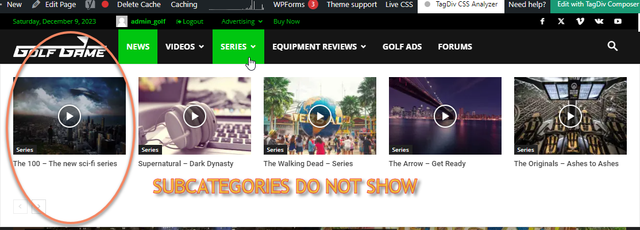
Basically, in building this new website, I like the Mega Menu drop downs. I have set Mega Menus to [parent] Categories that have Sub-Categories within them.
— There is nothing different about what was done. The process is exactly the same and it gives different results.
Is there a way to customize which drop-downs show Sub-Categories and which do not? How do I find this way, if it exists? Please, help! Thank you! (Btw, tried using Tagdiv composer and it said menus cannot be updated with it, just FYI)
 commandeleven
 Hello Bettina,
No, that was created using the WooCommerce shortcode and WordPress’s built-in editor.
That is why I said in my first email that when I use TagDiv Composer, it doesn’t display the payment options, but when I use WordPress’s built-in page editor, the payment options appear correctly.
The site is back online if you want to check the pages.
Regards,
Khalid
 contadmin
Hi,
I am unable to modify anything on the post and I don’t understand why? Could you please advise on the issue and how to solve it?
 justweb
Hi! My tagdiv composer stop loading, please help!
Already tried to deactivate all the plugins and still doesn´t work.
 RPECAdmin
 It’s the header login element placed with TagDiv Composer, and it’s enabled in the theme panel.
-
This reply was modified 2 years by
RPECAdmin.
 besthomegear
I have been experiencing multiple URLs blocked (not indexed) as shown in GSC. Here is a sample URL and you can see “Blocked by robots.txt – and the description of 13 reasons, with TD (Tagdiv) composer named. We have been working with developers trying to Reindex and validate URLs in GSC, but to no avail, finally, we stumbled on this notification when Testing the URL and clicking More Information in Search Console.
Please offer any suggestions to look at our Tagdiv settings in Cloud Library, or elsewhere in theme panel, to fix the settings, and allow us to resubmit all nonindexed or blocked URLs ASAP,
Thank you
Kevin
 BennySG
Hi, I’m trying to edit the content/labels within the Login/Register form (and associated forms too). The current form displays such text as ‘Sample Success Message’ – and I’m unable to locate where this can be modified. I’m assuming there is somewhere within TagDiv/Newspaper which allows me to update this? When I try and edit from the front end using the TagDiv composer, I notice it’s a shortcode. Which forms are used for this? Or am I required to create entirely new pages/forms for this?
Appreciate this is a relatively simple task, but I’ve spent >1 hour looking through the dashboard and searching google/these forums for help, but I’m unable to locate any resolutions to this issue. Thank you
 Bettina
 Hello Pratul!
You can change or adjust the blocks to display what you need in the tagdiv composer.
You can’t have the mobile theme layout on the desktop version.
The shop page seems to be the default one from Woocommerce, and the mobile version doesn’t load anymore. I suggest you use a cloud shop template from the TagDiv Shop plugin.
Thank you!
Bettina Hello @Nagarig !
I suggest you use a cloud header instead of a default one, so you can adjust it in the tagdiv composer.
Thank you!
Bettina Hello Pratul!
There is a 520 error from Cloudflare in your mobile shop. I can see that you have the mobile theme plugin installed on your homepage.
We have 3 options for mobile versions that you can use:
1. Responsive version: A responsive version of your website looks similar to the desktop version. TagDiv Composer is used to edit the page.Click on the mobile viewport: https://www.screencast.com/t/XDQJedlggSB. There, you can see your mobile version and edit or adjust the elements to look better.
2. Mobile pages: https://tagdiv.com/newspaper-10-3-7-update-brings-customizable-and-fast-mobile-pages
3. Mobile theme plugin: The Mobile Theme is a performance-optimized theme included in the main Newspaper theme that only loads on mobile devices. It comes with its own templates and designs for pages, posts, categories, etc., so your current templates from the desktop theme will get converted to the mobile theme layout. Please see https://forum.tagdiv.com/the-mobile-theme/ and https://forum.tagdiv.com/mobile-theme-introduction/ for more information.
A full explanation is here: https://www.youtube.com/watch?v=SpGkOnJeNZY
If you need to use mobile version 1 or 2, then you need to uninstall the Mobile Theme plugin and AMP.
Thank you!
Bettina Hello @iancollins!
If they are showing well in the tagdiv composer, then it should display the same on your website too.
Try to reindex your website and see the changes.
Thank you!
