
- NewspapertagDiv Composer – Website Manager
- NewspaperWhen tagDiv Composer is Not Working
- NewsmagtagDiv Composer Tutorial
- TutorialsFrom WPBakery to tagDiv Composer
- NewspapertagDiv Composer Tutorial
- NewsmagHow to use the Visual Composer plugin
- NewspaperScroll Animation
- NewspaperSingle External Shortcode and External Shortcode
- NewspaperCredit System
- NewspaperBookmark – Save For Later
- NewspaperFlex Block Builder and Flex Loop Builder
- NewspaperModules Builder in Newspaper Theme
- NewspaperIntroduction to CPT and ACF with Newspaper Theme
- NewspaperCreate a frontend submission form
- NewspaperHow to Use the Tabbed Content shortcode
- NewspaperCreate a form contact page
- NewspaperFilters and sorting for taxonomies
- NewspaperUser review system
- NewspaperCustom Fields Support
- NewspaperWooCommerce: Happy “Add to Favorites!”
 andreis
Hello,
On a clean install, I’ve beein importing Mintyside Pro templates and for one of them (the footer template) the TagDiv Composer is not active / available (template cannot be edited with TagDiv – however, at the time of import, I was able to do it). For all the other templates on the “Cloud Templates” tab, TagDiv Composer is working. How to solve it?
Thanks.
 DocMovies
Hello, I have created a single post template from the cloud templates option and selected it in a category for post layout under Theme Pannel => Categories => THE_CATEGORY => Post template selection option.
The template posts of the categories are showing in that template layout but when I edit the post as tagDiv Composer, that change is happening in all posts of the category.
Please let me know how to fix it?
 Anamaria
 Hi alohawithlove,
For use the tagDiv Composer you need to change the post page (set as blog) in Select from WordPress -> Settings -> Reading => https://www.screencast.com/t/MAynTW4Bam0.
After that, you need to create a new page(you can name it a blog) =>https://www.screencast.com/t/jB10hPU5Jk8c, where you add with tagDiv Composer a Posts Loops, which have the same structure as blog => https://www.screencast.com/t/xXbzitxm7XYR,
where you can change the settings.
Hope this helps you!
Thank you!
 Vlad S
 Hello !
Please make sure that your host plan is enough to run Newspaper Theme properly: https://forum.tagdiv.com/requirements-for-newspaper/
Also please look for a plugin conflict, that may cause tagDiv Composer to get overcrowded and make unnecessary requests.
Thank you !
Vlad S Hello !
Please send us a screenshot of your System Status Tab and make sure that all the requirements are met as you can see here: https://forum.tagdiv.com/requirements-for-newspaper/ ; You will have to first start looking for a plugin conflict. please deactivate ALL plugins except tagDiv ones, also if you are using child theme or cache plugin, deactivate them, clear all cache and try again.
Also you can try and remove and re-install the tagDiv Composer plugin.
Let us know the results.
Thank you !
Anamaria Hello,
tagDiv Composer is a page and cloud builder, it can be used only for pages and cloud templates, therefore you can use it on a single post template from tagDiv cloud library to adjust the layout, but not to write the post content, for this you need to use the WordPress editor.
You can edit the page with TD Composer in WordPress->Pages => https://www.screencast.com/t/AMOjYCA7Q7p, or in front side.
Thank you!
Vlad S Hello !
H1 is in your header logo, that can be changed as you can see here using tagDiv Composer: https://www.screencast.com/t/yuh2NqSgZ
Let us know the result !
Thank you !
 Bettina
 Hello!
The only way for having the more articles box is to add “Flex Block 1” element with TagDiv Composer. Apply a filter into the element like this: https://www.screencast.com/t/LzmlAPPO ; select the row and add these settings like in this screenshot: https://www.screencast.com/t/MrmnTfQs7Gf
After this, you will have more articles box sticky at the bottom of the page, but then you need to customize the design by yourself.
Hope that helps you!
Thank you!
Bettina Hello!
Please try to re-install the theme & TagDiv Composer plugin, also check our guide from here: https://forum.tagdiv.com/newspaper-theme-documentation/
If this problem is not solved, then please contact us via email at contact@tagdiv.com and provide the following:
– admin url and credentials
– A link to this topic in order to identify you
Our team will take a look!
Thank you!
Bettina Hello!
You can not edit default Mobile Theme plugin, but you can create mobile pages with TagDiv Composer.
For example, you can create/import mobile templates for categories like in this screenshot: https://www.screencast.com/t/vXLQHrutRh
Hope that helps you!
Thank you!
Anamaria Hi,
You can set the main menu to be a sticky menu from Theme Panel-> Header -> Main Menu => https://www.screencast.com/t/ShRFfKhm81,
or if you have a Pro Prebuilt Website you can set with tagDiv Composer in Manager, you can enable the sticky menu on desktop or only on mobile = > https://www.screencast.com/t/YTp5YZqel.
Hope this helps you!
Thank you!
 erickimani
 Thanks. Had to increase the memory but now there is anotehr problem there. I had posted it elsewhere before you replied. Its here
https://forum.tagdiv.com/topic/tagdiv-composer-plugin-exceeding-memory-limit/
Bettina Hello!
You can achieve this by editing the post with TagDiv Composer, select the Single Post Content element and you can change the font from there.
Hope that helps you!
Thank you!
Bettina Hello!
Please edit the homepage with TagDiv Composer, add a “Posts Loop” element and you will get the latest articles.
Let me know about your results!
Thank you!
Bettina Hello!
That option which you are speaking about it is for default templates only, and for cloud templates(PRO templates) you can edit that element with TagDiv Composer. So, in the end you don’t need those theme panel options.
Thank you!
Vlad S Hello !
My suggestion would be to install the new pro demo, uninstall the Standard pack plugin. You will see that all the elements in the composer that were using the old code will show up as text, all those have to be removed. We recommend you to use the flex blocks which are way more customizable in the tagDiv composer.
Thank you !
 vdaatland
 Wow, that is awesome news. Especially the ability to mass-edit pages via templates with Tagdiv composer would be a dream come true, save a lot of time/money and add to flexibility.
Stay safe. Wish you all the best 🙂
 Calin
Calin Hi,
This situation appear if you make update to last version of WordPress 5.6, then the button for composer is remove from Gutenberg, but the pages still can be edited from frontend or from pages -> https://i.imgur.com/7LgjYE1.png
Also if you set the classic editor then the button will be set back.
Thank you!
Vlad S Hello !
All the cloud templates were created using tagDiv composer and tagDiv Composer has been built around them. Without using tagDiv Composer and Cloud library you will have theme panel options and templates. In my opinion it would be a waste to not use the templates. WP Bakery unfortunately does not work with the cloud templates and also does not have any templates.
You can use normal templates as you can see here: https://www.screencast.com/t/qVtbEIU2kH4 You will be able to customize this only using the theme panel and you will not use TagDiv Composer, this meaning that your customization options would be reduced and you will have to custom code a lot of changes.
We are able to offer you a refund if you make a request here: https://themeforest.net/refund_requests/new
We are sorry for the inconvenience !
Thank you !
Vlad S Hello !
Please send us a screenshot of your System Status Tab and make sure that all the requirements are met as you can see here: https://forum.tagdiv.com/requirements-for-newspaper/ ; You will have to first start looking for a plugin conflict. please deactivate ALL plugins except tagDiv ones, also if you are using child theme or cache plugin, deactivate them, clear all cache and try again.
Also you can try and remove and re-install the tagDiv Composer plugin.
Let us know the results.
Thank you !
 aaronqur
A few days ago my site changed for the worse, only showing empty columns when I go to edit in the TDComposer. Here’s what I see when I edit any page:
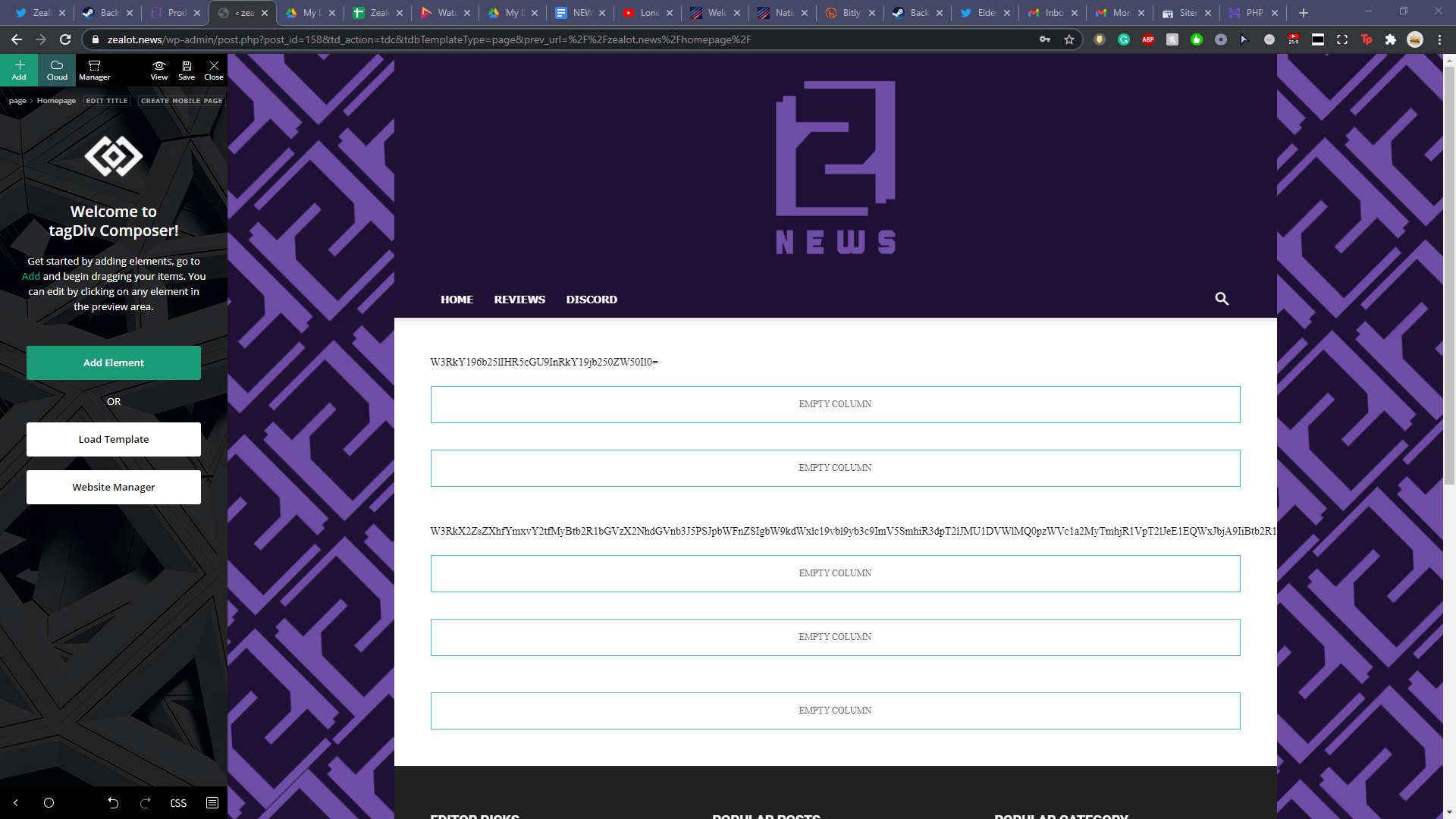
I already ran through all my plugins, deactivating them one at a time hoping for a fix. Sadly that didn’t work. I also updated my PHP to 7.4. I reverted back to 7.2 when I noticed the issue but that didn’t fix it either. Any help would be much appreciated, I’m trying to avoid restoring a backup so I don’t lose an immense amount of work over the past few days.
 webmorcha
Hello
I purchased newspaper yesterday. When i installed theme & Want to install td composer than this plugin is doesn’t install on my site. Please help me with this issue… Its an urgent for me. I think my theme files are not working properly.
Please reply me as soon as possible.
Thanks
Regards
Dilip Sharma
 anggagilang
 Thankyou for your answer, so i can make my own mobile theme with tagdiv composer, right?
But can i edit default mobile theme, like delete author box and share button on single post template?
 sedobcn
Hello Support Team.
I have version 9.1 of Newspaper Template installed on my wordpress. Some time ago I set up a banner using Theme Panel / Ads / Header ads. Today I tried to edit the banner code but the panel does not display the options of any position. I just make click but nothing displays. It does work in other options, but not in the Ads feature.
I have disabled all plugins except for tagDiv, but it doesn’t work.
I have disabled the child theme and cache plugin, and it doesn’t work either.
I have used the Mozila Firefox console and this is the error that indicates:
Reference error not detected: tdcContextMenu is not defined
init https://www.furgosfera.com/wp-content/plugins/td-composer/assets/js/js_files_for_wp_admin.min.js?ver=9e241c87ee8782e8f19bb886a935e653:10
jQuery 2
Shipping
handle
How can I solve that? Thanks a lot.
 alohawithlove
 Thank you, I know how to do all of this, but how do I get to the TD Composer for my blog feed? My blog page just says: “TD Composer is disabled on Posts Page”. Here’s my website: alohawithlove.com. And my blog posts page: alohawithlove.com/blog. I can’t change anything on the /blog page except with the theme panel, but that’s just basic changes.

